Visual monitoring for changes text can't catch.
Verid screenshots the page on every check and compares it pixel by pixel against the last one. Scope the comparison to a region, set a change threshold, and get the before, after, and diff images in the alert. Setup is one URL - no selectors, no configuration.
Interactive visual diff demo
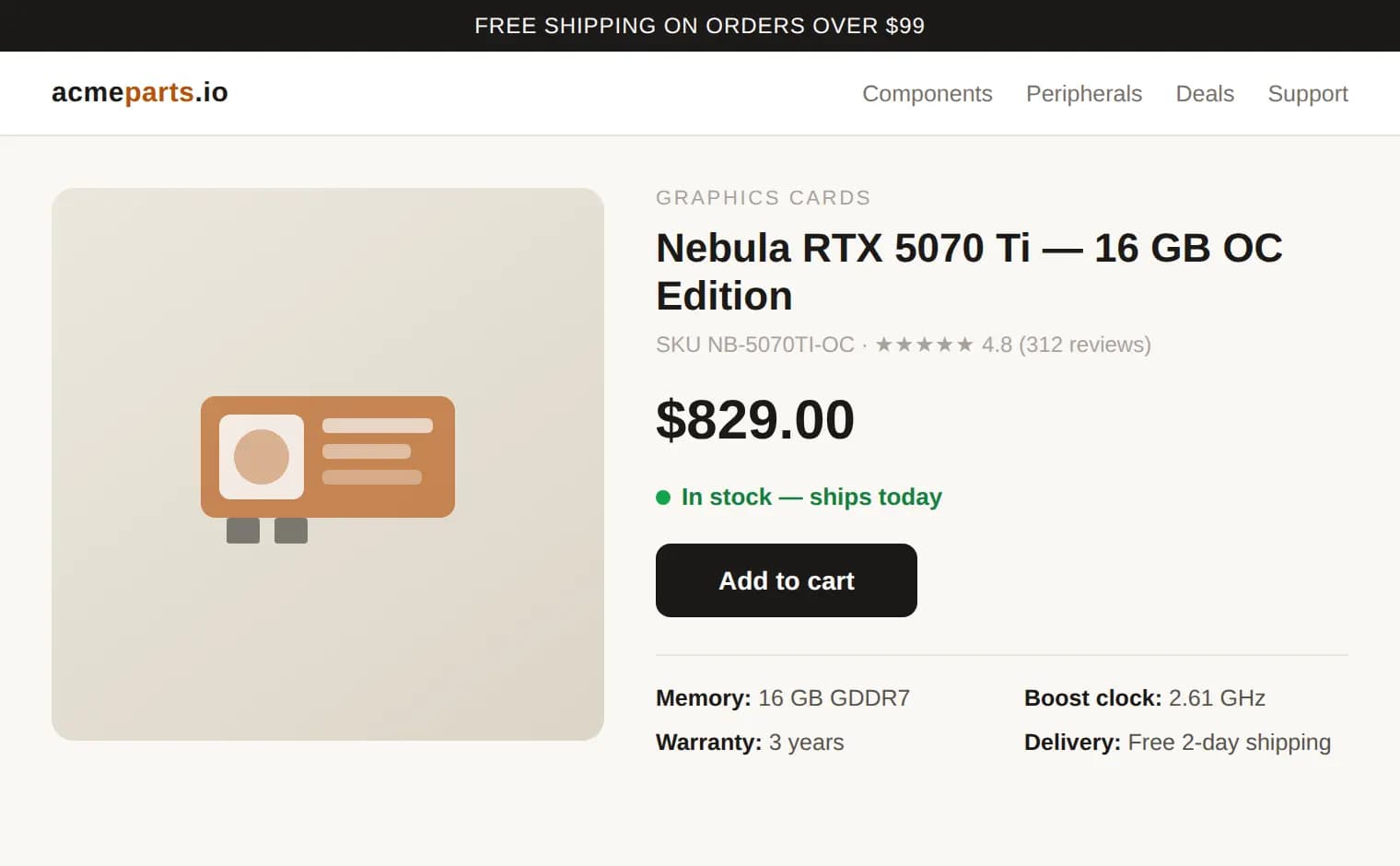
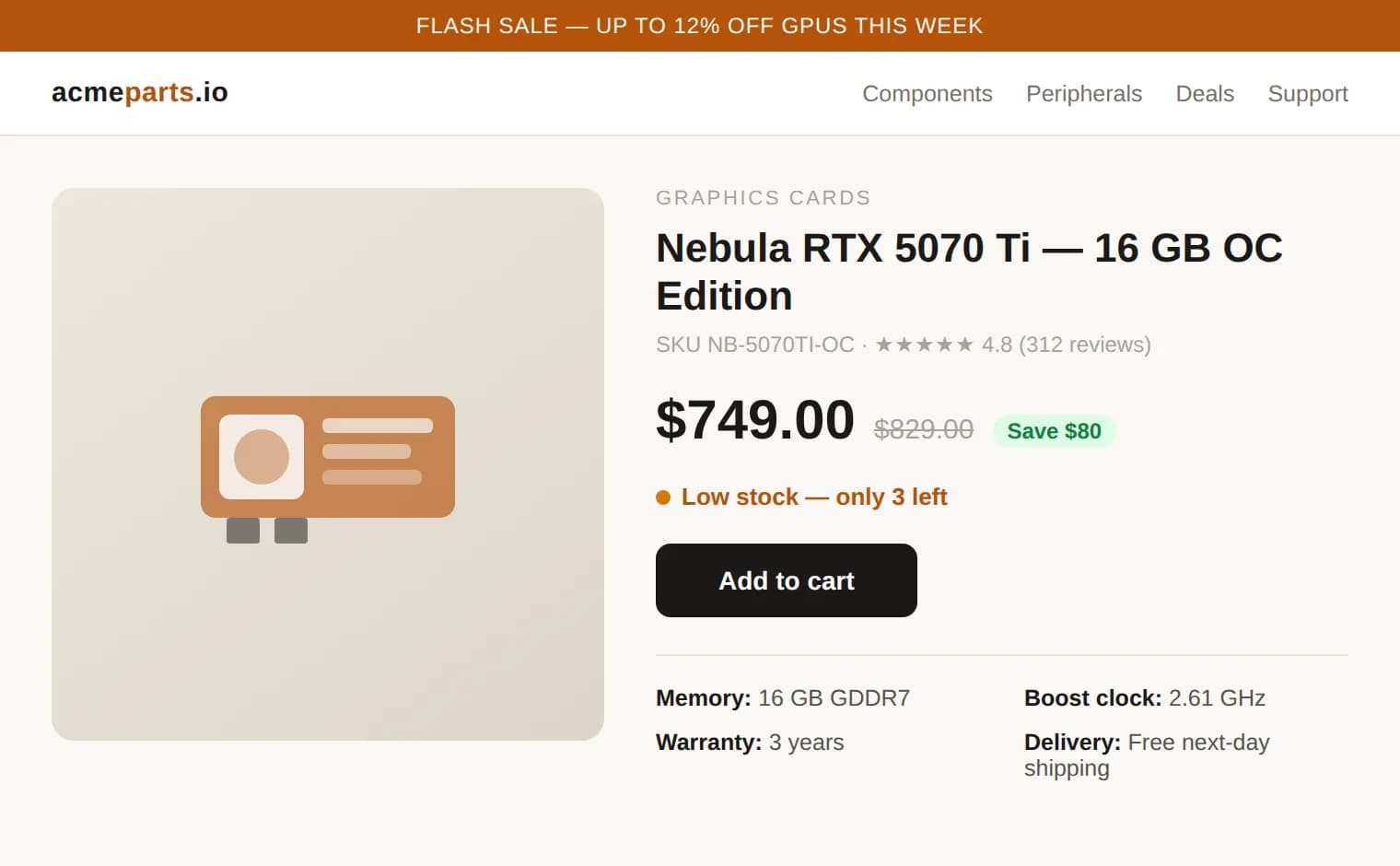
A real comparison from the engine: the "Changes" view is the actual pixel-level diff Verid computed, not a mockup. Try it yourself on any URL in the playground.
How visual monitoring works
Capture
On each run, a real Chrome browser renders the page and screenshots your chosen regions.
Compare
The new screenshot is compared pixel by pixel against the previous one; ignored elements are masked out.
Alert
If the changed area exceeds your threshold, delivery fires with the before, after, and red-highlight diff images.
Built for signal, not noise
Region scoping
Click a section of the rendered page to watch only that region. The pixel comparison ignores everything outside it.
Ignore selectors
Shift-click elements that always churn - ad slots, carousels, timestamps - and they are masked out of every comparison.
Change threshold
Alert only when more than 1%, 5%, 10%, or a custom percentage of pixels changed. Sub-threshold noise never reaches you.
Three compare views
Drag a slider curtain between before and after, view them side by side, or flip to the red-highlight diff overlay.
Screenshot history
Every check keeps its screenshot, so you can scrub back through how the page looked over time - with automatic retention pruning.
Alerts with proof
Webhook, Slack, Discord, and email alerts include links to the before, after, and diff images - evidence attached, not just "it changed".
One platform, two engines.
Visual monitors are their own simple monitor type - paste a URL and go. Run one alongside a structured monitor on the same page and you get the exact field value and the pixel-level proof, from one dashboard.
Use structured extraction when
- You care about a specific value - price, stock, version, headline.
- You want a rule: "alert only if price drops more than 5%".
- Downstream systems consume the change as JSON via webhook.
Add visual monitoring when
- Layout, imagery, or design is the signal - banners, hero sections, redesigns.
- You want human-checkable proof of what the page looked like.
- There is no stable selector to point at - the look is the thing.
Frequently asked questions
What is visual website monitoring?
Visual monitoring captures a screenshot of a page on every check and compares it pixel by pixel against the previous one. Changed regions are highlighted in red, and an alert fires only when the changed area exceeds the threshold you set. It catches layout shifts, swapped images, and redesigns that text diffing cannot see.
How is Verid different from Visualping or other screenshot tools?
Screenshot-only tools stop at the image. Verid gives you both engines in one platform: visual monitors for how a page looks, structured monitors for exact field values with predicate rules. Visual checks are region-scoped with a configurable change threshold, and every alert can be delivered as an HMAC-signed webhook, Slack, Discord, or email message with before, after, and diff images attached.
Can I monitor just one part of a page?
Yes. When you enable visual monitoring, Verid renders the page and shows you a clickable screenshot: click a section to watch only that region, shift-click elements like ad slots or timestamps to ignore them. The pixel comparison then runs only inside the regions you chose.
How do I avoid false alerts from ads and cookie banners?
Three controls: restrict the comparison to a selected region, add ignore selectors for elements that always churn (ad slots, carousels, clocks), and set a change threshold so the alert fires only when more than, say, 5% of pixels changed. High, medium, and low sensitivity presets map to 1%, 5%, and 10%, or you can set a custom percentage.
Does visual monitoring replace structured extraction?
No - it complements it. Structured extraction tells you what changed (the exact field value, diffed and checked against your predicate). Visual monitoring shows you how the page changed. They are separate monitor types in the dashboard - run one of each on the same URL when you want both signals.
Is visual monitoring included in the free trial?
Yes. The 14-day free trial includes unlimited visual monitors with 100 visual runs for the trial and screenshot history, no credit card required. Each visual check is one run. When the trial ends, monitors pause until you choose a plan. Paid plans share 1,000 to 100,000 runs a month across all checks and raise the screenshot storage budget.