API Monitoring vs Scraping: Why the Loop Is the Product
Scraping APIs are genuinely useful. You call an endpoint, pass a URL, and get back structured data instead of raw HTML. No proxy management, no headless browser config, no fighting Cloudflare on a Saturday. For a one-time data pull, that's fine.
The problem is most use cases are not one-time. You want to know when the price drops. When a library releases a new version. When a competitor updates their pricing page. When a product goes back in stock.
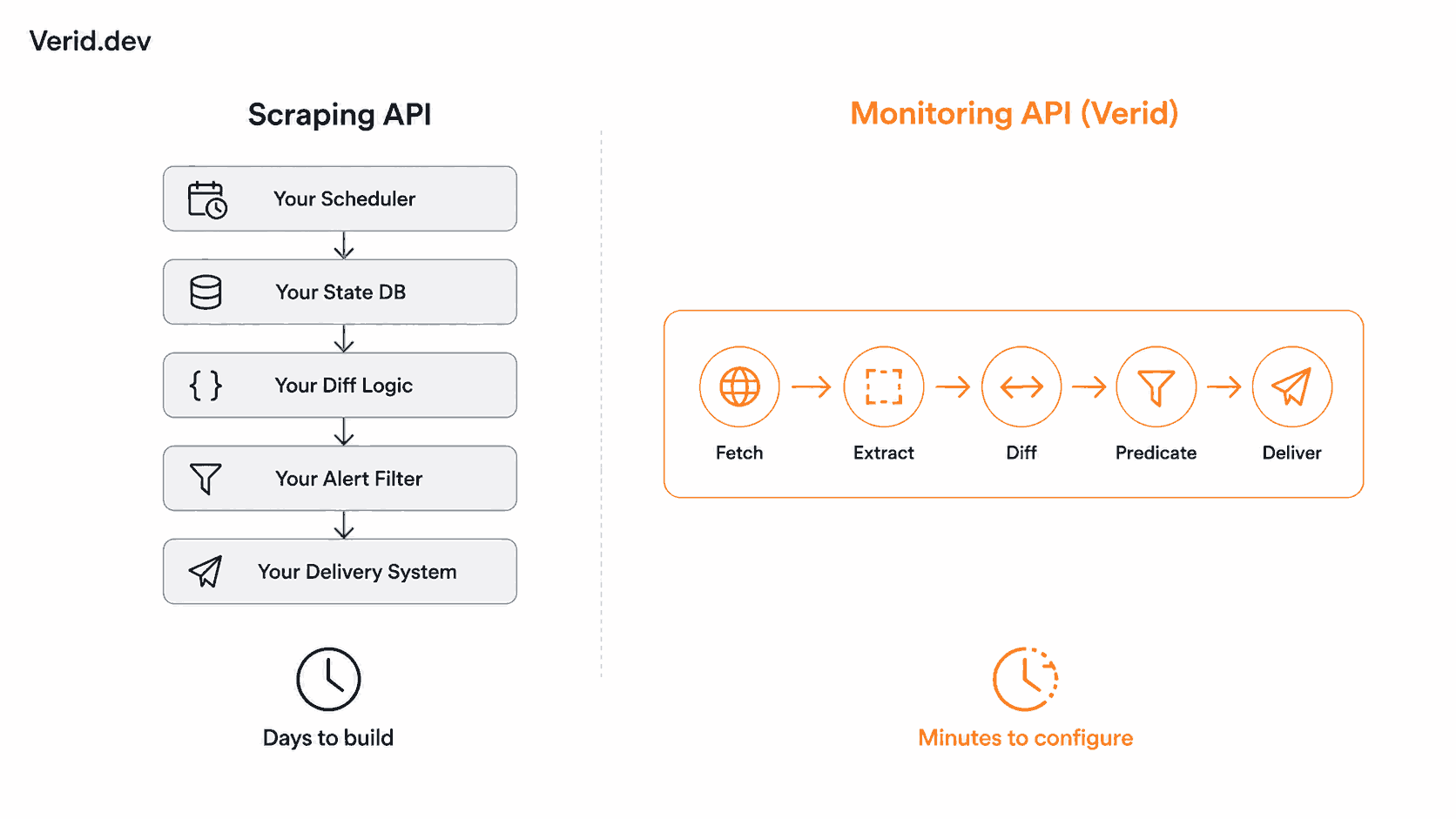
For those cases, a scraping API hands you the shovel and tells you to dig the rest yourself. You still have to write the scheduler. Store previous state somewhere. Implement the diff. Define the condition under which you care about the change. Wire up a notification. Handle retries when your endpoint is down. That's not glue code. That's most of the product.
This is the distinction that matters: scraping APIs optimize the fetch, monitoring APIs close the loop.
What a Scraping API Actually Gives You
Scraping APIs abstract the hard parts of fetching page content: residential proxy rotation, CAPTCHA solving, JavaScript rendering, session management. Tools like ScraperAPI, ScrapingBee, and Bright Data are good at this layer. You send a URL, they return HTML or structured JSON, you pay per request.
That's the end of what they do. The rest of the pipeline is on you.
Here's what you're building when you try to use a scraping API for ongoing monitoring:
- A scheduler (cron, a queue worker, or a managed job runner)
- A database table to store the last known state per URL
- A diff function to compare old and new values
- A conditional alert layer to avoid noise on irrelevant changes
- A delivery mechanism (email, Slack, webhook)
- Retry logic and dead-letter handling for failed deliveries
- Error monitoring for when the scraper itself breaks
Each of these is a surface area for bugs. And the scraping API you're using to power this will cheerfully return you an updated HTML snapshot with no idea that you care about exactly one field buried inside it.
The Monitoring Loop Is a Different Problem
A monitoring API is not a better scraping API. It's a different product category entirely.
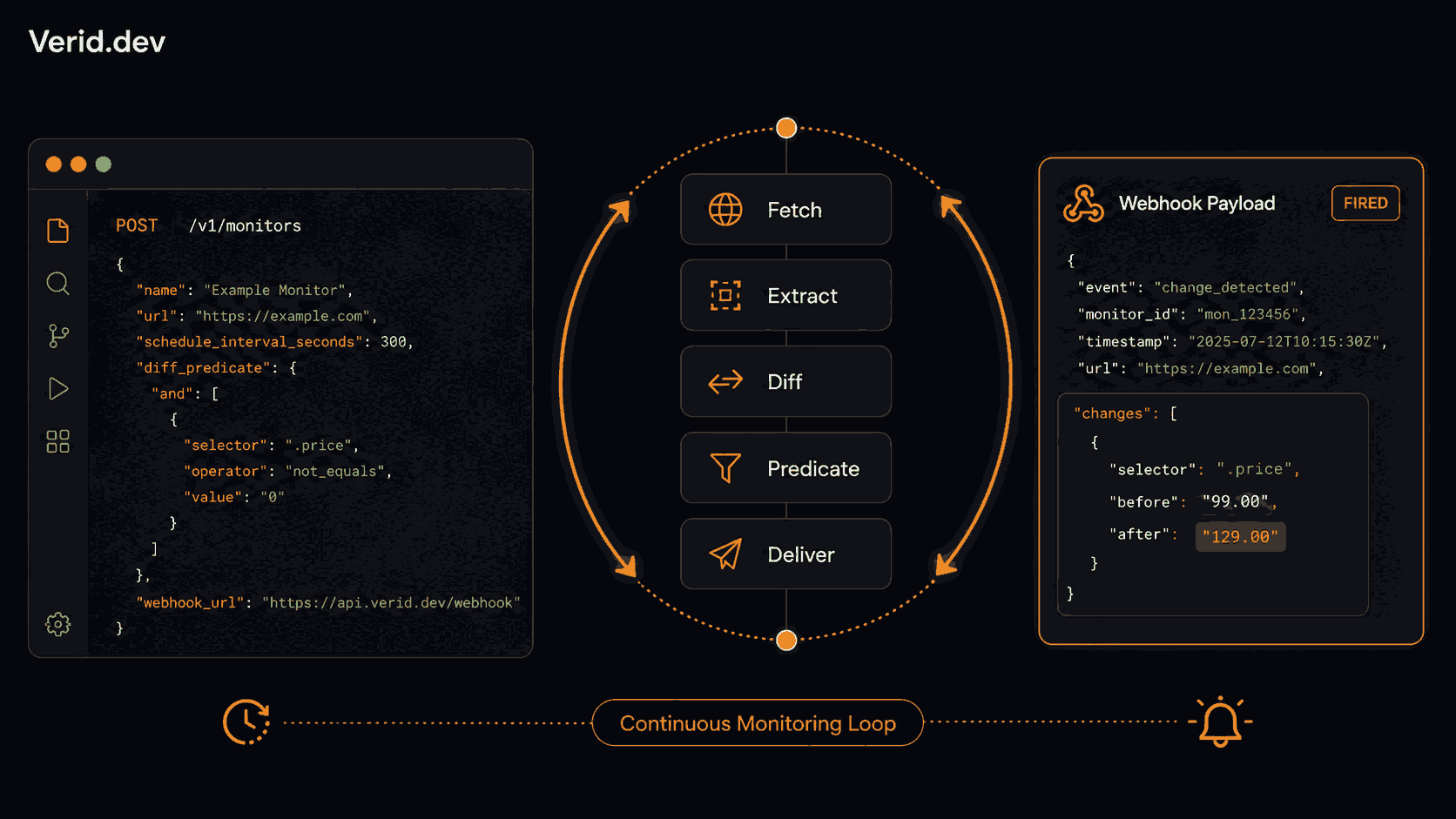
The goal is not to fetch a page. It's to evaluate a condition against a page on a schedule and take action when that condition is true. The fetch is just the first step.
A proper monitoring loop has five stages:
| Stage | What it does |
|---|---|
| Fetch | Retrieve the URL, handling JS rendering and bot protection |
| Extract | Pull typed fields from the response using a configured method |
| Diff | Compare extracted fields to the previous run |
| Predicate | Evaluate whether the diff matches a condition you defined |
| Deliver | Push the result to your endpoint, Slack, Discord, or email |
A scraping API gives you Stage 1, maybe 2 if it supports structured extraction. You own everything else.
Architecture Comparison
Here's what the two approaches look like in practice:
| Capability | Scraping API | Monitoring API |
|---|---|---|
| Fetch with proxy + JS rendering | Yes | Yes |
| Structured field extraction | Varies | Yes |
| Scheduled polling | No, you build it | Yes, configured per monitor |
| State persistence (last known value) | No, you store it | Yes, per-field history |
| Field-level diff | No, you compute it | Yes, automatic |
| Predicate-based alerting | No | Yes |
| Signed webhook delivery | No | Yes |
| Retry logic and dead-letter queue | No, you write it | Yes |
| Time to first meaningful alert | Days of plumbing | Minutes |
Where This Goes Wrong in Practice
The most common failure pattern is underestimating the diff and alerting problem.
Developers wire up a cron job that calls a scraping API every hour, dump the response into a database, and then write something like:
if new_price != old_price:
    send_alert(new_price)
This works until it doesn't. Cookie banners change. Dynamic timestamps update. Ad content rotates. The page changes, but not in any way you care about, and suddenly you're getting noise. You add filters. The filters get more complex. You're maintaining a side system that exists entirely to cope with the fact that your data source has no concept of "what changed and whether it matters."
The right level of abstraction is a predicate: a declarative rule evaluated against the diff. Did price drop by more than 10%? Did the version field change? Did availability go from "Out of stock" to "In Stock"? If none of those are true, nothing is delivered. Quiet by default.
How Verid Closes the Loop
Verid is built around this five-stage loop. Each monitor you create runs it on a schedule you set, anywhere from every minute to once a day, on any plan including the 14-day free trial. Plans differ by how many runs (checks) you get each month.
Extraction supports six methods: CSS selectors, XPath, JSONPath, regex, full-page hash, and LLM-based extraction for pages where markup breaks traditional selectors. The output is always typed fields, not raw HTML. If a static fetch returns empty fields, Verid automatically retries with a headless browser, then a residential proxy. That escalation is automatic, not a config option you have to find.
Predicates are where the logic lives. There are nine predicate types: field changes, field equals, numeric increase or decrease by percentage or absolute value, regex match on the new value, and composite AND/OR combinations. You're not writing "anything changed." You're writing "price dropped by at least 10% AND availability is In Stock."
{
  "type": "composite",
  "operator": "AND",
  "conditions": [
    { "type": "field_decreases_by_percent", "field": "price", "threshold": 10 },
    { "type": "field_equals", "field": "availability", "value": "In Stock" }
  ]
}
That predicate only fires when both conditions are true simultaneously. Everything else is recorded but not delivered.
Delivery uses HMAC-signed webhooks (signed with Verid-Signature: t={timestamp},v1={signature}), Slack, Discord, or email. Six retries with exponential backoff. Failed deliveries land in a dead-letter queue and can be replayed from the dashboard or via POST /v1/deliveries/:id/replay. The webhook payload gives you before/after values for each changed field:
{
  "id": "del_01H...",
  "monitor_id": "uuid",
  "fired_at": "2026-06-25T09:31:00Z",
  "diff": {
    "fields_changed": ["price"],
    "before": { "price": "49.99" },
    "after":  { "price": "44.99" }
  },
  "monitor": {
    "url": "https://example.com/product",
    "name": "Competitor Price Watch"
  }
}
Real-World Examples
Dependency tracking: You want to know when React ships a new release. With a scraping API, you're polling GitHub's API on a schedule, storing tag_name in a database, diffing on every run, and wiring up a Slack message when it changes. With Verid, you create one monitor:
curl -X POST https://api.verid.dev/v1/monitors \
  -H "Authorization: Bearer $VERID_API_KEY" \
  -H "Content-Type: application/json" \
  -d '{
    "name": "React Latest Release",
    "url": "https://api.github.com/repos/facebook/react/releases/latest",
    "schedule_interval_seconds": 3600,
    "extract_config": {
      "method": "json_path",
      "fields": { "tag_name": "$.tag_name" }
    },
    "diff_predicate": { "type": "field_changes", "field": "tag_name" },
    "deliveries": [{ "type": "webhook", "url": "https://your-app.com/hooks" }]
  }'
That's the entire pipeline. Schedule, extraction, diff, predicate, delivery. No scheduler to maintain. No database table for state. If the webhook fails, Verid retries it automatically.
Price monitoring: You're tracking a competitor's product pricing with CSS extraction. The selector is .product-price. You only want alerts when price drops more than 5%, not on every page render. That's field_decreases_by_percent with a threshold of 5. You never hear about it until it matters.
API contract monitoring: You're polling an upstream partner's JSON API every 5 minutes watching for schema drift. A full-page hash would fire on any change, but you care about a specific field. Use field_changes on $.api_version. Nothing else triggers it.
The Verid use cases page has working configs for 31 of these patterns, including SERP monitoring, regulatory filing tracking, and restock alerts.
Polling vs Event-Driven: A Note on Architecture
Some teams reach for webhooks on their scraping API, expecting event-driven behavior. But most scraping APIs don't have webhooks. They have a response. You call, they answer. Scheduling and state are your problem.
True event-driven monitoring means the system watches on your behalf and pushes to your endpoint only when something meaningful happens. The architectural implications are significant:
| Dimension | Polling (DIY) | Event-Driven (Verid) |
|---|---|---|
| Trigger | Your cron job | Verid's scheduler |
| State storage | Your database | Verid's field history |
| Noise filtering | Your logic | Predicates |
| Delivery reliability | Your retry code | 6x backoff + DLQ |
| Overhead per monitor | High | One API call to create |
The polling approach is fine for a single monitor. It breaks down when you have 50 of them and they all need different frequencies, different fields, different alert conditions. That's when you're running a mini-monitoring platform inside your own infrastructure.
Common Mistakes
Using full-page hash when you care about a field. Full-page hash fires on any byte change, including ad content, dynamic timestamps, and cookie notices. Use field-level extraction and predicates instead.
Skipping signature verification on webhooks. Any endpoint that processes incoming webhooks without verifying the signature is trusting whoever hits it. Verid's HMAC-signed webhooks give you a Verid-Signature header to verify with a constant-time comparison before processing the payload.
Setting check frequency higher than your actual need. A monitor that runs every 5 minutes when daily is sufficient wastes plan budget and adds noise. Match frequency to how fast the underlying data actually changes.
Ignoring first-run behavior. On a new monitor, the first run establishes a baseline and never fires. That's correct behavior, not a bug. Deliveries only fire when there's something to compare against.
Treating a scraping API as a monitoring system. The fetch is not the product. The loop is.
Best Practices
- Use JSONPath extraction for JSON APIs. It's more precise than CSS selectors and doesn't break on markup changes.
- Use LLM extraction as a fallback when markup is unstable. Describe the field in natural language and Verid handles selector drift without a code deploy.
- Combine predicates with AND/OR composites to model real business conditions, not just "did anything change."
- Verify webhook signatures in every receiving endpoint. The code is ten lines in any language.
- Use the Node.js SDK if you're managing monitors programmatically, it wraps the REST API and handles typing.
Scraping APIs are a good tool for the right job. Getting structured data out of a web page, once, on demand, is exactly what they're for. Ongoing monitoring is a different job. The fetch is the easy part. The loop is where most of the engineering time goes, and it's the part that actually delivers value.
Start a 14-day free trial of Verid with unlimited monitors, 200 runs, signed webhooks, and the full extraction pipeline. No credit card required.
Frequently Asked Questions
What's the difference between a scraping API and a monitoring API?
A scraping API returns page content on demand. A monitoring API runs the entire pipeline on a schedule: fetch, extract, diff, evaluate a condition, and deliver an alert only when that condition is true. The scraping API gives you the data. The monitoring API tells you when something you care about changed.
Can I use a scraping API to build website monitoring?
Yes, but you're building the monitoring system yourself. You need a scheduler, state storage, a diff function, alert logic, and retry-safe delivery. That's a non-trivial engineering investment. A purpose-built monitoring API like Verid handles all of that in the monitor configuration.
How do predicate-based alerts reduce noise?
Predicates evaluate a specific condition against the field-level diff from each run. If the condition is not met, nothing is delivered, even if the page changed. So a price monitor with field_decreases_by_percent at 10% stays silent when a price increases, fluctuates by 1%, or when unrelated page content changes.
How does Verid handle JavaScript-heavy or bot-protected pages?
Verid's fetch layer escalates automatically: static fetch first, then headless browser if extraction returns empty fields, then residential proxy for bot-protected targets. You don't configure this per monitor. It happens transparently.
About the author

Software Engineer
As a software engineer, Suleman works across Verid’s queueing, scraping and notification layers. His posts turn that day-to-day engineering into practical walkthroughs for anyone automating website change tracking.
More from Suleman →Related posts
XPath Tutorial: A Practical Guide for Web Scraping and Monitoring
Learn XPath syntax, axes, functions, and real scraping examples. Discover how to use XPath for website monitoring with Verid's change detection API.
Read the post →monitoringAPI Contract Monitoring: How to Catch Breaking Changes Before They Hit Production
Learn how API contract monitoring catches breaking changes before production. Schema drift, field-level diff, and continuous JSON API monitoring explained.
Read the post →monitoringHow to Monitor Job Listings for Keywords and Get Instant Alerts
Learn how to track new job postings automatically using Verid. Set keyword filters, configure smart alerts, and get notified the moment a match appears.
Read the post →web scrapingWeb Scraping Legality in 2026: What Every Developer Should Know Before Writing a Single Line
Is web scraping legal in 2026? Learn what the law actually says about public data, CFAA, GDPR, robots.txt, and how to build compliant data workflows.
Read the post →