How to Monitor Job Listings for Keywords and Get Instant Alerts
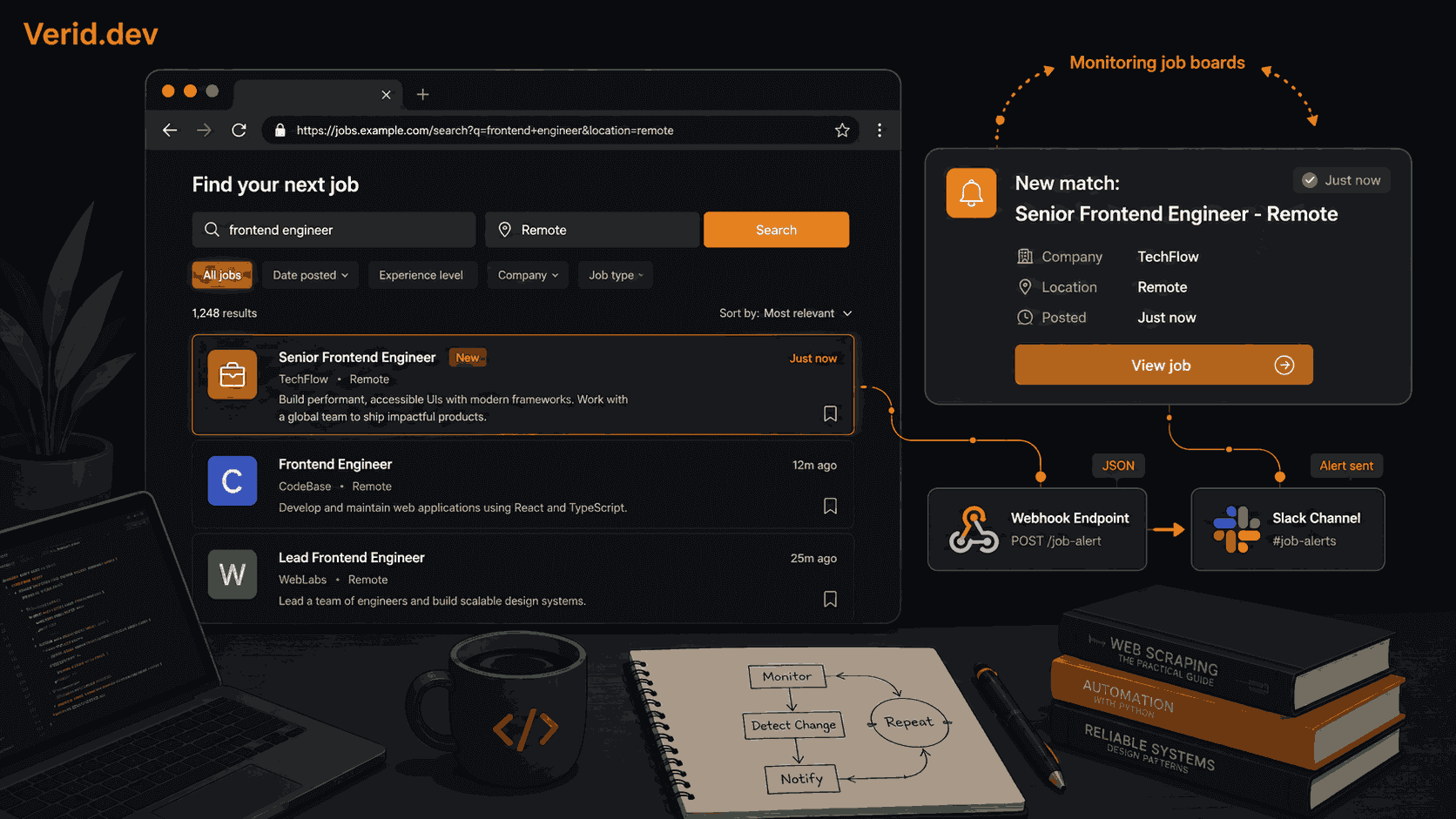
Job boards have a timing problem. Popular roles at desirable companies can receive hundreds of applications within the first few hours of going live. By the time you notice a new posting on your morning scroll, you are often already deep in the applicant queue.
The platforms' own alert systems don't help much. LinkedIn job alerts are chronically noisy. Indeed sends email digests that sometimes lag by hours. And most company careers pages don't offer any alert feature at all.
This guide shows a more reliable approach: using Verid to watch any job board or careers page and fire an alert the moment a new listing appears that matches your criteria. You don't need to write a scraper. You don't need to manage a cron job. You write a config once, and the monitoring loop runs itself.
Who this is for: Job seekers who want first-mover advantage on competitive roles. Recruiters tracking competitor hiring. Developers who want to route job alerts into their own tooling.
Why Generic Job Alerts Fall Short
The built-in alerts on most job platforms share the same structural limitation: they fire based on a keyword match at index time, then batch those alerts into periodic digests. There is often a 2-6 hour gap between when a listing goes live and when you receive the email.
That gap is the problem. Speed matters in competitive hiring pipelines.
The other issue is specificity. You cannot monitor a specific company's careers page directly through Indeed or LinkedIn without relying on whether that company chose to post there. Startups hiring on their own Greenhouse or Lever instances, niche companies posting only on We Work Remotely, or positions listed on a company's own /careers page simply won't appear in those alert systems.
Monitoring the source directly solves both problems.
How Verid Monitors Job Pages
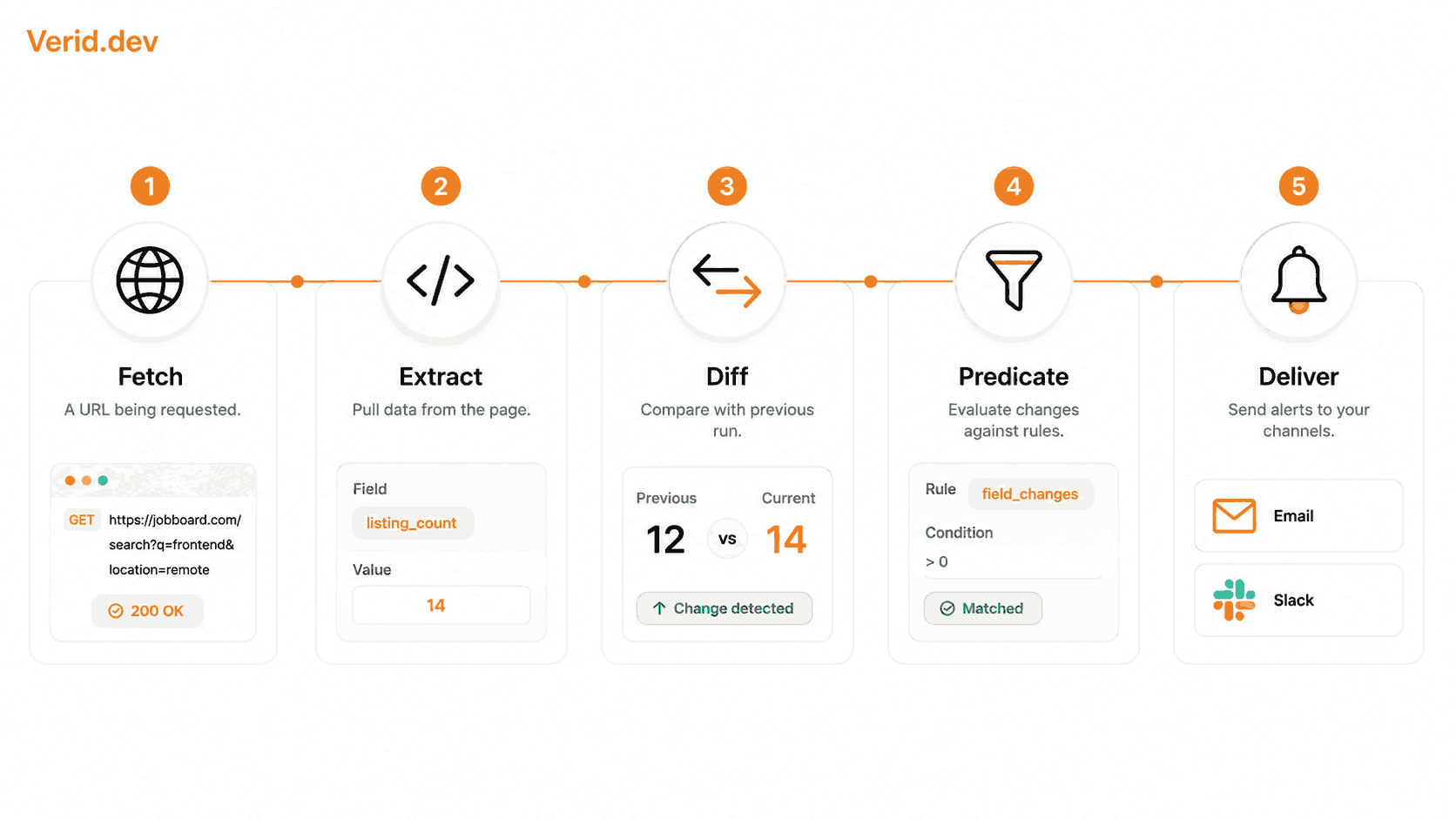
Verid is a web change detection API. It watches a URL on a schedule you define, extracts specific fields from the page, compares those fields against the previous run, and fires a delivery (webhook, email, Slack, or Discord) only when a condition you write returns true.
For job monitoring, that looks like this:
- You point Verid at a job search URL with your keyword already in the query string.
- Verid fetches the page on your schedule (daily, hourly, every 15 minutes, or as often as every minute).
- An extraction method pulls the number of visible listings from the page.
- A predicate compares that count to the previous run.
- If the count changed, Verid sends you an alert with before and after values.
The core advantage over screenshot-based tools is that Verid alerts on structured field changes, not raw pixel diffs. A timestamp updating in the page footer won't trigger anything. A change in your extracted listing count will.
Choosing What to Monitor
Before configuring anything, you need a URL. The most important decision is picking a job search URL that already has your keyword baked in rather than monitoring a homepage or a generic listings page.
Here are reliable starting points:
| Source | URL pattern | Notes |
|---|---|---|
| We Work Remotely | weworkremotely.com/remote-jobs/search?term=YOUR+KEYWORD | Clean markup, good for CSS/AI extraction |
| Remote OK | remoteok.com/remote-YOUR-KEYWORD-jobs | Tag-based, fast to configure |
| Indeed | indeed.com/jobs?q=KEYWORD&l=remote | High volume, JS-heavy - requires browser fetch mode |
| Company /careers pages | stripe.com/jobs, notion.so/careers | Best specificity; no alert feature built in |
| Greenhouse-hosted roles | boards.greenhouse.io/COMPANY | Clean JSON available if you inspect the network tab |
Company careers pages are often the most valuable targets. Roles posted directly there are frequently not syndicated to major job boards at all, or appear on them with a delay of hours to days.
Setting Up a Monitor: No-Code Path
If you don't want to touch an API, the Verid dashboard handles everything visually. Start a 14-day free trial - no credit card required, with unlimited monitors and 200 runs for the trial.
Step 1: Create the monitor
Log into your dashboard and click New Monitor. Fill in:
- Name: Something descriptive -
WWR - Senior Product Designerworks. - URL: Your keyword-filtered job search URL.
- Schedule interval:
86400seconds (24 hours), about 30 runs a month, is a good start (about 14 runs over the 14-day free trial, and well within Lite's 1,000 runs a month). Any plan can go shorter, such as 3600 (hourly, about 720 runs a month) or 900 seconds (15 minutes, about 2,880 runs a month).
Step 2: Pick an extraction method
This is the decision that determines how reliable your monitor will be. Verid supports six extraction methods. For job listing pages, three are practical:
AI/LLM prompt is the easiest and most resilient option. You describe what you want in plain English:
{
  "method": "prompt",
  "prompt": "Count the number of job listings visible on this page. Also extract the title of the first listing.",
  "schema": {
    "listing_count": "number",
    "first_title": "string"
  }
}
Verid sends the page to an LLM, which extracts the fields you described and returns them as structured JSON. The schema field ensures consistent output, and the field names (listing_count, first_title) are what you reference in your predicate. This method survives page redesigns and works on any job board without requiring you to inspect HTML. The free trial includes 50 LLM extractions; extractions only count on cache misses, so daily-checked pages consume very few.
CSS selector is faster and doesn't touch your LLM quota. It requires opening browser DevTools to find the right selector, but it's precise and lightweight:
{
  "method": "css",
  "fields": {
    "listing_count": "section.jobs li"
  }
}
On We Work Remotely, that selector targets each job listing element. Verid counts the matches and stores that number. See the CSS extraction guide if you're not familiar with finding selectors in DevTools.
Full-page hash requires zero configuration - Verid hashes the entire rendered page and fires when anything changes. It's useful for low-volume niche boards where any page change is relevant, but it will fire on sidebar updates, timestamps, or ad rotations, so expect some noise.
For most job searches, start with the LLM prompt method. The structured output and resilience to layout changes make it the most practical choice.
Step 3: Configure the predicate
The predicate decides when Verid actually sends an alert. Without one, every check passes silently.
For a listing count field, use field_changes:
{
  "type": "field_changes",
  "field": "listing_count"
}
This fires whenever listing_count differs from the last successful run - whether it went up or down. If you only care about new listings appearing (count increasing), you can use field_increases_by_absolute with a threshold of 1:
{
  "type": "field_increases_by_absolute",
  "field": "listing_count",
  "threshold": 1
}
Full documentation of all nine predicate types is in the Verid predicates reference.
Step 4: Add a delivery
Under Deliveries, click Add Delivery and choose:
- Email for personal job searching. You'll get a plain, readable summary of what changed.
- Slack if you're running a shared job-alert channel with a team. Paste a Slack incoming webhook URL.
- Discord for the same workflow with a Discord server.
- Webhook if you want to pipe alerts into your own application or an automation tool like Make or Zapier.
Save the monitor. Verid establishes a baseline on the first run (no alert fires for the first check), then compares every subsequent run against it.
Setting Up via the API
The Verid REST API gives you full programmatic control. This path suits developers who want to manage monitors as code, integrate job alerts into existing tooling, or spin up many monitors at once.
Get your API key from the dashboard under API Keys - keys begin with vrd_:
export VERID_API_KEY="vrd_your_key_here"Create a monitor watching We Work Remotely for React developer roles:
curl -X POST https://api.verid.dev/v1/monitors \
  -H "Authorization: Bearer $VERID_API_KEY" \
  -H "Content-Type: application/json" \
  -d '{
    "name": "WWR - React Developer",
    "url": "https://weworkremotely.com/remote-jobs/search?term=react+developer",
    "schedule_interval_seconds": 3600,
    "extract_config": {
      "method": "prompt",
      "prompt": "Count the number of job listings visible on this page.",
      "schema": {
        "listing_count": "number"
      }
    },
    "diff_predicate": {
      "type": "field_increases_by_absolute",
      "field": "listing_count",
      "threshold": 1
    },
    "deliveries": [
      {
        "type": "email",
        "to": "you@example.com"
      }
    ]
  }'
Note: schedule_interval_seconds: 3600 (hourly) uses about 336 runs over the 14-day trial, more than its 200. During the trial, use 86400.
To trigger an immediate test run instead of waiting for the schedule:
curl -X POST https://api.verid.dev/v1/monitors/{monitor_id}/run \
  -H "Authorization: Bearer $VERID_API_KEY" \
  -H "Content-Type: application/json" \
  -d '{}'
Replace {monitor_id} with the id field from the create response.
Using the Node.js SDK
If you prefer TypeScript or Node.js, the official SDK at @verid.dev/sdk wraps the REST API cleanly:
npm install @verid.dev/sdkimport { VeridClient } from '@verid.dev/sdk';
const client = new VeridClient({
apiKey: process.env.VERID_API_KEY!,
});
const monitor = await client.monitors.create({
name: 'Remote OK - Product Manager',
url: 'https://remoteok.com/remote-product-manager-jobs',
schedule_interval_seconds: 3600,
extract_config: {
method: 'prompt',
prompt: 'Count the number of job listings visible on this page.',
schema: { listing_count: 'number' },
},
diff_predicate: {
type: 'field_increases_by_absolute',
field: 'listing_count',
threshold: 1,
},
deliveries: [{ type: 'email', to: 'you@example.com' }],
});
// Run immediately to verify extraction is working
await client.monitors.runNow(monitor.id);
console.log('Monitor created:', monitor.id);Monitoring Company Careers Pages Directly
Job boards are a good starting point, but the highest-signal targets are often individual company careers pages. Roles listed there sometimes never appear on aggregators at all.
The approach depends on how the company's careers page is built:
Standard HTML pages (common on smaller companies): Use CSS extraction if the HTML structure is clean, or the LLM prompt method if the layout is complex or changes frequently.
Greenhouse or Lever instances (very common at startups): These are usually structured HTML pages. Greenhouse uses consistent markup like .opening for individual role entries. A CSS selector like .opening would count listed roles. Alternatively, many Greenhouse instances expose a JSON endpoint at boards.greenhouse.io/COMPANY/jobs - if so, JSONPath is cleaner:
{
  "method": "json_path",
  "fields": {
    "job_count": "$.jobs"
  }
}
And the matching predicate:
{
  "type": "field_increases_by_absolute",
  "field": "job_count",
  "threshold": 1
}
JavaScript-heavy SPAs (common at larger tech companies): Set fetch_mode to "browser" in your monitor config. Verid will render the page in a headless browser before extracting, which handles React and Vue-built careers pages that don't return useful HTML on a static fetch. Most pages work with the default auto fetch mode, which automatically escalates to browser rendering when the static response looks empty.
Competitive Intelligence: Monitoring Competitor Hiring
Job listing monitoring has a second audience beyond job seekers. For sales teams, founders, and product teams, watching what roles competitors are hiring for is a meaningful signal.
A competitor opening three backend infrastructure roles after years of product hiring suggests a platform rearchitecture. A company that has been hiring sales reps for a geographic region they've never covered before is expanding there. These patterns become visible weeks or months before any press release.
The Verid SERP monitoring use case and competitor tech stack change detection cover adjacent patterns if competitive intelligence is your primary goal.
For hiring-signal monitoring specifically: set up monitors on each competitor's careers page, extract job category counts or department-filtered URLs, and use the field history in Verid's dashboard to track how headcount signals shift over time.
Handling Webhook Deliveries
If you're routing job alerts into your own application rather than email, you'll want to verify the HMAC signature on each webhook. Verid signs every delivery with your monitor's secret, and includes up to 6 retries with exponential backoff if your endpoint is unavailable.
The verification logic in Node.js:
import { createHmac, timingSafeEqual } from 'crypto';

function verifySignature(
  header: string,
  rawBody: string,
  secret: string
): boolean {
  const parts = Object.fromEntries(header.split(',').map(p => p.split('=')));
  const ts = parseInt(parts['t'] ?? '0', 10);
  const sig = parts['v1'];
  if (!ts || !sig) return false;
  if (Math.abs(Date.now() / 1000 - ts) > 300) return false; // 5-min drift

  const expected = createHmac('sha256', secret)
    .update(`${ts}.${rawBody}`)
    .digest('hex');
  return timingSafeEqual(
    Buffer.from(expected, 'hex'),
    Buffer.from(sig, 'hex')
  );
}

app.post('/hooks/job-alerts', (req, res) => {
  const header = req.headers['verid-signature'] as string;
  if (!verifySignature(header, req.rawBody, process.env.WEBHOOK_SECRET!)) {
    return res.status(401).send('Invalid signature');
  }
  // process the job alert
  const { diff, monitor } = req.body;
  console.log(`New listings detected on: ${monitor.name}`);
  console.log('Before:', diff.before.listing_count);
  console.log('After:', diff.after.listing_count);
  res.sendStatus(200);
});
The full webhook payload includes diff.before, diff.after, monitor.name, monitor.url, and fired_at. Verification snippets for Python, Ruby, Go, and PHP are in the webhooks documentation.
Practical Tips
Use specific search URLs, not homepages. weworkremotely.com/remote-jobs/search?term=react+developer keeps your extracted listing count relevant to your actual search. Monitoring the homepage means your count includes every job on the platform.
Run a manual test before relying on the monitor. Use client.monitors.runNow() or the API equivalent immediately after creation to verify extraction is working and check that your predicate would fire under the right conditions.
Layer multiple monitors instead of making one overly broad. Monitors are unlimited on every plan, so you can cover several different combinations of keyword and board - senior product designer on We Work Remotely, product designer remote on Remote OK, and a few specific company careers pages. That's more useful than one monitor on a generic jobs homepage.
Escalate to hourly checks on high-competition roles. Daily monitoring is sufficient for most searches. If you're targeting roles that routinely fill within 24 hours at high-demand companies, hourly checks are worth it: each hourly monitor uses about 720 runs a month, and the Starter plan at $19/month (5,000 runs) covers about six of them.
For JS-heavy job boards, set fetch_mode: "browser" explicitly. Pages built on React or that require login/interaction to render job listings won't return useful content on a plain static fetch. Setting browser mode ensures Verid renders the page fully before extracting.
Plan Comparison
| Plan | Price | Runs per month | Delivery endpoints |
|---|---|---|---|
| 14-day free trial | $0, no card | 200 total | 1 per monitor |
| Lite | $9/mo | 1,000 | 2 per monitor |
| Starter | $19/mo | 5,000 | 3 per monitor |
| Pro | $49/mo | 15,000 | 10 per monitor |
| Scale | $149/mo | 100,000 | 25 per monitor |
For most job seekers, Lite ($9/month, 1,000 runs) covers a focused search, and the 14-day free trial is enough to test it. Recruiters managing multiple clients or developers building job-alert tooling will want Starter or Pro. Full details at verid.dev/pricing.
Job listing monitoring with Verid is a straightforward setup with a meaningful payoff. A few minutes of configuration replaces the daily manual check loop, and the predicate system means you only hear about real changes, not page noise.
Start a 14-day free trial - no credit card, unlimited monitors, 200 runs, and the full extraction and alerting loop. The quickstart guide covers your first monitor in under two minutes.
Frequently Asked Questions
Can I get alerted only when a specific keyword appears in a new job title?
Yes, with the LLM extraction method. Prompt the model to extract job titles from the page ("Extract all job titles currently listed on this page as a comma-separated string"), then use a field_matches_regex predicate to match only titles containing your keyword. This is more precise than monitoring a listing count, but it requires your extraction prompt to be detailed enough to reliably pull titles.
What happens when a job board changes its HTML layout?
If you're using CSS selectors and the board updates its markup, your selector may return empty values. Two options: switch to the LLM prompt method (it describes what to extract in natural language and adapts to layout changes), or update the selector manually. With the LLM method, layout changes are handled automatically - you describe the field, not the structure.
How fast can Verid detect a new job posting?
Every plan, and the free trial, can check as often as every minute; shorter intervals simply use more runs (a 15-minute monitor uses about 2,880 runs a month). In practice, if a listing goes live between two check intervals, you'll receive an alert within one interval of posting - so within 15 minutes on a 15-minute schedule. This is faster than any built-in alert system on the major job boards, which typically batch notifications over hours.
Can I monitor multiple job boards and consolidate alerts in one place?
Yes. Create separate monitors for each board, and configure each one to deliver to the same webhook endpoint, Slack channel, or email address. Webhook delivery is the most flexible option if you want to aggregate, deduplicate, or re-route alerts through your own application.
About the author

Software Engineer
Suleman is a software engineer focused on web-data infrastructure. He works on Verid’s scraping and change-detection stack, and covers CSS and XPath selectors, JSON API monitoring, and how to design alerts developers won’t end up muting.
More from Suleman →Related posts
API Contract Monitoring: How to Catch Breaking Changes Before They Hit Production
Learn how API contract monitoring catches breaking changes before production. Schema drift, field-level diff, and continuous JSON API monitoring explained.
Read the post →monitoringAPI Monitoring vs Scraping: Why the Loop Is the Product
Discover why API monitoring outperforms scraping. Learn how Verid.dev simplifies change detection with continuous monitoring and webhooks.
Read the post →monitoringStop Monitoring Noise: How Predicate-Based Alerting Saves Your Sanity
Learn how predicate-based alerting filters out monitoring noise so you only get notified when a real condition you care about is actually true.
Read the post →monitoringXPath Tutorial: A Practical Guide for Web Scraping and Monitoring
Learn XPath syntax, axes, functions, and real scraping examples. Discover how to use XPath for website monitoring with Verid's change detection API.
Read the post →