How to Track Competitor Tech Stack Changes Automatically
Learn how to detect when competitors change their tech stack, update their tools, or ship new features using Verid's web change detection API.
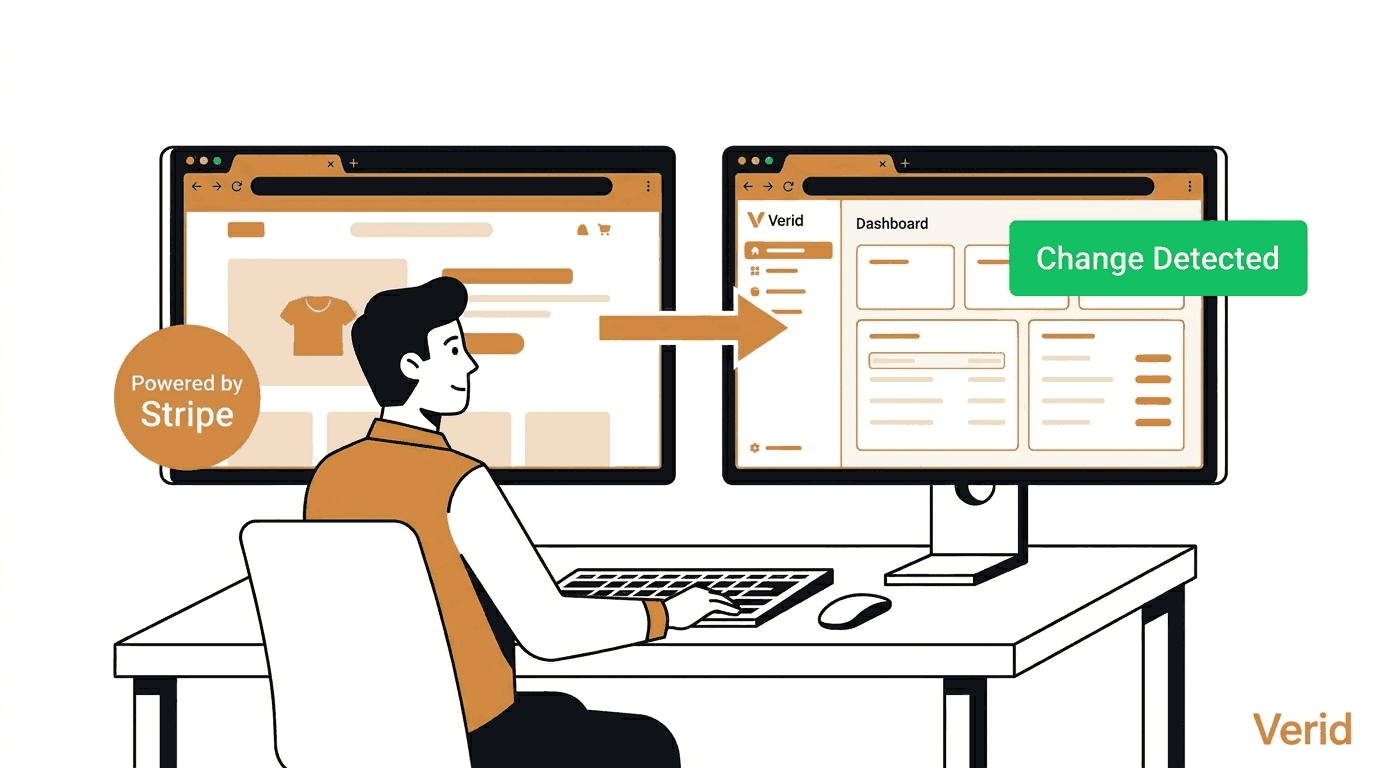
Imagine waking up one morning to find that your biggest competitor quietly switched their payment provider, added a new live chat widget, or launched a feature you have been planning for months. You only noticed because a customer told you.
That kind of intelligence gap is common and it is expensive.
Knowing when a competitor changes their tech stack, pricing page, product announcement, or release notes gives you a real edge. You can respond faster, adjust your roadmap, and stop being surprised.
This guide explains what competitor tech stack change detection is, why it matters, and how to set it up using Verid, a developer-first web change detection API.
What Is Competitor Tech Stack Monitoring?
Competitor tech stack monitoring means watching a competitor's website or public API endpoints for any changes that reveal what tools, frameworks, libraries, or services they are using or switching to.
This could include:
- A new third-party script appearing in their page source (for example, a new analytics or chat tool)
- A version bump in a public JavaScript file or CDN link
- A change in their
package.jsonor release notes page - A new badge or integration announcement on their pricing page
- An update to their developer documentation or API changelog
For SaaS companies, agencies, and solo developers, this kind of signal is valuable. It tells you how fast competitors are shipping, what vendors they trust, and where they might be investing next.
Why It Matters for SaaS, Agencies, and Developers
For SaaS founders: Knowing a competitor just integrated a new payment provider or switched to a different customer support platform tells you something about where they are putting resources.
For agencies: Tracking what CMS, analytics tools, or marketing platforms a prospect or client's competitor is using helps you tailor pitches and recommendations.
For developers: Watching public repos, npm package pages, or changelog endpoints means you get notified the moment a dependency ships a breaking change or a rival product ships a new version.
Traditional monitoring tools either give you screenshots with too much noise, or raw HTML that requires you to build your own parsing and alerting system. Neither is practical.
What Is Verid and How Does It Help?
Verid is a web change detection API built specifically for developers. Instead of taking screenshots and comparing pixels, Verid extracts specific fields from a page or API response and only alerts you when those exact fields change.
The core idea: you tell Verid what to watch (a URL), what to pull out of the page (a specific element, JSON field, or text pattern), and when to alert you (a rule you define). Verid handles all the scheduling, fetching, diffing, retrying, and delivery.
Here is the five-stage pipeline Verid runs for every monitor:
- Fetch - Loads the page. If the site uses JavaScript, it automatically falls back to a headless browser. If the site blocks bots, it escalates to a residential proxy. You do not configure this manually.
- Extract - Pulls out the specific fields you care about using one of six extraction methods.
- Diff - Compares the new values against the last successful run and records exactly what changed.
- Predicate - Checks whether the change matches your rule (for example, "did the version field change?" or "did the price drop by more than 5%?").
- Deliver - Sends you a signed webhook, Slack message, Discord notification, or email only when your rule is true.
The result is a quiet, precise monitoring system. You get notified when something meaningful happens, not every time a cookie banner loads.
Verid offers a 14-day free trial with unlimited monitors and 200 runs, no credit card required. After the trial, monitors pause until you choose a plan. Paid plans start at $9 per month for more runs, longer history, and more delivery endpoints. See Verid pricing for full details.
Using the Verid Dashboard (No Code Required)
You do not need to write a single line of code to start monitoring competitors. The Verid dashboard walks you through the full setup.
Step 1: Sign Up and Get an API Key
Go to verid.dev and start a 14-day free trial. No credit card is required. Once inside the dashboard, navigate to the API Keys section and generate your key. It will start with the prefix vrd_.
Step 2: Create a New Monitor
Click "Create Monitor" from the dashboard. You will see a form asking for:
- Monitor name - Something descriptive like "Competitor Tech Page" or "Rival Changelog".
- URL - The page you want to watch. This can be a competitor's pricing page, their changelog, a public API endpoint, or their release notes.
Step 3: Choose an Extraction Method
This is the most important step. You tell Verid what to actually pull from the page. See the next section for a full breakdown of the six methods.
For a typical competitor webpage, CSS Selector is the fastest starting point. You paste a CSS selector that targets the specific element you care about (for example, a version badge or a featured tool name).
Step 4: Set the Schedule
Every plan, including the free trial, can check a monitor as often as every 60 seconds. Plans differ by runs per month, and each check uses one run. The 14-day free trial includes 200 runs for the whole trial, enough for about 14 monitors checked once a day while you test. After the trial, paid plans start with Lite ($9/mo, 1,000 runs) and go up to:
- Starter ($19/mo): 5,000 runs a month (about 6 monitors checked hourly)
- Pro ($49/mo): 15,000 runs a month (about 20 hourly monitors, or 5 every 15 minutes)
- Scale ($149/mo): 100,000 runs a month (about 138 hourly monitors)
For most competitor tracking use cases, daily or hourly is more than enough.
Step 5: Set Up Delivery
Choose how you want to be notified when a change is detected. Options include webhook (a POST request to your server), Slack, Discord, and email. For getting started quickly without any code, email is the simplest choice. Enter your email and Verid will send you a plain summary whenever your predicate fires.
Step 6: Save and Let It Run
Once saved, Verid immediately queues a baseline run to record the current state. From that point, every check compares against that baseline. You only hear from Verid when something actually changes.
Extraction Methods Explained
Verid supports six ways to pull data from a page. Here is how each one works and when to use it for tech stack monitoring.
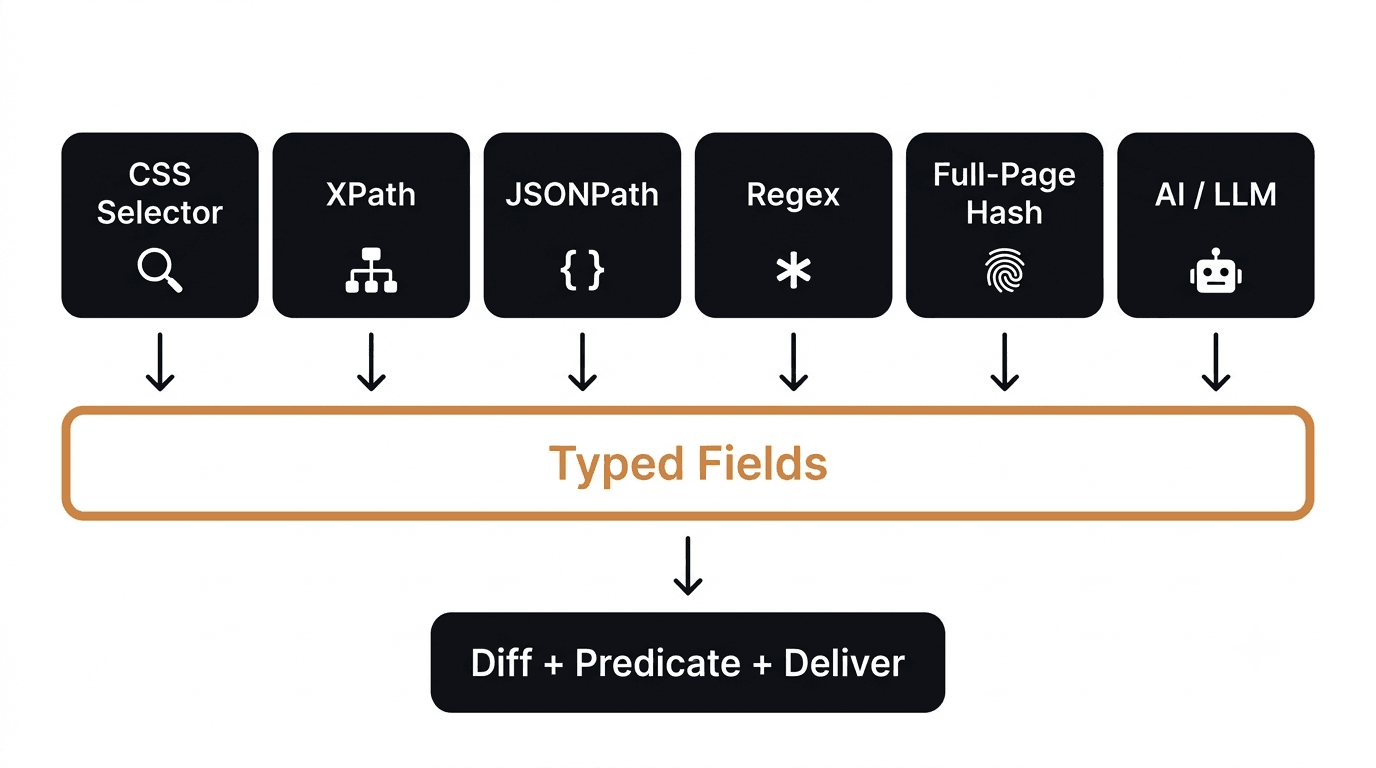
CSS Selector
Targets a specific HTML element on a rendered page using standard CSS syntax. Best for competitor product pages, pricing pages, or any webpage where you can right-click an element and copy its selector in browser DevTools.
Example: watching the text content of a version badge or a featured integration name.
"extract_config": {
  "method": "css",
  "fields": {
    "tech_badge": "[data-test=tech-stack-label]",
    "version": ".release-version"
  }
}
XPath
An alternative to CSS selectors for complex HTML structures. Useful when you need to locate an element by its relationship to a nearby element, such as "the text that comes after the label that says Powered by."
"extract_config": {
  "method": "xpath",
  "fields": {
    "stack_label": "//span[@class='stack-name']/text()"
  }
}
JSONPath
The right choice when monitoring a JSON API endpoint. If a competitor has a public API or if you are watching a service like the npm registry or GitHub releases, JSONPath lets you pull a specific field directly from the response.
"extract_config": {
  "method": "json_path",
  "fields": {
    "tag_name": "$.tag_name",
    "published_at": "$.published_at"
  }
}
Regex
Matches a pattern against the raw page body. Useful for counting occurrences (for example, how many times a specific tool name appears) or capturing a value from inconsistently structured text.
"extract_config": {
  "method": "regex",
  "fields": {
    "sdk_version": "sdk-version-([0-9.]+)"
  }
}
The first capture group becomes the extracted value.
Full-Page Hash
No selector needed. Verid hashes the entire rendered page and alerts you when anything changes at all. Good for a quick smoke test on a competitor's homepage, but it can generate false positives from dynamic content like timestamps or ad rotations.
"extract_config": {
  "method": "full_page"
}
AI / LLM Extraction
Describe what you want in plain English. Verid passes the page to a language model and asks it to find the field you described. This is the most resilient method because it keeps working even when the page layout changes.
"extract_config": {
  "method": "prompt",
  "prompt": "Extract the name of the payment provider and the chat support tool visible on this page.",
  "schema": {
    "payment_provider": "string",
    "chat_tool": "string"
  }
}
Note: LLM extractions count against your plan's monthly LLM-call quota. Check the Billing page in your dashboard to track usage.
Quick Comparison
| Method | Best For | Requires Code? | Noise Risk |
|---|---|---|---|
| CSS Selector | HTML pages, specific elements | No (use DevTools) | Low |
| XPath | Complex HTML, XML feeds | No (moderate skill) | Low |
| JSONPath | JSON APIs, public endpoints | No | Very low |
| Regex | Raw text, pattern matching | Minimal | Low |
| Full-Page Hash | "Did anything change?" | No | High |
| AI / LLM | Unstructured or frequently redesigned pages | No | Very low |
API Usage: Real Working Examples
If you prefer to create and manage monitors programmatically, Verid provides a full REST API and an official Node.js SDK.
The base URL for all API calls is https://api.verid.dev. All requests require an Authorization: Bearer vrd_your_key header.
cURL Example: Monitor a Competitor Tech Page
This example monitors a competitor's public changelog page for any change in the version field, using CSS extraction. Replace vrd_your_api_key with your actual key and adjust the URL and selector to match your target.
curl -X POST https://api.verid.dev/v1/monitors \
  -H "Authorization: Bearer vrd_your_api_key" \
  -H "Content-Type: application/json" \
  -d '{
    "name": "Competitor Changelog Version",
    "url": "https://competitor.com/changelog",
    "schedule_interval_seconds": 86400,
    "extract_config": {
      "method": "css",
      "fields": {
        "latest_version": ".changelog-entry:first-child .version-tag"
      }
    },
    "diff_predicate": {
      "type": "field_changes",
      "field": "latest_version"
    },
    "deliveries": [
      {
        "type": "email",
        "email": "you@yourcompany.com"
      }
    ]
  }'
schedule_interval_seconds: 86400 equals 24 hours. Any plan can go as low as 60 seconds, but a daily check uses only about 30 runs a month.
Node.js Example (using the official SDK)
Install the SDK first:
npm install @verid.dev/sdkThen create the monitor in your Node.js application:
import { VeridClient } from '@verid.dev/sdk';

const client = new VeridClient({
  apiKey: process.env.VERID_API_KEY,
});

const monitor = await client.monitors.create({
  name: 'Competitor Tech Stack Page',
  url: 'https://competitor.com/changelog',
  schedule_interval_seconds: 86400,
  extract_config: {
    method: 'css',
    fields: {
      latest_version: '.changelog-entry:first-child .version-tag',
    },
  },
  diff_predicate: {
    type: 'field_changes',
    field: 'latest_version',
  },
  deliveries: [
    {
      type: 'email',
      email: 'you@yourcompany.com',
    },
  ],
});

console.log('Monitor created:', monitor.id);
Set your API key as an environment variable before running:
export VERID_API_KEY="vrd_your_key_here"You can also trigger a manual run at any time without waiting for the schedule:
await client.monitors.runNow(monitor.id);Full SDK documentation is available at docs.verid.dev.
Webhooks, Email Delivery, and Alerts
When Verid detects a change that matches your predicate, it sends a delivery. Here is how each channel works.
Email Delivery
The simplest option. When a predicate fires, Verid sends a plain-text email summarizing what changed: the monitor name, the field that changed, the old value, and the new value. No login required to act on it.
To use email delivery, add this to your deliveries array when creating a monitor:
"deliveries": [
  {
    "type": "email",
    "email": "your@email.com"
  }
]
Webhook Delivery
A webhook is a POST request that Verid sends to a URL you control. This is the most powerful option because you can process the change data in your own application: log it to a database, trigger a Slack message, update a dashboard, or kick off any downstream workflow.
All webhook deliveries are signed using HMAC-SHA256. The signature appears in the Verid-Signature header. You should verify this before processing any payload.
Here is what a webhook payload looks like when a tech stack change is detected:
{
  "id": "del_01H...",
  "version": "2026-05-01",
  "monitor_id": "uuid",
  "run_id": "uuid",
  "fired_at": "2026-06-10T09:00:00Z",
  "diff": {
    "fields_changed": ["latest_version"],
    "before": { "latest_version": "v2.1.4" },
    "after": { "latest_version": "v2.2.0" }
  },
  "monitor": {
    "url": "https://competitor.com/changelog",
    "name": "Competitor Tech Stack Page"
  }
}
The diff object tells you exactly what changed: the field name, the old value, and the new value. No guesswork.
Verifying the Webhook Signature in Node.js
import { createHmac, timingSafeEqual } from 'crypto';

function verifyWebhook(header, rawBody, secret) {
  const parts = Object.fromEntries(
    header.split(',').map((p) => p.split('='))
  );
  const timestamp = parseInt(parts['t'] ?? '0', 10);
  const signature = parts['v1'];

  if (!timestamp || !signature) return false;
  if (Math.abs(Date.now() / 1000 - timestamp) > 300) return false;

  const expected = createHmac('sha256', secret)
    .update(`${timestamp}.${rawBody}`)
    .digest('hex');

  return timingSafeEqual(
    Buffer.from(expected, 'hex'),
    Buffer.from(signature, 'hex')
  );
}
For verification examples in Python, Ruby, Go, and PHP, see the Verid webhooks documentation.
Retry Behavior
If your webhook endpoint is down or returns a non-2xx response, Verid retries automatically using exponential backoff:
| Attempt | Delay |
|---|---|
| 1 | Immediate |
| 2 | 5 minutes |
| 3 | 15 minutes |
| 4 | 30 minutes |
| 5 | 1 hour |
| 6 | 2 hours |
After 6 failed attempts, the delivery is marked as dead. You can replay it from the dashboard or via POST /v1/deliveries/:id/replay.
Scheduling and Check Intervals
Verid runs your monitors on a schedule you control. The interval is set in seconds using the schedule_interval_seconds field.
Here is a reference table based on the current Verid plans:
| Plan | Price | Runs per Month | History |
|---|---|---|---|
| Free trial (14 days) | $0 | 200 for the trial | 14 days |
| Lite | $9/mo | 1,000 | 90 days |
| Starter | $19/mo | 5,000 | 180 days |
| Pro | $49/mo | 15,000 | 365 days |
| Scale | $149/mo | 100,000 | 2 years |
For competitive tech stack monitoring, the Lite or Starter plan covers most use cases: Lite's 1,000 runs cover about 30 pages checked daily, and Starter's 5,000 runs cover about 6 pages checked hourly. Unless you need near-real-time detection (for example, watching a competitor's pricing page for flash sale changes), daily or hourly checks are more than sufficient.
The 14-day free trial needs no credit card. It is a good place to start while you figure out which competitors and pages are worth monitoring closely.
Full Use Case: End-to-End Competitor Tech Stack Flow
Here is what a complete competitor tech stack monitoring workflow looks like using Verid.
Goal: Get notified by email the moment a competitor's changelog page shows a new version number.
Step 1: You set up the monitor.
Using the dashboard or the API, you create a monitor pointing at the competitor's changelog URL. You use a CSS selector to target the version number displayed on the page. You set the delivery to email.
Step 2: Verid runs on schedule.
Every 24 hours (or as often as every minute, if you set a shorter interval), Verid fetches the page, extracts the version field, and compares it to the stored value from the last run.
Step 3: The competitor ships a new release.
The version number on the changelog page changes from v2.1.4 to v2.2.0.
Step 4: The predicate fires.
Verid sees that the latest_version field changed. Your predicate rule (field_changes) evaluates to true.
Step 5: You receive an email alert.
Verid sends you a plain email: monitor name, old value, new value, timestamp. You open it, see what changed, and decide what to do next. No dashboard login required.
The entire loop runs automatically. You set it once and let Verid handle the rest.
You can extend this same pattern to watch a competitor's:
- Pricing page (detect new tiers or price changes)
- Integrations page (detect new tool announcements)
- Public GitHub releases (detect version bumps)
- npm package page (detect dependency updates)
- Job postings page (detect technology keywords in new listings)
- API documentation (detect new endpoints or deprecation notices)
Frequently Asked Questions
What is competitor tech stack monitoring?
Competitor tech stack monitoring means automatically watching a competitor's website, public API, changelog, or documentation for changes that reveal what tools, technologies, or services they are using or updating. Instead of manually checking pages, you set up automated monitors that alert you only when something meaningful changes.
How does Verid detect changes?
Verid fetches your target URL on a schedule, extracts specific fields using your chosen method (CSS selector, JSONPath, AI, and others), compares the extracted values against the last recorded state, and fires an alert only if your predicate rule evaluates to true. It tracks field-level values, not screenshots, so alerts are precise and low-noise.
Can non-developers use Verid?
Yes. The Verid dashboard lets you create monitors, choose extraction methods, set schedules, and configure email delivery without writing any code. You will need to identify a CSS selector (which you can copy from browser DevTools by right-clicking any element) or choose a simpler method like full-page hash. The AI extraction method requires no technical knowledge at all: you describe what you want in plain English.
How often does monitoring run?
As often as you set, down to every 60 seconds on every plan, including the free trial. Plans differ by runs per month rather than interval: each check uses one run, so a daily monitor uses about 30 runs a month and an hourly one about 720. Intervals are set in seconds using the schedule_interval_seconds field in the API, or via the schedule selector in the dashboard.
Want this running on your own URL? Spin up the same monitor in about a minute. 5 free, no credit card.
About the author

Software Engineer
A software engineer who works on distributed job processing and web scraping, Suleman helps run the pipeline that powers Verid’s monitors. He writes about extracting data from pages that weren’t built to be extracted from.
More from Suleman →Related use cases
How to Detect SEO Title and Meta Description Drift Using Verid
Learn how to detect SEO title and meta description drift automatically using Verid. Monitor metadata changes across your site and get instant alerts before rankings drop.
View blueprint →Competitor AnalysisHow to Monitor SaaS Competitor Pricing Changes Automatically
Learn how to monitor SaaS competitor pricing pages automatically with Verid. Get instant alerts when plans, prices, or features change - no manual checks needed.
View blueprint →Competitor AnalysisHow to Track Competitor Ad and Landing Page Copy Changes (And Get Alerted the Moment They Update)
Learn how to track competitor ad landing pages, headlines, pricing, and CTAs automatically using Verid's web change detection API. No coding required to start.
View blueprint →