How to Detect SEO Title and Meta Description Drift Using Verid
Learn how to detect SEO title and meta description drift automatically using Verid. Monitor metadata changes across your site and get instant alerts before rankings drop.

Your page was ranking on page one last month. Now it has dropped to page three. You check your content. Nothing changed. You check your backlinks. Everything looks fine.
Then you open the page source and find the problem: your SEO title is now 97 characters long and your meta description is blank. Somewhere in a recent deployment, a template variable broke. The metadata drifted, and your rankings followed.
This is SEO metadata drift. It is one of the most common and most invisible causes of ranking drops. And in most teams, no one catches it until the damage is already done.
This guide explains exactly what SEO title and meta description drift is, why it matters, and how to catch it automatically using Verid, a developer-first web change detection API.
What Is SEO Metadata Drift?
SEO metadata drift happens when the <title> tag or <meta name="description"> tag on a page changes without anyone intending it to. The change can be subtle. A CMS update might truncate a title. A template refactor might drop a description field. A developer might push a hotfix that accidentally resets a metadata field to its default placeholder.
From a search engine perspective, these are not small issues. According to Google's own documentation on title links, the title element is one of the most important on-page signals for understanding what a page is about. A drifted or broken title sends the wrong signal to Googlebot on every crawl.
Meta descriptions do not directly influence rankings, but they heavily influence click-through rate. If your meta description resets to a generic fallback, your organic CTR drops, which over time can reduce your rankings indirectly.
Drift is different from an intentional update. An intentional update is tracked in a changelog, reviewed before deployment, and purposeful. Drift is unintentional. It slips through without review, and without active monitoring, you will not know it happened.
Why Standard SEO Audits Miss Drift
Most SEO teams run periodic site audits using tools like Screaming Frog, Semrush, or Ahrefs. These tools are excellent for point-in-time snapshots: they crawl your site today and flag issues they find right now.
But they do not watch for change over time. They tell you that your title is currently 102 characters. They do not tell you that it was 58 characters three days ago and something changed it.
That time-based comparison is exactly what drift detection requires. You need a system that checks a page on a schedule, remembers the previous state of the title and description fields, and alerts you the moment either field changes to something different.
That is what Verid does.
How Verid Works for SEO Drift Detection
Verid is a web change detection API that monitors any URL on a schedule, extracts specific fields from the page, compares each new result to the last known state, and fires a notification only when something actually changes.
The core workflow has five stages:
- Fetch the page (static fetch first, headless browser if needed)
- Extract the specific fields you define using CSS, XPath, JSONPath, regex, or AI
- Diff the new values against the previous run
- Evaluate a predicate you set (for example: fire only if the
titlefield changes) - Deliver the before/after result to your webhook, Slack, Discord, or email
For SEO drift detection, you point Verid at a page URL, configure CSS selectors for the <title> tag and <meta name="description"> content attribute, and set the predicate to fire whenever either field changes. From that point on, Verid checks that page on your chosen schedule and alerts you the moment the metadata shifts.
Every plan, including the free trial, can check as often as every 60 seconds. Plans differ by runs (one run per check): the 14-day free trial includes 200 in total, and paid plans range from 1,000 runs a month (Lite, enough to check about 30 pages daily) to 100,000 (Scale). For high-traffic landing pages where a drift event could cost thousands in lost organic revenue, the hourly or 15-minute interval is worth it.
Method 1: Dashboard Setup (No Code Required)
If you are not a developer or prefer a visual interface, you can configure a metadata drift monitor entirely through the Verid dashboard. Here is how.
Step 1: Sign up and open the dashboard
Go to verid.dev/auth/signup and start a 14-day free trial. No credit card is needed. The trial includes unlimited monitors and 200 runs.
Step 2: Create a new monitor
Click "New Monitor" from the dashboard home. Give it a descriptive name, for example: Homepage SEO Metadata or Pricing Page Title.
Step 3: Enter the target URL
Paste the full URL of the page you want to monitor. For example: https://www.yoursite.com/pricing
Use a real production URL, not a staging URL. You want to monitor the same page that Googlebot is crawling.
Step 4: Configure extraction fields
In the extraction section, choose CSS Selector as the method and add two fields:
| Field Name | CSS Selector |
|---|---|
| seo_title | title |
| meta_description | meta[name="description"] |
Verid will extract the text content of the <title> element and the content attribute of the meta description tag on every run.
Step 5: Set the monitoring interval
Any plan, including the free trial, can check as often as every minute, so the real limit is your monthly runs. A daily check uses about 30 runs a month, an hourly check about 720, and a 15-minute check about 2,880. If you are monitoring high-traffic landing pages, the Starter plan ($19/month, 5,000 runs) covers about 6 pages checked hourly, and the Pro plan ($49/month, 15,000 runs) covers about 5 pages checked every 15 minutes.
Step 6: Set the predicate
Choose "Field Changes" as the predicate type and apply it to both fields. This tells Verid: only fire an alert if the value of seo_title or meta_description is different from what it was on the previous run.
Step 7: Configure delivery
Choose where you want to receive alerts. You can pick email for a simple, no-code setup. Enter your email address or your team's shared inbox (for example: seo-team@yourcompany.com). You can also add a Slack webhook URL to post alerts directly into a Slack channel.
Click Save. Your drift monitor is live.
Method 2: API Setup
If you prefer to create and manage monitors programmatically, Verid has a full REST API. This is useful when you want to spin up monitors automatically for every new page you publish, or when you are integrating drift detection into a CI/CD pipeline.
Get your API key from the dashboard under API Keys. Keys start with the prefix vrd_.
Here is a complete working example that creates a metadata drift monitor for a page using curl:
curl -X POST https://api.verid.dev/v1/monitors \
  -H "Authorization: Bearer vrd_your_api_key" \
  -H "Content-Type: application/json" \
  -d '{
    "name": "Homepage SEO Metadata Drift",
    "url": "https://www.yoursite.com/",
    "schedule_interval_seconds": 86400,
    "extract_config": {
      "method": "css",
      "fields": {
        "seo_title": "title",
        "meta_description": "meta[name=\"description\"]"
      }
    },
    "diff_predicate": {
      "type": "composite",
      "operator": "OR",
      "conditions": [
        { "type": "field_changes", "field": "seo_title" },
        { "type": "field_changes", "field": "meta_description" }
      ]
    },
    "deliveries": [
      {
        "type": "email",
        "to": "seo-alerts@yourcompany.com"
      }
    ]
  }'
Set schedule_interval_seconds to 86400 for a daily check (about 30 runs a month), 3600 for hourly (about 720), or 900 for every 15 minutes (about 2,880).
When a metadata drift is detected, you will receive a webhook or email payload that looks like this:
{
  "id": "del_01H...",
  "monitor_id": "uuid",
  "fired_at": "2026-06-11T08:15:00Z",
  "diff": {
    "fields_changed": ["seo_title"],
    "before": {
      "seo_title": "Pricing Plans | YourSite",
      "meta_description": "Compare our flexible pricing plans and pick the one that fits your team."
    },
    "after": {
      "seo_title": "Pricing | undefined | YourSite",
      "meta_description": "Compare our flexible pricing plans and pick the one that fits your team."
    }
  },
  "monitor": {
    "url": "https://www.yoursite.com/pricing",
    "name": "Pricing Page SEO Metadata Drift"
  }
}
The diff.before and diff.after fields show you exactly what changed. In this example, a broken template variable turned a clean title into Pricing | undefined | YourSite. You would know about this within the next monitoring cycle, not weeks later when rankings have already dropped.
Method 3: Node.js SDK
For teams already working with Node.js, the official Verid SDK makes integration even faster. Install it with npm:
npm install @verid.dev/sdkThen create a metadata drift monitor in your code:
import { VeridClient } from '@verid.dev/sdk';

const client = new VeridClient({
  apiKey: process.env.VERID_API_KEY!,
});

const monitor = await client.monitors.create({
  name: 'Blog Index SEO Metadata',
  url: 'https://www.yoursite.com/blog',
  schedule_interval_seconds: 3600, // hourly, about 720 runs a month
  extract_config: {
    method: 'css',
    fields: {
      seo_title: 'title',
      meta_description: 'meta[name="description"]',
    },
  },
  diff_predicate: {
    type: 'composite',
    operator: 'OR',
    conditions: [
      { type: 'field_changes', field: 'seo_title' },
      { type: 'field_changes', field: 'meta_description' },
    ],
  },
  deliveries: [
    { type: 'slack', webhookUrl: process.env.SLACK_WEBHOOK_URL! },
    { type: 'email', to: 'seo@yourcompany.com' },
  ],
});

console.log('Monitor created:', monitor.id);
The SDK is fully typed with TypeScript, so your editor will autocomplete every field and flag any configuration mistakes before you run the code.
You can also trigger a manual run at any time:
await client.monitors.runNow(monitor.id);This is useful after a deployment when you want to immediately verify that the metadata on a key page is still intact.
Method 4: Webhooks and Integrations
When a metadata drift predicate fires, Verid sends the change payload to the delivery destinations you configured. Here is how each option works.
Webhooks
Verid POSTs a signed JSON payload to your endpoint. The signature uses HMAC-SHA256, the same format used by Stripe. You can verify the signature in your handler before processing:
import { createHmac, timingSafeEqual } from 'crypto';

function verifySignature(header: string, rawBody: string, secret: string): boolean {
  const parts = Object.fromEntries(header.split(',').map((p) => p.split('=')));
  const ts = parseInt(parts['t'] ?? '0', 10);
  const sig = parts['v1'];
  if (!ts || !sig) return false;
  if (Math.abs(Date.now() / 1000 - ts) > 300) return false;
  const expected = createHmac('sha256', secret).update(`${ts}.${rawBody}`).digest('hex');
  return timingSafeEqual(Buffer.from(expected, 'hex'), Buffer.from(sig, 'hex'));
}
Failed deliveries are retried up to 6 times with exponential backoff, so you will not miss an alert because your server was briefly down.
Email delivery requires no code. Add { "type": "email", "to": "your@email.com" } to the deliveries array. Verid sends a plain, readable summary of what changed. This works well for SEO managers who need to be informed but do not manage webhooks.
Slack Integration
For teams that live in Slack, add your Slack incoming webhook URL as a delivery destination:
{
  "type": "slack",
  "webhookUrl": "https://hooks.slack.com/services/T.../B.../..."
}
When a metadata field drifts, Verid posts the before/after diff directly into your chosen Slack channel. Your SEO team and developers can see it together and respond in the same thread.
Each monitor supports multiple delivery destinations simultaneously. You can webhook your internal tooling, ping a Slack channel, and email a stakeholder all from the same change event.
For more on delivery setup, see the Verid Notifications documentation.
Extraction Methods for SEO Metadata
Verid offers six extraction methods. For SEO metadata monitoring specifically, here is how each one applies.
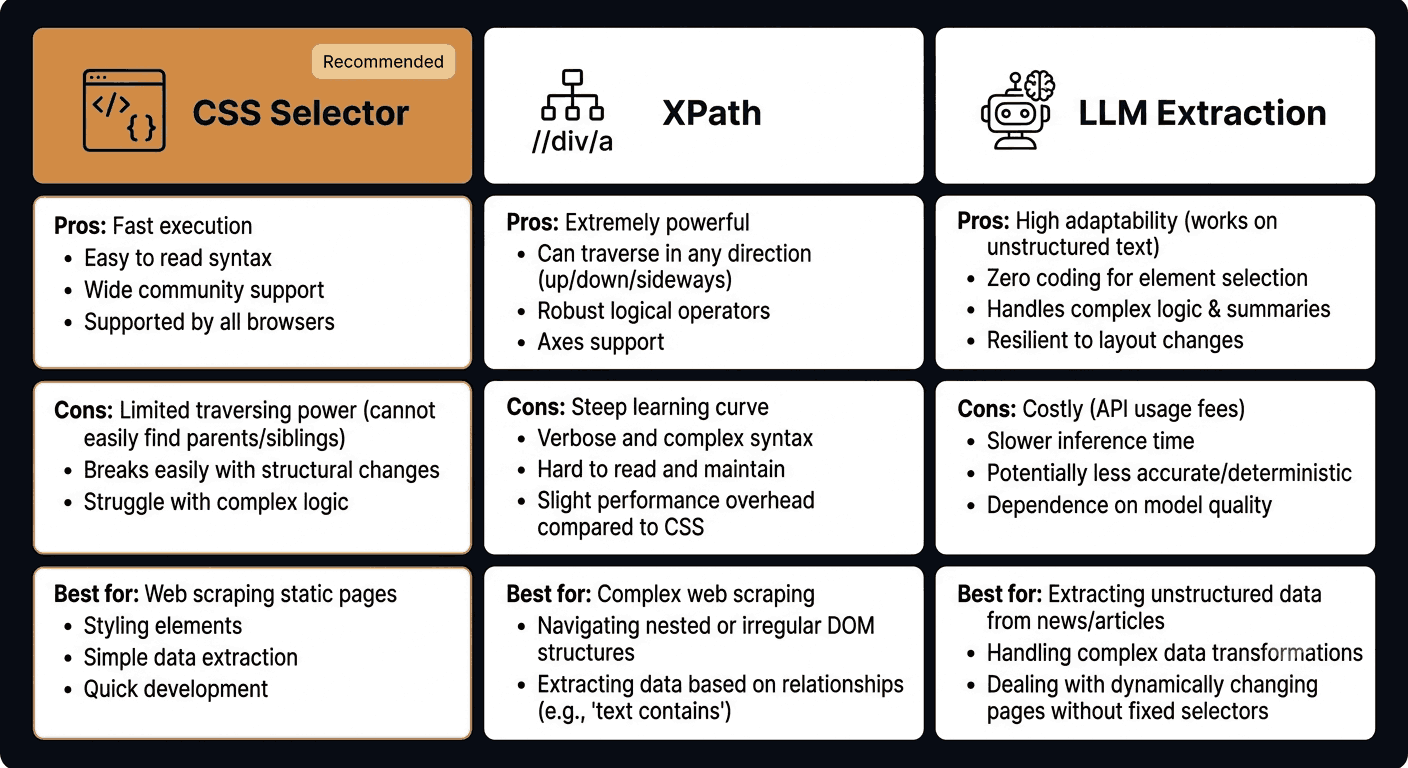
CSS Selector (Recommended for SEO Metadata)
CSS selectors are the fastest and most reliable method for extracting SEO metadata. The <title> element and <meta> tags have stable, well-defined positions in the HTML <head>. They do not move around. They do not depend on complex DOM traversal.
{
  "method": "css",
  "fields": {
    "seo_title": "title",
    "meta_description": "meta[name=\"description\"]",
    "og_title": "meta[property=\"og:title\"]",
    "og_description": "meta[property=\"og:description\"]"
  }
}
You can also track Open Graph tags alongside the standard title and description. If a social sharing template breaks, you will catch that too.
Pros: Simple, fast, precise, zero ambiguity on well-structured pages. Cons: Breaks if the tag structure changes in a major way (rare for <head> metadata). Best for: All standard SEO metadata monitoring.
XPath
XPath gives you more expressive power for navigating the DOM. It is useful when you need to extract something relative to another element or when the page structure is non-standard. For simple <title> and <meta> extraction, XPath is more verbose than CSS with no added benefit.
{
  "method": "xpath",
  "fields": {
    "seo_title": "//title/text()",
    "meta_description": "//meta[@name='description']/@content"
  }
}
Pros: More expressive for complex traversal. Cons: Verbose for simple cases; overkill for standard <head> metadata. Best for: Non-standard page structures or when CSS selectors are insufficient.
LLM Extraction
LLM extraction lets you describe the field you want in plain English instead of writing a selector. Verid sends the page to an AI model and returns structured JSON based on your description.
{
  "method": "llm",
  "prompt": "Extract the SEO title from the <title> tag and the meta description from the <meta name='description'> content attribute. Return as JSON with keys seo_title and meta_description."
}
Pros: Works even when selectors would break; useful for prototyping or unfamiliar page structures. Cons: Slower than CSS/XPath; consumes your monthly LLM extraction quota (50 calls during the free trial, 500/month on Starter). Best for: Fallback option when the page structure is dynamic or unknown. Not recommended as the primary method for stable metadata fields.
Summary: Which Method to Use
For the vast majority of SEO metadata drift detection, use CSS selectors. The <title> and <meta> tags are among the most structurally stable elements on any HTML page. CSS extraction is fast, free from any LLM quota, and produces unambiguous results every time.
Use XPath if you have unusual constraints. Use LLM extraction as a fallback if CSS breaks after a major page restructure.
See Verid's full extraction guide for a detailed comparison of all six methods.
Building a Multi-Page SEO Monitoring System
For most websites, a single page monitor is not enough. You want to watch your most important pages at minimum. Here is a practical setup for a content site or SaaS product.
Pages to monitor for metadata drift:
- Homepage
- Pricing page
- Top-traffic landing pages
- Blog index
- Top 10 blog posts by organic traffic (check these in Google Search Console)
- Product or feature pages
On Lite ($9/month, 1,000 runs a month), start by checking your six highest-traffic pages daily, which uses about 180 runs a month; the 14-day free trial covers that while you test. On the Starter plan ($19/month), you get 5,000 runs a month, which is enough to check about 6 pages hourly, or a full landing page set and your top blog posts daily.
You can automate monitor creation using the API. If you use a CMS or sitemap, write a small script that reads your sitemap XML, filters for your top pages, and creates a Verid monitor for each URL. The SDK makes this straightforward:
import { VeridClient } from '@verid.dev/sdk';

const client = new VeridClient({ apiKey: process.env.VERID_API_KEY! });

const pagesToMonitor = [
  'https://www.yoursite.com/',
  'https://www.yoursite.com/pricing',
  'https://www.yoursite.com/features',
  'https://www.yoursite.com/blog',
];

for (const url of pagesToMonitor) {
  await client.monitors.create({
    name: `SEO Metadata: ${url}`,
    url,
    schedule_interval_seconds: 3600,
    extract_config: {
      method: 'css',
      fields: {
        seo_title: 'title',
        meta_description: 'meta[name="description"]',
      },
    },
    diff_predicate: {
      type: 'composite',
      operator: 'OR',
      conditions: [
        { type: 'field_changes', field: 'seo_title' },
        { type: 'field_changes', field: 'meta_description' },
      ],
    },
    deliveries: [
      { type: 'slack', webhookUrl: process.env.SLACK_WEBHOOK_URL! },
    ],
  });
}
When to Use Real-Time vs Daily Monitoring
Not all pages need the same monitoring frequency. Here is a practical guide:
| Page Type | Recommended Interval | Runs per Month (per page) |
|---|---|---|
| Homepage | 1 hour | About 720 |
| Pricing page | 1 hour | About 720 |
| High-traffic landing pages | 15 minutes | About 2,880 |
| Blog posts (top 10) | 24 hours | About 30 |
| Blog posts (long tail) | 24 hours | About 30 |
| Product or feature pages | 1 hour | About 720 |
A 24-hour interval is perfectly acceptable for pages that are not business-critical or where a one-day detection window is acceptable, and it uses only about 30 runs a month per page. For pages that drive most of your organic revenue, an hourly check is the right call; the Starter plan's 5,000 runs a month cover about 6 pages checked hourly. A broken title on a high-converting pricing page can cost far more than $19 per month in lost organic traffic.
For a full breakdown of plan limits, see Verid Pricing.
Connecting Drift Detection to Your SEO Workflow
Getting an alert is only step one. Here is how to build a complete response workflow around Verid's metadata drift alerts.
Step 1: Receive the alert Verid fires a Slack message or email with the before/after diff. Your SEO manager and relevant developer both see it.
Step 2: Assess severity Is the title now blank? That is critical. Did it change from 58 to 61 characters? That is low priority. The before/after diff in the Verid payload gives you everything you need to triage in seconds.
Step 3: Trace the cause Cross-reference the drift event timestamp with your deployment log. Verid's fired_at field tells you exactly when the change was detected. Check your Git history or CMS changelog for changes around that time.
Step 4: Fix and verify Fix the issue, deploy the fix, then use Verid's manual run feature to immediately re-check the page rather than waiting for the next scheduled cycle:
await client.monitors.runNow(monitorId);Step 5: Log the incident For E-E-A-T and internal accountability, keep a log of metadata drift incidents: what changed, when, why, and how it was fixed. This is useful during SEO audits and demonstrates responsible site governance to stakeholders.
SEO Best Practices for Title and Description Tags
While you set up drift detection, it is worth confirming that your baseline metadata follows current best practices. Detecting drift is most valuable when the original state is already optimized.
SEO title guidelines (based on Google Search Central documentation):
- Keep titles between 50 and 60 characters to avoid truncation in search results
- Place the primary keyword near the beginning
- Make each title unique across all pages
- Accurately describe the page content
- Avoid keyword stuffing
Meta description guidelines (based on Moz's meta description guide):
- Keep descriptions between 120 and 160 characters
- Write for humans, not just search engines
- Include a natural mention of your target keyword
- Add a soft call to action where appropriate
- Make each description unique
If Verid detects a drift that moves your title from 55 characters to 102 characters, you know immediately that the fix is not just to restore the old value but to check why the template is now producing an oversized title.
Frequently Asked Questions
What is SEO title and meta description drift?
SEO drift happens when the <title> tag or <meta name="description"> tag on a page changes unintentionally. This is usually caused by a CMS update, template bug, or deployment error. Because these changes are unintentional, they often go unnoticed until organic rankings or click-through rates decline. Automated monitoring with a tool like Verid catches these changes as soon as they happen.
How often should I monitor my pages for metadata drift?
For your most important pages (homepage, pricing, top landing pages), check at least once per hour. For blog posts and lower-traffic pages, a daily check is usually sufficient. Verid's 14-day free trial includes 200 runs with no credit card. Paid plans start at $9 per month for 1,000 runs (about 30 pages checked daily), and higher plans add the monthly runs that hourly or more frequent checks need.
Can Verid monitor metadata on JavaScript-rendered pages?
Yes. Verid first attempts a static fetch. If the page requires JavaScript to render the <head> metadata (for example, pages built with Next.js or Nuxt.js that use client-side hydration), Verid automatically retries with a headless browser. This means you get accurate extraction even on modern JS-heavy pages.
Is Verid only for developers?
No. The Verid dashboard provides a full no-code interface for setting up monitors, configuring CSS selectors, choosing notification channels, and reviewing change history. You do not need to write any code to start monitoring your SEO metadata. The API and SDK are available for teams who want to automate monitor management programmatically, but they are not required.
Want this running on your own URL? Spin up the same monitor in about a minute. 5 free, no credit card.
About the author

Software Engineer & Technical Writer
Hanzala is a software engineer and technical writer. He splits his time between shipping features in Verid’s monitoring stack and turning them into documentation and guides a developer can follow without guessing.
More from HANZALA SALEEM →Related use cases
How to Track Competitor Tech Stack Changes Automatically
Learn how to detect when competitors change their tech stack, update their tools, or ship new features using Verid's web change detection API.
View blueprint →Competitor AnalysisHow to Monitor SaaS Competitor Pricing Changes Automatically
Learn how to monitor SaaS competitor pricing pages automatically with Verid. Get instant alerts when plans, prices, or features change - no manual checks needed.
View blueprint →Competitor AnalysisHow to Track Competitor Ad and Landing Page Copy Changes (And Get Alerted the Moment They Update)
Learn how to track competitor ad landing pages, headlines, pricing, and CTAs automatically using Verid's web change detection API. No coding required to start.
View blueprint →