How to Monitor SaaS Competitor Pricing Changes Automatically
Learn how to monitor SaaS competitor pricing pages automatically with Verid. Get instant alerts when plans, prices, or features change - no manual checks needed.

Competitor pricing changes happen quietly and without warning. One day your go-to competitor drops their Starter plan by $10 and starts eating into your trial conversions. You find out three weeks later when a potential customer asks why you are $30 more expensive.
If you have ever manually refreshed a competitor's pricing page to check for updates, you already know the problem: it is slow, inconsistent, and simply does not scale beyond two or three competitors. The moment you have five or more pricing pages to watch, manual checking breaks down.
This guide shows you how to use Verid to build automated SaaS competitor pricing monitors that alert you the instant a price, plan name, or feature list changes. No scraping infrastructure. No brittle homemade scripts. Just a clean configuration and an alert when something actually shifts.
Why SaaS Pricing Intelligence Matters
Most SaaS companies benchmark competitor pricing once at launch and then slowly drift out of sync. This matters more than most founders realize.
Competitor pricing is not static. Competitors run experiments. They restructure plan tiers. They quietly raise prices to improve margins or slash them to grab market share. If you are not watching, you are flying blind.
The companies that win on pricing tend to have three things:
- Near real-time awareness of what competitors are charging
- A clear picture of what features sit at each price tier
- The ability to react, not just observe
Manually refreshing pricing pages once a week gives you none of that. Automated competitor pricing monitoring gives you all three.
Step 1: Monitor Competitor Pricing with the Verid Dashboard (No Code Required)
If you are not a developer, the Verid dashboard is the fastest way to set up a competitor pricing monitor. Here is the full workflow.
Start a Free Verid Trial
Go to verid.dev/auth/signup and create your account. The 14-day free trial gives you unlimited monitors and 200 runs, with no credit card required.
Create a New Monitor
Once logged in, click New Monitor from the dashboard. You will be asked for:
- Name - something descriptive like "Competitor A Pricing Page"
- URL - the actual URL of the competitor's pricing page
Use a real, public pricing page URL. For example, if you are monitoring a competitor whose pricing lives at https://somecompany.com/pricing, that is exactly what you enter.
Choose the Right Extraction Method
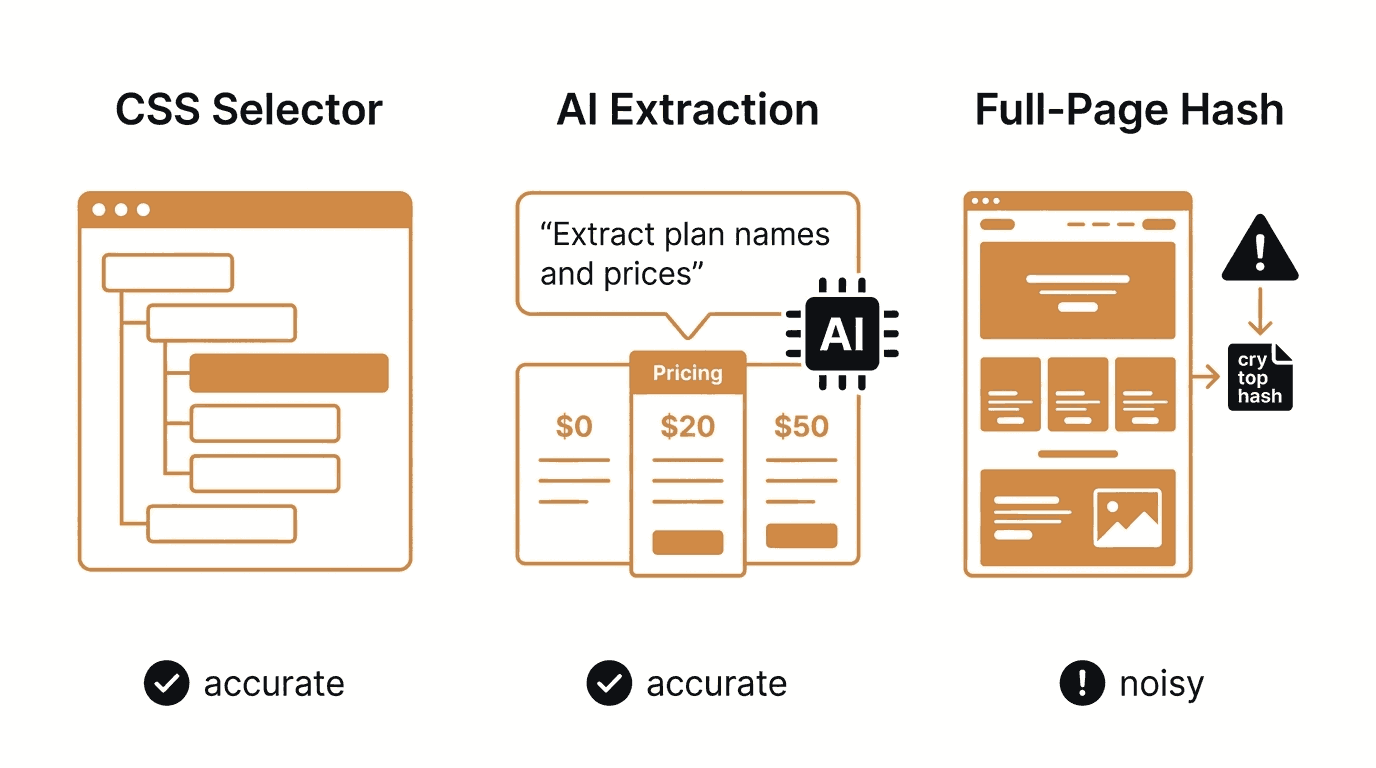
This is the most important decision you will make when setting up a pricing monitor. Verid offers six extraction methods, each suited to a different type of page. For SaaS pricing pages, the three most relevant are:
| Method | Accuracy | Ease of Setup | Best For | Limitation |
|---|---|---|---|---|
| CSS Selector | High | Medium | Pricing tables with consistent HTML structure | Breaks if competitor redesigns their page |
| AI / LLM Prompt | High | Easy | Any pricing page, especially redesign-prone ones | Counts against your monthly LLM quota |
| Full-Page Hash | Low | Very Easy | Knowing something changed, but not what | Triggers on minor page updates like cookie banners |
For most SaaS pricing pages, the AI (LLM) extraction method is the best starting point. Pricing pages are notorious for layout overhauls. A competitor might completely rebuild their pricing section and your CSS selector stops working overnight. With LLM extraction, you simply describe in plain English what you want: "Extract the name, monthly price, and annual price for each plan." Verid handles the rest, and if the page design changes, the prompt still works.
If you are comfortable with browser DevTools and want maximum accuracy with zero LLM quota usage, CSS selector extraction is the better choice for pages with a stable, predictable HTML structure.
Full-page hash is not recommended for pricing intelligence. It fires on any change, including cookie consent banner updates, ad rotations, and timestamp changes. You will get noise, not signal.
Step 2: Configure the Monitoring Schedule
After choosing your extraction method, you set how often Verid should check the page.
Verid's Lite plan easily covers a 24-hour (daily) check interval, which uses about 30 runs a month per page (well inside its 1,000 runs at $9/month, and the 14-day free trial covers it while you test) and is a good baseline for SaaS pricing intelligence. Competitor pricing rarely changes more than once a day, so daily checks catch most meaningful shifts.
If you need faster detection, every plan can check as often as every minute. Plans differ by how many runs (checks) you get each month:
| Plan | Runs per Month | Monthly Price |
|---|---|---|
| Free trial (14 days) | 200 for the whole trial | $0 |
| Lite | 1,000 | $9/mo |
| Starter | 5,000 | $19/mo |
| Pro | 15,000 | $49/mo |
| Scale | 100,000 | $149/mo |
For most competitive monitoring use cases, hourly checks strike the right balance between responsiveness and cost; at about 720 runs a month per page, the Starter plan's 5,000 runs cover six pricing pages. If you are in a fast-moving, price-competitive category, a 15-minute interval (about 2,880 runs a month per page, so Pro's 15,000 runs cover five) means you find out about a competitor's flash sale within minutes.
To set the schedule in the dashboard, enter the interval in hours. The shortest accepted interval on every plan, including the free trial, is one minute (60 seconds via the API); daily is 86,400 seconds.
Step 3: Configure Alerts and Deliveries
A monitor that does not tell you anything is useless. Verid supports four delivery channels:
- Email - a readable summary of what changed, delivered to your inbox
- Webhook - an HMAC-signed POST request to any URL you specify, with 6 automatic retries
- Slack - sends the before/after diff directly into a Slack channel
- Discord - same field-level alert, routed to a Discord webhook
For this walkthrough, we will configure email delivery, which requires no technical setup and works for anyone on any plan.
In the monitor settings, go to the Deliveries section and add a new delivery with:
- Type: Email
- To: your work email address
That is it. When Verid detects a change that matches your predicate, it sends a plain readable email showing which fields changed and their before/after values. No dashboard login required.
Note on the free trial: The free trial allows 1 delivery endpoint per monitor. Paid plans allow 2 (Lite) to 25 (Scale) delivery endpoints per monitor, so on Starter and above you can route the same alert to email, Slack, and a webhook simultaneously.
Setting the Predicate (When Should It Alert?)
The predicate defines the exact condition that triggers a delivery. For a basic pricing change alert, use any_field_changes, which fires whenever any of your extracted fields differs from the last run:
{ "type": "any_field_changes" }If you only want to hear about price reductions specifically, use field_decreases_by_percent:
{
  "type": "field_decreases_by_percent",
  "field": "starter_monthly_price",
  "threshold": 5
}
This fires only when your starter_monthly_price field drops by 5% or more. Everything else stays quiet.
See the full list of available predicates in the Verid docs.
Step 4: Monitor SaaS Competitors with the Verid API and Node.js SDK
For developers who want to manage monitors programmatically or build pricing intelligence into an existing workflow, Verid provides a full REST API and an official Node.js SDK.
Real-World Scenario: Monitoring Three Competitor Pricing Pages
Let's say you run a project management SaaS and you want to track pricing changes on these three competitor pages:
https://linear.app/pricinghttps://basecamp.com/pricinghttps://www.notion.so/pricing
Here is how to create a monitor for Linear's pricing page using the Verid API directly with curl. The LLM extraction method is used because it handles design changes gracefully.
curl -X POST https://api.verid.dev/v1/monitors \
  -H "Authorization: Bearer $VERID_API_KEY" \
  -H "Content-Type: application/json" \
  -d '{
    "name": "Linear Pricing Page",
    "url": "https://linear.app/pricing",
    "schedule_interval_seconds": 86400,
    "extract_config": {
      "method": "prompt",
      "prompt": "Extract all pricing plan names, their monthly prices as numbers without currency symbols, and their annual prices as numbers without currency symbols. If a field is not present, use null.",
      "schema": {
        "free_monthly": "number or null",
        "starter_monthly": "number or null",
        "starter_annual": "number or null",
        "plus_monthly": "number or null",
        "plus_annual": "number or null"
      }
    },
    "diff_predicate": {
      "type": "any_field_changes"
    },
    "deliveries": [
      { "type": "email", "to": "founder@yourcompany.com" }
    ]
  }'
When a change is detected, the delivery payload looks like this:
{
  "id": "del_01J...",
  "version": "2026-05-01",
  "monitor_id": "a3f7...",
  "run_id": "b9d2...",
  "fired_at": "2026-06-01T08:14:00Z",
  "diff": {
    "fields_changed": ["starter_monthly"],
    "before": { "starter_monthly": 8 },
    "after":  { "starter_monthly": 10 }
  },
  "monitor": {
    "url": "https://linear.app/pricing",
    "name": "Linear Pricing Page"
  }
}
You see exactly which field changed, from what value to what, and when.
Node.js SDK Example
Install the SDK first:
npm install @verid.dev/sdkThen create all three competitor monitors in a single script:
import { VeridClient } from '@verid.dev/sdk';

const client = new VeridClient({
  apiKey: process.env.VERID_API_KEY!,
});

const competitorPricingPages = [
  { name: 'Linear Pricing', url: 'https://linear.app/pricing' },
  { name: 'Basecamp Pricing', url: 'https://basecamp.com/pricing' },
  { name: 'Notion Pricing', url: 'https://www.notion.so/pricing' },
];

for (const competitor of competitorPricingPages) {
  const monitor = await client.monitors.create({
    name: competitor.name,
    url: competitor.url,
    schedule_interval_seconds: 86400,
    extract_config: {
      method: 'prompt',
      prompt:
        'Extract all pricing plan names and their monthly and annual prices as numbers without currency symbols. Use null for any missing values.',
      schema: {
        plan_1_name: 'string or null',
        plan_1_monthly: 'number or null',
        plan_1_annual: 'number or null',
        plan_2_name: 'string or null',
        plan_2_monthly: 'number or null',
        plan_2_annual: 'number or null',
        plan_3_name: 'string or null',
        plan_3_monthly: 'number or null',
        plan_3_annual: 'number or null',
      },
    },
    diff_predicate: { type: 'any_field_changes' },
    deliveries: [{ type: 'email', to: 'founder@yourcompany.com' }],
  });

  console.log(`Created monitor: ${monitor.name} (${monitor.id})`);
}
Run this script once and Verid handles the rest. Every 24 hours, it visits each pricing page, extracts the current plan structure, compares it to the last known state, and emails you if anything changed.
Triggering a Manual Run
Need to verify the monitor is working immediately after setup? Use the manual run endpoint:
curl -X POST https://api.verid.dev/v1/monitors/{monitor_id}/run \
  -H "Authorization: Bearer $VERID_API_KEY"
Manual runs have no daily cap on any plan; each one uses one run from your monthly pool, just like a scheduled check. This is useful for testing your extraction config before relying on the scheduled interval.
A Complete Real-World Scenario
You are the founder of a B2B SaaS tool for design teams. Your three main competitors are Notion, Basecamp, and Linear. You are worried about being undercut on your mid-tier plan.
Here is what your setup looks like:
- You create three monitors, one per competitor pricing page, using the LLM extraction method.
- You set the schedule to 24 hours (about 90 runs a month for all three, well inside the Lite plan's 1,000) or 1 hour if you are on Starter.
- You configure email delivery to your personal work email.
- You set the predicate to
any_field_changesso you get notified about price changes, plan name changes, and feature tier shifts.
Three weeks later, on a Tuesday morning, you open your email and find this:
Verid Alert: Notion Pricing Page Field changed:pro_monthlyBefore:16After:12
Notion dropped their Pro plan from $16 to $12 per user. You have this information at 8am. By 9am your team is already in a discussion about how to respond.
Without Verid, you would have found out when the first customer mentioned it during a sales call.
Benefits of Automated SaaS Competitor Pricing Monitoring
Save hours of manual research every week. Checking 5 competitor pricing pages manually, twice a week, adds up quickly. Verid eliminates all of it.
React to competitor strategy changes faster. The first company to respond to a competitor's price drop often captures the customers sitting on the fence.
Track more than just price. LLM extraction lets you monitor plan names, feature tiers, and positioning language. When a competitor rebrands their "Enterprise" plan to "Scale" and adds new features, you know.
Scale to any number of competitors. Manual tracking collapses at 5 or 6 competitors. Verid has no monitor limit on any plan; you only budget runs, and Lite's 1,000 runs a month at $9 cover about 30 pricing pages checked daily.
Receive alerts through the channels your team already uses. Verid's notification system supports email, Slack, Discord, and signed webhooks. Alerts land where your team already works.
Zero infrastructure to maintain. No scraper to host, no browser cluster to manage, no cron job to babysit. Verid runs the infrastructure and handles bot protection automatically through its three-layer fetch system (static fetch, headless browser, residential proxy).
Frequently Asked Questions
How can I automatically monitor competitor pricing changes?
The fastest way is to use a web change detection tool like Verid. You point it at a competitor's pricing page URL, choose an extraction method (CSS selector for structured HTML or LLM/AI extraction for any pricing page), configure how often it should check, and add your email or Slack as the delivery channel. Verid checks the page on schedule, compares the extracted data to the previous run, and sends an alert only when something actually changes.
What is the best extraction method for monitoring SaaS pricing pages?
For most SaaS pricing pages, LLM (AI) extraction is the most reliable choice. Pricing pages are redesigned frequently, and CSS selectors break whenever the HTML structure changes. LLM extraction uses a plain-English prompt to describe what you want extracted. It works across layout changes and returns structured, named fields you can reference in predicates. CSS selector extraction is a good alternative if the page has a stable HTML structure and you want to avoid using your monthly LLM quota.
Can I receive alerts when a competitor changes their pricing page?
Yes. Verid supports email, Slack, Discord, and signed webhook deliveries. Once a monitor detects a change that matches your predicate, it pushes a before/after diff to your chosen channel automatically. Webhooks are HMAC-signed and retried up to 6 times with exponential backoff. Email alerts require no technical setup at all.
How do I monitor multiple SaaS competitors at once?
Create one monitor per competitor pricing page. You can do this manually through the Verid dashboard or programmatically using the REST API or the Node.js SDK. Every plan includes unlimited monitors, so you can easily cover a broad competitive landscape. Each monitor tracks its own URL independently and sends its own alerts, giving you clean, actionable diffs per competitor.
Want this running on your own URL? Spin up the same monitor in about a minute. 5 free, no credit card.
About the author

Software Engineer
Suleman builds and maintains the parts of Verid that watch a page and decide what counts as a change (extraction, diffing, and delivery), and writes hands-on guides drawn from running those systems every day.
More from Suleman →Related use cases
How to Track Competitor Tech Stack Changes Automatically
Learn how to detect when competitors change their tech stack, update their tools, or ship new features using Verid's web change detection API.
View blueprint →Competitor AnalysisHow to Detect SEO Title and Meta Description Drift Using Verid
Learn how to detect SEO title and meta description drift automatically using Verid. Monitor metadata changes across your site and get instant alerts before rankings drop.
View blueprint →Competitor AnalysisHow to Track Competitor Ad and Landing Page Copy Changes (And Get Alerted the Moment They Update)
Learn how to track competitor ad landing pages, headlines, pricing, and CTAs automatically using Verid's web change detection API. No coding required to start.
View blueprint →