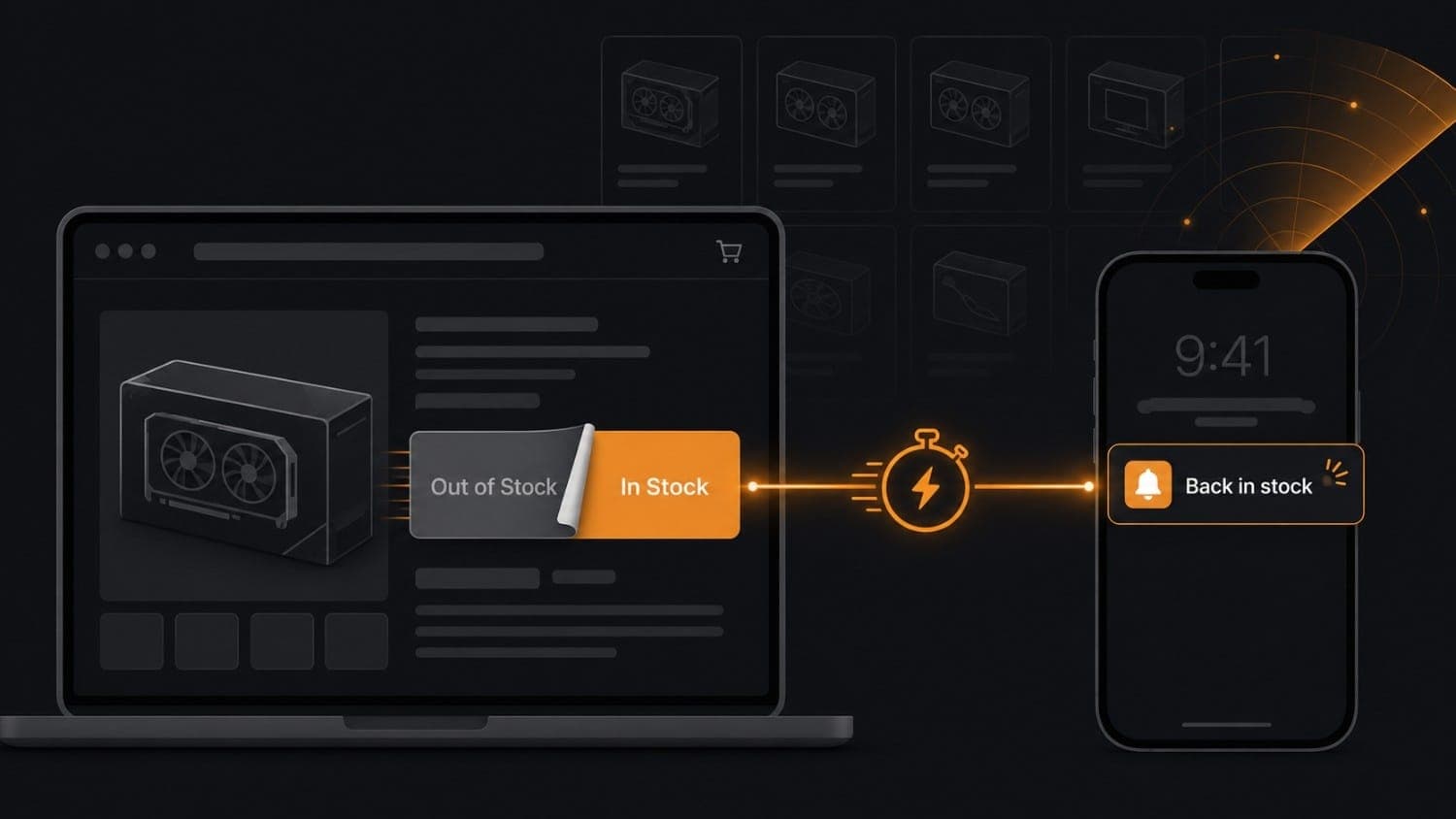
Get Notified the Instant Items Are Back in Stock
There's a particular kind of frustration unique to modern online shopping. You find the exact thing you want, the right GPU, the limited sneaker colorway, the concert merch that just hit the site and the page says "Sold Out." You sign up for the store's notification email, wait three weeks, and then it arrives at 11 PM on a Wednesday. By the time you click through the next morning, it's gone again.
The retailer's email wasn't wrong. The item actually was back in stock for about forty minutes.
This problem isn't really about email timing. It's about architecture. A batch marketing email that goes out hours after a restock event will never beat someone who is monitoring the product page directly, on a server, checking every few minutes, and getting a push to their phone the second the status flips. That's a fundamentally different approach.
This guide covers how back-in-stock monitoring actually works at a technical level, why most existing approaches fall short, and how to build a reliable restock alert for literally any product page, not just your own store, using Verid's web change detection API.
Why "Notify Me" Forms Aren't Enough
Most retailers do have a "notify me when available" button. The problem is what happens behind it.
When a product page goes out of stock on a Shopify store or a major retailer, the notify-me opt-in collects your email into a list. When someone restocks the SKU, a job runs that sends a batch email to that list. The delay between the restock event and email delivery can range from minutes to hours, depending on how frequently the batch job runs, whether the ESP delivery queue is backed up, and whether the email lands in your promotions tab.
For low-demand items, that delay is fine. For anything that will sell out again in under an hour, you're essentially being given a polite head start that doesn't matter.
And for products you're not buying from your own store, a GPU at a major retailer, a limited sneaker drop on a brand site, a collectible on a marketplace, there's often no notify-me form at all. You're left to check manually, set up a calendar reminder, or rely on a browser extension running on a laptop that's only on when you're home.
Server-side monitoring changes the equation entirely.
How Restock Monitoring Actually Works
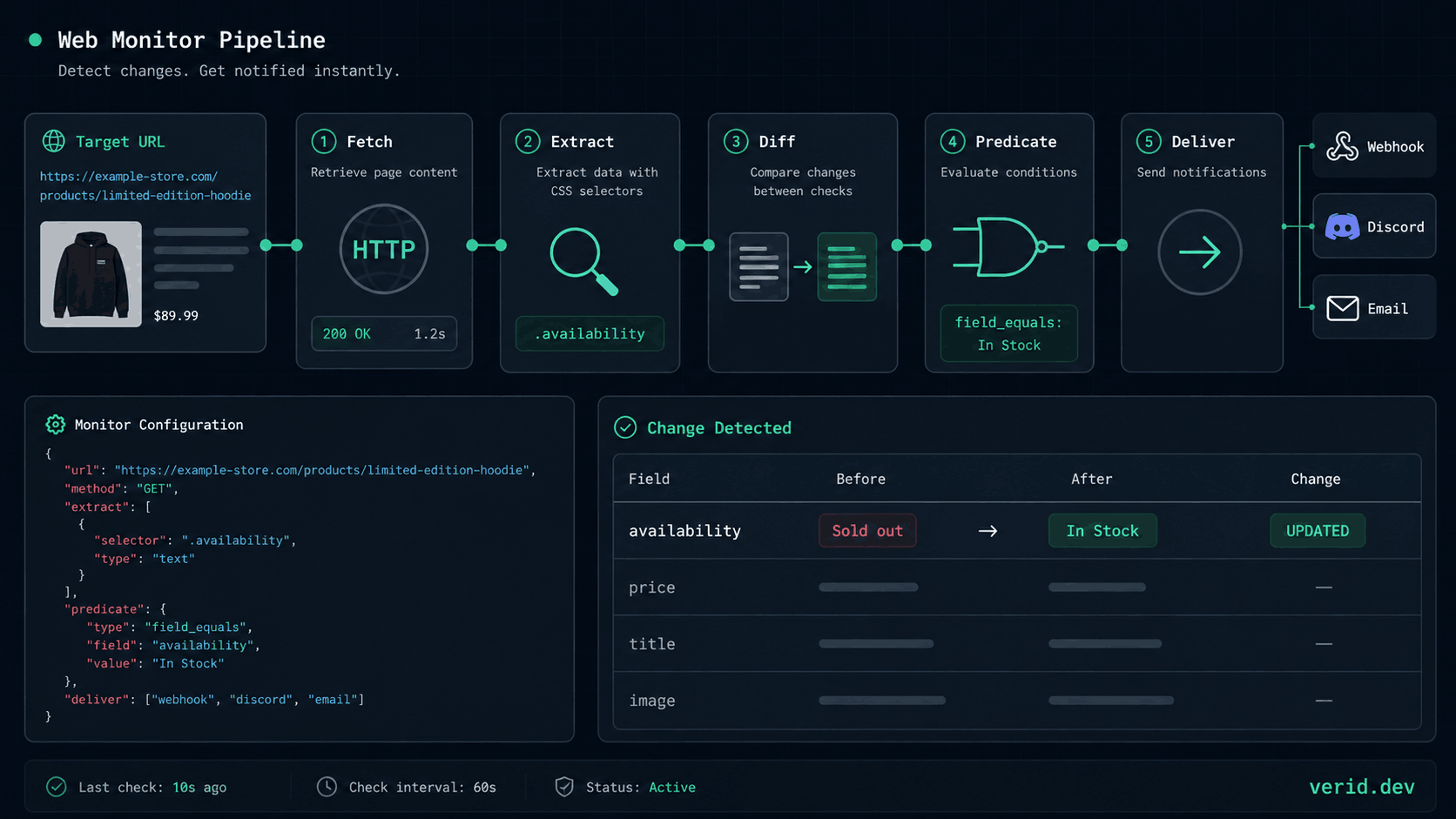
At its core, catching a restock event means solving a simple problem: repeatedly checking a product page and detecting the moment a specific piece of text transitions from one value to another, say, from "Sold out" to "In Stock", and then firing a notification the instant that transition happens.
That sounds straightforward, but there are several layers of complexity most people underestimate.
The extraction problem. You can't just diff the entire page. Product pages constantly change: timestamps update, recommended products rotate, ad slots refresh. If you alert on any page change, you'll get noise on every check. You need to extract only the availability field, isolate it as a named value, and compare just that field between runs.
The JS rendering problem. A lot of stock status text is rendered by JavaScript, not present in the raw HTML. If your checker just fetches the HTML without executing scripts, it'll see a blank field or a skeleton loader, not the actual availability status.
The bot-protection problem. High-demand product pages, exactly the ones worth monitoring, are often behind Cloudflare or similar protection. A standard HTTP fetch will get a challenge page, not the product data.
The false-positive problem. Even if you extract the right field, you need to think about what exactly constitutes a meaningful change. "In Stock" and "In stock" are different strings. The price field might be absent (empty string) when out of stock and reappear when it returns. Your predicate needs to match the actual state transition, not just any change.
The delivery problem. Once a change is detected, getting notified quickly means having an alert channel that actually reaches you fast. A webhook into a notification service is much faster than waiting for an email. And if your webhook endpoint goes down temporarily, you need automatic retries so you don't miss the event.
This is the full loop that a reliable restock alert system has to solve.
Approaches to Restock Monitoring: A Comparison
Before getting into the implementation, it's worth being honest about the tradeoffs between the major approaches.
| Approach | Speed | Reliability | Setup Effort | Works on Any Site? | Cost |
|---|---|---|---|---|---|
| Retailer's notify-me email | Hours delay typical | Inconsistent | Zero (just sign up) | No | Free |
| Browser extension | Near-real-time (laptop only) | Gets blocked by Cloudflare | Low | Partial | Free–low |
| DIY scraper (cron + fetch) | As fast as your cron | Breaks on HTML changes | High (and ongoing) | Yes, with work | Infrastructure cost |
| Screenshot diff tools | Minutes | Noisy (any pixel change) | Low | Yes | Subscription |
| API-based change detection (Verid) | As fast as your check interval | Structured, predicate-filtered | Low (config-based) | Yes | Subscription |
The browser extension approach is popular for personal use but has a fundamental problem: it only runs when your browser is open. For restocks that happen at 3 AM or during a work meeting, it's invisible. It's also increasingly blocked by the anti-bot layers that high-demand retailers use.
The DIY scraper route works, but the ongoing maintenance cost is real. Retailers change their HTML. Cloudflare updates its fingerprinting. A selector that worked last month broke on a Sunday. You're maintaining infrastructure instead of just getting alerts.
Screenshot diff tools generate a lot of noise. They fire when the retailer adds a banner, changes a recommendation widget, or updates an ad. If you're watching a high-traffic product page, you'll quickly learn to ignore the alerts, which defeats the entire purpose.
API-based structured monitoring with field-level predicates solves the noise problem at the architecture level: alerts only fire when the rule you wrote returns true, not on every byte change.
Monitoring a Product Page with Verid
Verid is a web change detection API that handles the full monitoring loop: scheduled fetching, structured field extraction, field-level diffing, predicate evaluation, and signed webhook delivery. The relevant capability for restock alerts is the combination of CSS extraction and the field_equals (or field_matches_regex) predicate.
Here's the mental model: instead of "has this page changed," the question becomes "has this specific field on this page reached this specific value." That's the difference between useful and noisy.
Step 1: Identify the Availability Field
Before creating a monitor, open the product page in your browser, right-click the stock status text, and inspect the element. You're looking for a CSS selector that reliably targets the availability string and nothing else.
On most product pages, this looks like one of:
.product-availability-label#stock-status[data-testid="availability"].availability span
The actual selector varies by site, but the inspection process is the same. You want a selector that returns exactly the text you care about: "Sold out", "In Stock", "Out of stock", "Add to cart", whatever string the page uses.
If the page is JavaScript-heavy (the stock text is rendered by React or a similar framework), you may not see the text in the initial HTML source. Verid handles this automatically: if the CSS extraction returns empty fields on a static fetch, the job retries with a headless browser.
Step 2: Configure the Extraction
The extract_config tells Verid which fields to pull from the page on each run. For a basic restock monitor, you want, at minimum, the availability field, and optionally the price field (which is useful both for your predicate and for the notification payload):
{
  "method": "css",
  "fields": {
    "availability": ".product-availability-label",
    "price": ".price"
  }
}
This returns structured JSON after each run:
{
  "availability": "Sold out",
  "price": ""
}
When the item restocks, that same extraction will return:
{
  "availability": "In Stock",
  "price": "$1,599.00"
}
That's the state transition you're alerting on.
Step 3: Write the Predicate
The diff_predicate is where you define exactly what condition triggers a notification. For a restock alert, the cleanest option is field_equals:
{
  "type": "field_equals",
  "field": "availability",
  "value": "In Stock"
}
This only fires when the availability field transitions to the value "In Stock." Any other change, a cookie banner, a timestamp, or a related product rotation is silently ignored.
One practical caveat: the string match is case-sensitive. "In Stock" and "In stock" are different. Before deploying the monitor, it's worth running one manual check to confirm what string the page actually returns. If the retailer uses multiple possible in-stock strings (like "Available" or "Add to Cart"), use field_matches_regex instead:
{
  "type": "field_matches_regex",
  "field": "availability",
  "pattern": "^(In [Ss]tock|Available|Add to [Cc]art)$"
}
Step 4: Create the Monitor via API
With the extraction config and predicate defined, creating the monitor is a single API call. Here it is with curl:
curl -X POST https://api.verid.dev/v1/monitors \
  -H "Authorization: Bearer vrd_your_api_key" \
  -H "Content-Type: application/json" \
  -d '{
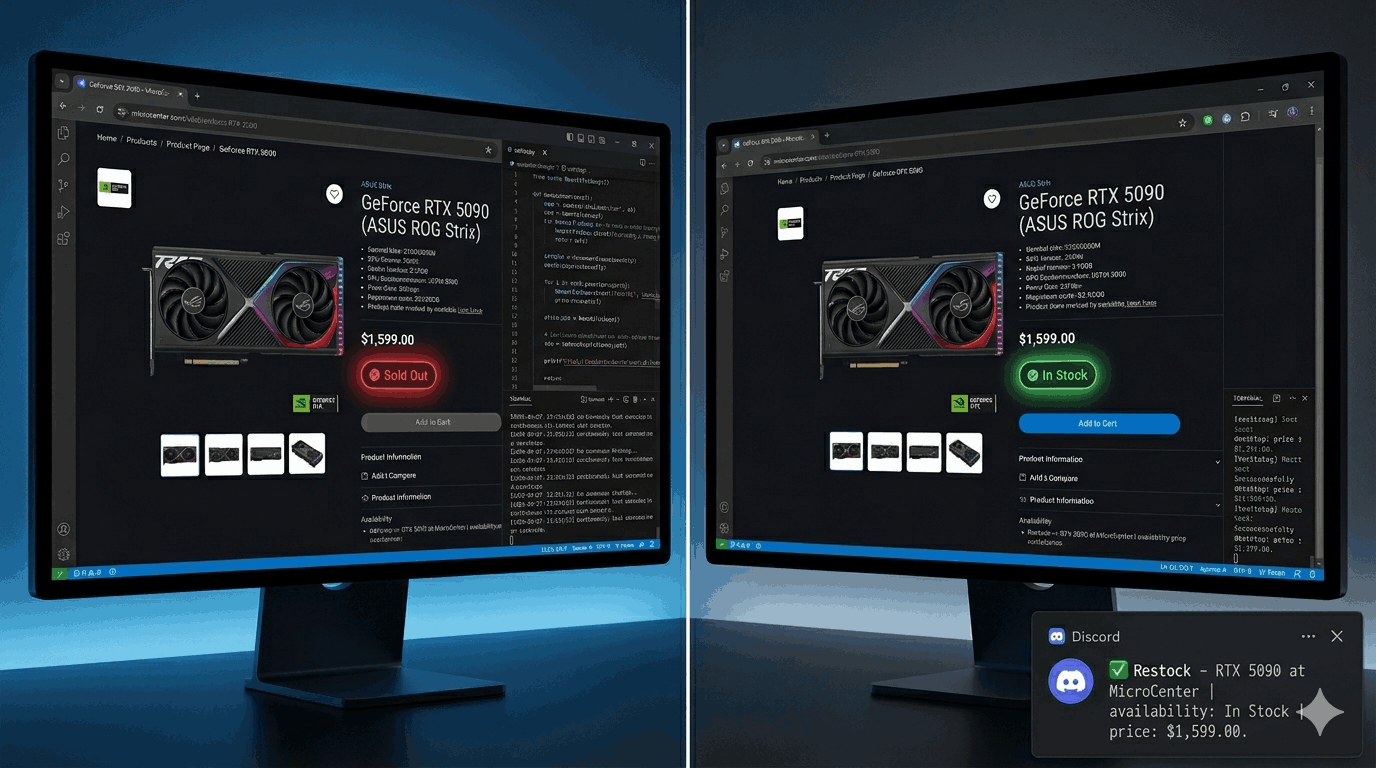
    "name": "Restock - RTX 5090 at MicroCenter",
    "url": "https://retailer.com/products/rtx-5090",
    "schedule_interval_seconds": 300,
    "extract_config": {
      "method": "css",
      "fields": {
        "availability": ".product-availability-label",
        "price": ".price"
      }
    },
    "diff_predicate": {
      "type": "field_equals",
      "field": "availability",
      "value": "In Stock"
    },
    "deliveries": [
      { "type": "discord", "webhookUrl": "https://discord.com/api/webhooks/YOUR_WEBHOOK_URL" },
      { "type": "email",   "to": "you@yourcompany.com" }
    ]
  }'
The schedule_interval_seconds: 300 sets a five-minute check interval, which uses about 8,640 runs a month. Every plan can check as often as every minute; what changes by tier is how many runs you get each month, and a single five-minute monitor fits within Pro's 15,000. Check the Verid pricing page for the current limits by tier.
And the same monitor created with the Node.js SDK:
import { VeridClient } from '@verid.dev/sdk';

const client = new VeridClient({ apiKey: process.env.VERID_API_KEY! });

await client.monitors.create({
  name: 'Restock - RTX 5090 at MicroCenter',
  url: 'https://retailer.com/products/rtx-5090',
  schedule_interval_seconds: 300,
  extract_config: {
    method: 'css',
    fields: {
      availability: '.product-availability-label',
      price: '.price',
    },
  },
  diff_predicate: {
    type: 'field_equals',
    field: 'availability',
    value: 'In Stock',
  },
  deliveries: [
    { type: 'discord', webhookUrl: 'https://discord.com/api/webhooks/...' },
    { type: 'email', to: 'you@yourcompany.com' },
  ],
});
What the Webhook Delivers
When the predicate fires, Verid POSTs a signed JSON payload to your endpoint. The payload includes the exact before/after field values so your downstream code knows what changed without having to re-fetch the page:
{
  "id": "del_01H...",
  "version": "2026-05-01",
  "monitor_id": "9b1c...",
  "fired_at": "2026-06-01T03:22:00Z",
  "diff": {
    "fields_changed": ["availability", "price"],
    "before": { "availability": "Sold out", "price": "" },
    "after":  { "availability": "In Stock", "price": "$1,599.00" }
  },
  "monitor": {
    "url":  "https://retailer.com/products/rtx-5090",
    "name": "Restock - RTX 5090 at MicroCenter"
  }
}
Every webhook is signed with HMAC-SHA256 in the same format Stripe uses. If you've verified Stripe webhooks before, the verification logic is identical. The signature is included in the Verid-Signature header.
If your endpoint is down when the delivery fires, Verid retries automatically with exponential backoff: immediately, then at 5 minutes, 15 minutes, 30 minutes, 1 hour, and 2 hours. If all six attempts fail, the delivery is marked dead and visible in your dashboard for manual replay.
Delivery Channels: Which One Reaches You Fastest
Verid supports four delivery channels per monitor, and each monitor can deliver to multiple destinations simultaneously. Choosing the right channel matters for restock alerts, because the window to act is often short.
| Channel | Best For | Typical Latency |
|---|---|---|
| Webhook | Triggering automated purchasing flows, mobile push via your own app | Sub-second |
| Discord | Personal or team channels, communities | Seconds |
| Slack | Engineering or operations teams | Seconds |
| Backup notification, non-technical stakeholders | 1–5 minutes |
For personal restock alerts, Discord is usually the practical winner: it's free, push notifications work reliably on mobile, and you don't need to run any server infrastructure. Set up a Discord webhook in under a minute and configure it as a delivery on your Verid monitor.
For team or production use cases, say, a reseller business monitoring dozens of SKUs or an operations team tracking supplier inventory, the webhook channel is more powerful. It lets you route the event into your own application, trigger downstream processes, or fan out to multiple notification systems.
A practical production setup might look like this:
"deliveries": [
  { "type": "webhook", "url": "https://your-app.com/hooks/restock" },
  { "type": "discord", "webhookUrl": "https://discord.com/api/webhooks/..." },
  { "type": "email",   "to": "alerts@your-company.com" }
]
The webhook fires first and triggers the business logic. Discord pings the team immediately. Email creates a record for anyone who missed the Discord ping.
Advanced Use Case: Composite Predicates
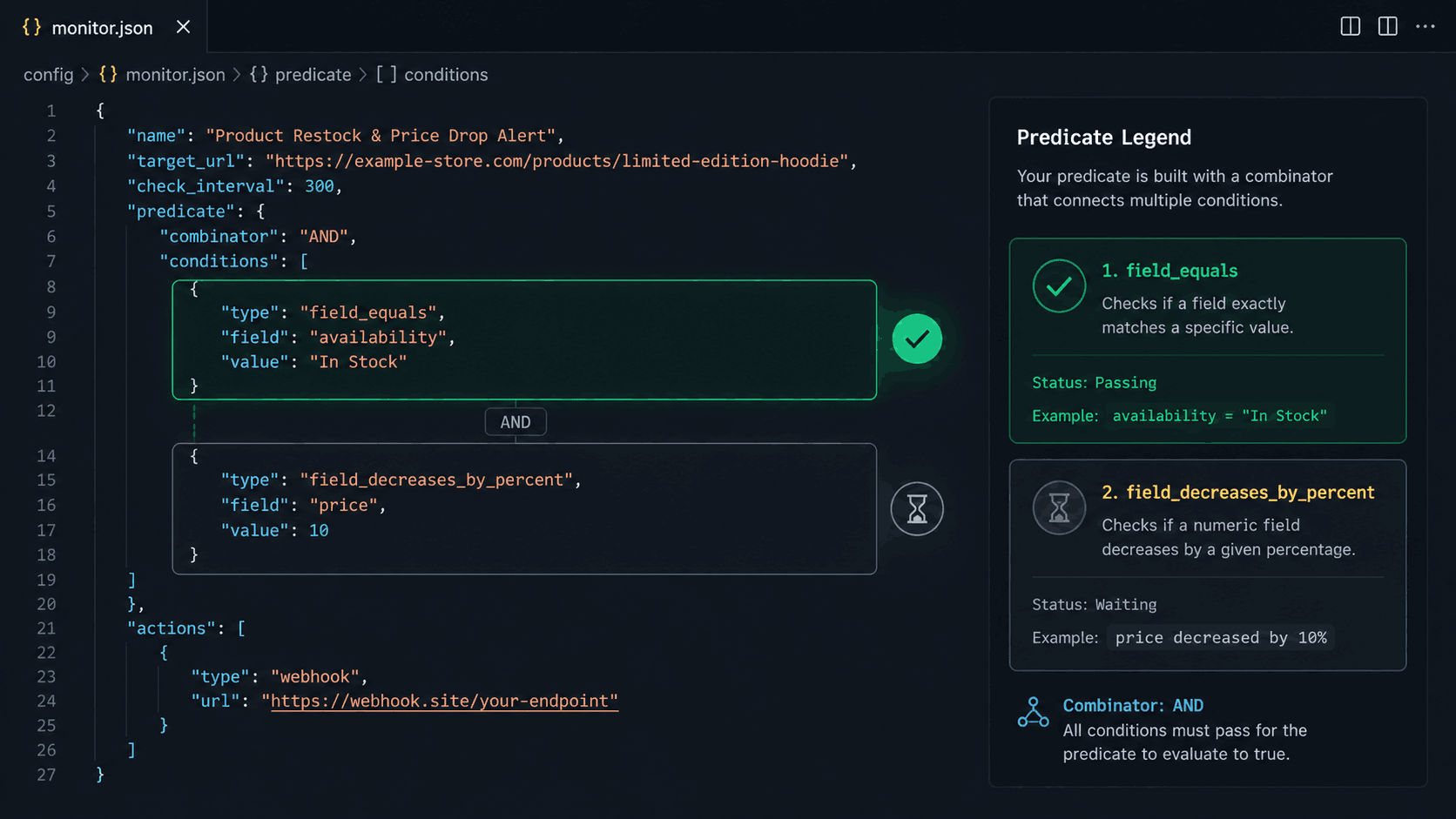
The real power of predicate-based monitoring becomes clear when you combine conditions. Consider a scenario where you're monitoring a product you'd buy at the current price, but you've also been waiting for a small price drop. You want to know when it's back in stock, and when the price has dropped.
Verid's composite predicate handles this:
{
  "type": "composite",
  "operator": "AND",
  "conditions": [
    {
      "type": "field_equals",
      "field": "availability",
      "value": "In Stock"
    },
    {
      "type": "field_decreases_by_percent",
      "field": "price",
      "threshold": 5
    }
  ]
}
This monitor only fires when both conditions are simultaneously true: availability is exactly "In Stock" AND the price has dropped by at least 5% from the previous recorded value. Any other state in stock at the same price, price drop while still out of stock, produces no notification.
For resellers or price-sensitive buyers, this eliminates an entire class of irrelevant alerts. You're not just watching for availability; you're watching for the specific combination of conditions that makes the purchase worthwhile.
Monitoring JSON-Based Product APIs
Not every product page renders in HTML. Some retailers and supplier portals expose product availability through REST APIs that return JSON, such as wholesale platforms, B2B suppliers, or product data feeds.
For these, Verid's json_path extraction method is more appropriate than CSS:
{
  "method": "json_path",
  "fields": {
    "availability": "$.inventory.status",
    "stock_count": "$.inventory.quantity",
    "price": "$.pricing.retail_price"
  }
}
Paired with a predicate:
{
  "type": "field_equals",
  "field": "availability",
  "value": "in_stock"
}
Or if you want to know when any units appear:
{
  "type": "field_increases_by_absolute",
  "field": "stock_count",
  "threshold": 1
}
The same full pipeline scheduling, diffing, predicates, and delivery apply regardless of whether the source is an HTML page or a JSON endpoint.
Handling Bot-Protected and JavaScript-Heavy Product Pages
High-demand product pages, the ones most worth monitoring, are often the hardest to scrape. There are two main challenges:
JavaScript rendering. Availability status on modern storefronts is often injected by a React or Vue component after the initial HTML loads. A raw HTTP fetch sees the skeleton, not the actual stock text. Verid handles this automatically: if CSS extraction returns empty fields on a static fetch, it automatically retries with a headless browser. No configuration required.
Bot protection. Sites like Cloudflare, Akamai, and custom bot-detection layers will block standard HTTP requests. Verid's three-layer fetching pipeline escalates automatically: static fetch → headless browser → residential proxy network. You don't manage proxy lists or user-agent rotation; the infrastructure handles the escalation.
This is meaningful for practical monitoring. A GPU available at a major retailer protected by bot-detection, or a limited sneaker release behind Cloudflare, can still be monitored reliably. The proxy bandwidth consumed counts against your plan's allocation (50 MB for Starter, 500 MB for Pro, 5 GB for Scale), but for a single product page checked every few minutes, consumption is minimal.
Building a Multi-Product Restock Watcher
For anyone monitoring more than one or two products, resellers, procurement teams, and hobbyist collectors, the API makes it straightforward to create monitors programmatically. Here's a TypeScript pattern for creating a batch of restock monitors from a list of products:
import { VeridClient } from '@verid.dev/sdk';

const client = new VeridClient({ apiKey: process.env.VERID_API_KEY! });

const productsToWatch = [
  {
    name: 'RTX 5090 at MicroCenter',
    url: 'https://microcenter.com/product/rtx-5090',
    selector: '.availability-status',
    inStockValue: 'In Stock',
  },
  {
    name: 'PS6 at Best Buy',
    url: 'https://bestbuy.com/products/ps6',
    selector: '[data-testid="fulfillment-add-to-cart-button"]',
    inStockValue: 'Add to Cart',
  },
  {
    name: 'AJ1 Chicago at Nike',
    url: 'https://nike.com/t/air-jordan-1-chicago',
    selector: '.available-qty',
    inStockValue: 'Available',
  },
];

for (const product of productsToWatch) {
  await client.monitors.create({
    name: `Restock - ${product.name}`,
    url: product.url,
    schedule_interval_seconds: 900, // 15 min (about 2,880 runs/month per monitor)
    extract_config: {
      method: 'css',
      fields: { availability: product.selector },
    },
    diff_predicate: {
      type: 'field_equals',
      field: 'availability',
      value: product.inStockValue,
    },
    deliveries: [
      { type: 'discord', webhookUrl: process.env.DISCORD_WEBHOOK_URL! },
    ],
  });
}

console.log(`Created ${productsToWatch.length} restock monitors.`);
This creates one monitor per product, all delivering to the same Discord channel. When any of them fires, the Discord notification includes the monitor name, so you know immediately which product restocked.
Practical Tips and Common Pitfalls
The in-stock string varies by retailer. Before deploying a monitor, run a manual test to see exactly what text the page returns. "In Stock" and "In stock" are different. So are "Add to Cart" and "Add to Bag" (Apple's phrasing). When in doubt, use field_matches_regex with a pattern that covers the reasonable variants.
The first run establishes the baseline. Verid's first run records the current state without triggering any delivery. The second run is the first one that can fire an alert. This means you want to start the monitor before the expected restock window, not at the moment you think the restock will happen.
Check intervals and plan tiers. Every plan can check as often as every minute, but a three-minute or five-minute interval uses about 14,400 or 8,640 runs a month per monitor. For most personal use cases, a 15-minute interval (about 2,880 runs a month) is sufficient; limited drops typically sell out in 10–30 minutes, so 15-minute monitoring will catch all but the fastest-moving items. Plan your tier based on how time-sensitive your target products are.
Virtual queue pages. Some high-demand retailers' Yeezy releases and certain GPU restocks put the product page behind a virtual waiting room when inventory is available. Verid sees the queue page, not the product. For these, the detection approach needs to be different (monitoring a queue position or a different URL structure). The standard restock monitor pattern applies to products where the page itself shows the availability status.
The LLM fallback. If a product page's HTML structure is too unusual or dynamic for standard CSS selectors, Verid's LLM extractor can extract the availability field using a natural language description:
{
  "method": "llm",
  "prompt": "Extract the product availability status. Return JSON with key 'availability' containing the stock status text (e.g. 'In Stock', 'Sold out', 'Available', 'Out of stock')."
}
LLM extractions count against your monthly quota but are cached for 30 days; unchanged pages don't re-consume quota.
Pricing and Plan Selection
| Plan | Price | Runs per Month | Best For |
|---|---|---|---|
| Free trial (14 days) | $0 | 200 (whole trial) | Testing your setup before choosing a plan |
| Lite | $9/mo | 1,000 | About 30 products checked daily |
| Starter | $19/mo | 5,000 | Personal monitoring, non-urgent restocks |
| Pro | $49/mo | 15,000 | Active resellers, time-sensitive drops |
| Scale | $149/mo | 100,000 | High-volume, near-real-time monitoring |
For most personal restock monitoring scenarios, the Pro plan at $49/month includes 15,000 runs a month, enough for about five products at 15-minute intervals or about 20 at hourly, a good fit for a serious collector or small reseller operation.
The Scale plan's 100,000 runs a month, enough for about 11 monitors at 5-minute intervals, are relevant for genuinely time-sensitive inventory: GPUs that sell out in minutes, concert tickets, vaccine appointment slots, and similar high-demand situations where a 15-minute window is too large.
The 14-day free trial's unlimited monitors and 200 runs (no credit card required) are useful for testing your extraction config and verifying that your selectors work before choosing a plan.
Who Should Build This vs. Use a Plugin
If you run a Shopify or WooCommerce store and you want to notify your own customers when your own products restock, a dedicated plugin (Amp, Stoq, Timesact, etc.) is the more appropriate tool. Those apps integrate directly with your store's inventory system, capture opt-in emails from customers, and handle the notification workflow without requiring any API knowledge.
Verid is the right choice when:
- You're monitoring product pages you don't own (competitor sites, retailers, marketplaces)
- You need to monitor any arbitrary URL, not just Shopify-compatible stores
- You want programmatic control, creating monitors via API, managing them in code, and routing events into your own application
- You need a webhook delivery rather than an email sequence
- You're building a product or internal tool that includes restock alerting as a feature
- You want composite predicates, alerting only when availability AND price conditions are both met simultaneously
The two approaches solve different problems. Plugin-based notify-me is a customer retention and marketing automation tool. API-based change detection is an infrastructure tool for monitoring the web.
Frequently Asked Questions
What's the fastest way to get notified when a product is back in stock?
The fastest approach is server-side monitoring with a webhook delivery to a channel that sends push notifications to your phone. Discord mobile push is a practical and free option. Browser extensions only work when your laptop is open, and retail notify-me emails are typically batched and delayed. A dedicated monitor running every 5–15 minutes on the server and delivering to Discord will reliably beat both approaches for any restock that isn't sold out in under a minute.
Can I monitor any product page for restock alerts, or only my own store?
You can monitor any publicly accessible URL. Verid extracts a named field from the page (like an availability status element) and fires when that field matches your predicate. It works on any retailer's product page, any marketplace listing, or any JSON API endpoint; you're not limited to stores you control. The only constraint is that the page must be publicly accessible; pages behind login walls can't be fetched.
How do I handle product pages that show different "in stock" strings (like "Available" vs "Add to Cart")?
Use the field_matches_regex predicate instead of field_equals. Set the pattern to match all the variants you want to catch, for example: ^(In [Ss]tock|Available|Add to [Cc]art|Add to Bag)$. The regex is applied against the extracted field value after each run, so as long as any of those strings is present, the predicate fires. Run one manual check first (via the dashboard or the API's runNow endpoint) to confirm exactly what string your target page returns.
About the author

Software Engineer & Technical Writer
Software engineer and technical writer. Hanzala bridges Verid’s codebase and its documentation, writing the guides, reference pages and honest comparisons that get a developer from an idea to a working monitor.
More from HANZALA SALEEM →Related posts
How Ecommerce Teams Use Structured Price Monitoring to Win on Margins
How ecommerce teams use structured price monitoring to protect margins, automate competitor alerts, and make faster repricing decisions.
Read the post →price monitoringBest Price Monitoring Tools for Ecommerce in 2026
Compare the 7 best price monitoring tools for ecommerce in 2026 — Verid, Visualping, Prisync, Price2Spy, changedetection.io, Browse AI, and Wiser — with honest pros, cons, and pricing.
Read the post →change detectionFree Website Change Monitors Compared (No Card Required)
Compare free website change monitors that need no credit card. Real limits, check frequency, and which tool actually fits your use case.
Read the post →visual monitoringVisual Regression Testing vs Visual Monitoring: Which Do You Need?
Visual regression testing catches bugs before release. Visual monitoring catches changes after deployment. Learn the difference and which one you need.
Read the post →