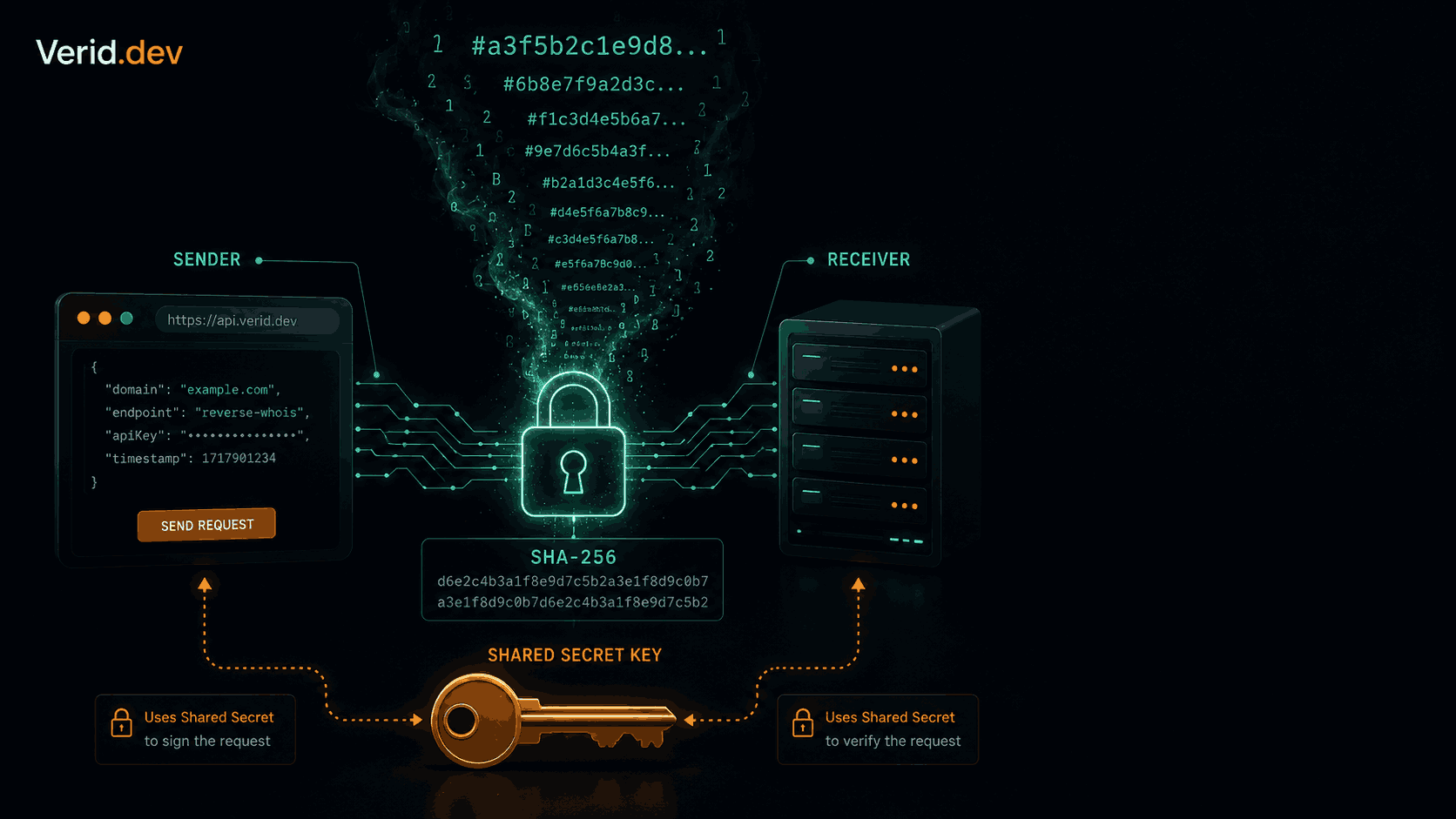
HMAC Webhook Verification: How to Validate Signed Webhook Payloads
Webhooks are convenient until someone starts forging them. A POST request hits your endpoint, looks plausible, and your application processes it without question. That is the exact attack surface HMAC signing was designed to close.
This guide covers how HMAC webhook verification actually works, the mistakes most implementations get wrong, and production-ready code across five languages - including exactly how to verify the signed payloads that Verid.dev delivers to your endpoint.
What is HMAC Webhook Verification?
HMAC stands for Hash-based Message Authentication Code. In the context of webhooks, it is a mechanism where the sender computes a cryptographic signature over the request body using a shared secret key, then includes that signature in a request header. Your server recomputes the same signature independently and compares the two. If they match, the payload is authentic and unmodified. If they differ, you reject it.
The algorithm most commonly used is HMAC-SHA256. Stripe, GitHub, Slack, Shopify, and Verid all use it. The key reason SHA-256 is the default is that SHA-1 is now considered weak for this purpose. If a service still sends sha1= prefixed signatures, treat that as a yellow flag in your security review.
Why Signature Validation Matters
Without signature verification your webhook endpoint is essentially a public POST route that will execute whatever payload arrives at it. The practical risks:
| Threat | What an attacker can do |
|---|---|
| Payload spoofing | Send a fake event that triggers an action (order refund, config change, deploy) |
| Replay attack | Re-send a captured legitimate request to trigger the same action multiple times |
| Man-in-the-middle | Modify a payload in transit without the sender knowing |
| Enumeration | Probe your endpoint to learn about internal state from response codes |
HTTPS alone does not protect you here. Transport encryption confirms the channel is private, but it says nothing about whether the sender is who they claim to be or whether the payload was tampered with between the original sender and your server.
How HMAC Signing Works
The math is straightforward. Given a message M and a secret K:
signature = HMAC-SHA256(K, M)SHA-256 is a one-way function. You cannot reverse the digest to recover K. An attacker who intercepts a signed request can see the payload and the signature but cannot derive the secret from them. That is the entire security premise.
For webhook delivery, most providers concatenate the Unix timestamp with the raw body before hashing. This is what makes replay protection possible - the timestamp is baked into the signed payload.
signed_payload = "{timestamp}.{raw_request_body}"
signature      = HMAC-SHA256(secret, signed_payload)
The timestamp is also sent in the header so your server can reconstruct the exact same string.
The Signed Request Flow
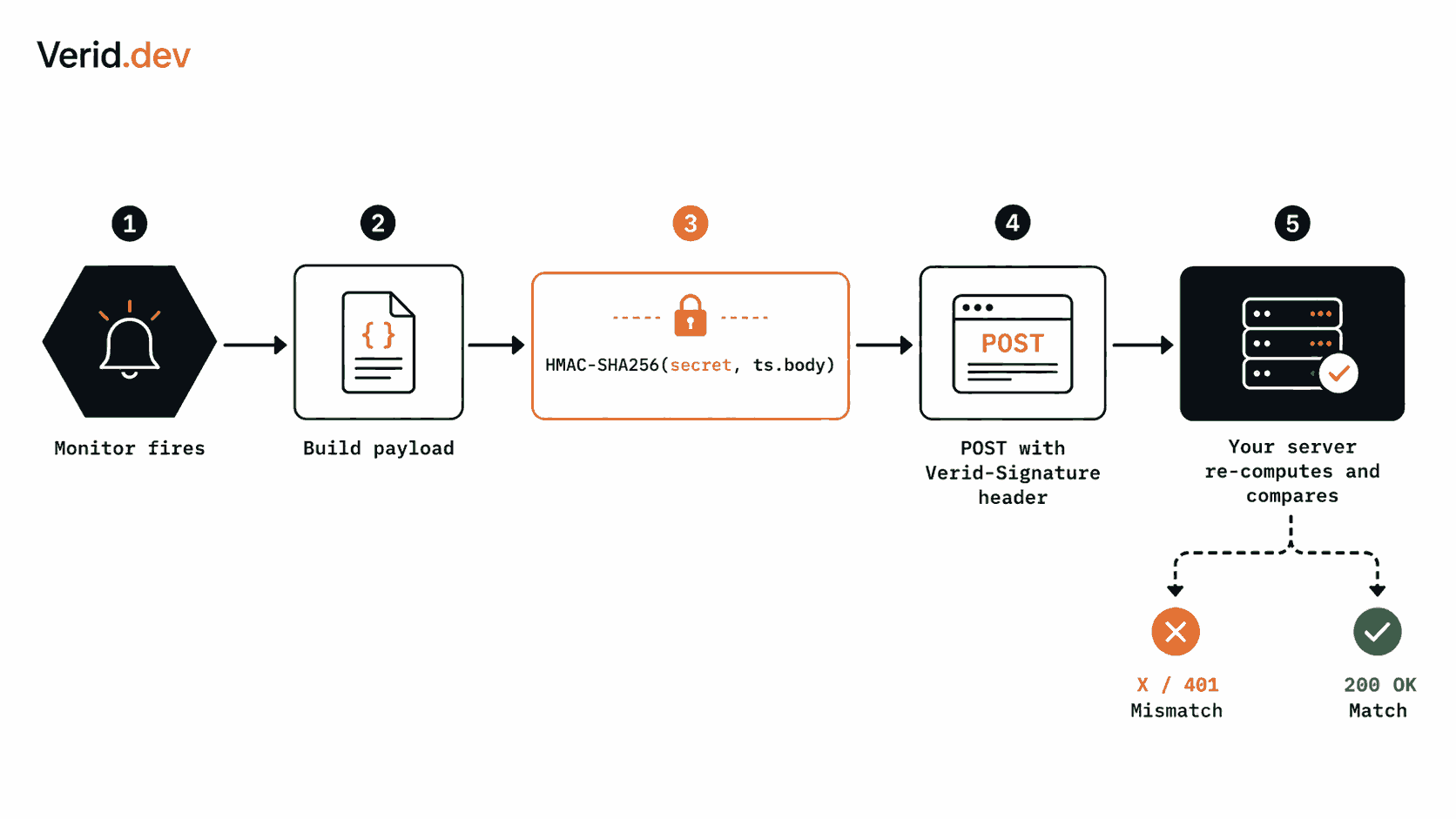
Here is the full lifecycle of a signed webhook delivery:
Sender (Verid)                            Your Server
─────────────────────────────────────────────────────
1. Change detected, payload built
2. ts  = current Unix timestamp
3. sig = HMAC-SHA256(secret, ts + "." + body)
4. POST /your-endpoint
   Headers:
     Content-Type: application/json
     Verid-Signature: t={ts},v1={sig}
   Body: { ...change payload... }
                              ──────────────────────▶
                              5. Parse t and v1 from header
                              6. Check |now - t| < 300s
                              7. Recompute expected_sig
                              8. timingSafeEqual(expected, v1)?
                                 ✓ Yes → process payload
                                 ✗ No  → return 401
Step 6 is the replay window check. Step 8 is the constant-time comparison. Both are required.
Step-by-Step Verification Process
Breaking it down without code first:
- Read the raw body - not a parsed JSON object, the raw bytes as received. Parsers may reformat whitespace or reorder keys, which changes the hash.
- Extract the header - find
Verid-Signature(or whatever the provider calls it) and split out thetandv1values. - Validate the timestamp - compute the absolute difference between the header timestamp and your current server time. Reject anything older than 5 minutes (300 seconds).
- Reconstruct the signed string - concatenate
t+"."+ raw body. - Compute your HMAC - run HMAC-SHA256 with your webhook secret.
- Compare using constant time - never use a regular equality check here.
- Return the appropriate response -
200on success,401on failure. Do not reveal which check failed.
Every step matters. Skipping step 3 opens replay attacks. Skipping step 6 opens timing attacks. Skipping step 1 (using parsed JSON) causes intermittent false negatives that are maddening to debug.
Verification Code Examples
Node.js / TypeScript
This is the exact implementation from the Verid.dev webhook docs. It uses Node's built-in crypto module - no extra dependencies.
import { createHmac, timingSafeEqual } from 'crypto';

function verifyWebhook(
  header: string,
  rawBody: string,
  secret: string,
  toleranceSecs = 300,
): boolean {
  // Parse "t=1715698422,v1=a3f5b2c..." into a map
  const parts = Object.fromEntries(
    header.split(',').map((p) => p.split('=')),
  );
  const timestamp = parseInt(parts['t'] ?? '0', 10);
  const signature = parts['v1'];

  if (!timestamp || !signature) return false;

  // Reject stale requests
  if (Math.abs(Date.now() / 1000 - timestamp) > toleranceSecs) return false;

  // Recompute expected signature
  const expected = createHmac('sha256', secret)
    .update(`${timestamp}.${rawBody}`)
    .digest('hex');

  // Constant-time comparison - never use ===
  return timingSafeEqual(
    Buffer.from(expected, 'hex'),
    Buffer.from(signature, 'hex'),
  );
}
Express.js wiring - the key detail here is express.raw(). You must capture the raw body before any body parser runs.
import express from 'express';

const app = express();

// Mount raw body parser before json parser for this route
app.post(
  '/webhooks/verid',
  express.raw({ type: 'application/json' }),
  (req, res) => {
    const header = req.headers['verid-signature'] as string;
    const rawBody = req.body.toString('utf8');

    if (!header || !verifyWebhook(header, rawBody, process.env.WEBHOOK_SECRET!)) {
      return res.status(401).send('Unauthorized');
    }

    const payload = JSON.parse(rawBody);
    console.log('Verified change:', payload.diff.fields_changed);
    res.sendStatus(200);
  },
);
If you have a global express.json() middleware, mount the raw parser specifically on this route before the global one runs, or restructure to apply express.json() after signature verification.
Python
import hmac
import hashlib
import time

def verify_webhook(
    header: str,
    raw_body: str,
    secret: str,
    tolerance_secs: int = 300,
) -> bool:
    parts = dict(p.split("=", 1) for p in header.split(","))
    timestamp = int(parts.get("t", 0))
    signature = parts.get("v1", "")

    if not timestamp or not signature:
        return False

    if abs(time.time() - timestamp) > tolerance_secs:
        return False

    signed_payload = f"{timestamp}.{raw_body}"
    expected = hmac.new(
        secret.encode("utf-8"),
        signed_payload.encode("utf-8"),
        hashlib.sha256,
    ).hexdigest()

    # hmac.compare_digest is the constant-time comparison for Python
    return hmac.compare_digest(expected, signature)
Flask users: access request.get_data(as_text=True) before request.json to get the raw body.
Go
import (
    "crypto/hmac"
    "crypto/sha256"
    "encoding/hex"
    "fmt"
    "math"
    "strconv"
    "strings"
    "time"
)

func verifyWebhook(header, rawBody, secret string, toleranceSecs float64) bool {
    parts := make(map[string]string)
    for _, p := range strings.Split(header, ",") {
        kv := strings.SplitN(p, "=", 2)
        if len(kv) == 2 {
            parts[kv[0]] = kv[1]
        }
    }

    tsStr, ok := parts["t"]
    if !ok { return false }
    ts, err := strconv.ParseInt(tsStr, 10, 64)
    if err != nil { return false }

    sig, ok := parts["v1"]
    if !ok { return false }

    if math.Abs(float64(time.Now().Unix()-ts)) > toleranceSecs { return false }

    signedPayload := fmt.Sprintf("%d.%s", ts, rawBody)
    mac := hmac.New(sha256.New, []byte(secret))
    mac.Write([]byte(signedPayload))
    expected := hex.EncodeToString(mac.Sum(nil))

    // crypto/hmac.Equal is constant-time
    return hmac.Equal([]byte(expected), []byte(sig))
}
PHP
<?php
function verifyWebhook(
    string $header,
    string $rawBody,
    string $secret,
    int $toleranceSecs = 300
): bool {
    $parts = [];
    foreach (explode(',', $header) as $part) {
        [$k, $v] = explode('=', $part, 2);
        $parts[$k] = $v;
    }

    $timestamp = (int)($parts['t'] ?? 0);
    $signature = $parts['v1'] ?? '';

    if (!$timestamp || !$signature) return false;
    if (abs(time() - $timestamp) > $toleranceSecs) return false;

    $signedPayload = "{$timestamp}.{$rawBody}";
    $expected = hash_hmac('sha256', $signedPayload, $secret);

    // hash_equals is constant-time in PHP
    return hash_equals($expected, $signature);
}
?>
Replay Attack Protection
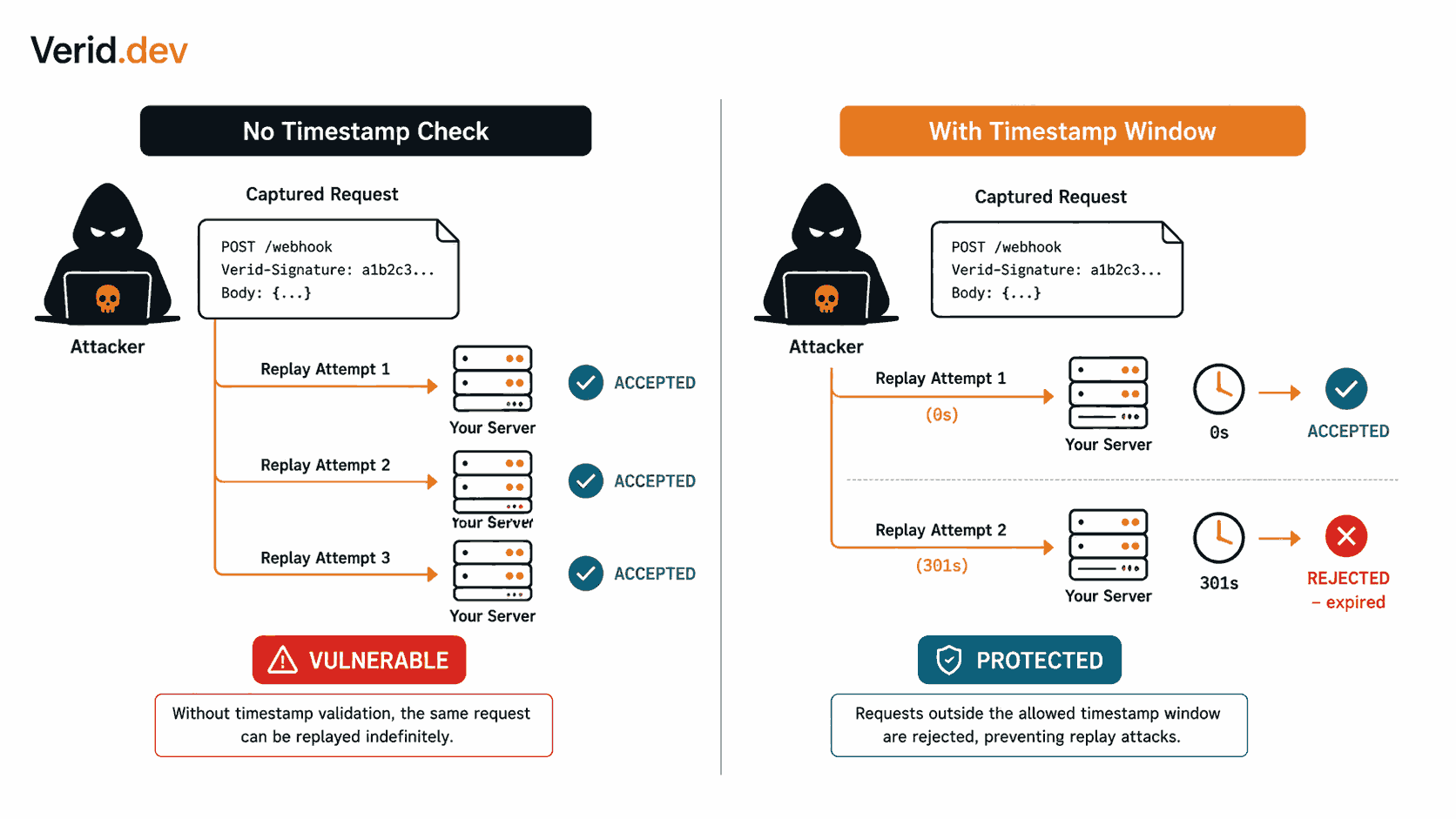
A timing window is not optional. Without it, an attacker who captures a valid signed request can replay it indefinitely - every replay will verify correctly because the signature is valid.
Verid uses a 5-minute (300-second) window by default. This means your server must reject any request where the absolute difference between the current time and the t timestamp exceeds 300 seconds:
if (Math.abs(Date.now() / 1000 - timestamp) > 300) return false;Make sure your server clock is synchronized via NTP. A server with a drifted clock will reject valid requests. Most cloud environments handle this automatically.
One additional pattern worth knowing: tracking delivery IDs. The Verid payload includes an id field (del_01H...). For systems where double-processing is catastrophic (payment triggers, inventory adjustments), store processed delivery IDs in a cache with a TTL slightly longer than your tolerance window and reject duplicates explicitly.
Constant-Time Comparison
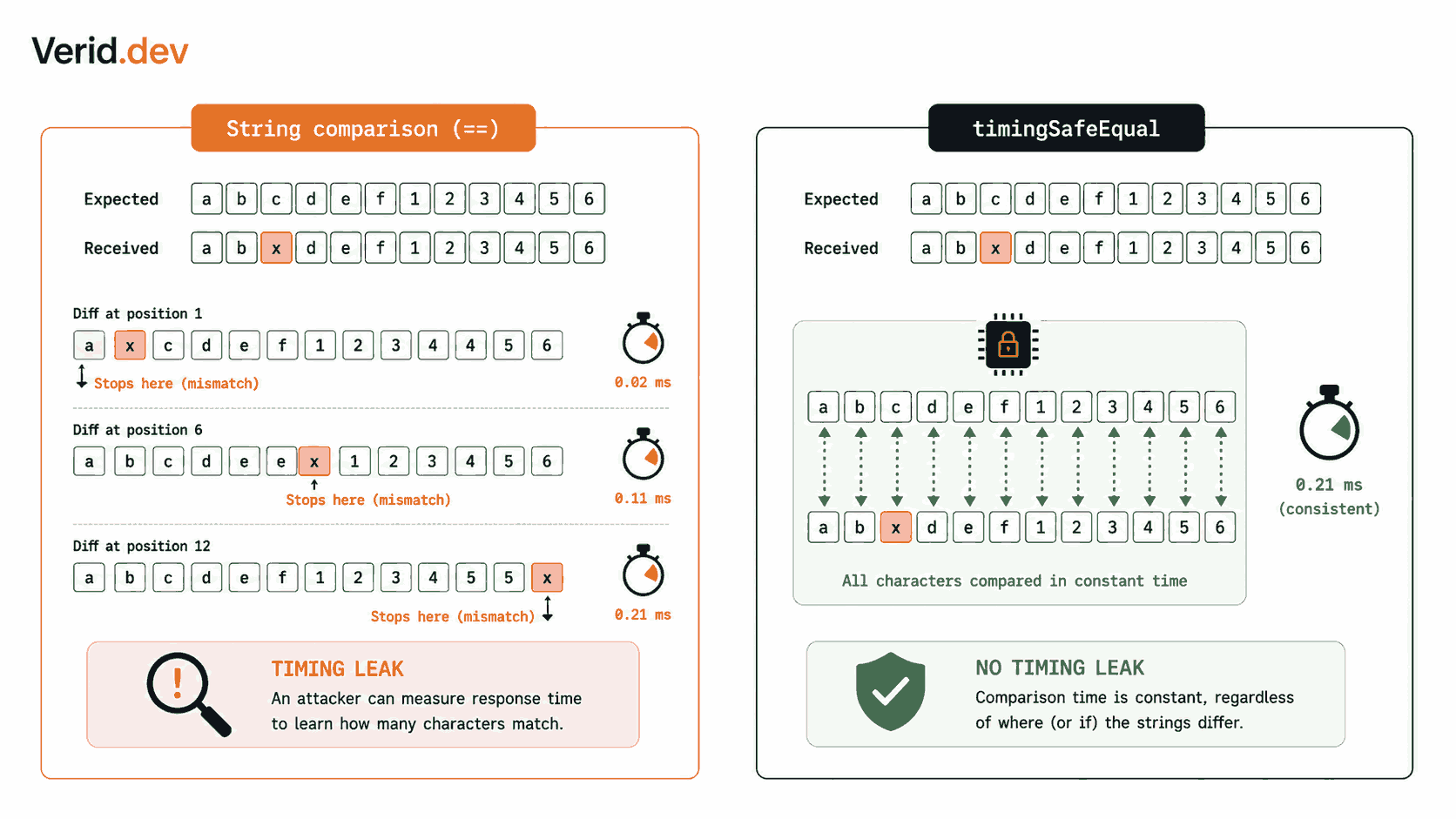
Using a regular equality check (===, ==, ==) to compare HMAC signatures leaks information through timing. Standard string comparison stops at the first mismatched byte and returns early. An attacker sending slightly different signatures can measure response times to work out the correct signature byte by byte.
Constant-time comparison runs through both strings entirely regardless of where they differ, giving an identical execution time for match and non-match. Every language has one:
| Language | Constant-time function |
|---|---|
| Node.js | crypto.timingSafeEqual() |
| Python | hmac.compare_digest() |
| Go | hmac.Equal() |
| PHP | hash_equals() |
| Ruby | ActiveSupport::SecurityUtils.secure_compare() |
If you roll your own verification function, this is the one thing you must not skip.
Common Security Mistakes
These are the errors that show up most often in real webhook implementations:
| Mistake | Why it is dangerous | Fix |
|---|---|---|
| Using parsed JSON body instead of raw body | JSON re-serialization changes whitespace/key order, invalidating legitimate signatures | Capture raw bytes before any parser |
| No timestamp check | Opens unlimited replay attack window | Reject requests outside a 300s window |
Using === for comparison | Enables timing side-channel attacks | Use timingSafeEqual or equivalent |
| Hardcoding the secret in source | Secret leaks via git history, logs, error messages | Store in environment variables or a secrets manager |
| Logging the raw signature header | Aids attackers in forging requests | Log only boolean verification result |
| Returning 200 on failed verification | Hides endpoint behavior but makes debugging impossible | Return 401 consistently on failure |
Ignoring the v1= prefix | If the provider changes signing scheme, you might accept legacy signatures | Always parse and validate the scheme prefix |
HMAC vs Other Webhook Auth Methods
| Method | Security | Complexity | Secret distribution |
|---|---|---|---|
| HMAC-SHA256 | High | Low | Shared secret per endpoint |
| Bearer token | Medium | Very low | Token sent with every request |
| RSA / ECDSA | Very high | High | Public key only shared |
| mTLS | Very high | Very high | Certificates both sides |
| IP allowlist | Medium | Low | No key needed |
| No auth | None | None | - |
HMAC-SHA256 sits at the right point on that curve for most webhook use cases - strong cryptographic guarantees, easy to implement, no PKI infrastructure required.
How Verid.dev Fits Into Secure Webhook Workflows
Verid.dev is a developer-first web change detection API. You configure a monitor, set a schedule and an extraction rule, and Verid fires a signed webhook to your endpoint whenever a predicate you define becomes true - price dropped 10%, a version field changed, stock flipped from out-of-stock to in-stock.
Every Verid webhook delivery follows the same HMAC-SHA256 pattern described in this article. The Verid-Signature header uses the format t={timestamp},v1={hex_digest}, where the signed string is {timestamp}.{raw_body}. If you have previously verified Stripe webhooks, the format is identical.
The delivery payload includes before/after field values, the monitor name, and a unique delivery ID you can use for idempotency:
{
  "id": "del_01H...",
  "version": "2026-05-01",
  "monitor_id": "uuid",
  "run_id": "uuid",
  "fired_at": "2026-06-25T09:31:00Z",
  "diff": {
    "fields_changed": ["version"],
    "before": { "version": "v18.2.0" },
    "after":  { "version": "v19.0.0" }
  },
  "monitor": {
    "url":  "https://api.github.com/repos/facebook/react/releases/latest",
    "name": "React latest release"
  }
}
Your webhook secret is scoped per monitor. If a secret is compromised you can rotate it for that monitor without affecting others. Failed deliveries retry automatically six times with exponential backoff. Anything that still fails lands in a dead-letter queue visible from the dashboard, and you can replay individual deliveries via POST /v1/deliveries/:id/replay. See the Verid notifications docs for the full retry schedule.
The Node.js SDK handles monitor creation and management, while signature verification happens on your side using the pattern shown above. The Verid quickstart walks through the complete flow from API key to verified webhook in under two minutes.
Best Practices Checklist
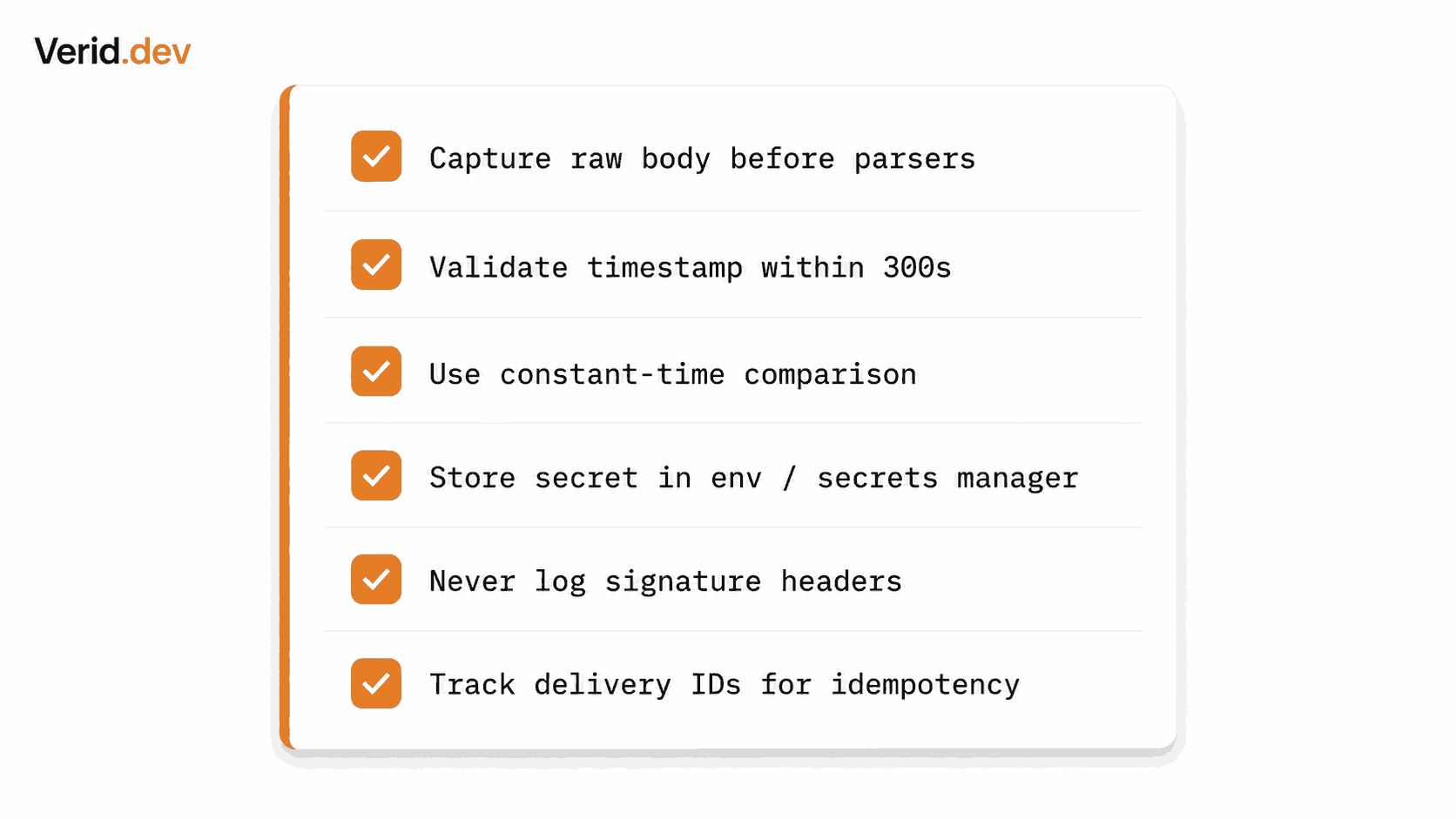
Before you ship your webhook handler to production, confirm each of these:
- Read raw request body before any JSON parsing
- Extract timestamp and signature from the header separately
- Reject requests where
|now - timestamp| > 300 - Recompute HMAC-SHA256 with the exact signed string (
ts.rawBody) - Use a constant-time comparison function
- Return
401on any verification failure (not400or403) - Store your webhook secret in an environment variable or secrets manager
- Never log raw signature values
- Ensure NTP sync on your server
- Test with an intentionally corrupted signature to confirm rejection
- For idempotency-sensitive workflows, store and check processed delivery IDs
Frequently Asked Questions
What is the difference between HMAC-SHA1 and HMAC-SHA256 for webhooks?
SHA-1 is considered cryptographically weak and NIST formally deprecated it for digital signature use. HMAC-SHA1 still functions as authentication (collision attacks on SHA-1 do not directly break HMAC), but HMAC-SHA256 provides a larger digest, is aligned with current recommendations, and is what all major providers have moved to. GitHub, for instance, added the X-Hub-Signature-256 header in 2020 specifically to move users off X-Hub-Signature (SHA-1). Use SHA-256 for new implementations and treat a SHA-1-only provider as a risk to flag.
Why does my verification fail even though I am using the right secret?
The most common causes: (1) you are hashing a parsed/re-serialized JSON object instead of the raw body bytes; (2) a middleware like express.json() has already consumed and discarded the raw body stream; (3) there is a trailing newline difference between what you stored as the secret and what the sender used; (4) your server clock is significantly drifted and the request is falling outside the tolerance window. Add temporary debug logging of expected and received signatures (delete this before production) to narrow it down.
Should I use a separate webhook secret per monitor or a single account-level secret?
Per-monitor secrets are better. Verid issues one per monitor by design. If a single secret is ever exposed, the blast radius is limited to that monitor rather than every webhook your account sends. Rotating a per-monitor secret also has zero impact on other monitors.
What HTTP status code should I return when signature verification fails?
Return 401 Unauthorized. Your webhook provider will treat this as a failure and retry the delivery. Do not return 200 on a failed verification, as that tells the sender the delivery succeeded. Avoid returning detailed error messages in the response body - they help an attacker understand which specific check failed.
About the author

Software Engineer
Suleman builds and maintains the parts of Verid that watch a page and decide what counts as a change (extraction, diffing, and delivery), and writes hands-on guides drawn from running those systems every day.
More from Suleman →Related posts
How to Set Up a Dead Letter Queue for Failed Webhook Deliveries
Learn how dead letter queues catch failed webhook deliveries: retry design, backoff, replay, and monitoring, with real config examples.
Read the post →monitoringTrack npm Package Updates Automatically
Stop polling npm manually. Learn how to monitor npm packages for new versions and fire webhook notifications the moment a release lands. No cron jobs required.
Read the post →developer toolsWebhook Best Practices: A Developer's Production Guide
Learn production-ready webhook best practices: HMAC signature verification, async processing, idempotency, retry logic, and monitoring for reliable delivery.
Read the post →developer toolsGoogle Alerts Alternative for Developers: Structured Monitoring with Webhooks
Google Alerts has no API, no webhooks, and no structured output. Here's what developers use instead to monitor URLs programmatically.
Read the post →