How to Set Up a Dead Letter Queue for Failed Webhook Deliveries
Every webhook system eventually loses a delivery. A receiving server goes down for maintenance, a deploy returns a string of 502s, a firewall rule changes overnight and starts blocking your IP range. None of that is rare. It is just Tuesday.
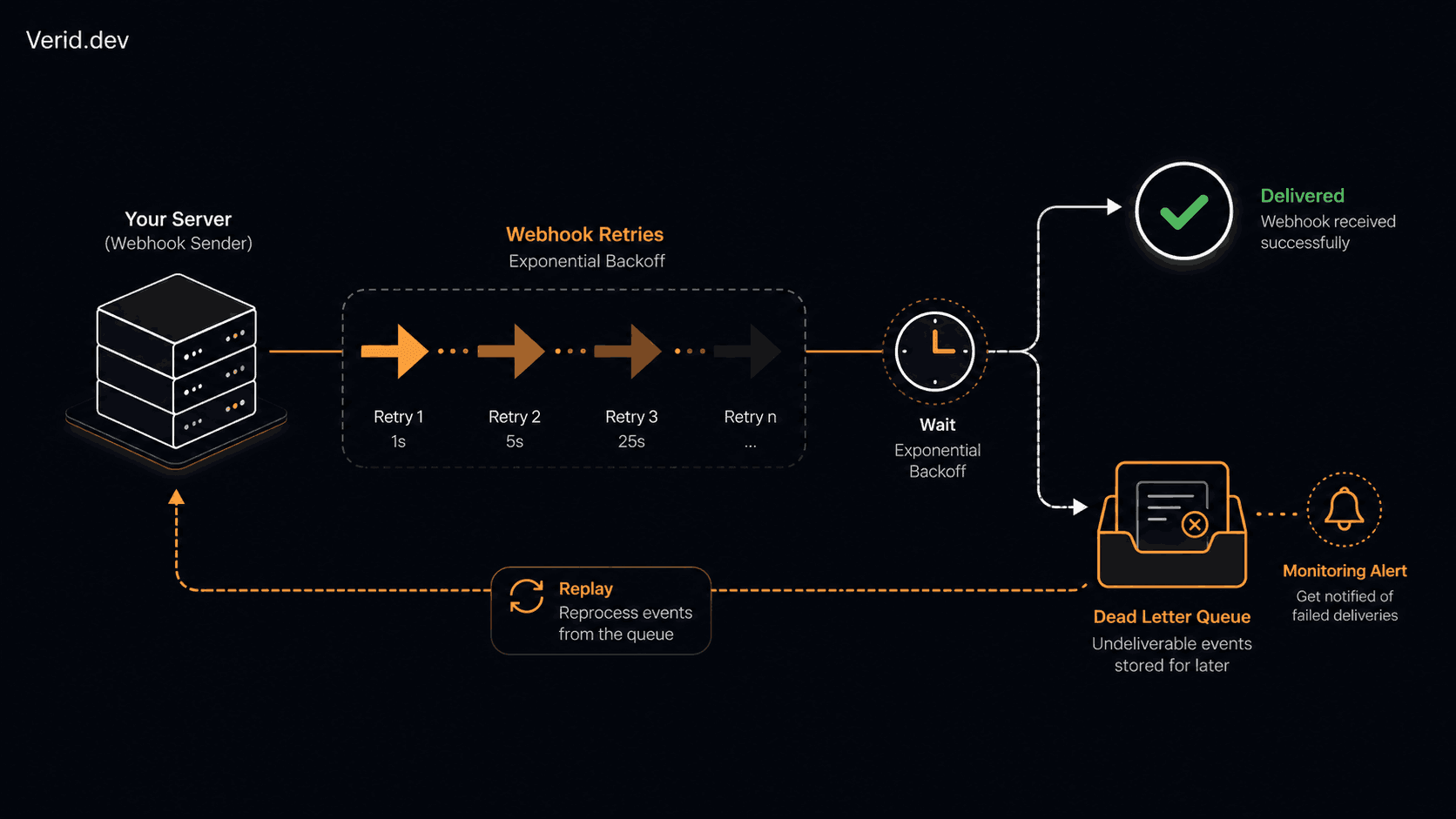
The question is not whether deliveries will fail. It is what happens to them after they do. If your answer is "we log it and move on," you have a gap, and that gap is usually where the support tickets come from. A dead letter queue (DLQ) is the structure that closes it.
This guide covers what a DLQ actually is, why webhook retries eventually give up, how to design the queue and retry logic around it, and how to monitor and replay failed events without turning your on-call rotation into a chore.
What Is a Dead Letter Queue?
A dead letter queue is a holding area for messages, jobs, or events that could not be processed successfully after a defined number of attempts. Instead of disappearing when a delivery fails for the last time, the event gets written somewhere durable: a database table, a message broker queue, an S3 bucket, anything that survives a restart.
The point is not to retry forever. Infinite retries on a broken endpoint just burn CPU and clutter logs. The point is to stop in a controlled way, while keeping the event around so a human or automated process can inspect and replay it later.
This pattern did not start with webhooks. Message brokers like RabbitMQ and Apache Kafka have used dead letter exchanges and topics for years. Webhook DLQs apply the same idea to HTTP callbacks.
Why Webhook Deliveries Fail
Most failures fall into a handful of buckets, and how you treat each one should differ.
| Failure type | Typical cause | Should it retry? |
|---|---|---|
| Connection timeout | Receiver overloaded or network blip | Yes |
| 5xx response | Bug, deploy in progress, dependency outage | Yes |
| 429 rate limited | Receiver throttling you | Yes, with longer backoff |
| 4xx response (except 429) | Bad payload, auth failure, deprecated endpoint | Usually no |
| DNS failure | Receiver domain misconfigured or expired | Limited retries |
| TLS / certificate error | Expired or misconfigured cert on receiver | Limited retries |
That last column matters more than it looks. A 400 response almost never fixes itself on attempt four. Retrying it just delays the moment someone notices their endpoint is broken, and it wastes a retry slot that could have gone to a genuinely transient failure.
How Retries Work, and When They Stop
A sane retry strategy uses exponential backoff: each attempt waits longer than the last, so a struggling receiver gets breathing room instead of a retry storm on top of its existing problems.
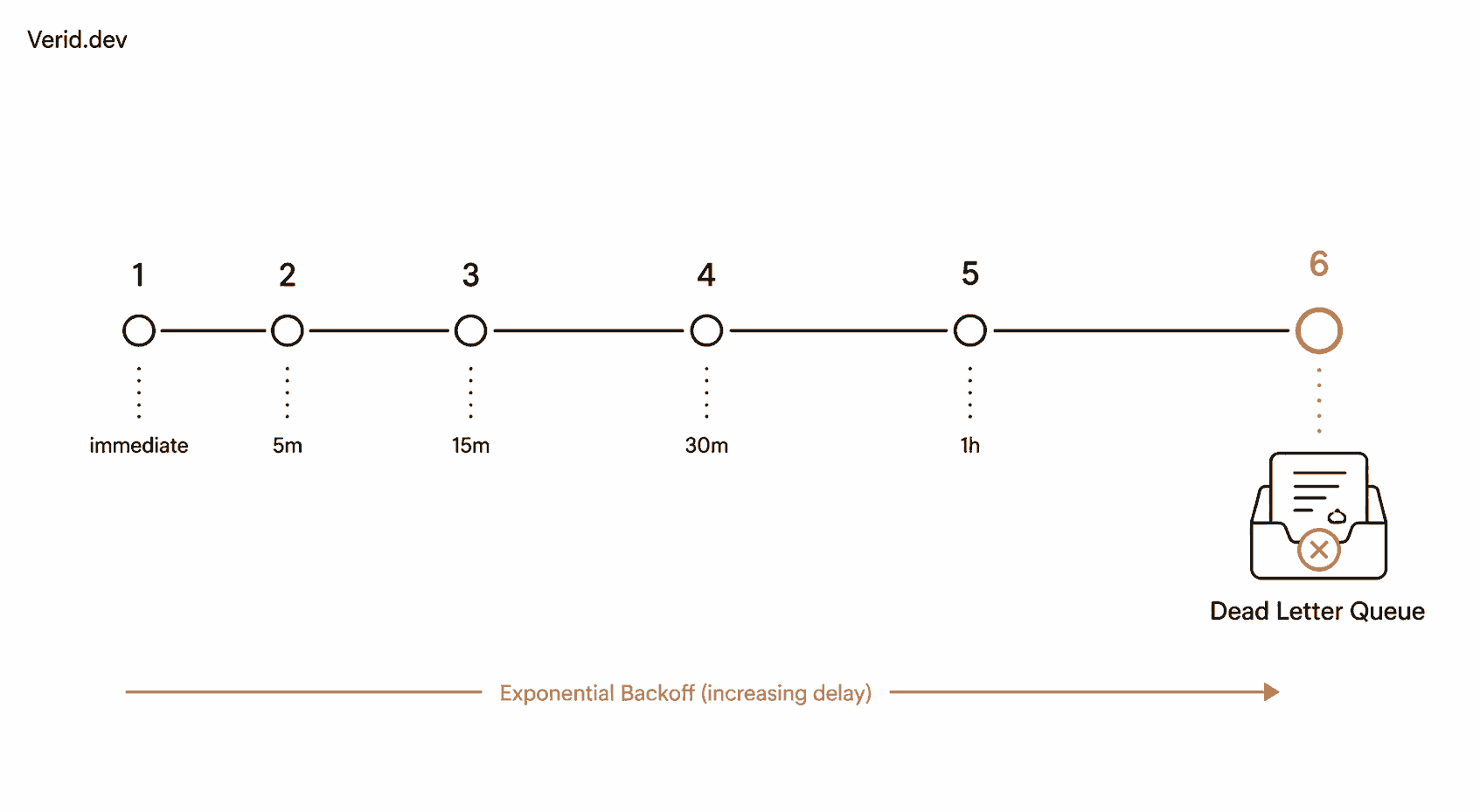
Verid's webhook delivery, for example, runs six attempts with backoff that stretches from an immediate first try out to a two-hour final attempt:
| Attempt | Delay before this attempt | Elapsed time |
|---|---|---|
| 1 | Immediate | 0s |
| 2 | 5 minutes | 5m |
| 3 | 15 minutes | 20m |
| 4 | 30 minutes | 50m |
| 5 | 1 hour | 1h 50m |
| 6 (final) | 2 hours | 3h 50m |
After attempt six fails, the delivery is marked dead and surfaces in the dashboard, which is exactly the behavior a DLQ is meant to produce: a clear stop, not a silent one.
Six attempts spread across roughly four hours is a reasonable default for most SaaS-to-SaaS integrations. It covers a typical deploy window, a brief outage, or someone restarting a server. It does not cover a receiver that has been broken for three days, and it shouldn't try to.
DLQ Architecture: What Actually Goes in the Queue
A dead letter entry needs enough context to be useful months later, not just at the moment it failed. At minimum, store:
- The original payload, byte for byte
- The destination URL
- A timestamp for every attempt
- The HTTP status code and response body from each attempt (truncated)
- A delivery ID that ties back to the source event
- The failure category (timeout, 5xx, 4xx, DNS, TLS)
Skip the response body and you'll eventually get a ticket you can't diagnose, because "it failed" with no detail isn't actionable six weeks later.
Retry Strategy and Backoff: A Comparison
| Strategy | How it works | Good for | Risk |
|---|---|---|---|
| Fixed interval | Same delay every attempt | Simple internal jobs | Retry storms during outages |
| Linear backoff | Delay increases by a constant | Predictable, low-traffic systems | Still aggressive early on |
| Exponential backoff | Delay roughly doubles each time | Most webhook systems | Needs a sane ceiling |
| Exponential with jitter | Backoff plus randomized offset | High-volume, many consumers | Slightly more complex to implement |
If you are sending webhooks to more than a handful of customers, add jitter. Without it, every failed delivery from one outage window retries on the exact same schedule, arriving in synchronized bursts instead of spread out, which defeats the point of backoff.
Poison Messages and Failure Categorization
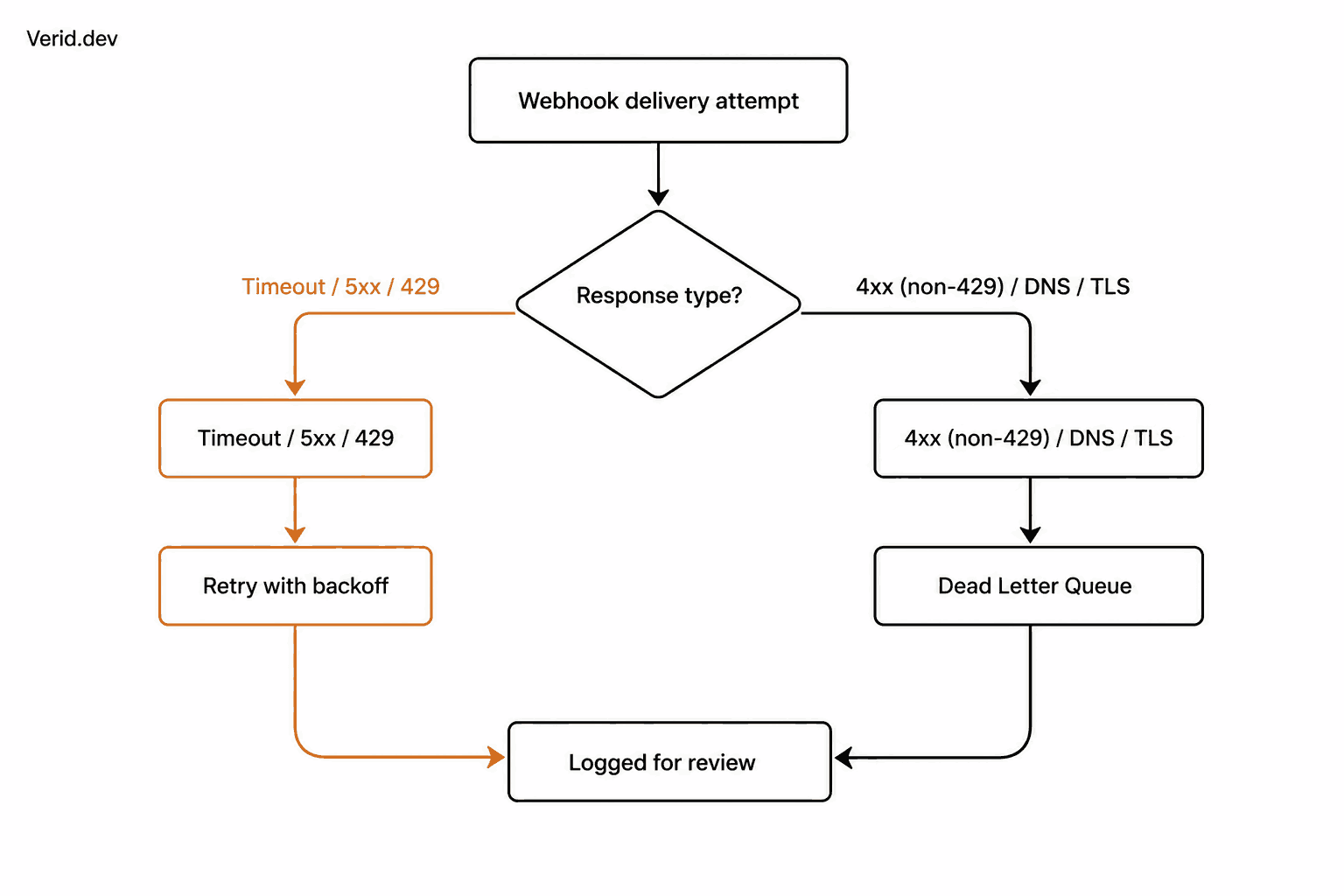
A poison message will never succeed no matter how many times you retry it: malformed JSON your own system generated, a payload referencing a deleted resource, an endpoint returning 410 Gone. Sending these through the same retry path as a transient timeout wastes attempts and delays detection.
Categorize on the first failure, not the last. A 401 on attempt one almost certainly means a rotated or revoked API key. There's little reason to wait through five more attempts before flagging it; route it to the DLQ with a "likely permanent" tag immediately, separate from the "still might recover" bucket.
Monitoring Failed Webhooks
Track these metrics, because each answers a different question:
| Metric | What it tells you |
|---|---|
| Delivery success rate (rolling 1h) | Is something broken right now? |
| DLQ entry rate | Are failures trending up? |
| Time-to-first-failure | Did the receiver just go down, or was it always flaky? |
| Replay success rate | Are DLQ fixes actually working? |
| Oldest unaddressed DLQ entry | Is anyone looking at this queue at all? |
That last one is the metric teams skip and regret skipping. A DLQ with a thousand entries from three months ago that nobody has touched isn't a safety net, it's a graveyard.
Alerting
Alert on rate of change, not raw counts. A spike from 2 failures an hour to 200 means something just broke. A steady trickle of 2 an hour from a single customer's misconfigured endpoint is a different, lower-urgency problem, and paging someone for it at 3 a.m. trains your team to ignore alerts.
A workable rule: page if DLQ entries for a single destination exceed a threshold within a 10-minute window, and route everything else to a daily digest. Verid's own delivery pipeline surfaces dead deliveries in the dashboard rather than paging on every single failure, which is the right default for most teams: visibility first, interruption only when the pattern actually demands it.
Replay Strategy and Idempotency
Replaying a dead letter only works safely if the receiver can handle the same event arriving twice. That means every webhook consumer needs to treat the delivery ID as an idempotency key, check whether it has already processed that ID, and skip duplicate side effects (charging a card twice, sending a duplicate email) if it has.
// Example consumer-side idempotency check
async function handleWebhook(req, res) {
  const deliveryId = req.headers['x-delivery-id'];

  const alreadyProcessed = await db.deliveries.findOne({ id: deliveryId });
  if (alreadyProcessed) {
    return res.status(200).send('already processed');
  }

  await db.deliveries.insert({ id: deliveryId, processedAt: new Date() });
  await processPayload(req.body);

  res.status(200).send('ok');
}
This single check is the difference between a DLQ that's safe to replay freely and one where every replay is a small gamble.
A simple replay worker pulls entries from the dead letter store and resends them, ideally with a cap on how many a single run will attempt:
// Minimal replay worker
async function replayDeadLetters(limit = 50) {
  const entries = await dlq.fetchUnresolved({ limit });

  for (const entry of entries) {
    try {
      const res = await fetch(entry.destinationUrl, {
        method: 'POST',
        headers: { 'Content-Type': 'application/json' },
        body: entry.payload,
      });

      if (res.ok) {
        await dlq.markResolved(entry.id);
      } else {
        await dlq.recordReplayAttempt(entry.id, res.status);
      }
    } catch (err) {
      await dlq.recordReplayAttempt(entry.id, 'network_error');
    }
  }
}
Security Considerations
Treat the DLQ store like the original payloads, because that's exactly what it contains. If webhook bodies include customer data, the dead letter store needs the same encryption-at-rest and access controls as your primary database, not an afterthought bucket with looser permissions.
On the delivery side, signature verification still applies. Verid signs every webhook using HMAC-SHA256 in the same header format used by Stripe and Svix, so a receiver can confirm a payload genuinely came from Verid before trusting it, even on a replayed delivery.
# Verifying a Verid webhook signature (conceptual, Node crypto)
node -e "
const crypto = require('crypto');
const payload = process.env.RAW_BODY;
const secret = process.env.VERID_SECRET;
const expected = crypto.createHmac('sha256', secret).update(payload).digest('hex');
console.log(expected);
"
Compare the computed value against the v1 portion of the Verid-Signature header, and reject anything that doesn't match before processing the body.
Production Best Practices Checklist
| Practice | Why it matters |
|---|---|
| Cap retries with exponential backoff | Stops retry storms, gives receivers room to recover |
| Categorize failures on first attempt | Avoids wasting retries on permanent failures |
| Store full context with every dead letter | Makes replay and debugging possible later |
| Require idempotency keys on the receiver | Makes replay safe |
| Alert on rate of change, not raw counts | Reduces alert fatigue |
| Set a max age for unresolved entries | Forces a decision instead of indefinite limbo |
| Encrypt the DLQ store | Payloads often contain customer data |
Common Mistakes
Retrying 4xx responses like 5xx responses is the most common one. It floods the DLQ with events that were never going to succeed and buries the failures that need attention.
A second mistake is treating the DLQ as a permanent archive instead of a working queue. If entries sit there for months, it stops being a recovery tool and becomes a place data goes to be forgotten.
A third is skipping idempotency on the receiving side, which makes replays risky enough that nobody wants to run them.
When Not to Use a DLQ
If your webhook volume is low (a handful of events a day) and the consequence of a missed delivery is minor, a full DLQ pipeline might be more infrastructure than the problem deserves. A retry with logging and a manual "resend" button in an admin panel can cover that case without the added complexity of a separate queue and replay worker.
The threshold to watch for: once you have more than one engineer debugging "did that webhook ever arrive" questions, or once a missed delivery has real business cost (a missed price drop alert, an unprocessed payment event), it's time to build the real thing.
Real-World Use Cases
Teams using Verid to monitor GitHub and npm releases depend on reliable delivery, since a missed version-change webhook can let a dependency update slip past CI unnoticed. Likewise, competitor price tracking workflows that trigger repricing logic need every price-drop event to land, because a dropped webhook there has a direct, measurable cost.
Scaling Webhook Infrastructure
As delivery volume grows, a few patterns help the DLQ scale alongside it: partition the dead letter store by destination so one broken receiver's backlog doesn't slow down queries for everyone else's, batch replay attempts instead of replaying one at a time, and set per-destination retry budgets so a single misbehaving endpoint can't consume disproportionate capacity. OpenTelemetry tracing across the delivery and replay paths also helps pinpoint where time is being lost at scale.
Conclusion
A dead letter queue isn't complicated, but it's easy to skip until a missed webhook costs you something. Cap your retries with backoff, categorize failures honestly, store enough context to act on a dead letter later, require idempotency so replay is safe, and alert on patterns instead of every blip. Get those right and "we never noticed the webhook failed" stops being a sentence your team has to say.
If you're building or monitoring webhook-driven workflows, Verid's own delivery pipeline already applies these patterns: six retries with exponential backoff, HMAC-signed payloads, and a dead-letter queue that surfaces failed deliveries instead of dropping them. You can see how it works in the notifications documentation or start a free trial.
Frequently Asked Questions
What is the difference between a retry queue and a dead letter queue?
A retry queue holds events that are still being actively reattempted. A dead letter queue holds events that have exhausted their retries and need manual review or replay, separating "still in progress" from "needs attention."
How many times should a webhook retry before going to a dead letter queue?
There's no universal number, but five to seven attempts spread over a few hours, using exponential backoff, covers most transient outages without retrying indefinitely. Verid uses six attempts over roughly four hours.
Can you safely replay a webhook from a dead letter queue?
Yes, as long as the receiving endpoint is idempotent. Without an idempotency check on the delivery ID, replaying a webhook risks duplicate side effects like double charges or repeated notifications.
Should every 4xx webhook response trigger a retry?
No. A 429 (rate limited) should retry with backoff, but other 4xx responses like 400 or 401 usually indicate a permanent problem (bad payload, invalid credentials) that won't resolve with more attempts, and should route to the dead letter queue faster.
About the author

Software Engineer & Technical Writer
Software engineer and technical writer. Hanzala bridges Verid’s codebase and its documentation, writing the guides, reference pages and honest comparisons that get a developer from an idea to a working monitor.
More from HANZALA SALEEM →Related posts
HMAC Webhook Verification: How to Validate Signed Webhook Payloads
Learn how HMAC webhook signature verification works, why it matters, and how to implement it in Node.js, Python, Go, and more - with replay attack protection.
Read the post →monitoringTrack npm Package Updates Automatically
Stop polling npm manually. Learn how to monitor npm packages for new versions and fire webhook notifications the moment a release lands. No cron jobs required.
Read the post →developer toolsWebhook Best Practices: A Developer's Production Guide
Learn production-ready webhook best practices: HMAC signature verification, async processing, idempotency, retry logic, and monitoring for reliable delivery.
Read the post →developer toolsGoogle Alerts Alternative for Developers: Structured Monitoring with Webhooks
Google Alerts has no API, no webhooks, and no structured output. Here's what developers use instead to monitor URLs programmatically.
Read the post →