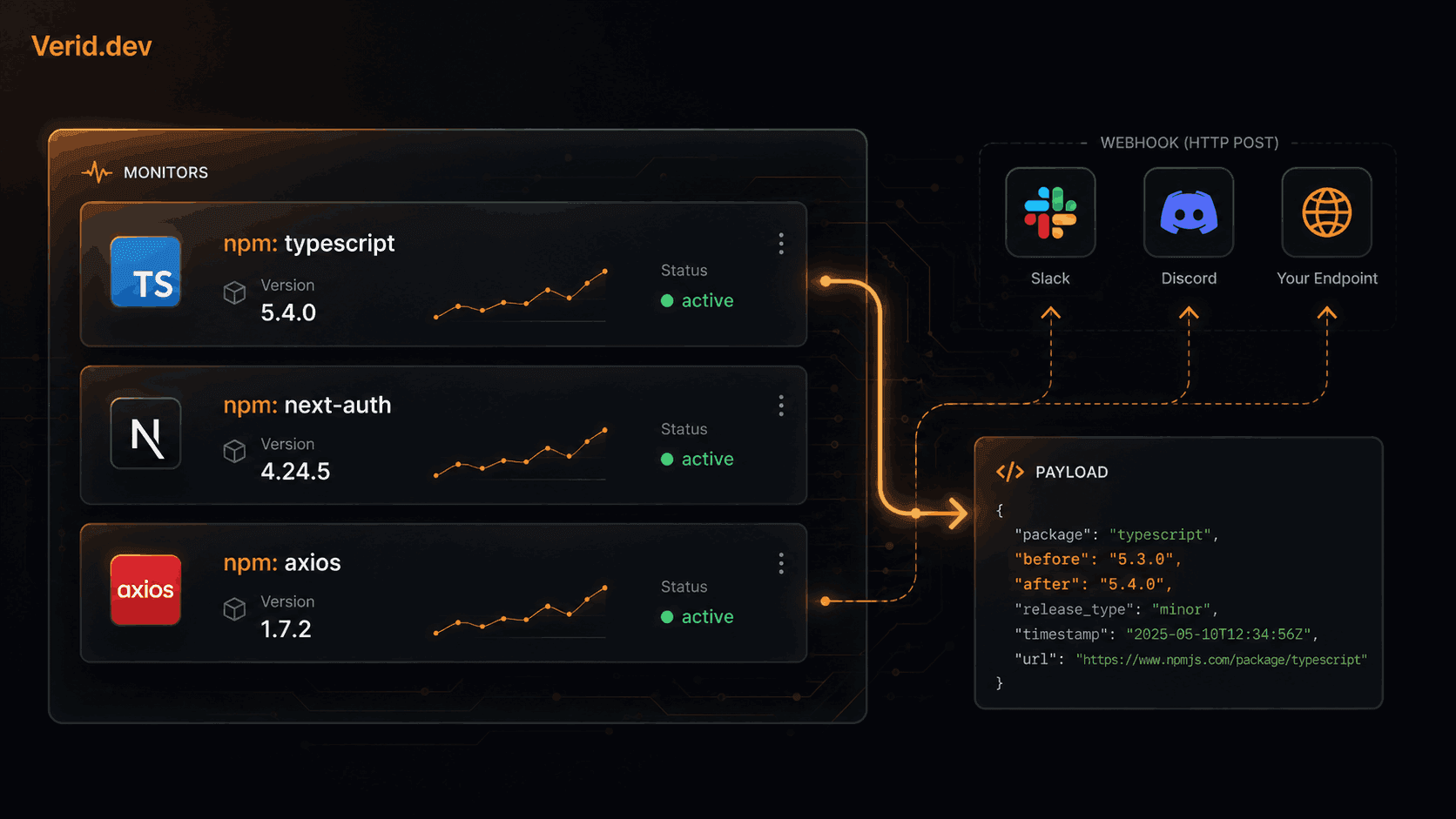
Track npm Package Updates Automatically
Every team that maintains a production Node.js application carries a quiet background anxiety: is a critical dependency sitting at a version that just received a security patch? The answer is almost always "probably not yet," because most teams only check when something breaks.
Manual approaches running npm outdated, occasionally browsing the npm registry, or relying on weekly Dependabot PRs are fine for routine housekeeping. They are not fine when a security-relevant release lands on a Tuesday afternoon and nobody finds out until code review Thursday. This article walks through how to build an automated npm package monitoring setup that fires a webhook the moment a new version publishes, using the npm registry's own public JSON API and Verid to handle scheduling, diffing, and delivery.
Why Tracking Package Versions Actually Matters
The npm ecosystem publishes thousands of package versions per day. For any given production application, the ratio of "updates that matter" to "updates that exist" is tiny but the ones that matter really matter.
Security patches are the obvious case. A CVE gets disclosed, the maintainer ships 2.4.1, and your application keeps running 2.4.0 until someone notices. But there are subtler reasons to stay current. Framework teams often drop deprecation shims in minor releases without breaking anything immediately; if you skip three minors, the eventual major migration becomes a multi-day project instead of a half-hour one. Infrastructure packages — database clients, HTTP libraries, auth adapters ship behavioral fixes in patch releases that can silently affect production correctness.
The challenge is not knowing that updates exist. It is knowing when they exist, quickly enough to act.
The Three Common Approaches (and Their Limits)
npm outdated and npm-check-updates are CLI tools you run manually. They tell you what is behind right now, but they require a person to remember to run them. Useful for audits; useless for real-time awareness.
Dependabot and Renovate open pull requests on a schedule. For most teams this is the right default for routine bumps — they handle the PR, run the tests, and wait for review. The limitation is latency. Both tools default to daily or weekly batching. A critical patch can sit for 12 to 24 hours before anyone even knows a PR exists.
npm hooks (the built-in registry webhook system) can push notifications in real time, but they require a paid npm account, a persistent server to receive the payloads, and your own logic for filtering out noise. The API is also lightly documented and has not received meaningful investment in years.
None of these approaches give you a clean, configurable, predicate-filtered webhook that fires on a schedule you control without building infrastructure yourself.
How the npm Registry Exposes Version Data
Before building anything, it helps to understand what the npm registry actually makes available. Every package on the registry has a public, unauthenticated JSON document at:
https://registry.npmjs.org/{package-name}The dist-tags.latest field in that document always reflects the most recently published stable version. For example:
curl https://registry.npmjs.org/typescript | jq '."dist-tags".latest'
# "5.4.5"
There is no webhook on this endpoint. The registry does not push anything. But the field is stable, predictable, and free to poll — which is exactly the contract you need to build reliable monitoring on top of it.
For scoped packages like @scope/package-name, URL-encode the slash before making the request: https://registry.npmjs.org/@scope%2Fpackage-name.
Setting Up Automated Monitoring with Verid
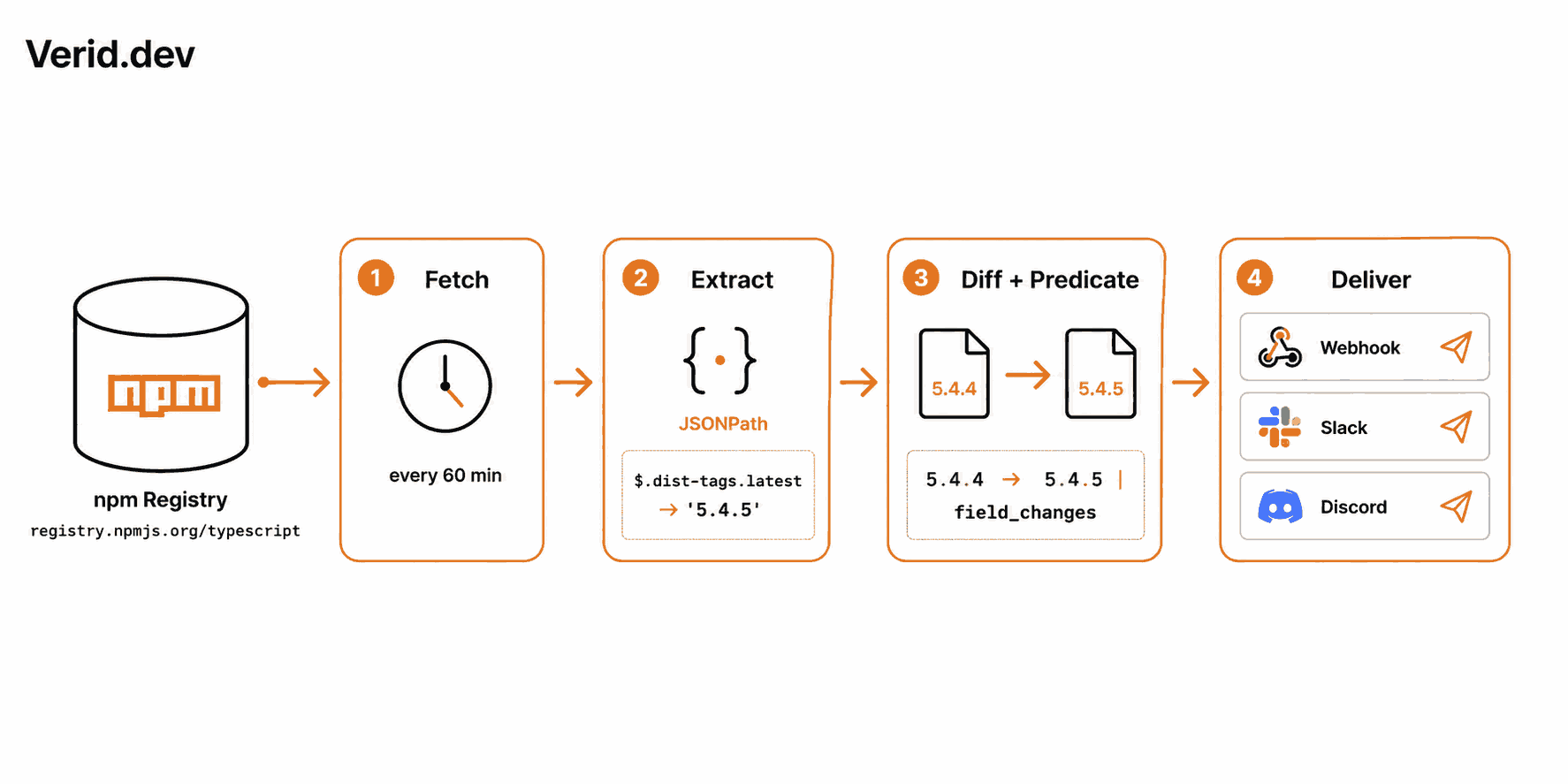
Verid is a web change detection API that runs the full monitoring loop for you: scheduled fetches, structured field extraction via JSONPath, field-level diffing against the previous run, predicate evaluation, and signed webhook delivery with automatic retries. It ships with a ready-made template specifically for npm package version tracking.
Step 1: Get an API Key
Sign up at verid.dev and create an API key from the dashboard. Keys start with vrd_. Export it as an environment variable:
export VERID_API_KEY="vrd_your_key_here"Step 2: Create the Monitor
The quickest path is the npm-new-version template. Pass the package registry URL, your preferred delivery, and let Verid fill in the extraction config and predicate:
curl -X POST https://api.verid.dev/v1/monitors/from-template/npm-new-version \
  -H "Authorization: Bearer $VERID_API_KEY" \
  -H "Content-Type: application/json" \
  -d '{
    "name": "npm - typescript",
    "url": "https://registry.npmjs.org/typescript",
    "deliveries": [
      {
        "type": "webhook",
        "url": "https://your-app.com/webhooks/npm-updates"
      }
    ]
  }'
That one request configures everything: hourly polling, JSONPath extraction of dist-tags.latest, a field_changes predicate so the webhook only fires when the version actually changes, and signed delivery to your endpoint.
Step 3: Build the Monitor Manually (Full Control)
If you want to monitor additional fields like time.modified to log the publish timestamp or adjust the polling interval, use the full monitor creation endpoint:
curl -X POST https://api.verid.dev/v1/monitors \
  -H "Authorization: Bearer $VERID_API_KEY" \
  -H "Content-Type: application/json" \
  -d '{
    "name": "npm - typescript",
    "url": "https://registry.npmjs.org/typescript",
    "schedule_interval_seconds": 3600,
    "extract_config": {
      "method": "json_path",
      "fields": {
        "latest_version": "$.dist-tags.latest",
        "modified": "$.time.modified"
      }
    },
    "diff_predicate": {
      "type": "field_changes",
      "field": "latest_version"
    },
    "deliveries": [
      {
        "type": "webhook",
        "url": "https://your-app.com/webhooks/npm-updates"
      }
    ]
  }'
The same monitor can be created using the official Node.js SDK (npm install @verid.dev/sdk):
import { VeridClient } from '@verid.dev/sdk';

const client = new VeridClient({ apiKey: process.env.VERID_API_KEY! });

await client.monitors.create({
  name: 'npm - typescript',
  url: 'https://registry.npmjs.org/typescript',
  schedule_interval_seconds: 3600,
  extract_config: {
    method: 'json_path',
    fields: {
      latest_version: '$.dist-tags.latest',
      modified: '$.time.modified',
    },
  },
  diff_predicate: { type: 'field_changes', field: 'latest_version' },
  deliveries: [
    { type: 'webhook', url: 'https://your-app.com/webhooks/npm-updates' },
  ],
});
What the Webhook Payload Looks Like
When a new version publishes, Verid sends an HTTP POST to your endpoint with a structured before/after diff:
{
  "id": "del_01H...",
  "version": "2026-05-01",
  "monitor_id": "9b1c...",
  "fired_at": "2026-05-08T11:42:00Z",
  "diff": {
    "fields_changed": ["latest_version", "modified"],
    "before": {
      "latest_version": "5.4.4",
      "modified": "2026-04-30T13:01:00Z"
    },
    "after": {
      "latest_version": "5.4.5",
      "modified": "2026-05-08T11:40:00Z"
    }
  },
  "monitor": {
    "name": "npm - typescript",
    "url": "https://registry.npmjs.org/typescript"
  }
}
You get the package name, the previous version, the new version, and the publish timestamp everything you need to log, route, or act on the event without making a secondary API call.
Verifying the Webhook Signature
Every Verid webhook is HMAC-signed. The Verid-Signature header contains a timestamp and a SHA-256 signature. Verify it before trusting the payload:
import { createHmac, timingSafeEqual } from 'crypto';

function verifySignature(header: string, rawBody: string, secret: string): boolean {
  const parts = Object.fromEntries(header.split(',').map((p) => p.split('=')));
  const ts = parseInt(parts['t'] ?? '0', 10);
  const sig = parts['v1'];
  if (!ts || !sig) return false;
  // Reject payloads older than 5 minutes
  if (Math.abs(Date.now() / 1000 - ts) > 300) return false;

  const expected = createHmac('sha256', secret)
    .update(`${ts}.${rawBody}`)
    .digest('hex');

  return timingSafeEqual(Buffer.from(expected, 'hex'), Buffer.from(sig, 'hex'));
}

app.post('/webhooks/npm-updates', (req, res) => {
  const header = req.headers['verid-signature'] as string;

  if (!verifySignature(header, req.rawBody, process.env.WEBHOOK_SECRET!)) {
    return res.status(401).send('Invalid signature');
  }

  const { diff, monitor } = req.body;
  const { before, after } = diff;

  console.log(
    `${monitor.name}: ${before.latest_version} → ${after.latest_version}`
  );

  // Trigger your own downstream logic here
  res.sendStatus(200);
});
The timing check prevents replay attacks. The timingSafeEqual comparison avoids timing side-channels. See the Verid webhooks documentation for verification snippets in Python, Ruby, Go, and PHP.
Monitoring Multiple Packages
Real applications depend on dozens of packages. You can create a monitor per package programmatically:
import { VeridClient } from '@verid.dev/sdk';

const client = new VeridClient({ apiKey: process.env.VERID_API_KEY! });

const packages = ['next', 'react', 'typescript', 'zod', 'prisma'];

for (const pkg of packages) {
  await client.monitors.createFromTemplate('npm-new-version', {
    name: `npm - ${pkg}`,
    url: `https://registry.npmjs.org/${pkg}`,
    deliveries: [
      { type: 'webhook', url: 'https://your-app.com/webhooks/npm-updates' },
    ],
  });
}
All five monitors share the same webhook endpoint. The payload always includes monitor.name, so your handler can route by package name without any additional lookup.
Polling vs Webhooks: A Practical Comparison
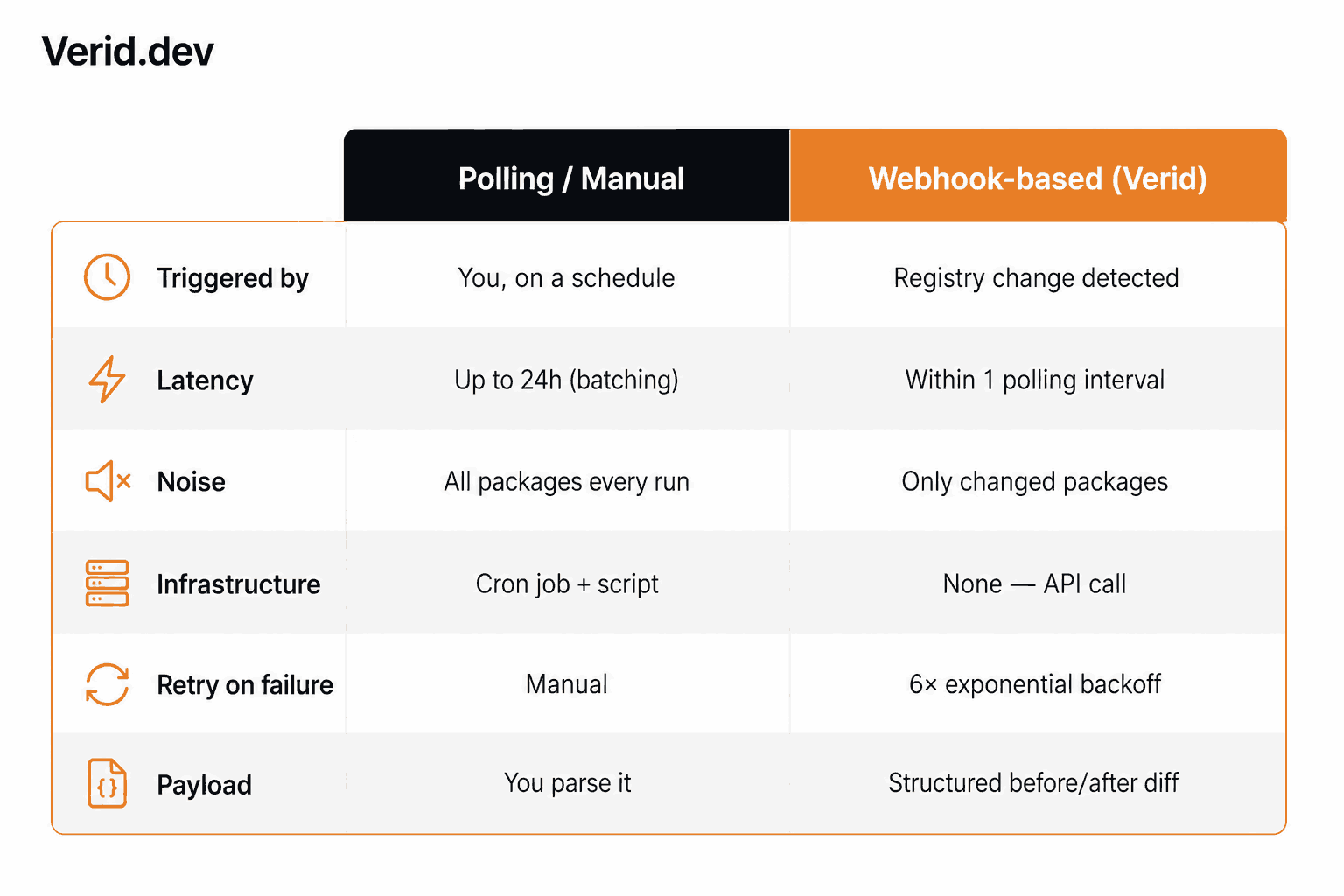
| Capability | Manual / Polling | Webhook-based (Verid) |
|---|---|---|
| Triggered by | You, on a schedule | Registry change detected |
| Latency | Up to 24h (batching) | Within 1 polling interval |
| Noise | All packages every run | Only changed packages |
| Infrastructure needed | Cron job + parsing script | One API call |
| Retry on failure | Manual | 6× exponential backoff |
| Payload | Raw JSON you parse | Structured before/after diff |
| Signature verification | You implement it | Built in |
Real-World Use Cases
Security teams watching dependencies for patch releases tied to CVEs. When a CVE-mentioned library ships a fix, the webhook can open a priority ticket, post to a security Slack channel, and label the PR automatically — without a human in the loop.
Platform engineering teams maintaining internal boilerplates. The moment a critical dependency updates, a workflow can open a draft PR against the template repository and assign it to the responsible engineer.
Open source maintainers tracking upstream packages their library wraps. Instead of manually checking whether the underlying SDK has released a new minor, they get a webhook that can trigger their own CI to run compatibility tests.
Developer advocacy teams monitoring the npm ecosystem for ecosystem signals tracking downloads and release velocity for competing packages requires knowing when those packages publish.
Common Mistakes to Avoid
Polling too frequently. The npm registry is a public service. Polling every minute for 50 packages puts you at risk of rate limiting and adds no value — most packages release a few times per week at most. Hourly is the right default interval.
Ignoring scoped packages. @nestjs/core is not the same URL as nestjs%2Fcore. The slash in a scoped package name must be percent-encoded: https://registry.npmjs.org/@nestjs%2Fcore. Without encoding, the registry returns a 404 or redirect.
Tracking prereleases by accident. The dist-tags.latest field only reflects stable releases. If you want to track beta or release candidate versions, you need to point your JSONPath at $.dist-tags.next or $.dist-tags.beta explicitly. Monitoring latest and expecting RC coverage is a common source of missed signals.
Not verifying webhook signatures. Any endpoint that receives webhooks and acts on them without signature verification is vulnerable to spoofed payloads. The HMAC verification step shown above takes ten lines of code and eliminates the attack surface entirely.
Treating the webhook as a deployment trigger without a test gate. Getting notified that axios released 2.0.0 is useful. Automatically deploying it without running your test suite is not. Webhooks are best used to open PRs, post to Slack, and trigger CI — not to push directly to production.
Best Practices for Production Use
Keep one monitor per package rather than combining multiple packages into a single monitor. Field naming stays clean, routing in your webhook handler stays obvious, and you can tune polling intervals per package based on how actively it releases.
Store the fired_at timestamp from the webhook payload alongside the version number. This gives you a changelog of exactly when each update landed in your environment, which is useful for incident retrospectives ("did we know about this patch before the incident?").
Use Verid's dead-letter queue awareness. If your webhook endpoint is down when a release lands, Verid retries six times with exponential backoff. Once it exhausts retries, the delivery lands in the dead-letter queue. Monitor your endpoint's uptime to avoid missing deliveries.
Conclusion
The gap between "I know updates exist" and "I know when they exist" is where most teams lose time. npm outdated tells you the past. Dependabot tells you eventually. A webhook-based monitor tells you now, with a structured diff, a verified payload, and no infrastructure to babysit.
The npm registry exposes everything you need at registry.npmjs.org/{package}. The pattern is simple: extract the dist-tags.latest field, compare it to the last run, fire when it changes. Verid handles the scheduling, comparison, and delivery — including retries and signature signing — so you spend time on the response logic, not the polling infrastructure.
Start a 14-day free trial at verid.dev with unlimited monitors and 200 runs, no credit card required. The npm package version tracking use case page has copy-paste configs for common packages, and the quickstart guide walks through the full setup in under two minutes.
Frequently Asked Questions
Can I monitor private npm packages with this approach?
The registry.npmjs.org endpoint for private packages requires authentication. You can attach custom request headers to a Verid monitor to pass an npm token, but private package monitoring is not covered by the npm-new-version template out of the box. Public packages work with no credentials.
How is this different from Dependabot or Renovate?
Dependabot and Renovate open pull requests on a schedule they control usually daily. Verid fires a webhook the moment a version change is detected, on a polling interval you set (as low as every minute, on any plan). They serve different jobs: Dependabot automates the upgrade PR workflow; Verid gives you real-time awareness so you can decide what to do.
What happens if my webhook endpoint is temporarily unavailable?
Verid retries the delivery up to six times using exponential backoff. Anything that exhausts all retries lands in a dead-letter queue rather than being silently dropped. You can review and reprocess failed deliveries from the dashboard.
Does Verid only work with npm, or can I monitor other package registries?
Verid monitors any URL that returns structured data. The same JSONPath extraction pattern works for PyPI (https://pypi.org/pypi/{package}/json), GitHub Releases, and any other JSON API. See the PyPI package updates and GitHub release monitoring use cases for ready-made configurations.
About the author

Software Engineer
Suleman is a software engineer. He builds the scheduling and diffing machinery that decides when Verid re-checks a page and whether the result is worth an alert, and writes about applying the same ideas to your own monitoring setup.
More from Suleman →Related posts
How to Monitor a JSON API for Changes and Trigger Webhooks Automatically
Learn how to detect JSON API field changes, define smart predicates, and fire signed webhooks automatically without writing a single polling loop.
Read the post →developer toolsPredicate-Based Alerting: Stop Getting Spammed by Your Monitoring Tool
Alert fatigue is a monitoring tool bug. Verid's predicate system fires only when a change meets a condition — price drop, regex match, or threshold crossed.
Read the post →monitoringAPI Contract Monitoring: How to Catch Breaking Changes Before They Hit Production
Learn how API contract monitoring catches breaking changes before production. Schema drift, field-level diff, and continuous JSON API monitoring explained.
Read the post →webhooksHow to Set Up a Dead Letter Queue for Failed Webhook Deliveries
Learn how dead letter queues catch failed webhook deliveries: retry design, backoff, replay, and monitoring, with real config examples.
Read the post →