How to Get Automatic PyPI Package Update Alerts
Get instant alerts when any PyPI package releases a new version. Set up automated Python package update notifications with Verid in minutes.
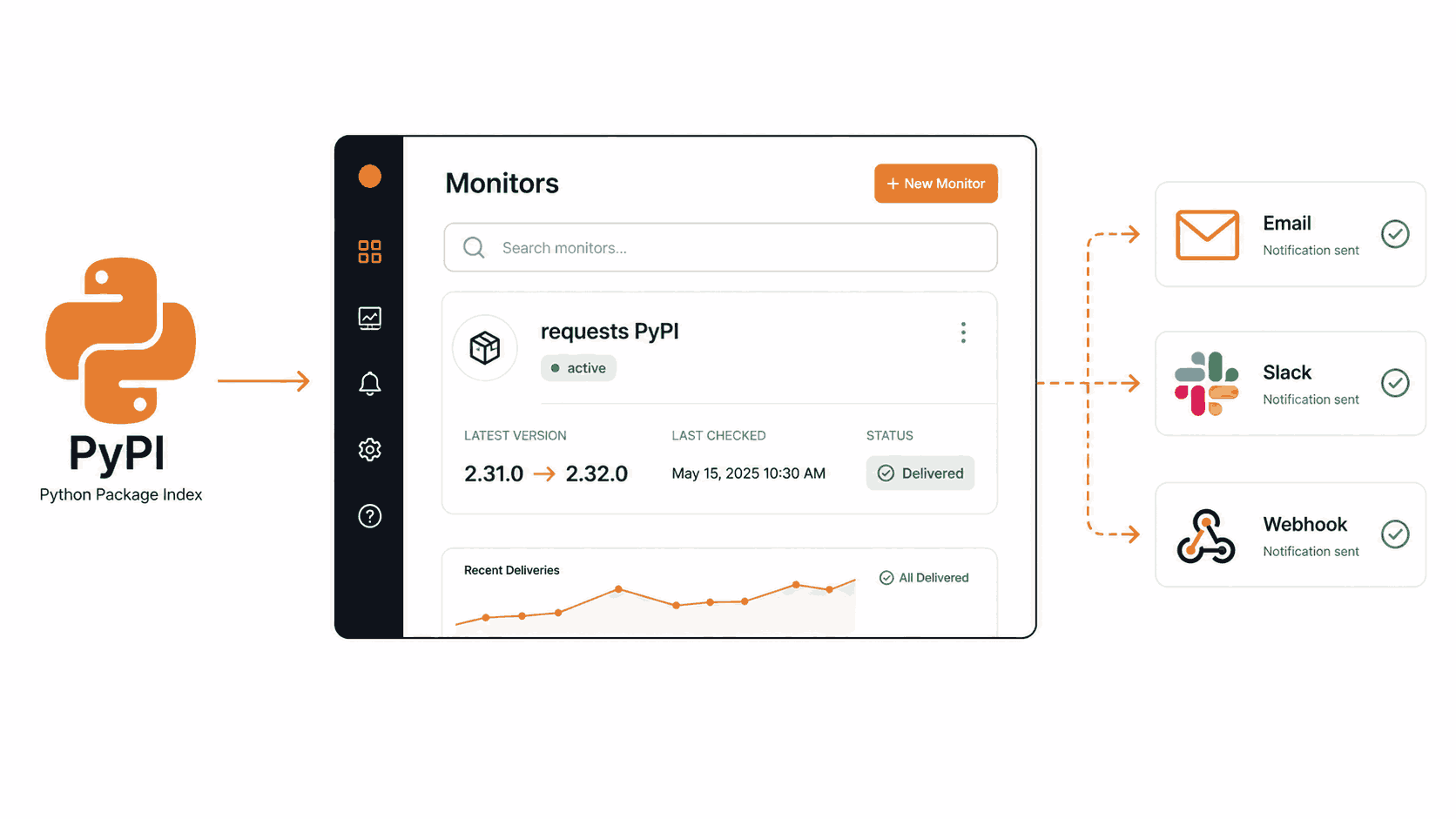
Python projects depend on dozens of packages. A new version of requests, FastAPI, Pydantic, or boto3 can ship security patches, breaking changes, or long-awaited features at any moment. If you miss the release, your application keeps running with a vulnerable or outdated dependency until someone notices on a bad day.
Most developers handle this by checking PyPI manually, relying on GitHub watch notifications, or waiting for a Dependabot pull request. Each of those approaches has gaps. Manual checks get skipped. GitHub watchers only cover repositories you track. Dependabot only triggers inside your own repos and only when you commit.
Verid gives you a third option: a dedicated monitor that hits the PyPI JSON API on a schedule, compares the current version against the last seen version, and sends you an alert the moment something changes. No code to maintain, no cron jobs, no missed releases.
This guide walks through the complete setup from zero: dashboard workflow, extraction method selection, notification configuration, and the full API and SDK path for teams that want to automate everything.
Why Manually Tracking PyPI Releases Does Not Scale
PyPI hosts over 500,000 packages. The Python Packaging Index publishes thousands of new releases every week. Even if you maintain a focused requirements.txt with twenty dependencies, tracking each one by hand is:
- Time-consuming. You have to visit each package page or RSS feed separately.
- Error-prone. It is easy to forget a package for weeks at a time.
- Slow on security. CVEs often attach to a specific version. If you do not know a new patched version is out, you cannot upgrade promptly.
- Invisible to your team. One person might check, but the information rarely reaches the full team automatically.
Automated PyPI package monitoring removes the manual step entirely. When a new release appears, Verid catches it and routes a notification to your inbox, Slack channel, Discord server, or any webhook endpoint.
How to Monitor PyPI Package Updates Using the Verid Dashboard
This section covers the complete dashboard setup. Assume you have never used Verid before.
Step 1: Start a Free Trial and Get an API Key
Go to verid.dev and sign up. No credit card is required. The 14-day free trial includes unlimited monitors and 200 runs, which is enough to check your most critical dependencies daily while you test.
After signing in, open the API Keys page in the dashboard if you plan to use the API later. API keys start with the prefix vrd_.
Step 2: Find the Correct PyPI URL to Monitor
PyPI provides a stable JSON API for every package. The URL format is:
https://pypi.org/pypi/<package-name>/jsonFor example, to monitor the popular requests library:
https://pypi.org/pypi/requests/jsonThis endpoint returns structured JSON. The current version lives at $.info.version. This is the field you will extract.
You can verify what the response looks like by opening that URL in your browser or running:
curl https://pypi.org/pypi/requests/json | python3 -m json.tool | grep '"version"' | head -1Step 3: Create a New Monitor in the Dashboard
- Click New Monitor in the Verid dashboard.
- Give it a descriptive name, for example:
requests PyPI version. - Paste the URL:
https://pypi.org/pypi/requests/json
Step 4: Choose the Extraction Method
Select JSONPath as the extraction method. The PyPI endpoint returns clean JSON, so JSONPath is the perfect fit. No browser rendering is needed.
Set up one field:
| Field name | JSONPath expression |
|---|---|
version | $.info.version |
This tells Verid to pull the version field out of the info object inside the JSON response.
Step 5: Set the Check Frequency
On the free trial, a sensible check interval is 24 hours (86,400 seconds), which uses about 30 runs a month per package, so the trial's 200 runs cover about 14 packages for its 14 days, and Lite's 1,000 runs a month cover about 30. This means Verid will check your PyPI package once per day and alert you if the version has changed since the previous check.
Every plan, including the free trial, can check as often as every minute. Plans differ by how many runs you get each month, and each check uses one run:
| Plan | Runs per Month |
|---|---|
| Free trial (14 days) | 200 for the trial |
| Lite ($9/mo) | 1,000 |
| Starter ($19/mo) | 5,000 |
| Pro ($49/mo) | 15,000 |
| Scale ($149/mo) | 100,000 |
For most Python dependency monitoring use cases, a daily or hourly check is perfectly sufficient since PyPI releases are not that time-sensitive in the way that stock prices are.
Step 6: Configure the Change Predicate
Set the diff predicate to:
Field changes: versionThis tells Verid to fire a notification only when the version field changes. If PyPI returns the same version as before, the monitor runs silently. No alert noise.
Step 7: Add a Notification Delivery
Click Add Delivery and choose your preferred channel:
- Email: Enter your email address. Verid sends a plain, readable summary of what changed.
- Slack: Paste your Slack incoming webhook URL to get the diff dropped into any channel.
- Discord: Paste your Discord webhook URL for community or team servers.
- Webhook: Enter any HTTPS endpoint. Verid will POST a signed JSON payload with the before and after values.
During the free trial you can configure 1 delivery per monitor. Lite and above support multiple deliveries per monitor.
Click Save. The monitor is now active.
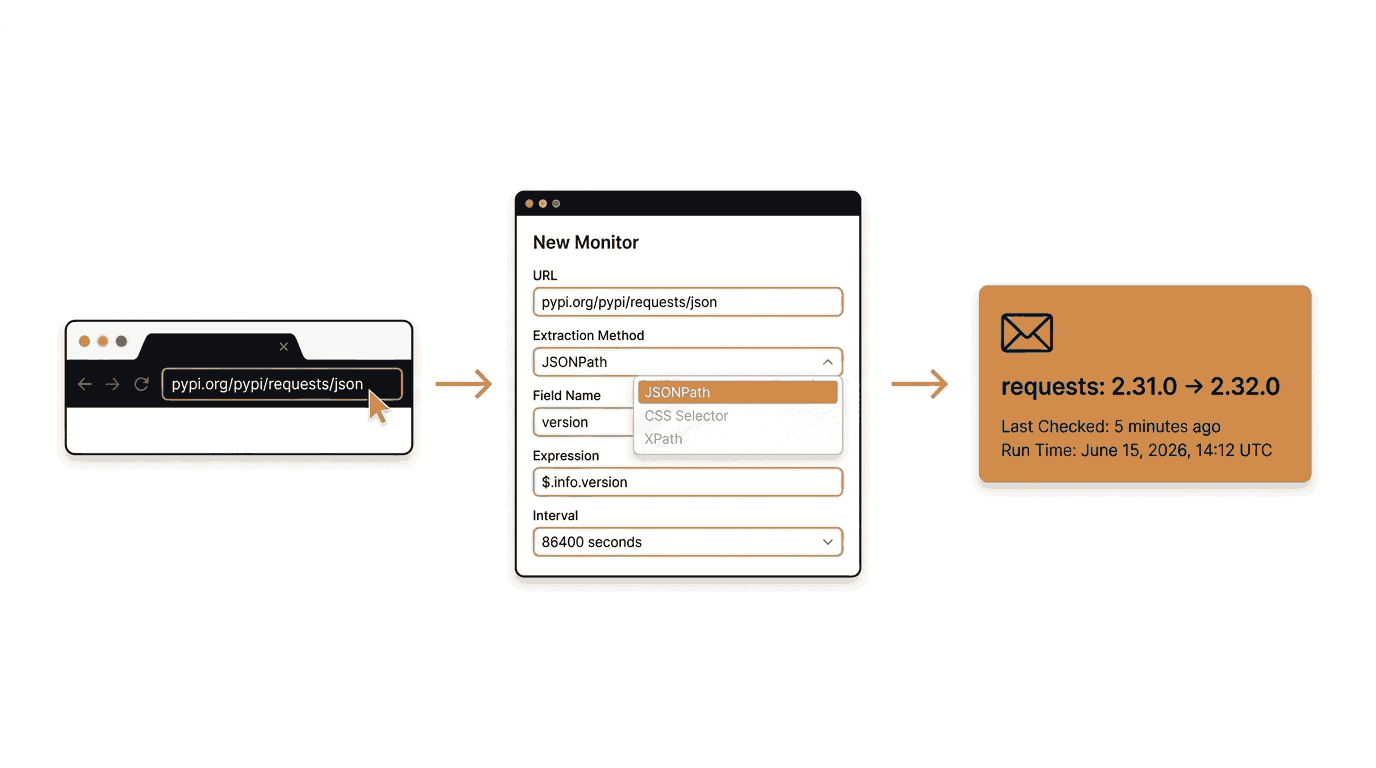
Choosing the Best Extraction Method for PyPI Monitoring
Verid supports six extraction methods. The right choice depends entirely on the shape of the data source. Here is how each method compares for PyPI monitoring:
| Extraction Method | Best Use Case | Advantages | Limitations | Recommended for PyPI? |
|---|---|---|---|---|
| JSONPath | JSON APIs | Clean, precise, fast. No browser needed. | Only works on JSON responses. | Yes, strongly recommended |
| CSS Selector | HTML pages | Good for rendered web pages | Breaks if PyPI changes its HTML layout | No |
| XPath | Complex HTML or XML | More expressive than CSS for HTML | Overkill for a clean JSON endpoint | No |
| Regex | Raw text, inconsistent markup | Flexible pattern matching | Fragile, harder to maintain | Not needed here |
| Full-page hash | "Did anything change at all?" | No selector needed | Cannot tell you what changed or by how much | No |
| AI / LLM Prompt | Unstructured pages | Works without selectors | Uses LLM quota, slower, unnecessary for JSON | No |
The clear winner for PyPI is JSONPath.
PyPI's JSON API is stable, documented, and returns a predictable structure. The $.info.version expression drills directly to the version string in one step. There is no HTML to parse, no browser rendering required, and no risk of layout changes breaking your monitor.
Even non-developers can understand the logic: "go to the info section of the JSON response and read the version field."
If you ever wanted to track additional metadata such as the release date or the summary text, you can add more fields to the same monitor:
| Field name | JSONPath expression |
|---|---|
version | $.info.version |
summary | $.info.summary |
requires_python | $.info.requires_python |
Creating Email Alerts for New Package Releases
Email is the simplest notification channel to set up and requires no external integrations.
When you add an email delivery to your monitor, Verid sends you a notification whenever the change predicate fires. The email contains:
- The monitor name
- The field that changed
- The before value (old version)
- The after value (new version)
- A timestamp
For example, when requests releases a new version, you would receive a notification showing something like:
Monitor: requests PyPI version
Field changed: version
Before: 2.31.0
After:  2.32.0
No dashboard login needed to understand what happened.
Other Available Notification Channels
Verid supports four delivery types in total:
- Email - Plain readable summary, as described above
- Webhook - HMAC-signed POST to your own endpoint, with 6 automatic retries and exponential backoff. Anything that still fails after retries goes into a dead-letter queue.
- Slack - Before/after diff posted directly to a Slack channel via an incoming webhook URL
- Discord - Same field-level alert, routed to a Discord webhook
All four channels are configured through the same Deliveries section in the dashboard or the API. See the notifications documentation for full details.
Monitoring PyPI Updates with the Verid API and Node.js SDK
If you prefer to automate monitor creation or manage monitors programmatically, the Verid REST API and Node.js SDK cover the entire workflow.
Prerequisites
- A Verid API key (from the dashboard API Keys page), starting with
vrd_ - Node.js 18 or later (for the SDK examples)
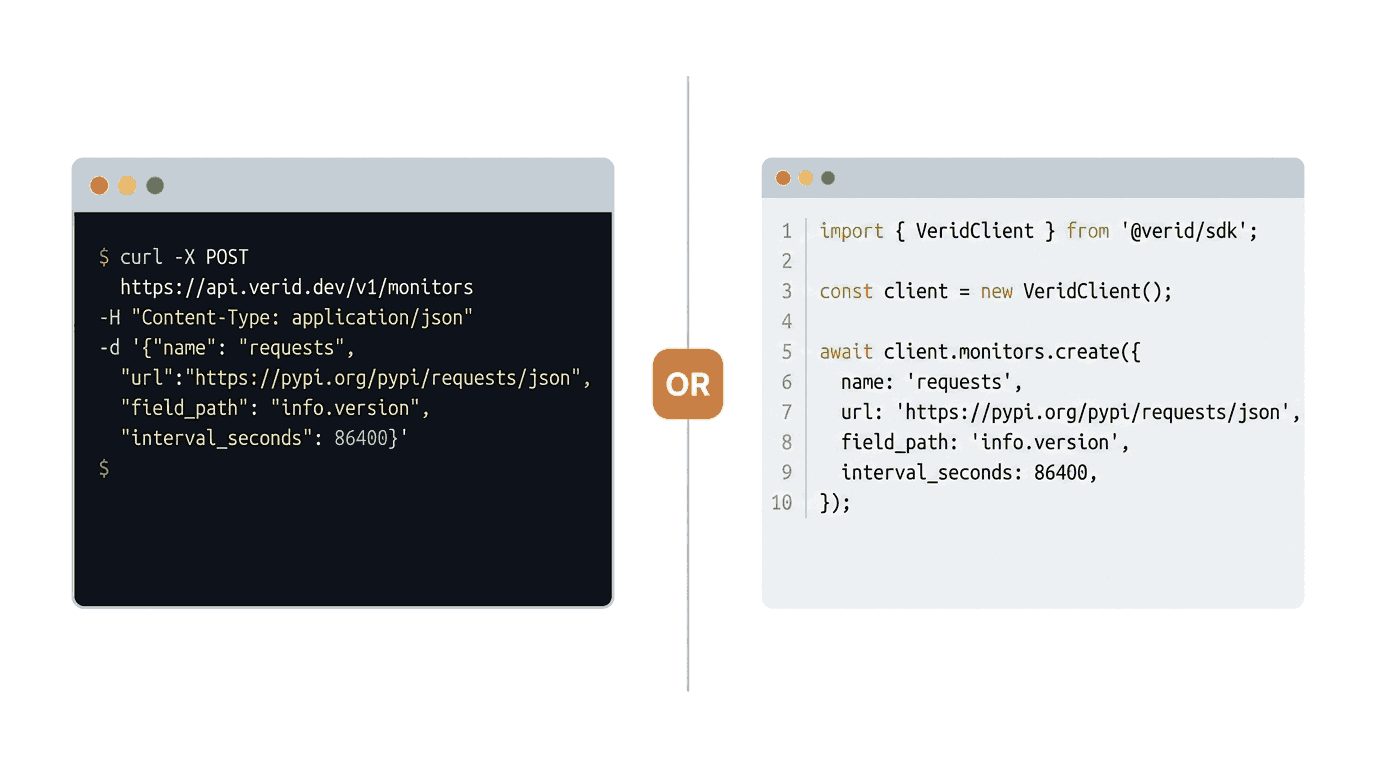
Option A: Create a PyPI Monitor with the REST API (curl)
curl -X POST https://api.verid.dev/v1/monitors \
  -H "Authorization: Bearer vrd_your_api_key" \
  -H "Content-Type: application/json" \
  -d '{
    "name": "requests PyPI version",
    "url": "https://pypi.org/pypi/requests/json",
    "schedule_interval_seconds": 86400,
    "extract_config": {
      "method": "json_path",
      "fields": {
        "version": "$.info.version"
      }
    },
    "diff_predicate": {
      "type": "field_changes",
      "field": "version"
    },
    "deliveries": [
      {
        "type": "email",
        "to": "you@yourteam.com"
      }
    ]
  }'
Replace vrd_your_api_key with your actual API key and you@yourteam.com with your email address. The schedule_interval_seconds value of 86400 sets a 24-hour interval, which uses about 30 runs a month.
A successful response returns 201 Created with the full monitor object including its id.
Option B: Use the Official Node.js SDK
Install the SDK from npm:
npm install @verid.dev/sdkCreate a monitor:
import { VeridClient } from '@verid.dev/sdk';

const client = new VeridClient({
  apiKey: process.env.VERID_API_KEY!,
});

const monitor = await client.monitors.create({
  name: 'requests PyPI version',
  url: 'https://pypi.org/pypi/requests/json',
  schedule_interval_seconds: 86400,
  extract_config: {
    method: 'json_path',
    fields: {
      version: '$.info.version',
    },
  },
  diff_predicate: {
    type: 'field_changes',
    field: 'version',
  },
  deliveries: [
    {
      type: 'email',
      to: 'you@yourteam.com',
    },
  ],
});

console.log('Monitor created:', monitor.id);
Set your API key as an environment variable before running:
export VERID_API_KEY=vrd_your_api_keyUsing the Built-In PyPI Template
Verid includes a ready-made template for PyPI monitoring. You can use it to create a monitor even faster:
curl -X POST https://api.verid.dev/v1/monitors/from-template/pypi-new-version \
  -H "Authorization: Bearer vrd_your_api_key" \
  -H "Content-Type: application/json" \
  -d '{
    "name": "requests PyPI version",
    "url": "https://pypi.org/pypi/requests/json",
    "deliveries": [
      {
        "type": "email",
        "to": "you@yourteam.com"
      }
    ]
  }'
The template slug pypi-new-version is one of Verid's built-in templates and comes pre-configured with the correct JSONPath extraction and version change predicate.
Triggering a Manual Check
At any time, you can trigger an immediate check on any monitor without waiting for the scheduled interval:
curl -X POST https://api.verid.dev/v1/monitors/<monitor_id>/run \
  -H "Authorization: Bearer vrd_your_api_key" \
  -H "Content-Type: application/json" \
  -d '{}'
Manual runs have no daily cap on any plan. Each one uses one run from your monthly allowance, like a scheduled check.
Verifying Webhook Signatures (TypeScript)
If you use a webhook delivery, always verify the Verid-Signature header before processing the payload:
import { createHmac, timingSafeEqual } from 'crypto';

function verifySignature(header: string, rawBody: string, secret: string): boolean {
  const parts = Object.fromEntries(header.split(',').map((p) => p.split('=')));
  const ts = parseInt(parts['t'] ?? '0', 10);
  const sig = parts['v1'];
  if (!ts || !sig) return false;
  if (Math.abs(Date.now() / 1000 - ts) > 300) return false;

  const expected = createHmac('sha256', secret)
    .update(`${ts}.${rawBody}`)
    .digest('hex');

  return timingSafeEqual(Buffer.from(expected, 'hex'), Buffer.from(sig, 'hex'));
}
See the Verid webhooks documentation for verification examples in Python, Ruby, Go, and PHP.
Real-World Use Cases
1. Monitoring Critical Production Dependencies
If your application runs on FastAPI, SQLAlchemy, or Celery, a version bump can introduce breaking API changes. Set up a Verid monitor for each:
https://pypi.org/pypi/fastapi/json
https://pypi.org/pypi/sqlalchemy/json
https://pypi.org/pypi/celery/json
Each monitor uses the same JSONPath field $.info.version and fires when the version changes.
2. Tracking Security-Related Package Updates
Security patches often ship as point releases. Packages like cryptography, paramiko, and Pillow have published CVE-related releases in the past. Monitoring these means you hear about patches the same day they land on PyPI, giving your team time to upgrade before exploits are attempted.
3. Monitoring Popular Open Source Tools
If you build integrations on top of tools like boto3 (AWS SDK for Python), google-cloud-storage, or openai, staying current with their releases ensures you can use new API features and avoid deprecated methods. A Verid monitor on each of those packages keeps your team informed automatically.
4. Dependency Management Across Development Teams
Large teams often have multiple services sharing the same base dependencies. When a shared library like pydantic ships a new version, every team needs to know. Instead of sending a Slack message manually, a Verid monitor with a Slack delivery routes the notification to your #engineering channel automatically and consistently.
5. Pre-Release and Beta Monitoring
PyPI publishes pre-release versions (alpha, beta, release candidates) alongside stable releases. The $.info.version field captures these too. If your team wants to test beta versions of frameworks early, you will see them the moment they appear.
Frequently Asked Questions
How can I receive alerts when a PyPI package updates?
Set up a monitor on https://pypi.org/pypi/<package-name>/json using Verid's JSONPath extraction method. Extract the field $.info.version and configure a field_changes predicate on the version field. Add an email, Slack, Discord, or webhook delivery. Verid will alert you the next time the version value changes.
Can I monitor multiple Python packages at once?
Yes. Create one monitor per package. Monitors are unlimited on every plan. At one check a day, the 14-day free trial's 200 runs cover about 14 packages while you test, which covers your most critical dependencies. Paid plans include 1,000 to 100,000 runs a month, so you can track your entire dependency tree if needed. See the pricing page for the full comparison.
How often should I check PyPI for package updates?
For most use cases, once per day (about 30 runs a month per package) is sufficient. PyPI releases are not time-critical in the way that financial data is. If you are monitoring security-sensitive packages and want faster detection, you can check every hour (about 720 runs a month) or every 15 minutes (about 2,880) on any plan; the Starter plan ($19/month) includes 5,000 runs a month and the Pro plan ($49/month) 15,000.
Can Verid detect changes other than the version number?
Yes. You can extract multiple fields from the same PyPI JSON response. For example, you could track $.info.requires_python to know when a package drops support for an older Python version, or $.info.yanked to detect if a release has been pulled from PyPI. Each field is tracked independently and can have its own predicate.
Want this running on your own URL? Spin up the same monitor in about a minute. 5 free, no credit card.
About the author

Software Engineer & Technical Writer
A software engineer and technical writer, Hanzala works on Verid’s API surface and everything written about it. His posts cover website change detection, scraping trade-offs, and integrating monitoring alerts into an existing stack.
More from HANZALA SALEEM →Related use cases
How to Monitor JSON API Fields and Get Alerts When Data Changes
Learn how to track specific fields in any JSON API response and receive instant alerts when values change. Step-by-step guide using Verid.
View blueprint →Developer & DevOpsHow to Track NPM Package Version Changes Automatically
Learn how to monitor npm package versions automatically and get email alerts the moment a new version is published. No code required to get started.
View blueprint →Developer & DevOpsGet Instant RSS Feed New Item Alerts Without Writing a Scraper
Learn how to monitor any RSS feed and get instant alerts when new items are published. Set up RSS feed notifications in minutes with Verid.
View blueprint →