How to Monitor JSON API Fields and Get Alerts When Data Changes
Learn how to track specific fields in any JSON API response and receive instant alerts when values change. Step-by-step guide using Verid.
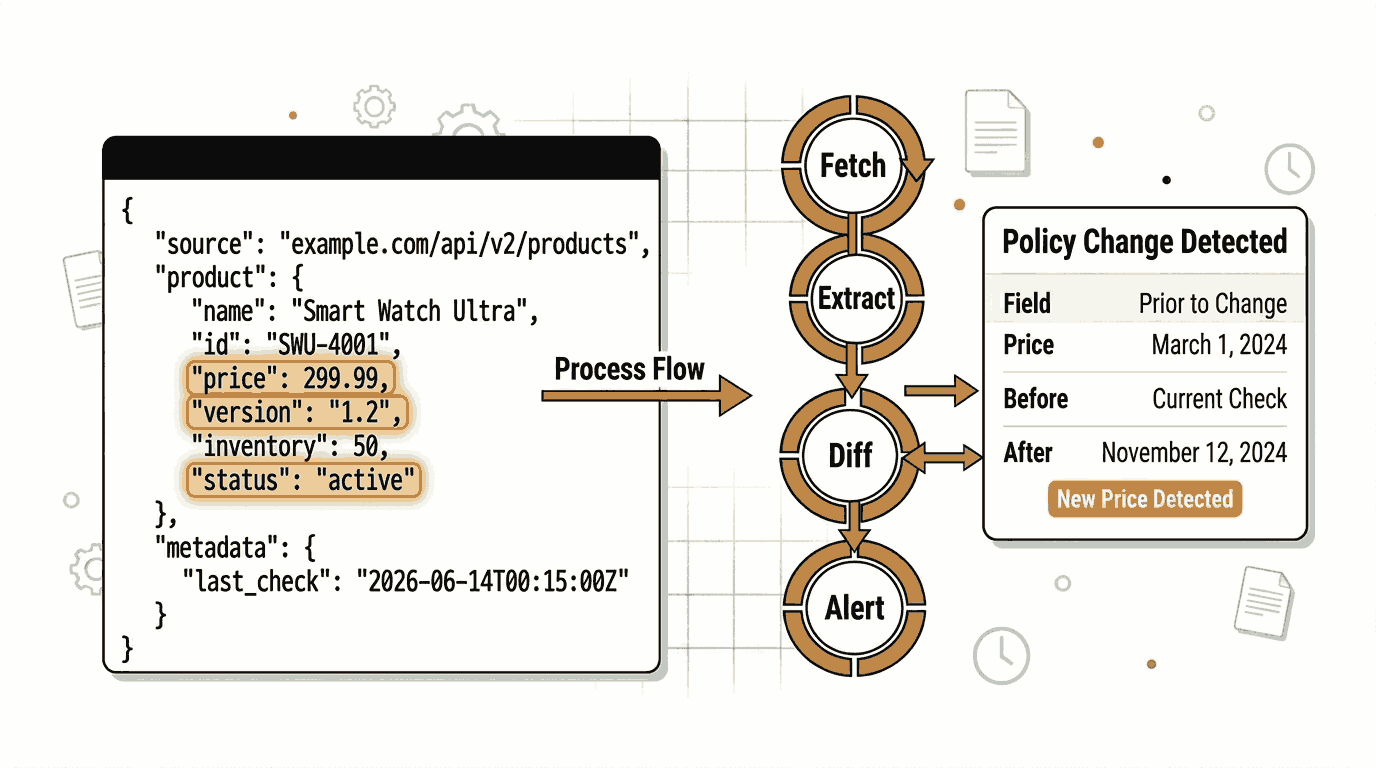
Most APIs do not stay the same forever. A product price updates. A software version increments. A stock availability flips from unavailable to in stock. A government endpoint adds a new field. A cryptocurrency rate swings by ten percent in an hour.
If your business, application, or workflow depends on data from a JSON API, you need to know when that data changes, not hours later when something breaks, but the moment it happens.
This guide explains what JSON API field monitoring is, why it matters, and how to set it up from scratch using Verid, a developer-first change detection API built specifically for this kind of monitoring.
What Is JSON API Field Monitoring?
A JSON API (short for JavaScript Object Notation Application Programming Interface) is a way for software systems to exchange structured data over the internet. When you request data from an API, the response typically looks something like this:
{
  "bitcoin": {
    "usd": 67312.45
  }
}
JSON API field monitoring means watching one or more specific values inside that response and detecting when they change. Instead of monitoring whether a webpage looks different visually, you are monitoring whether a specific piece of structured data has a new value.
The key word here is "field." You are not watching the entire API response for any byte-level difference. You are watching a named field, such as price, version, or availability, and triggering an action only when that exact field crosses a threshold you define.
This is fundamentally different from screenshot monitoring tools, which take a picture of a page and compare pixels. Those tools trigger on cookie banners, rotating advertisements, and timestamps. Field-level monitoring only triggers when the data you actually care about changes.
Why Businesses Monitor JSON API Responses
Here are the most common real-world reasons teams set up JSON API field monitors:
Product price tracking. A retailer monitors a competitor's pricing API and receives an alert the moment a product price drops so they can adjust their own pricing automatically.
Stock and inventory monitoring. An e-commerce workflow watches an inventory API for a field like availability to change from out_of_stock to in_stock and immediately sends a restock notification to customers.
Software release detection. A development team monitors the GitHub API for a repository's latest release tag. When a new version is published, their CI pipeline triggers automatically.
Cryptocurrency and financial rates. A trading system watches a price field and fires an alert when Bitcoin drops more than ten percent in a single check cycle.
Weather and environmental data. An application polls a weather API and alerts users only when a specific threshold, such as temperature dropping below freezing, is crossed.
Government and public data changes. A compliance team monitors a regulatory body's public API and gets notified when new data appears, such as a new filing or policy update.
SaaS and upstream API contract monitoring. An engineering team polls a third-party API every five minutes to catch breaking schema changes, like a field being renamed or removed, before those changes cause errors in production.
In all of these cases, the value is specificity and silence. You want an alert that fires when something meaningful happens and stays quiet the rest of the time.
How to Monitor JSON API Fields Using the Verid Dashboard
Verid is a web change detection API that handles the full monitoring loop: fetching the URL, extracting specific fields, comparing them to the previous run, evaluating whether a rule you defined is true, and delivering a notification through your chosen channel.
The following walkthrough assumes you have no programming experience. Everything can be done through the Verid dashboard.
Step 1: Start a Free Trial
Go to verid.dev and start a 14-day free trial. No credit card is required. The trial includes unlimited monitors and 200 runs, which is enough to follow this guide completely.
After signing up, navigate to the API Keys page in the dashboard and create a key. This key starts with the prefix vrd_ and is how Verid authenticates your monitors.
Step 2: Create a New Monitor
In the dashboard, click New Monitor. You will be presented with a form asking for basic details about what you want to monitor.
For this walkthrough, use the publicly accessible CoinGecko Bitcoin price endpoint:
https://api.coingecko.com/api/v3/simple/price?ids=bitcoin&vs_currencies=usdThis is a free, unauthenticated JSON API that anyone can use. When you open it in a browser, you will see a response like:
{
  "bitcoin": {
    "usd": 67312.45
  }
}
Set the Name to something descriptive, such as "Bitcoin Price Monitor."
Step 3: Choose the Extraction Method
This is the most important configuration step. Verid supports six different extraction methods. Choosing the right one depends entirely on what kind of data source you are monitoring.
Here is a comparison of all six methods to help you decide:
| Method | Best for | Advantage | Limitation | Recommended for JSON APIs? |
|---|---|---|---|---|
| JSONPath | JSON API responses | Reads directly from the parsed JSON structure. Clean, precise, no HTML parsing needed. | Only works with JSON responses. | Yes, this is the ideal choice. |
| CSS Selector | Rendered HTML pages | Familiar to anyone who knows web development. | Does not work on JSON APIs, which return raw data, not HTML. | No. |
| XPath | Complex HTML or XML documents | Can traverse parent and sibling elements that CSS cannot reach. | Verbose syntax. Not suited for JSON. | No. |
| Regex | Plain text or raw response bodies | Works on any text format. | Brittle on structured data. Extracts match counts, not values. | Only as a fallback. |
| Full-page hash | "Did anything change at all?" scenarios | Requires zero configuration. | Cannot tell you what changed or by how much. High false-positive rate on dynamic pages. | No. |
| AI / LLM prompt | Unstructured pages where selectors break | Describe the field in plain English. | Slower and counts against a monthly AI call quota. | Only if the JSON structure changes frequently. |
For JSON API monitoring, JSONPath is always the correct choice. It reads the JSON response directly by navigating the field structure, which is exactly what you need.
Step 4: Configure JSONPath Field Extraction
Select JSONPath as your extraction method. Then define the field you want to track.
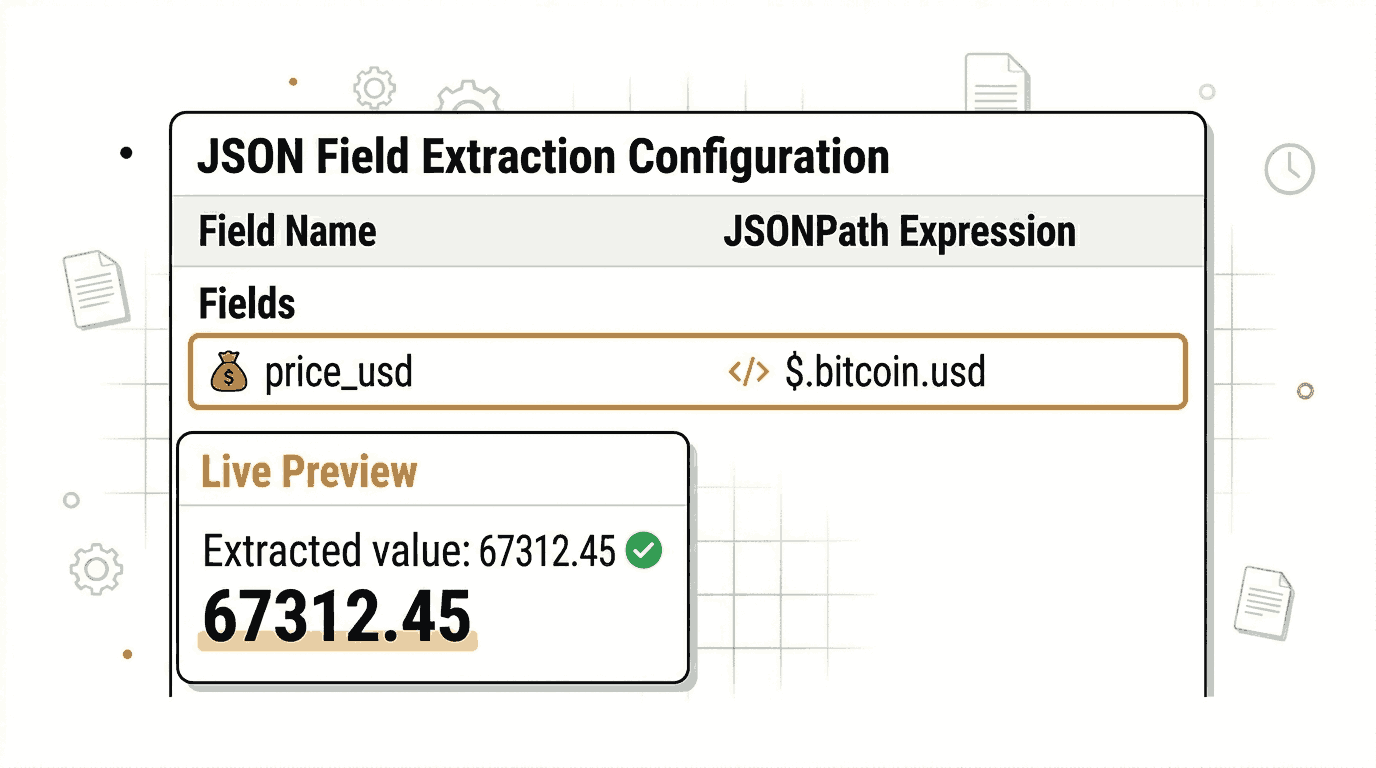
JSONPath uses a simple dot-notation to navigate a JSON response. The $ symbol represents the root of the JSON object. To reach bitcoin.usd in the CoinGecko response, the expression is:
$.bitcoin.usdIn the dashboard form, name the field price_usd and enter $.bitcoin.usd as the expression. Verid will extract this value on every monitoring run and store it independently.
Step 5: Set a Predicate (Your Alert Rule)
A predicate is the rule that decides whether a notification is sent after each monitoring run. Without a predicate, every single change to the field would trigger an alert. With a predicate, you define the condition that must be true before Verid sends anything.
Verid supports nine predicate types. For a Bitcoin price monitor, a useful choice is field_decreases_by_percent, which fires when the price drops by at least a percentage threshold you set.
For a simple "alert me whenever the value changes at all" setup, use field_changes, which fires whenever the field value is different from the previous run.
Select field changes in the dashboard and reference the field name price_usd.
Step 6: Set the Monitoring Schedule
Every plan, and the free trial, can check as often as every 60 seconds, but each check uses one run. A good starting point is 24 hours (one check per day: about 14 runs over the 14-day trial, and about 30 runs a month, well inside Lite's 1,000 at $9/month). Set your monitor to check once every 24 hours.
If you upgrade to a paid plan, you get more runs to check more frequently. Hourly checks use about 720 runs a month, every 15 minutes about 2,880, and every 5 minutes about 8,640. The Starter plan ($19/month) includes 5,000 runs, the Pro plan ($49/month) 15,000, and the Scale plan ($149/month) 100,000. More frequent checks are important for fast-moving data like cryptocurrency prices or stock availability.
Step 7: Configure Email Notifications
In the Notifications section of the monitor form, add a delivery. Select Email as the delivery type and enter your email address.
Verid also supports webhooks (for sending data directly to your application), Slack, and Discord. However, email is the simplest option and requires no additional configuration.
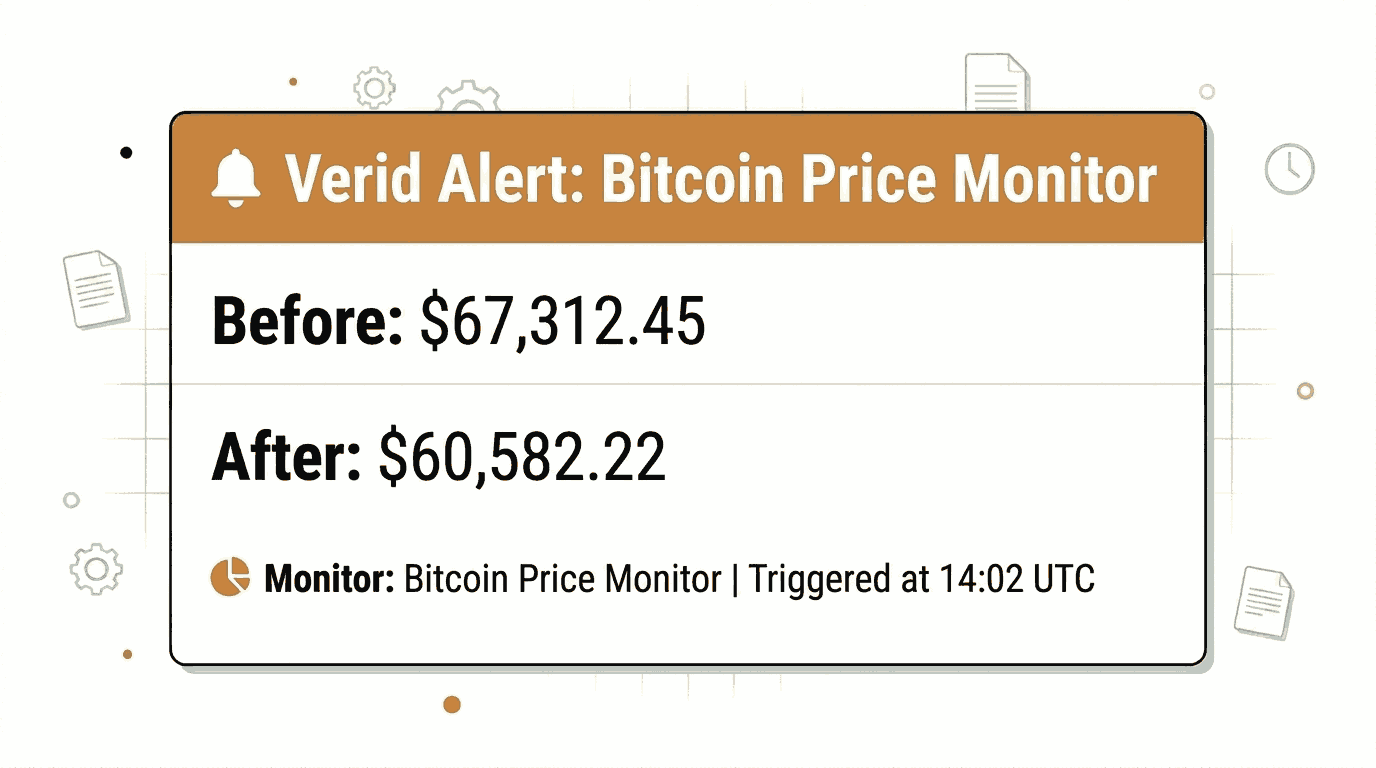
When the predicate fires, Verid will send you a plain-language email summarizing what changed, including the before and after values of the field.
Step 8: Save and Activate
Click Save Monitor. The monitor is now active. Verid will check the CoinGecko endpoint every 24 hours, extract the $.bitcoin.usd field, compare it to the last stored value, evaluate your rule, and send you an email if the rule is true.
Note that the first run of a monitor never fires a notification. The first run establishes the baseline value. All future runs compare against that baseline.
Monitoring JSON API Fields with the Verid API
If you are a developer, you can create and manage monitors programmatically using the Verid REST API. This is useful for automating monitor creation, building monitoring into your deployment pipeline, or managing large numbers of monitors without using the dashboard.
The base URL for the Verid API is:
https://api.verid.devAll requests require an Authorization header with your API key:
Authorization: Bearer vrd_your_api_keyCreating a JSON API Monitor via the API
Here is a complete curl command to create the same Bitcoin price monitor from the previous section, configured to send an email alert:
curl -X POST https://api.verid.dev/v1/monitors \
  -H "Authorization: Bearer $VERID_API_KEY" \
  -H "Content-Type: application/json" \
  -d '{
    "name": "Bitcoin Price Monitor",
    "url": "https://api.coingecko.com/api/v3/simple/price?ids=bitcoin&vs_currencies=usd",
    "schedule_interval_seconds": 86400,
    "extract_config": {
      "method": "json_path",
      "fields": {
        "price_usd": "$.bitcoin.usd"
      }
    },
    "diff_predicate": {
      "type": "field_changes",
      "field": "price_usd"
    },
    "deliveries": [
      {
        "type": "email",
        "to": "you@yourdomain.com"
      }
    ]
  }'
The schedule_interval_seconds value of 86400 equals 24 hours, which uses about 30 runs a month (about 14 over the 14-day free trial).
Triggering a Manual Run
To test your monitor immediately without waiting for the next scheduled run, use the run endpoint:
curl -X POST https://api.verid.dev/v1/monitors/{monitor_id}/run \
  -H "Authorization: Bearer $VERID_API_KEY" \
  -d '{}'
Replace {monitor_id} with the UUID returned when you created the monitor.
Listing Your Monitors
curl https://api.verid.dev/v1/monitors \
  -H "Authorization: Bearer $VERID_API_KEY"
The response includes pagination metadata, monitor status, last run time, and next scheduled run time.
Fetching Run History
To see the results of past monitoring runs for a specific monitor:
curl https://api.verid.dev/v1/monitors/{monitor_id}/runs \
  -H "Authorization: Bearer $VERID_API_KEY"
Each run record includes the extracted field values, a diff showing what changed, whether a delivery was triggered, and how long the fetch took.
Monitoring JSON API Fields with the Verid Node.js SDK
Verid publishes an official Node.js SDK on npm. It wraps the REST API and provides TypeScript-native types.
Installation
npm install @verid.dev/sdkInitializing the Client
import { VeridClient } from '@verid.dev/sdk';

const client = new VeridClient({
  apiKey: process.env.VERID_API_KEY!,
});
Store your API key in an environment variable rather than hardcoding it in your source files.
Creating a JSON API Monitor
const monitor = await client.monitors.create({
  name: 'Bitcoin Price Monitor',
  url: 'https://api.coingecko.com/api/v3/simple/price?ids=bitcoin&vs_currencies=usd',
  schedule_interval_seconds: 86400,
  extract_config: {
    method: 'json_path',
    fields: {
      price_usd: '$.bitcoin.usd',
    },
  },
  diff_predicate: {
    type: 'field_changes',
    field: 'price_usd',
  },
  deliveries: [
    {
      type: 'email',
      to: 'you@yourdomain.com',
    },
  ],
});

console.log('Monitor created:', monitor.id);
Listing Monitors
const { data } = await client.monitors.list();
console.log(`You have ${data.length} monitors.`);
Triggering a Manual Run
await client.monitors.runNow(monitor.id);
console.log('Manual run queued.');
This is useful during development to verify that your extraction expressions work correctly before the first scheduled run.
Real-World Example: Monitor Bitcoin Price and Get Email Alerts
Let us walk through a complete, practical example from start to finish.
Goal: Receive an email whenever the Bitcoin price changes from one daily check to the next.
API URL being monitored:
https://api.coingecko.com/api/v3/simple/price?ids=bitcoin&vs_currencies=usd&include_24hr_change=trueThis is a free, public endpoint from CoinGecko that requires no authentication or API key. It returns the current Bitcoin price in US dollars along with the 24-hour percentage change.
JSON field being tracked: $.bitcoin.usd (the current price in USD)
Extraction method: JSONPath, because the response is structured JSON data.
Predicate: field_changes on the price_usd field. This fires whenever the price value is different from the previous run. If you want finer control, switch to field_decreases_by_percent with a threshold of 10 to only alert on significant drops.
Schedule: 86400 seconds (24 hours), about 30 runs a month. Any plan, and the free trial, can set this as low as 60 seconds; shorter intervals just use more of your runs.
Notification delivery: Email.
Here is the complete curl command to set this up:
curl -X POST https://api.verid.dev/v1/monitors \
  -H "Authorization: Bearer $VERID_API_KEY" \
  -H "Content-Type: application/json" \
  -d '{
    "name": "Bitcoin Daily Price Alert",
    "url": "https://api.coingecko.com/api/v3/simple/price?ids=bitcoin&vs_currencies=usd&include_24hr_change=true",
    "schedule_interval_seconds": 86400,
    "extract_config": {
      "method": "json_path",
      "fields": {
        "price_usd": "$.bitcoin.usd",
        "change_24h": "$.bitcoin.usd_24h_change"
      }
    },
    "diff_predicate": {
      "type": "field_changes",
      "field": "price_usd"
    },
    "deliveries": [
      {
        "type": "email",
        "to": "you@yourdomain.com"
      }
    ]
  }'
When the monitor fires, the email you receive will include the before and after values of price_usd and change_24h, so you can see at a glance how much the price moved.
Why Use Verid for JSON API Monitoring
JSONPath extraction built in. Most monitoring tools are designed for HTML pages. Verid was built with API monitoring as a first-class use case. JSONPath expressions work directly against the parsed JSON response, which means there is no need to write a parser or handle response formatting.
Predicate-driven alerting. You do not just get notified that a value changed. You define the exact condition, like a price dropping by ten percent or a version field changing, and Verid only fires when that condition is true. This eliminates noise from minor fluctuations.
Before and after diffs in every notification. Every delivery includes the previous value and the new value side by side. You know immediately what changed and by how much, without having to log into a dashboard or query a database.
Reliable delivery with automatic retries. When a webhook or email delivery fails, Verid retries up to six times with exponential backoff. Failed deliveries are held in a dead-letter queue and can be replayed manually via the API.
Multiple notification channels. Verid delivers to webhooks (signed with HMAC for security), Slack, Discord, and email. You can configure multiple delivery targets per monitor, subject to your plan's limits.
Full REST API and Node.js SDK. Every monitor operation available in the dashboard is also available through the API. This means monitoring can be part of your infrastructure-as-code rather than a manual process.
14-day free trial, no card. Unlimited monitors, 200 runs, and 14 days of history are included in the trial. No credit card is required. When it ends, monitors pause until you choose a plan; paid plans start at $9/month for 1,000 runs.
You can learn more about Verid's full feature set on the features page, explore extraction methods in the extraction guides, or review delivery options in the notifications documentation.
For the JSON API field monitoring use case in particular, Verid's use case page covers how teams use this to catch upstream schema drift before it breaks production.
Frequently Asked Questions
How can I monitor changes in a JSON API response?
You need a tool that can fetch the API endpoint on a schedule, parse the JSON response, extract specific fields by name, and compare them to previous values. Verid does all of this with a single API call. You define the URL, the JSONPath expressions for the fields you care about, a predicate that decides when to alert, and a delivery destination. From that point, Verid handles the fetching, parsing, diffing, and notification automatically.
What is the best way to detect JSON field changes?
JSONPath is the most reliable method for structured JSON data. A JSONPath expression like $.product.price navigates the JSON object tree directly and extracts the exact value you want to track. Paired with a predicate like field_changes or field_decreases_by_percent, you get alerts that fire only when the data matches a rule you define, rather than on every minor fluctuation.
Can I receive email alerts when API data changes?
Yes. Verid supports email as a delivery type. When you create a monitor, include a delivery configuration with "type": "email" and your email address. Whenever the predicate fires, Verid sends a plain-text email showing the monitor name, which fields changed, and the before and after values. No dashboard login is needed to read the alert.
How often should a JSON API be monitored?
It depends on how frequently the data changes and how quickly you need to react. For slowly changing data like software release versions or regulatory filings, once a day is usually sufficient. For e-commerce pricing or inventory, hourly checks (about 720 runs a month) offer a reasonable balance. For fast-moving data like cryptocurrency prices, checks every 15 or 5 minutes fit within the runs of the Pro or Scale plans. Verid's pricing page shows the runs included in each plan tier.
Want this running on your own URL? Spin up the same monitor in about a minute. 5 free, no credit card.
About the author

Software Engineer
Suleman is a software engineer working on backend systems and browser automation at Verid. Much of his time goes to the unglamorous half of monitoring: brittle selectors, anti-bot interstitials, dedupe logic, and that’s what he writes about.
More from Suleman →Related use cases
How to Get Automatic PyPI Package Update Alerts
Get instant alerts when any PyPI package releases a new version. Set up automated Python package update notifications with Verid in minutes.
View blueprint →Developer & DevOpsHow to Track NPM Package Version Changes Automatically
Learn how to monitor npm package versions automatically and get email alerts the moment a new version is published. No code required to get started.
View blueprint →Developer & DevOpsGet Instant RSS Feed New Item Alerts Without Writing a Scraper
Learn how to monitor any RSS feed and get instant alerts when new items are published. Set up RSS feed notifications in minutes with Verid.
View blueprint →