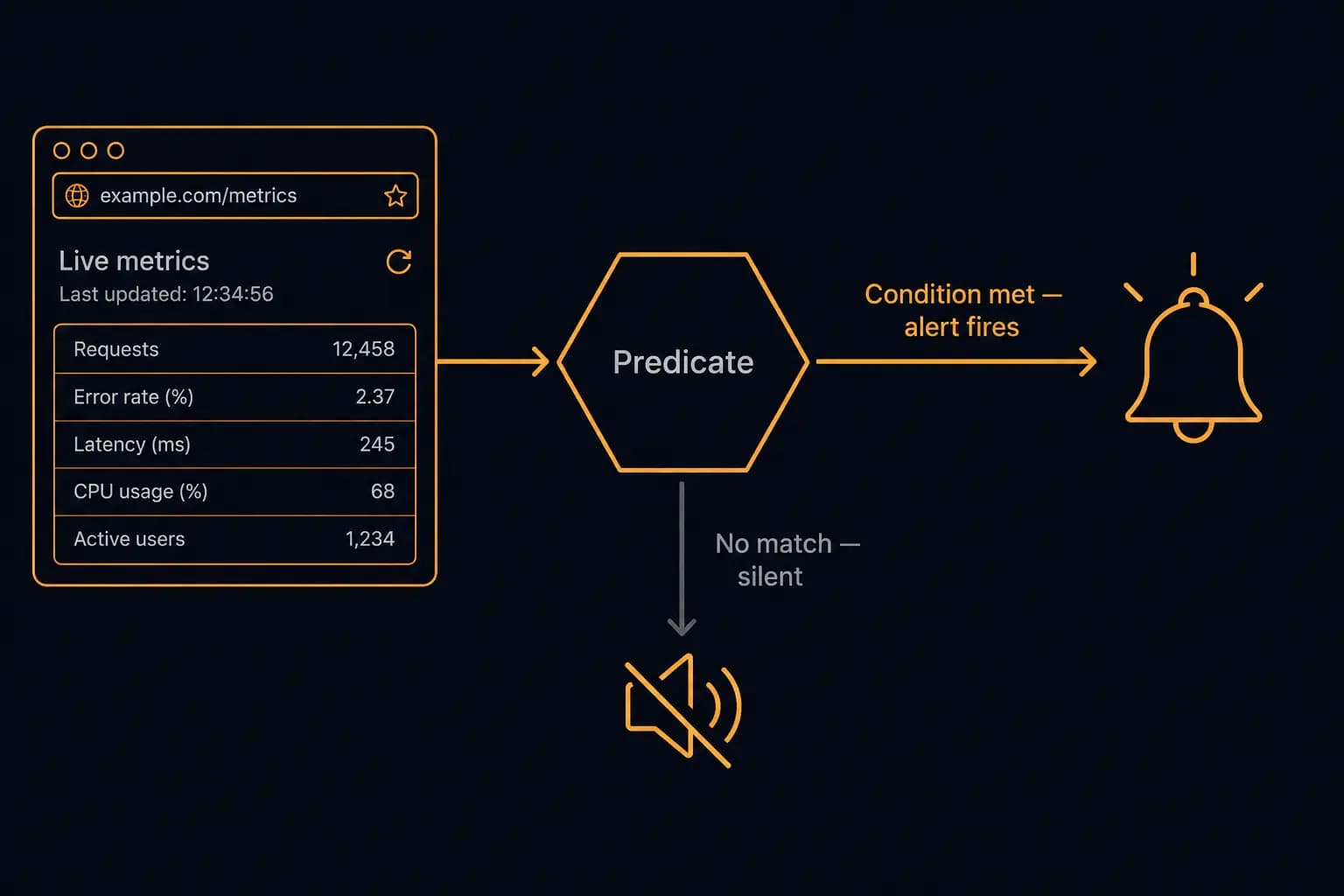
Predicate-Based Alerting: Stop Getting Spammed by Your Monitoring Tool
Your monitoring tool fires. You check it. The competitor's pricing page changed its footer copyright year. You add another noise filter to your mental stack and move on. Twenty minutes later it fires again. This time the navigation bar reordered two items.
This is alert fatigue — and it is a product design failure, not a configuration problem. Most monitoring tools alert on every change because "alert on every change" is the simplest thing to build. If you need something smarter, you either write custom filtering logic on top of the tool or you live with the noise.
Verid takes a different approach. Every monitor can carry a predicate — a rule that the diff result must satisfy before an alert fires. No predicate match, no delivery. This post explains how the predicate system works, shows the exact JSON for each predicate type, and walks through the real-world cases where predicates eliminate noise without requiring any downstream filtering code.
Why "Alert on Every Change" Doesn't Scale
The problem is structural. A typical web page produces change events from dozens of sources that have nothing to do with the thing you are monitoring.
- Ad slots refresh on every render
- Cookie consent banners appear and disappear
- Navigation links get A/B tested silently
- CDN edge nodes inject cache-control comments into HTML
- Timestamps in page footers tick over at midnight
- CMS platforms add and remove analytics snippet versions
A monitoring tool that fires on every DOM diff will fire on all of these. The real signal — the price you care about, the version number that changed, the status text that flipped — arrives buried inside a stream of noise.
The traditional fix is to narrow the CSS selector to isolate the specific element, which helps. But even a tightly scoped selector can produce false positives: a "Sale — 20% off" banner injected inside the pricing card, a currency formatting change from "$99.00" to "$99", or a whitespace normalization your scraper handles inconsistently.
Selector precision and predicate logic solve different parts of the problem. Selectors control what gets extracted. Predicates control when an alert fires based on what was extracted. You need both.
What a Predicate Is (the Short Version)
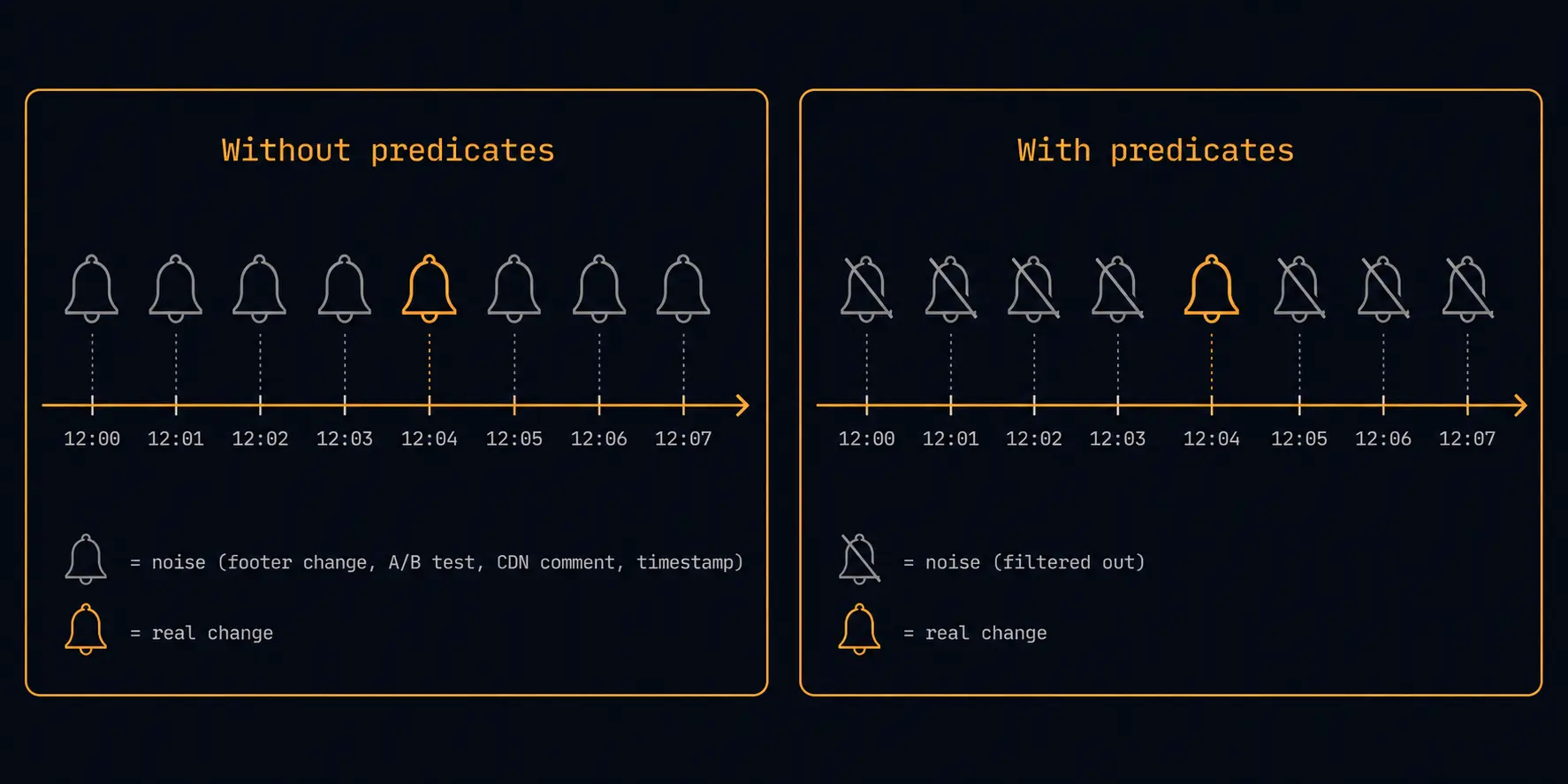
A predicate is a condition attached to a monitor that Verid evaluates on every diff result before deciding whether to deliver an alert.
| Without predicates | With predicates |
|---|---|
| Every change fires an alert | Only changes that satisfy the condition fire |
| Noise filtering lives in your webhook receiver | Noise filtering runs inside Verid before delivery |
| Any change to the extracted field triggers delivery | A price drop of more than 10% triggers delivery |
| A/B test variants wake you up at 3am | A/B test variants are silent |
Predicates live on the monitor, not on the delivery destination. That means a single predicate gates every delivery endpoint on that monitor — Slack, webhook, email — simultaneously. You configure the rule once; every channel respects it.
The Predicate Types
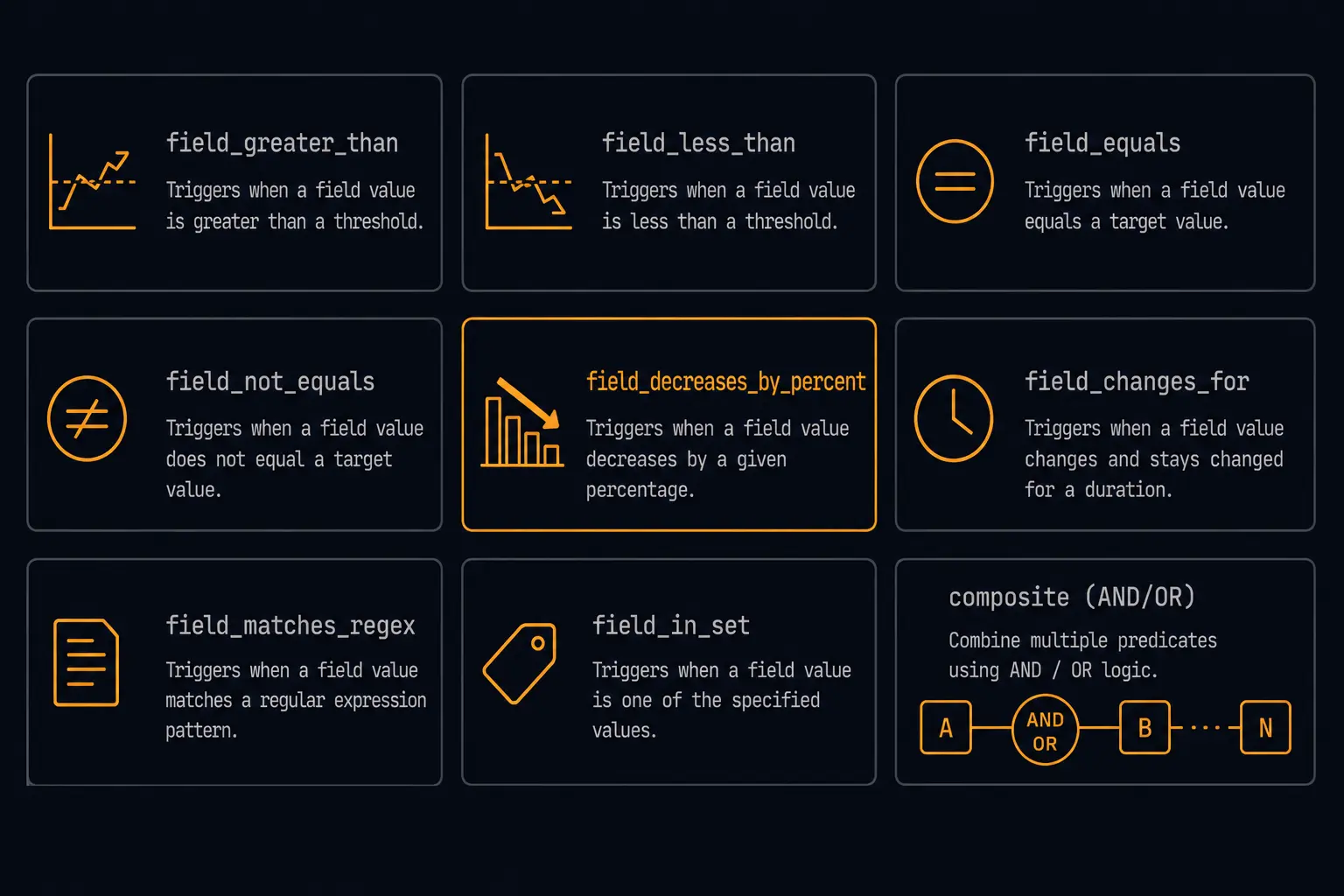
Verid's predicate system has eight types, plus a composite operator for combining them. Here is the full reference.
any_field_changes
The default. Fires whenever any extracted field on the monitor changes. Equivalent to running without a predicate. Use this when the extraction is already tight enough that any change is meaningful.
{
  "type": "any_field_changes"
}
field_changes
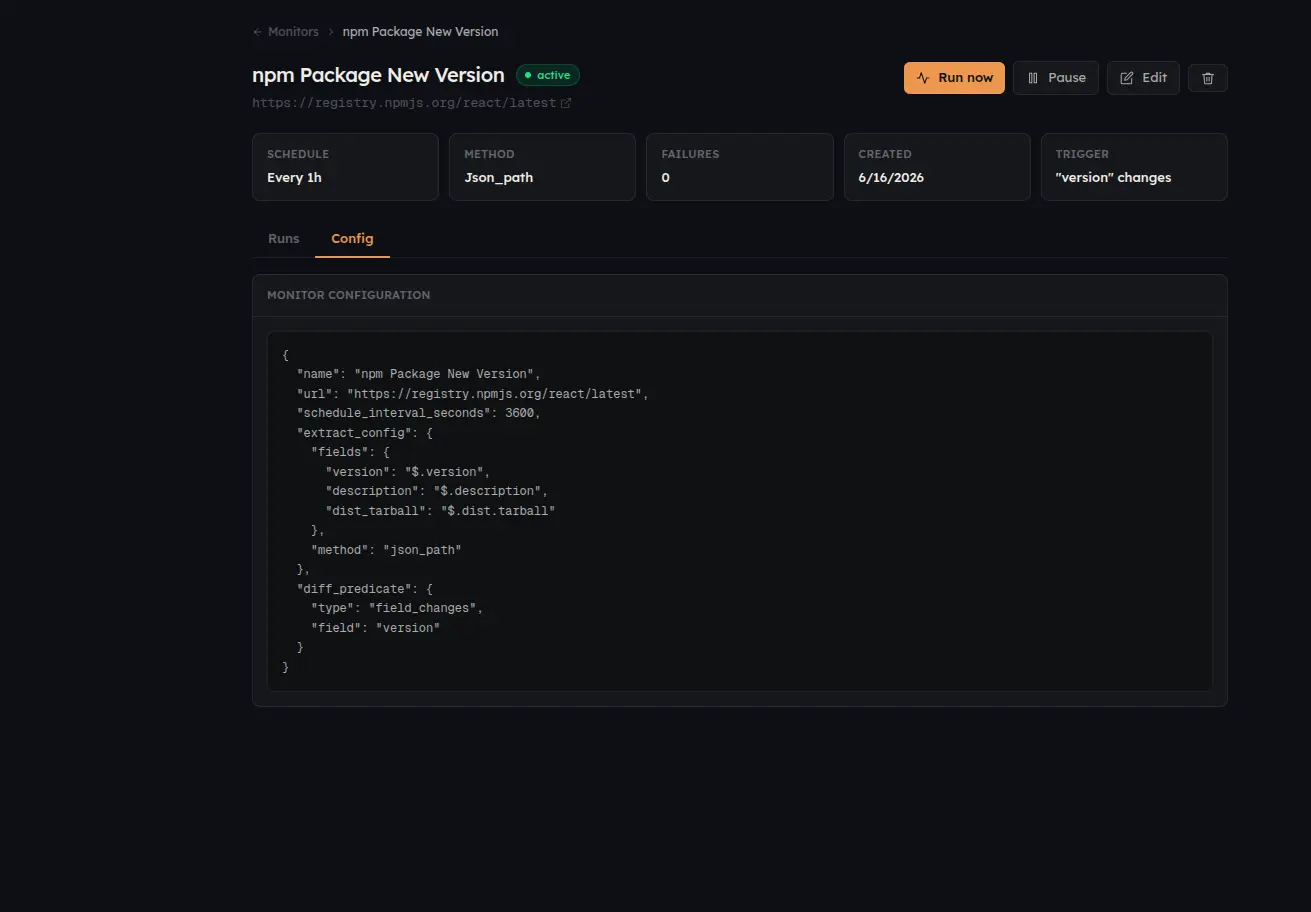
Fires only when a specific named field changes. Useful when your monitor extracts multiple fields (price, plan name, availability) but you only want alerts for one of them.
{
  "type": "field_changes",
  "field": "price"
}
field_decreases_by_percent
Fires when a numeric field drops by at least the given percentage from its previous value. The canonical use case: alert only when a competitor's price drops by 10% or more, ignoring cent-level rounding changes.
{
  "type": "field_decreases_by_percent",
  "field": "price",
  "threshold": 10
}
One important implementation detail: the field value must be a plain number. A field containing the string "$49.99" will produce NaN after parseFloat, and the predicate will not fire. Extract numeric values (strip the currency symbol before storing) for percent and absolute threshold predicates to work correctly.
field_increases_by_percent
The inverse — fires when a field increases by at least the threshold percentage. Use this to track stock quantities climbing back above a reorder point, or a competitor adding seats to their enterprise tier.
{
  "type": "field_increases_by_percent",
  "field": "stock_count",
  "threshold": 50
}
field_decreases_by_absolute
Fires when a numeric field drops by at least the absolute amount. Useful when a percentage threshold is too loose at low price points — a 10% drop from $9.99 is $1; you might want to alert only if it drops by $5 or more.
{
  "type": "field_decreases_by_absolute",
  "field": "price",
  "threshold": 5
}
field_increases_by_absolute
Fires when a numeric field increases by at least the absolute amount.
{
  "type": "field_increases_by_absolute",
  "field": "employee_count",
  "threshold": 100
}
field_matches_regex
Fires when the current value of a field matches a regular expression pattern. Applied to the after value — i.e., what the field contains now. Use this for status fields, version strings, and any case where you care about the shape of the new value rather than a numeric delta.
{
  "type": "field_matches_regex",
  "field": "version",
  "pattern": "^v\\d+\\.\\d+\\.0$"
}
This example fires only on major/minor release tags (v2.1.0, v3.0.0) and ignores patch releases (v2.1.3). You would set this on a monitor watching a product's changelog or GitHub release page.
field_equals
Fires when the current value of a field exactly equals the specified value. Type-sensitive — a numeric 5 and a string "5" are not equal. Use this for status transitions you care about specifically.
{
  "type": "field_equals",
  "field": "status",
  "value": "out_of_stock"
}
composite (AND / OR)
Combines multiple predicates with boolean logic. Both AND and OR are supported. Conditions can be nested arbitrarily.
AND example — alert only when the price drops AND is also currently below $50:
{
  "type": "composite",
  "operator": "AND",
  "conditions": [
    {
      "type": "field_decreases_by_percent",
      "field": "price",
      "threshold": 5
    },
    {
      "type": "field_equals",
      "field": "price",
      "value": 49
    }
  ]
}
OR example — alert if either the price or the plan name changes:
{
  "type": "composite",
  "operator": "OR",
  "conditions": [
    { "type": "field_changes", "field": "price" },
    { "type": "field_changes", "field": "plan_name" }
  ]
}
Real-World Predicate Recipes
These are the four patterns that come up most often when setting up monitors on Verid.
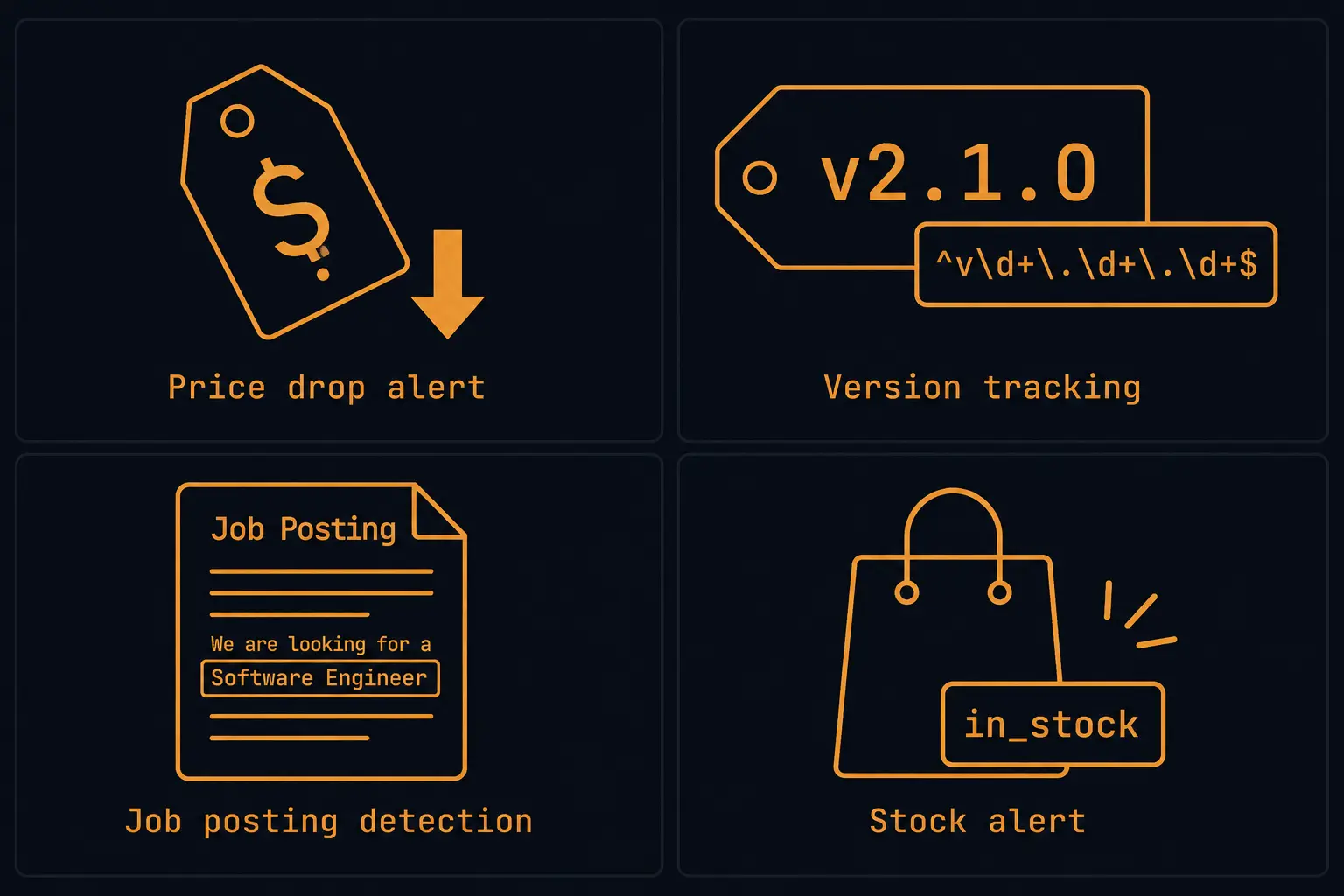
Competitor price drop alert
You are tracking a competitor's Pro plan price and want an alert only when it drops meaningfully — not when they tweak the display string from "$99/month" to "$99/mo."
Extract the price as a plain number by using a CSS selector that targets the price element and configuring the extraction type as number. Then set:
{
  "type": "field_decreases_by_absolute",
  "field": "price",
  "threshold": 1
}
Anything under a $1 drop is ignored. A real pricing change — $99 to $79 — fires immediately. For more on wiring this into a full webhook pipeline, see the guide on monitoring competitor pricing pages with webhooks.
Version or release tracking
You want to know when a dependency or SaaS product ships a new minor version, but not when they bump a patch.
Monitor the page or API endpoint that shows the current version. Extract the version string as text. Apply:
{
  "type": "field_matches_regex",
  "field": "version",
  "pattern": "^\\d+\\.\\d+\\.0$"
}
This fires on 2.1.0 or 3.0.0 but not on 2.1.3. Combine with field_changes via a composite AND if you want to ensure the predicate only applies to changes (rather than evaluating against a static page load).
Job posting detection
You are watching a company's careers page to know when they post a role in a specific function — say, "machine learning" or "infrastructure." You do not want an alert every time the page reshuffles its layout.
Extract the full text of the job listing section. Apply:
{
  "type": "field_matches_regex",
  "field": "job_listings",
  "pattern": "(?i)machine learning|ML engineer|infrastructure"
}
This fires only when the extracted text now contains the pattern. Because it evaluates the after value, it alerts you when the keyword appears — not when it disappears. Add a second monitor with a different predicate if you want both events.
Stock back-in-stock alert
You are tracking a product that is currently out of stock. You want exactly one alert when it comes back in, and nothing else.
{
  "type": "field_equals",
  "field": "availability",
  "value": "in_stock"
}
This fires the moment the field value matches "in_stock". If the page cycles through "limited stock" and back to "in_stock" on subsequent checks, you get an alert for each transition — which is usually the right behavior.
How Predicates Interact with Deliveries
A predicate gates delivery, not detection. Verid still runs every scheduled check on every monitor regardless of the predicate. The diff is computed, the field values are recorded, and the run is stored in your history. The predicate only determines whether the result triggers a delivery to your webhook, Slack channel, or email.
This matters for a few reasons.
Your run history is complete regardless of predicate outcomes. You can inspect past checks and see the values that were extracted even when they did not trigger an alert. This is useful for debugging a predicate that seems too aggressive ("why didn't this alert fire?") — check the run history to see the extracted value and confirm whether it met the predicate condition.
Predicates do not affect your billing or check quota. A check run that is filtered by a predicate still counts as one run against your plan's monthly runs. What predicates reduce is noise, not cost. The Verid pricing page has the full breakdown of what counts against each tier.
If you have multiple delivery endpoints on a single monitor (Lite and above), the predicate applies to all of them uniformly. There is no per-endpoint predicate at this time — one predicate per monitor, evaluated once per run.
Setting a Predicate in the Dashboard
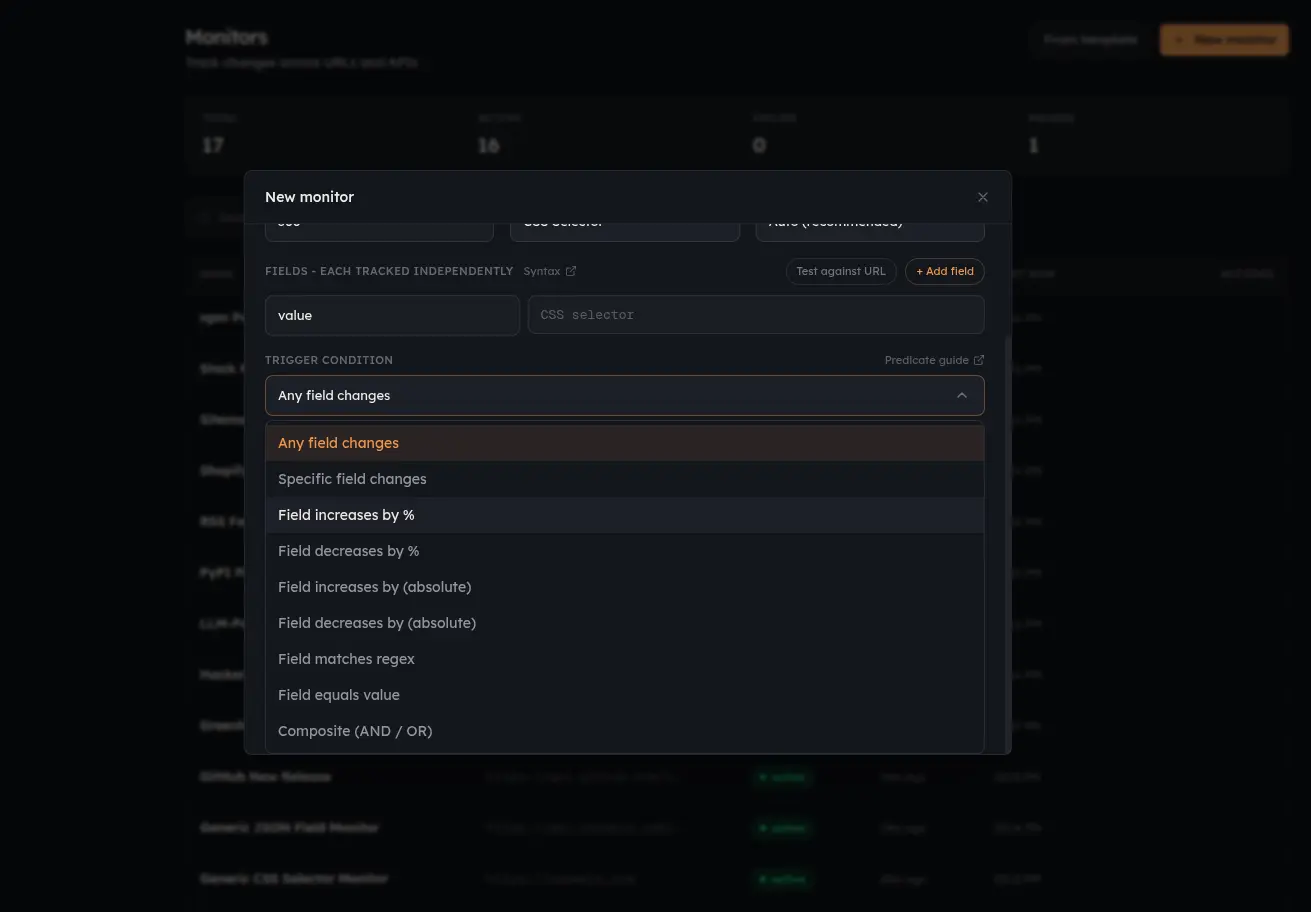
On any monitor's settings page, open the Alerting tab. You will see a JSON editor pre-filled with {"type": "any_field_changes"} — the no-predicate default.
Replace the JSON with any predicate from this guide and save. The new predicate takes effect on the next scheduled check. No restart, no re-deploy.
For teams managing monitors via the API, set the predicate field on the monitor create or update endpoint. The full schema is in the Verid API docs.
Alert Fatigue Is a Solved Problem
Every monitoring tool can detect changes. The tools that eliminate alert fatigue are the ones that give you control over when a change becomes an alert.
A predicate like field_decreases_by_percent with a threshold of 10 means your on-call engineer does not wake up because a competitor changed their footer. They wake up because the competitor cut their Pro plan price by $20 — and that is a decision worth waking up for.
The predicate types covered in this post — numeric thresholds, regex patterns, equality checks, and composite logic — cover the majority of real monitoring use cases. If you are already using Verid's change detection and finding that alerts are too noisy, adding a predicate is a one-field JSON change on your monitor.
Start a 14-day free trial at verid.dev — unlimited monitors, 200 runs, no credit card, predicates available on every plan. If you have 5 monitors tracking things that only matter when specific conditions are met, the predicate system will cut your alert volume to exactly the changes you care about.
Frequently Asked Questions
What happens if my predicate condition is never met — do I still get billed for checks?
Yes. Verid runs every scheduled check on your monitor regardless of the predicate outcome. The predicate only controls whether the result triggers a delivery. Checks that do not satisfy the predicate are still recorded in your run history and still count against your plan's monthly runs. Predicates reduce notification noise, not run usage.
Can I use a predicate on a monitor that extracts multiple fields?
Yes. field_changes, field_decreases_by_percent, field_increases_by_percent, field_decreases_by_absolute, field_increases_by_absolute, field_matches_regex, and field_equals all target a specific named field by the field key in the predicate JSON. A monitor extracting price, plan_name, and availability can have a predicate that fires only on price changes, leaving plan_name and availability changes silent.
Can I combine predicates — for example, alert only when the price drops AND the plan name changes simultaneously?
Yes, use the composite predicate with "operator": "AND". Each entry in conditions is a full predicate object, including nested composites. There is no enforced depth limit, though deeply nested predicates are harder to reason about — keep it flat where you can.
The field_decreases_by_percent predicate never fires even though the price dropped. What's wrong?
The most common cause: the extracted field value is a string containing a currency symbol, like "$79.99". The predicate's numeric comparison calls parseFloat internally, which returns NaN for strings that start with "$". The predicate always returns false for NaN inputs. Fix this by ensuring your monitor extracts the price as a plain number. In Verid, set the extraction type to number on the relevant field, which strips non-numeric characters before storing the value.
Does the field_matches_regex predicate check the old value, the new value, or both?
It checks only the after value — what the field contains on the current check. If you want to match a transition (e.g., fire when the value changes from one specific string to another), combine field_changes and field_equals with a composite AND predicate.
Can I set different predicates for different delivery endpoints on the same monitor?
Not currently. One predicate per monitor, applied uniformly to all delivery endpoints. If you need different alerting conditions to go to different destinations, set up separate monitors — one per condition and destination combination. This is the recommended pattern for tracking multiple aspects of a page with different alert thresholds.
Is there a way to preview whether a predicate would have fired on past check results?
The run history in the Verid dashboard shows the extracted field values for every past check. You can read those values and manually compare them against a candidate predicate. A predicate dry-run mode (evaluate a predicate against historical results without triggering deliveries) is on the roadmap but is not available in the current version.
About the author

Software Engineer
As a software engineer, Suleman works across Verid’s queueing, scraping and notification layers. His posts turn that day-to-day engineering into practical walkthroughs for anyone automating website change tracking.
More from Suleman →Related posts
Monitor Competitor Pricing Pages with Webhooks (Step-by-Step)
Set up a webhook receiver that fires on real price changes: verified payload, currency parsing, noise filtering, and routing to Slack or a repricing engine.
Read the post →monitoringTrack npm Package Updates Automatically
Stop polling npm manually. Learn how to monitor npm packages for new versions and fire webhook notifications the moment a release lands. No cron jobs required.
Read the post →change detectionWhat Is Web Change Detection? (And Why Monitoring Tools Get It Wrong)
Most monitoring tools just watch for byte changes. Learn what web change detection really is, why false positives happen, and how to fix it.
Read the post →developer toolsWebhook Best Practices: A Developer's Production Guide
Learn production-ready webhook best practices: HMAC signature verification, async processing, idempotency, retry logic, and monitoring for reliable delivery.
Read the post →