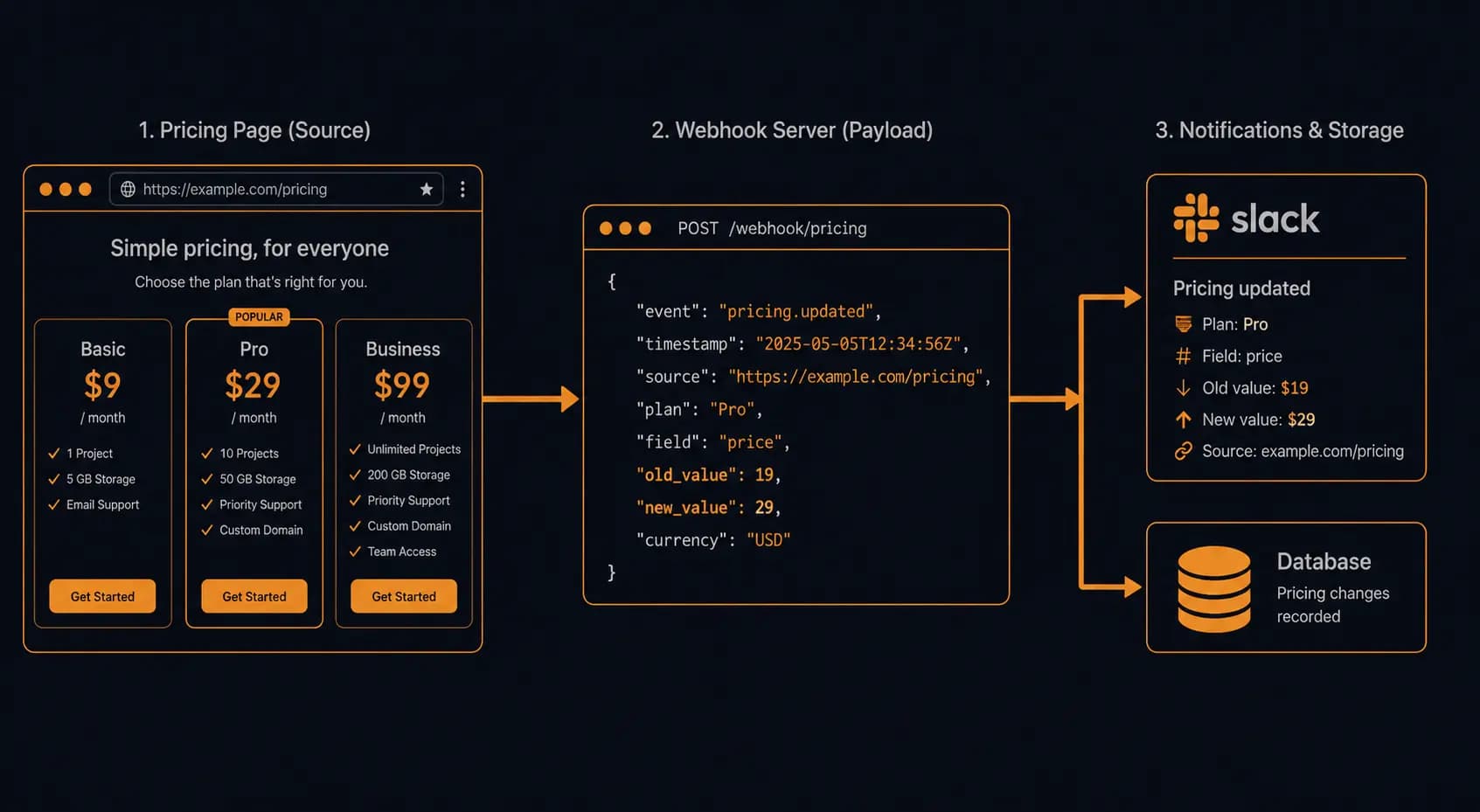
Monitor Competitor Pricing Pages with Webhooks (Step-by-Step)
Your competitor just dropped their Pro plan by $20. You found out two days later, while talking to a churned customer. That delay is the real cost of not having a proper pricing webhook pipeline.
A tool like Verid can watch a competitor's pricing page and fire a webhook the moment the content changes. But "fire a webhook" is only the start. You need to receive it, verify it wasn't spoofed, parse the actual price change out of the payload, filter out noise (A/B tests, currency formatting rounding, CDN-level rewrites), and route the confirmed change somewhere actionable - a Slack alert, a database row, or a repricing engine. That end-to-end is what this guide covers.
If you're still deciding whether to build your own scraper or use a managed tool, this guide on building a website change detector in Node.js covers the build-vs-buy tradeoff. If you want the conceptual overview of competitor price tracking methods first, start here. This post assumes you've made the decision and are ready to wire up a production-grade webhook pipeline specifically for pricing pages.
Step 1: Set Up the Monitor on a Competitor's Pricing Page
A pricing page is not a generic URL. It has structural properties that affect how you configure the monitor and what you'll get in the webhook payload.
Target the right selector, not the page
Monitoring the full page body of a pricing page generates false positives constantly. Navigation links, promotional banners, testimonial carousels, and cookie consent reflows all produce diffs that have nothing to do with price changes.
Configure your monitor with a CSS selector that isolates the pricing content. Good targets:
.pricing-cardor.plan-price- the per-plan price elements[data-plan="pro"] .price- attribute-scoped selectors if the page uses a consistent data model#pricing table- the entire pricing table if you want to catch tier restructures, not just number changes
In Verid, you set this under the monitor's Extraction tab. The monitor will extract only the matched content, diff it against the previous version, and only fire the webhook when that extracted content changes. Full-page noise never reaches your webhook endpoint.
Set a check frequency that matches the business stakes
Most SaaS companies change pricing infrequently - quarterly reviews are typical. But promotional pricing (Black Friday, end-of-quarter discounts) can appear and disappear within hours. Hourly checks are a sensible default, at about 720 runs a month per monitor. If you're tracking a competitor that runs short-window promotions, 15-minute checks (about 2,880 runs a month) are worth the extra runs.
Capture the diff link in your payload
Verid generates a permanent diff link for every detected change - a side-by-side view of old vs. new content. Make sure your monitor is configured to include this in the webhook payload. You'll use it as the diff_url field when you build the Slack notification in Step 5.
Step 2: Configure the Webhook Endpoint
In the Verid dashboard, go to the monitor's Delivery tab and enter the URL of your receiver. This is the HTTPS endpoint you'll build in Step 3.
Two things to copy from this screen before you leave:
- The signing secret. Verid generates a per-monitor signing secret when you enable webhook delivery. Copy it now - it won't be shown again in full. Store it as an environment variable (
VERID_WEBHOOK_SECRET). You'll use it in Step 3 to verify every incoming request. - The payload format. Verid lets you choose between a minimal diff payload and a full-content payload. For pricing page monitoring, use the full-content payload - you need
old_valueandnew_valueto do any meaningful price parsing.
What the webhook payload looks like
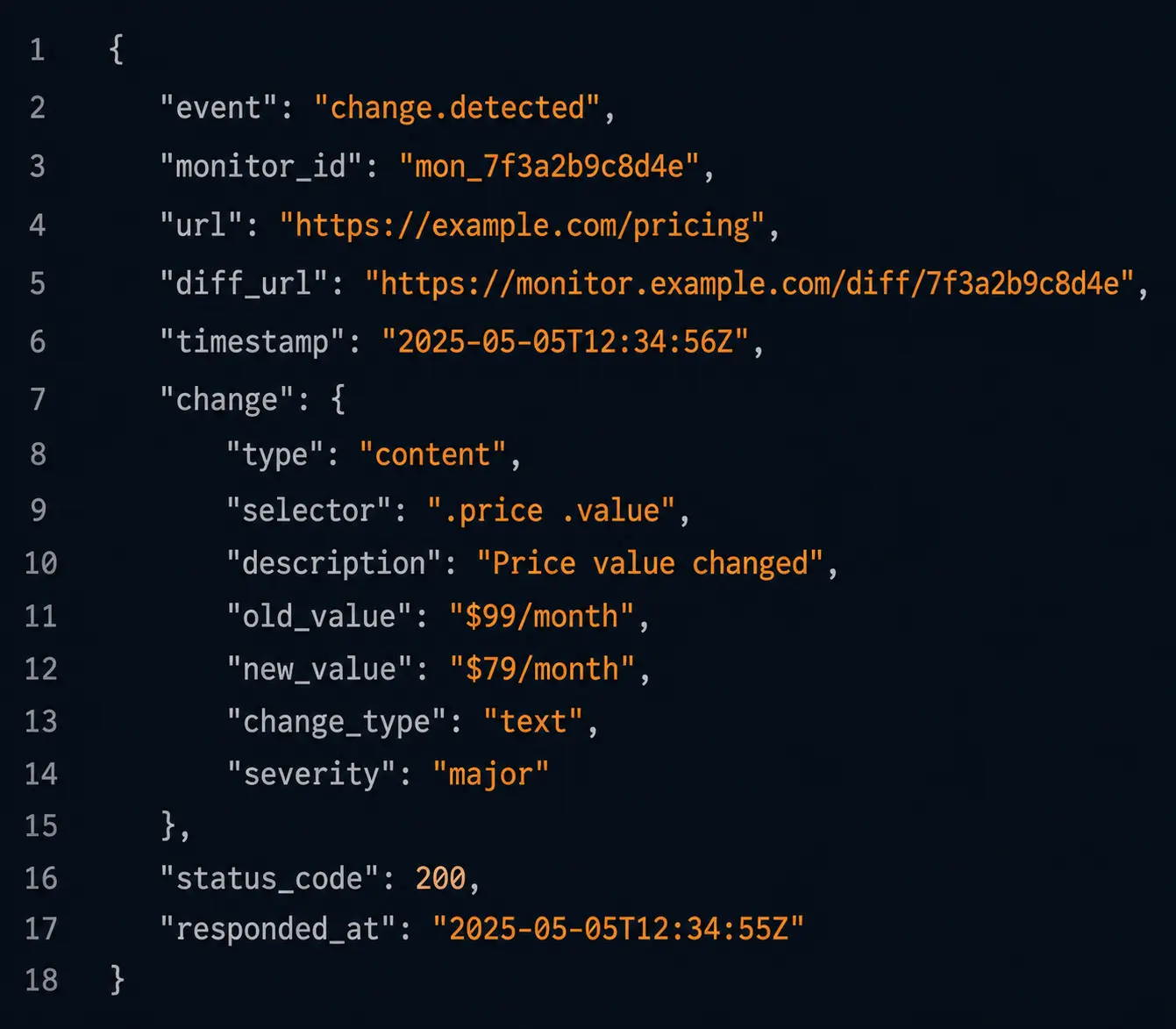
When Verid detects a change on your monitored pricing page, it sends a POST to your endpoint with a JSON body structured like this:
{
  "event": "monitor.change_detected",
  "monitor_id": "mon_01j9xk4p2q3r5s6t",
  "monitor_name": "Competitor Pro Plan Pricing",
  "url": "https://competitor.com/pricing",
  "checked_at": "2026-06-15T14:23:11Z",
  "diff_url": "https://verid.dev/monitors/mon_01j9xk4p2q3r5s6t/diffs/dif_01j9xk8m",
  "change": {
    "selector": ".pricing-card[data-plan='pro'] .price",
    "old_value": "$99/month",
    "new_value": "$79/month",
    "similarity_score": 0.84
  }
}
The similarity_score is a number between 0 and 1. A score near 1 means the content barely changed (a word swap, a punctuation difference). A score near 0 means the content changed substantially. For price changes, you'll typically see scores in the 0.7-0.95 range - the structure is the same, only the number changed.
The diff_url is the permanent link to the visual diff. Include this in every downstream notification so the person who receives the alert can inspect exactly what changed without logging into Verid.
Step 3: Build the Webhook Receiver and Verify the Signature
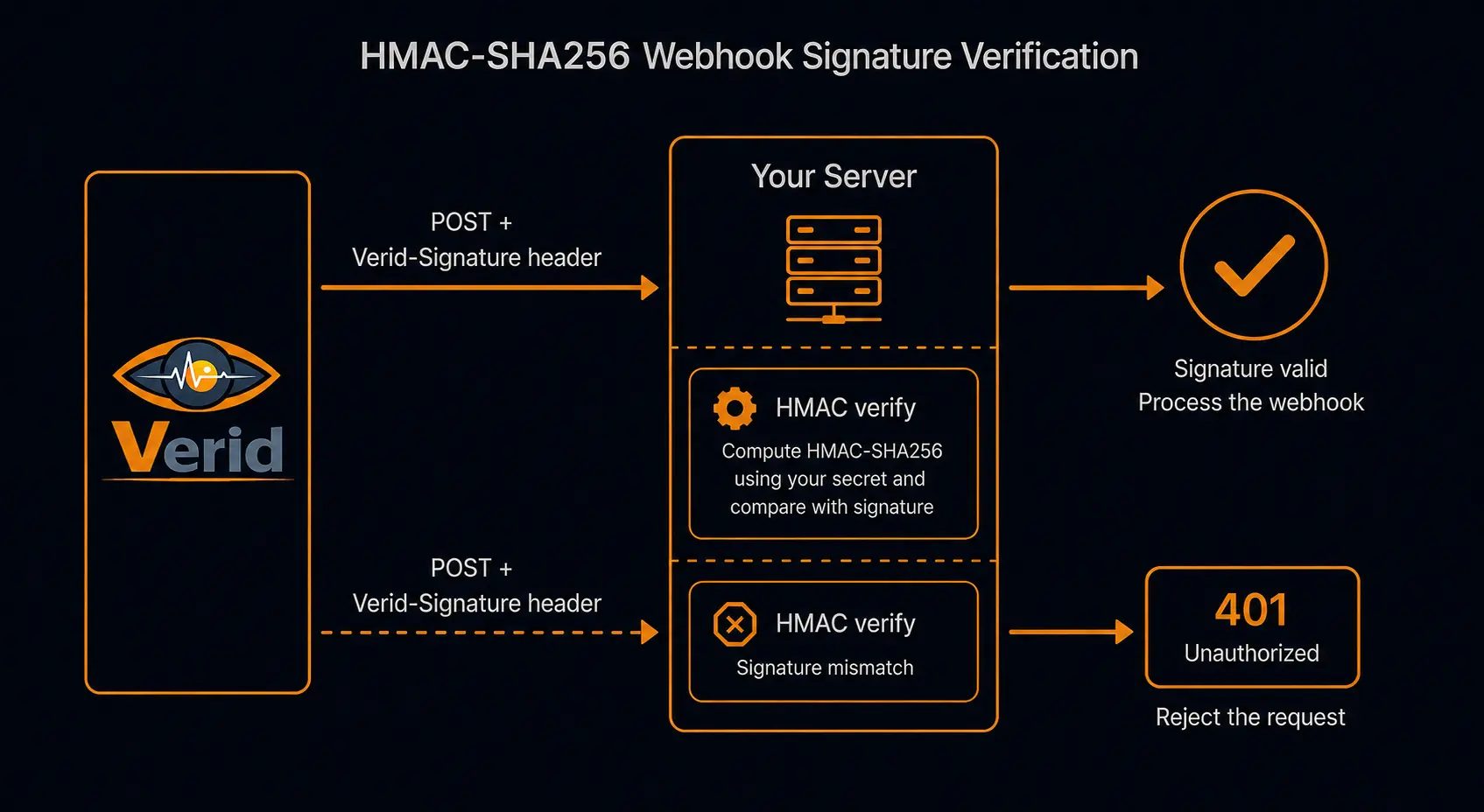
This is where most implementations go wrong. If you skip signature verification, your repricing logic is a single forged POST request away from a competitor gaming your system.
Verid signs each webhook with an HMAC of the raw request body using your monitor's signing secret. The signature is sent in the Verid-Signature request header as a hex-encoded HMAC-SHA256 digest.
Here's a minimal Express receiver that verifies the signature before touching the payload:
import express from 'express';
import crypto from 'crypto';

const app = express();

// IMPORTANT: parse as raw Buffer, not JSON.
// Node's JSON parser transforms the body, which breaks the HMAC comparison.
app.use('/webhooks/pricing', express.raw({ type: 'application/json' }));

function verifyVeridSignature(rawBody, signatureHeader, secret) {
  const expected = crypto
    .createHmac('sha256', secret)
    .update(rawBody)
    .digest('hex');

  // Use timingSafeEqual to prevent timing attacks
  const expectedBuf = Buffer.from(expected, 'hex');
  const receivedBuf = Buffer.from(signatureHeader, 'hex');

  if (expectedBuf.length !== receivedBuf.length) return false;
  return crypto.timingSafeEqual(expectedBuf, receivedBuf);
}

app.post('/webhooks/pricing', (req, res) => {
  const signature = req.headers['verid-signature'];
  const secret = process.env.VERID_WEBHOOK_SECRET;

  if (!signature || !verifyVeridSignature(req.body, signature, secret)) {
    return res.status(401).json({ error: 'Invalid signature' });
  }

  const payload = JSON.parse(req.body.toString());

  // Payload is verified - safe to process
  res.status(200).json({ received: true });
  processPriceChange(payload).catch(console.error);
});

app.listen(3001);
Two implementation details matter here:
Parse the body as raw bytes, not JSON. Express's express.json() middleware reformats the body before your handler sees it. Any whitespace or key-ordering difference between what Verid sent and what your middleware reconstituted will break the HMAC. Parse with express.raw() and only call JSON.parse() after the signature check passes.
Use timingSafeEqual, not ===. String comparison with === short-circuits on the first mismatch, which leaks information about how many characters of the signature are correct. crypto.timingSafeEqual runs in constant time regardless of where the mismatch occurs.
Step 4: Parse the Price Change Payload
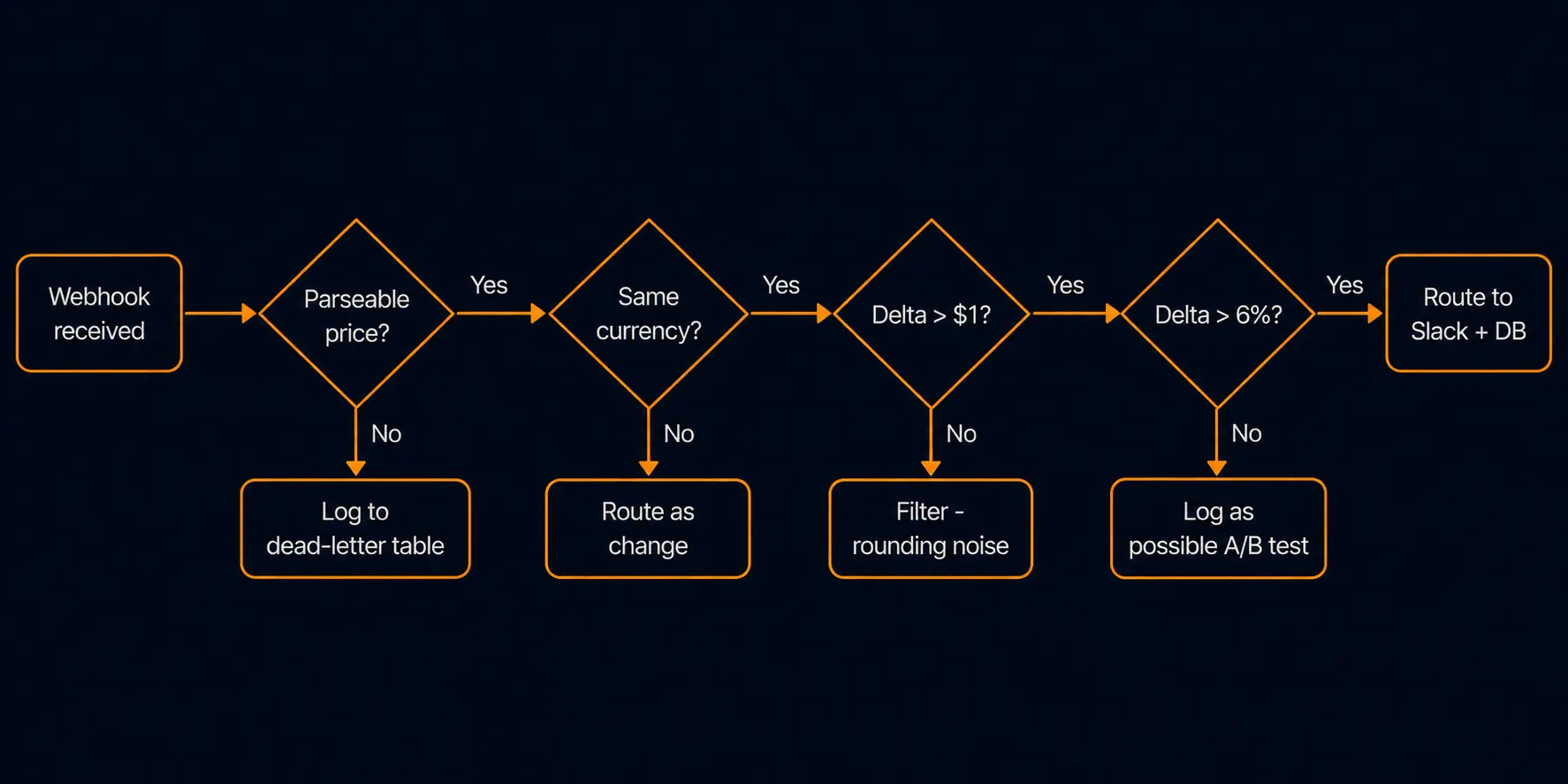
A verified webhook containing "old_value": "$99/month" is not yet actionable. You need to extract the numeric price, handle currency correctly, and filter out changes that aren't real price movements.
This is the section neither the generic change detector tutorial nor the high-level competitor price tracking guide goes deep on. Pricing pages have structural quirks that produce false positives if you don't account for them.
Currency parsing
Price strings from real pricing pages come in formats like:
$99/month$99/moUS$99.0099 USD€89£75 per monthFrom $79
A regex-based parser that handles the common cases:
function parsePrice(priceString) {
  if (!priceString) return null;

  // Extract numeric value (handles commas in thousands: $1,299)
  const numericMatch = priceString.replace(/,/g, '').match(/[\d]+(?:\.\d{1,2})?/);
  if (!numericMatch) return null;

  // Extract currency symbol or code
  const currencyMatch = priceString.match(/([£€$¥₹]|USD|EUR|GBP|CAD|AUD)/);

  return {
    amount: parseFloat(numericMatch[0]),
    currency: currencyMatch ? currencyMatch[1] : 'USD',
    raw: priceString.trim()
  };
}
Always preserve the raw string alongside the parsed amount. If your parser fails on an edge case, you still have the original string to log, alert on manually, or feed through a more capable parser later.
JSON-LD structured data on pricing pages
Many SaaS pricing pages include <script type="application/ld+json"> blocks with Product or Offer schema. This is the most reliable price source on the page because it's structured for machine consumption - no parsing heuristics required.
If you're using a CSS selector that captures the full pricing section HTML, your old_value and new_value will contain this JSON-LD as a string. Extract it before falling back to regex:
function extractJsonLdPrice(htmlString) {
  const jsonLdMatch = htmlString.match(
    /<script[^>]+type="application\/ld\+json"[^>]*>([\s\S]*?)<\/script>/
  );
  if (!jsonLdMatch) return null;

  try {
    const schema = JSON.parse(jsonLdMatch[1]);
    // Handle both single Offer and array of Offers
    const offers = schema.offers
      ? Array.isArray(schema.offers) ? schema.offers : [schema.offers]
      : [];

    return offers.map(o => ({
      name: schema.name || null,
      price: parseFloat(o.price),
      currency: o.priceCurrency || 'USD',
      priceValidUntil: o.priceValidUntil || null
    }));
  } catch {
    return null;
  }
}
The priceValidUntil field is worth logging. A competitor advertising priceValidUntil: "2026-06-30" is running a promotional price that will expire - that context changes how you respond.
Filtering A/B test and rounding noise
This is the biggest source of false positives in pricing page monitoring. Before routing a change downstream, run it through a noise filter:
function isRealPriceChange(oldValue, newValue) {
  const oldPrice = parsePrice(oldValue);
  const newPrice = parsePrice(newValue);

  // Can't parse - treat as a change (don't silently swallow it)
  if (!oldPrice || !newPrice) return true;

  // Same currency required
  if (oldPrice.currency !== newPrice.currency) return true;

  // Ignore rounding differences under $1 (e.g. $99.00 vs $99)
  if (Math.abs(oldPrice.amount - newPrice.amount) < 1.0) return false;

  // Ignore A/B test variants: if change is exactly ±5% it might be a test
  // Log it anyway but don't route to repricing engine
  const pctChange = Math.abs(oldPrice.amount - newPrice.amount) / oldPrice.amount;
  if (pctChange < 0.06) {
    console.warn('Small price change detected - possible A/B test:', { oldPrice, newPrice });
    // Still return true to surface it - let the human decide
  }

  return true;
}
The 5% threshold is a heuristic, not a rule. Some A/B tests use larger deltas. The right approach is to log borderline changes and let a human review them, rather than silently dropping them. Silently dropping a real 5% price cut is worse than getting a false positive alert.
Step 5: Route the Verified Change
You have a verified, parsed, noise-filtered price change. Now route it to where it can actually drive a decision.
Route to Slack
The most common first destination. Include the diff link so the recipient can inspect the change without leaving the notification:
async function notifySlack(payload, oldPrice, newPrice) {
  const direction = newPrice.amount < oldPrice.amount ? 'decreased' : 'increased';
  const delta = Math.abs(newPrice.amount - oldPrice.amount).toFixed(2);

  await fetch(process.env.SLACK_WEBHOOK_URL, {
    method: 'POST',
    headers: { 'Content-Type': 'application/json' },
    body: JSON.stringify({
      text: `Competitor price ${direction} by $${delta}`,
      blocks: [
        {
          type: 'section',
          text: {
            type: 'mrkdwn',
            text: `*Competitor pricing change detected*\n*Monitor:* ${payload.monitor_name}\n*URL:* ${payload.url}\n*Old price:* ${oldPrice.raw}\n*New price:* ${newPrice.raw}\n*Change:* ${direction} by $${delta}`
          }
        },
        {
          type: 'actions',
          elements: [
            {
              type: 'button',
              text: { type: 'plain_text', text: 'View Diff' },
              url: payload.diff_url
            }
          ]
        }
      ]
    })
  });
}
Route to a repricing engine
If you're running an automated repricing system, write the confirmed change to a database table and let your repricing logic poll it:
async function writeToPricingLog(payload, oldPrice, newPrice) {
  await db('competitor_price_events').insert({
    monitor_id: payload.monitor_id,
    competitor_url: payload.url,
    old_amount: oldPrice.amount,
    new_amount: newPrice.amount,
    currency: newPrice.currency,
    old_raw: oldPrice.raw,
    new_raw: newPrice.raw,
    diff_url: payload.diff_url,
    detected_at: payload.checked_at,
    created_at: new Date().toISOString()
  });
}
A separate repricing job can then query this table, compare competitor prices to your own, and apply your pricing rules. Keeping the webhook receiver and the repricing logic decoupled means a slow database write or a repricing rule bug doesn't cause your webhook endpoint to time out and trigger Verid retries.
Wire it all together
Here's the complete processPriceChange function referenced in Step 3:
async function processPriceChange(payload) {
  const { change } = payload;

  const oldPrice = parsePrice(change.old_value);
  const newPrice = parsePrice(change.new_value);

  // Try JSON-LD extraction if raw parse fails
  const oldJsonLd = !oldPrice ? extractJsonLdPrice(change.old_value) : null;
  const newJsonLd = !newPrice ? extractJsonLdPrice(change.new_value) : null;

  const resolvedOld = oldPrice || (oldJsonLd?.[0] ? { ...oldJsonLd[0], raw: change.old_value } : null);
  const resolvedNew = newPrice || (newJsonLd?.[0] ? { ...newJsonLd[0], raw: change.new_value } : null);

  if (!isRealPriceChange(change.old_value, change.new_value)) {
    console.log('Noise filtered - no action:', { old: change.old_value, new: change.new_value });
    return;
  }

  await Promise.all([
    notifySlack(payload, resolvedOld || { raw: change.old_value, amount: 0 }, resolvedNew || { raw: change.new_value, amount: 0 }),
    writeToPricingLog(payload, resolvedOld || { raw: change.old_value, amount: 0, currency: 'USD' }, resolvedNew || { raw: change.new_value, amount: 0, currency: 'USD' })
  ]);
}
For a deeper look at how this fits into a broader competitor intelligence architecture, this post on building a competitor price intelligence system covers the full stack view: where the webhook receiver sits relative to a scraper layer, a diff engine, and a data store.
Deploying and Testing Your Webhook Receiver
Before pointing Verid at your production endpoint, test the signature verification with a local tunnel.
Local testing with a tunnel. Use ngrok or Cloudflare Tunnel to expose your local Express server. Set the resulting HTTPS URL as the webhook endpoint in Verid, trigger a manual check from the dashboard, and confirm your receiver logs received: true.
Test with a crafted payload. To test your signature verification without waiting for a real change, generate a test HMAC locally:
import crypto from 'crypto';

const secret = process.env.VERID_WEBHOOK_SECRET;
const testPayload = JSON.stringify({
  event: 'monitor.change_detected',
  monitor_id: 'test',
  change: { old_value: '$99/month', new_value: '$79/month', selector: '.price' }
});

const sig = crypto.createHmac('sha256', secret).update(testPayload).digest('hex');

// Then POST testPayload with header: 'verid-signature: <sig>'
Production checklist before go-live:
- Webhook endpoint is HTTPS only
- Signing secret is in an environment variable, not hardcoded
- Receiver returns 200 within 5 seconds (do heavy processing async, as shown in Step 3)
- Database writes and Slack calls are in a try/catch - a failed downstream call should not cause your endpoint to return 5xx and trigger retries
- You have at least one monitor running on the 14-day free trial to validate the end-to-end flow before paying for more runs
Frequently Asked Questions
What happens if my webhook endpoint returns a non-200 status?
Verid will retry the delivery with exponential backoff. If your endpoint is down temporarily, you won't miss changes - they'll be delivered once the endpoint recovers. This is why returning 200 immediately and processing async (as shown in Step 3) matters: if your Slack call takes 3 seconds and you process synchronously, an occasional Slack API slowdown will look like endpoint failures to Verid's retry logic.
Can I monitor pricing pages that render prices with JavaScript?
Yes. Verid supports a browser mode that runs a full headless Chromium session before extracting content. Enable it on the monitor's Extraction tab. Browser mode is slower and uses more resources, but it's the only reliable option for prices injected by a client-side framework after the initial HTML load.
How do I handle a competitor with multiple pricing tiers on one page?
Use separate monitors with separate selectors - one per tier. This gives you a distinct webhook payload per plan change, so your routing logic knows whether the competitor changed their entry plan or their enterprise plan without having to parse which tier changed from a combined diff.
What's the difference between the similarity score and a real price change?
The similarity_score in the payload reflects how similar the new content is to the old content at a text level. A score of 0.85 on a pricing page means 85% of the text is the same - which is consistent with a single number changing in a larger block of copy. Use it as a first-pass triage signal, not as a price-change detector. The actual price comparison happens in your parser, not in the score.
My price parser returns null for some competitor pages. What should I do?
Log the raw old_value and new_value strings to a dead-letter table rather than silently dropping them. A null parse result means the page structure is unusual - it could be a currency you haven't handled, a "contact us for pricing" string, or a range like "$79-$129/month". Check the diff link in the payload to inspect the raw change, then extend your parser to handle the new format.
How do I avoid alerting on temporary promotional banners that overlap the pricing selector?
Tighten your CSS selector to target only the plan price element, not the surrounding card. If a promotional banner appears inside .pricing-card, a selector like .pricing-card .plan-price or .pricing-card [data-price] will ignore it. Alternatively, use Verid's content filter to exclude strings matching known promotional patterns before the diff fires.
Does this pipeline work for e-commerce product prices, not just SaaS pricing pages?
The same pipeline works, but e-commerce pages typically have many more price points and higher change frequency. You'll want to store price events in a database (as shown in the writeToPricingLog function) rather than routing everything to Slack, and run aggregation queries to distinguish a temporary sale from a permanent price change. The competitor price tracking guide covers the e-commerce angle in more detail.
Start Monitoring Pricing Pages
The complete pipeline - monitor configured with a tight CSS selector, webhook receiver with signature verification, price parser with noise filtering, and routing to Slack and a database - runs on Verid's 14-day free trial, which includes unlimited monitors and 200 runs, no credit card. After the trial, the Lite plan at $9/month (1,000 runs) covers about 30 pages checked daily; move to a larger plan for more runs if you want hourly checks on a competitor that moves frequently.
Set up your first pricing monitor at verid.dev - no credit card required, under 5 minutes to configure.
About the author

Software Engineer
As a software engineer, Suleman works across Verid’s queueing, scraping and notification layers. His posts turn that day-to-day engineering into practical walkthroughs for anyone automating website change tracking.
More from Suleman →Related posts
Predicate-Based Alerting: Stop Getting Spammed by Your Monitoring Tool
Alert fatigue is a monitoring tool bug. Verid's predicate system fires only when a change meets a condition — price drop, regex match, or threshold crossed.
Read the post →competitor monitoringBest Competitor Pricing Tools in 2026: Compared for Developers and Growth Teams
Compared: the best competitor price tracking software and tools for 2026 — features, pricing, and the API-first pick for developers.
Read the post →competitor monitoringBest Competitor Monitoring Tools for SaaS Companies in 2026
Compare 9 competitor monitoring tools for SaaS teams in 2026, from five-figure CI suites to API-based pricing page monitors like Verid.
Read the post →developer toolsWebhook Best Practices: A Developer's Production Guide
Learn production-ready webhook best practices: HMAC signature verification, async processing, idempotency, retry logic, and monitoring for reliable delivery.
Read the post →