Competitor Price Intelligence: Build a Real System
A competitor price intelligence system sounds straightforward until you actually build one. Then you discover that scraping a price is the easy part. The hard part is everything that comes after: detecting whether the number actually changed, deciding who gets notified and how fast, storing the history so you can spot trends, and keeping all of this running reliably without manual babysitting.
Most engineering teams end up gluing five separate tools together to cover that surface area. This post walks through what each of those tools is, why each seam is a reliability risk, and how a single change-detection platform like Verid can replace the whole stack.
What competitor price intelligence actually requires
Before you write a single line of code, map the problem properly. A production-grade competitor price intelligence system has five distinct concerns:
- Fetching: retrieving the page or API endpoint that contains the price
- Extracting: pulling the price out of the raw HTML or JSON
- Diffing: determining whether the value changed since the last check
- Alerting: notifying the right people through the right channel, with the right latency
- Storing: keeping history so you can analyze trends, not just react to individual changes
Each concern has real engineering depth. Skip any one of them and you get a system that either generates too much noise, misses changes, or produces data you cannot act on.
The 5-tool stack most teams cobble together
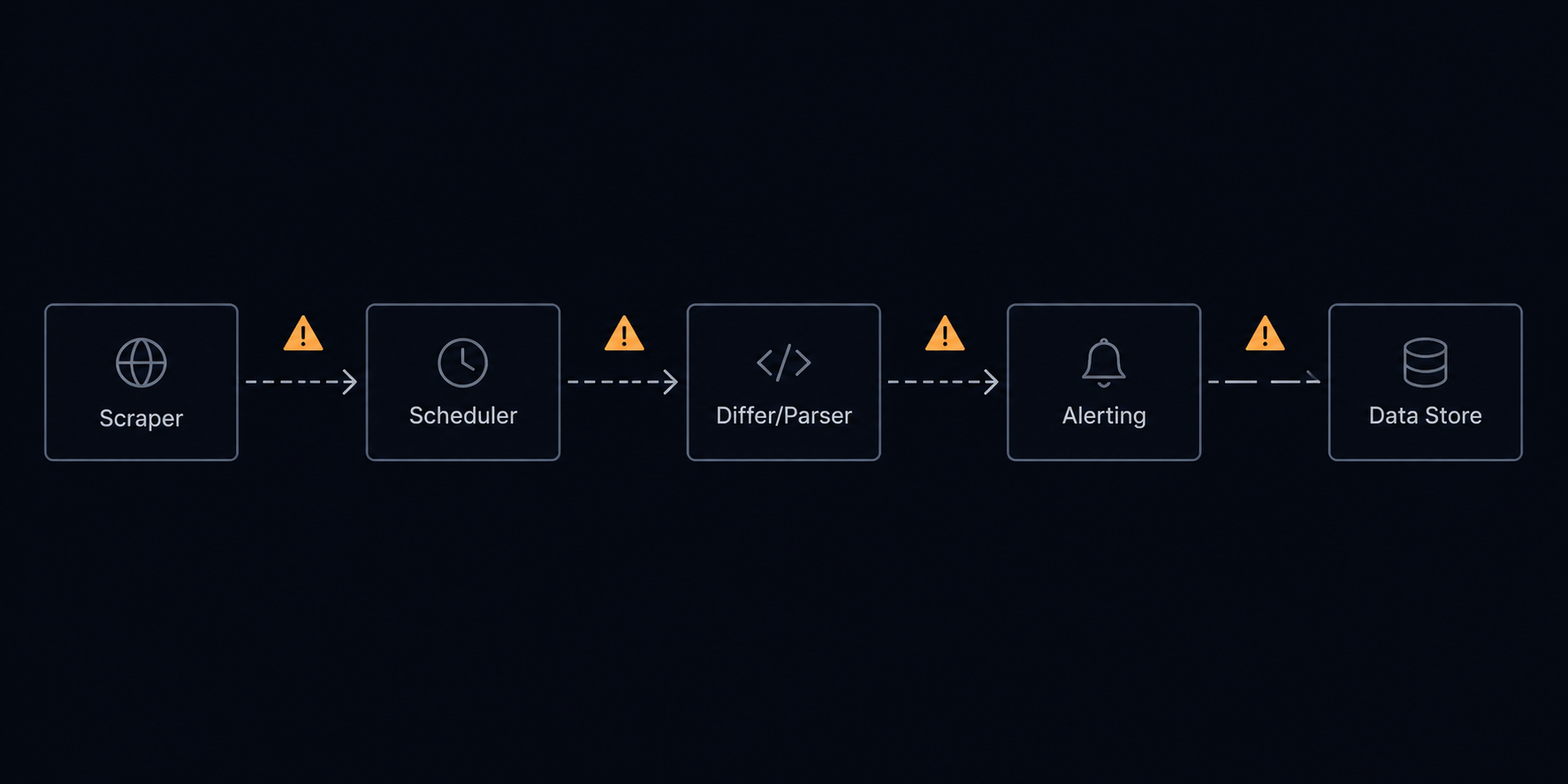
If you search "competitor price tracking" tutorials, most of them stop after step one. They show you how to fire a requests.get() call at a product page and BeautifulSoup your way to a price element. What they don't show you is the operational machinery that makes the output useful.
Here is what the full DIY stack looks like in practice.
Tool 1: A scraper (Python, Scrapy, Playwright)
The scraper fetches pages and extracts values. For static HTML this is simple. For JavaScript-rendered pages — which covers most modern ecommerce and SaaS pricing pages — you need a headless browser. Playwright or Puppeteer adds memory overhead per concurrent page, proxy management complexity, and fingerprinting risk.
You also need to handle: rate limiting, rotating user agents, captchas, session cookies for authenticated pages, and graceful retry logic. These are all solvable, but each one is a maintenance surface.
Tool 2: A scheduler (cron, Celery, Airflow)
Your scraper needs to run on a schedule. For a handful of competitors this is a cron job. At 50+ targets with different check frequencies, you need a proper task queue. Celery + Redis or a managed service like Airflow. Now you have infrastructure to run, monitor, and scale. A stuck worker at 3am means stale data until someone notices.
Tool 3: A differ / parser
Raw HTML changes constantly — ads load, session tokens rotate, recommendations shuffle. Your differ needs to be selective: strip noise, isolate the price field, and compare only the semantic value. If your differ is too broad, every page load fires an alert. Too narrow, and real changes slip through.
This is where most homebrew systems break. A CSS selector that worked last month breaks when the retailer redesigns their product page. Now your "price changed" alerts go silent and no one knows until a sales call surfaces a discrepancy.
Tool 4: An alerting layer (PagerDuty, Slack webhooks, email, custom webhooks)
A price change at 2am on a Friday is only useful if it reaches the right person fast enough to act on it. You need: configurable channels per monitor, deduplication so a single price change doesn't trigger 40 Slack messages, throttling for noisy periods, and a way to route different severity levels to different destinations.
Wiring this yourself means managing Slack app tokens, SMTP relay configuration, and webhook retry logic. If your webhook endpoint is down, does the alert retry or get silently dropped?
Tool 5: A data store + history layer (PostgreSQL, BigQuery, a dashboard)
Spot-checking individual price changes isn't enough for competitive strategy. You need historical data to answer questions like: how often does this competitor discount? Do they match our prices within 24 hours? What's the average time between price reductions?
That requires a persistent store, a schema that can handle multiple products and competitors efficiently, and some kind of query interface. Building and maintaining this alongside all four other tools is a full-time engineering project.
The real cost of the 5-tool stack
Each of these tools is independently reasonable. The problem is the seams. Every handoff between tools is a reliability risk, a monitoring gap, and a debugging surface. When something breaks — and something always breaks — you're tracing through five separate systems to find the root cause.
The teams that feel this most acutely aren't large enterprises with dedicated data engineering squads. They're growth engineers at mid-size ecommerce companies who need competitor price tracking working reliably while they focus on other things.
How to design the system properly
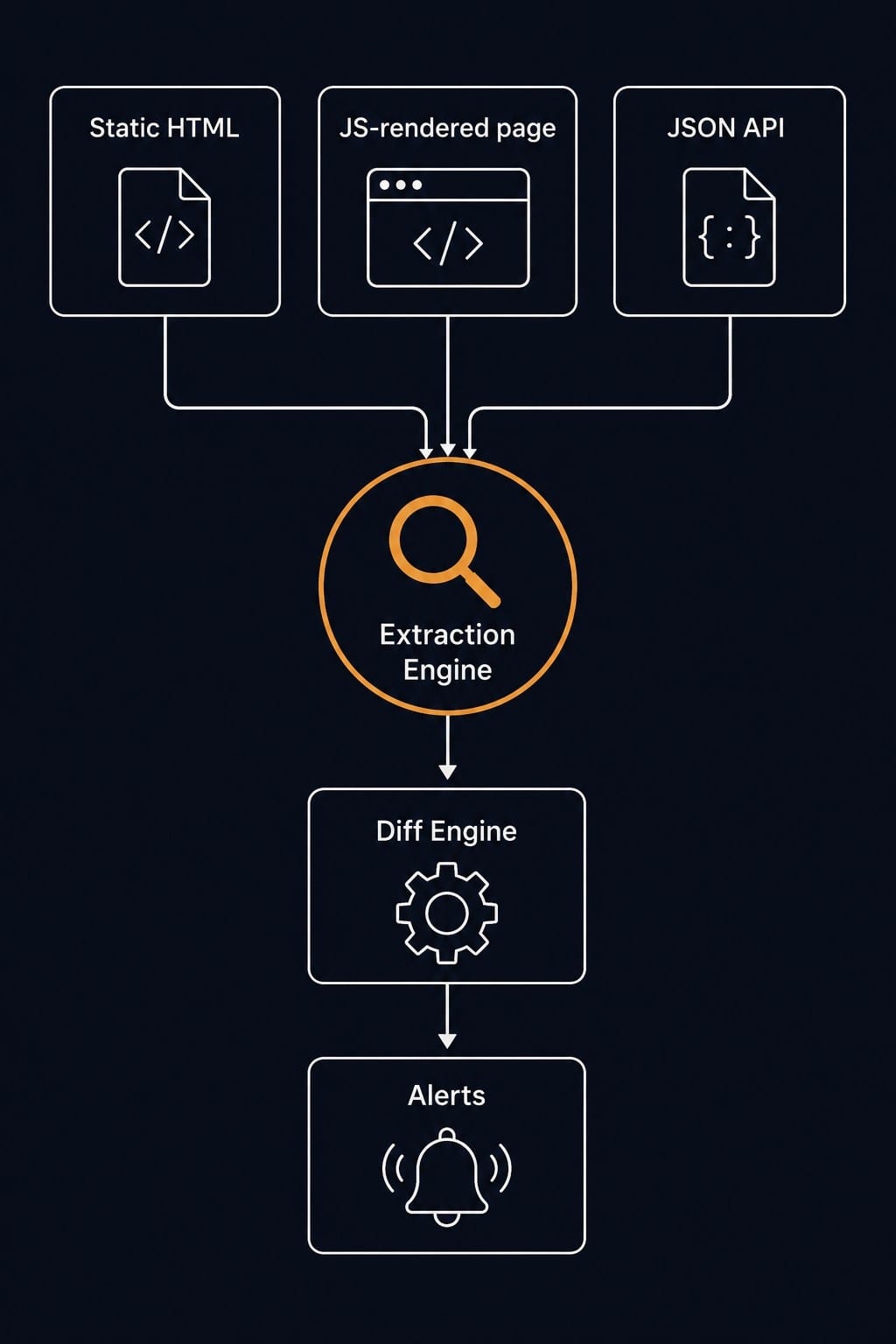
Whether you build or buy, the architecture of a sound competitor price intelligence system looks the same.
Define your monitoring targets precisely
Start with a spreadsheet: competitor URL, the CSS selector or JSON path for the price field, check frequency, and who needs to be notified. Be specific about what counts as a price change worth alerting on. A price that fluctuates by ±$0.01 due to currency rounding is not the same signal as a 20% discount.
For ecommerce targets, you'll typically monitor:
- The primary product price (the number shown to logged-out visitors)
- The sale price (often a separate element)
- Shipping cost (relevant for total cost of ownership comparisons)
- Bundle and quantity-break pricing
For SaaS competitor monitoring, you're watching pricing page copy, tier feature lists, and promotional banners. That's a different extraction problem — text fields rather than numeric values — but the underlying infrastructure is the same.
Choose your extraction strategy by page type
Static HTML pages are the simplest case. A CSS selector against the rendered HTML is reliable if the page structure is stable. XPath gives you more precision for deeply nested elements.
JavaScript-rendered pages require a headless browser. This is the majority of modern ecommerce. The browser must execute scripts, wait for the price element to appear in the DOM, then extract. This is 3–10x slower per check than static extraction and significantly more expensive to run at scale.
JSON APIs are the most reliable source when available. Many ecommerce platforms expose product data via internal APIs that the frontend calls — /__api/products/12345 type endpoints. Monitoring the JSON field directly is faster, cheaper, and more stable than HTML scraping. Verid's JSON API field monitoring covers exactly this pattern.
Image-based prices (prices rendered in product images) require OCR and are outside the scope of most monitoring tools, including Verid.
Set check frequency based on competitive dynamics
Not every competitor needs minute-level monitoring. A few practical rules:
- Flash sales / promotional periods (Black Friday, Prime Day competitors): 5–15 minute checks
- Dynamic pricing competitors (airlines, hotels, Amazon marketplace sellers): 15–30 minute checks
- Standard SaaS competitors: hourly or daily is sufficient, pricing pages change infrequently
- Compliance / MAP enforcement: daily snapshots with full history are more important than real-time alerts
The Verid pricing page shows this directly - every plan can check as often as every minute and plans differ only by monthly runs, so you can match monitoring frequency to competitive intensity without overpaying.
Build alerting that doesn't cry wolf
The single biggest failure mode in price intelligence systems is alert fatigue. If every minor fluctuation triggers a notification, teams start ignoring the channel. Then a real 30% price cut goes unnoticed for three days.
Good alerting rules:
- Threshold-based: only alert if the change exceeds X% or $Y
- Directional: price drops and price increases are different signals — route them differently
- Deduplication window: if the same price change fires across 5 product variants, consolidate into one notification
- Cooldown period: don't re-alert on the same monitor within N hours unless the price changes again
Webhooks give you the most flexibility here. A webhook payload containing the old value, new value, percentage change, and a link to the historical diff can feed into any downstream system — Slack, PagerDuty, an internal dashboard, a repricing engine.
Where Verid collapses the 5-tool stack
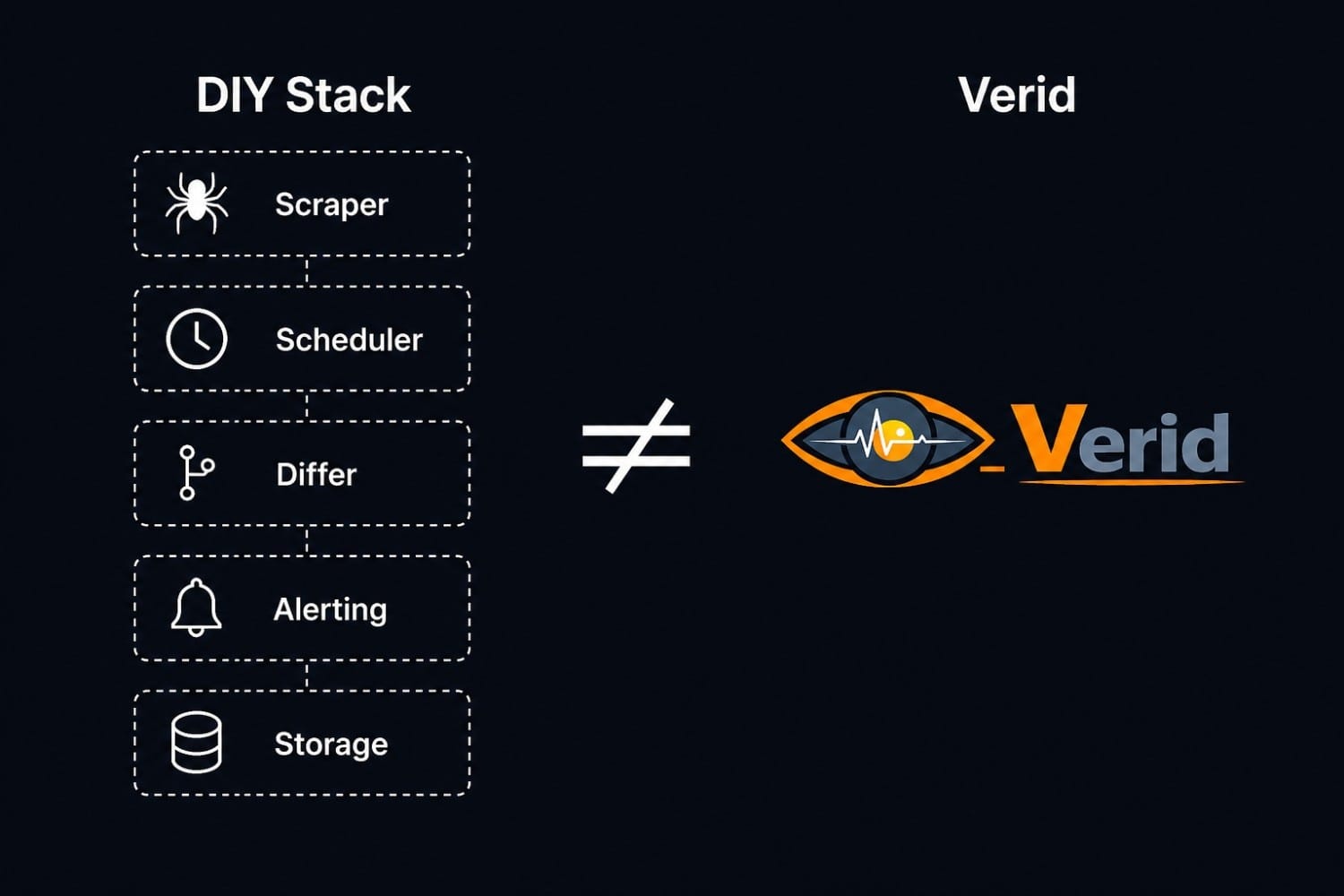
Verid is a developer-first web change-detection platform. For competitor price intelligence, it replaces all five layers described above.
Fetching and browser rendering: Verid handles both static and JavaScript-rendered pages. You specify which mode per monitor. No headless browser infrastructure to run, scale, or debug.
Extraction: use CSS selectors, XPath, or JSON path expressions to isolate exactly the field you care about. The diff engine compares only that extracted value, not the full page. So a competitor redesigning their product page doesn't break your price monitor — the selector either still resolves or you get a clear extraction error, not silent garbage data.
Diffing: the platform does the comparison. You define what constitutes a change worth notifying on. Text changes, numeric threshold changes, presence/absence of elements.
Alerting: Slack, email, and webhooks are built in. Webhook payloads carry the old value, new value, and a direct link to the diff view. You can pipe this into any downstream system without writing webhook retry logic. The competitor ad and landing copy monitoring use case shows how this same alerting layer works for non-numeric changes like promotional copy.
History and audit trail: every check is logged. You can view the full change history per monitor, see exactly when a price changed, and export or query that data.
For teams running MAP pricing compliance programs — tracking whether resellers are honoring your minimum advertised price — this history layer is critical. MAP pricing compliance monitoring requires a persistent, auditable record, not just real-time alerts.
Setting up a competitor price monitor in Verid
The setup is under five minutes for a standard product page:
- Create a new monitor and paste the product URL
- Select "Browser" mode if the page is JavaScript-rendered, "HTTP" for static pages
- Add a CSS selector pointing to the price element (e.g.,
[data-price],.product-price__amount) - Set check frequency and notification channels
- Save - Verid runs the first check immediately and establishes a baseline
From that point forward, Verid polls on your schedule, diffs the extracted value, and fires your configured alerts on change. No cron jobs, no differ code, no webhook endpoints to maintain.
For Shopify-based competitors, the Shopify product stock and price monitoring use case has specific selector patterns that work reliably across Shopify storefronts.
Scaling to a full competitor intelligence program
Once the basic price monitor is running, a mature SaaS competitor monitoring or ecommerce intelligence program typically adds:
- Pricing page copy changes: Verid monitors text diffs on competitor feature/pricing pages, alerting when a competitor adds a new tier, changes feature inclusions, or updates positioning copy
- Job listings: a competitor posting 10 ML engineer roles is a product signal. Job listing monitoring extracts this without a separate pipeline
- Tech stack changes: headers and script tags reveal CDN switches, analytics tools, A/B testing platforms
- Stock status: out-of-stock events at competitors are pricing and inventory signals
Each of these runs through the same monitoring infrastructure. One platform, one alert routing config, one history store.
Build vs. buy: when DIY still makes sense
The DIY 5-tool stack is the right call in two scenarios:
You have highly customized extraction needs. If your competitor intelligence requires OCR, audio parsing, login-gated pages with complex session management, or multi-step navigation flows, a general-purpose tool may not cover it. Custom scrapers can handle edge cases that platforms cannot.
You're operating at enormous scale with dedicated data engineering. If you're monitoring millions of SKUs across hundreds of retailers, you'll eventually need infrastructure that's tuned to your specific data model. The platforms that make sense at 500 monitors don't always make sense at 500,000.
For everyone else — and for most engineering teams building competitive intelligence for the first time — the operational cost of maintaining the 5-tool stack exceeds the cost of a purpose-built platform, even accounting for platform subscription fees. If your extraction needs are method-specific, Verid's extraction guides walk through CSS selector, XPath, JSONPath, and LLM-based approaches in detail.
Frequently Asked Questions
What is competitor price intelligence?
Competitor price intelligence is the systematic tracking and analysis of a competitor's pricing — including product prices, discount events, tier structures, and promotional offers — with the goal of informing your own pricing and sales strategy. A working system fetches competitor pages on a schedule, extracts the price data, detects changes, stores history, and delivers alerts through the appropriate channels.
How often should I check competitor prices?
It depends on your competitive environment. For dynamic-pricing competitors (marketplaces, airlines, hotels), 5–15 minute checks during active selling periods make sense. For SaaS pricing pages that change infrequently, daily or hourly checks are sufficient and cheaper. Match check frequency to the speed at which a price change requires a response from your team.
Do I need a headless browser to scrape competitor prices?
For most modern ecommerce and SaaS sites, yes. Prices are often rendered client-side via JavaScript — a plain HTTP request returns a skeleton HTML page with no price in it. A headless browser (Playwright, Puppeteer) executes the page's JavaScript, waits for the price element to appear, and then extracts it. Verid handles this automatically in "browser mode" — you don't need to run headless browser infrastructure yourself.
What's the difference between competitor price tracking and price intelligence?
Competitor price tracking refers to the real-time or near-real-time monitoring of current prices. Price intelligence is broader: it includes the historical trend data, analysis of discount cadences, pattern recognition (e.g., this competitor always discounts 20% on Tuesdays before a launch), and the strategic interpretation of that data. A tracking system that stores history enables intelligence; a system that only alerts on current changes does not.
Will a competitor's website block my price monitor?
Possibly. Public pricing pages are generally accessible, but aggressive scraping can trigger rate limits, CAPTCHA challenges, or IP blocks. Using realistic request headers, randomized intervals, and a residential or datacenter proxy pool mitigates most blocks. Verid rotates headers and manages request pacing on your behalf; for heavily protected targets, a dedicated proxy service may still be necessary.
How do I monitor prices on JavaScript-heavy pages without coding?
Use a browser-mode monitor in Verid. Paste the URL, select browser rendering, add the CSS selector for the price element, and set a schedule. Verid handles the headless browser execution, DOM waiting, extraction, and diffing. No code required beyond writing a CSS selector, which most engineers can do in under a minute with browser DevTools.
Can I track competitor prices on Shopify stores?
Yes. Shopify's product page HTML is consistent across storefronts — the price element is typically at .price__current or [data-product-price], though theme variations exist. Verid's Shopify stock and price monitoring use case covers this with tested selector patterns. For stock status alongside price, you can monitor both fields with a single monitor using a compound selector strategy.
About the author

Software Engineer
As a software engineer, Suleman works across Verid’s queueing, scraping and notification layers. His posts turn that day-to-day engineering into practical walkthroughs for anyone automating website change tracking.
More from Suleman →Related posts
Monitor Competitor Pricing Pages with Webhooks (Step-by-Step)
Set up a webhook receiver that fires on real price changes: verified payload, currency parsing, noise filtering, and routing to Slack or a repricing engine.
Read the post →competitor monitoringBest Competitor Pricing Tools in 2026: Compared for Developers and Growth Teams
Compared: the best competitor price tracking software and tools for 2026 — features, pricing, and the API-first pick for developers.
Read the post →web scrapingWeb Scraping Legality in 2026: What Every Developer Should Know Before Writing a Single Line
Is web scraping legal in 2026? Learn what the law actually says about public data, CFAA, GDPR, robots.txt, and how to build compliant data workflows.
Read the post →developer toolsHow to Monitor GitHub Releases and Get Instant Slack or Discord Alerts
If you maintain or depend on open-source projects, you've almost certainly been burned by a release you missed. A breaking change ships in a framework you depend on, your CI starts failing on Monday morning, and you find out the fix landed three days ago. The problem isn't that the release happened quietly: it's that you had no reliable way to catch it. This guide covers how to monitor any GitHub repository for new releases and route a structured alert to Slack or Discord the moment a stable ve
Read the post →