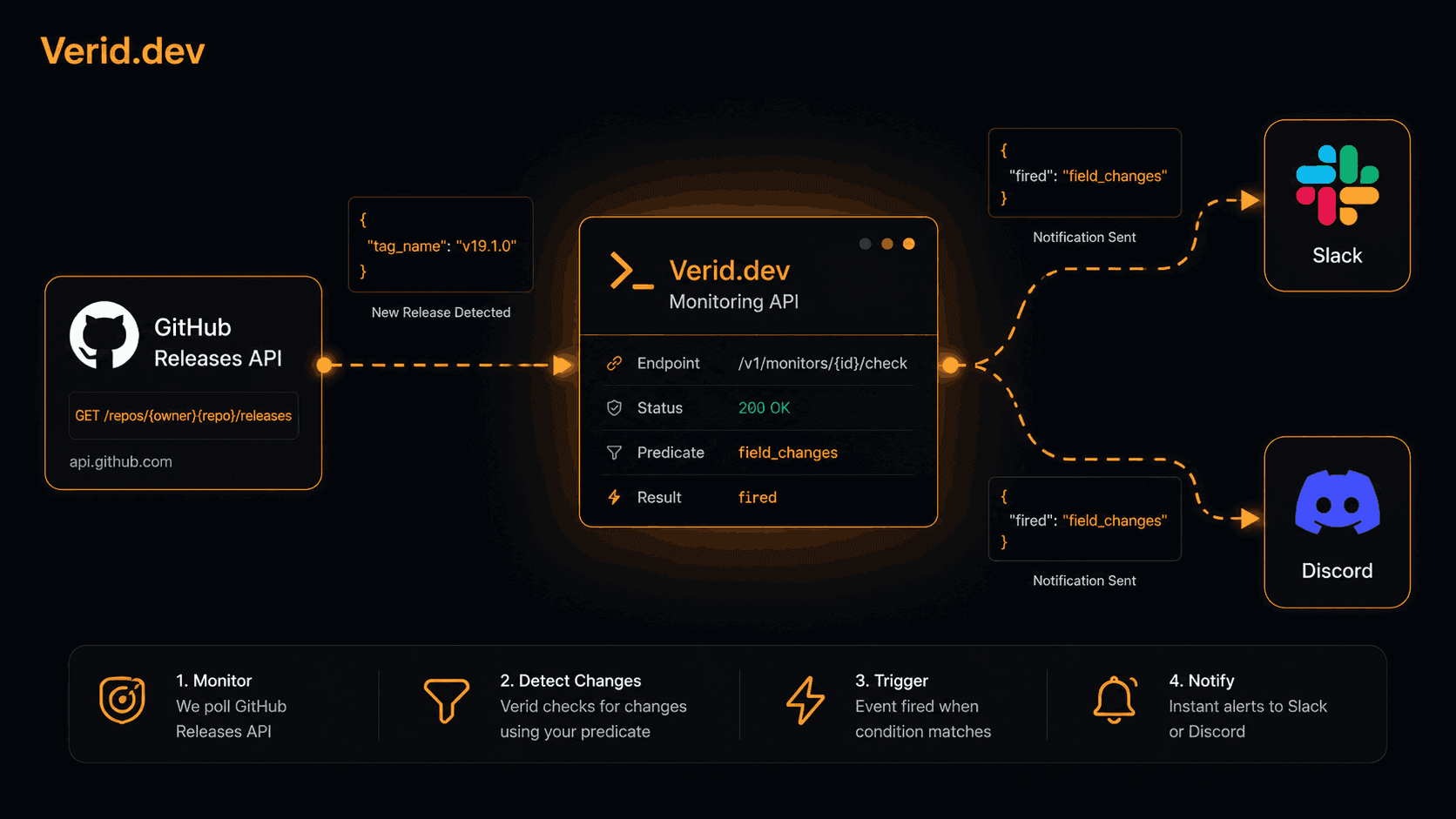
How to Monitor GitHub Releases and Get Instant Slack or Discord Alerts
If you maintain or depend on open-source projects, you've almost certainly been burned by a release you missed. A breaking change ships in a framework you depend on, your CI starts failing on Monday morning, and you find out the fix landed three days ago. The problem isn't that the release happened quietly: it's that you had no reliable way to catch it.
This guide covers how to monitor any GitHub repository for new releases and route a structured alert to Slack or Discord the moment a stable version ships, without needing admin access to the repo and without building your own polling infrastructure.
1. Why GitHub's Built-in Notifications Fall Short
GitHub gives you two options for following a repo: Watch and Subscribe to releases. Watch sends you a notification for every issue comment, PR review, and commit. Even the "releases only" subscription still mixes in release candidates and prereleases with stable versions, which creates alert fatigue fast.
The other common approach is the GitHub Releases RSS feed at https://github.com/{owner}/{repo}/releases.atom. It works, but threading an Atom feed into Slack, a Slack bot, or a Discord webhook requires glue code on your end. Someone has to write the poller, maintain the parser, and keep the delivery logic alive.
The third option, GitHub's repository webhook events, requires admin access to the target repository. That rules it out entirely for third-party or upstream projects you don't own.
None of these approaches let you express a rule like: "fire exactly once per stable release, include the before and after version, and send a signed payload I can verify."
2. Your Options for Release Monitoring
Here's a quick comparison of the common approaches:
| Approach | Requires repo admin | Filters prereleases | Structured payload | Delivery to Slack or Discord |
|---|---|---|---|---|
| GitHub Watch (releases) | No | No | No | No |
| GitHub Releases RSS | No | No | No | DIY |
| GitHub repo webhook | Yes | Manual | Partial | DIY |
| Self-hosted poller | No | Manual | You write it | DIY |
| Verid API monitor | No | Yes (predicate) | Yes, field-level diff | Yes, built-in |
The self-hosted poller approach from repos like github-release-monitor and github-releases-notifier covers the gap partially, but you're still responsible for hosting, state management, signature verification, and retry logic when your endpoint is down.
Verid closes the full loop: poll, extract, diff, evaluate a predicate, and deliver a signed payload with automatic retries.
3. How the GitHub Releases API Works
GitHub's public REST API exposes the latest release for any repository at a stable endpoint:
GET https://api.github.com/repos/{owner}/{repo}/releases/latestThis endpoint is unauthenticated and free. It returns a JSON object with the fields you actually care about:
{
  "tag_name": "v19.1.0",
  "name": "v19.1.0",
  "published_at": "2026-06-10T14:22:00Z",
  "prerelease": false,
  "html_url": "https://github.com/facebook/react/releases/tag/v19.1.0"
}
One important note: /releases/latest always returns the most recent non-prerelease, non-draft release by definition. If you want to monitor release candidates or betas too, you'd point at /repos/{owner}/{repo}/releases and watch the first array element. We'll cover that in the filtering section.
GitHub rate-limits unauthenticated requests to 60 per hour per IP. One monitor per repo running hourly is well within budget. If you're tracking many repos simultaneously, pass an authenticated token via a custom Authorization header on your monitor to get 5,000 requests per hour instead.
See the full GitHub REST API documentation for releases for the complete field reference.
4. Setting up a GitHub Release Monitor with Verid
Verid is a developer-first web change detection API. You give it a URL, an extraction config, a predicate (the rule for when to fire), and a delivery target. Verid handles polling, state, diffing, and delivery including retries and a dead-letter queue.
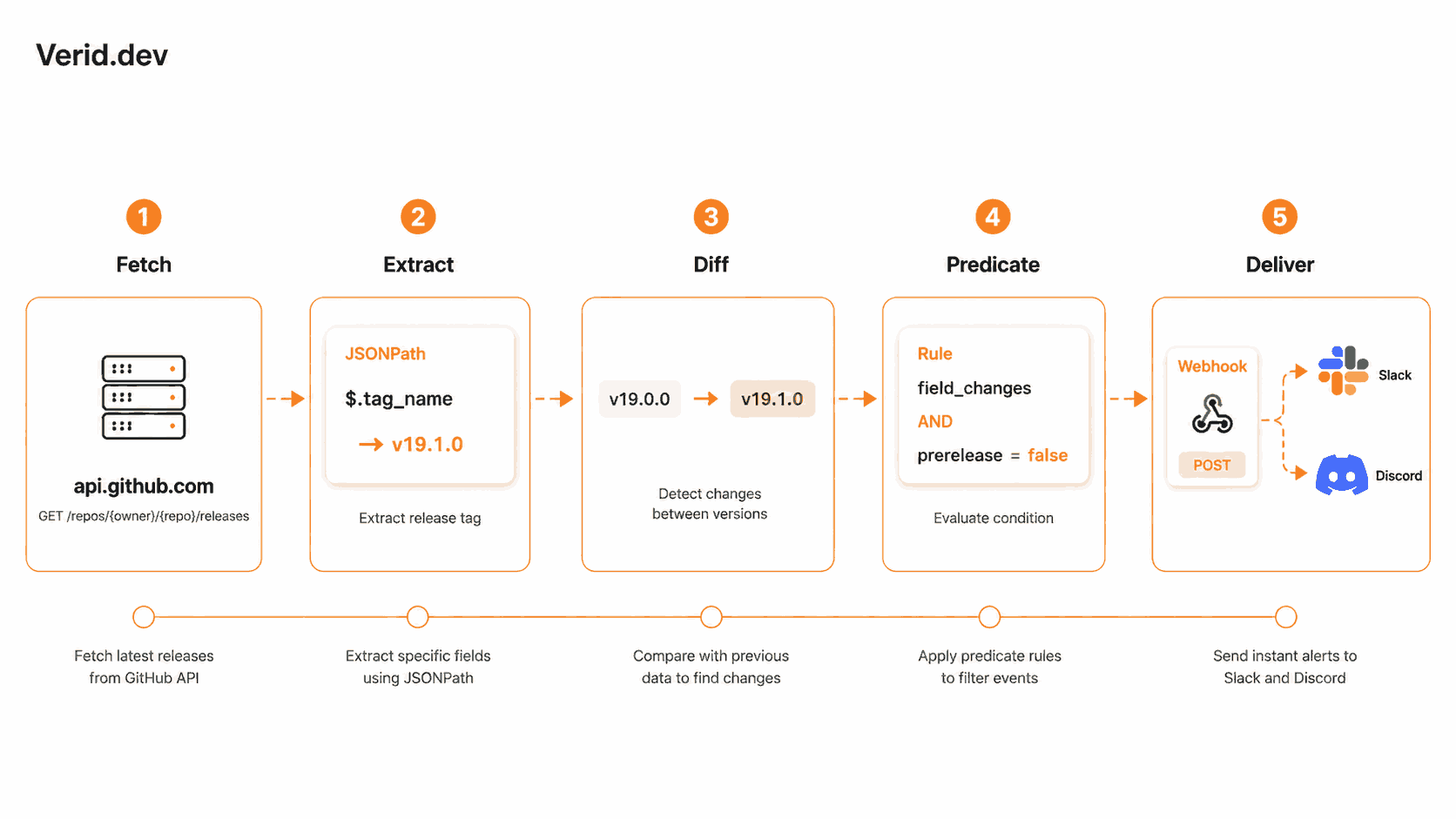
Step 1: Get an API key. Sign up at verid.dev and grab your key from the dashboard. Keys start with vrd_.
Step 2: Create a monitor. Here's the minimal API call to start watching React's releases:
curl -X POST https://api.verid.dev/v1/monitors \
  -H "Authorization: Bearer vrd_your_api_key" \
  -H "Content-Type: application/json" \
  -d '{
    "name": "React stable releases",
    "url": "https://api.github.com/repos/facebook/react/releases/latest",
    "schedule_interval_seconds": 3600,
    "extract_config": {
      "method": "json_path",
      "fields": {
        "tag_name": "$.tag_name",
        "name": "$.name",
        "published_at": "$.published_at",
        "prerelease": "$.prerelease",
        "html_url": "$.html_url"
      }
    },
    "diff_predicate": {
      "type": "field_changes",
      "field": "tag_name"
    },
    "deliveries": [
      {
        "type": "webhook",
        "url": "https://your-app.com/webhooks/verid"
      }
    ]
  }'
When tag_name changes, Verid fires a POST to your endpoint with the before and after values:
{
  "id": "del_01H...",
  "version": "2026-05-01",
  "monitor_id": "9b1c...",
  "fired_at": "2026-06-25T09:31:00Z",
  "diff": {
    "fields_changed": ["tag_name", "name", "published_at", "html_url"],
    "before": {
      "tag_name": "v19.0.0",
      "html_url": "https://github.com/facebook/react/releases/tag/v19.0.0"
    },
    "after": {
      "tag_name": "v19.1.0",
      "html_url": "https://github.com/facebook/react/releases/tag/v19.1.0"
    }
  }
}
That's your trigger. From here you can forward this payload to Slack, Discord, a PagerDuty runbook, or anything else.
Verid also provides a ready-made template for this exact pattern. Using the template skips the manual extraction config:
curl -X POST https://api.verid.dev/v1/monitors/from-template/github-new-release \
  -H "Authorization: Bearer vrd_your_api_key" \
  -H "Content-Type: application/json" \
  -d '{
    "name": "Next.js stable releases",
    "url": "https://api.github.com/repos/vercel/next.js/releases/latest",
    "deliveries": [
      { "type": "slack", "webhookUrl": "https://hooks.slack.com/services/..." }
    ]
  }'
For the step-by-step walkthrough with every field explained, see the GitHub Release Tracker recipe in the Verid docs.
5. Sending Alerts to Slack
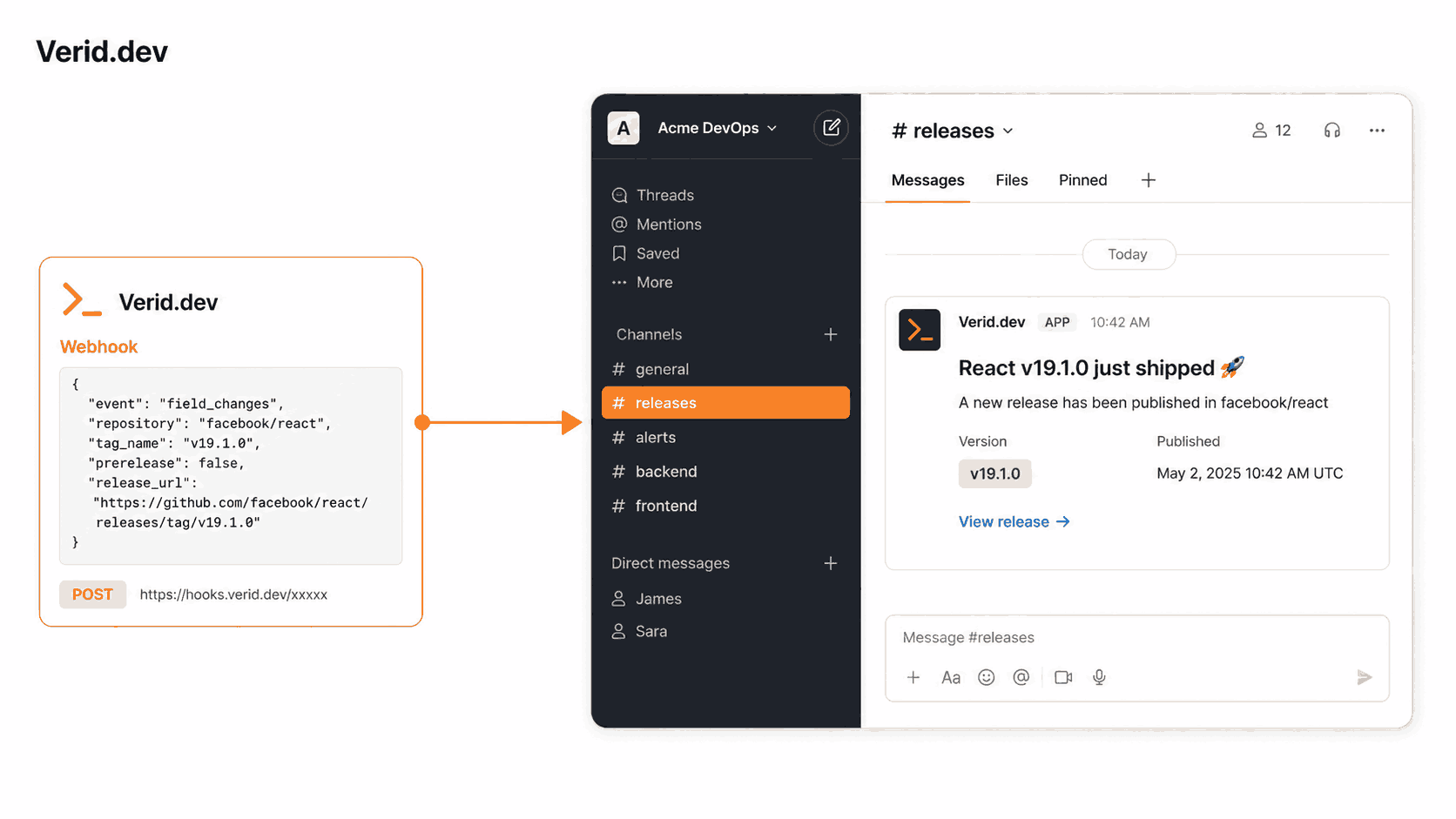
Verid supports native Slack delivery. Add a Slack incoming webhook URL to your monitor's deliveries array:
"deliveries": [
  {
    "type": "slack",
    "webhookUrl": "https://hooks.slack.com/services/T.../B.../xxx"
  }
]
Verid posts the before/after diff directly into the channel. The Slack message you receive includes the monitor name, the fields that changed, and the new values.
If you need a custom message format (for example, a rich Block Kit card with a button linking to the changelog), use the webhook delivery type and build your Slack message server-side from the diff payload. Here's a minimal Express handler that formats and forwards to Slack:
import express from 'express';
import { createHmac, timingSafeEqual } from 'crypto';

const app = express();
app.use(express.json({ verify: (req, _res, buf) => { (req as any).rawBody = buf; } }));

function verifySignature(header: string, rawBody: Buffer, secret: string): boolean {
  const parts = Object.fromEntries(header.split(',').map(p => p.split('=')));
  const ts = parseInt(parts['t'] ?? '0', 10);
  const sig = parts['v1'];
  if (!ts || !sig) return false;
  if (Math.abs(Date.now() / 1000 - ts) > 300) return false;
  const expected = createHmac('sha256', secret).update(`${ts}.${rawBody}`).digest('hex');
  return timingSafeEqual(Buffer.from(expected, 'hex'), Buffer.from(sig, 'hex'));
}

app.post('/webhooks/verid', async (req, res) => {
  const header = req.headers['verid-signature'] as string;
  if (!verifySignature(header, (req as any).rawBody, process.env.WEBHOOK_SECRET!)) {
    return res.status(401).send('Invalid signature');
  }

  const { diff, monitor } = req.body;
  const after = diff.after;

  await fetch('https://hooks.slack.com/services/...', {
    method: 'POST',
    headers: { 'Content-Type': 'application/json' },
    body: JSON.stringify({
      blocks: [
        {
          type: 'section',
          text: {
            type: 'mrkdwn',
            text: `*${monitor.name}* just shipped *${after.tag_name}*`
          },
          accessory: {
            type: 'button',
            text: { type: 'plain_text', text: 'View release' },
            url: after.html_url
          }
        }
      ]
    })
  });

  res.sendStatus(200);
});
Set up your Slack incoming webhook from the Slack API dashboard.
6. Sending Alerts to Discord
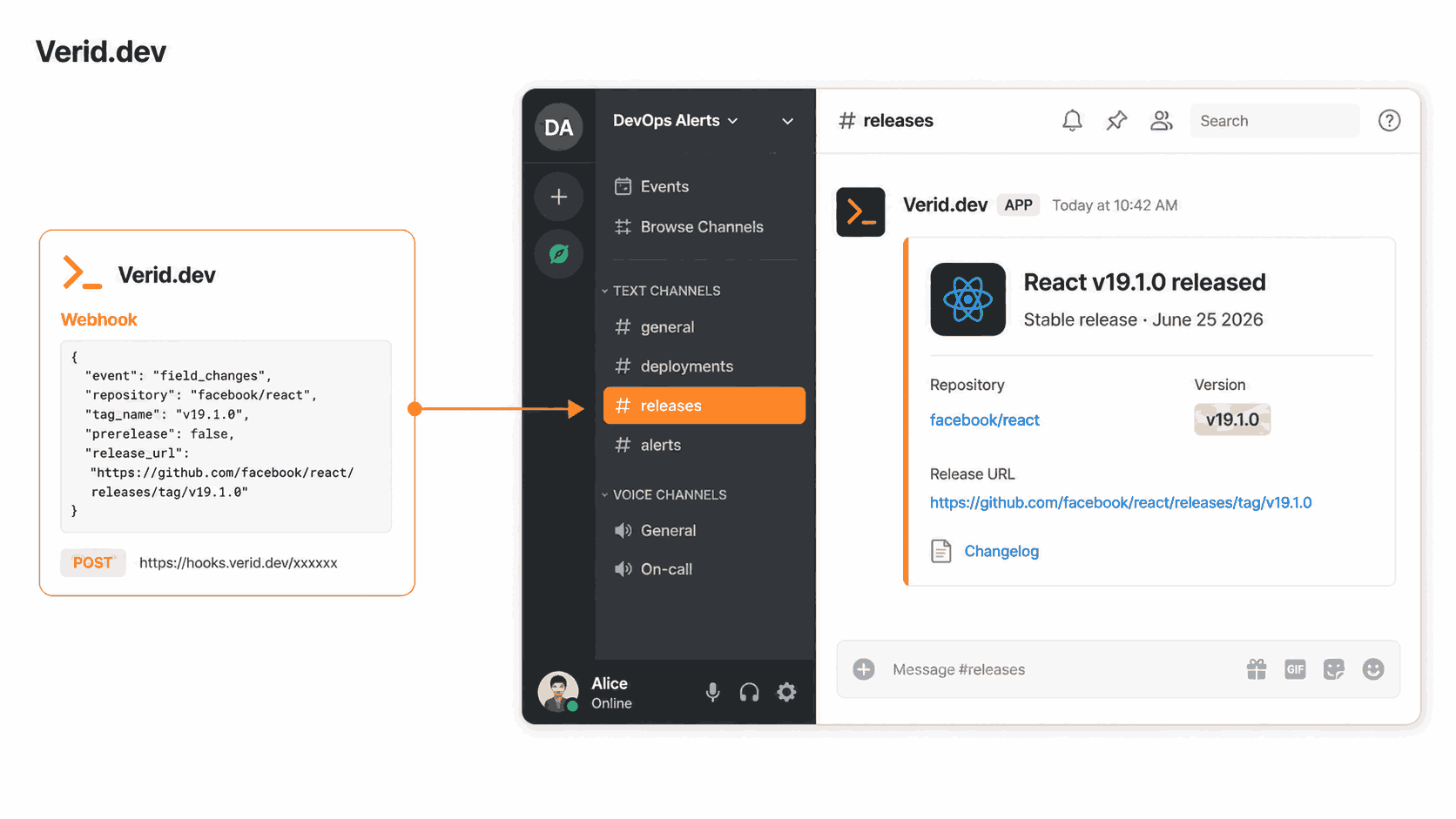
Discord supports native Slack-compatible webhooks. Add a Discord delivery the same way:
"deliveries": [
  {
    "type": "discord",
    "webhookUrl": "https://discord.com/api/webhooks/..."
  }
]
For a richer embed, receive the Verid webhook and post an embed to Discord directly using the Discord Webhooks API:
app.post('/webhooks/verid', async (req, res) => {
  // ... signature verification (same as above)

  const { diff, monitor } = req.body;
  const after = diff.after;

  await fetch('https://discord.com/api/webhooks/YOUR_ID/YOUR_TOKEN', {
    method: 'POST',
    headers: { 'Content-Type': 'application/json' },
    body: JSON.stringify({
      embeds: [
        {
          title: `${monitor.name}: ${after.tag_name} released`,
          url: after.html_url,
          color: 0xd38a45,
          fields: [
            { name: 'Previous version', value: diff.before.tag_name, inline: true },
            { name: 'New version', value: after.tag_name, inline: true },
            { name: 'Published', value: after.published_at, inline: false }
          ],
          timestamp: new Date().toISOString()
        }
      ]
    })
  });

  res.sendStatus(200);
});
7. Using the Node.js SDK
If you prefer TypeScript over raw curl calls, the official @verid.dev/sdk package covers the full API:
npm install @verid.dev/sdkimport { VeridClient } from '@verid.dev/sdk';
const client = new VeridClient({ apiKey: process.env.VERID_API_KEY! });
await client.monitors.create({
name: 'Next.js stable releases',
url: 'https://api.github.com/repos/vercel/next.js/releases/latest',
schedule_interval_seconds: 3600,
extract_config: {
method: 'json_path',
fields: {
tag_name: '$.tag_name',
name: '$.name',
published_at: '$.published_at',
prerelease: '$.prerelease',
html_url: '$.html_url',
},
},
diff_predicate: {
type: 'composite',
operator: 'AND',
conditions: [
{ type: 'field_changes', field: 'tag_name' },
{ type: 'field_equals', field: 'prerelease', value: false },
],
},
deliveries: [
{ type: 'slack', webhookUrl: process.env.SLACK_WEBHOOK_URL! },
],
});See the Verid API reference for the full list of monitor options.
8. Filtering Out Prereleases and Tag Noise
The /releases/latest endpoint already skips prereleases by design, so a simple field_changes on tag_name gives you stable-only alerts with no extra work. That said, there are two cases where you'll want the composite predicate:
Case 1: You're pointing at /releases (the list endpoint) to catch RCs and betas too. In this case, use the composite predicate to split your alerts by type:
{
  "type": "composite",
  "operator": "AND",
  "conditions": [
    { "type": "field_changes", "field": "tag_name" },
    { "type": "field_equals", "field": "prerelease", "value": false }
  ]
}
Case 2: A repo uses a tag scheme that includes noise like nightly-2026-06-25 alongside v2.1.0. Pair a regex predicate on tag_name to filter to semver-shaped tags only. Verid's predicate documentation covers the field_matches_regex type.
A few things to keep in mind about tag formats: repositories use v1.2.3, 1.2.3, and release-1.2.3 interchangeably. Treat tag_name as an opaque string in your downstream code rather than trying to parse it.
9. Verifying Webhook Signatures
Every Verid webhook delivery carries a Verid-Signature header. The header contains a timestamp (t) and an HMAC-SHA256 signature (v1) separated by commas. You should always verify it before processing the payload.
Here's the verification logic in TypeScript:
import { createHmac, timingSafeEqual } from 'crypto';

function verifyVeridSignature(
  header: string,
  rawBody: string | Buffer,
  secret: string
): boolean {
  const parts = Object.fromEntries(header.split(',').map(p => p.split('=')));
  const ts = parseInt(parts['t'] ?? '0', 10);
  const sig = parts['v1'];

  if (!ts || !sig) return false;

  // Reject payloads older than 5 minutes to prevent replay attacks
  if (Math.abs(Date.now() / 1000 - ts) > 300) return false;

  const expected = createHmac('sha256', secret)
    .update(`${ts}.${rawBody}`)
    .digest('hex');

  return timingSafeEqual(Buffer.from(expected, 'hex'), Buffer.from(sig, 'hex'));
}
Two things to get right here: pass the raw request body (not the parsed JSON object), and use timingSafeEqual instead of string comparison to prevent timing attacks.
The Verid webhooks documentation has equivalent snippets in Python, Ruby, Go, and PHP.
10. Common Mistakes
Polling too frequently on unauthenticated requests. GitHub's unauthenticated rate limit is 60 requests per hour per IP. If you run 60 or more hourly monitors, you'll start hitting 403s. Either add a Authorization: token ghp_... header to your monitor or stay well below the limit.
Using string equality on the prerelease field. The GitHub API returns prerelease as a boolean JSON value (false), not the string "false". Verid's field_equals predicate uses typed comparison, so pass false without quotes in your predicate config.
Parsing rawBody after Express has already consumed it. Signature verification requires the raw bytes. Always configure your body parser to preserve them, either via the verify callback on express.json() or by using express.raw() for the webhook route.
Trusting the payload without verifying the signature. An unverified webhook endpoint accepts arbitrary POST requests from anyone. An attacker could spoof a release notification and trigger your deployment pipeline. Always verify.
Missing the dead-letter queue. If your endpoint returns a non-2xx status consistently, Verid retries up to six times with exponential backoff. After that, the delivery lands in a dead-letter queue in the dashboard. Check it if alerts stop arriving.
11. Conclusion
Monitoring GitHub releases is one of those problems that seems trivial until you actually need it to be reliable. GitHub's native tools generate noise. Self-hosted pollers need maintenance. Repository webhooks require admin access you often don't have.
The approach here: poll the GitHub Releases API with a JSONPath extractor, evaluate a predicate to filter stable releases only, and deliver a signed before/after diff to Slack or Discord. Verid handles the polling schedule, state comparison, retry logic, and delivery.
Six repos checked daily use about 180 runs a month, which fits Lite at $9 (1,000 runs a month); the 14-day free trial covers it while you test. For most teams tracking a handful of key dependencies, an hourly cadence is more than enough, and the Starter plan's 5,000 runs cover about six repos checked hourly.
Start at verid.dev or read the GitHub Release Tracker recipe to see the full API call in one place.
Frequently Asked Questions
Does this work for private GitHub repositories?
Yes. The GitHub Releases API supports private repos when you include a GitHub personal access token as a custom Authorization header on your Verid monitor. The token needs at least repo scope to read private release data.
Can I monitor multiple repositories with one setup?
Each repository needs its own monitor, since Verid tracks state per URL. You can create monitors in bulk via the REST API or SDK in a simple loop and route all of them to the same Slack channel or Discord webhook.
What happens if my webhook endpoint is temporarily down?
Verid retries failed deliveries up to six times with exponential backoff. Deliveries that exhaust all retries are moved to a dead-letter queue visible in your dashboard, so nothing is silently dropped.
How is this different from just using GitHub Actions on push?
GitHub Actions release triggers require you to own the repository. For third-party upstream dependencies, you have no access to the repo's Actions configuration. Verid polls the public API from outside the repository, so it works on any public repo without any access.
About the author

Software Engineer & Technical Writer
Hanzala is a software engineer and technical writer covering web monitoring, automation and API design. He builds the integrations he documents, which is why the code samples in his posts tend to work on the first try.
More from HANZALA SALEEM →Related posts
How to Build a Website Change Detector (Node.js Guide + When to Buy)
Build a website change detector in Node.js from scratch — then learn exactly where DIY breaks down and when a managed API is the smarter call.
Read the post →how-toHow to Use AI Extraction to Monitor Pages That Break CSS Selectors
Selectors break when sites redesign. See how AI extraction keeps monitors alive, with real Verid configs, code, and a selector vs LLM comparison.
Read the post →competitor monitoringBest Competitor Monitoring Tools for SaaS Companies in 2026
Compare 9 competitor monitoring tools for SaaS teams in 2026, from five-figure CI suites to API-based pricing page monitors like Verid.
Read the post →how-toHow to Monitor PyPI Packages for Security Updates and New Releases
Learn how to monitor PyPI packages for CVEs, security advisories, and new releases using JSONPath, webhooks, and automated alerts with Verid.
Read the post →