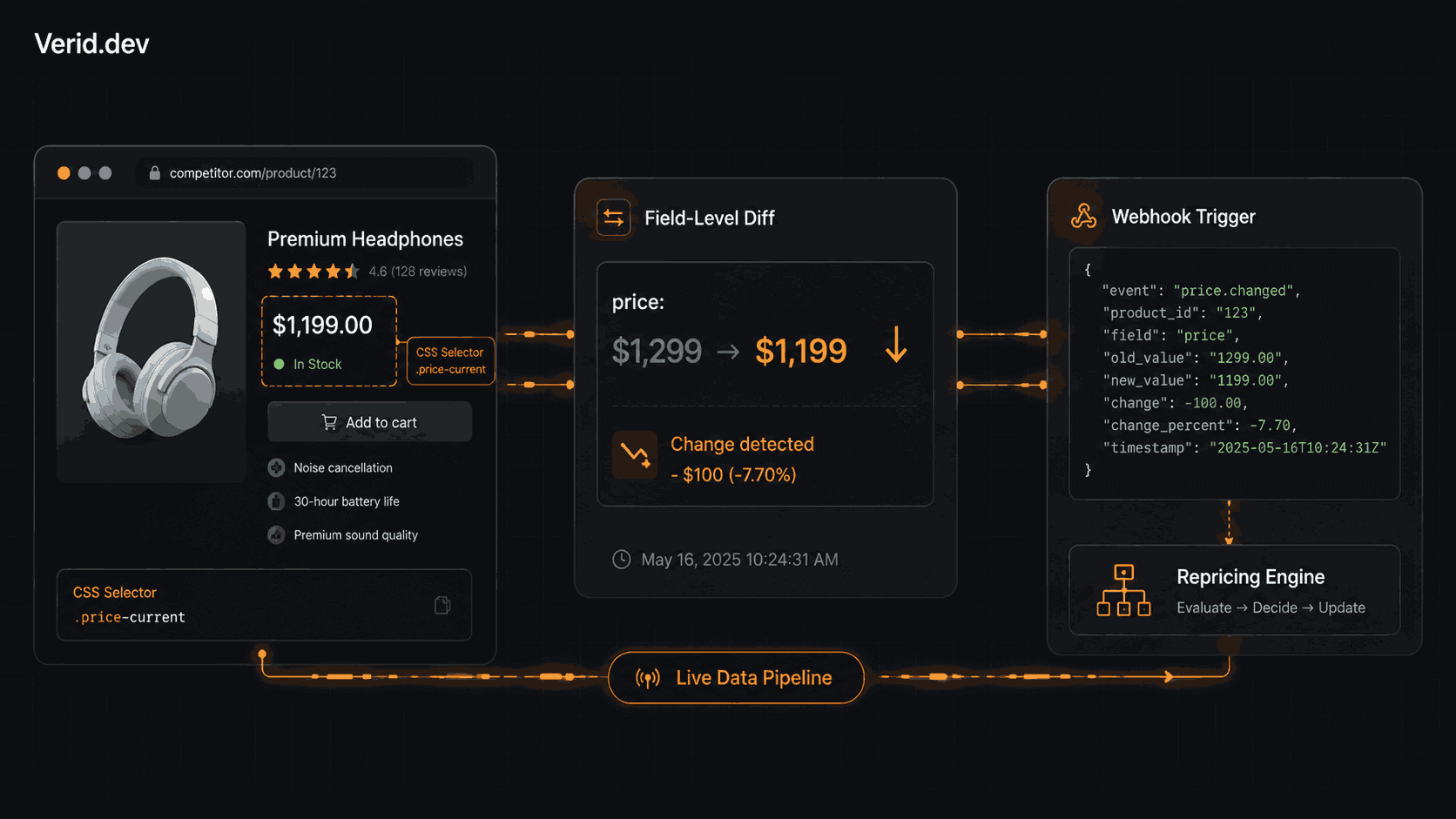
How Ecommerce Teams Use Structured Price Monitoring to Win on Margins
Margins in ecommerce compress from both directions. Advertising costs keep climbing while pricing pressure from competitors, marketplaces, and aggregators makes it harder to hold a price for more than a few hours. Most teams respond by checking competitor pages manually or setting up scrapers that dump raw HTML somewhere nobody reads.
What separates pricing teams that protect margins from those that react too late comes down to one thing: the quality of the signal they're working from. Not the volume of data, but whether the system tells them specifically what changed, when it changed, and whether that change actually matters.
That's what structured price monitoring is. This article walks through how it works and how to implement it.
Why Ecommerce Margins Are Under More Pressure Than Ever
Google Shopping, price comparison engines, and Amazon's product pages have made pricing nearly transparent for most product categories. A shopper who finds your listing and wants to cross-check it takes about ten seconds. That transparency is good for buyers. For sellers, it means every SKU you carry effectively has a public price floor enforced by whoever is willing to go lowest.
The instinct is to race to the bottom, and that's where most pricing teams lose. The smarter move is to price to your own margin floor while staying informed about where competitors are, so you can respond when it matters and hold when it doesn't. That requires a monitoring system that tells you about real price moves, not page noise.
Why Manual Price Tracking and Basic Scrapers Both Fail
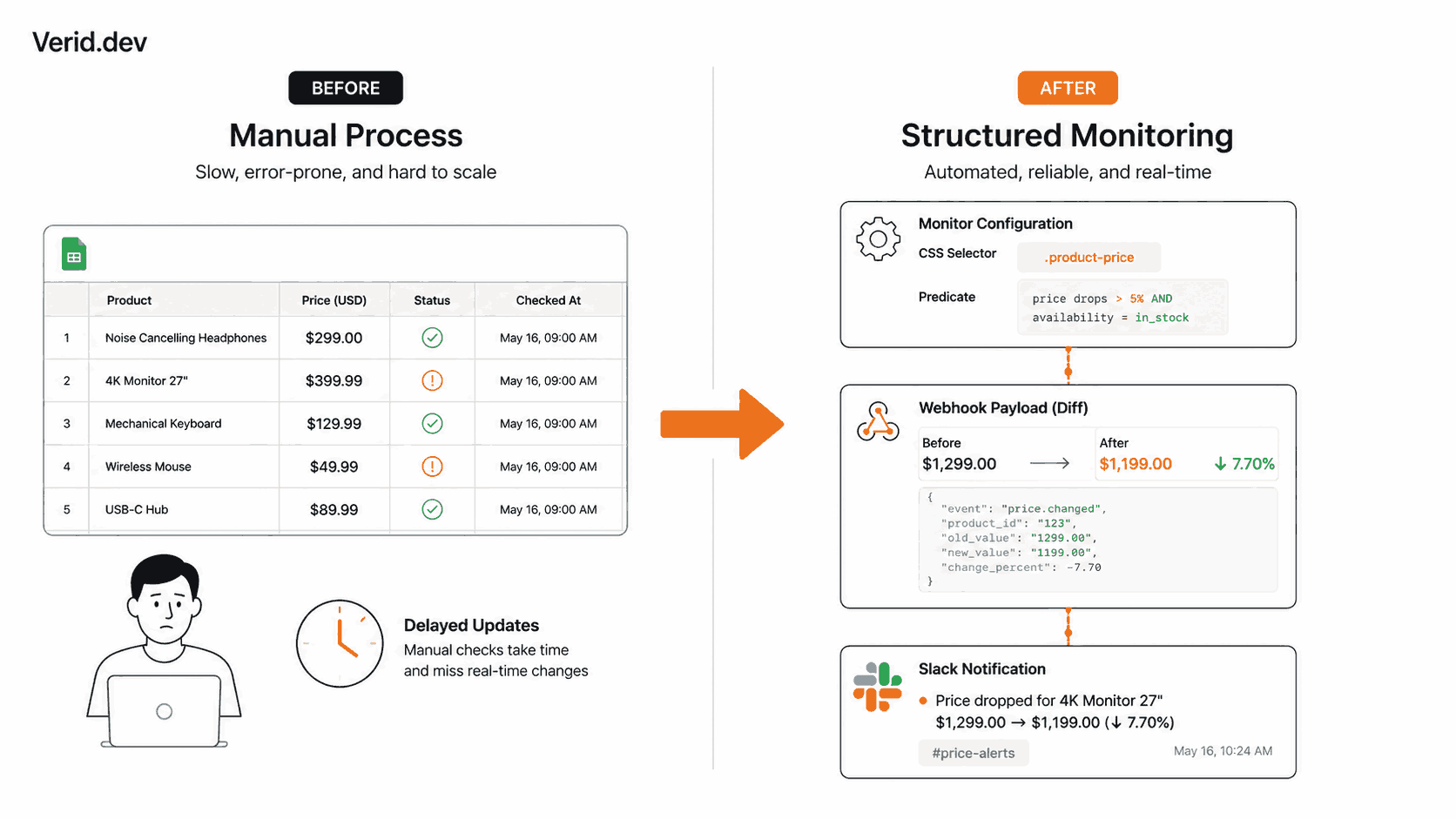
Manual tracking has three failure modes that stack on each other. Once-daily checks mean up to 23 hours of blindness during which a competitor can run a flash sale and return to normal pricing before you notice. Analysts check the URLs they remember, not the long tail of SKUs that quietly erode margin. And spreadsheet comparisons miss context, like whether the competitor even has the item in stock when they're showing a lower price.
DIY scrapers solve the scheduling problem but introduce new ones. You write the fetch, the parser, the scheduler, the diff logic, the retry mechanism, and the alert delivery. Then the competitor updates their CSS classes or adds bot protection, and you're debugging infrastructure on a Sunday. Even when the scraper runs cleanly, you're often comparing raw HTML strings, so a cookie banner rotation or a timestamp update fires an alert that means nothing.
The pattern that keeps failing is the same: noise instead of signal. "The page changed" is nearly useless. "Price dropped from $1,299 to $1,199 and the item is still in stock" is actionable.
| Approach | What you get | What you still have to build |
|---|---|---|
| Manual spreadsheet | Flexibility | Everything. Speed, scale, consistency. |
| DIY scraper | Scheduling | Diff logic, retry, alerts, state storage |
| Screenshot tool | "Page changed" alert | Meaning. It fires on ads, banners, timestamps. |
| Structured monitoring | Field-level diff, predicate alerts | Repricing logic specific to your business |
What Structured Price Monitoring Actually Means
Structured monitoring means you extract named fields from a page, store their values, compare them run to run, and fire alerts only when a predicate you define returns true.
The key difference from raw scraping is that you're working with typed fields, not text blobs. When you extract price: 1199.00 and availability: "in_stock" as named, structured fields, you can write a rule like "alert me only when price decreases by more than 5% and availability is in_stock." That predicate fires on meaningful pricing moves. It stays quiet when an ad rotates or the page navigation changes.
Field-level diff history also matters here. If you can see that a competitor dropped their price three times in the past two weeks, all on Thursday afternoons, that's a pattern. It changes how you respond. Raw HTML diffs give you none of that.
The Five-Stage Loop That Makes It Work
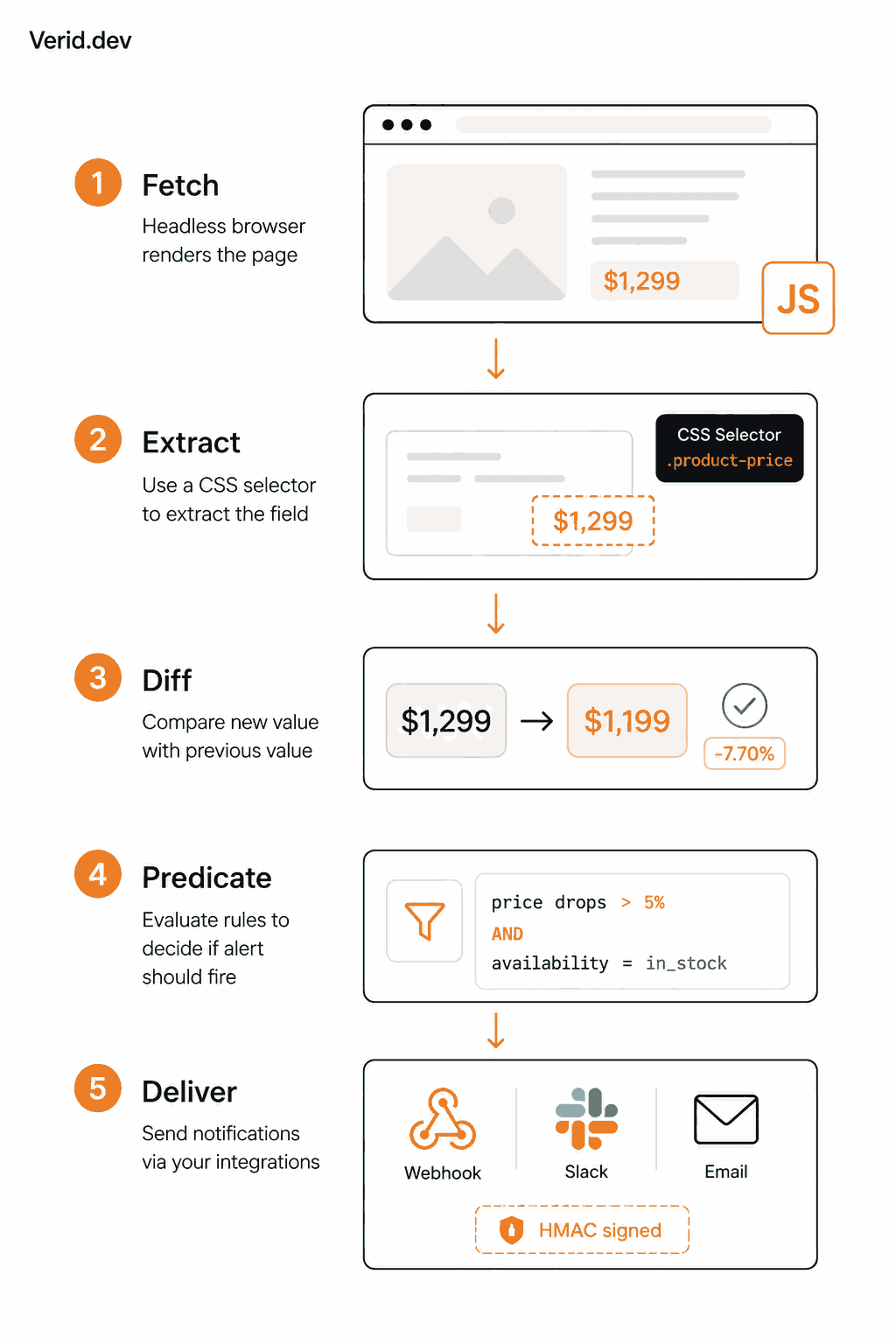
The most reliable way to build this is to treat each monitored URL as a pipeline with five stages: fetch, extract, diff, evaluate predicate, deliver.
Fetch handles the reality that a lot of ecommerce pages are JavaScript-rendered or behind bot protection. A static HTTP request won't return the price; you need a headless browser. The best monitoring setups escalate automatically, starting with a fast static fetch and falling back to a headless browser or residential proxy if extraction returns empty fields.
Extract is where you pull specific fields out of the page. CSS selectors work well for stable HTML structure. JSONPath works when the site exposes a product API (many Shopify stores do this through their storefront API). When markup is unpredictable or keeps changing, an LLM-based extractor can describe the field in natural language and find it regardless of selector changes.
Diff compares each extracted field against the value from the previous run. This is field-level comparison, not page-level. If price changed and nothing else did, you get a diff that says exactly that, not a noisy HTML comparison.
Predicate is the filter. Does the diff match a rule you care about? Price dropped by more than 5%? Availability flipped from out-of-stock to in-stock? A composite predicate combining both with AND logic? Only if the predicate returns true does anything get sent.
Deliver sends the before/after diff to wherever your team works: a webhook your repricing service consumes, a Slack channel, or an email summary.
Building a Competitor Price Monitor with Verid
Verid is a developer-first change detection API that runs this pipeline for you. You define the monitor via API, set the extraction config and predicate, and Verid handles fetch scheduling, extraction, diffing, and signed webhook delivery.
Here's a monitor that tracks a competitor product page and fires when the price changes:
curl -X POST https://api.verid.dev/v1/monitors \
  -H "Authorization: Bearer $VERID_API_KEY" \
  -H "Content-Type: application/json" \
  -d '{
    "name": "Competitor - Laptop Pro 14",
    "url": "https://competitor.com/products/laptop-pro-14",
    "schedule_interval_seconds": 1800,
    "extract_config": {
      "method": "css",
      "fields": {
        "price": ".product-price .current",
        "availability": ".stock-status",
        "title": "h1.product-title"
      }
    },
    "diff_predicate": { "type": "field_changes", "field": "price" },
    "deliveries": [
      { "type": "webhook", "url": "https://your-app.com/hooks/price-change" }
    ]
  }'
That monitor runs every 30 minutes. When the price field changes, Verid fires a webhook with the before and after values:
{
  "id": "del_01H...",
  "fired_at": "2026-06-29T09:15:00Z",
  "diff": {
    "fields_changed": ["price"],
    "before": { "price": "$1,299.00", "availability": "In stock" },
    "after":  { "price": "$1,199.00", "availability": "In stock" }
  },
  "monitor": {
    "name": "Competitor - Laptop Pro 14",
    "url": "https://competitor.com/products/laptop-pro-14"
  }
}
Your repricing service receives this, computes the new gap against your own price, and decides whether to match, hold, or adjust.
If you want to filter further, use a composite predicate that fires only when the price drops and the item is in stock:
{
  "type": "composite",
  "operator": "AND",
  "conditions": [
    { "type": "field_changes", "field": "price" },
    { "type": "field_equals", "field": "availability", "value": "In stock" }
  ]
}
This eliminates the false alarm of a competitor showing a lower price on a product they can't actually ship.
For the Node.js SDK version, install it first:
npm install @verid.dev/sdkThen create the same monitor:
import { VeridClient } from '@verid.dev/sdk';

const client = new VeridClient({ apiKey: process.env.VERID_API_KEY! });

await client.monitors.create({
  name: 'Competitor - Laptop Pro 14',
  url: 'https://competitor.com/products/laptop-pro-14',
  schedule_interval_seconds: 1800,
  extract_config: {
    method: 'css',
    fields: {
      price: '.product-price .current',
      availability: '.stock-status',
      title: 'h1.product-title',
    },
  },
  diff_predicate: { type: 'field_changes', field: 'price' },
  deliveries: [
    { type: 'webhook', url: 'https://your-app.com/hooks/price-change' },
  ],
});
See the competitor price tracking use case and the price drop alert recipe for more implementation detail.
Real Business Workflow
The concrete workflow most pricing teams land on: pick the SKUs that matter most, create one monitor per SKU with a 15 to 30 minute interval on volatile categories, route webhooks to a repricing service that knows your margin floor, and log every decision with a reason for later analysis.
One monitor per SKU is the key discipline. Not one per competitor store. It keeps diffs clean, history readable, and notification logic simple. Verid's field-level diff history lets you see every price movement on a specific product over time, surfacing competitor patterns you can start to anticipate.
Practical Gotchas
Currency symbols break percent-based predicates. If you want to fire only when a price drops more than 5%, the extracted field needs to be a raw number. A value like "$1,299.00" parses as NaN and the predicate never fires. Use a site that exposes a product API returning numeric prices, switch to JSONPath extraction, or use LLM extraction to normalize. The price drop alert recipe covers this in detail.
The first run establishes baseline, it doesn't alert. Verid needs one clean extraction run to store the starting value before it can diff. No alert fires on the first run.
JS-heavy product pages need browser mode. If the price doesn't appear in view-source, Verid will auto-escalate from static fetch to headless browser when the static fetch returns empty fields.
Tracking too many SKUs at high frequency burns through your monthly runs. Start with your top 20 to 30 SKUs at hourly checks. Once you have a working repricing loop, expand. The pricing plans scale from 1,000 runs a month on Lite to 100,000 on Scale, with unlimited monitors on every plan.
What Good Pricing Intelligence Actually Looks Like
The goal isn't more dashboards. It's a system where a competitor's pricing move, within 15 to 30 minutes, triggers a decision in your own systems with no human in the loop unless the decision is ambiguous.
Structured monitoring makes that possible because it filters at the source. You're not asking someone to sort through 100 "page changed" emails to find the one that means something. The predicate layer does that before delivery.
When your stack is producing clean, typed, field-level diffs on a schedule, repricing rules actually work: if competitor X drops below our price by more than $30 and they have the item in stock, set our price to theirs minus $5 down to margin floor. That rule requires trusted, structured data. It breaks immediately on screenshot diffs or raw HTML comparisons.
Teams that get this right stop losing sales to price gaps they didn't notice for 12 hours, and stop unnecessary margin giveaways where they matched a competitor who was actually out of stock.
The Verid quickstart gets a working monitor running in under two minutes on the 14-day free trial, no credit card required.
Frequently Asked Questions
What is structured price monitoring in ecommerce?
Structured price monitoring means extracting specific price and availability fields from competitor pages as typed data, storing the values over time, and alerting only when a rule you define is met, like a price drop above a threshold. It's different from screenshot-based monitoring (which fires on any visual change) or raw scraping (which returns unstructured HTML you still have to parse and compare yourself).
How often should ecommerce teams check competitor prices?
For volatile categories like consumer electronics, 15 to 30 minute intervals are common. For slower-moving categories, hourly or every few hours is usually enough. The right answer depends on how quickly your pricing team or automated repricing system can act on a change. There's no benefit to checking every 5 minutes if your repricing cycle is daily.
How do I avoid alert noise when monitoring competitor pricing pages?
Use predicate-based alerting rather than change-based alerting. Instead of "fire when anything on the page changes," define a rule like "fire when the price field changes" or "fire when price drops by more than 5% and availability is in stock." This filters out cookie banners, ad rotations, timestamps, and everything else that changes without meaning anything.
Can I monitor JavaScript-rendered product pages for price changes?
Yes, but you need a monitoring tool that can execute JavaScript and render the page before extraction. Verid auto-escalates from a static fetch to a headless browser when the static fetch returns empty fields. For pages you know are JS-heavy upfront, the competitor price tracking guide covers the fetch_mode browser option and when to use it.
About the author

Software Engineer
Suleman builds and maintains the parts of Verid that watch a page and decide what counts as a change (extraction, diffing, and delivery), and writes hands-on guides drawn from running those systems every day.
More from Suleman →Related posts
How to Build an Amazon Price Tracker Without an Amazon API Key
Track Amazon prices without Amazon's API. Verid extracts price and stock, then fires a webhook the moment your threshold hits.
Read the post →E-commerce & PricingHulu Black Friday 2026: Price History, What to Expect, and How to Catch It Live
See what Hulu's Black Friday deals have cost in past years, what to expect in 2026, and how to get notified the second the discount goes live.
Read the post →price monitoringBest Price Monitoring Tools for Ecommerce in 2026
Compare the 7 best price monitoring tools for ecommerce in 2026 — Verid, Visualping, Prisync, Price2Spy, changedetection.io, Browse AI, and Wiser — with honest pros, cons, and pricing.
Read the post →ecommerceGet Notified the Instant Items Are Back in Stock
Stop missing restocks. Learn how to monitor any product page for availability changes and get instant webhook, Discord, or email alerts the second items return.
Read the post →