
How to Build an Amazon Price Tracker Without an Amazon API Key
Amazon does not give you a clean, official way to pull live product prices at scale. The Product Advertising API exists, but it is built for affiliates driving sales, not for developers who just want to watch a price and get pinged when it drops. If you have ever tried to sign up for it only to hit an eligibility wall, you already know this.
This guide skips the API entirely. Instead, it walks through building a working Amazon price and stock tracker using Verid, a web change detection API that treats "watch a page and tell me when something meaningful happens" as the actual product, not a side effect of scraping. By the end you will have a monitor running that checks a product page on a schedule, pulls out price, availability, and rating as typed fields, and fires a signed webhook the moment your rule is true.
Why the Amazon API isn't the right tool here
The Product Advertising API (PA-API) was designed to help Amazon Associates generate product links and pricing widgets for approved affiliate sites, not to power arbitrary price-monitoring tools. Two things make it a poor fit for this project:
First, access is gated behind affiliate performance. To keep using PA-API, an Associates account has to generate qualifying referral sales on a rolling basis, and Amazon has tightened that bar over time rather than loosened it. If you are not actively running an affiliate site with real sales volume, you likely cannot get or keep a working key.
Second, Amazon has already begun deprecating PA-API, pointing developers toward a newer Creators API instead. Building a monitoring pipeline on an API that is being phased out is a maintenance headache you can avoid entirely by not depending on it in the first place.
None of this means tracking Amazon prices is against the rules in some blanket sense. It means the official API is scoped for a different job. The practical alternative, and the one most price-intelligence companies actually use, is reading the page the way a browser does: fetch it, pull the fields you care about, and act on the diff.
The usual DIY approach, and where it breaks
Search for "Amazon price tracker" and most tutorials converge on the same shape: a Python script using requests or Selenium, a CSS selector or two, a cron job, and an email function bolted on at the end. It works for a demo. It breaks in production for a few predictable reasons:
- Amazon renders dynamically and defends itself. Product pages vary their markup, price is sometimes split across multiple elements (base price, strikethrough price, per-unit price), and repeated automated requests get challenged with CAPTCHAs or blocked outright.
- You own the whole pipeline. Fetching, parsing, storing the last known value, diffing, retrying failed requests, and sending the alert are all separate pieces of infrastructure you now have to run and babysit.
- Selectors rot. The class name your script depends on today gets renamed in the next front-end deploy, and your tracker goes silent without telling you.
| Approach | What you get | What you still build |
|---|---|---|
| DIY scraper (Python/Selenium) | Full control | Scheduler, proxy rotation, state storage, diffing, retries, alerting |
| Browser extension trackers (Keepa, CamelCamelCamel) | Price history for personal shopping | Nothing programmatic — no API for your own workflows |
| Generic scraping APIs | Structured HTML/JSON per request | Scheduling, diffing, predicate logic, delivery |
| Verid | Fetch, extract, diff, predicate, and delivery in one config | Nothing extra — you write the rule |
How Verid solves it
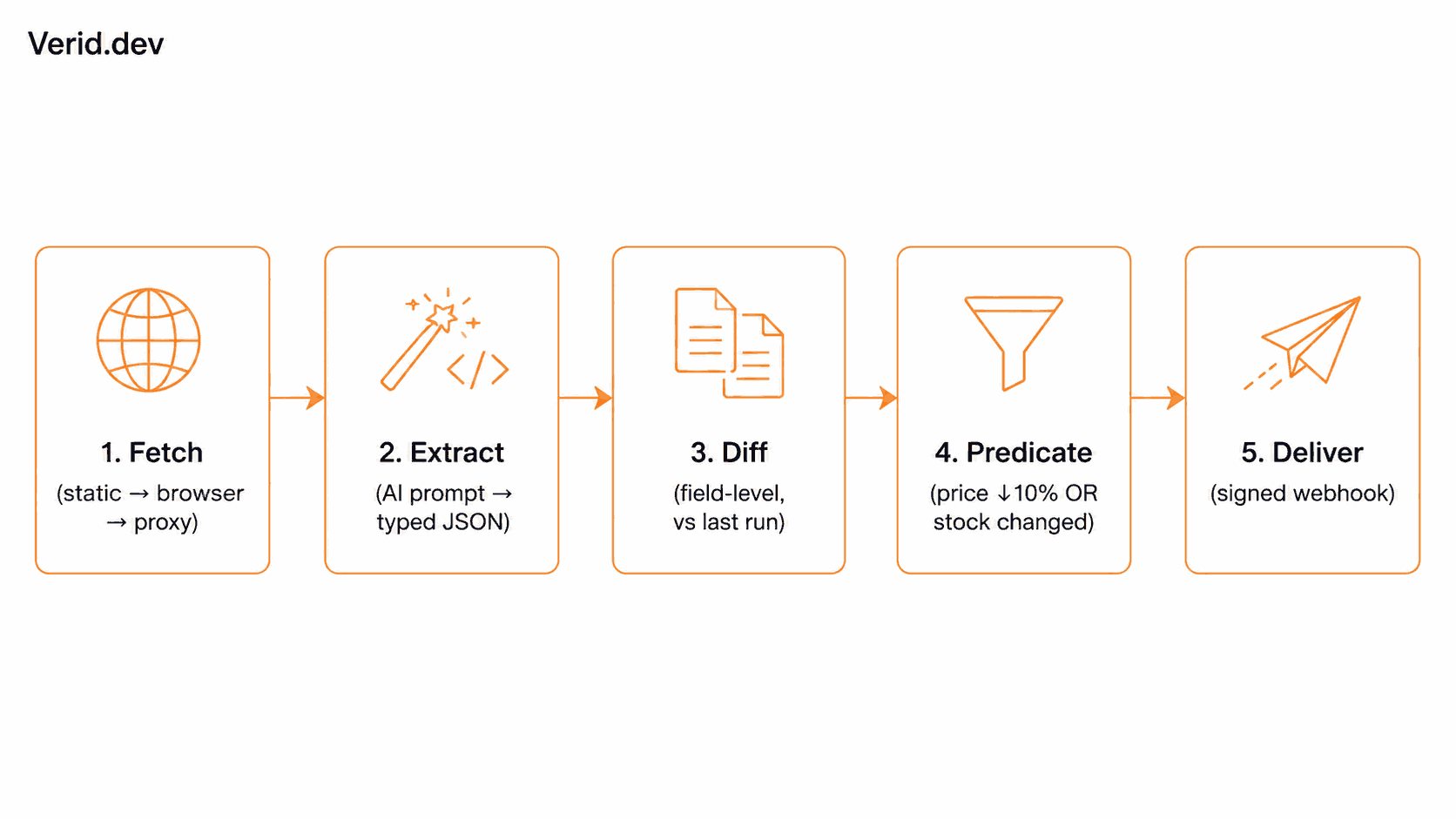
Verid runs every monitor through the same five-stage loop, and Amazon product pages are a reasonable fit for all five stages:
- Fetch. A static HTTP fetch runs first. If the page comes back looking empty or JS-heavy, Verid automatically retries with a stealth headless browser, and escalates to a residential proxy if the site is actively fighting automated access. You configure none of this per request.
- Extract. You choose how to pull fields out of the page. For a page as layout-variable and bot-defensive as an Amazon listing, AI/LLM prompt extraction is the more durable choice over hand-written CSS selectors, because you describe the field in plain English instead of pinning to a specific DOM node.
- Diff. Every run is compared field-by-field against the last successful run, not just "did the byte count change."
- Predicate. You define the actual rule: price dropped by X%, stock came back, both, and Verid only fires when it evaluates true.
- Deliver. A signed webhook, Slack message, Discord message, or email goes out, with retries and a dead-letter queue if your endpoint is briefly down.
Why prompt extraction beats CSS selectors here
You could technically point a css extractor at a price element. The catch, documented directly in Verid's own price-drop recipe, is that percentage-based predicates need a clean number: a CSS-extracted string like "$49.99" parses as NaN and simply never fires. You'd need to also strip the currency symbol, which is exactly the kind of brittle string-handling you're trying to avoid.
The prompt extraction method sidesteps this. You describe what you want, provide a schema, and the model returns typed JSON, price already normalized to a plain number, availability already normalized to a boolean.
{
  "method": "prompt",
  "prompt": "Extract the product title, the current listed price in USD as a plain number with no currency symbol, whether the item is currently available to buy (true or false), and the star rating out of 5 if shown.",
  "schema": {
    "title": "string",
    "price": "number",
    "available": "boolean",
    "rating": "number or null"
  }
}
LLM extractions are cached for 30 days based on a content hash, so if the page hasn't actually changed between checks, you don't burn your monthly LLM-call quota re-running the same extraction.
Step-by-step: build the monitor
1. Get an API key
Sign up at verid.dev the 14-day free trial includes unlimited monitors, 200 runs, and 14-day history, no card required. Generate a key from the dashboard; it will start with the vrd_ prefix.
export VERID_API_KEY="vrd_your_key_here"2. Define the predicate
You want an alert when either the price drops meaningfully or the item flips from unavailable to available whichever happens first.
{
  "type": "composite",
  "operator": "OR",
  "conditions": [
    { "type": "field_decreases_by_percent", "field": "price", "threshold": 10 },
    { "type": "field_changes", "field": "available" }
  ]
}
field_decreases_by_percent needs a numeric field, which is exactly what the prompt schema above guarantees. field_changes on available fires on the transition in either direction, so you'll also know if the item goes out of stock, not just when it comes back.
3. Create the monitor
curl -X POST https://api.verid.dev/v1/monitors \
  -H "Authorization: Bearer $VERID_API_KEY" \
  -H "Content-Type: application/json" \
  -d '{
    "name": "Amazon - Wireless Headphones Price Watch",
    "url": "https://www.amazon.com/dp/EXAMPLE_ASIN",
    "schedule_interval_seconds": 3600,
    "extract_config": {
      "method": "prompt",
      "prompt": "Extract the product title, the current listed price in USD as a plain number with no currency symbol, whether the item is currently available to buy (true or false), and the star rating out of 5 if shown.",
      "schema": {
        "title": "string",
        "price": "number",
        "available": "boolean",
        "rating": "number or null"
      }
    },
    "diff_predicate": {
      "type": "composite",
      "operator": "OR",
      "conditions": [
        { "type": "field_decreases_by_percent", "field": "price", "threshold": 10 },
        { "type": "field_changes", "field": "available" }
      ]
    },
    "deliveries": [
      { "type": "webhook", "url": "https://your-app.com/hooks/amazon-price" }
    ]
  }'
An hourly interval (3600 seconds) uses about 720 runs a month, more than the free trial's 200, so plan on Lite or above for hourly checks. Pick the interval based on how time-sensitive the alert actually needs to be. See the pricing page for the full breakdown.
If you'd rather work in TypeScript, the same call through the official Node SDK:
import { VeridClient } from '@verid.dev/sdk';

const client = new VeridClient({ apiKey: process.env.VERID_API_KEY! });

const monitor = await client.monitors.create({
  name: 'Amazon - Wireless Headphones Price Watch',
  url: 'https://www.amazon.com/dp/EXAMPLE_ASIN',
  schedule_interval_seconds: 3600,
  extract_config: {
    method: 'prompt',
    prompt:
      'Extract the product title, the current listed price in USD as a plain number with no currency symbol, whether the item is currently available to buy (true or false), and the star rating out of 5 if shown.',
    schema: {
      title: 'string',
      price: 'number',
      available: 'boolean',
      rating: 'number or null',
    },
  },
  diff_predicate: {
    type: 'composite',
    operator: 'OR',
    conditions: [
      { type: 'field_decreases_by_percent', field: 'price', threshold: 10 },
      { type: 'field_changes', field: 'available' },
    ],
  },
  deliveries: [{ type: 'webhook', url: 'https://your-app.com/hooks/amazon-price' }],
});
What you'll receive when it fires
Every delivery is a signed POST with the before/after diff, not a vague "something changed" ping:
{
  "id": "del_01H...",
  "version": "2026-05-01",
  "monitor_id": "uuid",
  "run_id": "uuid",
  "fired_at": "2026-06-12T14:03:00Z",
  "diff": {
    "fields_changed": ["price"],
    "before": { "price": 89.99, "available": true },
    "after":  { "price": 79.99, "available": true }
  },
  "monitor": {
    "url": "https://www.amazon.com/dp/EXAMPLE_ASIN",
    "name": "Amazon - Wireless Headphones Price Watch"
  }
}
Verify the signature before trusting the payload. Every webhook carries a header with a timestamp and an HMAC signature, computed with Node's built-in crypto module:
import { createHmac, timingSafeEqual } from 'crypto';

function verifySignature(header: string, rawBody: string, secret: string): boolean {
  const parts = Object.fromEntries(header.split(',').map((p) => p.split('=')));
  const timestamp = parseInt(parts['t'] ?? '0', 10);
  const signature = parts['v1'];
  if (!timestamp || !signature) return false;
  if (Math.abs(Date.now() / 1000 - timestamp) > 300) return false;

  const expected = createHmac('sha256', secret)
    .update(`${timestamp}.${rawBody}`)
    .digest('hex');

  return timingSafeEqual(Buffer.from(expected, 'hex'), Buffer.from(signature, 'hex'));
}
This pattern, a timestamped payload signed with HMAC-SHA256, is the same shape used by most webhook providers and is worth understanding independent of Verid; MDN's SubtleCrypto documentation covers the underlying primitives if you're implementing verification in a browser or edge runtime instead of Node.
Real-world workflow
A typical setup looks like this: one monitor per ASIN you actually care about, checked hourly or daily depending on your tier, delivering to a Slack channel your team already watches. When a delivery lands, a lightweight handler reads diff.fields_changed, decides whether it's a price drop worth acting on or a restock worth telling customers about, and routes accordingly. If you're tracking a competitor's SKU rather than your own watch list, the same pattern shows up in Verid's competitor price tracking use case, and if the alert you actually want is "back in stock" rather than "price changed," the restock alerts use case covers that predicate shape in more depth.
Best practices
- Use
promptextraction for Amazon specifically. CSS selectors work fine on stable, self-controlled pages. On a page that varies layout by category and actively resists scraping, natural-language extraction with aschemadegrades more gracefully. - Set a realistic interval. Amazon prices move throughout the day, but checking every five minutes rarely buys you much over hourly checks unless you're tracking a flash sale window, and it burns through your tier's quota faster.
- Always verify the webhook signature. Don't process a payload before confirming it actually came from Verid.
- Use a composite predicate, not two monitors. One monitor watching for "price dropped OR stock changed" is simpler to reason about than maintaining two separate monitors against the same URL.
Callout: The first run of any monitor never fires an alert. Verid needs a baseline to diff against. Don't assume something is broken if nothing arrives in the first check cycle.
Common mistakes
| Mistake | Why it fails | Fix |
|---|---|---|
CSS selector on .a-price or similar | Amazon's price markup varies by category and A/B test; selectors break silently | Use prompt extraction with a schema |
Percent predicate on a "$79.99" string | Currency-prefixed strings can parse as NaN, so the predicate never fires | Ask the prompt to return price "as a plain number with no currency symbol" |
| Checking every 1–5 minutes on every SKU | Burns through quota and adds no real value for typical price movement | Match interval to how fast the price actually needs to be actionable |
| Skipping signature verification | Anyone who finds your webhook URL could send fake payloads | Verify the HMAC signature before processing |
| One monitor per condition | Doubles the monitors you need and the alerts you have to reconcile | Combine conditions with a composite predicate |
Performance and scaling
Checking one ASIN is a five-minute setup. Watching fifty is a slightly different problem, and Verid's tiers are built around that scaling curve rather than treating every monitor as identical:
| Tier | Runs/mo | History | LLM calls/mo |
|---|---|---|---|
| 14-day free trial | 200 (trial total) | 14 days | 50 (trial total) |
| Lite ($9/mo) | 1,000 | 90 days | 250 |
| Starter ($19/mo) | 5,000 | 180 days | 500 |
| Pro ($49/mo) | 15,000 | 365 days | 5,000 |
| Scale ($149/mo) | 100,000 | 2 years | 25,000 |
A few things to keep in mind as you scale past a handful of ASINs:
- LLM calls are the quota that matters here, alongside monthly runs, since prompt extraction is what most Amazon monitors will use. The 30-day content-hash cache helps so that a page that hasn't visibly changed doesn't re-run the model.
- Templates cut setup time for repeatable patterns. Verid ships generic templates (
generic-llm-prompt,generic-css-selector) you can start from via the API reference rather than writing everyextract_configfrom scratch. - Proxy bandwidth is tier-gated too. The free trial and Lite have no proxy allowance; if Amazon starts serving your fetches a bot-check page instead of the product page, that's usually a signal you need the proxy allowance that comes with Starter and above, not a signal that the extraction config is wrong.
Amazon API vs. Verid: the real comparison
| Amazon PA-API | Verid | |
|---|---|---|
| Access requirement | Approved Associates account, ongoing qualifying sales | 14-day free trial, no sales required |
| Data source | Amazon's own product catalog feed | The live rendered product page |
| Setup time | Application + approval process | Minutes |
| Structured output | Yes, but Amazon-defined shape | Yes, your own field names and schema |
| Alerting | None built in | Predicate-driven webhooks |
| Longevity | <cite index="33-1">Actively being phased out in favor of a newer Creators API</cite> | Actively maintained REST API + SDK |
Conclusion
You don't need Amazon's blessing, an affiliate account, or a script that breaks every time a div gets renamed to build a working price tracker. The pattern that actually holds up is the same one Verid is built around: fetch the page reliably, extract the fields you care about as typed data, diff against the last known state, and only speak up when a rule you defined is true. For a page as changeable and defensive as an Amazon listing, that means leaning on prompt-based extraction instead of pinning to selectors, and letting the predicate, not a cron job checking everything constantly, decide when you actually get pinged.
Frequently Asked Questions
Is it legal to track Amazon prices without using their official API?
Monitoring publicly visible page data is a different activity from calling a private, authenticated API. This article doesn't offer legal advice, and Amazon's Terms of Service and robots directives are worth reviewing for your specific use case, but reading a public page on a reasonable schedule is a common and widely used pattern across the price-intelligence industry.
Why not just use the Amazon Product Advertising API?
PA-API access is tied to maintaining affiliate sales volume, and Amazon has been steering developers toward a replacement Creators API. For a straightforward "alert me on a price drop" use case, that's a lot of gatekeeping for a job that doesn't require Amazon's sales data at all.
Can I track multiple Amazon products at once?
Yes, create one monitor per product URL. Monitors are unlimited on every tier; what each tier caps is monthly runs (1,000 on Lite, up to 100,000 on Scale; the 14-day trial includes 200), so put your most time-sensitive SKUs on the fastest intervals and check the rest less often.
What happens if Amazon shows a CAPTCHA instead of the product page?
Verid's fetch layer automatically escalates from a static request to a headless browser to a residential proxy when a site resists automated access. If checks are still failing after that, it usually means the interval is too aggressive for the tier's proxy allowance rather than a configuration mistake.
About the author

Software Engineer & Technical Writer
A software engineer and technical writer, Hanzala focuses on developer experience at Verid: SDKs, API reference, and step-by-step guides. He writes about change detection, scheduling, and alert design for teams automating web data.
More from HANZALA SALEEM →Related posts
How Ecommerce Teams Use Structured Price Monitoring to Win on Margins
How ecommerce teams use structured price monitoring to protect margins, automate competitor alerts, and make faster repricing decisions.
Read the post →E-commerce & PricingHulu Black Friday 2026: Price History, What to Expect, and How to Catch It Live
See what Hulu's Black Friday deals have cost in past years, what to expect in 2026, and how to get notified the second the discount goes live.
Read the post →competitor pricingHow to Build a Price Alert System Without Writing a Scraper
Build a production-ready price alert system without writing or maintaining a scraper. One API call, structured fields, and predicate-driven delivery.
Read the post →price trackingWalmart Price Tracker: Monitor Price Changes and Get Instant Alerts
Track Walmart product prices automatically. Get instant alerts when prices drop using Verid's web change detection API - no scraping infrastructure needed.
Read the post →