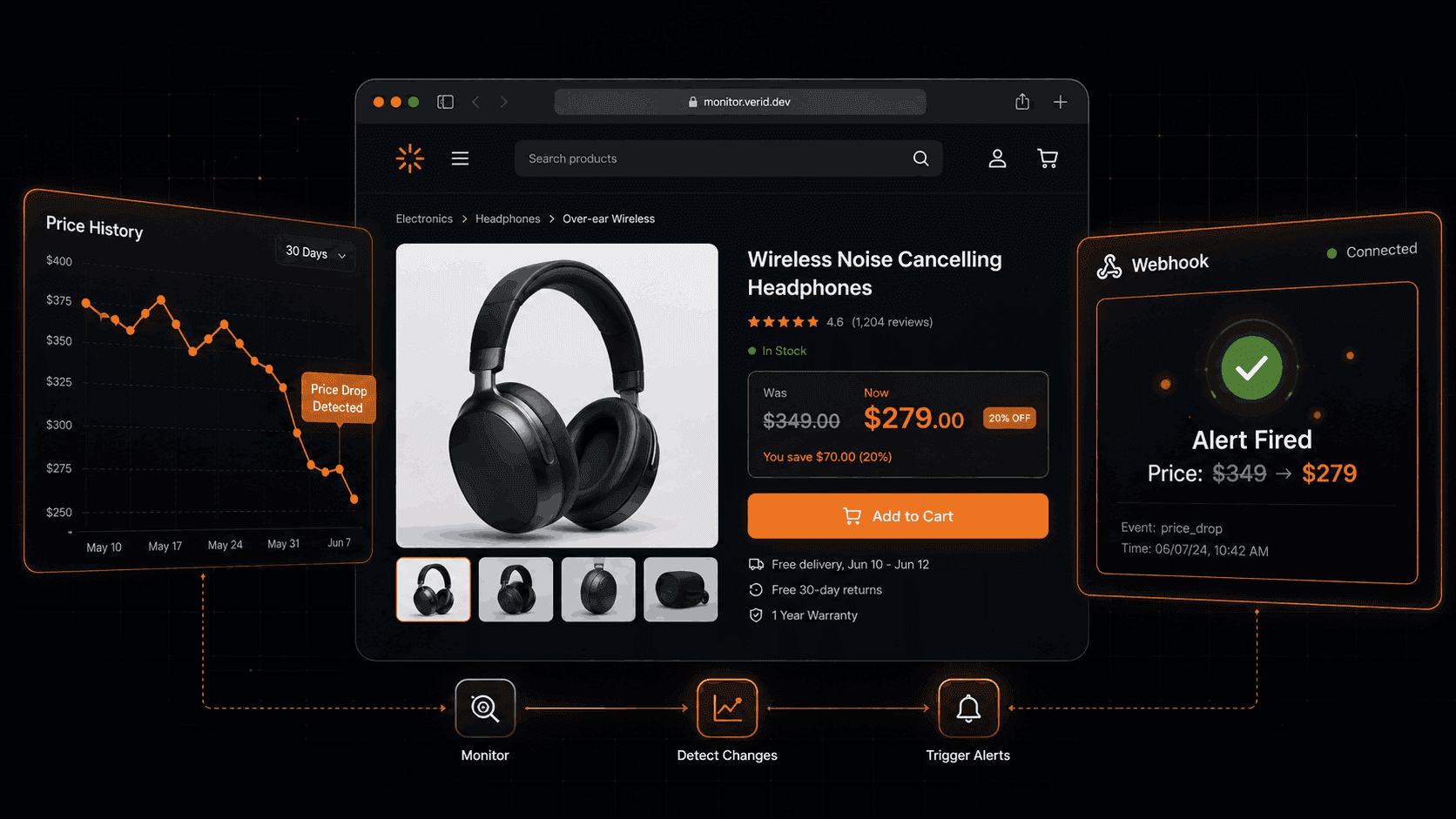
Walmart Price Tracker: Monitor Price Changes and Get Instant Alerts
Walmart prices move constantly. Rollbacks start without notice. Clearance markdowns go live at 2 AM. Flash deals sell out in hours. If you're checking product pages by hand, you're always playing catch-up.
This guide covers how to set up a reliable Walmart price tracker that runs automatically, fires alerts only when prices actually change, and integrates with whatever workflow you already use without maintaining your own scraper.
Why Tracking Walmart Prices Matters
Walmart is the largest retailer in the United States by revenue, with eCommerce sales growing 28% year over year as of Q3 FY2026. For anyone competing with or buying from Walmart, price visibility isn't optional it's a competitive requirement.
For pricing teams, a competitor dropping a product by $40 and holding that price for 36 hours while you're unaware is pure margin loss. For marketplace sellers, a Walmart Rollback that undercuts your Amazon listing pulls conversion before you can respond. For deal hunters and procurement teams, the difference between monitoring hourly and checking daily can mean the product sells out before you act.
The common thread: price information that arrives late is barely more useful than no information.
The Problem with Manual Price Checks
Most teams start with a spreadsheet. Someone visits a list of URLs on Monday morning, pastes prices into cells, and flags anything worth investigating. It works until it doesn't.
Manual tracking has three failure modes that compound over time:
It's slow. A once-a-day check means up to 23 hours of exposure after a price changes. Walmart Rollbacks are time-limited. Missing the start is the same as missing the event.
It's shallow. Analysts check the URLs they remember, not the full SKU catalog. Long-tail products get ignored. That's often where the most interesting price moves happen.
It's inconsistent. Humans miss small changes $1,299 versus $1,289 looks similar when you're scanning a screen quickly. Systematic tracking doesn't have that problem.
The table below shows how manual and automated tracking compare across the dimensions that actually matter:
| Dimension | Manual Tracking | Automated Tracking |
|---|---|---|
| Detection speed | Up to 24 hours | Minutes to hourly |
| Coverage | URLs you remember | Every SKU you configure |
| Accuracy | Human error possible | Exact field extraction |
| Scalability | Degrades with volume | Scales without effort |
| Alert noise | None (but misses changes) | Configurable — fire on rules only |
| Infrastructure cost | Analyst time | Tool subscription |
For one or two products, manual checks are fine. For any serious catalog, automated monitoring is the only approach that scales.
How Automated Walmart Price Tracking Works
At its core, automated price tracking is a loop: fetch the page, extract the price, compare it to the last known value, and fire an alert if the rule you defined is true.
The differences between tools come down to which parts of that loop they handle well.
Consumer apps like BuyRadar and Waltrack check prices daily useful for personal shopping, not for business-grade monitoring. Screenshot tools fire on any page change, including cookie banners and timestamp updates, which creates alert fatigue fast. DIY scrapers give you control but you're also maintaining headless browser infrastructure, retry logic, and diff storage.
Verid is built specifically for the middle ground: structured field extraction from any URL, field-level diff, predicate-based alerting, and webhook delivery without the infrastructure overhead.
The key concept is predicates. Instead of firing every time a byte changes on the page, Verid only fires when a rule you define is true. For Walmart price tracking, that rule might be:
- Price dropped by 5% or more
- Price dropped below a specific threshold
- Stock status changed to "In Stock"
- Price changed at all (for any-direction monitoring)
That distinction eliminates noise. You get one alert when something actionable happens, not ten alerts about rotating ads and timestamp changes.
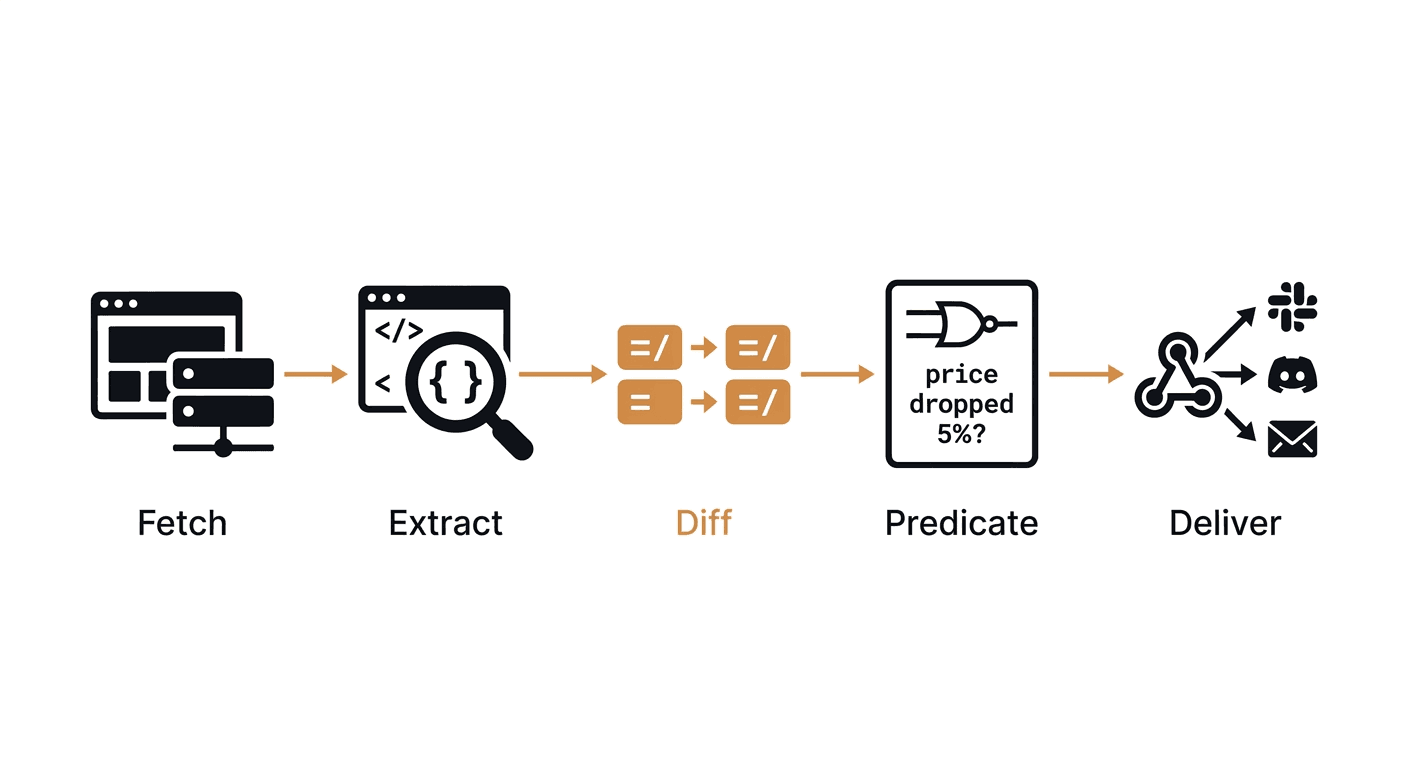
How to Set Up Walmart Price Monitoring with Verid
Verid's competitor price tracking workflow applies directly to Walmart product pages. Here's a complete working example.
Step 1: Identify the price selector
Open the Walmart product page, right-click the price element, and inspect the HTML. Look for a stable CSS selector that targets the displayed price something like .price-characteristic or a [itemprop="price"] attribute. If the page is JavaScript-rendered and the selector doesn't appear in source, Verid will automatically fall back to headless browser mode.
Step 2: Define your extraction config
{
  "method": "css",
  "fields": {
    "price": "[itemprop='price']",
    "availability": ".prod-product-offer-fulfillment span"
  }
}
Step 3: Set your predicate
For monitoring any price change:
{ "type": "field_changes", "field": "price" }For monitoring only price drops of 5% or more (note: requires the extracted value to be numeric, strip the currency symbol if needed in your downstream handler):
{
  "type": "field_decreases_by_percent",
  "field": "price",
  "threshold": 5
}
Step 4: Create the monitor via API
curl -X POST https://api.verid.dev/v1/monitors \
  -H "Authorization: Bearer vrd_your_api_key" \
  -H "Content-Type: application/json" \
  -d '{
    "name": "Walmart - Product Name",
    "url": "https://www.walmart.com/ip/product-id",
    "schedule_interval_seconds": 3600,
    "extract_config": {
      "method": "css",
      "fields": {
        "price": "[itemprop=\"price\"]",
        "availability": ".prod-product-offer-fulfillment span"
      }
    },
    "diff_predicate": { "type": "field_changes", "field": "price" },
    "deliveries": [
      { "type": "webhook", "url": "https://your-app.com/hooks/walmart-price" }
    ]
  }'
Or with the Node.js SDK:
import { VeridClient } from '@verid.dev/sdk';

const client = new VeridClient({ apiKey: 'vrd_your_api_key' });

await client.monitors.create({
  name: 'Walmart - Product Name',
  url: 'https://www.walmart.com/ip/product-id',
  schedule_interval_seconds: 3600,
  extract_config: {
    method: 'css',
    fields: {
      price: '[itemprop="price"]',
      availability: '.prod-product-offer-fulfillment span',
    },
  },
  diff_predicate: { type: 'field_changes', field: 'price' },
  deliveries: [
    { type: 'slack', webhookUrl: 'https://hooks.slack.com/services/...' },
  ],
});
Step 5: Receive and act on the webhook
When the price changes, Verid sends a signed webhook payload with before and after values:
{
  "monitor_id": "9b1c...",
  "fired_at": "2026-06-01T08:15:00Z",
  "diff": {
    "fields_changed": ["price"],
    "before": { "price": "349.00", "availability": "In stock" },
    "after":  { "price": "279.00", "availability": "In stock" }
  }
}
Your application receives this, computes the change, and routes it to a repricing system, a Slack channel, an internal dashboard, or anywhere else.
All webhooks are HMAC-signed and Verid retries delivery up to 6 times with exponential backoff if your endpoint is unavailable. Failed deliveries queue in a dead-letter log so nothing is silently dropped.
Practical Use Cases
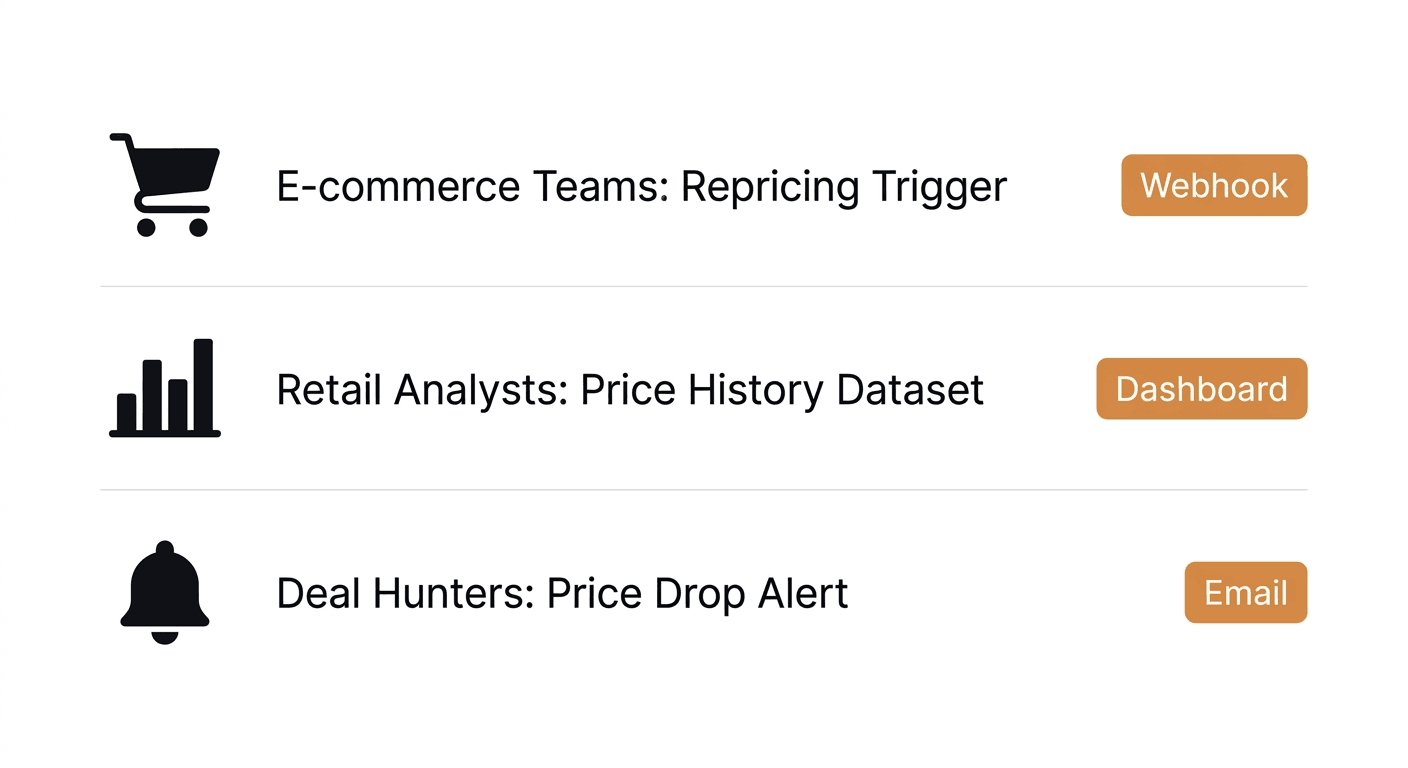
Walmart price monitoring isn't a single-audience problem. Here's how different teams use it:
| User Type | Monitoring Goal | Alert Type |
|---|---|---|
| E-commerce pricing teams | Track competitor SKUs, trigger repricing | Webhook → repricing engine |
| Retail analysts | Build price history datasets, spot patterns | Webhook → data warehouse |
| Marketplace sellers | Catch Walmart undercutting their listings | Slack or Discord notification |
| Deal hunters / personal shoppers | Get notified when a wishlist item drops | Email alert |
| Procurement teams | Monitor bulk item prices before PO decisions | Email or webhook |
E-commerce and marketplace sellers get the most direct ROI. When a Walmart Rollback starts, sellers on Amazon or other platforms who respond within the hour protect conversion. Those who find out 24 hours later have already lost sales to the price gap.
Retail analysts use Verid's field-level diff history to reconstruct how a product's price moved over a season. Verid stores run history for 180 days on the Starter plan and up to 2 years on the Scale plan long enough to identify promotional patterns and forecast future price behavior.
Procurement and sourcing teams track high-volume items ahead of purchase decisions. Knowing a price dropped 12% in the past two weeks before placing a bulk order is actionable intelligence that spreadsheet checks simply don't surface in time.
For teams also monitoring stock availability alongside price, Verid's restock alert workflow lets you combine a price predicate with a stock status predicate using a composite AND rule so you only get alerted when the item is both cheaper and actually in stock.
Benefits of Instant Price Drop Alerts
The gap between "I'll check tomorrow" and "I just got notified" is where competitive advantage lives in retail.
Instant alerts let pricing teams react to Rollback starts and ends in near real time instead of discovering them during a weekly review. For marketplace sellers, that reaction window is the difference between matching a competitor's price before sales shift and responding after the damage is done.
There are also less obvious benefits. Monitoring price changes over time reveals promotional patterns, which products go on Rollback before major events, how deep the discount typically runs, and how long it lasts. That kind of data turns reactive price-matching into a proactive pricing strategy.
Automated monitoring also removes the human bottleneck. A pricing analyst's time is better spent on strategy than on opening 50 browser tabs every morning. Verid runs the checks on a schedule you set, as often as every minute on any plan, 24 hours a day.
Best Practices for Walmart Price Monitoring
A few things that make monitoring more reliable in practice:
Use one monitor per SKU. Bundling multiple products into one monitor makes it harder to isolate which product changed. Per-SKU monitors give clean diffs and clean notifications.
Start before the event you care about. Verid establishes a baseline on the first run — no alert fires until the second check. If you're monitoring a product ahead of a sale event, set the monitor up at least one check cycle before the event starts.
Set the right check interval for your use case. For Walmart Rollbacks that last days, hourly checks are sufficient. For flash deals or Black Friday-style events, 15-minute or 5-minute intervals are worth the extra runs: each check uses one run, so a monitor checked every 15 minutes uses about 2,880 runs a month. The Verid pricing page shows how many runs each plan includes.
Handle currency symbols in downstream logic. Verid extracts price values as strings from the page. If you want to use percentage-drop predicates, make sure your extraction produces a clean numeric string. Otherwise, use field_changes and apply your own threshold logic in the webhook consumer.
Use the LLM extractor as a fallback. If Walmart reskins a product page and your CSS selector breaks, Verid's AI extractor lets you describe the field in plain English ("the current selling price") and re-run without redeploying code. This is available on all plans. Learn more about Verid's extraction methods.
Monitoring Walmart vs. Other Retailers
Walmart's pricing behavior is distinct from Amazon's. Amazon reprices algorithmically, sometimes multiple times per day in small increments. Walmart price changes are less frequent but tend to be larger when they happen. Rollbacks and clearance markdowns move 10-30% at once.
That means hourly checks are generally sufficient for Walmart, while Amazon monitoring benefits from more frequent polling. If you're tracking the same product across both retailers, use separate monitors with different intervals.
The table below shows how monitoring configuration differs by retailer:
| Retailer | Price Change Frequency | Recommended Interval | Notes |
|---|---|---|---|
| Walmart | Lower frequency, larger moves | Hourly | Rollbacks and clearance events |
| Amazon | High frequency, small moves | Every 15-30 min | Algorithm-driven |
| Target | Moderate | Hourly | Follows Walmart/Amazon patterns |
Verid's competitor price tracking use case covers cross-retailer monitoring setup in detail.
Conclusion
A Walmart price tracker that actually works for business purposes needs to do more than check prices once a day and send an email. It needs to extract the right field from a JavaScript-rendered page, compare it against the last known value, apply a rule you define, and deliver a signed notification to wherever your team works reliably, without you maintaining the infrastructure.
Verid handles that full loop. You write the config; it runs the pipeline. Start a 14-day free trial with unlimited monitors and 200 runs, no credit card, and have your first Walmart price alert running in a few minutes.
Start monitoring Walmart prices free for 14 days
Frequently Asked Questions
What is a Walmart price tracker?
A Walmart price tracker is a tool that monitors product pages on Walmart.com and sends you an alert when prices change. Automated trackers run on a schedule, checking hourly or more frequently and fire notifications via email, webhook, Slack, or other channels, so you don't have to check manually.
Does Walmart have a built-in price alert system?
Walmart does not offer a native price drop alert tool for general products. Some items have a "track price" option through Walmart+, but it is limited in coverage and doesn't offer programmatic or webhook-based delivery. Third-party tools fill that gap.
How do I track multiple Walmart products at once?
With a tool like Verid, you create one monitor per product URL and configure each with its own extraction rules and alert conditions. Every plan allows unlimited monitors; what limits you is runs per month, since each check uses one run. The Starter plan's 5,000 runs cover about 6 products checked hourly, the Pro plan's 15,000 runs about 20, and the Scale plan's 100,000 runs about 138.
How often should I check Walmart prices?
For general catalog monitoring, hourly checks are sufficient. Walmart prices change less frequently than Amazon's, and most Rollbacks last at least a day. For high-stakes items during sale events like Black Friday or Walmart Deals weeks, 15-minute or 5-minute intervals give you faster reaction time.
About the author

Software Engineer & Technical Writer
Hanzala is a software engineer and technical writer. He splits his time between shipping features in Verid’s monitoring stack and turning them into documentation and guides a developer can follow without guessing.
More from HANZALA SALEEM →Related posts
How to Build an Amazon Price Tracker Without an Amazon API Key
Track Amazon prices without Amazon's API. Verid extracts price and stock, then fires a webhook the moment your threshold hits.
Read the post →competitor pricingHow to Build a Price Alert System Without Writing a Scraper
Build a production-ready price alert system without writing or maintaining a scraper. One API call, structured fields, and predicate-driven delivery.
Read the post →competitor monitoringCompetitor Price Tracking: Tools, Methods & Strategy (2026)
Compare the best competitor price tracking tools—from free monitors to enterprise platforms. Learn how to track competitor prices without a six-figure budget.
Read the post →change detectionFree Website Change Monitors Compared (No Card Required)
Compare free website change monitors that need no credit card. Real limits, check frequency, and which tool actually fits your use case.
Read the post →