Apify Alternative for Scheduled Website Monitoring
There is a specific moment developers hit when evaluating Apify for a monitoring task. You open the Actor editor, wire up a scraper, add a schedule, and then realize the actual job is not "scrape this page every hour." It is "tell me when the price drops" or "tell me when a new version ships." Apify is built to run code on a schedule. It was not built to answer that second question on its own, and closing that gap is usually where the extra work starts.
This isn't a knock on Apify. It's a genuinely capable platform for browser automation, large scale extraction, and custom scraping logic. The friction shows up specifically when the use case is narrower: check a page or an API on a recurring interval, and only get notified when something meaningful changes. Building and maintaining an Actor for that is possible. It's also more infrastructure than the job requires.
What Is an Apify Actor, and How Do Scheduled Actors Work?
An Apify Actor is a containerized program, packaged with a Dockerfile and an input schema, that runs on Apify's cloud infrastructure to perform a task such as scraping a page, automating a browser, or processing data. You can trigger an Actor manually from the console, through the Apify API, or with Apify's built-in Scheduler, which uses cron expressions (or a visual builder) to fire runs at set times, with each schedule able to trigger up to ten Actors or saved tasks.
That scheduler is solid for what it does: start a container, run your code, stop it. What happens after the run, deciding whether anything worth acting on actually changed, comparing it to the last run, and routing an alert to the right place, is left to you to build inside the Actor or in a separate service that consumes its output.
What Is the Difference Between Scraping and Monitoring?
Scheduled scraping and scheduled monitoring solve different problems, even though they both run on a timer.
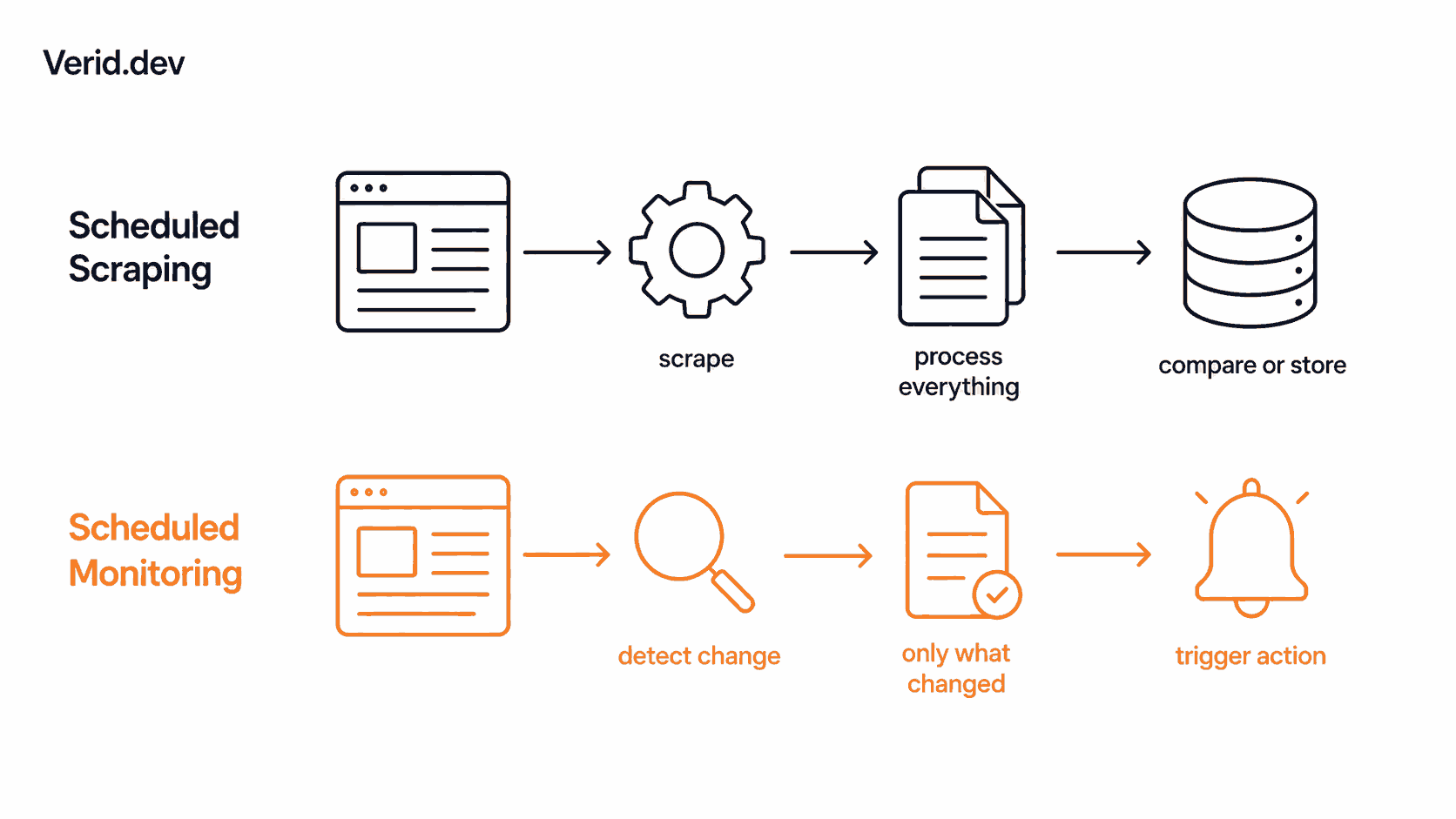
A scraping workflow typically looks like this: website in, full extraction out, then your own code decides what to do with the result.
Website → Scrape → Process everything → Compare or store resultsEvery run pulls the full page or dataset. If you want to know whether anything changed, you write the diffing logic yourself: store the previous result, compare fields, decide what counts as significant, and avoid firing on noise like a rotating ad or a timestamp in the footer.
A monitoring workflow inverts the emphasis. The system fetches the page, but the point of the run is change detection, not raw extraction:
Website → Monitor → Detect change → Fetch/process only what changed → Trigger an actionThe output of a monitoring run isn't "here is the page." It's "here is what changed, and whether it matched the rule you set." That distinction matters most in workflows where you're checking the same page repeatedly and only care about the runs where something actually moved: competitor pricing, release tracking, stock status, documentation edits, and policy pages that publish without notice.
Where Building an Actor Still Makes Sense
Apify earns its place when the job is genuinely a scraping job: pulling large structured datasets from many pages, driving a real browser through multi-step interactions, or running custom logic that needs full control over the crawl, like paginating through thousands of listings or handling site-specific login flows. The Apify Store also gives you a large catalog of pre-built Actors, so you're not always starting from a blank container. If you need the raw dataset itself, not just a signal that it changed, an Actor is the right tool.
Where an Actor Becomes Overhead for Simple Monitoring
The overhead shows up when the actual requirement is narrower than "run a scraper." To turn a scheduled Actor into a monitor, you still have to build the parts Apify doesn't provide out of the box: a place to store the previous run's result, logic to diff the new run against it field by field, rules to decide what counts as a meaningful change versus noise, and a delivery step with retries so a failed webhook doesn't just silently disappear. None of that is exotic engineering, but it is a second system sitting on top of the Actor, and it's the part that breaks on a Sunday when a class name changes or a webhook endpoint times out.
Apify's own compute pricing adds a second consideration for monitoring specifically. Compute units bill on memory times runtime, so a scraper that renders a full page with a headless browser every fifteen minutes, all day, every day, costs meaningfully more than the same interval spent checking whether one field changed. For a monitoring workload, most of that compute is spent re-processing pages that didn't change at all.
What Does a Monitoring First Workflow Look Like?
A dedicated monitoring workflow starts from the opposite assumption: most checks won't find anything worth reporting, so the system should optimize for staying quiet, not for processing everything. That means the fetch, the extraction, the diff, and the alert rule are one connected loop instead of separate pieces you wire together.
This is the specific gap Verid is built to close. It's a change detection API: you point it at a URL, tell it what field to extract, and set a rule for when to notify you. Verid runs the schedule, the fetch, the extraction, the diff, and the delivery, so the only thing you write is the config.
The loop breaks down into five stages. First, fetch: Verid tries a static request, then automatically escalates to a headless browser and a residential proxy if the site needs it, described in more detail on the change detection page. Second, extract: you choose from CSS selectors, XPath, JSONPath, regex, full-page hashing, or an AI prompt to pull a typed field instead of raw HTML. Third, diff: each run is compared against the last successful one, field by field. Fourth, predicate: the diff only becomes an alert if a rule you defined, like "price dropped 10%" or "version changed," actually evaluates true. Fifth, delivery: a signed webhook, Slack message, Discord message, or email goes out, with six retries and a dead-letter queue if delivery keeps failing, covered on the notifications page.
How Verid Fits Into the Workflow
Creating a monitor is a single API call. This example, taken directly from Verid's quickstart guide, watches the GitHub API for a new React release and posts a webhook only when the tag changes:
curl -X POST https://api.verid.dev/v1/monitors \
  -H "Authorization: Bearer $VERID_API_KEY" \
  -H "Content-Type: application/json" \
  -d '{
    "name": "React New Releases",
    "url": "https://api.github.com/repos/facebook/react/releases/latest",
    "schedule_interval_seconds": 3600,
    "extract_config": {
      "method": "json_path",
      "fields": { "tag_name": "$.tag_name" }
    },
    "diff_predicate": { "type": "field_changes", "field": "tag_name" },
    "deliveries": [{ "type": "webhook", "url": "https://your-app.com/webhooks/verid" }]
  }'
There's no scraper to deploy and no diffing logic to write. The schedule_interval_seconds field replaces the cron expression, extract_config replaces the parsing code, diff_predicate replaces the comparison logic, and deliveries replaces the alerting service. Verid also ships an official Node.js SDK if you'd rather manage monitors in code than curl, along with ready-made recipes for GitHub releases, crypto prices, and other common patterns.
Scheduled Actor vs Dedicated Monitoring: A Quick Comparison
| Approach | Best For | Main Workflow | Maintenance |
|---|---|---|---|
| Apify scheduled Actor | Large scale scraping, custom browser automation, full dataset extraction | Website in, full extraction out, you process and diff it | You write and maintain the diff, storage, and alert logic |
| Screenshot only tools | Simple visual "did the page change" checks | Whole page compared to the last screenshot | Whole page noise, no rule to scope what fires |
| Verid | Scheduled change detection with a defined rule | Fetch, extract, diff, predicate, deliver in one loop | You write the config, Verid runs the loop |
Which Use Cases Fit a Monitoring API Instead of an Actor?
Several recurring workflows map cleanly onto rule based monitoring rather than raw scraping. Competitor price tracking extracts a price field with CSS or XPath and only alerts on a percentage drop, so a repricing job can trigger straight off the webhook payload. Dependency and release monitoring uses JSONPath against GitHub, npm, or PyPI endpoints to catch a version bump before it breaks CI. Restock alerts watch an availability string and fire only when it flips to in stock. JSON API field monitoring applies the same idea to any internal or third party endpoint, catching a feature flag or schema change the moment it happens. Regulatory and policy page monitoring uses full-page hashing to catch silent edits on government pages that don't publish changelogs. SERP monitoring tracks ranking positions and AI Overview blocks for a set of keywords. In every one of these, the value isn't the scrape itself, it's the rule that decides whether the scrape mattered. Verid's blog post on API monitoring versus scraping goes deeper into why that distinction changes the shape of the system you build.
What About Visual Changes That Selectors Can't Catch?
Not every change is a field. A redesigned hero section, a swapped banner image, or a layout shift doesn't show up in a CSS selector, because there's no text value to extract. Verid's visual monitoring handles that case separately: it screenshots the page on each check, compares it pixel by pixel against the previous run, and alerts only when the changed area crosses a threshold you set, with the option to scope the comparison to one region and mask out elements that always churn, like ad slots or timestamps. Visual and structured monitors are separate monitor types that can run on the same URL, so you get an exact field value from one and pixel level proof from the other when you need both signals.
How Does This Help AI Agents and RAG Pipelines Stay Current?
Agents and retrieval pipelines are only as fresh as the data they're built on, and re-crawling a full site on a schedule to catch one field is wasteful for both compute and latency. A monitoring loop that watches a specific endpoint or page section and only pushes an update when a defined predicate fires gives an agent pipeline a much smaller, more relevant stream to ingest: a webhook that says exactly what field changed and what the new value is, rather than a full page it has to re-parse and re-embed. For any pipeline that needs to know the moment a price, a version, a policy, or a status changes, and act on it through a webhook rather than a scheduled full re-crawl, that's a smaller and more reliable integration surface than rebuilding the extraction and diffing logic inside the agent itself.
When Is Apify Still the Better Choice?
Apify remains the stronger option when the job genuinely requires custom crawl logic across many pages, multi-step browser interactions like form fills and logins, or a full dataset export rather than a change signal. If you need thousands of rows scraped from a marketplace on a one-time or recurring basis, or you're building a general purpose automation pipeline that happens to include scraping as one step, Apify's Actor model and Store give you flexibility Verid isn't designed to replace.
When Is a Dedicated Monitoring API a Better Fit?
A monitoring API fits when the question is narrower: did this specific value change, and should that trigger an action. If you're checking the same handful of pages or endpoints on a recurring schedule, and the deliverable you actually want is a webhook with a before and after value rather than a fresh dataset every time, building and maintaining an Actor is more system than the task needs. Verid's 14-day free trial covers unlimited monitors and 200 runs with no credit card, which is enough to test the difference on a real page before deciding.
Conclusion
Apify and a dedicated monitoring API aren't solving the same problem, even though both can technically run on a schedule. Apify runs your code. A monitoring API runs the loop: fetch, extract, diff, predicate, deliver, so the only thing you maintain is the rule. If the job is "scrape this at scale," build the Actor. If the job is "tell me when this specific thing changes," that's the use case a monitoring API was built for, and it's usually the faster path to a working alert.
Frequently Asked Questions
Can I use Apify for scheduled website monitoring?
Yes, technically. You'd build an Actor to fetch and parse the page, add a schedule with a cron expression, and then write your own diffing and alerting logic on top, since Apify's scheduler starts and stops runs but doesn't compare results or evaluate rules on its own.
Do I need to build an Actor for website monitoring?
No. A dedicated change detection API lets you point at a URL, pick an extractor like CSS, XPath, JSONPath, regex, full-page hash, or an AI prompt, and set a rule for when to alert, without deploying or maintaining a scraper.
What is the difference between web scraping and web change detection?
Scraping is about extracting data from a page. Change detection is about comparing that extraction to the previous run and deciding, based on a rule, whether the difference is worth acting on. Scraping answers "what is on this page." Monitoring answers "did the thing I care about change."
Does scheduled monitoring work on pages without a public API?
Yes. Structured monitors can use CSS, XPath, or full-page hashing directly against rendered HTML, and static fetches automatically escalate to a headless browser for JavaScript-heavy or bot-protected pages, so a public API isn't required to monitor a page for changes.
About the author

Software Engineer & Technical Writer
Software engineer and technical writer, Hanzala works on both Verid’s product and its docs. He’s most at home explaining APIs, webhooks and selector syntax in plain language, with examples you can actually run.
More from HANZALA SALEEM →Related posts
Free Website Change Monitors Compared (No Card Required)
Compare free website change monitors that need no credit card. Real limits, check frequency, and which tool actually fits your use case.
Read the post →comparisonFirecrawl vs Verid: A Scraping API and a Monitoring Loop Are Not the Same Thing
Firecrawl scrapes and now checks pages on a schedule. Verid is built only for monitoring. Here's the real architectural difference.
Read the post →comparisonWachete Alternative for Developers: Get Structured Data, Not Raw Diffs
Wachete shows you raw diffs. Verid extracts the exact field you care about and fires a webhook only when your predicate is true. No noise, no glue code.
Read the post →comparisonDistill Alternatives for Teams That Need an API Instead of a Browser Extension
Distill works fine as a browser extension. But when your team needs an API, predicates, webhooks, and zero glue code, here's what to use instead.
Read the post →