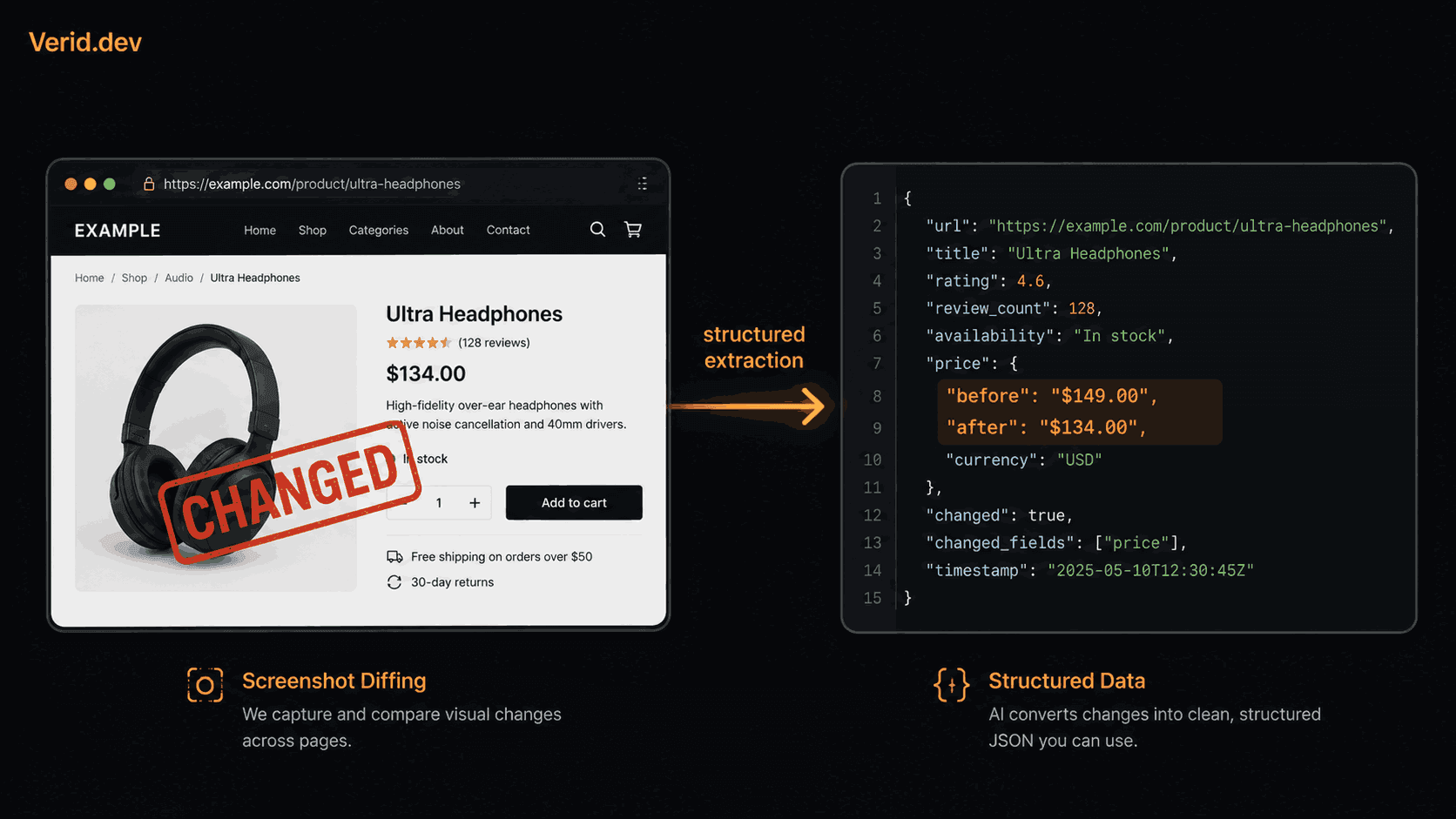
Wachete Alternative for Developers: Get Structured Data, Not Raw Diffs
Wachete has carved out a real niche. It monitors pages for text changes, supports CSS selectors for targeting specific elements, handles JavaScript-rendered pages, and even tracks changes inside PDFs and Word documents. The pricing is genuinely affordable, plans start around $5.40 per month, and the setup is mostly no-code. That combination makes it an easy choice for individuals and small teams who need basic alerting without writing a single line of code.
For those use cases, Wachete does what it says. You paste a URL, pick a page element, and get an email when something changes. That is a solved problem.
The issue shows up the moment you try to build anything on top of it.
The Problem with "Something Changed"
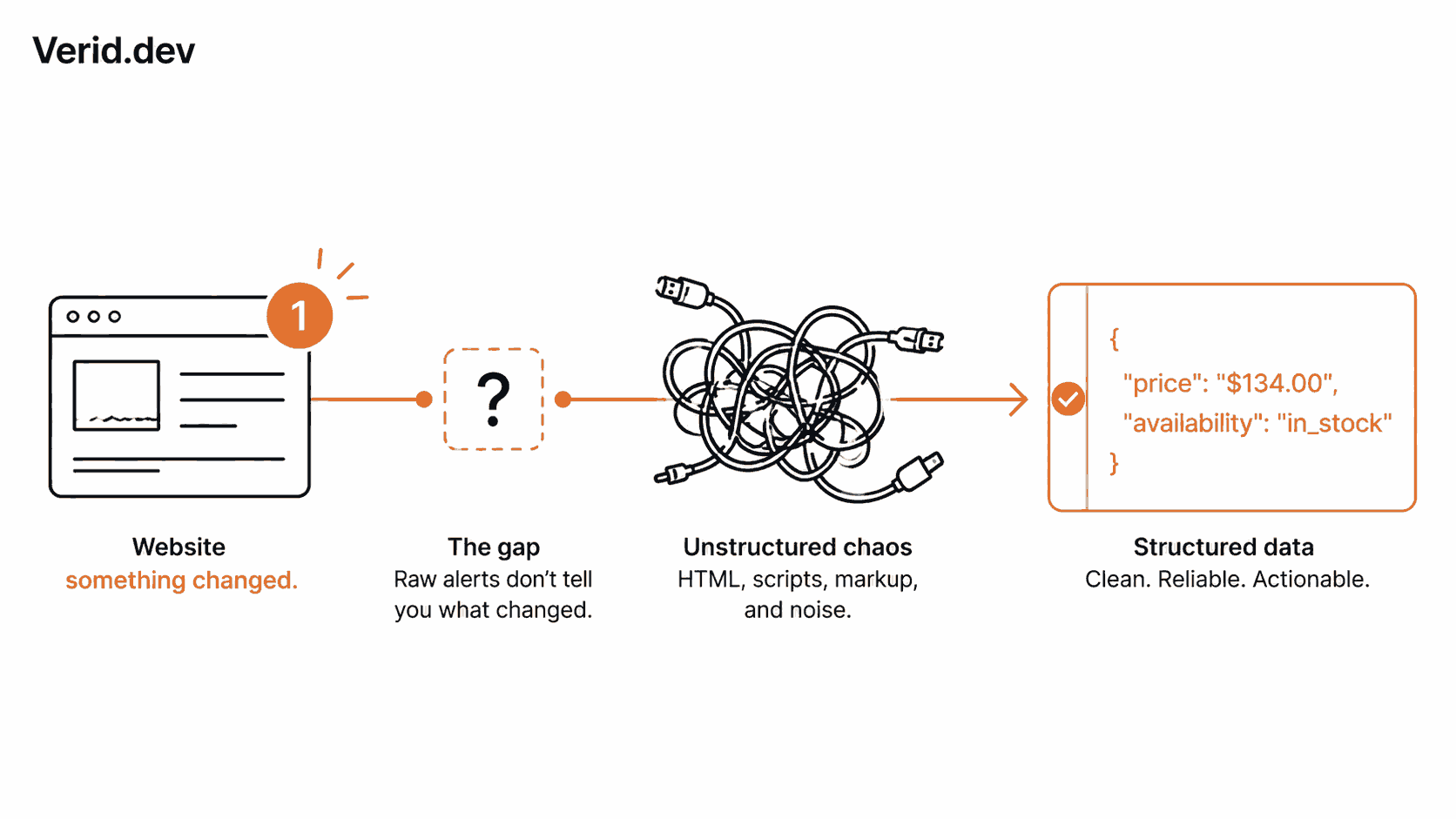
Screenshot-based and raw diff monitors share a structural weakness: they tell you that a page changed, not what changed or whether that change matters to you.
In practice, this generates a lot of noise. Cookie banners get refreshed. Ad slots rotate. Timestamps update on every load. A page that runs A/B tests will fire alerts constantly without any meaningful content shifting at all. You spend more time triaging alerts than acting on them.
But alert noise is only part of the problem. The bigger issue is what happens after detection.
Say a Wachete alert fires and the price on a competitor's page actually did drop. Now what? You have a screenshot or a raw text diff sitting in your inbox. To build something useful on top of that, you still need to:
- Extract the new price as a number
- Compare it against your own price or a threshold
- Trigger a repricing workflow, a Slack message to your team, or an entry in a database
- Store the before and after values somewhere queryable
None of that is in Wachete. You are back to writing glue code, and a lot of it.
What Structured Data Monitoring Actually Means
The alternative is not just capturing a screenshot at a finer granularity. It is a different model entirely.
Instead of comparing two page snapshots, a structured monitor targets specific fields, extracts them as typed values, compares them numerically or semantically, and fires a delivery only when a rule you define returns true.
That changes the output from "the page changed" to "the price field dropped from $149.00 to $134.00 and the availability field is now in_stock." The difference matters the moment you want to automate anything downstream.
How Verid Closes the Loop
Verid is a developer-first change detection API built around this model. Every monitor runs a five-stage pipeline: fetch, extract, diff, evaluate a predicate, and deliver. You configure the pipeline once via the REST API, and Verid runs it on the schedule you set.
Extraction Methods
Verid supports six extraction methods, each returning typed named fields rather than raw HTML:
| Method | Best for |
|---|---|
css | Rendered HTML pages, standard selectors |
xpath | Complex HTML/XML, ancestor traversal |
json_path | JSON APIs, JSONPath expressions |
regex | Plain text, raw body matching, count tracking |
full_page | "Did anything at all change?" |
prompt (LLM) | Unstructured pages, frequently re-layouting sites |
Every method produces the same output format: a named field map. That is what predicates and webhook payloads reference. The extraction method is an implementation detail your downstream code never needs to know about.
Predicates: Signal Without Noise
This is where Verid solves the noise problem structurally rather than through configuration hacks. Before any delivery goes out, a predicate is evaluated against the diff from the latest run. If the predicate returns false, nothing is delivered. The run is recorded, but your endpoint stays quiet.
The nine predicate types available today:
| Predicate | Fires when |
|---|---|
any_field_changes | Any tracked field differs |
field_changes | A specific field differs |
field_increases_by_percent | Numeric field rose by at least N% |
field_decreases_by_percent | Numeric field dropped by at least N% |
field_increases_by_absolute | Numeric field rose by at least N |
field_decreases_by_absolute | Numeric field dropped by at least N |
field_matches_regex | New value matches a pattern |
field_equals | Field equals a literal value |
composite | AND / OR combination of the above |
You can nest composites to handle compound conditions. "Fire only when price dropped at least 10% AND availability is in_stock" is a single JSON block, not a downstream filter you write yourself.
Delivery
When a predicate fires, Verid sends a structured webhook payload that includes the field name, before value, after value, the monitor ID, and the timestamp. No parsing required on your end.
{
  "monitor": "Competitor price tracker",
  "fired": "field_decreases_by_percent",
  "field": "price",
  "before": "149.00",
  "after": "134.00",
  "at": "2026-06-25T09:31:00Z"
}
Every webhook is HMAC-signed using your monitor's secret, sent in the Verid-Signature header. Six automatic retries with exponential backoff follow any failure, and anything still undelivered lands in a dead-letter queue rather than being silently dropped.
Slack, Discord, and email are also available if you want alerts before you have a webhook endpoint set up.
Creating a Monitor
The full REST API requires nothing beyond an HTTP client. Here is a price drop monitor that fires only when a competitor's price falls by 10% or more:
curl -X POST https://api.verid.dev/v1/monitors \
  -H "Authorization: Bearer $VERID_API_KEY" \
  -H "Content-Type: application/json" \
  -d '{
    "name": "Competitor price tracker",
    "url": "https://competitor.com/product/widget",
    "schedule_interval_seconds": 900,
    "extract_config": {
      "method": "css",
      "fields": {
        "price": "[data-test=product-price]",
        "availability": "[data-availability]"
      }
    },
    "diff_predicate": {
      "type": "composite",
      "operator": "AND",
      "conditions": [
        { "type": "field_decreases_by_percent", "field": "price", "threshold": 10 },
        { "type": "field_equals", "field": "availability", "value": "in_stock" }
      ]
    },
    "deliveries": [
      { "type": "webhook", "url": "https://your-app.com/hooks/pricing" }
    ]
  }'
If you prefer the Node.js SDK:
import { VeridClient } from '@verid.dev/sdk';

const client = new VeridClient({ apiKey: process.env.VERID_API_KEY! });

const monitor = await client.monitors.create({
  name: 'Competitor price tracker',
  url: 'https://competitor.com/product/widget',
  schedule_interval_seconds: 900,
  extract_config: {
    method: 'css',
    fields: {
      price: '[data-test=product-price]',
      availability: '[data-availability]',
    },
  },
  diff_predicate: {
    type: 'composite',
    operator: 'AND',
    conditions: [
      { type: 'field_decreases_by_percent', field: 'price', threshold: 10 },
      { type: 'field_equals', field: 'availability', value: 'in_stock' },
    ],
  },
  deliveries: [{ type: 'webhook', url: 'https://your-app.com/hooks/pricing' }],
});
Install the SDK with npm install @verid.dev/sdk.
Verifying Webhooks
Structured data is only useful if you can trust it. Verid signs every request using HMAC-SHA256. Here is the verification logic in TypeScript:
import { createHmac, timingSafeEqual } from 'crypto';

function verifySignature(header: string, rawBody: string, secret: string): boolean {
  const parts = Object.fromEntries(header.split(',').map(p => p.split('=')));
  const ts = parseInt(parts['t'] ?? '0', 10);
  const sig = parts['v1'];
  if (!ts || !sig) return false;
  if (Math.abs(Date.now() / 1000 - ts) > 300) return false;

  const expected = createHmac('sha256', secret)
    .update(`${ts}.${rawBody}`)
    .digest('hex');

  return timingSafeEqual(Buffer.from(expected, 'hex'), Buffer.from(sig, 'hex'));
}

app.post('/hooks/pricing', (req, res) => {
  const header = req.headers['verid-signature'] as string;
  if (!verifySignature(header, req.rawBody, process.env.WEBHOOK_SECRET!)) {
    return res.status(401).send('Invalid signature');
  }
  const { field, before, after } = req.body;
  console.log(`${field} changed: ${before} -> ${after}`);
  res.sendStatus(200);
});
See the webhooks reference for equivalent snippets in Python, Ruby, Go, and PHP.
Wachete vs. Verid: Side by Side
| Capability | Wachete | Verid |
|---|---|---|
| Target audience | Non-developers, small teams | Developers, API-first workflows |
| Output format | Screenshot diff / raw text diff | Typed named fields (JSON) |
| Alert logic | Any change detected | Predicate evaluated against field diff |
| Alert noise | High (timestamps, ads, rotating content) | Low by default |
| Extraction methods | CSS selectors, full-page | CSS, XPath, JSONPath, regex, full-page, LLM |
| JSON API support | No | Yes (JSONPath natively) |
| API for monitor management | Limited | Full REST API with OpenAPI 3.1 spec |
| Node.js SDK | No | Yes (@verid.dev/sdk) |
| Webhook delivery | No native signed webhooks | HMAC-signed, 6x retry, dead-letter queue |
| Bot/JS-heavy sites | Supported | Auto-escalates static -> browser -> proxy |
| Downstream automation | Requires Zapier | Direct API + signed webhooks |
| Free plan | Yes | 14-day free trial, no card (unlimited monitors, 200 runs) |
Migrating from Wachete
If you are already running monitors in Wachete, the migration path is straightforward.
For every Wachete watch you have, you need to answer two questions: what field am I actually tracking, and when do I want an alert? The CSS selector you used in Wachete maps directly to Verid's method: "css" field config. The threshold or sensitivity setting you configured maps to a predicate type.
The quickstart guide gets you to a running monitor in under two minutes. If your pages are JavaScript-rendered, leave fetch_mode on auto and Verid will escalate to a headless browser automatically. For pages that change their markup frequently, switch the extraction method to prompt and describe the field in natural language. No selector maintenance required.
If you are monitoring a JSON API rather than an HTML page, use method: "json_path". Wachete has no native JSON support, so this is probably the biggest gap you will close immediately.
Pricing
| Plan | Price | Runs per month | History |
|---|---|---|---|
| Free trial (14 days) | $0 | 200 for the whole trial | 14 days |
| Lite | $9/mo | 1,000 | 90 days |
| Starter | $19/mo | 5,000 | 180 days |
| Pro | $49/mo | 15,000 | 365 days |
| Scale | $149/mo | 100,000 | 2 years |
The free trial lasts 14 days and needs no credit card; after it, monitors pause until you choose a plan. See the full plan comparison for details on LLM extraction quotas and proxy bandwidth.
FAQ
Does Verid work on JavaScript-rendered pages?
Yes. The default fetch_mode: "auto" tries a static HTTP request first. If extraction returns empty fields, it retries automatically with a headless browser. Bot-protected sites fall through to a residential proxy as a third layer. Most monitors do not need any manual configuration for this.
What if the site changes its HTML structure and my selectors break?
Switch the extraction method to prompt and describe the field in plain English, for example "the current sale price in USD." The LLM extractor adapts without requiring a code deploy or selector update. LLM extractions count against your plan's monthly quota.
Can I monitor a JSON API, not just HTML pages?
Yes. Set method: "json_path" and write standard JSONPath expressions against the response body. This is one of the most common Verid use cases and something screenshot tools cannot do at all.
How is Verid different from Apify or ScrapingBee?
Those return raw HTML or rendered page content, leaving you to handle scheduling, state, diffing, predicates, and delivery yourself. Verid runs the entire loop on a schedule you set. You write the config, Verid runs the infrastructure, and your endpoint only receives a request when the rule you defined fires.
About the author

Software Engineer
Suleman is a software engineer focused on web-data infrastructure. He works on Verid’s scraping and change-detection stack, and covers CSS and XPath selectors, JSON API monitoring, and how to design alerts developers won’t end up muting.
More from Suleman →Related posts
Free Website Change Monitors Compared (No Card Required)
Compare free website change monitors that need no credit card. Real limits, check frequency, and which tool actually fits your use case.
Read the post →comparisonApify Alternative for Scheduled Website Monitoring
Compare Apify Actors to a dedicated change monitoring API. See when building an Actor makes sense, and when webhooks on a rule get you there faster.
Read the post →comparisonFirecrawl vs Verid: A Scraping API and a Monitoring Loop Are Not the Same Thing
Firecrawl scrapes and now checks pages on a schedule. Verid is built only for monitoring. Here's the real architectural difference.
Read the post →comparisonDistill Alternatives for Teams That Need an API Instead of a Browser Extension
Distill works fine as a browser extension. But when your team needs an API, predicates, webhooks, and zero glue code, here's what to use instead.
Read the post →