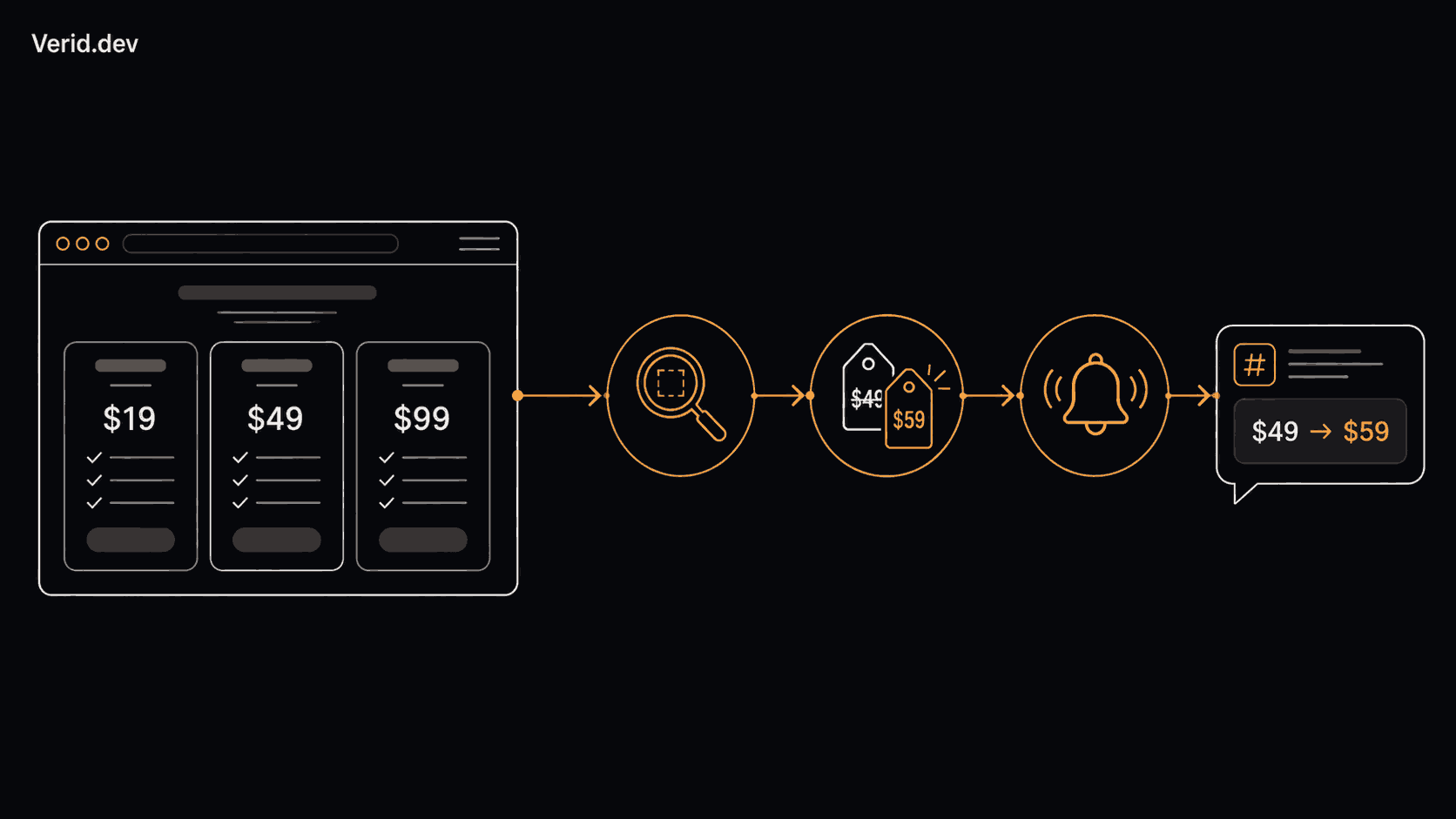
How to Detect When a Competitor Changes Their Pricing Page Automatically
Pricing pages change more often than most teams realize. A competitor quietly drops an entry tier, adds an AI add on, or moves a feature from one plan to another, and by the time your sales team hears about it in a lost deal call, the window to react is already gone.
This guide walks through how automated pricing page monitoring actually works, why manual checks fail at scale, and how to set up a monitor that watches a specific price field (not the whole page) and only alerts you when something meaningful changes.
The problem with checking pricing pages manually
Most teams start the same way. Someone bookmarks three or four competitor pricing pages and checks them "when they remember." That works for about a month.
Then one of these happens:
- The check gets skipped during a busy sprint, and a pricing change sits unnoticed for weeks.
- A screenshot tool is set up instead, and it starts firing alerts for cookie banners, rotating testimonials, and A/B test variants instead of actual price changes.
- Nobody owns the process, so the "monitoring" lives in one person's head and disappears when they change roles.
The underlying issue is that a pricing page is not one signal. It is a bundle of prices, plan names, feature lists, trial terms, and CTAs, all sitting in the same block of HTML. A human glance can miss a $10 change in a $49 line item. A tool that just diffs raw HTML cannot tell the difference between a price update and a timestamp in the footer.
Why pricing page monitoring matters
Pricing is one of the fastest moving parts of a competitor's public presence, and it is also one of the highest leverage signals available. Unlike a product roadmap or a hiring page, a pricing change tells you directly how a competitor is trying to win the next deal.
| Business benefit | What it means in practice |
|---|---|
| Faster competitive response | Sales and marketing hear about a price cut in minutes, not in a lost deal debrief |
| Accurate battlecards | Pricing sections in sales enablement material stay current automatically |
| Early trend detection | A pattern of small price increases or packaging changes becomes visible over months |
| Reduced manual workload | Nobody spends Monday mornings opening ten browser tabs to compare prices |
| Structured historical record | Every price and plan change is timestamped, not remembered secondhand |
For SaaS founders and product marketers specifically, pricing page changes often surface before an official announcement. A new tier appearing on the pricing page usually means the go to market motion behind it is already underway.
Common challenges with pricing page monitoring
Before automating anything, it helps to understand where most monitoring setups actually fail.
| Challenge | Why it happens |
|---|---|
| Alert noise | Full page monitoring fires on any byte level change, including ads and banners |
| Missed pages | Pricing lives across multiple URLs (main plan, enterprise, add ons) and only one gets watched |
| JavaScript rendered prices | Many pricing pages load prices client side, so a simple fetch returns empty fields |
| Non numeric price strings | A price like "$49/mo" cannot be compared with a percentage threshold without extra handling |
| No ownership | Alerts go to an inbox nobody checks, so the monitoring exists but nothing acts on it |
How automated pricing monitoring actually works
Automated monitoring replaces a manual glance with a repeatable loop that runs on a schedule. There are five stages, and skipping any one of them is usually where "monitoring" tools fall short:
- Fetch the page on a schedule, using a real browser if the price is rendered by JavaScript.
- Extract the specific field you care about (a price, a plan name, a feature label) rather than the whole page.
- Diff the new value against the last known value for that exact field.
- Evaluate a predicate, meaning a rule that decides whether the change is worth an alert (did the price actually drop, or just get reformatted?).
- Deliver a notification with the before and after values, through a channel your team already uses.
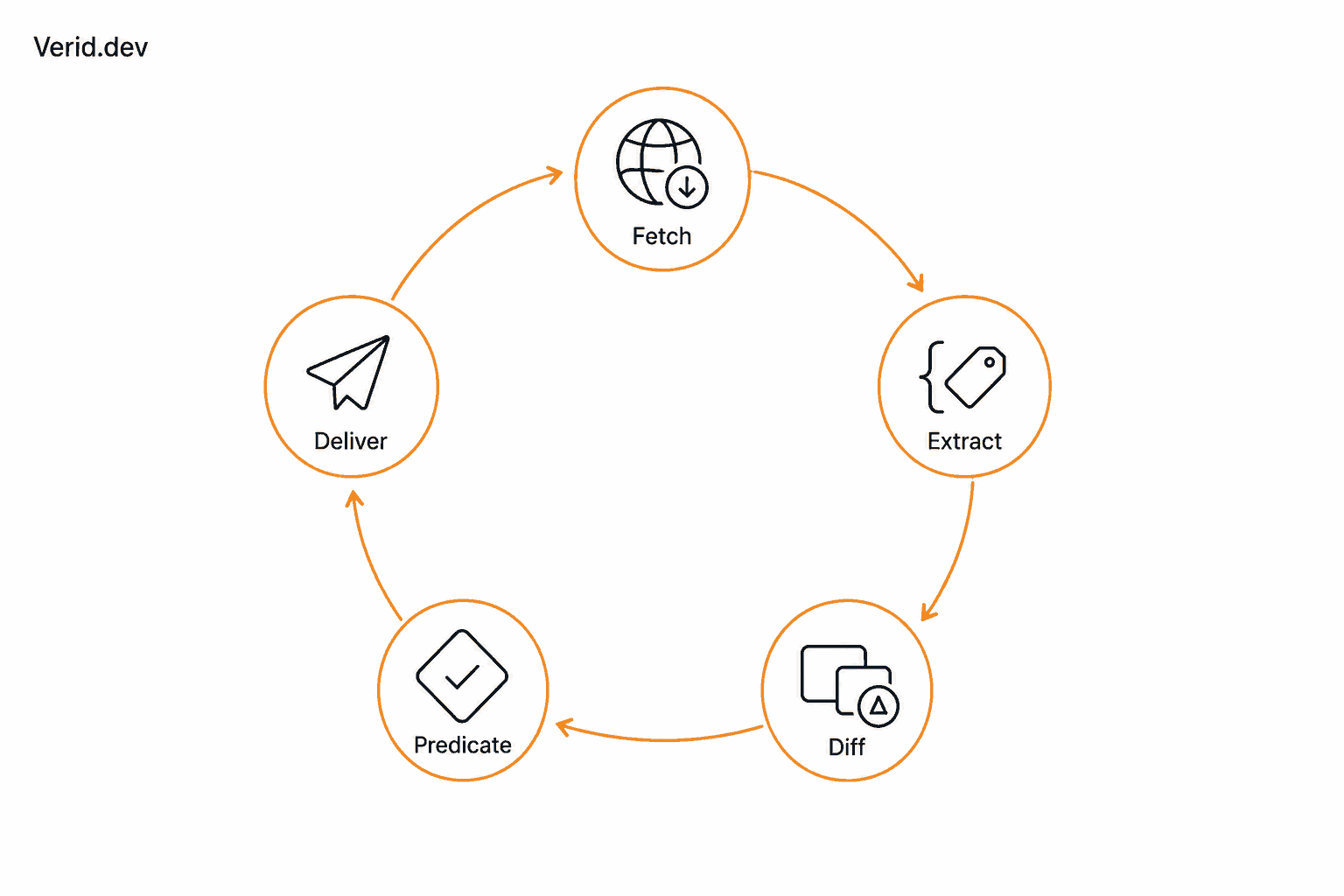
This is the difference between a screenshot tool and a structured monitoring approach. A screenshot diff shows you that pixels moved. A field level approach tells you that the Pro plan price went from $49 to $39.
Manual checks vs. automated monitoring
| Manual checks | Automated monitoring | |
|---|---|---|
| Consistency | Depends on someone remembering | Runs on a fixed schedule every time |
| Speed of detection | Days to weeks | Minutes to hours |
| Signal vs. noise | Human judgment filters noise, but slowly | Predicates filter noise automatically |
| Historical record | Screenshots or notes, rarely searchable | Timestamped field level history |
| Scales to 50+ competitor pages | No | Yes |
How to monitor a pricing page with Verid
Verid is a developer first web change detection API built around this exact loop: fetch, extract, diff, predicate, deliver, all in one API call. It is not a screenshot tool. It extracts the specific fields you name and only sends a notification when a rule you define is true.
Here is how the competitor pricing tracking use case is typically set up.
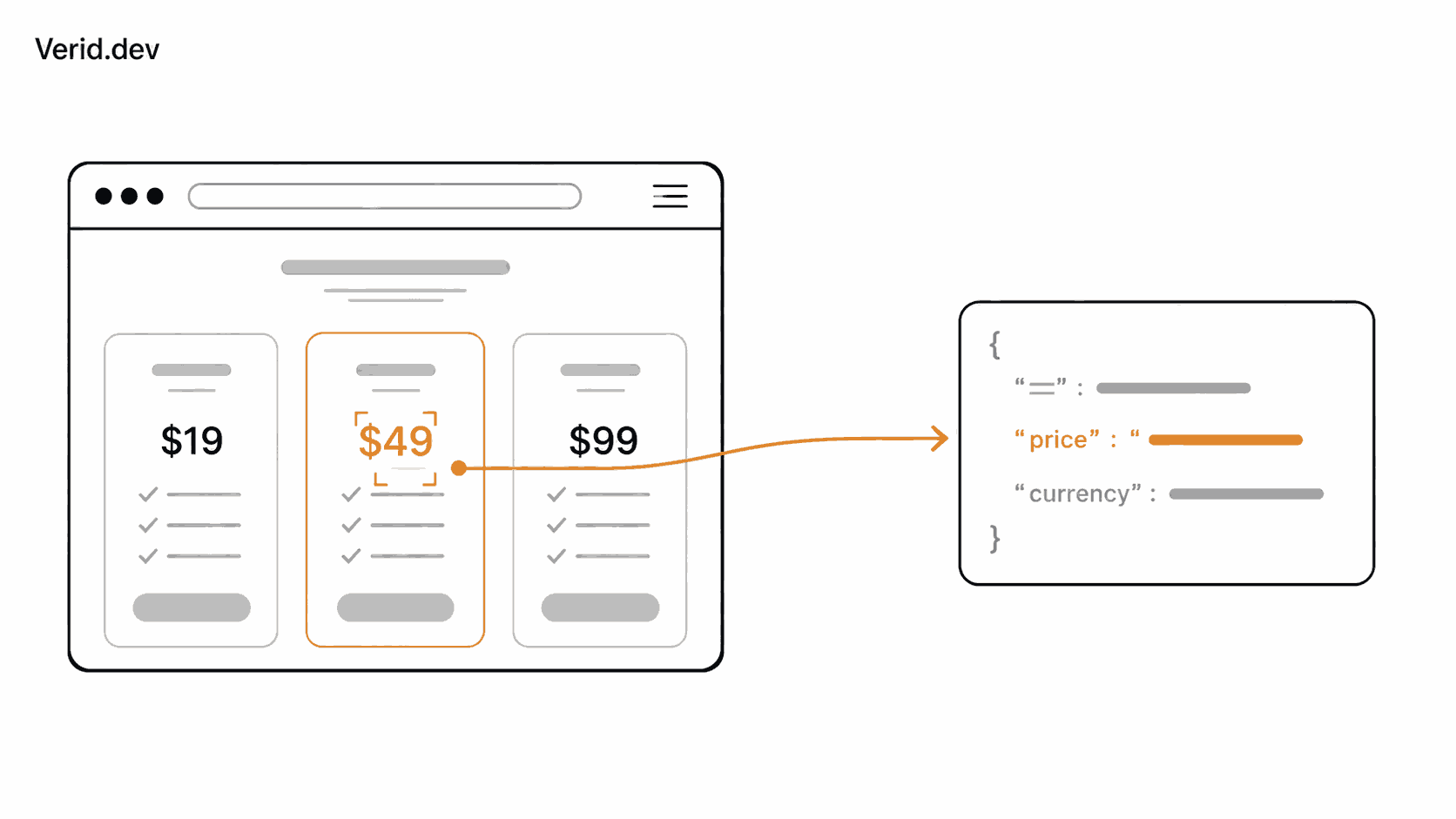
Step 1: Extract the price and plan name
Use CSS selector extraction to point at the exact elements holding the price and plan name, rather than hashing the entire page. If the pricing page is rendered with JavaScript, Verid's fetch layer escalates from a static fetch to a headless browser automatically, so you do not need to configure that separately.
{
  "method": "css",
  "fields": {
    "pro_plan_price": ".pricing-card.pro .price",
    "pro_plan_name": ".pricing-card.pro .plan-name"
  }
}
Step 2: Choose a predicate
This is the step most teams get wrong. Prices on a pricing page are usually strings like "$49/mo", not raw numbers. A field_decreases_by_percent predicate needs a numeric value, and a currency symbol will parse as NaN, which means it will silently never fire. Verid's own price drop alert recipe documents this exact gotcha.
For a text price like "$49/mo", the reliable option is a field_changes predicate, which fires on any change to that field regardless of format:
{
  "type": "field_changes",
  "field": "pro_plan_price"
}
If you need numeric threshold logic (only alert on drops of 10% or more, for example), pair CSS extraction with the AI extraction method to normalize the price into a plain number first, or combine conditions with a composite rule, as shown in Verid's change detection documentation:
{
  "type": "composite",
  "operator": "AND",
  "conditions": [
    { "type": "field_changes", "field": "pro_plan_price" },
    { "type": "field_changes", "field": "pro_plan_name" }
  ]
}
Step 3: Create the monitor
This follows the same request format shown in Verid's quickstart:
curl -X POST https://api.verid.dev/v1/monitors \
  -H "Authorization: Bearer $VERID_API_KEY" \
  -H "Content-Type: application/json" \
  -d '{
    "name": "Competitor Pro Plan Pricing",
    "url": "https://competitor.com/pricing",
    "schedule_interval_seconds": 3600,
    "extract_config": {
      "method": "css",
      "fields": {
        "pro_plan_price": ".pricing-card.pro .price",
        "pro_plan_name": ".pricing-card.pro .plan-name"
      }
    },
    "diff_predicate": {
      "type": "field_changes",
      "field": "pro_plan_price"
    },
    "deliveries": [
      { "type": "slack", "url": "https://hooks.slack.com/services/your/webhook/url" }
    ]
  }'
An hourly schedule_interval_seconds value is a reasonable default for a direct competitor's pricing page. When the price changes, the delivery payload includes both the before and after values, so your team sees exactly what moved without opening a dashboard.
Step 4: Verify and route the alert
Every webhook Verid sends is HMAC signed, so your endpoint can confirm it actually came from Verid before trusting the payload. Signature verification snippets in several languages are available in the webhooks documentation. If you would rather not run your own endpoint, deliveries can also go straight to Slack, Discord, or email.
Alert channels compared
| Channel | Best for |
|---|---|
| Webhook | Feeding changes into an internal database, CRM, or Slack bot |
| Slack | Teams that want the alert visible where competitive discussion already happens |
| Discord | Smaller teams or communities running lightweight monitoring |
| Anyone who wants a readable summary with no dashboard login required |
Step by step workflow
| Step | Action | Verid feature |
|---|---|---|
| 1 | Identify every URL where pricing appears (main page, enterprise page, add ons) | Multiple monitors, one per URL |
| 2 | Extract price and plan name fields, not the whole page | CSS, XPath, or AI extraction |
| 3 | Choose a predicate that fires only on meaningful change | field_changes or a composite rule |
| 4 | Set a check interval that matches how often the market moves | Daily, hourly, 15 minute, or down to 1 minute schedules on any plan |
| 5 | Route alerts to the channel your team actually checks | Webhook, Slack, Discord, or email |
| 6 | Review the before and after diff and log the strategic implication | Delivery payload with field level diff |
Monitoring frequency guide
| Page type | Suggested check interval |
|---|---|
| Direct competitor's primary pricing page | Hourly |
| Enterprise or contact sales pricing page | Daily |
| Adjacent competitor or aspirational competitor | Daily |
| Fast moving marketplace or ecommerce pricing | 15 minutes or faster |
Every Verid plan can run any of these intervals, down to every minute. Plans differ by monthly runs: the 14-day free trial includes 200 runs in total (about 14 pages checked daily while you test), Lite 1,000 (about 33 pages checked daily), Starter 5,000 (about six pages checked hourly), and Pro 15,000 (about five pages checked every 15 minutes).
Best practices
- Watch the specific element, not the full page. Scope your selector to the price and plan name so ad rotations and cookie banners do not trigger false alerts.
- Monitor every pricing related URL, not just the main page. Enterprise pricing, add on pages, and plan comparison tables often change independently.
- Match check frequency to how often the market moves. Hourly is reasonable for a direct competitor; daily is fine for a slower moving adjacent player.
- Assign an owner. An alert that nobody reads is the same as no monitoring at all. Decide in advance who reviews a pricing change and what they do with it.
- Keep a historical log. A single change means little on its own. A pattern of three price increases in a year tells you something about a competitor's trajectory.
Common mistakes
| Mistake | Consequence | Fix |
|---|---|---|
| Monitoring the whole page with a full hash | Constant false alerts from unrelated content | Scope extraction to the price element with CSS or XPath |
| Using a percent based predicate on a currency string | The predicate silently never fires because the value parses as not a number | Use field_changes, or normalize the value with AI extraction first |
| Only watching the homepage pricing card | Enterprise and add on pricing changes go unnoticed | Create a separate monitor for each pricing related URL |
| No process for acting on alerts | Notifications pile up unread | Assign an owner and a response step before turning monitoring on |
| Checking too infrequently for a fast moving market | Alerts arrive after the change has already affected deals | Increase check frequency to match the competitor's typical cadence |
Conclusion
A pricing page is one of the clearest signals a competitor gives you, and it is also one of the easiest to miss when it is being checked by hand. Structured, field level monitoring closes that gap. Instead of a person remembering to look, a scheduled check extracts the exact price and plan fields you care about, compares them to the last known value, and only reaches out when a rule you defined is actually true.
If you want to see the full loop in action, the competitor pricing tracking use case walks through a complete configuration, and the 14-day free trial includes unlimited monitors and 200 runs with no credit card, enough to start watching your top competitors with daily checks today.
FAQs
What is the best way to detect competitor pricing page changes automatically?
The most reliable method extracts a specific price field using a CSS selector or XPath expression, compares it against the last stored value, and fires an alert only when a defined rule (a predicate) evaluates to true. This avoids the noise generated by tools that diff the entire page.
How often should I check a competitor's pricing page?
Hourly checks are a reasonable default for a direct competitor's primary pricing page. Enterprise pricing pages, which change less often, can be checked daily. Fast moving markets like ecommerce may warrant checks every 15 minutes or less.
Why do price alerts sometimes fail to fire even when the price changed?
This usually happens when a percentage based rule is applied to a price string that includes a currency symbol, such as "$49.99". That string does not parse as a number, so a percent decrease predicate never evaluates as true. Using a field_changes rule, or normalizing the price to a plain number with AI extraction first, resolves this.
Can I monitor a pricing page that loads prices with JavaScript?
Yes. A static fetch will return empty fields on a JavaScript rendered page, so the monitoring tool needs to render the page in a real browser before extracting values. Verid's fetch layer escalates from a static fetch to a headless browser automatically when extraction returns nothing.
About the author

Software Engineer
A software engineer by trade, Suleman spends his days in Verid’s monitoring internals: browser automation, field-level extraction, and signed webhook delivery. His writing leans toward implementation detail: selectors, retries, rate limits, and what actually breaks in production.
More from Suleman →Related posts
Best Competitor Pricing Tools in 2026: Compared for Developers and Growth Teams
Compared: the best competitor price tracking software and tools for 2026 — features, pricing, and the API-first pick for developers.
Read the post →competitor monitoringHow to Track When a Competitor Switches Their Tech Stack (Without Checking Manually Every Week)
Stop manually re-checking BuiltWith. Learn how to get alerted the moment a competitor's site changes its tech stack, with a real workflow.
Read the post →competitor monitoringHow to Monitor Multiple Competitor Pages at Scale Without a Scraper
Learn how to track 50+ competitor pages using a change detection API, smart predicates, and webhooks. No scraping infrastructure required.
Read the post →competitor monitoringBest Competitor Monitoring Tools for SaaS Companies in 2026
Compare 9 competitor monitoring tools for SaaS teams in 2026, from five-figure CI suites to API-based pricing page monitors like Verid.
Read the post →