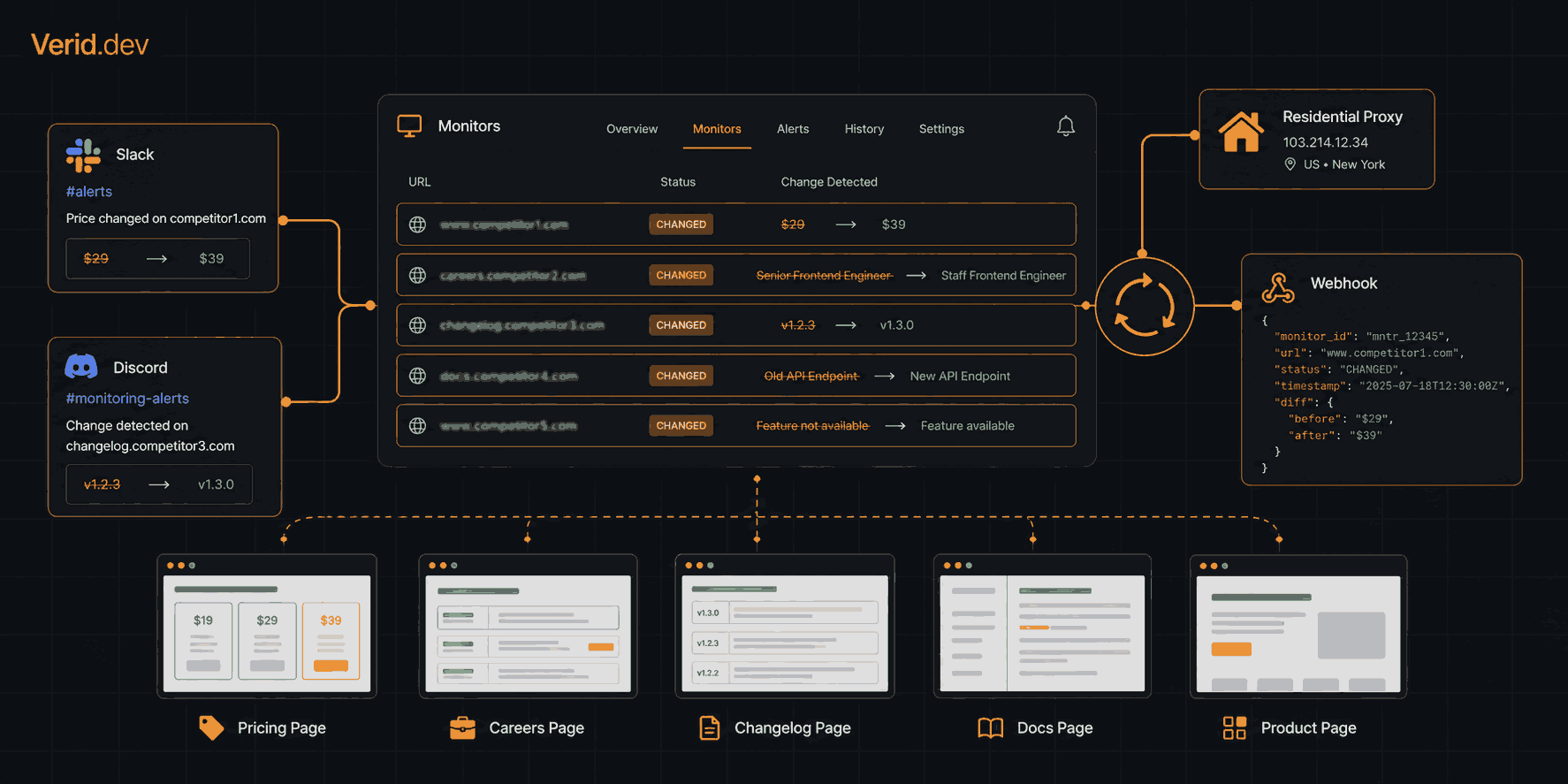
How to Monitor Multiple Competitor Pages at Scale Without a Scraper
Tracking competitor websites sounds simple until you're actually doing it. One pricing page, one hiring page, one changelog, fine, you can check those manually. Add ten more competitors, multiply by the number of pages you care about per company, and manual checks collapse inside a week.
The common fix is a scraper. That turns out to be the wrong tool for the job. Scrapers are built for extraction. Monitoring is a different problem: you don't need data, you need to know when data changes.
This guide covers how to set up competitor page monitoring for dozens to hundreds of URLs using a change detection API, with real code, practical extraction configs, and predicate logic that fires only when something genuinely matters.
Scraping and monitoring are not the same thing
Scraping returns data. Monitoring returns state changes. The distinction matters when you're building something that needs to run indefinitely.
A scraper answers: "What does this page contain right now?" You get HTML, you parse it, you store the result. If you want to know what changed, you run it again tomorrow and diff the outputs yourself. That means you're responsible for scheduling, state storage, diffing logic, error handling, and alerting. Four services to run for what is essentially a notification.
Monitoring answers a different question: "Has the value I care about changed since last time, and does it meet a condition I defined?" That question has a yes/no answer. If the answer is no, nothing happens. If it's yes, you get a notification with the before and after values already attached.
| Dimension | Web scraping | Change detection |
|---|---|---|
| Primary output | Raw data (HTML, JSON) | State change events |
| Alerting | You build it | Built-in, predicate-driven |
| Diffing | You store and compare | Done per-field automatically |
| Maintenance | High (selector rot, scheduling) | Low (config update on extraction error) |
| Signal-to-noise | Low (you process everything) | High (fires only on meaningful change) |
| Scaling model | Scraping pipeline | API call per monitor |
Four approaches, ranked by maintenance cost
DIY scraper. You write the fetch, the parser, the scheduler, the state database, the diff, and the alert. This gives you full control, but every piece is yours to maintain. When a competitor changes their CSS class names on a Friday evening, the silent failure is also yours.
Screenshot / visual monitoring tools. These check for visual changes by comparing page screenshots. They fire alerts on anything: cookie banners reloading, ad creative rotations, timestamps incrementing. Useful for human review workflows, not for automated pipelines that need to act on a specific value.
No-code page monitors (Visualping, Distill.io, UptimeRobot). Good entry point. But most lack API access on free tiers, offer limited monitor counts before costs escalate, and fire on byte-level page changes rather than the specific field you care about. They also don't support programmatic creation, so adding 50 monitors means clicking 50 times.
Change detection API. You define what field to extract, a predicate that says when to fire, and a destination for the notification. The infrastructure — scheduling, state, retries, signing — runs on the provider's side. Scaling from 5 to 500 monitors is an API call loop, not a configuration session.
How Verid's monitoring loop works
Verid runs every monitor through a five-stage loop on the schedule you set:
- Fetch — static HTTP request first. If the response looks empty or JavaScript-heavy, it auto-escalates to a headless browser. If the site actively fights bots, it falls through to a residential proxy.
- Extract — six extraction methods (CSS, XPath, JSONPath, regex, full-page hash, LLM prompt) pull out named fields. Output is always typed and structured.
- Diff — each field is compared against the previous successful run. The result is a before/after record per field.
- Predicate — the diff is evaluated against the rule you wrote. If the rule returns false, the run is recorded but nothing is delivered.
- Deliver — HMAC-signed POST to your webhook, Slack, Discord, or email. Six retries with exponential backoff, then a dead-letter queue. Nothing drops silently.
You write the extraction config and the predicate. Verid runs everything else.
Picking the right extraction method per page type
The extraction method determines what Verid pulls out of the page. Choosing correctly matters more than it might seem — the wrong method either returns nothing or returns too much.
| Page type | Recommended method | Why |
|---|---|---|
| Rendered HTML pricing page | css | CSS selectors target exactly the element you need |
| Complex XML or namespaced HTML | xpath | Parent/ancestor traversal that CSS can't express |
| REST API endpoint (JSON) | json_path | Reads the JSON response directly, no HTML parsing |
| Sitemap XML | regex | Count <loc> occurrences to detect new pages |
| Marketing site with unstable layout | prompt (LLM) | Describe the field in plain English, survives redesigns |
| Any page — "did anything change?" | full_page | Hashes the full response, no selector required |
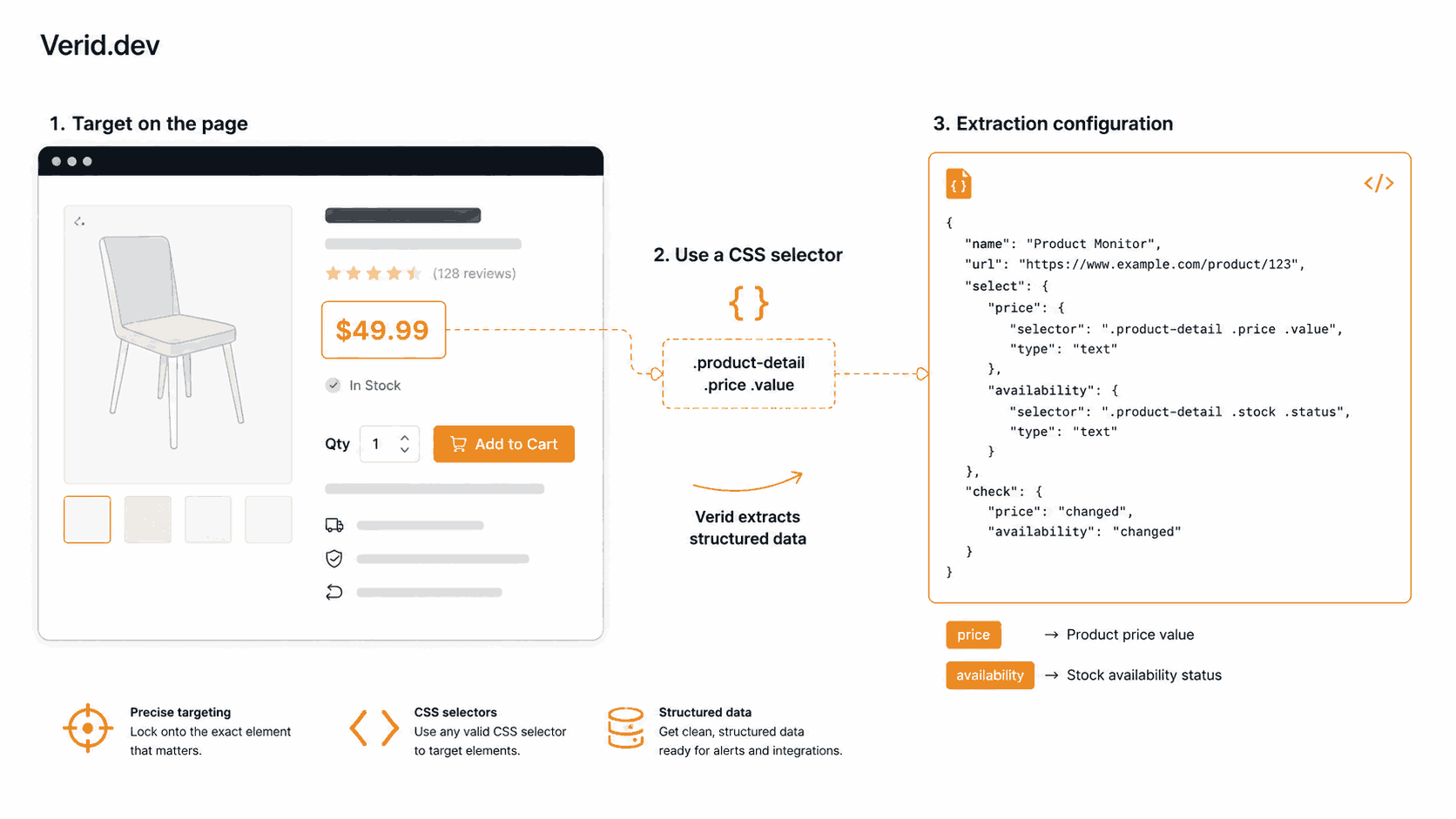
For most competitor pricing pages, CSS selectors are the right call. They're fast, deterministic, and don't consume LLM quota. Here's a monitor targeting a competitor's product page:
curl -X POST https://api.verid.dev/v1/monitors \
  -H "Authorization: Bearer $VERID_API_KEY" \
  -H "Content-Type: application/json" \
  -d '{
    "name": "Competitor A - Pro Plan Pricing",
    "url": "https://competitorA.com/pricing",
    "schedule_interval_seconds": 3600,
    "extract_config": {
      "method": "css",
      "fields": {
        "price": ".pricing-card--pro .price-amount",
        "plan_name": ".pricing-card--pro h3"
      }
    },
    "diff_predicate": { "type": "field_changes", "field": "price" },
    "deliveries": [
      { "type": "slack", "webhookUrl": "https://hooks.slack.com/services/..." }
    ]
  }'
The fields object maps a name you choose to a CSS selector. That name carries through to the diff payload and predicate references. Keep names short and descriptive — they show up in webhook bodies and Slack messages.
If a competitor's pricing page renders via JavaScript and view-source: doesn't show the price string, add "fetch_mode": "browser" to the request body. Verid then renders the page in a stealth headless browser before running selectors.
Predicates: alert only when it actually matters
This is the part most monitoring tools skip. A predicate is a rule evaluated against the field diff. If it returns false, no notification goes out. The run is still logged, but your Slack channel stays quiet.
Verid supports nine predicate types:
field_changes— fires whenever a specific field differs from last runany_field_changes— fires if any tracked field changedfield_decreases_by_percent/field_increases_by_percent— numeric threshold, e.g., price dropped 10%field_decreases_by_absolute/field_increases_by_absolute— fixed value thresholdfield_matches_regex— new value matches a patternfield_equals— new value equals a literalcomposite— AND/OR combinations of the above
The composite predicate is particularly useful for competitive intelligence. Say you want to know when a competitor drops their price by at least 5% and the product is still in stock — two conditions that together indicate a serious pricing move:
{
  "type": "composite",
  "operator": "AND",
  "conditions": [
    {
      "type": "field_decreases_by_percent",
      "field": "price",
      "threshold": 5
    },
    {
      "type": "field_equals",
      "field": "availability",
      "value": "In Stock"
    }
  ]
}
Without a composite predicate, you'd get an alert every time the price ticks down by any amount — including a $1 correction on a $2,000 product. With it, you filter to the signals that actually warrant a response.
One note on numeric parsing: if your extractor returns "$1,299.00" as a string, the percent predicates will fail to parse it as a number. Either strip the currency symbol in your selector (target the raw text node rather than a formatted display element) or use field_changes and apply your own threshold downstream in the webhook consumer. The competitor price tracking use case covers this in more detail.
Scaling to 50+ monitors via the API
This is where a change detection API earns its keep over no-code tools. Creating one monitor is a curl command. Creating fifty is a loop.
The Node.js SDK (@verid.dev/sdk) makes this straightforward. Suppose you have a list of competitor product URLs you want to track at 15-minute intervals on the Pro plan (its 15,000 monthly runs cover about 5 monitors at that rate):
import { VeridClient } from '@verid.dev/sdk';

const client = new VeridClient({ apiKey: process.env.VERID_API_KEY! });

const competitors = [
  { name: 'Competitor A - Pro Plan', url: 'https://competitorA.com/pricing', selector: '.pro-plan .price' },
  { name: 'Competitor B - Standard', url: 'https://competitorB.com/plans',   selector: '#plan-standard .amount' },
  { name: 'Competitor C - Growth',   url: 'https://competitorC.com/pricing', selector: '[data-plan="growth"] .price' },
  // ...add as many as your monthly runs allow
];

for (const comp of competitors) {
  await client.monitors.create({
    name: comp.name,
    url: comp.url,
    schedule_interval_seconds: 900, // 15 minutes (about 2,880 runs a month)
    extract_config: {
      method: 'css',
      fields: { price: comp.selector },
    },
    diff_predicate: { type: 'field_changes', field: 'price' },
    deliveries: [
      { type: 'slack', webhookUrl: process.env.SLACK_WEBHOOK_URL! },
    ],
  });

  console.log(`Created monitor: ${comp.name}`);
}
Run this once and all your monitors are live. Update extraction configs without touching the schedule or delivery config using PATCH /v1/monitors/:id. Pause a monitor when a competitor goes offline with POST /v1/monitors/:id/pause.
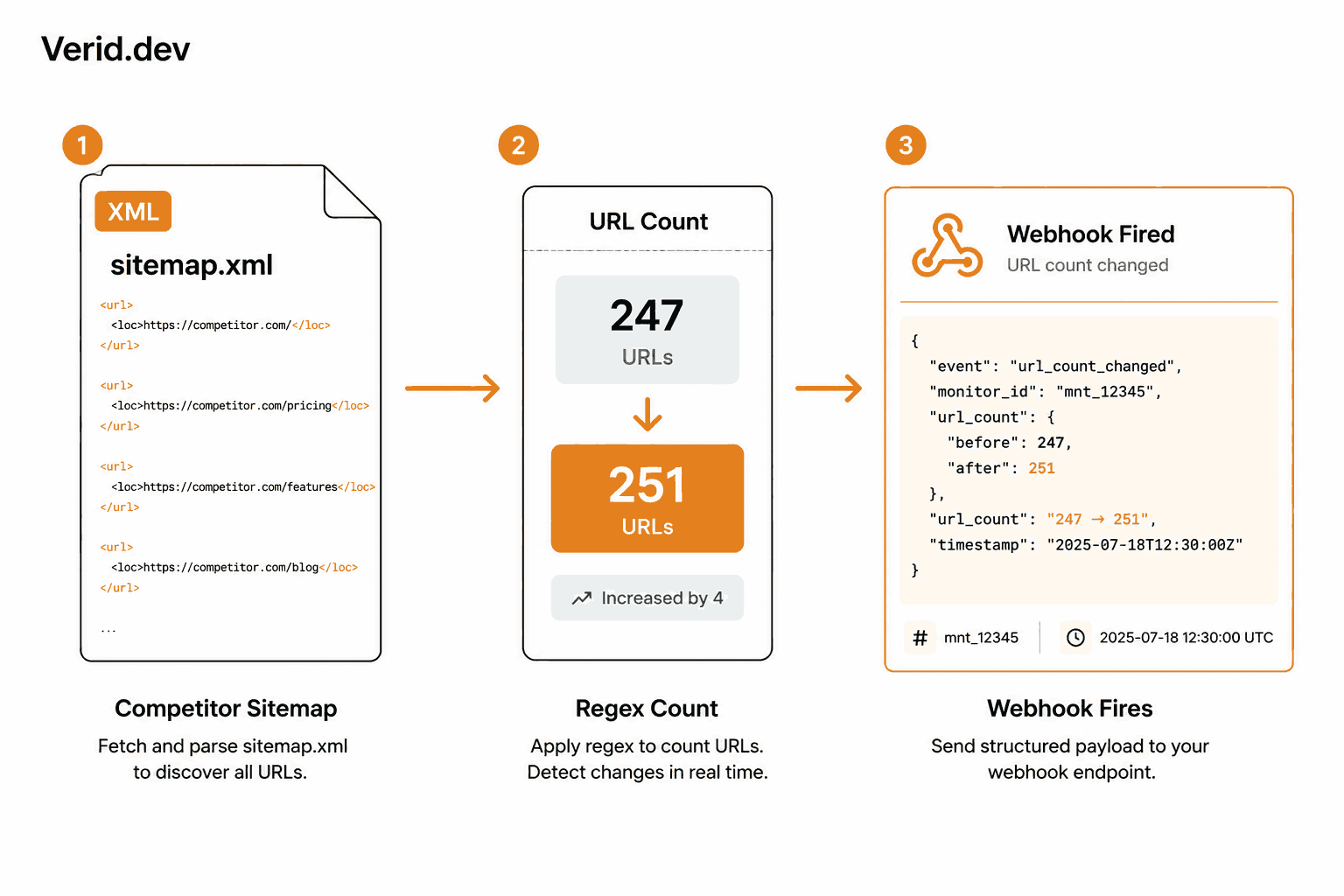
Sitemap monitoring for new pages. One underused pattern: monitor a competitor's sitemap for new URLs rather than scraping their site. When they add a new product page, blog post, or landing page, the <loc> count in sitemap.xml increases. The regex extractor handles this without any HTML parsing:
curl -X POST https://api.verid.dev/v1/monitors \
  -H "Authorization: Bearer $VERID_API_KEY" \
  -H "Content-Type: application/json" \
  -d '{
    "name": "Competitor B - New Pages",
    "url": "https://competitorB.com/sitemap.xml",
    "schedule_interval_seconds": 86400,
    "extract_config": {
      "method": "regex",
      "fields": { "url_count": "<loc>" }
    },
    "diff_predicate": {
      "type": "field_increases_by_absolute",
      "field": "url_count",
      "threshold": 1
    },
    "deliveries": [
      { "type": "webhook", "url": "https://your-app.com/hooks/new-pages" }
    ]
  }'
No capture group in the regex means Verid stores the match count. When that count grows by 1 or more, the webhook fires. You can also use the built-in template instead: POST /v1/monitors/from-template/sitemap-new-url.
JavaScript-heavy and bot-protected pages
Fetch mode is set per monitor, independently of extraction method. The default is auto: Verid tries a static HTTP request first. If the extracted fields come back empty — which usually means the content is rendered client-side — it automatically retries with a stealth headless browser.
For sites that actively block bots (Cloudflare with aggressive challenge modes, DataDome, etc.), Verid escalates further to a residential proxy network. This happens automatically on the auto fetch path. You can force browser mode from the start with "fetch_mode": "browser".
Proxy usage counts against the monthly bandwidth allocation on paid plans (50 MB on Starter, 500 MB on Pro, 5 GB on Scale). Most competitor page monitors don't need the proxy layer — standard headless rendering is enough for the majority of SaaS pricing and feature pages.
Routing alerts to where your team works
Verid delivers change notifications to four destinations: webhooks, Slack, Discord, and email. You can configure multiple delivery targets per monitor — up to the limit on your plan (1 on the free trial, 2 on Lite, 3 on Starter, 10 on Pro, 25 on Scale).
For teams that want to act on alerts programmatically — triggering a repricing workflow, logging to a database, or posting to a custom internal tool — the webhook is the right choice. Every webhook payload includes the structured before/after diff, the monitor name and URL, and a Verid-Signature header for verification.
Verifying the signature before acting on the payload is a 10-line check:
import { createHmac, timingSafeEqual } from 'crypto';

function isValidVeridWebhook(header: string, rawBody: string, secret: string): boolean {
  const parts = Object.fromEntries(header.split(',').map(p => p.split('=')));
  const ts = parseInt(parts['t'] ?? '0', 10);
  const sig = parts['v1'];
  if (!ts || !sig) return false;
  if (Math.abs(Date.now() / 1000 - ts) > 300) return false; // reject replays older than 5 min

  const expected = createHmac('sha256', secret)
    .update(`${ts}.${rawBody}`)
    .digest('hex');

  return timingSafeEqual(Buffer.from(expected, 'hex'), Buffer.from(sig, 'hex'));
}
The format matches Stripe's webhook signing scheme — if you've already verified Stripe webhooks in your application, this will look familiar. See the Webhooks docs for verification snippets in Python, Ruby, Go, and PHP.
Real-world use cases
Competitor pricing pages. The most common use case. One monitor per SKU, CSS extraction, field_changes or field_decreases_by_percent predicate. Delivers to a Slack channel or a repricing webhook.
Hiring pages. Track a competitor's jobs page for new engineering, product, or sales openings. Regex counting job titles or an any_field_changes predicate on a full_page hash gives you an early signal on where they're investing.
Changelogs and release notes. Monitor a sitemap.xml for new URLs matching /changelog/*, or point a monitor directly at a /changelog page with a URL-count regex. Know when a competitor ships a feature before your customers do.
Pricing page copy changes. Competitors often test messaging before changing prices — moving from "starts at" to "from" language, updating guarantee text, or reordering plan tiers. A full_page hash monitor catches all of it.
Legal and terms pages. Procurement teams and compliance officers need to track when vendor terms change. A field_changes monitor on a ToS page with a content hash gives a verifiable audit trail.
Status pages. An AWS or Statuspage-format status page responds to JSONPath or CSS extraction. A field_matches_regex predicate on the status field (^(degraded|outage|incident)) fires only when something goes wrong — not on every routine update.
All of these work with the same monitoring loop and the same API. You're writing different configs, not different infrastructure.
Getting started
The 14-day free trial includes unlimited monitors and 200 runs, all six extraction methods, signed webhooks, and the Node.js SDK - no credit card required. That's enough to validate your monitoring setup and extraction configs before committing to a paid tier.
Every plan has unlimited monitors and can check as often as every minute; plans differ by runs per month, and each check uses one run. From there, Lite ($9/month) includes 1,000 runs and Starter ($19/month) 5,000 runs, enough for about 6 monitors checked hourly. Pro ($49/month) brings that to 15,000 runs (about 20 hourly monitors, or 5 at 15-minute intervals), which handles most competitive intelligence programs. Scale ($149/month) includes 100,000 runs, about 138 monitors checked hourly.
Explore the use cases, browse the extraction guides, or go straight to the API reference. The quickstart gets your first monitor running in under two minutes.
Start a 14-day free trial at verid.dev
Frequently Asked Questions
What is the difference between a web scraper and a change detection API?
A web scraper extracts data from pages on demand and returns the raw content. You're responsible for scheduling repeated runs, storing previous states, diffing the outputs, and sending alerts. A change detection API handles all of that internally: you configure what to extract and when to alert, and the system runs the full loop — fetch, extract, diff, predicate evaluation, and delivery — on a schedule without any additional infrastructure on your side.
Can Verid monitor JavaScript-rendered competitor pages?
Yes. Verid's default fetch mode tries a static HTTP request first and automatically escalates to a stealth headless browser if the extraction returns empty fields. For pages protected by aggressive anti-bot systems, it falls through to a residential proxy. You can also force browser rendering explicitly with "fetch_mode": "browser" in your monitor config.
How do I avoid alert fatigue when monitoring dozens of pages?
Use specific predicates rather than any_field_changes. For pricing, set a field_decreases_by_percent threshold that matches a meaningful move in your category. For availability monitoring, use field_equals with the exact "In Stock" string. For general page changes you care about, narrow CSS selectors to the content area rather than pointing at the full page. The predicate layer is specifically designed to filter noise before delivery rather than routing all changes to your inbox.
How many competitor pages can I monitor at once?
As many as you like: every plan, including the free trial, has unlimited monitors. The real limit is runs per month, since each check uses one run. Starter's 5,000 runs cover about 6 pages checked hourly, Pro's 15,000 about 20, and Scale's 100,000 about 138. Because monitors are created via API, there is no practical barrier to setting up a large list programmatically. The Node.js SDK and the REST API both support bulk creation through a simple loop over your URL list.
About the author

Software Engineer
Suleman is a software engineer working on backend systems and browser automation at Verid. Much of his time goes to the unglamorous half of monitoring: brittle selectors, anti-bot interstitials, dedupe logic, and that’s what he writes about.
More from Suleman →Related posts
How to Track When a Competitor Switches Their Tech Stack (Without Checking Manually Every Week)
Stop manually re-checking BuiltWith. Learn how to get alerted the moment a competitor's site changes its tech stack, with a real workflow.
Read the post →competitor monitoringHow to Detect When a Competitor Changes Their Pricing Page Automatically
Learn how to detect competitor pricing page changes automatically using field level extraction, predicates, and webhook alerts with Verid.
Read the post →competitor monitoringBest Competitor Monitoring Tools for SaaS Companies in 2026
Compare 9 competitor monitoring tools for SaaS teams in 2026, from five-figure CI suites to API-based pricing page monitors like Verid.
Read the post →competitor monitoringMonitor Competitor Pricing Pages with Webhooks (Step-by-Step)
Set up a webhook receiver that fires on real price changes: verified payload, currency parsing, noise filtering, and routing to Slack or a repricing engine.
Read the post →