How to Monitor Appointment Slot Availability and Never Miss a Booking Again
Stop manually refreshing booking pages. Use Verid to monitor appointment slot availability and get instant alerts when a slot opens up.
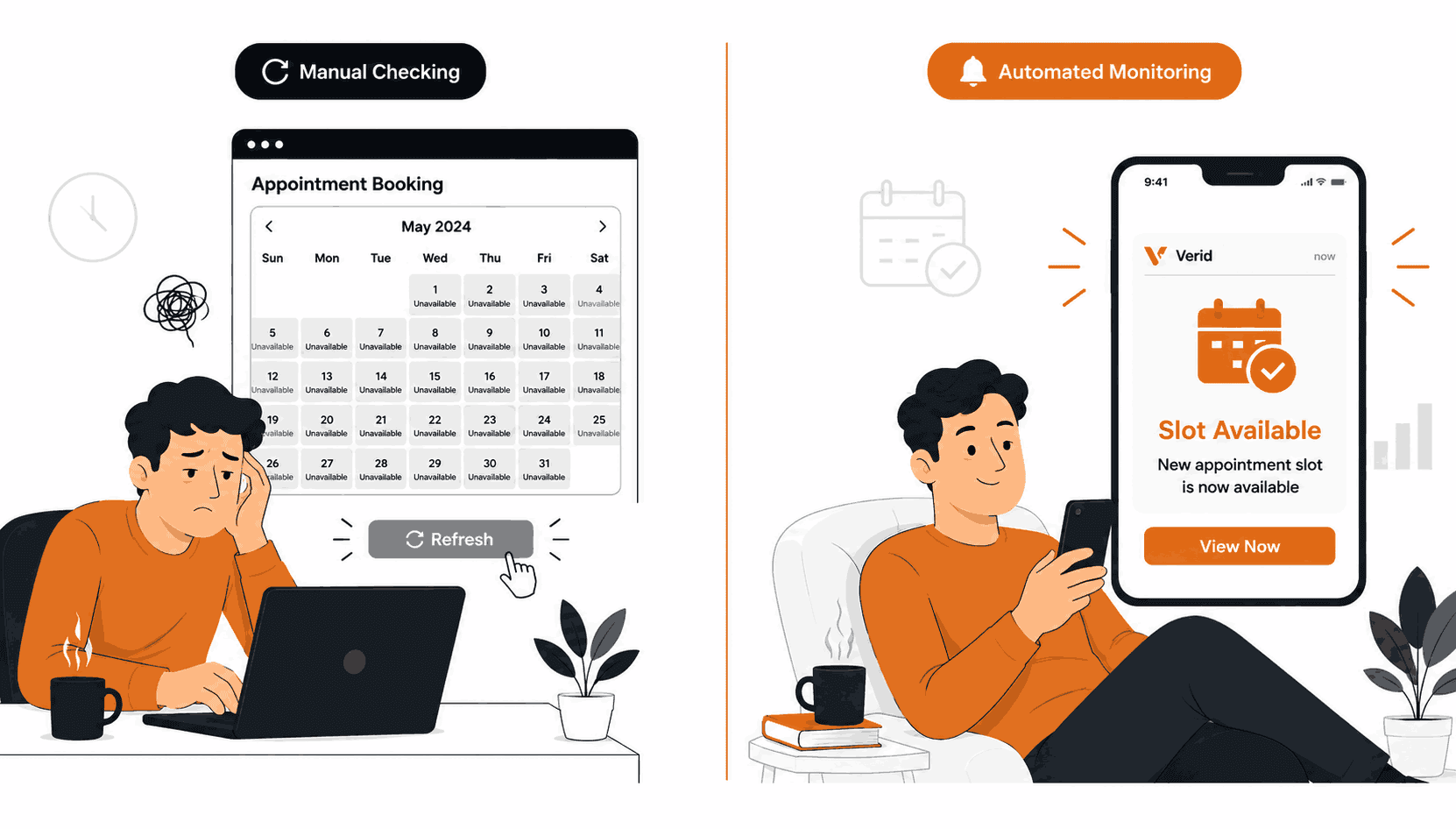
You have been trying to book a specialist appointment for weeks. Every time you check, all slots are taken. You refresh the page every morning, every evening, maybe a few times on your lunch break. And then one day, you finally miss it. Someone else got there first, in the few hours between your checks.
This is not just a doctor's office problem. The same frustration happens with visa application slots at government portals, popular restaurant reservations, fitness class bookings, driving test slots, university course registrations, and event tickets that occasionally reopen after a hold is released.
The root cause is always the same: cancellations happen unpredictably, slots reopen briefly, and whoever checks the page first wins. Manual checking can never compete with that. Automated monitoring can.
This guide explains how to use Verid to watch any appointment booking page and get notified the moment something opens up.
The Problem with Manual Appointment Checking
Most booking systems do not send cancellation alerts. A few offer a waitlist feature, but those notifications are often slow, capped at one per user, or simply broken. You cannot count on the platform to tell you when something opens.
Manual checking has two failure modes. Either you check too infrequently and miss the window, or you check so often that it consumes your time and attention. Neither is a good outcome.
What you actually need is a system that watches the booking page around the clock, compares what it sees to what it saw last time, and sends you an alert the moment anything changes. That is exactly what Verid does.
Choosing the Right Extraction Method
Before setting up a monitor, you need to decide how Verid should read the appointment page. Verid supports six extraction methods. For appointment availability, two of them are most relevant.
| Method | How it works | Best for |
|---|---|---|
| CSS Selector | Targets specific HTML elements by class or ID | Structured booking pages with visible slot elements |
| AI / LLM Prompt | Describes what to extract in plain English | Complex or frequently redesigned booking pages |
| Full-page hash | Hashes the entire page | Detecting any change at all, but noisier |
The recommended approach for most appointment pages is CSS Selector extraction. Booking UIs typically display availability in one of two ways: either a list of time slots with some marked "available" and others "full," or a single banner that says "No appointments available" until something opens.
In both cases, a CSS selector can target that specific element precisely. This means you only get alerted when availability actually changes, not when a cookie banner rotates or an ad refreshes elsewhere on the page.
Use AI extraction as a fallback if the booking page is a JavaScript-heavy single-page app where CSS selectors fail to return anything. You can read more about both approaches in the CSS Selector guide and the AI extraction guide.
Method 1: Using the Verid Dashboard (No Code Required)
The Verid dashboard lets you set up a full appointment monitor without writing a single line of code. Here is the complete workflow.
Step 1: Sign Up and Open the Dashboard
Go to verid.dev and start a free trial. No credit card is required. The 14-day trial gives you unlimited monitors and 200 runs, which is enough to start monitoring several booking pages at once.
Once you are in, navigate to the Monitors section and click Create Monitor.
Step 2: Enter the Appointment Page URL
Paste the URL of the booking or availability page you want to watch.
For example, the US Citizenship and Immigration Services (USCIS) publishes appointment availability at infopass.uscis.gov. The UK Government provides appointment booking for various services at gov.uk/book-a-service. Many NHS GP practices in the UK publish their booking availability through the NHS login portal at nhsapp.service.nhs.uk.
For restaurant reservations, platforms like OpenTable and Resy show real-time slot availability on individual restaurant pages. You can monitor a specific restaurant's availability page directly.
Enter the exact URL of the page you want to watch, then give your monitor a name like "NHS GP Appointments" or "OpenTable - Restaurant Name."
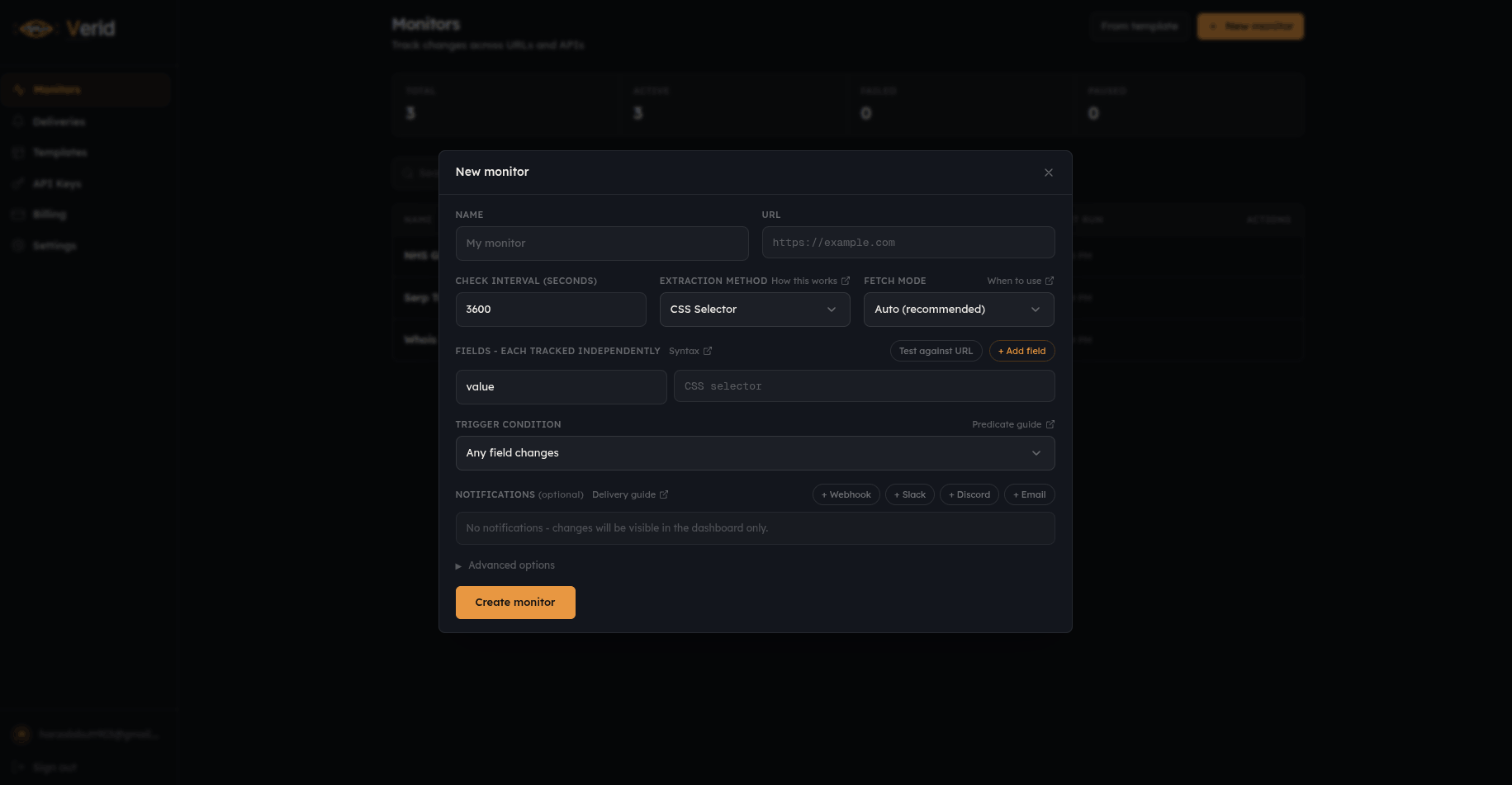
Step 3: Select CSS Selector as the Extraction Method
In the extraction configuration, select CSS Selector as the method.
You now need to tell Verid which element on the page contains the availability information. The simplest way to find this is to open the booking page in your browser, right-click the availability text or slot element, choose Inspect, then right-click the highlighted node in the DevTools panel and choose Copy selector.
Paste that selector into the field name in Verid. Give the field a clear name like available_slots or availability_status.
For pages that display a simple availability message:
{
  "method": "css",
  "fields": {
    "availability_status": ".availability-message"
  }
}
For pages that list individual time slots:
{
  "method": "css",
  "fields": {
    "available_count": ".slot--available",
    "first_slot_time": ".slot--available:first-child .slot-time"
  }
}
Note: Most booking pages load their slot data using JavaScript after the page initially opens. If your selector returns empty results even though you can see the text in your browser, enable Browser Mode in the monitor settings. This tells Verid to use a headless browser to fully render the page before extracting data, just like your browser does.
Step 4: Test the Extraction
Before saving, use the Test Extraction button. Verid will fetch the page right now and show you what value it extracted. You should see either a count of available slots, a text string like "No appointments available," or a specific time like "Tuesday 3:00 PM."
If the result looks correct, you are ready to configure the alert condition.
Step 5: Set the Predicate (When to Alert You)
The predicate tells Verid when to actually send you a notification. You do not want an alert every time the page loads. You want an alert only when something meaningful changes.
For a page that shows availability text, use this predicate: fire when the availability field matches the word "available" or "book":
{
  "type": "field_matches_regex",
  "field": "availability_status",
  "pattern": "available|book now|schedule"
}
For a page that lists slot counts, use this predicate: fire when the count changes from zero to anything higher:
{
  "type": "field_changes",
  "field": "available_count"
}
This means Verid stays completely silent while the slot count sits at zero. The moment a cancellation creates a new slot, the count changes, the predicate fires, and you get an alert.
Step 6: Set the Check Interval
The check interval controls how often Verid visits the page to look for changes.
The Lite plan ($9/month, 1,000 runs) easily covers a daily check interval (every 24 hours), about 30 runs a month per page. This is useful for monitoring appointment pages where slots open up on a predictable schedule, such as a new week of slots being released every Monday morning.
If you need to catch last-minute cancellations as they happen, you will want a shorter interval. Every plan can check as often as every minute, and each check uses one run, so the Starter plan with 5,000 runs a month covers about six pages checked hourly, while checking every 15 minutes uses about 2,880 runs a month per page. For busy appointment pages where slots disappear in minutes, upgrading to at least the Pro plan (15,000 runs) is worth considering.
For a daily check, set schedule_interval_seconds to 86400 (24 hours). The dashboard shows this as "Daily."
Step 7: Configure Email Delivery
In the Deliveries section, add your email address. Verid will send you a formatted summary whenever the predicate fires, showing what changed and what the new value is.
You can also add a Slack webhook, a Discord webhook, or your own custom webhook endpoint if you want the alert to go somewhere specific. Each monitor on the free trial supports 1 delivery destination. Paid plans support multiple destinations per monitor.
For email, the configuration is simply:
{
  "type": "email",
  "to": "your@email.com"
}
Step 8: Save and Activate
Click Save. Verid will run a first check immediately to establish a baseline reading. The first run never fires an alert because there is nothing to compare against yet. From the second run onward, every check is compared to the previous one, and your predicate decides whether to send you a notification.
You will find all your monitors and their current status in the Monitors dashboard.
Method 2: Using the Verid API and Node.js SDK
If you are a developer or want to automate the setup of multiple appointment monitors, Verid provides a full REST API and an official Node.js SDK. Everything you configured in the dashboard above maps directly to an API call.
Get Your API Key
Sign in to Verid and go to the API Keys page. Create a new key. It will start with vrd_. Store it as an environment variable:
export VERID_API_KEY="vrd_your_key_here"Creating a Monitor with curl
The following example creates a monitor for a public appointment booking page, checking daily (about 30 runs a month, well inside the Lite plan's 1,000), and delivering alerts to your email:
curl -X POST https://api.verid.dev/v1/monitors \
  -H "Authorization: Bearer $VERID_API_KEY" \
  -H "Content-Type: application/json" \
  -d '{
    "name": "NHS GP Appointment Slots",
    "url": "https://www.nhsapp.service.nhs.uk/appointments/gp",
    "schedule_interval_seconds": 86400,
    "fetch_mode": "browser",
    "extract_config": {
      "method": "css",
      "fields": {
        "availability_status": ".availability-message",
        "available_count": ".slot--available"
      }
    },
    "diff_predicate": {
      "type": "field_matches_regex",
      "field": "availability_status",
      "pattern": "available|book|schedule"
    },
    "deliveries": [
      {
        "type": "email",
        "to": "your@email.com"
      }
    ]
  }'
The API returns a 201 Created response with the full monitor object, including the monitor's id which you can use to check status or trigger a manual run later.
Creating a Monitor with the Node.js SDK
Install the official Verid SDK:
npm install @verid.dev/sdkThen create the monitor:
import { VeridClient } from '@verid.dev/sdk';

const client = new VeridClient({
  apiKey: process.env.VERID_API_KEY!,
});

const monitor = await client.monitors.create({
  name: 'NHS GP Appointment Slots',
  url: 'https://www.nhsapp.service.nhs.uk/appointments/gp',
  schedule_interval_seconds: 86400,
  fetch_mode: 'browser',
  extract_config: {
    method: 'css',
    fields: {
      availability_status: '.availability-message',
      available_count: '.slot--available',
    },
  },
  diff_predicate: {
    type: 'field_matches_regex',
    field: 'availability_status',
    pattern: 'available|book|schedule',
  },
  deliveries: [
    {
      type: 'email',
      to: 'your@email.com',
    },
  ],
});

console.log('Monitor created:', monitor.id);
Triggering a Manual Run
After creating a monitor, you can trigger an immediate check without waiting for the next scheduled interval. This is useful for testing:
await client.monitors.runNow(monitor.id);Manual runs have no daily cap on any plan. Each one uses one run from your monthly pool, just like a scheduled check.
What the Alert Looks Like
When a slot opens and your predicate fires, Verid sends the alert. If you chose email delivery, you will receive a plain, readable summary. If you chose webhook delivery, your endpoint will receive a JSON payload like this:
{
  "id": "del_01H...",
  "fired_at": "2026-06-11T09:15:00Z",
  "diff": {
    "fields_changed": ["availability_status", "available_count"],
    "before": {
      "availability_status": "No appointments available",
      "available_count": "0"
    },
    "after": {
      "availability_status": "Appointments available - book now",
      "available_count": "2"
    }
  },
  "monitor": {
    "url": "https://www.nhsapp.service.nhs.uk/appointments/gp",
    "name": "NHS GP Appointment Slots"
  }
}
You can see exactly what changed, what the old value was, and what the new value is. If you are building a more advanced alert system (for example, sending a push notification to your phone), you can use your webhook handler to parse this payload and trigger any downstream action.
For complete webhook verification examples in multiple programming languages, see the Webhooks documentation.
Using AI Extraction for Difficult Pages
Some booking pages are built entirely with JavaScript frameworks and load their content dynamically after the page opens. On these pages, CSS selectors often return empty results because the HTML that Verid first fetches does not yet contain the slot data.
There are two ways to handle this.
First, try enabling Browser Mode in your monitor settings ("fetch_mode": "browser"). This tells Verid to render the full page using a headless browser before running your selector, which solves most JavaScript rendering issues.
If that is still not enough, switch to AI extraction. You describe what you want in plain English and Verid's built-in LLM reads the fully rendered page and returns structured data:
{
  "method": "prompt",
  "prompt": "Check this appointment booking page. Return JSON with two keys: available_slots (the number of available appointment slots shown, or 0 if none are shown) and status_text (the exact availability message shown on the page, or 'none' if no message is shown).",
  "schema": {
    "available_slots": "number",
    "status_text": "string"
  }
}
With this configuration, you can then use a predicate like:
{
  "type": "field_increases_by_absolute",
  "field": "available_slots",
  "threshold": 1
}
This fires the alert the moment the slot count increases by at least 1 from its previous value.
Note that AI extractions count against your plan's monthly LLM quota. The free trial includes 50 AI extractions. See the pricing page for full details.
Tips for Better Appointment Monitoring
Match your check interval to how fast slots disappear. For government visa appointments where slots last hours, a daily check on the Lite plan works fine. For popular restaurant reservations that vanish in minutes, upgrade to the Pro or Scale plan for the extra runs and use a 5- to 15-minute interval.
Use Browser Mode for booking pages. Nearly all modern booking systems use JavaScript to load slot data. Setting fetch_mode: "browser" ensures Verid sees the same content your browser does.
Monitor the right URL. Some booking systems include a date range in the URL (for example, ?month=2026-07). If you want to monitor a specific upcoming month, use the URL with that date parameter. Run one monitor per time period if needed.
Be considerate with check frequency. Checking a small clinic's booking page every 60 seconds puts unnecessary load on their servers. A 5-minute interval is a reasonable floor for non-commercial booking pages, and a daily interval, which fits easily within Verid's Lite plan, is perfectly polite for most government and NHS services.
Combine multiple delivery channels. On Starter and above, you can send the same alert to email, Slack, and a custom webhook simultaneously. This ensures you see the notification wherever you happen to be.
FAQ
What is an appointment availability monitor?
An appointment availability monitor is an automated system that repeatedly checks a booking or scheduling page and sends you an alert when a slot becomes available. Instead of manually refreshing a page multiple times per day, the monitor watches continuously and notifies you the moment something changes.
Can Verid monitor any appointment booking website?
Verid can monitor any publicly accessible web page that displays availability information as visible text or HTML elements. This includes doctor and specialist booking pages, government appointment portals, restaurant reservation platforms, fitness class booking systems, and event ticket pages. Pages that require a login to view availability cannot be monitored without passing authentication credentials, which Verid supports via custom request headers on every plan.
How quickly will I be notified when a slot opens?
The speed of notification depends on the check interval you set. Every plan, including the free trial, can check as often as every 60 seconds; plans differ by how many runs you get each month (1,000 on Lite, 5,000 on Starter, 15,000 on Pro, 100,000 on Scale), and the 14-day trial includes 200 in total. For time-sensitive bookings where cancellation slots disappear quickly, a shorter interval backed by a paid plan's runs is recommended.
Does Verid work on booking pages that load with JavaScript?
Yes. Verid's default fetch mode tries a standard page load first and automatically falls back to a headless browser if the page appears to use JavaScript rendering. You can also explicitly set fetch_mode: "browser" in your monitor configuration to always use the browser renderer. For very complex or unstructured pages, Verid also offers AI-powered extraction that reads the rendered page content and returns structured data from a plain-language description.
Want this running on your own URL? Spin up the same monitor in about a minute. 5 free, no credit card.
About the author

Software Engineer
Suleman is a software engineer focused on web-data infrastructure. He works on Verid’s scraping and change-detection stack, and covers CSS and XPath selectors, JSON API monitoring, and how to design alerts developers won’t end up muting.
More from Suleman →Related use cases
How to Automatically Track Scholarship and Grant Deadlines with Verid (No Coding Needed)
Stop refreshing scholarship pages by hand. See how Verid automatically tracks deadlines and emails you the moment one changes.
View blueprint →Research & NicheAcademic Journal and Paper Update Alerts
Get instant alerts when new papers publish in academic journals or on arXiv. Set up automated monitoring with Verid on a 14-day free trial, no coding required.
View blueprint →Research & NicheHow to Monitor Job Listings for Keywords and Get Instant Alerts
Learn how to set up automated job listing alerts with Verid. Get notified the moment new jobs matching your keywords appear - no coding required.
View blueprint →