Academic Journal and Paper Update Alerts
Get instant alerts when new papers publish in academic journals or on arXiv. Set up automated monitoring with Verid on a 14-day free trial, no coding required.
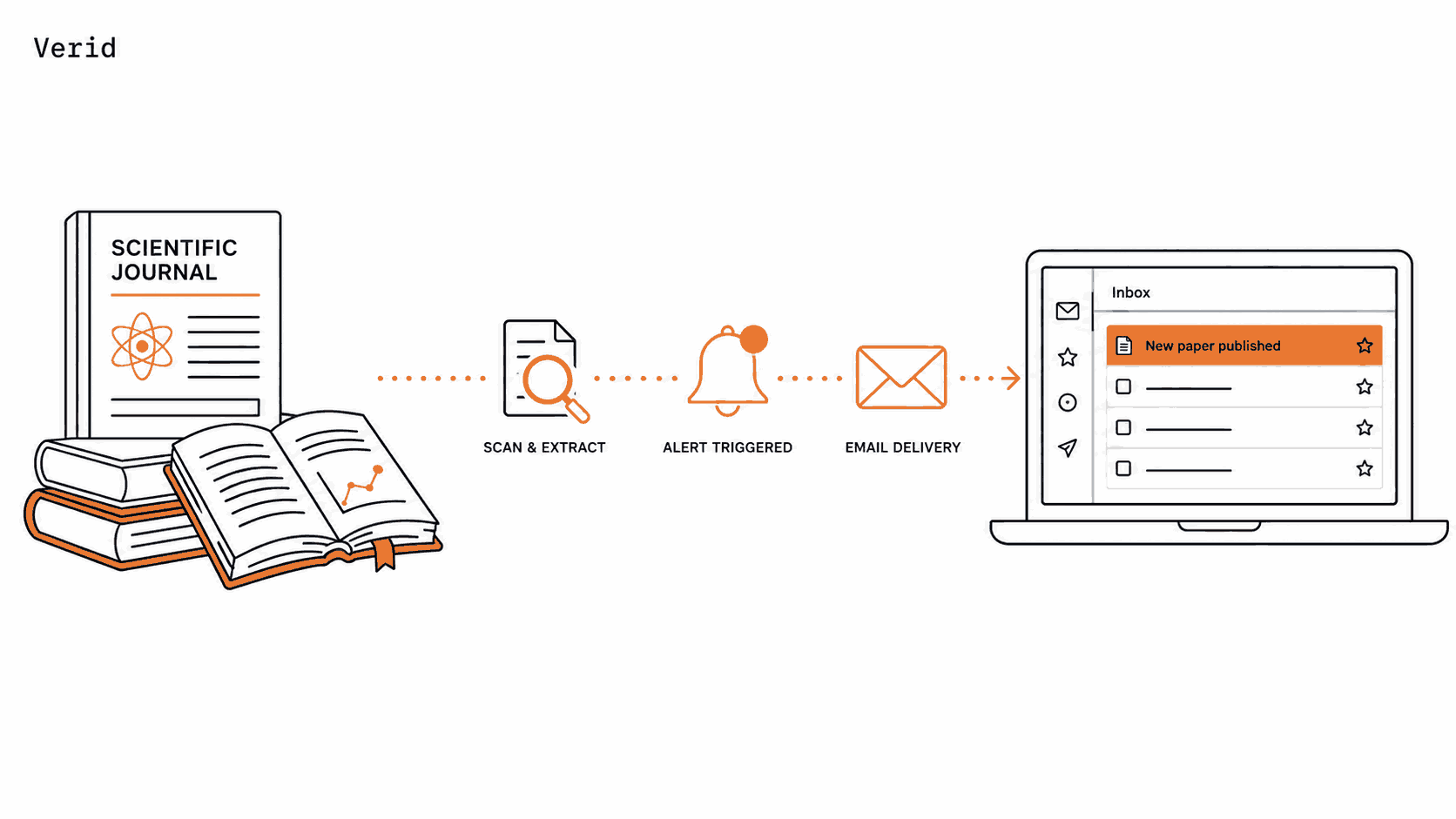
If you follow a research field closely, you already know the problem. A journal you care about publishes a new issue, a preprint server adds a paper that matters to your work, and you find out about it a week later because you happened to check the page, or because a weekly digest email finally landed in your inbox. By the time you see it, someone else has already read it, cited it, or built on it.
This guide shows you how to set up automatic alerts for new papers and journal issues using Verid, a developer-first web change detection API. You will learn how to do this entirely through a point-and-click dashboard with no programming experience, and how to do the same thing through the API or the official Node.js SDK if you prefer to automate it. Every example in this guide uses real, working URLs from arXiv, PLOS ONE, Nature, Science, Springer, IEEE Xplore, ACM, Wiley, and Elsevier's ScienceDirect (home to the Cell Press journals), so you can copy a configuration and adapt it to the journal you actually follow.
Why Monitor Academic Journals and Preprint Servers?
Staying current with the literature matters for a few concrete reasons:
- Priority and timing. In fast-moving fields like machine learning or genomics, being the first to read a relevant paper can change the direction of your own work.
- Grant and funding deadlines. Related scholarship and funding pages often move in lockstep with new calls for papers.
- Literature reviews stay current. Manually re-checking a dozen journal pages before a submission deadline is tedious and easy to get wrong.
- Competitive awareness. If you track a specific lab, journal, or preprint category, you want to know about a relevant publication before your peers mention it in a meeting.
Most publishers already offer email alerts or RSS feeds for exactly this reason. The problem is not that the information isn't published. The problem is that it's scattered across dozens of publisher sites, each with a different alert system, and most of them just dump every new item into your inbox without any filtering.
Why Manual Monitoring Is Hard to Sustain
If you have ever tried to keep up with journal alerts the old-fashioned way, you have probably run into one of these:
- Inbox overload. Subscribing to email alerts from ten journals means ten more newsletters competing with everything else in your inbox, and important papers get buried.
- Inconsistent RSS support. Some journals and preprint servers publish clean RSS or Atom feeds. Others only offer a table-of-contents page with no feed at all.
- No filtering. A "new issue" alert tells you an issue was published, not whether it contains anything relevant to your specific interests.
- Building it yourself is a chore. Writing a script that fetches a page, parses the HTML or XML, remembers what it saw last time, and sends you a notification is a reasonable weekend project, and then it becomes a permanent maintenance burden the first time the publisher redesigns their site.
This is exactly the kind of "checking-a-page-on-a-schedule" problem that a change detection API is built to solve.
How Verid Solves It
Verid is a web change detection API. Instead of you writing a script to fetch a URL, parse it, store the previous result, compare the two, and send yourself a message, you describe the job once and Verid runs the whole loop on a schedule:
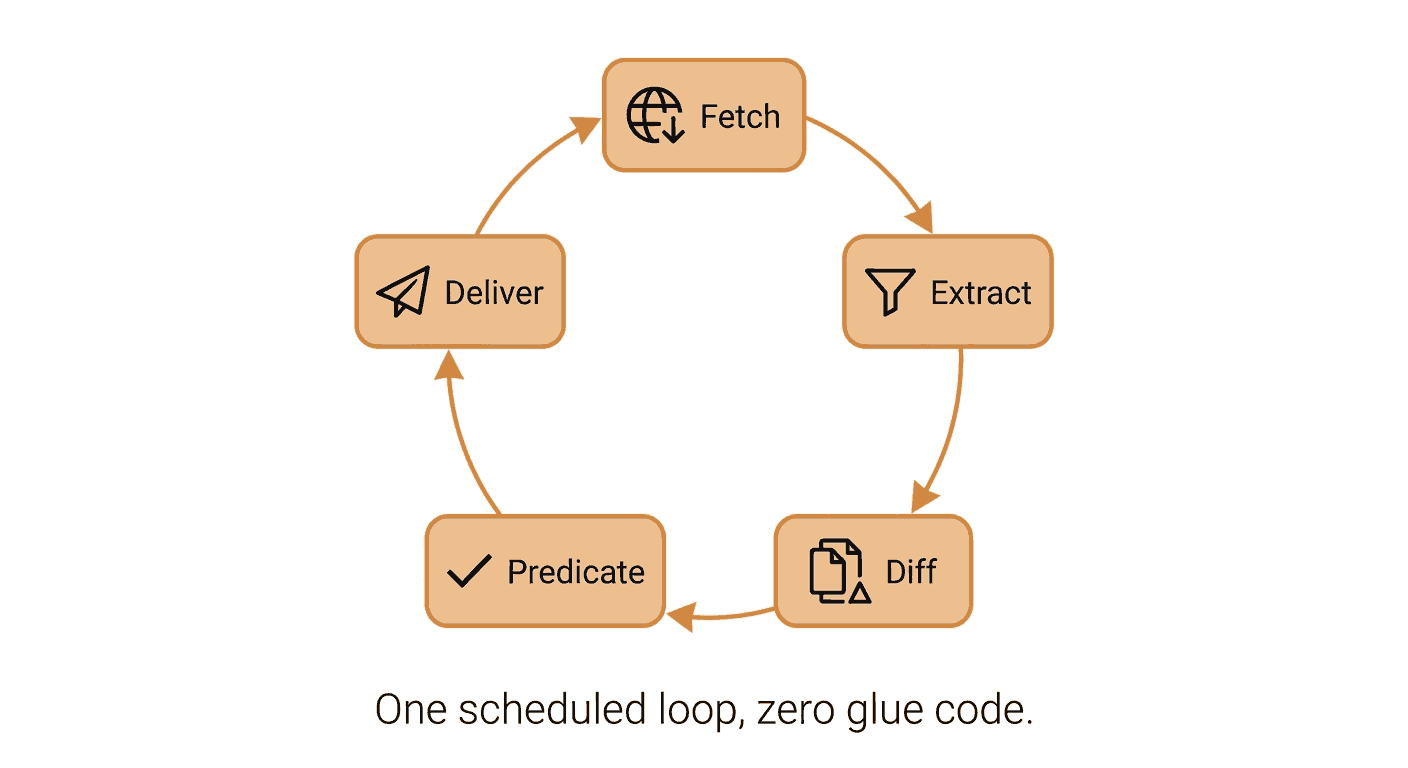
- Fetch the journal page, RSS feed, or preprint listing.
- Extract the specific field you care about, such as the number of entries in a feed or the title of the latest article.
- Diff the new value against the last time it ran.
- Evaluate a rule (called a predicate) you define, such as "the entry count went up by 1 or more."
- Deliver a notification to your email, a Slack channel, a Discord channel, or a webhook, but only when the rule actually fires.
That last point matters. A monitor that fires every time anything on the page changes, including a rotating "most read" widget or a timestamp in the footer, is just as useless as no monitor at all. Verid's diff predicates exist specifically so you only get notified when something meaningful happened.
Choosing the Right Extraction Method
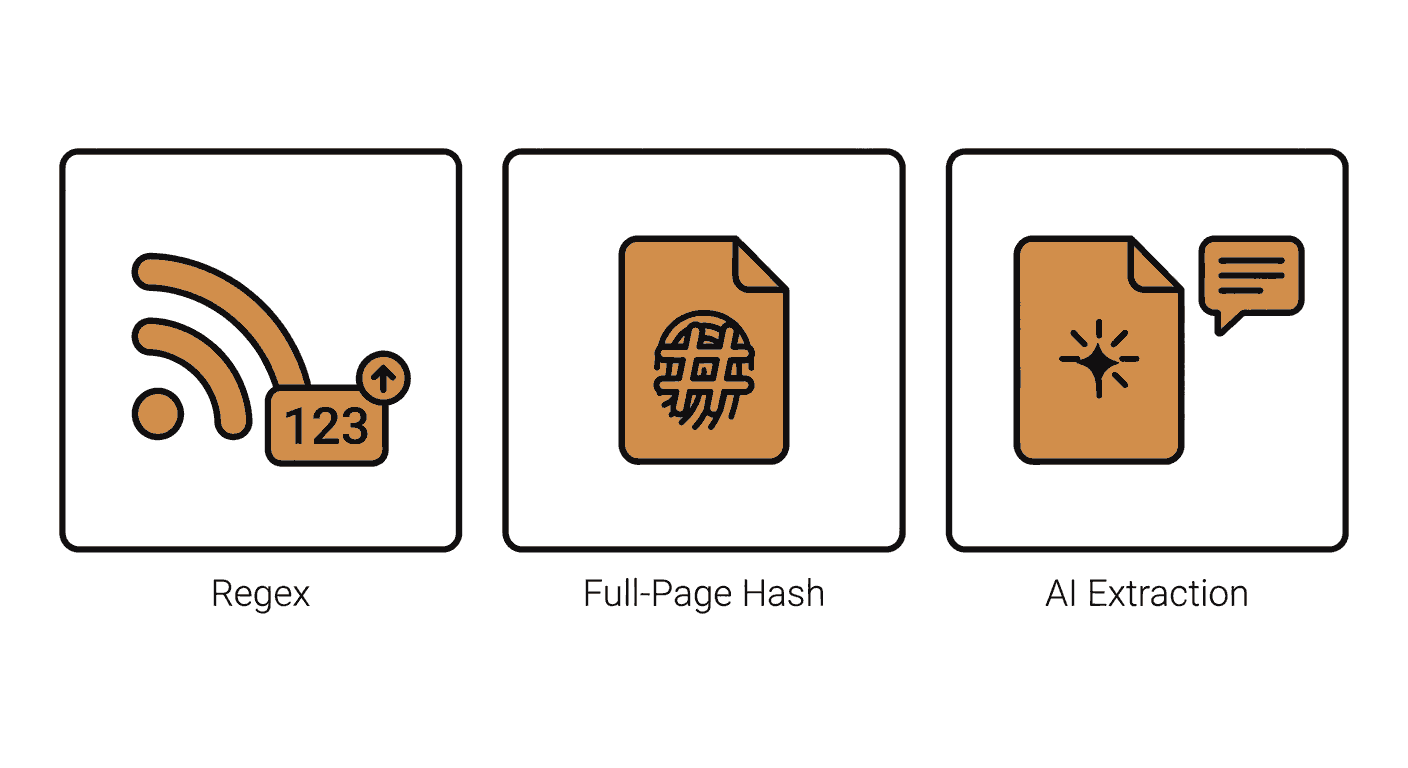
Verid supports six extraction methods. For academic journals and preprint servers, three of them are relevant, and which one you pick depends on whether your source publishes a feed.
| Method | How it works | Best for academic sources | Drawback |
|---|---|---|---|
| Regex | Counts or captures a pattern in the raw response body | RSS or Atom feeds from journals and preprint servers, since every entry is wrapped in a predictable <item> or <entry> tag | Only works cleanly when the source is a feed, not a rendered HTML page |
| Full-page hash | Hashes the entire response and fires when the hash changes | Journal table-of-contents pages that don't offer a feed and where you just want to know "did this page change at all" | Can produce false positives from rotating banners, ads, or "most-viewed" widgets |
| AI / LLM prompt | You describe in plain English what to extract, and the model returns structured fields | Journal homepages with inconsistent or frequently-changing markup, where a fixed CSS selector would break often | Counts against your plan's monthly LLM-call quota |
Recommendation: If the journal or preprint server publishes an RSS or Atom feed, use Regex to count entries. This is the same pattern Verid recommends for RSS feed monitoring in general, and it is the most reliable option because feed formats are standardized. If there is no feed, fall back to Full-page hash for a simple "something changed" alert, or use the AI extractor if you want a specific field, like the title of the newest article, pulled out of a page whose HTML structure isn't stable enough for a plain CSS selector. See the full extraction methods documentation for details on all six methods, including CSS selectors and XPath, which are useful if a specific journal page does have a stable, inspectable structure around its latest-article listing.
Real feeds you can use today:
| Source | Feed or page URL | Format |
|---|---|---|
| arXiv (Computation and Language) | https://rss.arxiv.org/rss/cs.CL | RSS |
| PLOS ONE | https://journals.plos.org/plosone/feed/atom | Atom |
| Nature (flagship journal) | https://www.nature.com/nature.rss | RSS |
| Science (AAAS current issue) | https://www.science.org/toc/science/current | HTML page |
| Springer (Machine Learning journal) | https://link.springer.com/journal/10994 | HTML page |
| IEEE Xplore (Trans. on Pattern Analysis & Machine Intelligence) | https://ieeexplore.ieee.org/xpl/mostRecentIssue.jsp?punumber=34 | HTML page |
| Wiley Online Library (FEBS Journal) | https://onlinelibrary.wiley.com/journal/17424658 | HTML page |
| ScienceDirect / Cell Press (Cell) | https://www.sciencedirect.com/journal/cell/issues | HTML page |
Dashboard Walkthrough: No Code Required
Everything below can be done through the Verid dashboard without writing a single line of code.
Step 1: Start a Free Trial
Go to verid.dev and sign up. Every new account starts with a 14-day free trial: unlimited monitors and 200 runs, with no credit card required, which is enough to follow this entire guide.
Step 2: Get Your API Key (Optional for the Dashboard Path)
If you plan to stick with the dashboard, you can skip this. If you later want to use the API or SDK, open the API Keys page in the dashboard and create a key. API keys start with the prefix vrd_.
Step 3: Create a New Monitor
From the dashboard home, click New Monitor. Fill in the form as follows.
Monitor name: Something you'll recognize later, for example arXiv cs.CL New Papers.
URL: The feed or page URL you want to watch. For this walkthrough, use arXiv's Computation and Language category feed:
https://rss.arxiv.org/rss/cs.CLStep 4: Choose the Extraction Method
Since arXiv publishes a standard RSS feed, select Regex as the method.
- Field name:
paper_count - Pattern:
<item>
Every new paper announced in that category adds one more <item> element to the feed, so counting them tells you exactly how many papers are currently listed.
Step 5: Set the Predicate (the Trigger Rule)
Choose field increases by absolute amount, set the field to paper_count, and set the threshold to 1. This means the monitor only fires when at least one new paper has been added, not on every check.
Step 6: Configure the Schedule
Set the interval to 24 hours, entered as 86400 seconds. A daily check uses about 30 runs a month, and every plan, including the free trial, can go as fast as every minute. For most research alerting, a daily check is more than enough; you're not trying to beat a stock ticker, you're trying to avoid missing a paper for a week.
| Plan | Runs per month |
|---|---|
| Free trial (14 days) | 200 (whole trial) |
| Lite ($9/mo) | 1,000 |
| Starter ($19/mo) | 5,000 |
| Pro ($49/mo) | 15,000 |
| Scale ($149/mo) | 100,000 |
See the full pricing page if you later need more runs for faster checks, for example during a conference submission season when you want same-hour awareness of new preprints.
Step 7: Configure Email Delivery
In the delivery section, select Email and enter the address where you want to receive alerts. When the paper count increases, you'll get an email showing the before and after values, for example paper_count: 214 → 216.
Step 8: Save and Activate
Click Save. The first run establishes a baseline silently, since there is nothing to compare it against yet. From the second run onward, any increase in paper_count triggers your email.
Repeating This for a Journal Without a Feed
Not every source publishes RSS. For a journal table-of-contents page like https://www.science.org/toc/science/current, follow the same steps but choose Full-page hash as the extraction method instead of Regex, and set the predicate to any field changes. This tells Verid to alert you whenever the page content changes at all, which is the right approach when there's no structured feed to count entries from.
If you want a specific detail, like the title of the newest article, rather than a generic "something changed" alert, use the AI / LLM prompt method instead. You describe what to extract in plain English, for example: "Extract the title of the most recently published article on this page." Verid handles the parsing for you.
Using the Verid API for Programmatic Setup
If you'd rather manage monitors as code, or want to create many of them at once, the REST API gives you full control. The base URL is https://api.verid.dev, and every request needs your API key in the Authorization header.
Example: Monitor arXiv for New Computation and Language Papers
curl -X POST https://api.verid.dev/v1/monitors \
  -H "Authorization: Bearer vrd_your_api_key" \
  -H "Content-Type: application/json" \
  -d '{
    "name": "arXiv cs.CL - New Papers",
    "url": "https://rss.arxiv.org/rss/cs.CL",
    "schedule_interval_seconds": 86400,
    "extract_config": {
      "method": "regex",
      "fields": {
        "paper_count": "<item>"
      }
    },
    "diff_predicate": {
      "type": "field_increases_by_absolute",
      "field": "paper_count",
      "threshold": 1
    },
    "deliveries": [
      {
        "type": "email",
        "to": "you@yourdomain.com"
      }
    ]
  }'
What each field does:
urlis the arXiv RSS feed for the Computation and Language subject class. Swap the category suffix (for examplecs.AI,stat.ML, orq-bio.NC) for the subject you follow, per arXiv's RSS documentation.extract_config.methodis"regex", which counts pattern matches in the raw feed body.diff_predicatefires only whenpaper_countincreases by at least 1, so you don't get an alert on days with no new papers.deliveriessends a plain-language email summary of the change.
Example: Monitoring a Journal Page With Full-Page Hashing
For a source without a feed, such as a Springer journal homepage, use full_page instead:
curl -X POST https://api.verid.dev/v1/monitors \
  -H "Authorization: Bearer vrd_your_api_key" \
  -H "Content-Type: application/json" \
  -d '{
    "name": "Springer Machine Learning Journal - Updates",
    "url": "https://link.springer.com/journal/10994",
    "schedule_interval_seconds": 86400,
    "extract_config": {
      "method": "full_page"
    },
    "diff_predicate": {
      "type": "any_field_changes"
    },
    "deliveries": [
      {
        "type": "email",
        "to": "you@yourdomain.com"
      }
    ]
  }'
Example: Extracting the Latest Article Title With AI
For a journal page where you want a specific field rather than a generic change alert, the prompt method is a better fit than trying to maintain a brittle CSS selector:
curl -X POST https://api.verid.dev/v1/monitors \
  -H "Authorization: Bearer vrd_your_api_key" \
  -H "Content-Type: application/json" \
  -d '{
    "name": "FEBS Journal - Latest Article",
    "url": "https://onlinelibrary.wiley.com/journal/17424658",
    "schedule_interval_seconds": 86400,
    "extract_config": {
      "method": "prompt",
      "prompt": "Extract the title of the most recently published article listed on this journal page.",
      "schema": { "latest_title": "string" }
    },
    "diff_predicate": {
      "type": "field_changes",
      "field": "latest_title"
    },
    "deliveries": [
      {
        "type": "webhook",
        "url": "https://your-app.com/hooks/febs-journal"
      }
    ]
  }'
This monitor fires only when the extracted title actually changes, and it delivers the before/after values as an HMAC-signed webhook rather than an email, which is useful if you want to feed new-paper events into your own reading-list app or Slack bot. Note that LLM extractions count against your plan's monthly quota (50 during the free trial, 250/month on Lite), so reserve this method for sources that genuinely need it.
Using the Verid Node.js SDK
Verid publishes an official Node.js SDK on npm. It's the fastest way to wire journal monitoring into an existing Node.js or TypeScript app, such as a personal reading-list tool.
Install
npm install @verid.dev/sdkCreate a Monitor
import { VeridClient } from '@verid.dev/sdk';

const client = new VeridClient({
  apiKey: process.env.VERID_API_KEY!,
});

const monitor = await client.monitors.create({
  name: 'arXiv cs.CL - New Papers',
  url: 'https://rss.arxiv.org/rss/cs.CL',
  schedule_interval_seconds: 86400,
  extract_config: {
    method: 'regex',
    fields: {
      paper_count: '<item>',
    },
  },
  diff_predicate: {
    type: 'field_increases_by_absolute',
    field: 'paper_count',
    threshold: 1,
  },
  deliveries: [
    {
      type: 'email',
      to: 'you@yourdomain.com',
    },
  ],
});

console.log('Monitor created:', monitor.id);
List Your Monitors
const { data } = await client.monitors.list();
console.log(data.map(m => `${m.name} - ${m.status}`));
Trigger a Manual Run for Testing
await client.monitors.runNow(monitor.id);This is useful while you're setting things up, so you don't have to wait a full day for the next daily check to confirm your configuration works.
Email Notifications
Email is the simplest delivery option and the right default for most researchers. You don't need a dashboard login or a developer setup, just an inbox. When a monitor fires, you get a plain summary showing what changed, for example the entry count going from 214 to 216, or the extracted title of the newest article. Configure it with:
{
  "type": "email",
  "to": "you@yourdomain.com"
}
Webhooks
If you want to pipe new-paper events into your own tool, such as a personal Notion database or a custom reading tracker, use a webhook instead. Verid signs every webhook delivery with HMAC-SHA256 in the Verid-Signature header, so your endpoint can verify the request genuinely came from Verid before trusting the payload:
{
  "type": "webhook",
  "url": "https://your-app.com/hooks/journal-alert"
}
Verid retries a failed delivery up to 6 times with exponential backoff (5 minutes, 15 minutes, 30 minutes, 1 hour, then 2 hours) before marking it dead. See the webhooks documentation for signature verification code in Node.js, Python, Ruby, Go, and PHP.
Slack Notifications
If you're tracking journals as part of a lab or research group, Slack delivery drops the alert directly into a shared channel so everyone sees new papers at the same time, without each person maintaining their own monitor:
{
  "type": "slack",
  "webhookUrl": "https://hooks.slack.com/services/T.../B.../..."
}
Each monitor can send to multiple destinations at once, so you can email yourself and post to a lab Slack channel from the same monitor without duplicating the configuration.
Best Practices for Journal and Paper Monitoring
- Match the interval to how often the source actually publishes. A weekly journal doesn't need an hourly check. Daily is fine for almost every academic use case; save faster intervals for genuinely time-sensitive windows like conference submission periods.
- Prefer feeds over full-page hashing when they exist. Counting
<item>or<entry>tags in an RSS or Atom feed is more reliable than hashing an entire HTML page, which can change for reasons that have nothing to do with new content. - Use the AI extractor sparingly. It's the right tool when a page's structure is genuinely inconsistent, but it counts against your monthly quota, so reserve it for sources where regex or full-page hashing don't give you what you need.
- Split broad categories into narrower feeds when possible. arXiv, for example, lets you target a specific subject class like
cs.CLinstead of the entire Computer Science archive, which cuts down on noise. - Use
runNowwhile testing. Both the API and the dashboard let you trigger an immediate check so you can confirm a new monitor is configured correctly instead of waiting for the next scheduled run.
Frequently Asked Questions
How can I get an alert when a journal publishes a new issue?
Create a monitor pointing at the journal's RSS feed if it has one, using the Regex extraction method to count <item> or <entry> tags, with a predicate that fires when the count increases. If the journal doesn't publish a feed, monitor the table-of-contents page directly using full-page hashing instead.
Can I monitor arXiv or another preprint server for new papers matching my field?
Yes. arXiv publishes RSS feeds per subject class at https://rss.arxiv.org/rss/{category}, for example cs.CL for Computation and Language or q-bio.NC for Neurons and Cognition. Point a Verid monitor at the feed for your subject class and use the Regex method to count new entries.
Is there a free way to monitor academic journals for updates?
To try it, yes. Verid's 14-day free trial includes unlimited monitors and 200 runs (about 14 sources checked daily for the whole trial) with no credit card required. After the trial, Lite at $9/month (1,000 runs a month, about 30 sources checked daily) is enough to track several journals or preprint categories at once.
What should I do if a journal doesn't offer an RSS feed?
Point a monitor directly at the journal's table-of-contents or current-issue page and use the full-page hash extraction method with an "any field changes" predicate. If you need a specific detail, like the title of the newest article, rather than a generic change notification, use the AI extraction method instead.
Want this running on your own URL? Spin up the same monitor in about a minute. 5 free, no credit card.
About the author

Software Engineer
A software engineer by trade, Suleman spends his days in Verid’s monitoring internals: browser automation, field-level extraction, and signed webhook delivery. His writing leans toward implementation detail: selectors, retries, rate limits, and what actually breaks in production.
More from Suleman →Related use cases
How to Automatically Track Scholarship and Grant Deadlines with Verid (No Coding Needed)
Stop refreshing scholarship pages by hand. See how Verid automatically tracks deadlines and emails you the moment one changes.
View blueprint →Research & NicheHow to Monitor Appointment Slot Availability and Never Miss a Booking Again
Stop manually refreshing booking pages. Use Verid to monitor appointment slot availability and get instant alerts when a slot opens up.
View blueprint →Research & NicheHow to Monitor Job Listings for Keywords and Get Instant Alerts
Learn how to set up automated job listing alerts with Verid. Get notified the moment new jobs matching your keywords appear - no coding required.
View blueprint →