How to Monitor an Etsy Shop for New Listings (No Scraping Skills Required)
Monitor any Etsy shop for new listings and get instant alerts by email, Slack, or webhook. Set up in minutes using Verid's no-code dashboard or API.
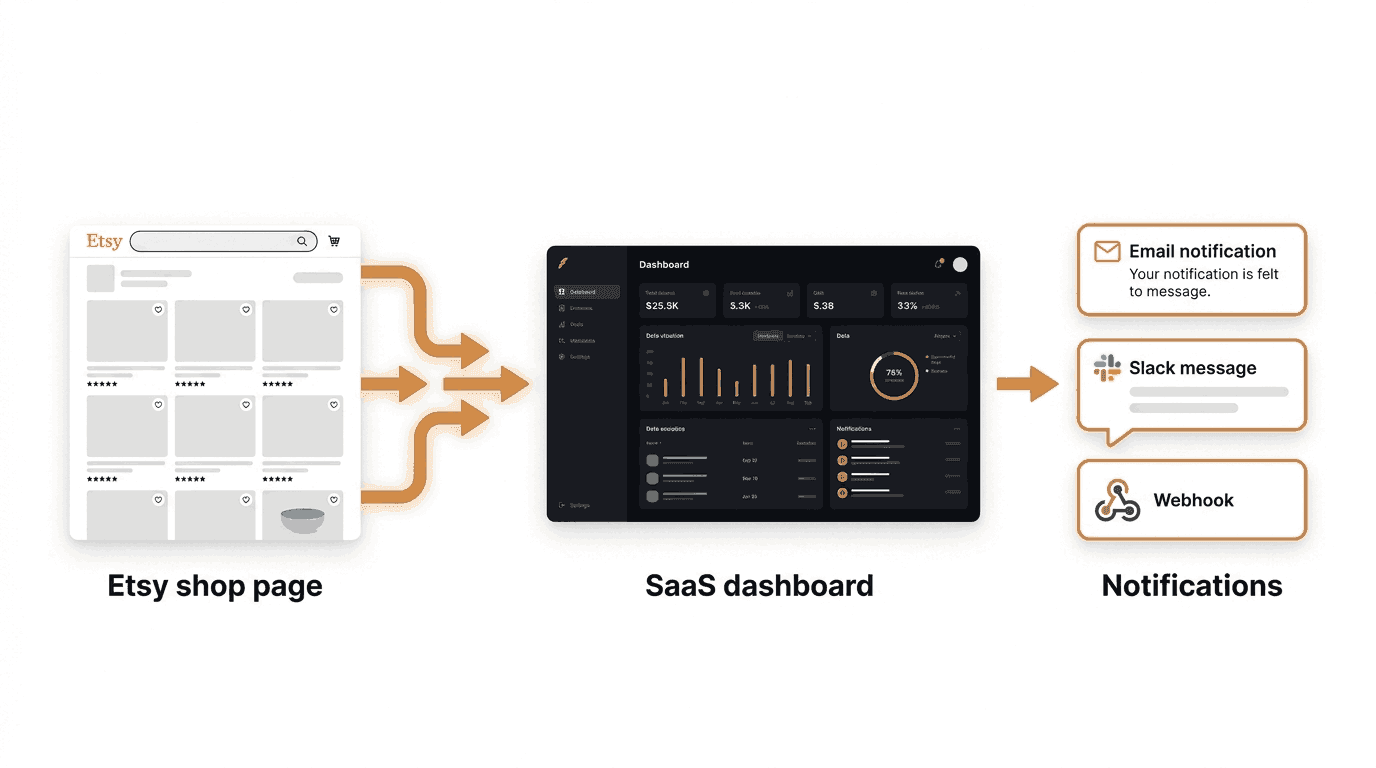
Whether you run a competing shop, work in product research, or just want to keep tabs on a seller you love, knowing the moment a new Etsy listing goes live gives you a real edge. The problem is that Etsy does not send alerts when a shop you care about publishes something new. You would have to check manually, every day, or miss it entirely.
This guide shows you how to automate that using Verid, a web change detection platform that watches a page for you and sends an alert the moment something changes. You will walk through two methods: a point-and-click dashboard setup that requires zero code, and an API or SDK approach for developers who want to automate everything programmatically.
What Is an Etsy Shop New Listings Monitor?
An Etsy shop new listings monitor is an automated system that checks an Etsy seller's page on a schedule and notifies you whenever a new product appears. Instead of refreshing a page manually, the monitor does it for you and only sends an alert when something actually changed.
Who uses this and why:
- Etsy sellers and competitors track rival shops to spot trends, pricing strategies, or new product launches before they go viral.
- Buyers and resellers watch specific shops for limited-edition drops, vintage finds, or seasonal items that sell out fast.
- Market researchers and trend analysts monitor niches across multiple shops to identify what is gaining traction.
- Brand protection teams watch for unauthorized sellers listing copycat products.
Why Verid Is a Good Fit for This
Etsy shop pages are rendered using JavaScript, which breaks most simple HTML-scraping approaches. Verid handles this automatically by escalating from a standard HTTP request to a headless browser when the page requires it. You do not have to configure any of that yourself.
Beyond fetching the page, Verid also:
- Extracts specific fields using six different methods (CSS, XPath, JSONPath, regex, full-page hash, and AI-powered extraction).
- Stores the previous result so it can detect what changed on the next check.
- Fires a delivery only when a rule you define is true, not on every minor page twitch like a cookie banner update.
- Retries failed deliveries up to six times with exponential backoff so you never silently miss an alert.
The 14-day free trial gives you unlimited monitors and 200 runs with no credit card required. A shop checked once a day uses about 14 runs over the trial, so that is enough to get started tracking a handful of shops.
Method 1: Set Up the Monitor Using the Verid Dashboard
This is the no-code path. You configure everything through a web interface, and Verid handles the rest.
Step 1: Create a Free Verid Account
Go to verid.dev/auth/signup and sign up. No credit card is needed for the 14-day free trial.
Once you are logged in, navigate to your dashboard. You will see an API Keys section in the sidebar. Your API key is available here if you ever want to use the API later, but for the dashboard workflow you do not need it yet.
Step 2: Create a New Monitor
Click New Monitor (or the plus icon, depending on the dashboard version). You will be asked for a name and a URL.
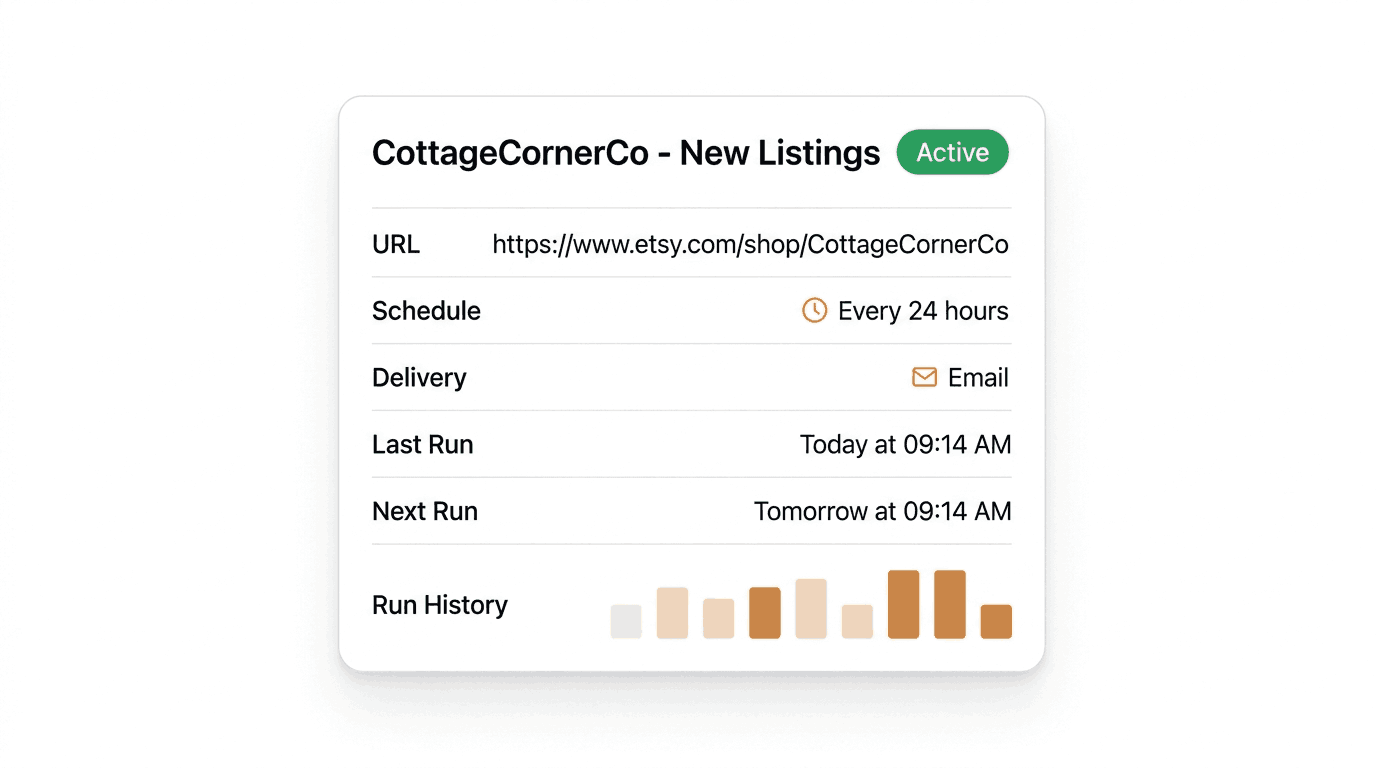
Name your monitor something descriptive. For example: CottageCornerCo - New Listings.
Enter the Etsy shop URL. Use the shop's main listings page. Here are real examples you can copy and test:
https://www.etsy.com/shop/CottageCornerCo(home decor and vintage finds)https://www.etsy.com/shop/SilverMapleStudio(handmade jewelry)https://www.etsy.com/shop/TheWildOlivePress(art prints and stationery)
Paste the URL of the shop you want to monitor into the URL field.
Step 3: Choose an Extraction Method
This is the most important configuration step. The extraction method tells Verid what to pull out of the page on each check.
For Etsy shop monitoring, there are two good options depending on what you want to track.
Extraction Method Comparison
| Method | What it does | Best for Etsy monitoring |
|---|---|---|
| CSS Selector | Targets a specific HTML element on the page | Extracting a listing title or count from a stable DOM element |
| AI / LLM Extraction | You describe what to find in plain English; an AI reads the page | Most reliable when Etsy's page structure changes or when you want a list of all current listing titles |
| Full-Page Hash | Hashes the entire rendered page; fires if anything changes | Useful only if you want to know something changed without caring what; produces more noise |
| Regex | Counts pattern matches in raw text | Can count how many listing URLs appear, useful as a simple new-listing counter |
Recommended choice: AI / LLM Extraction.
Etsy is a JavaScript-heavy application. Its HTML structure changes frequently, meaning a CSS selector that works today may stop working after an Etsy UI update. The AI extractor reads the rendered page content and finds what you describe in plain English, making it far more resilient over time.
Select AI / LLM Extraction as your method and enter a prompt like this:
Extract the titles of all product listings currently visible on this Etsy shop page. Return a JSON array under the key "listings" where each item is a listing title string.You can optionally add a schema:
{
  "listings": "array of strings"
}
This tells Verid's AI to return a consistent structure so the diff engine can compare it run-to-run.
Step 4: Configure the Schedule
The schedule determines how often Verid checks the page.
For a daily check, set the interval to 24 hours (86,400 seconds). This means Verid checks the Etsy shop once per day and alerts you if new listings appeared since the last check. A daily check uses about 30 runs a month, well inside the Lite plan's 1,000.
Set the schedule to Every 24 hours.
If you need faster monitoring, every plan, including the free trial, can check as often as every 60 seconds. Faster checks use more runs, so plans differ by how many runs you get each month:
| Plan | Price | Runs per month |
|---|---|---|
| 14-day free trial | $0 | 200 for the whole trial |
| Lite | $9/mo | 1,000 |
| Starter | $19/mo | 5,000 |
| Pro | $49/mo | 15,000 |
| Scale | $149/mo | 100,000 |
For most use cases, daily monitoring is more than sufficient for tracking new Etsy listings.
Step 5: Configure the Delivery (Alert)
This is where you tell Verid where to send the notification.
Choose Email for the simplest setup. Enter your email address in the delivery field.
Other delivery options available:
- Webhook: Verid sends a signed POST request to a URL you control, including the before-and-after diff. Ideal for developers who want to trigger a workflow in their own application or tools like Zapier or n8n.
- Slack: Paste a Slack incoming webhook URL and the alert drops directly into your chosen channel, formatted with the monitor name and what changed.
- Discord: Same as Slack but for Discord channels. Useful for community servers tracking trending Etsy niches.
For a beginner getting started, email is the simplest and most immediate choice. You can always add more delivery channels later.
Step 6: Set the Predicate (When to Alert)
The predicate is the rule that decides when Verid actually sends the notification. Without a predicate, you would get an alert every time the page changes for any reason, including session tokens, ad rotations, or timestamp updates.
For new listings monitoring, you want to fire when the listings field changes. Select:
- Predicate type:
any_field_changes
This tells Verid to send you an alert any time the extracted listings array is different from the previous run, meaning a new title appeared or an old one was removed.
Step 7: Save and Activate
Click Save Monitor. Verid will immediately queue a first run to establish a baseline. No alert fires on the first run since there is no previous state to compare against. From the next scheduled check onward, you will receive an email if the listings on that Etsy shop have changed.
Method 2: Create the Monitor Using the Verid REST API
If you are a developer or want to create monitors programmatically (for example, monitoring dozens of shops at once), the Verid REST API gives you full control.
The base URL for all API requests is https://api.verid.dev. All requests require an Authorization: Bearer YOUR_API_KEY header. Your API key starts with vrd_ and can be created from the API Keys page in the dashboard.
Get Your API Key
export VERID_API_KEY="vrd_your_key_here"Create an Etsy Shop Monitor
The following request creates a monitor that checks the CottageCornerCo Etsy shop daily and emails you when new listings appear.
curl -X POST https://api.verid.dev/v1/monitors \
  -H "Authorization: Bearer $VERID_API_KEY" \
  -H "Content-Type: application/json" \
  -d '{
    "name": "CottageCornerCo - New Listings",
    "url": "https://www.etsy.com/shop/CottageCornerCo",
    "schedule_interval_seconds": 86400,
    "fetch_mode": "browser",
    "extract_config": {
      "method": "prompt",
      "prompt": "Extract the titles of all product listings currently visible on this Etsy shop page. Return a JSON array under the key listings where each item is a listing title string.",
      "schema": {
        "listings": "array of strings"
      }
    },
    "diff_predicate": {
      "type": "any_field_changes"
    },
    "deliveries": [
      {
        "type": "email",
        "to": "you@yourcompany.com"
      }
    ]
  }'
Key fields explained:
schedule_interval_seconds: 86400sets a 24-hour interval (about 30 runs a month).fetch_mode: "browser"forces headless browser rendering, which is recommended for JavaScript-heavy sites like Etsy.extract_config.method: "prompt"uses AI extraction with a plain-English description.diff_predicate.type: "any_field_changes"fires the delivery whenever the extracted listings array differs from the last run.deliveriesaccepts one delivery on the free trial; paid plans allow up to 25 per monitor.
Successful response (HTTP 201):
{
  "id": "uuid",
  "name": "CottageCornerCo - New Listings",
  "url": "https://www.etsy.com/shop/CottageCornerCo",
  "status": "active",
  "schedule_interval_seconds": 86400,
  "last_run_at": null,
  "next_run_at": "2026-06-17T09:00:00Z",
  "created_at": "2026-06-16T08:42:00Z"
}
Trigger a Manual Run for Testing
Instead of waiting 24 hours, you can trigger an immediate run to confirm your configuration is working:
curl -X POST https://api.verid.dev/v1/monitors/YOUR_MONITOR_ID/run \
  -H "Authorization: Bearer $VERID_API_KEY" \
  -H "Content-Type: application/json" \
  -d '{}'
Response:
{
  "run_id": "uuid",
  "queued": true
}
Manual runs have no daily cap. Each one uses one run from your monthly allowance, just like a scheduled check.
Add a Webhook Delivery (Advanced)
To also receive a signed webhook in addition to email, update the monitor's deliveries. Note that the free trial supports one delivery per monitor; upgrade to Lite or above to combine email and webhook:
curl -X PATCH https://api.verid.dev/v1/monitors/YOUR_MONITOR_ID \
  -H "Authorization: Bearer $VERID_API_KEY" \
  -H "Content-Type: application/json" \
  -d '{
    "deliveries": [
      { "type": "email", "to": "you@yourcompany.com" },
      { "type": "webhook", "url": "https://your-app.com/hooks/etsy" }
    ]
  }'
When a new Etsy listing is detected, Verid POSTs a payload like this to your endpoint:
{
  "id": "del_01H...",
  "version": "2026-05-01",
  "monitor_id": "uuid",
  "run_id": "uuid",
  "fired_at": "2026-06-17T09:14:00Z",
  "diff": {
    "fields_changed": ["listings"],
    "before": {
      "listings": ["Handmade Linen Pillow", "Oak Serving Board"]
    },
    "after": {
      "listings": ["Handmade Linen Pillow", "Oak Serving Board", "Reclaimed Wood Candle Holder"]
    }
  },
  "monitor": {
    "url": "https://www.etsy.com/shop/CottageCornerCo",
    "name": "CottageCornerCo - New Listings"
  }
}
Every webhook is HMAC-signed using a per-monitor secret. See the Webhooks documentation for verification code in Node.js, Python, Ruby, Go, and PHP.
Method 3: Create the Monitor Using the Verid Node.js SDK
Verid publishes an official Node.js SDK on npm. This is the most convenient approach if you are building a Node.js or TypeScript application.
Install the SDK
npm install @verid.dev/sdkCreate the Etsy Shop Monitor
import { VeridClient } from '@verid.dev/sdk';

const client = new VeridClient({
  apiKey: process.env.VERID_API_KEY!,
});

const monitor = await client.monitors.create({
  name: 'CottageCornerCo - New Listings',
  url: 'https://www.etsy.com/shop/CottageCornerCo',
  schedule_interval_seconds: 86400,
  fetch_mode: 'browser',
  extract_config: {
    method: 'prompt',
    prompt:
      'Extract the titles of all product listings currently visible on this Etsy shop page. Return a JSON array under the key listings where each item is a listing title string.',
    schema: {
      listings: 'array of strings',
    },
  },
  diff_predicate: {
    type: 'any_field_changes',
  },
  deliveries: [
    {
      type: 'email',
      to: 'you@yourcompany.com',
    },
  ],
});

console.log('Monitor created:', monitor.id);
console.log('Next run at:', monitor.next_run_at);
Replace process.env.VERID_API_KEY with your actual key (or set it as an environment variable).
Trigger a Manual Test Run
const run = await client.monitors.runNow(monitor.id);
console.log('Test run queued, run ID:', run.run_id);
List All Your Monitors
const { data } = await client.monitors.list();
data.forEach((m) => {
  console.log(`${m.name} - ${m.status} - next run: ${m.next_run_at}`);
});
The SDK mirrors the REST API exactly. Any endpoint available via curl is available through the client. Full SDK source and documentation are available on npm (@verid.dev/sdk).
Scaling to Multiple Etsy Shops
If you want to monitor several shops at once, every plan, including the free trial, allows unlimited monitors. Each shop gets its own monitor configuration with its own URL and delivery settings. For competitive research across dozens of shops, the Starter plan at $19/month gives you 5,000 runs a month, enough for about 6 shops checked hourly or over 150 shops checked daily.
You can create all monitors in a loop using the SDK:
const shops = [
  { name: 'CottageCornerCo', url: 'https://www.etsy.com/shop/CottageCornerCo' },
  { name: 'SilverMapleStudio', url: 'https://www.etsy.com/shop/SilverMapleStudio' },
  { name: 'TheWildOlivePress', url: 'https://www.etsy.com/shop/TheWildOlivePress' },
];

for (const shop of shops) {
  await client.monitors.create({
    name: `${shop.name} - New Listings`,
    url: shop.url,
    schedule_interval_seconds: 86400,
    fetch_mode: 'browser',
    extract_config: {
      method: 'prompt',
      prompt: 'Extract the titles of all product listings on this Etsy shop page. Return JSON with key listings as an array of strings.',
    },
    diff_predicate: { type: 'any_field_changes' },
    deliveries: [{ type: 'email', to: 'alerts@yourcompany.com' }],
  });
}
Summary
| Step | Dashboard | API / SDK |
|---|---|---|
| Create account | verid.dev/auth/signup | Same |
| Add monitor | Click "New Monitor" | POST /v1/monitors |
| Extraction method | Select "AI / LLM" | method: "prompt" |
| Schedule | Every 24 hours | schedule_interval_seconds: 86400 |
| Delivery | { type: "email", to: "..." } | |
| Test | Manual run button | POST /v1/monitors/:id/run |
Verid handles the scheduling, the JavaScript rendering, the change detection, and the retries. You define what to watch and where to send the alert.
Frequently Asked Questions
Can I get an alert every time a new Etsy listing goes live, not just once a day?
Yes. Every plan, including the free trial, can check a shop as often as every 60 seconds. Faster checks use more runs: an hourly check uses about 720 runs a month, so the Starter plan ($19/month, 5,000 runs) covers about 6 hourly shops, the Pro plan ($49/month, 15,000 runs) about 20, and the Scale plan ($149/month, 100,000 runs) about 138. Compare plans at verid.dev/pricing to pick the run allowance you need.
Does this work on any Etsy shop, or only specific ones?
It works on any public Etsy shop page. Paste the shop's URL in the format https://www.etsy.com/shop/SHOPNAME and Verid will monitor it. The shop does not need to have any special settings enabled.
Will I get spammed with alerts if Etsy updates its page layout without adding new listings?
Not with the AI extraction setup described in this guide. Verid only fires a delivery when the extracted listings field changes, meaning the actual list of product titles is different. Minor page layout changes, timestamp updates, and ad rotations do not affect the extracted field and do not trigger alerts.
Can I monitor multiple Etsy shops at the same time?
Yes. Each Etsy shop requires one monitor. Monitors are unlimited on every plan, including the free trial. What you budget is runs: a shop checked daily uses about 30 runs a month, so the Lite plan's 1,000 runs cover about 33 shops and the Starter plan's 5,000 runs cover over 150. You can create all your shop monitors via the dashboard or automate the setup using the API or Node.js SDK.
Want this running on your own URL? Spin up the same monitor in about a minute. 5 free, no credit card.
About the author

Software Engineer
Suleman is a software engineer. He builds the scheduling and diffing machinery that decides when Verid re-checks a page and whether the result is worth an alert, and writes about applying the same ideas to your own monitoring setup.
More from Suleman →Related use cases
How to Monitor Shopify Product Prices and Stock Automatically
Learn how to track Shopify product prices and stock availability automatically using Verid. Get instant alerts when prices drop or items restock.
View blueprint →E-commerce & PricingHow to Get Restock Alerts for Out-of-Stock Products Using Verid
Learn how to use Verid to monitor any product page and get an email the moment it comes back in stock. Step-by-step guide for beginners.
View blueprint →Markets & FinanceHow to Monitor Airline Prices and Get Alerts When They Drop
Learn why airfare changes so often and how to monitor airline prices automatically, with a step by step setup for custom fare drop alerts.
View blueprint →