How to Track Mortgage and Loan Rate Changes Automatically Using Verid
Learn how to track mortgage and loan rate changes automatically using Verid's web change detection API. Set up alerts via webhook, email, or Slack in minutes.
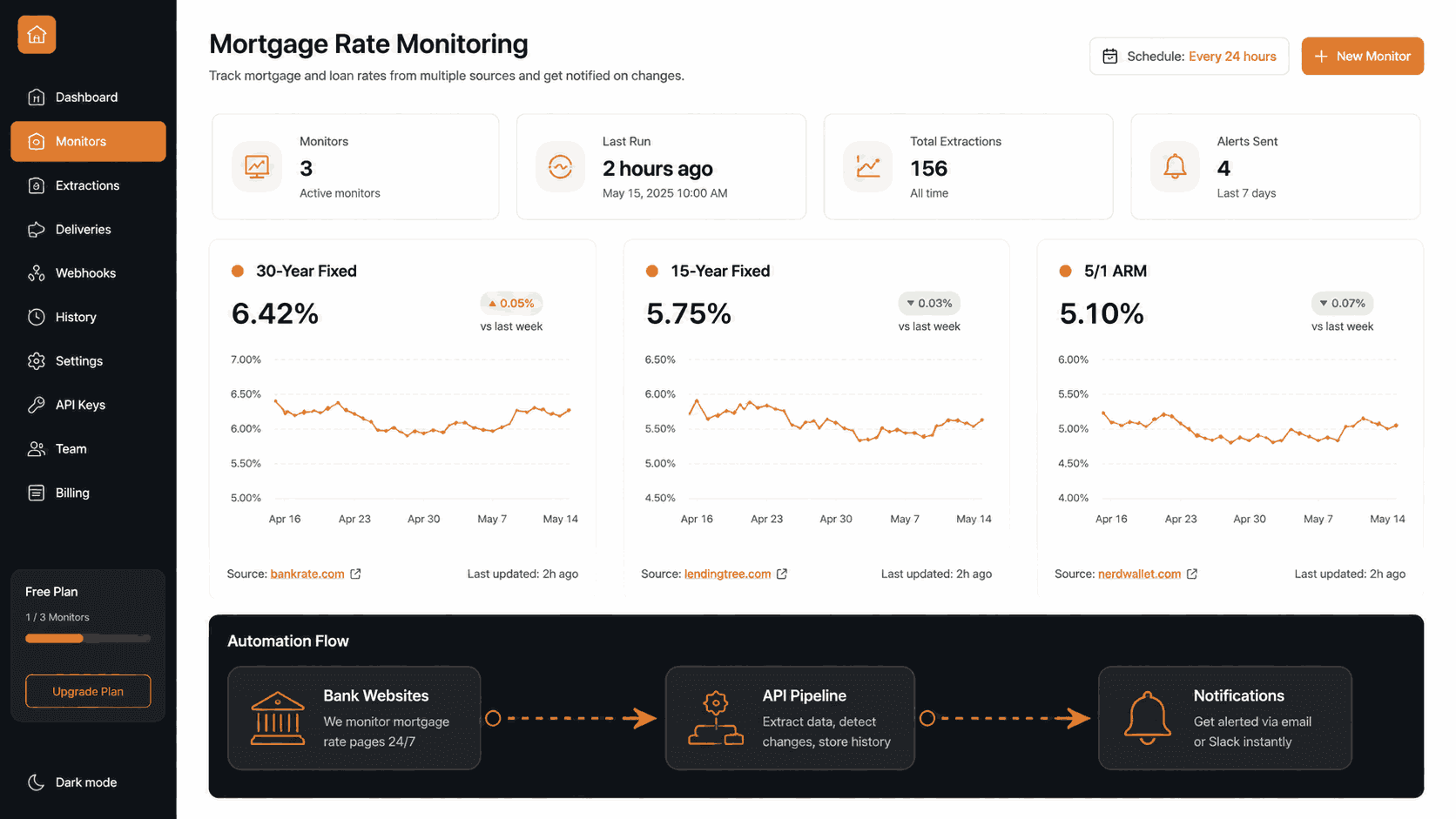
Mortgage rates can move by a quarter point overnight. A loan rate you checked on Monday may look completely different by Thursday. For homebuyers, investors, brokers, and fintech developers, that lag is costly.
Manual rate checking is slow, error-prone, and impossible to scale. What you need is an automated mortgage rate monitoring system that watches the pages you care about, extracts the exact numbers, and alerts you the moment something changes.
That is exactly what Verid is built for.
This guide walks you through the full setup: from creating your first monitor in the dashboard to writing production-ready API code that fires a webhook every time a lender changes their posted rate.
Why Mortgage and Loan Rate Monitoring Matters
Interest rates are one of the most consequential numbers in personal finance. A shift of even 0.25% on a 30-year fixed mortgage changes the total cost of a home by tens of thousands of dollars.
Here is who needs real-time loan rate tracking and why:
- Homebuyers who want to lock in before rates climb further
- Real estate investors comparing lender rates to time refinancing decisions
- Mortgage brokers monitoring competitor rates to stay competitive
- Fintech companies that surface rate comparison data for their users
- Financial journalists and analysts tracking rate trends across institutions
Manually visiting Bankrate, LendingTree, NerdWallet, and individual bank pages every day is not sustainable. Automating that process with a tool like Verid saves time and ensures you never miss a meaningful change.
Why Use Verid for Mortgage Rate Tracking
Verid is a developer-first web change detection API. Unlike screenshot-based monitoring tools that alert you whenever a cookie banner refreshes, Verid extracts the specific field you care about (say, the 30-year fixed APR), stores its value, and only alerts you when that value actually changes.
Here is what makes Verid well-suited for financial rate monitoring:
Structured extraction, not pixel diffs. Verid uses CSS selectors, XPath, JSONPath, regex, full-page hashing, or AI/LLM prompts to pull typed fields out of any page. You track the rate number itself, not a screenshot of the page.
Smart predicates. You can tell Verid to fire only when a rate increases by more than 0.1 percentage points, not on every minor DOM fluctuation. This eliminates alert noise from dynamic ads or page timestamps.
Reliable delivery. Alerts go out via signed webhooks, Slack, Discord, or email. Every webhook is HMAC-signed and retried up to six times with exponential backoff if your endpoint is temporarily unavailable.
No infrastructure to maintain. Verid handles the scheduler, the headless browser fallback, the state storage, and the retry queue. You define the config, Verid runs the loop.
Free trial available. You can start a 14-day free trial with unlimited monitors and 200 runs, no credit card required. After that, the Lite plan at $9/month includes 1,000 runs a month (enough for about 30 monitors on a daily, 24-hour check interval).
Dashboard Setup: Step-by-Step for Non-Developers
You do not need to write a single line of code to start monitoring mortgage rates. The Verid dashboard walks you through the full setup.
Step 1: Start a free trial
Go to verid.dev and sign up. No credit card is required. The 14-day free trial includes unlimited monitors and 200 runs.
Step 2: Get your API key
After signup, navigate to the API Keys page in the dashboard. Create a key. It will begin with the prefix vrd_. Treat this key like a password; it controls your entire account.
Step 3: Create a new monitor
Click New Monitor in the dashboard. Fill in the following fields:
Name: Give it a descriptive name like Bankrate 30-Year Fixed Rate
URL: Enter the page you want to monitor. For example:
https://www.bankrate.com/mortgages/mortgage-rates/for current mortgage rateshttps://www.lendingtree.com/home/mortgage/rates/for LendingTree rate comparisonshttps://www.nerdwallet.com/mortgages/mortgage-ratesfor NerdWallet rate tables
Step 4: Choose an extraction method
This is the most important part. You need to tell Verid which part of the page contains the rate you care about.
For most rate comparison pages, CSS Selector is the recommended method. Right-click the rate figure on the page in your browser, select "Inspect", and identify the element's class or data attribute. Then enter that selector in Verid.
For example, if the 30-year fixed rate is inside an element with the class rate-value, your field config would look like:
Field name: rate_30yr
Selector: .rate-value
You can track multiple rates (15-year fixed, 5/1 ARM, FHA) in a single monitor by adding additional named fields.
Step 5: Set a schedule
A good check interval for this use case is 24 hours (once per day). This is sufficient for mortgage rates, which typically update once per business day.
Every plan, including the free trial, can check as often as every 60 seconds, but each check uses one run. A daily monitor uses about 30 runs a month, while an hourly one uses about 720. The Starter plan at $19/month includes 5,000 runs, enough for about 6 monitors checked hourly.
Step 6: Set a predicate (optional but recommended)
A predicate controls when you actually get notified. Without one, you get an alert every time any tiny thing changes on the page.
For rate monitoring, use field_changes on your rate field. This fires only when the rate number itself changes, not when unrelated page elements shift.
Step 7: Add a delivery method
Choose how you want to be alerted:
- Email: Enter your email address. Verid sends a plain, readable summary of what changed.
- Webhook: Enter a URL from your own application to receive machine-readable JSON.
- Slack: Connect a Slack webhook URL to drop alerts into a channel.
Click Save. Your monitor is now live.
Extraction Methods: Comparison for Rate Monitoring
Verid supports six extraction methods. The right one depends on what the rate source looks like under the hood.
| Method | Accuracy | Ease of Use | Handles JS Pages | Best For Mortgage Tracking |
|---|---|---|---|---|
| CSS Selector | High | Easy | Yes (with browser mode) | Rate comparison pages with stable class names |
| XPath | High | Moderate | Yes (with browser mode) | Pages where CSS paths are insufficient, nested tables |
| JSONPath | Very High | Easy | N/A (API responses only) | Bank or aggregator JSON APIs, fintech data endpoints |
| Regex | Moderate | Moderate | No | Extracting a rate from raw text, unstructured HTML |
| Full-Page Hash | Low (for specific values) | Very Easy | Yes | Detecting any change on a page when selectors are unknown |
| AI / LLM Prompt | High | Very Easy | Yes | Pages that frequently redesign, or when selectors break |
Recommended method for most mortgage rate tracking: CSS Selector.
Rate comparison sites like Bankrate and NerdWallet use structured HTML with named data attributes or consistent class names around rate figures. A CSS selector targeting that element is fast, precise, and low-cost.
Use JSONPath when you are monitoring a financial data API that returns JSON. For example, if a lender exposes a rates endpoint at a public URL, JSONPath lets you pinpoint the exact field ($.rates.fixed_30yr) without parsing anything manually.
Use AI/LLM extraction as a fallback when the page redesigns and your CSS selector breaks. Describe what you want in plain English and Verid's LLM finds it. Note that LLM extractions count against your plan's monthly LLM quota.
Avoid Full-Page Hash for rate tracking. It triggers on every byte change including cookie banners, ad rotations, and timestamps, generating noise rather than signal.
API and Node.js SDK Integration
For developers who want to build a programmatic mortgage rate monitoring system, Verid offers a full REST API and an official Node.js SDK.
Install the SDK
npm install @verid.dev/sdkCreate a mortgage rate monitor with the Node.js SDK
The example below sets up a monitor for Bankrate's mortgage rates page, extracts the 30-year fixed rate using a CSS selector, and fires a webhook whenever that rate changes.
import { VeridClient } from '@verid.dev/sdk';

const client = new VeridClient({
  apiKey: process.env.VERID_API_KEY!,
});

const monitor = await client.monitors.create({
  name: 'Bankrate 30-Year Fixed Rate',
  url: 'https://www.bankrate.com/mortgages/mortgage-rates/',
  schedule_interval_seconds: 86400, // 24 hours (about 30 runs a month)
  extract_config: {
    method: 'css',
    fields: {
      rate_30yr_fixed: '[data-rate-type="30yr-fixed"] .rate-value',
      rate_15yr_fixed: '[data-rate-type="15yr-fixed"] .rate-value',
      rate_5yr_arm:    '[data-rate-type="5yr-arm"] .rate-value',
    },
  },
  diff_predicate: {
    type: 'any_field_changes',
  },
  deliveries: [
    {
      type: 'webhook',
      url: 'https://your-app.com/webhooks/mortgage-rates',
    },
    {
      type: 'email',
      // Email delivery is configured in the dashboard under notification settings
    },
  ],
});

console.log('Monitor created:', monitor.id);
Note on CSS selectors: The selectors above are illustrative. Use your browser's DevTools (right-click > Inspect) on the actual Bankrate page to find the exact class names or data attributes for the rate elements you want to track.
Trigger a manual check
await client.monitors.runNow(monitor.id);List all your monitors
const { data: monitors } = await client.monitors.list();
monitors.forEach(m => console.log(m.name, m.id));
Using the raw REST API with curl
If you prefer not to use the SDK, every operation is available via the REST API:
curl -X POST https://api.verid.dev/v1/monitors \
  -H "Authorization: Bearer $VERID_API_KEY" \
  -H "Content-Type: application/json" \
  -d '{
    "name": "NerdWallet Mortgage Rates",
    "url": "https://www.nerdwallet.com/mortgages/mortgage-rates",
    "schedule_interval_seconds": 86400,
    "extract_config": {
      "method": "css",
      "fields": {
        "fixed_30yr": ".rate-table__rate--30-year",
        "fixed_15yr": ".rate-table__rate--15-year"
      }
    },
    "diff_predicate": {
      "type": "any_field_changes"
    },
    "deliveries": [
      {
        "type": "webhook",
        "url": "https://your-app.com/hooks/rates"
      }
    ]
  }'
The API base URL is https://api.verid.dev/v1. Full endpoint documentation is available at docs.verid.dev/api-reference.
Webhooks and Email Alerts
How webhooks work
When Verid detects that a mortgage rate has changed and the predicate evaluates to true, it sends a signed HTTP POST request to your webhook URL. The payload includes:
- The monitor ID and name
- The URL that was checked
- The timestamp of the change
- A
diffobject showing the before and after values of every changed field
Example webhook payload for a rate change:
{
  "id": "del_01H...",
  "version": "2026-05-01",
  "monitor_id": "uuid",
  "run_id": "uuid",
  "fired_at": "2026-06-10T08:00:00Z",
  "diff": {
    "fields_changed": ["rate_30yr_fixed"],
    "before": { "rate_30yr_fixed": "6.84%" },
    "after":  { "rate_30yr_fixed": "6.72%" }
  },
  "monitor": {
    "url":  "https://www.bankrate.com/mortgages/mortgage-rates/",
    "name": "Bankrate 30-Year Fixed Rate"
  }
}
This payload tells you exactly what changed (the 30-year fixed rate), what it was before (6.84%), and what it is now (6.72%), all in a machine-readable format your application can act on immediately.
Verifying the webhook signature
Every Verid webhook includes a Verid-Signature header. You must verify this before processing the payload.
import { createHmac, timingSafeEqual } from 'crypto';

function verifyWebhook(
  header: string,
  rawBody: string,
  secret: string,
  toleranceSecs = 300,
): boolean {
  const parts = Object.fromEntries(
    header.split(',').map((p) => p.split('=')),
  );
  const timestamp = parseInt(parts['t'] ?? '0', 10);
  const signature = parts['v1'];

  if (!timestamp || !signature) return false;
  if (Math.abs(Date.now() / 1000 - timestamp) > toleranceSecs) return false;

  const expected = createHmac('sha256', secret)
    .update(`${timestamp}.${rawBody}`)
    .digest('hex');

  return timingSafeEqual(
    Buffer.from(expected, 'hex'),
    Buffer.from(signature, 'hex'),
  );
}

// In your Express handler:
app.post('/webhooks/mortgage-rates', (req, res) => {
  const header = req.headers['verid-signature'] as string;
  const body = req.rawBody; // raw string body before JSON.parse

  if (!verifyWebhook(header, body, process.env.WEBHOOK_SECRET!)) {
    return res.status(401).send('Invalid signature');
  }

  const payload = req.body;
  const changed = payload.diff.fields_changed;
  const before = payload.diff.before;
  const after = payload.diff.after;

  console.log(`Rate changed on ${payload.monitor.name}`);
  changed.forEach((field: string) => {
    console.log(`  ${field}: ${before[field]} -> ${after[field]}`);
  });

  res.sendStatus(200);
});
Verification snippets for Python, Ruby, Go, and PHP are available in the Verid webhooks documentation.
Retry behavior
If your endpoint is temporarily unavailable, Verid retries with exponential backoff:
| Attempt | Delay |
|---|---|
| 1 | Immediate |
| 2 | 5 minutes |
| 3 | 15 minutes |
| 4 | 30 minutes |
| 5 | 1 hour |
| 6 | 2 hours |
After six failed attempts, the delivery is marked as dead and can be replayed from the dashboard or via POST /v1/deliveries/:id/replay.
Email notifications
Email is the simplest delivery method and requires no code. When a rate changes, Verid sends a readable summary directly to your inbox. No dashboard login required to see what changed. Configure it from the Notifications section in the dashboard when creating or editing a monitor.
Slack integration (optional)
If your team works in Slack, you can route mortgage rate alerts to any channel. Create an incoming webhook in your Slack workspace, copy the URL, and paste it as a delivery endpoint in Verid. When a rate changes, Slack receives the before/after diff as a formatted message.
Real Use Case: Building a Mortgage Rate Monitoring System
Here is a practical, end-to-end system for tracking rates across multiple lenders.
Architecture overview
- Monitor setup: Create one Verid monitor per lender page (Bankrate, LendingTree, NerdWallet, or individual bank rate pages).
- Extraction: Use CSS selectors to extract the 30-year fixed, 15-year fixed, and 5/1 ARM rates as named fields on each monitor.
- Predicate: Use
any_field_changesto fire whenever any of the tracked rate fields update. - Delivery: Send a webhook to your backend and/or an email to your team.
- Action: Your backend stores the historical rate data, calculates movement, and optionally sends a formatted report or triggers a downstream workflow.
Sample system for a mortgage broker
A broker wants to know every morning if any lender changed their posted rates overnight. Setup:
- 5 monitors on the Lite plan (one each for Bankrate, LendingTree, NerdWallet, Chase, and Wells Fargo rate pages, using about 150 of the 1,000 monthly runs)
- 24-hour schedule (aligns with the daily rate update cycle used by most lenders)
- Email delivery so the broker gets a summary in their inbox each morning only on days when something changes
- Predicate:
any_field_changesso alerts fire whenever any tracked rate field updates
No alert means rates held steady. An alert means something moved, and the email shows exactly which rate and by how much.
Sample system for a fintech app
A fintech application wants to surface live rate data to users and trigger a notification when rates drop.
- 50 monitors on the Scale plan ($149/month) covering multiple lender pages (50 hourly monitors use about 36,000 of its 100,000 monthly runs)
- Hourly schedule for near-real-time tracking
- Webhook delivery to the application backend
- Predicate:
field_decreases_by_percentwith a threshold of 0.05 (fires when any rate drops by 5 basis points or more) - Backend action: Store the new rate in the database, push a mobile notification to users who set a rate-drop alert for that range
Scheduling: How Check Intervals Work
Verid's scheduling system runs each monitor on the interval you specify. Every plan can check as often as every 60 seconds. Plans differ by how many runs you get each month, and each check uses one run:
| Plan | Price | Runs per Month | History |
|---|---|---|---|
| Free trial | $0 for 14 days | 200 for the whole trial | 14 days |
| Lite | $9/mo | 1,000 | 90 days |
| Starter | $19/mo | 5,000 | 180 days |
| Pro | $49/mo | 15,000 | 365 days |
| Scale | $149/mo | 100,000 | 2 years |
For mortgage rate tracking, a 24-hour interval is genuinely practical: a daily monitor uses about 30 runs a month, so several lenders fit well inside the Lite plan's 1,000 runs at $9/month, and the 14-day free trial covers them while you test. Most published mortgage rates update once per business day. A daily check catches every meaningful change without requiring a bigger plan.
If you are monitoring a more volatile rate source (such as treasury yields or real-time bond market data exposed via a JSON API), a 5-minute interval enables near-real-time detection. At that rate one monitor uses about 8,640 runs a month, so plan your run budget accordingly.
In the API, schedule is set via schedule_interval_seconds. For a 24-hour check, use 86400. For hourly, use 3600.
Frequently Asked Questions
What is mortgage rate tracking and why should I automate it?
Mortgage rate tracking means monitoring posted loan rates from lenders and aggregators over time to detect when rates change. Because rates can shift multiple times per week, manual checking is unreliable and time-consuming. Automating it with a tool like Verid means you get notified the moment a rate changes, without having to check each page yourself.
How often does Verid check for rate changes?
As often as you choose, down to every 60 seconds on every plan, including the free trial. A 24-hour interval is sufficient for most published mortgage rates, which update on a daily business cycle, and uses about 30 runs a month per monitor. Shorter intervals use more runs, so plans differ by runs per month rather than check frequency.
Which extraction method works best for mortgage rate pages?
CSS Selector is the recommended method for most rate comparison websites like Bankrate, LendingTree, and NerdWallet. These sites use structured HTML with stable class names around their rate figures. For lenders that expose rates via a JSON API, JSONPath is more accurate and efficient. Use the AI/LLM extraction method as a fallback if a site redesigns and your CSS selectors stop working.
Should I use the dashboard or the API to set up rate monitoring?
Both work well. The dashboard is the faster option if you want to get started in minutes without writing any code. The API and Node.js SDK are the better choice if you are building a system that needs to create monitors programmatically, process webhook payloads in your own backend, or integrate rate change data into an existing application. Many teams start with the dashboard to prototype, then switch to the API for production.
Want this running on your own URL? Spin up the same monitor in about a minute. 5 free, no credit card.
About the author

Software Engineer
A software engineer by trade, Suleman spends his days in Verid’s monitoring internals: browser automation, field-level extraction, and signed webhook delivery. His writing leans toward implementation detail: selectors, retries, rate limits, and what actually breaks in production.
More from Suleman →Related use cases
How to Monitor Airline Prices and Get Alerts When They Drop
Learn why airfare changes so often and how to monitor airline prices automatically, with a step by step setup for custom fare drop alerts.
View blueprint →Markets & FinanceHow to Set Up Automated Crypto Price Alerts Using CoinGecko and Verid
Learn how to set up automated crypto price alerts using CoinGecko and Verid. Get Bitcoin and Ethereum notifications by email, Slack, or webhook.
View blueprint →Markets & FinanceHow to Monitor Currency Exchange Rates and Get FX Rate Alerts with Verid
Track FX rate changes on any currency pair and receive instant email or webhook alerts when rates move. Set up in minutes with Verid, no code required.
View blueprint →