How to Monitor Terms of Service and Privacy Policy Changes Automatically
Learn how to monitor Terms of Service and Privacy Policy changes automatically using Verid. Get instant alerts before policy updates affect your business.
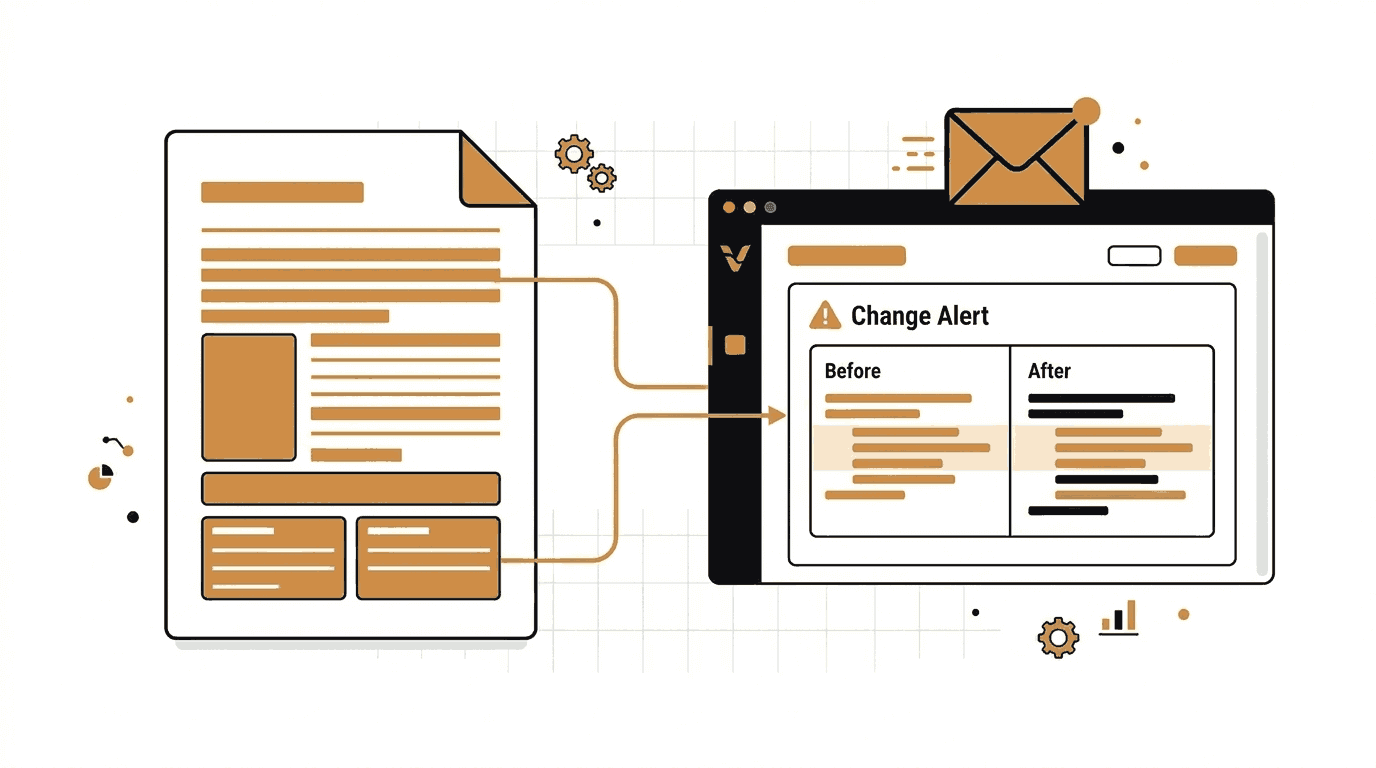
Most people only read a Terms of Service page once. That is the moment they sign up. After that, it sits quietly in the background, changing without warning, until one day something important is different and nobody noticed in time.
That is a real risk. Privacy policies and terms of service are living documents. They change when companies update their data practices, introduce new fees, change arbitration clauses, or adjust what data they can share with third parties. If you are a business that relies on third-party platforms, or if you work in legal, compliance, or security, missing those updates can have real consequences.
This guide walks you through how to use Verid to monitor any Terms of Service or Privacy Policy page automatically, so you always know when something changes.
Why Policy Changes Matter
Google's Privacy Policy covers billions of users across dozens of services. OpenAI's Terms of Use governs what millions of developers and businesses can build with its APIs. Microsoft's Services Agreement affects every person using an Outlook, Xbox, or OneDrive account.
These documents change. And companies are generally not required to notify you in a way that makes the change obvious. A banner saying "We updated our Terms" does not tell you what changed or why it matters.
Here is what you risk by not monitoring:
- Compliance gaps. If a vendor adds a new data sharing clause, your own compliance posture may change without you realizing it.
- Contract surprises. New arbitration clauses, dispute resolution changes, or fee structures can appear buried in a routine update.
- Security implications. Privacy policy changes that expand data collection may conflict with your internal security policies or regional regulations like GDPR.
- Audit failures. If your compliance team cannot demonstrate that you were aware of a third-party policy change, that is a gap in your audit trail.
Manual monitoring, meaning checking pages yourself on a schedule, does not scale. Automated monitoring solves this cleanly.
What Is Verid?
Verid is a developer-first web change detection API. It monitors any URL, extracts specific fields or content from the page, and sends you an alert only when something meaningful changes.
Unlike screenshot-based tools that fire alerts every time a cookie banner rotates or an ad refreshes, Verid focuses on structured content. You define what you want to track. It monitors that field and delivers a diff only when your defined condition is true.
For Terms of Service and Privacy Policy monitoring, this means you can detect when the actual legal text changes, not when a sidebar link shifts position.
Verid supports:
- Six extraction methods: CSS selectors, XPath, JSONPath, regex, full-page hashing, and AI/LLM prompt
- Nine predicate types to define when alerts fire
- Four delivery channels: webhooks, Slack, Discord, and email
- A REST API and an official Node.js SDK
- A 14-day free trial with unlimited monitors and 200 runs, no credit card required
Part 1: Setting Up Monitoring Without Writing Any Code
If you are not a developer, you can set up policy monitoring from the Verid dashboard in a few minutes. Here is how.
Step 1: Start a Free Trial
Go to verid.dev and sign up. Every new account starts with a 14-day free trial: unlimited monitors, 200 runs, and 14 days of history. No credit card is required.
Once logged in, you land on the dashboard where you can create and manage monitors.
Step 2: Create a New Monitor
Click the button to create a new monitor. You will be asked to fill in a few fields.
Monitor Name
Give it a clear, descriptive name. Something like "OpenAI Terms of Use" or "Google Privacy Policy" works well. You will see this name in alerts and in your dashboard, so make it easy to recognize at a glance.
Target URL
This is the page you want to watch. Paste the full URL of the Terms of Service or Privacy Policy page. For example:
https://openai.com/policies/row-terms-of-use/https://policies.google.com/privacyhttps://www.microsoft.com/en-us/servicesagreement/https://www.amazon.com/gp/help/customer/display.html?nodeId=508088
Scheduling Interval
This is how often Verid checks the page. Every plan, including the free trial, can check as often as every minute, and each check uses one run. For policy pages, once every 24 hours is a sensible setting. That means Verid will visit the page daily and compare it to the last time it checked.
A daily check uses about 30 runs a month, so Lite ($9/month, 1,000 runs) covers about 30 policy pages, and the 14-day free trial covers about 14 while you test. If you need more frequent checks, an hourly check uses about 720 runs a month, which fits on Lite ($9/month, 1,000 runs) for one page or Starter ($19/month, 5,000 runs) for about six. For most legal document monitoring, daily checks are sufficient since policy changes are rarely deployed in the middle of the night without notice.
Step 3: Choose an Extraction Method
This is the most important configuration decision. It determines what Verid reads from the page and what it compares between runs.
For Terms of Service and Privacy Policy pages, you have three practical options:
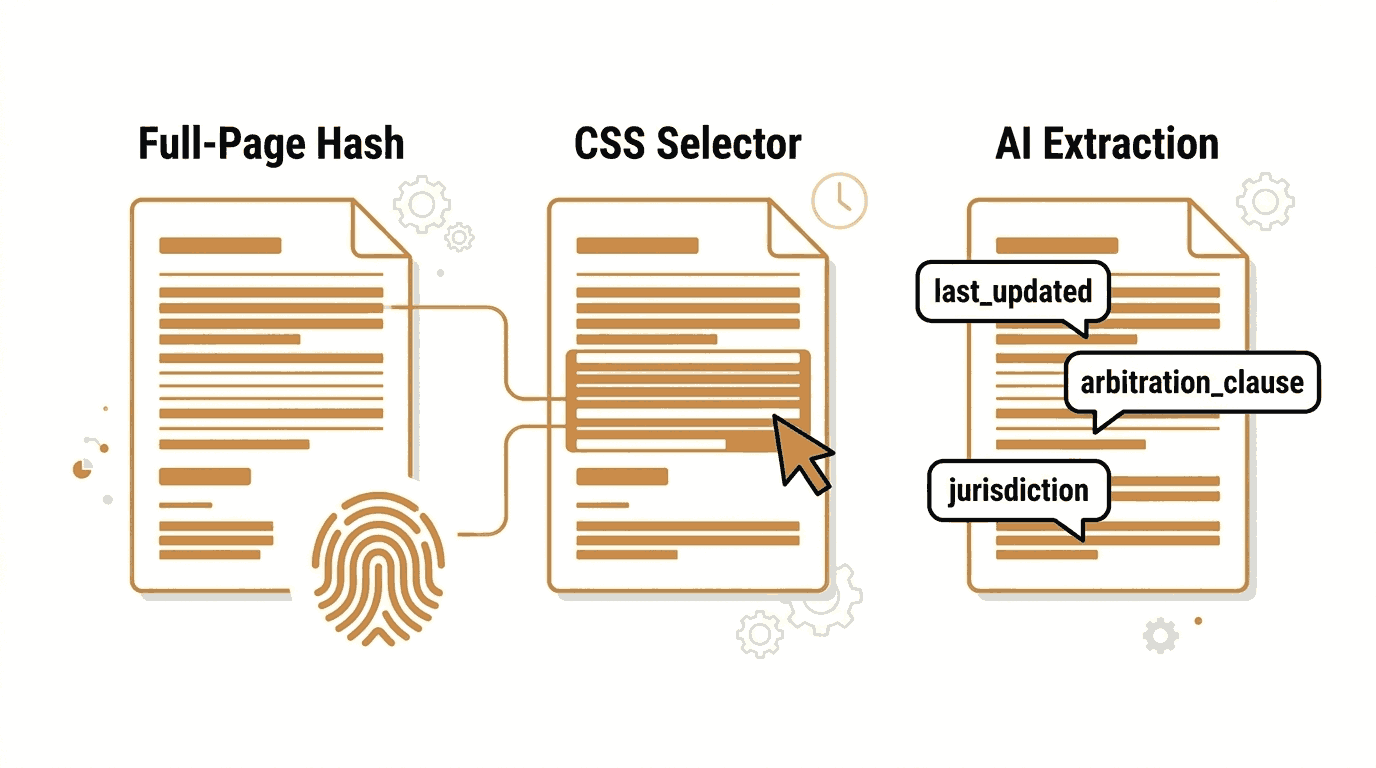
Option A: Full-Page Hash (Simplest)
Full-page hash is the easiest method. Verid hashes the entire rendered page and alerts you when anything at all changes.
When to use it: When you want to catch any change on the page without thinking about selectors. This is the right starting point if you are new to the tool.
The tradeoff: You may occasionally get alerts caused by things unrelated to the legal text, such as navigation menu updates, footer changes, or cookie consent banners. If the page is frequently updated in non-essential areas, you might want to use a more targeted method.
Configuration:
{
  "method": "full_page"
}
Pair this with the any_field_changes predicate, and Verid will alert you any time the page hash changes.
Option B: CSS Selector Extraction (More Precise)
If you want to monitor only the actual policy content and ignore surrounding navigation, headers, and footers, CSS selector extraction is the right choice.
Most Terms of Service and Privacy Policy pages wrap their content in a predictable container element. You can use your browser's developer tools to find the right selector.
How to find the selector:
- Open the Terms of Service page in Chrome or Firefox.
- Right-click on the main text content and choose Inspect.
- Look for the
<div>or<article>that wraps the full policy text. - Right-click that element and choose Copy, then Copy Selector.
For example, on many pages the main content is wrapped in a <main> tag or a <div> with a class like .policy-content or .legal-content. A simple selector like main or article will often work.
Configuration example for a policy page with a <main> content area:
{
  "method": "css",
  "fields": {
    "policy_text": "main"
  }
}
Set the predicate to field_changes on policy_text and you will only get alerts when that specific element changes.
Read the full guide: How to Use CSS Selector Extraction
Option C: AI Extraction (Most Flexible)
AI extraction lets you describe in plain English what you want to extract. Verid sends the page content to an LLM and returns structured fields.
This is the best option when:
- The page is rendered by JavaScript and CSS selectors return empty values
- You want to extract a specific named field, like a "Last Updated" date or a specific clause
- The page layout changes over time and you want something resilient to redesigns
Example: Extract the last updated date from a Privacy Policy
{
  "method": "prompt",
  "prompt": "Find the date this privacy policy was last updated. Return JSON with key: last_updated.",
  "schema": {
    "last_updated": "string"
  }
}
When the last_updated field changes, Verid fires an alert. This is a precise and low-noise way to detect real policy changes.
Example: Extract a specific clause summary
{
  "method": "prompt",
  "prompt": "Extract the section that describes arbitration or dispute resolution. Return JSON with key: arbitration_clause.",
  "schema": {
    "arbitration_clause": "string"
  }
}
Note that AI extraction counts against your plan's monthly LLM quota. The free trial includes 50 LLM extractions, and Lite includes 250 per month. See the pricing page for full limits.
Read the full guide: How to Use AI Extraction
Which Method Should You Choose?
| Method | Setup Difficulty | Noise Level | Best For |
|---|---|---|---|
| Full-Page Hash | Easiest | Medium | Simple "something changed" monitoring |
| CSS Selector | Easy | Low | Monitoring the main content block precisely |
| AI Extraction | Easy | Very Low | Extracting named fields like last updated date |
For most users starting out, Full-Page Hash is the fastest way to get going. Once you want more precision, switch to CSS Selector or AI Extraction.
Step 4: Configure Your Alert
After setting the extraction method, configure how Verid notifies you when a change is detected.
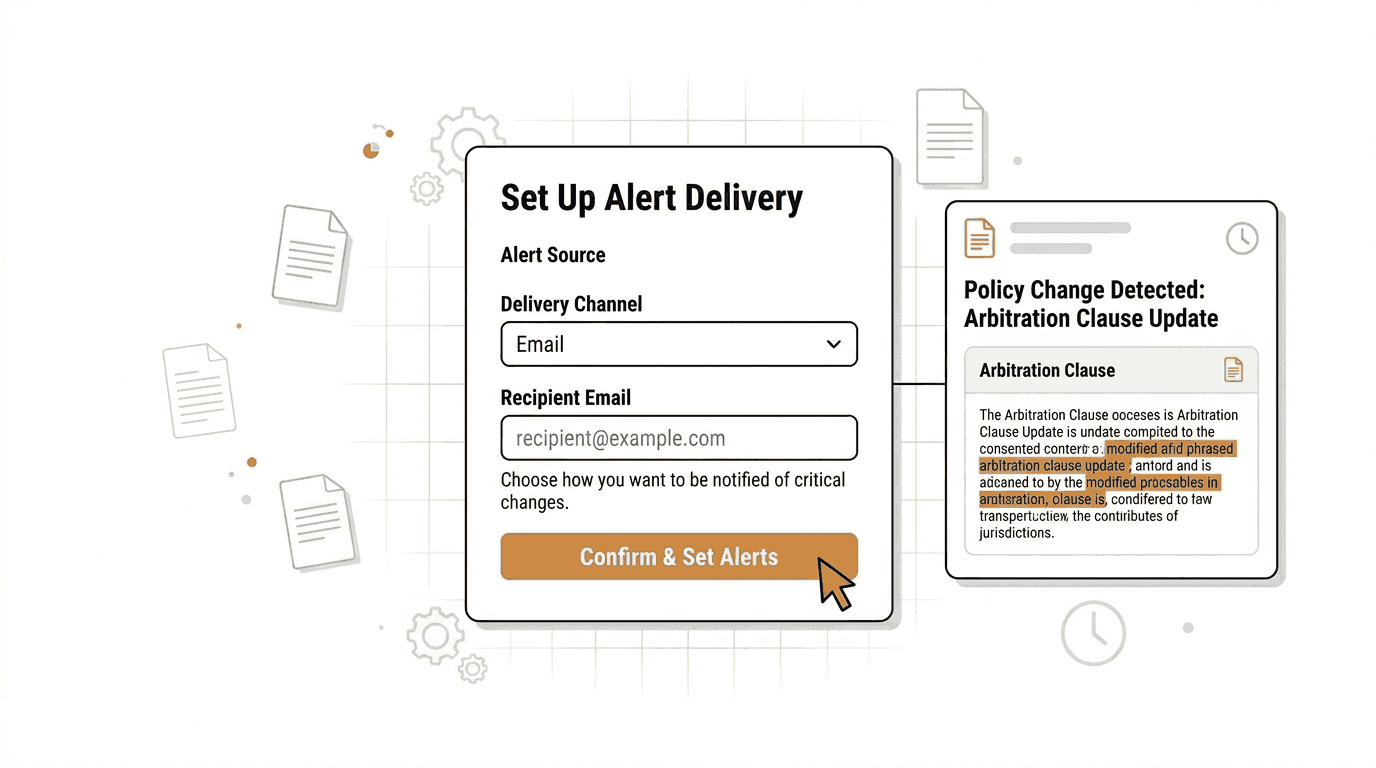
Adding an Email Delivery
In the dashboard, under the Deliveries section, add a new delivery with type Email and enter the email address where you want to receive alerts.
When a change is detected, Verid sends a plain, readable email summarizing what changed. No login required to read it.
You can add multiple delivery destinations per monitor. During the free trial, each monitor supports one delivery endpoint. Higher plans support more, so you could email yourself and also route the alert to a Slack channel or webhook simultaneously.
Predicate Configuration
The predicate decides when Verid actually sends an alert. For policy monitoring:
- If using Full-Page Hash, use
any_field_changes. - If using CSS Selector or AI Extraction with a named field, use
field_changeson that field name.
For example, if your CSS extraction creates a field called policy_text, set:
{
  "type": "field_changes",
  "field": "policy_text"
}
This means alerts only fire when that specific field changes, not on every run.
Part 2: Real-World Monitoring Examples
Here are four practical examples using real company policy pages.
Example 1: Monitor OpenAI's Terms of Use
OpenAI's Terms of Use page at https://openai.com/policies/row-terms-of-use/ governs usage of ChatGPT and the API for individuals. If you build products with the OpenAI API, this page is essential to monitor.
Dashboard setup:
- Name: OpenAI Terms of Use
- URL:
https://openai.com/policies/row-terms-of-use/ - Schedule: Every 24 hours
- Extraction: Full-Page Hash or AI Extraction with prompt "Find the date this terms of use page was last updated. Return JSON with key: last_updated."
- Predicate:
any_field_changes(for hash) orfield_changesonlast_updated(for AI) - Delivery: Email to your address
Example 2: Monitor Google's Privacy Policy
Google's Privacy Policy at https://policies.google.com/privacy applies across Google Search, Gmail, YouTube, Google Analytics, and more. Any change here potentially affects how data is handled across a wide range of workflows.
Dashboard setup:
- Name: Google Privacy Policy
- URL:
https://policies.google.com/privacy - Schedule: Every 24 hours
- Extraction: CSS Selector with field
policy_texttargetingmainorarticle - Predicate:
field_changesonpolicy_text - Delivery: Email
Example 3: Monitor Microsoft's Services Agreement
The Microsoft Services Agreement at https://www.microsoft.com/en-us/servicesagreement/ covers Outlook, OneDrive, Xbox Live, Bing, and other Microsoft consumer services.
Dashboard setup:
- Name: Microsoft Services Agreement
- URL:
https://www.microsoft.com/en-us/servicesagreement/ - Schedule: Every 24 hours
- Extraction: Full-Page Hash
- Predicate:
any_field_changes - Delivery: Email
Example 4: Monitor Amazon's Conditions of Use
Amazon's Conditions of Use at https://www.amazon.com/gp/help/customer/display.html?nodeId=508088 governs use of all Amazon retail and digital services.
Dashboard setup:
- Name: Amazon Conditions of Use
- URL:
https://www.amazon.com/gp/help/customer/display.html?nodeId=508088 - Schedule: Every 24 hours
- Extraction: CSS Selector with field
policy_texttargeting the main content div - Predicate:
field_changesonpolicy_text - Delivery: Email
Part 3: Setting Up Monitoring via the API
If you are a developer who wants to automate policy monitoring across multiple vendors, create monitors programmatically using the Verid REST API or the official Node.js SDK.
Get Your API Key
Sign up at verid.dev, then go to the API Keys section in your dashboard. Create a key. It will start with vrd_. Treat it like a password.
export VERID_API_KEY="vrd_your_key_here"Create a Monitor with cURL
The following example creates a monitor for OpenAI's Terms of Use using full-page hash extraction and email delivery. It runs every 86400 seconds (24 hours), which fits easily within the free trial and every paid plan.
curl -X POST https://api.verid.dev/v1/monitors \
  -H "Authorization: Bearer $VERID_API_KEY" \
  -H "Content-Type: application/json" \
  -d '{
    "name": "OpenAI Terms of Use",
    "url": "https://openai.com/policies/row-terms-of-use/",
    "schedule_interval_seconds": 86400,
    "extract_config": {
      "method": "full_page"
    },
    "diff_predicate": {
      "type": "any_field_changes"
    },
    "deliveries": [
      {
        "type": "email",
        "to": "your@email.com"
      }
    ]
  }'
Replace your@email.com with your actual email address.
Create a Monitor with AI Extraction via cURL
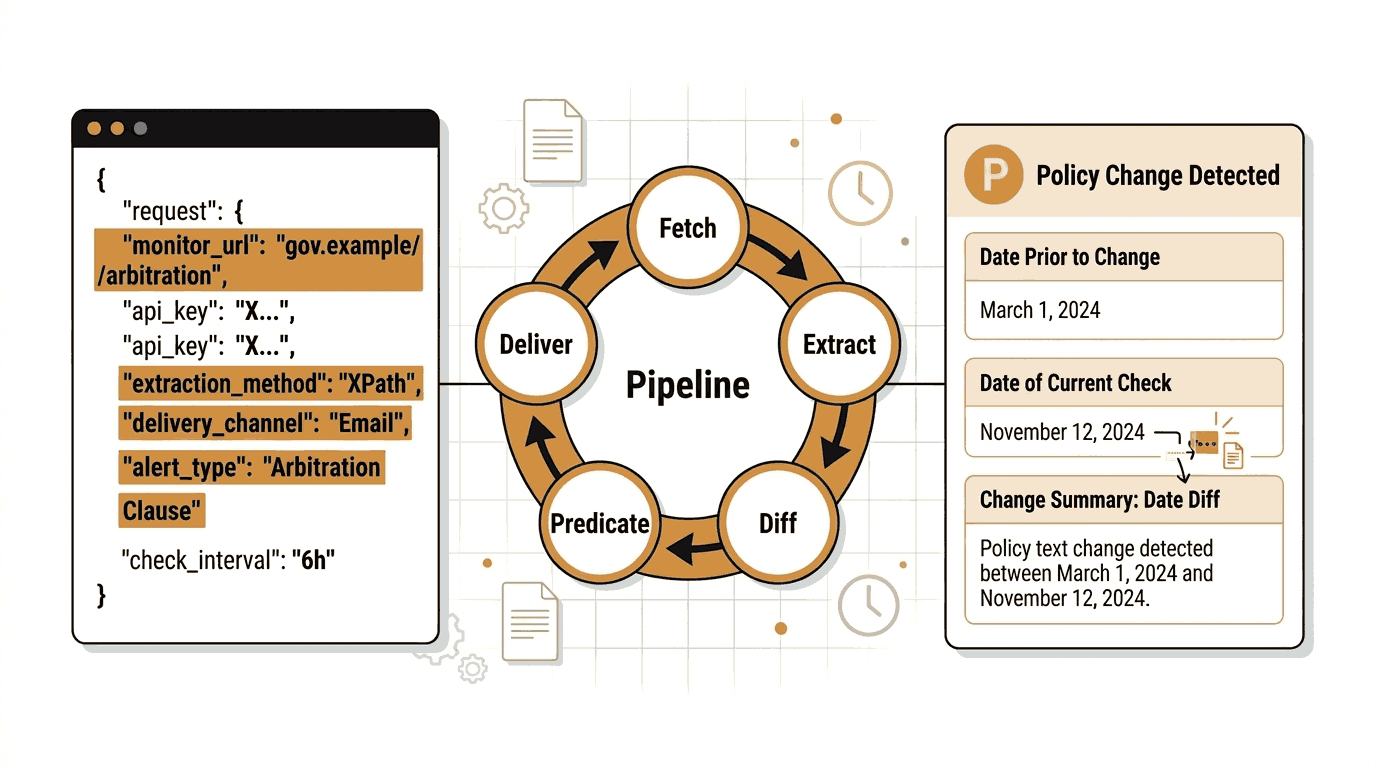
This example monitors Google's Privacy Policy and uses AI extraction to pull out the last updated date. When that date changes, an email is sent.
curl -X POST https://api.verid.dev/v1/monitors \
  -H "Authorization: Bearer $VERID_API_KEY" \
  -H "Content-Type: application/json" \
  -d '{
    "name": "Google Privacy Policy",
    "url": "https://policies.google.com/privacy",
    "schedule_interval_seconds": 86400,
    "extract_config": {
      "method": "prompt",
      "prompt": "Find the date this privacy policy was last updated. Return JSON with key: last_updated.",
      "schema": {
        "last_updated": "string"
      }
    },
    "diff_predicate": {
      "type": "field_changes",
      "field": "last_updated"
    },
    "deliveries": [
      {
        "type": "email",
        "to": "your@email.com"
      }
    ]
  }'
Create Multiple Monitors with the Node.js SDK
Install the official Verid SDK:
npm install @verid.dev/sdkThen create monitors for multiple policy pages in a single script:
import { VeridClient } from '@verid.dev/sdk';

const client = new VeridClient({
  apiKey: process.env.VERID_API_KEY,
});

const policyPages = [
  {
    name: 'OpenAI Terms of Use',
    url: 'https://openai.com/policies/row-terms-of-use/',
  },
  {
    name: 'Google Privacy Policy',
    url: 'https://policies.google.com/privacy',
  },
  {
    name: 'Microsoft Services Agreement',
    url: 'https://www.microsoft.com/en-us/servicesagreement/',
  },
  {
    name: 'Amazon Conditions of Use',
    url: 'https://www.amazon.com/gp/help/customer/display.html?nodeId=508088',
  },
];

for (const page of policyPages) {
  const monitor = await client.monitors.create({
    name: page.name,
    url: page.url,
    schedule_interval_seconds: 86400,
    extract_config: {
      method: 'full_page',
    },
    diff_predicate: {
      type: 'any_field_changes',
    },
    deliveries: [
      {
        type: 'email',
        to: 'legal-alerts@your-company.com',
      },
    ],
  });

  console.log(`Created monitor: ${monitor.name} (${monitor.id})`);
}
This creates four monitors, one per policy page, all delivering email alerts to the same address. You can see all monitors in your Verid dashboard and pause or delete them at any time.
Listing Your Policy Monitors
To see all monitors you have created:
curl https://api.verid.dev/v1/monitors \
  -H "Authorization: Bearer $VERID_API_KEY"
The response includes each monitor's status, last run time, and next scheduled run.
Triggering a Manual Run
If you want to check a page immediately rather than waiting for the next scheduled run, trigger a manual run:
curl -X POST https://api.verid.dev/v1/monitors/YOUR_MONITOR_ID/run \
  -H "Authorization: Bearer $VERID_API_KEY" \
  -H "Content-Type: application/json" \
  -d '{}'
Replace YOUR_MONITOR_ID with the ID returned when you created the monitor. There is no daily cap on manual runs; each one uses one run from your monthly allowance, like a scheduled check.
Part 4: What the Alert Looks Like
When a change is detected, Verid sends an email with a summary of what changed. The email includes:
- The monitor name
- The URL that was monitored
- The time the change was detected
- The before and after values for any fields that changed
If you are using full-page hash extraction, the alert tells you the page hash changed. If you are using AI extraction with a last_updated field, the alert shows you the previous date and the new date side by side.
This is a clean, readable summary. You do not need to log into a dashboard to understand what happened.
Part 5: Tips for Better Policy Monitoring
Monitor the canonical page, not a redirected one. Some companies have region-specific policy URLs. Monitor the one that applies to your users.
Start with full-page hash. It is the easiest way to get started. Once you understand what kinds of changes appear, you can refine to CSS or AI extraction.
Use a shared team email address. Route policy change alerts to a shared inbox like legal-alerts@ or compliance@ so multiple people are aware when something changes.
Document what you were monitoring and when. When a change alert arrives, note the date and what changed. This creates an audit trail that is useful for compliance reviews.
Scale up your monitoring interval for high-risk vendors. If a vendor is critical to your operations, consider moving it to hourly checks (about 720 runs a month per page) so you catch changes faster.
Check your plan limits. The 14-day free trial includes 200 runs and 50 LLM extractions in total; Lite includes 1,000 runs and 250 LLM extractions per month. If you are monitoring many policy pages using AI extraction, track your usage on the billing page in the dashboard.
Frequently Asked Questions
Why should I monitor Terms of Service changes?
Terms of Service and Privacy Policies define your legal relationship with a platform. When they change, your rights, obligations, and risks may also change. Companies are not always required to make those changes obvious. Automated monitoring ensures you are notified immediately when a document is updated, giving you time to review the change before it affects your business or compliance status.
How often should Privacy Policies be checked?
For most vendors, daily monitoring is sufficient. Privacy policies and terms of service typically do not change on an hourly basis. However, if you are in a regulated industry where a vendor policy change could trigger a compliance review, you may want hourly checks, which use about 720 runs a month per page and fit comfortably on a Starter or Pro plan.
What is the best way to detect website policy changes automatically?
The most reliable approach is to use a structured change detection tool like Verid. Unlike screenshot-based tools that alert on any visual change, Verid extracts specific fields, such as the policy text or last updated date, and only sends an alert when that content actually changes. This reduces false positives and makes it clear what changed.
Can I receive automatic alerts when legal documents change?
Yes. Verid supports email alerts, webhooks, Slack, and Discord. For non-technical users, email is the simplest option. Set up a monitor for any Terms of Service or Privacy Policy URL, add an email delivery, and you will receive a notification the next time the page changes. The 14-day free trial includes unlimited monitors, 200 runs, and one delivery endpoint per monitor, and no credit card is required to get started.
Want this running on your own URL? Spin up the same monitor in about a minute. 5 free, no credit card.
About the author

Software Engineer
Suleman is a software engineer who builds the systems behind Verid: the headless-browser scrapers, the diff engine, and the webhook delivery pipeline. He writes about change detection, structured extraction, and keeping automated monitors reliable at scale.
More from Suleman →Related use cases
How to Detect WHOIS and Domain Ownership Changes Automatically
Learn how to monitor WHOIS records and detect domain ownership changes automatically using Verid. Set up alerts for registrar swaps, expiration updates, and nameserver changes.
View blueprint →Compliance & RegulatoryHow to Monitor Regulatory Filings and Policy Pages Automatically
Learn how to automatically track regulatory filings, policy updates, and government pages with Verid.dev - get email alerts the moment anything changes.
View blueprint →Compliance & RegulatoryHow to Set Up Automated Government Contract and Tender Alerts (No Coding Required)
Never miss a government contract again. Learn how to set up automated government tender alerts using Verid to monitor procurement portals 24/7.
View blueprint →