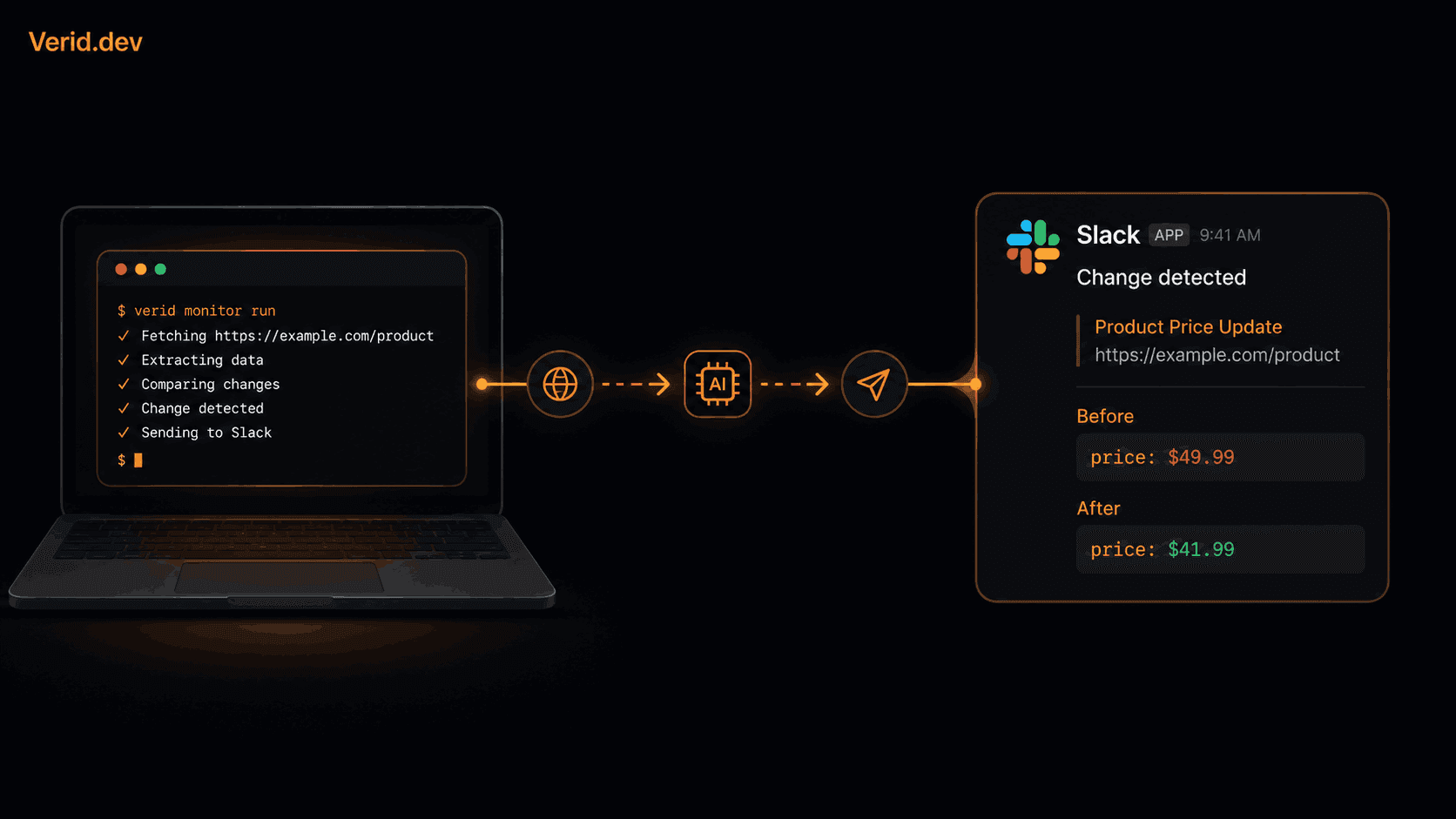
Website Change Alerts in Slack: A Developer's Setup Guide
Most teams monitoring competitor pages, regulatory portals, or upstream API endpoints run into the same problem. They get notified that something changed, but not what changed or whether it was worth acting on. A screenshot diff at 2 AM tells you a banner shifted. It does not tell you that a price dropped 12%.
This guide explains how to wire up precise, field-level Slack alerts using Verid, a developer-first change detection API. You define the field, you define the rule, and Slack only rings when that rule is true.
Why Screenshot-Based Monitoring Creates Alert Fatigue
Tools like Visualping and similar screenshot monitors work by taking a visual snapshot of a page and comparing it to the previous one. That approach fires on cookie banners, rotating ad creatives, session timestamps, and anything else that updates on the page, not just the signal you care about.
The result is a Slack channel full of noise. Teams start ignoring it, which defeats the purpose.
The underlying problem is that screenshot tools operate at the pixel or HTML-string layer. They do not understand the semantic structure of a page. They cannot answer "did the price drop by more than 10%" because they never extracted a price field in the first place.
| Approach | What it detects | Alert quality |
|---|---|---|
| Screenshot diff | Any visual change | High noise |
| Full-page HTML hash | Any byte change | Very high noise |
| DIY scraper + alert | Fields you extract | Depends on what you build |
| Verid (field + predicate) | Specific field crossing a rule | Quiet by default |
How Verid Works
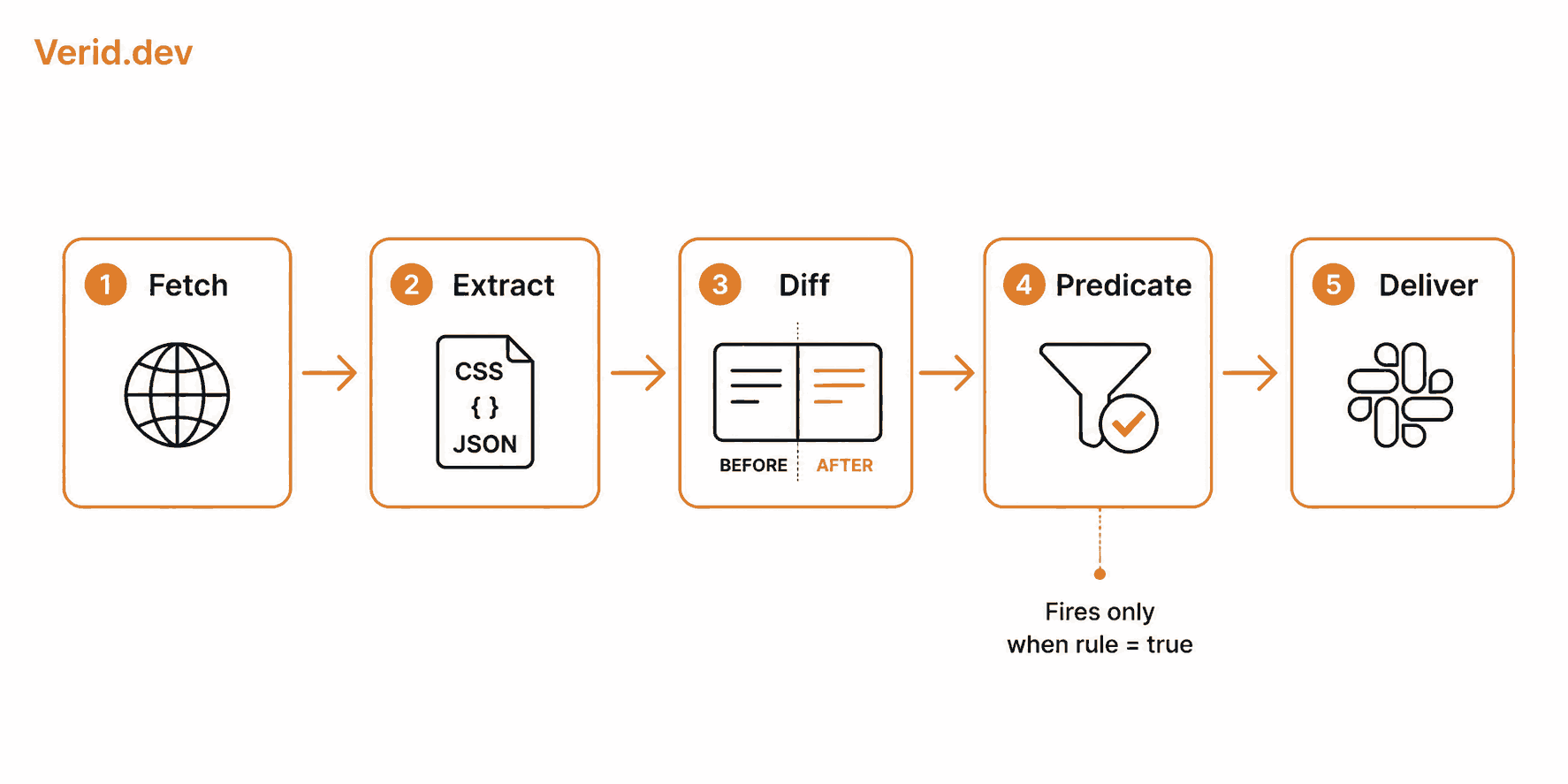
Verid is a REST API that runs a five-stage loop on a schedule: fetch, extract, diff, evaluate a predicate, and deliver. You configure this loop once with JSON. Verid handles the infrastructure, retries, and state storage.
Extraction supports CSS selectors, XPath, JSONPath, regex, full-page hashing, and LLM-based extraction. The output is always typed fields, not raw HTML.
A predicate is the rule that decides whether a delivery fires. There are nine predicate types, including field_changes, field_decreases_by_percent, field_equals, field_matches_regex, and a composite type for AND/OR combinations. If the predicate returns false, the run is recorded silently. Your Slack channel stays quiet.
Delivery targets include HMAC-signed webhooks, Slack, Discord, and email. A single monitor can deliver to multiple destinations at once.
Step 1: Get a Verid API Key
Sign up at verid.dev. The 14-day free trial includes unlimited monitors, 200 runs, and 14-day diff history. No credit card required.
Once inside the dashboard, create an API key from the API Keys page. Keys start with the prefix vrd_. Treat it like a password.
export VERID_API_KEY="vrd_your_key_here"Step 2: Create a Slack Incoming Webhook
Verid posts to Slack using a standard Slack Incoming Webhook. You create one inside your Slack workspace settings.
- Go to your Slack workspace and open Apps > Incoming Webhooks.
- Enable the feature and click Add New Webhook to Workspace.
- Choose the channel you want alerts to land in, for example
#competitor-intelor#price-alerts. - Copy the webhook URL. It looks like:
https://hooks.slack.com/services/T.../B.../...
Keep this URL secure. Anyone with it can post to your channel.
Step 3: Create a Monitor with Slack Delivery
The following example monitors a competitor product page for a price drop of 10% or more. It extracts the price field using a CSS selector and fires only when the predicate is true.
curl -X POST https://api.verid.dev/v1/monitors \
  -H "Authorization: Bearer $VERID_API_KEY" \
  -H "Content-Type: application/json" \
  -d '{
    "name": "Competitor Pricing Page",
    "url": "https://competitor.com/product/widget-pro",
    "schedule_interval_seconds": 3600,
    "extract_config": {
      "method": "css",
      "fields": {
        "price": ".product-price",
        "availability": "[data-stock-status]"
      }
    },
    "diff_predicate": {
      "type": "field_decreases_by_percent",
      "field": "price",
      "threshold": 10
    },
    "deliveries": [
      {
        "type": "slack",
        "webhookUrl": "https://hooks.slack.com/services/T.../B.../..."
      }
    ]
  }'
When Verid detects that the price field dropped by 10% or more since the last run, it posts a formatted message to your Slack channel with the monitor name, the field that changed, and the before/after values. If the price fluctuates by 2%, nothing is delivered.
Step 4: Add a Webhook Endpoint for Programmatic Handling (Optional)
Slack delivery is useful for human-visible alerts. If you also want your application to react programmatically, such as triggering a repricing job or updating a database record, add a webhook delivery alongside the Slack one.
"deliveries": [
  {
    "type": "slack",
    "webhookUrl": "https://hooks.slack.com/services/T.../B.../..."
  },
  {
    "type": "webhook",
    "url": "https://your-app.com/webhooks/verid"
  }
]
Both fire from the same change event. Verid sends them independently and retries each one separately.
Verify the Webhook Signature
All Verid webhooks are signed with HMAC-SHA256. The signature appears in the Verid-Signature header in the format t={timestamp},v1={signature}. Verify it before processing the payload.
import { createHmac, timingSafeEqual } from 'crypto';

function verifyWebhook(header, rawBody, secret, toleranceSecs = 300) {
  const parts = Object.fromEntries(
    header.split(',').map((p) => p.split('='))
  );
  const timestamp = parseInt(parts['t'] ?? '0', 10);
  const signature = parts['v1'];

  if (!timestamp || !signature) return false;
  if (Math.abs(Date.now() / 1000 - timestamp) > toleranceSecs) return false;

  const expected = createHmac('sha256', secret)
    .update(`${timestamp}.${rawBody}`)
    .digest('hex');

  return timingSafeEqual(
    Buffer.from(expected, 'hex'),
    Buffer.from(signature, 'hex')
  );
}

app.post('/webhooks/verid', (req, res) => {
  const header = req.headers['verid-signature'];
  if (!verifyWebhook(header, req.rawBody, process.env.WEBHOOK_SECRET)) {
    return res.status(401).send('Invalid signature');
  }
  const { diff, monitor } = req.body;
  console.log(`${monitor.name} changed:`, diff.fields_changed);
  res.sendStatus(200);
});
See the Verid webhooks documentation for verification examples in Python, Go, Ruby, and PHP.
Step 5: Using Composite Predicates for Smarter Alerts
Simple predicates work well for single-signal monitors. Composite predicates let you combine conditions with AND or OR logic.
This example fires only when the price drops by 10% AND the item is in stock at the same time:
{
  "diff_predicate": {
    "type": "composite",
    "operator": "AND",
    "conditions": [
      {
        "type": "field_decreases_by_percent",
        "field": "price",
        "threshold": 10
      },
      {
        "type": "field_equals",
        "field": "availability",
        "value": "In Stock"
      }
    ]
  }
}
Without the composite, you might get alerted about a discounted item that is already sold out. The AND condition eliminates that category of noise entirely before it reaches Slack.
Using the Node.js SDK
If you prefer working in JavaScript rather than raw cURL, Verid publishes an official SDK on npm.
npm install @verid.dev/sdkimport { VeridClient } from '@verid.dev/sdk';
const client = new VeridClient({
apiKey: process.env.VERID_API_KEY,
});
const monitor = await client.monitors.create({
name: 'Competitor Pricing Page',
url: 'https://competitor.com/product/widget-pro',
schedule_interval_seconds: 3600,
extract_config: {
method: 'css',
fields: {
price: '.product-price',
availability: '[data-stock-status]',
},
},
diff_predicate: {
type: 'field_decreases_by_percent',
field: 'price',
threshold: 10,
},
deliveries: [
{
type: 'slack',
webhookUrl: process.env.SLACK_WEBHOOK_URL,
},
],
});
console.log('Monitor created:', monitor.id);Retry Behavior and Delivery Reliability
Failed Slack deliveries, whether due to a Slack API error or a temporary outage, are retried automatically with exponential backoff. Here is the schedule Verid follows:
| Attempt | Delay |
|---|---|
| 1 | Immediate |
| 2 | 5 minutes |
| 3 | 15 minutes |
| 4 | 30 minutes |
| 5 | 1 hour |
| 6 | 2 hours |
After six failed attempts, the delivery is marked dead and visible in your dashboard. You can replay it from the dashboard or with POST /v1/deliveries/:id/replay. This means even if your Slack webhook goes down briefly, you will not silently lose alerts.
Practical Slack Channel Setup
Routing all change alerts to a single Slack channel creates the same noise problem you were trying to avoid. A better pattern is to scope alerts by team or signal type when you create each monitor.
A practical channel structure:
| Slack Channel | Monitor types |
|---|---|
| #competitor-intel | Pricing pages, feature pages |
| #stock-alerts | Product availability, inventory |
| #dependency-updates | GitHub releases, npm, PyPI |
| #compliance | Regulatory portals, policy pages |
Each monitor delivers to the channel most relevant to the people who need to act on it. The compliance team does not need to see competitor pricing noise, and your sales team does not need library release notifications.
What Verid Does Not Do
A few boundaries worth knowing before you build:
Verid does not log into authenticated sessions. Monitors work on publicly accessible URLs and APIs. If a page requires login, Verid cannot reach it.
Verid is not an uptime monitor. It tracks field-level state changes on a schedule, not real-time HTTP availability. For uptime alerting, UptimeRobot or similar tools are more appropriate.
Every plan, including the free trial, can check as often as every minute, but each check uses one run, so your monthly runs set the practical limit. The trial's 200 runs cover a daily check on about 14 monitors while you test; an hourly monitor uses about 720 runs a month (the Lite plan at $9 per month includes 1,000), and a 15-minute monitor about 2,880 (the Starter plan at $19 per month includes 5,000).
Best Practices
Use specific CSS selectors or JSONPath expressions rather than broad ones. Selecting .page-content will extract far more text than you want to diff. Selecting .product-price gives you exactly the number.
Set predicates at the outset, not after the fact. If you start a monitor with any_field_changes and it fires constantly, narrowing the predicate requires reconfiguring the monitor. Know your threshold before you deploy.
Test your Slack webhook URL independently before embedding it in a monitor. Slack provides a test payload button in the webhook settings that confirms delivery without waiting for a monitor to fire.
Store your Slack webhook URL and Verid API key in environment variables, not hardcoded in scripts. Both grant meaningful access to systems your team depends on.
Summary
Screenshot monitoring and generic "page changed" tools are useful starting points, but they create Slack channels nobody reads. The actual need is specific: alert me when a field I care about crosses a threshold I define.
Verid handles that with a single API call. You define the URL, the field, the predicate, and the Slack webhook. Verid runs the schedule, stores the state, evaluates the rule, and posts to Slack only when it matters.
The 14-day free trial covers unlimited monitors and 200 runs with no credit card required. The quickstart guide walks through the first monitor in under two minutes.
Frequently Asked Questions
What does the Slack message from Verid actually show?
Verid posts a formatted message that includes the monitor name, the field or fields that changed, and the before and after values. For example: "Competitor Pricing Page: price changed from $49.99 to $41.99." It also includes a link to the full run in your dashboard.
Can one monitor deliver to multiple Slack channels?
Not directly to multiple channels with a single delivery config entry. However, you can list multiple delivery objects in the deliveries array, one slack entry per channel, and Verid will fire all of them when the predicate triggers.
Does Verid handle JavaScript-rendered pages?
Yes. Verid attempts a static fetch first. If the extraction returns empty fields, it automatically retries with a headless browser. Bot-protected sites escalate further to a residential proxy. No configuration is needed for this escalation to happen.
How is this different from using Zapier or Make to forward monitoring alerts to Slack?
Zapier and Make can route alerts between tools but they do not handle the monitoring or change detection themselves. You still need a source that tells them something changed. Verid does the full loop: fetch, extract, diff, evaluate, and deliver. No middle layer is needed.
About the author

Software Engineer & Technical Writer
Hanzala is a software engineer and technical writer who cares about the gap between a feature existing and a developer understanding it. At Verid he writes the docs and guides for webhooks, extraction rules and API integration, and the code behind a good deal of it.
More from HANZALA SALEEM →Related posts
How to Send Website Change Alerts to n8n, Zapier, and Make
Learn how to send website change alerts into n8n, Zapier, or Make using Verid's webhook API, with real config, code, and setup steps.
Read the post →alertsBack-in-Stock Email Alerts Without Building a Custom System
Set up a back-in-stock email notification system in minutes - no custom code, no scrapers. Monitor any page and alert customers automatically with Verid.
Read the post →seoHow to Set Up Google Alerts (+ What They Don't Catch)
Set up, manage, and fix Google Alerts — plus what Google Alerts can't monitor on a web page, and the tool to use instead.
Read the post →change detectionFree Website Change Monitors Compared (No Card Required)
Compare free website change monitors that need no credit card. Real limits, check frequency, and which tool actually fits your use case.
Read the post →