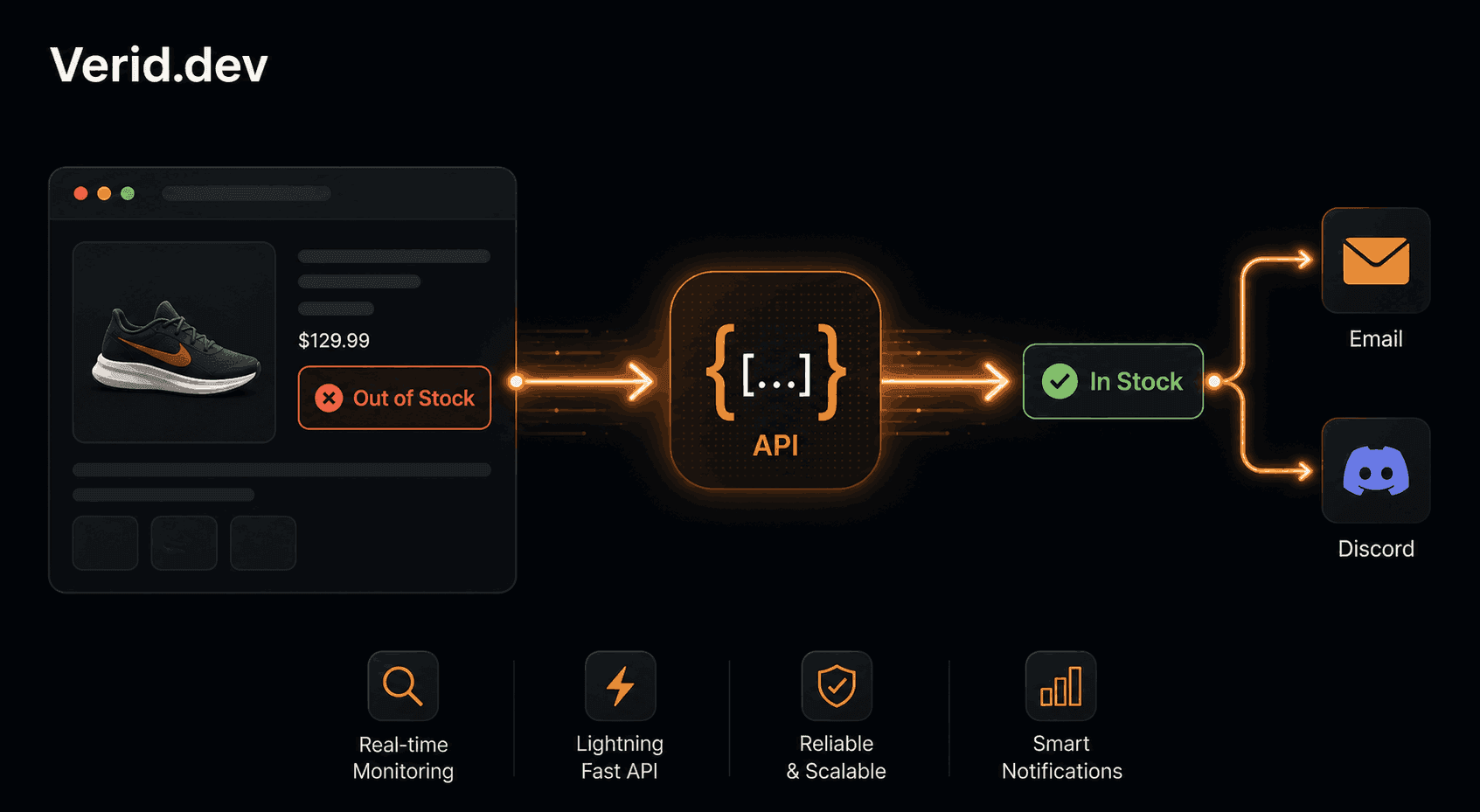
Back-in-Stock Email Alerts Without Building a Custom System
Every ecommerce store hits this wall eventually. A product sells out, customers come looking, and there is nothing to catch them. No sign-up form, no "Notify Me" button, no follow-up. They leave, and most of them never come back.
Setting up a back-in-stock email notification system is one of the highest-ROI things you can do for an online store. Retailers lose over $1 trillion in sales annually to out-of-stock events, and a well-timed restock email converts at far higher rates than a cold campaign because the customer already wants the item.
The problem has always been the implementation. Building it from scratch means scrapers, schedulers, databases, retry logic, and email delivery - weeks of work before you even test it. This guide shows a cleaner path: using Verid's web change detection API to watch any product page for stock status changes and fire alerts the moment something comes back in.
What a Back-in-Stock Notification System Actually Does
The concept is simple: a customer visits your store, sees a sold-out product, and can register their email to be notified when it's available again. When inventory is restocked, the system detects the change and sends that email automatically.
That simple loop involves four moving parts:
- A way to watch the product page for availability changes
- Logic to detect when the status changes from out-of-stock to in-stock
- A trigger that fires when the condition is met - not on every page check
- A delivery mechanism to send the email (or Slack message, or webhook)
Most solutions handle only one or two of these. Shopify apps handle the customer-facing sign-up form and email sending, but they depend entirely on your own inventory system - they cannot watch a supplier's site or a competitor's product page. DIY scrapers handle the watching part but hand you all the glue work. Verid closes the entire loop.
Why the Standard Approaches Fall Short
Before getting to the setup, it is worth understanding why the common options create problems.
Platform-native "Notify Me" apps
Shopify and WooCommerce apps like Amp Back in Stock or Swym are excellent for capturing customer emails on your own store. They hook into your inventory data directly. The limitation is scope - they only work for your inventory. If you need to watch a wholesale supplier's site, a marketplace listing, or a third-party retailer carrying your product, they cannot help.
DIY scrapers
You write the fetch call, parse the HTML, store the previous state, diff it, schedule it as a cron job, handle retries when the site goes down, and set up email delivery. On a stable page with predictable HTML this takes a few days. Then the retailer redesigns their product pages and you spend a Sunday fixing class names. Bot protection breaks your scraper. You miss a restock because your cron job silently failed.
Screenshot-based monitors
These tools alert you when "the page changed." They fire on cookie banners, rotating ads, updated timestamps, and A/B test variations. The signal-to-noise ratio is so poor that teams quickly learn to ignore the alerts - which defeats the entire purpose.
| Approach | Watches external pages | Structured field detection | Predicate-based alerts | Reliable delivery |
|---|---|---|---|---|
| Shopify app | No - own inventory only | Via Shopify API | Limited | Yes |
| DIY scraper | Yes | You build it | You build it | You build it |
| Screenshot monitor | Yes | No - pixel diffs | No | Noisy |
| Verid | Yes | Yes - 6 methods | Yes - 9 predicate types | Yes - 4 channels + retries |
How Verid's Monitoring Loop Works
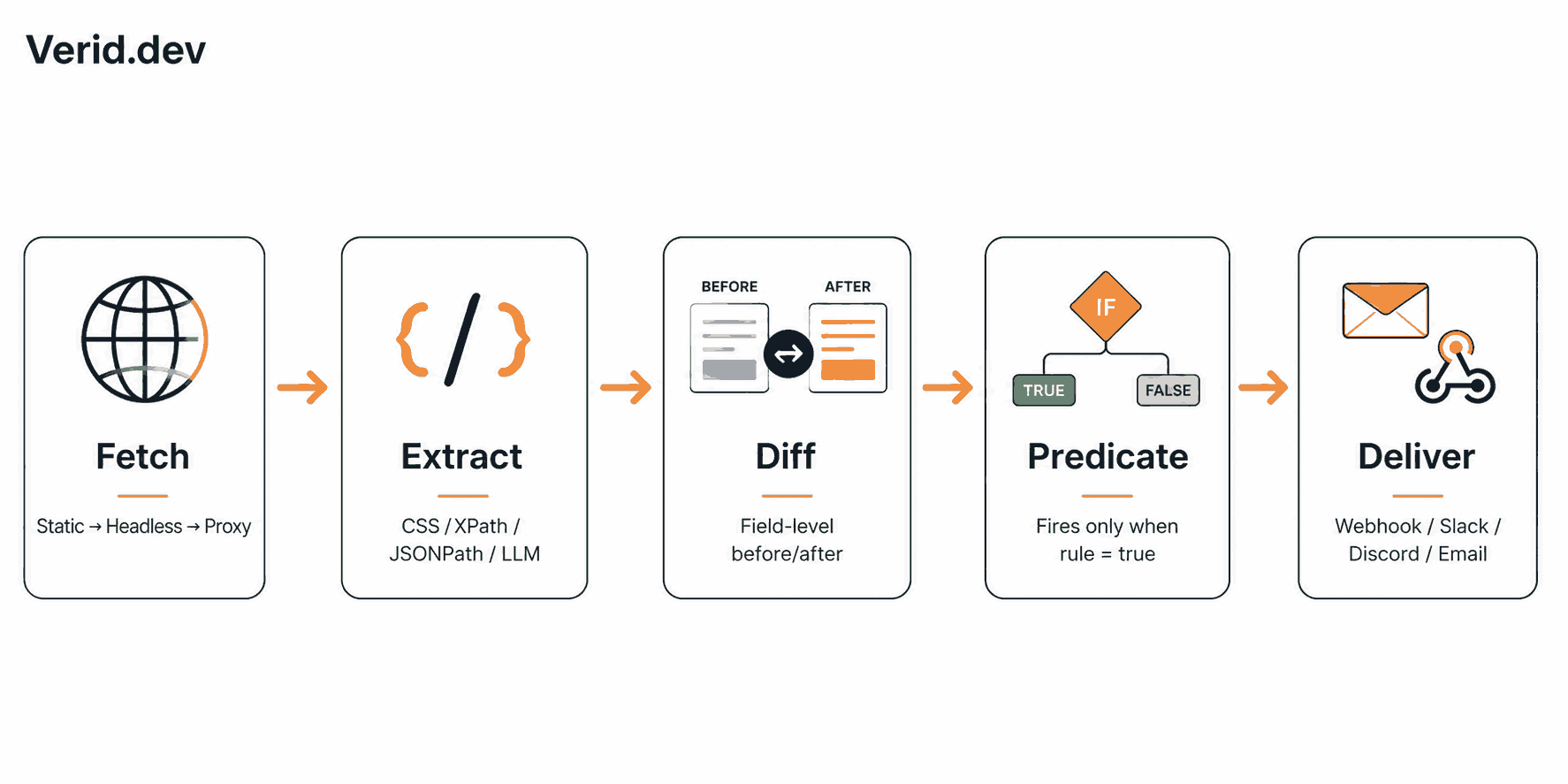
Verid runs a five-stage pipeline on a schedule you define:
Fetch - Verid makes an HTTP request to the URL. If the page is JavaScript-rendered, it automatically falls back to a headless browser. If that is blocked, it escalates to a residential proxy. You do not configure any of this.
Extract - Verid pulls the specific fields you care about using CSS selectors, XPath, JSONPath, regex, full-page hashing, or an AI/LLM extractor for pages where selectors keep breaking. The output is always typed JSON fields, never raw HTML.
Diff - The new values are compared against the last successful run. Verid tracks exactly which fields changed and stores the before/after values.
Predicate - This is the part that eliminates noise. Verid evaluates the rule you define. If the rule is not satisfied, nothing is sent. The monitor stays quiet until the condition is actually true.
Deliver - When the predicate fires, Verid sends the payload to your chosen destinations: a signed webhook, Slack, Discord, or email. Failed deliveries are retried up to six times with exponential backoff. Anything still undelivered goes into a dead-letter queue visible in your dashboard.
Setting Up a Back-in-Stock Monitor: Step by Step
Here is a complete working example for a product page that displays a visible stock label.
Step 1 - Identify the right CSS selector
Open the product page in Chrome, right-click the availability text ("In stock", "Out of stock", "Add to cart"), and choose Inspect. Copy the selector for that element. For a typical Shopify product page it often looks like .product__availability or [data-availability].
If the markup keeps changing between sessions, use Verid's LLM extractor instead - describe the field in plain English and skip the selector entirely.
Step 2 - Create the monitor via API
curl -X POST https://api.verid.dev/v1/monitors \
  -H "Authorization: Bearer vrd_your_api_key" \
  -H "Content-Type: application/json" \
  -d '{
    "name": "Product X - Restock Alert",
    "url": "https://example-store.com/products/product-x",
    "schedule_interval_seconds": 300,
    "extract_config": {
      "method": "css",
      "fields": {
        "availability": ".product-availability-label",
        "price": ".price"
      }
    },
    "diff_predicate": {
      "type": "field_equals",
      "field": "availability",
      "value": "In stock"
    },
    "deliveries": [
      { "type": "email", "to": "alerts@yourstore.com" },
      { "type": "webhook", "url": "https://your-app.com/hooks/restock" }
    ]
  }'
This monitor checks the page every five minutes (a 300-second interval uses about 8,640 runs a month - see Verid's pricing page for the runs each plan includes). It fires only when the availability field equals exactly "In stock".
Step 3 - Handle variant-level changes
Many products have multiple variants. If you need to track a specific size or color, monitor the variant URL directly - most ecommerce platforms expose a unique URL per variant. Set up one monitor per variant you care about, or use the field_matches_regex predicate to match multiple in-stock strings:
{
  "type": "field_matches_regex",
  "field": "availability",
  "pattern": "^(In stock|Available|Add to cart)$"
}
This handles inconsistent labeling without needing to update the monitor when the store changes wording.
Step 4 - Route the alert to email
Verid's email delivery sends a plain, readable notification with the before/after diff. You can deliver to multiple addresses or route to a webhook and handle formatting yourself. For stores that want to send a branded email through their own ESP (Klaviyo, Mailchimp, or similar), the webhook delivery is the right choice - Verid fires the webhook, your app receives it and triggers the campaign.
The webhook payload looks like this:
{
  "id": "del_01H...",
  "version": "2026-05-01",
  "monitor_id": "9b1c...",
  "fired_at": "2026-06-01T09:15:00Z",
  "diff": {
    "fields_changed": ["availability", "price"],
    "before": { "availability": "Sold out", "price": "" },
    "after":  { "availability": "In stock", "price": "$89.00" }
  },
  "monitor": {
    "url":  "https://example-store.com/products/product-x",
    "name": "Product X - Restock Alert"
  }
}
Every webhook carries a Verid-Signature header using HMAC-SHA256, the same signing format as Stripe. Verify it before trusting the payload.
Using the Node.js SDK
If you prefer TypeScript over raw HTTP calls, the official SDK covers every API endpoint:
import { VeridClient } from '@verid.dev/sdk';

const client = new VeridClient({ apiKey: process.env.VERID_API_KEY! });

await client.monitors.create({
  name: 'Product X - Restock Alert',
  url: 'https://example-store.com/products/product-x',
  schedule_interval_seconds: 300,
  extract_config: {
    method: 'css',
    fields: {
      availability: '.product-availability-label',
      price: '.price',
    },
  },
  diff_predicate: {
    type: 'field_equals',
    field: 'availability',
    value: 'In stock',
  },
  deliveries: [
    { type: 'email', to: 'alerts@yourstore.com' },
  ],
});
Install it with npm install @verid.dev/sdk. Full TypeScript types are included, so autocomplete covers every predicate and extraction method.
Predicate Options for Restock Monitoring
Verid supports nine predicate types. For back-in-stock workflows, three are especially useful:
| Predicate | When to use |
|---|---|
field_equals | Fire when availability matches an exact string ("In stock") |
field_matches_regex | Fire when availability matches any of several strings |
composite (AND) | Fire only when availability is in-stock AND price is present - useful for pre-order pages that show "In stock" before pricing is confirmed |
For monitoring a supplier's stock count rather than a text label, field_increases_by_absolute triggers when a numeric quantity field rises above zero.
Delivery Channels Compared
| Channel | Best for | Config key |
|---|---|---|
| Non-technical stakeholders, store owners | type: "email" | |
| Webhook | Custom email flows via ESP, app integrations | type: "webhook" |
| Slack | Internal ops teams, buying teams | type: "slack" |
| Discord | Community drops, developer teams | type: "discord" |
A single monitor can deliver to all four channels simultaneously. Full delivery configuration is documented here.
Best Practices
Verify your selector before going live. Run the monitor once manually using POST /api/v1/monitors/:id/run and inspect the extracted values in the run history. Confirm the field value matches what you expect before the predicate can fire.
Start the monitor before the restock window. The first run sets the baseline. If you start the monitor after the product is already in stock, the first run records "In stock" and no alert fires - because there was no change to detect. Start monitoring while the item is still out of stock.
Match the string exactly, or use regex. The field_equals predicate is case-sensitive. "In stock" and "In Stock" are different. Inspect the actual page output and copy the string verbatim, or switch to field_matches_regex for flexibility.
Choose an interval that fits your run budget. Every Verid plan, including the free trial, can check as often as every 60 seconds, and each check uses one run. A daily check uses about 30 runs a month, hourly about 720, and every 5 minutes about 8,640. The 14-day free trial includes 200 runs in total, Starter ($19/month) 5,000, Pro ($49/month) 15,000, and Scale ($149/month) 100,000, so for high-demand drops where a product can sell out in minutes, a 5-minute check fits on Pro or Scale. Check pricing before setting aggressive schedules.
Use composite predicates for pre-order pages. Some stores mark products "In stock" during a pre-order period without a real purchase price. A composite AND predicate that requires both availability = "In stock" and price field present prevents false alerts.
Common Mistakes
Watching the wrong URL. Shopify variant URLs have query parameters like ?variant=12345. The stock label for size M lives on a different URL than size L. Monitor the specific variant URL, not the base product URL.
Forgetting JavaScript-rendered pages. Some product pages load availability via JavaScript after the initial HTML. Verid handles this with automatic headless browser fallback - you do not need to configure it, but if your selector consistently returns empty, check whether the page is JS-rendered.
Alerting on noise. Using any_field_changes instead of a specific predicate means your monitor fires when a product description is updated, when a review count changes, or when timestamps refresh. Always define the minimum specific predicate that describes the change you care about.
Not verifying webhook signatures. The HMAC signature on every Verid webhook is there to confirm the payload genuinely came from Verid. Skipping signature verification exposes your endpoint to spoofed payloads. The Node.js SDK handles verification automatically.
Real-World Scenarios
Tracking a supplier for purchasing decisions. A DTC brand monitors their primary supplier's product page to catch restocks before they sell through to retailers. The monitor fires a Slack alert to the buying team the moment the supplier's stock label changes. Lead time goes from days to minutes.
Wholesale marketplace listings. An independent retailer monitors a wholesale marketplace product page for a specific SKU using the LLM extractor (the marketplace's HTML changes frequently). The monitor emails the procurement team when the wholesale price also drops below a threshold - using a composite AND predicate combining field_equals on availability and field_decreases_by_percent on price.
Limited-edition consumer product drops. A consumer monitors a brand's product page for a limited sneaker release. With a 5-minute interval (about 8,640 runs a month, which fits on a Pro plan), the alert fires within minutes of the product going live - before the brand's own batched notification emails go out.
Frequently Asked Questions
Can Verid monitor JavaScript-rendered Shopify and WooCommerce product pages?
Yes. Verid attempts a static fetch first. If the availability field returns empty - which happens on pages that render stock status via JavaScript - the job automatically retries with a headless browser at no extra configuration on your part. Most Shopify and WooCommerce product pages work with either CSS selectors or the LLM extractor.
How quickly will I get notified after a product restocks?
That depends on your monitoring interval. With a 15-minute interval, you will receive the alert within 15 minutes of the page reflecting the change. At 5-minute checks, the maximum delay is 5 minutes. Every plan can check as often as every 60 seconds; faster intervals simply use more of your monthly runs. Delivery itself (webhook, email, Slack) adds seconds, not minutes.
What if the product page changes its HTML layout and breaks my selector?
Switch the extract_config method to llm and describe the field in natural language - for example, "the current stock status of the product". Verid's AI extractor handles dynamic or unpredictable markup without you writing a new selector. The LLM extraction results are cached for 30 days on unchanged content.
Can I use Verid to notify my own customers, not just my internal team?
Verid delivers to webhooks, email addresses, Slack, and Discord. For notifying individual customers who signed up on your store, the most practical approach is to route the webhook to your own backend, which then triggers your ESP (Klaviyo, Mailchimp, etc.) to send the branded restock campaign to your subscriber list. Verid handles the detection and trigger; your ESP handles the customer-facing email.
Final Thoughts
A back-in-stock email notification system does not have to mean weeks of engineering work. The hard parts - reliable fetching, structured extraction, field-level diffing, predicate evaluation, signed delivery with retries - are exactly what Verid is built to handle.
For ecommerce teams monitoring their own inventory, the workflow is five minutes from API key to live alert. For teams monitoring external pages like suppliers, marketplaces, or competitor listings, the same setup works without modification.
Start a 14-day free trial with unlimited monitors, no credit card required, and check the restock alerts use case page for copy-paste config examples across different predicate types.
About the author

Software Engineer & Technical Writer
Hanzala is a software engineer and technical writer. He splits his time between shipping features in Verid’s monitoring stack and turning them into documentation and guides a developer can follow without guessing.
More from HANZALA SALEEM →Related posts
How to Send Website Change Alerts to n8n, Zapier, and Make
Learn how to send website change alerts into n8n, Zapier, or Make using Verid's webhook API, with real config, code, and setup steps.
Read the post →notificationWebsite Change Alerts in Slack: A Developer's Setup Guide
Learn how to send structured Slack alerts when a specific website field changes. Step-by-step guide using the Verid API with real code examples.
Read the post →seoHow to Set Up Google Alerts (+ What They Don't Catch)
Set up, manage, and fix Google Alerts — plus what Google Alerts can't monitor on a web page, and the tool to use instead.
Read the post →change detectionFree Website Change Monitors Compared (No Card Required)
Compare free website change monitors that need no credit card. Real limits, check frequency, and which tool actually fits your use case.
Read the post →