How to Detect Status Page Incidents Automatically
Learn how to monitor AWS, Stripe, and GitHub status pages for incidents automatically using Verid's change detection API. Get instant alerts via email or webhook.
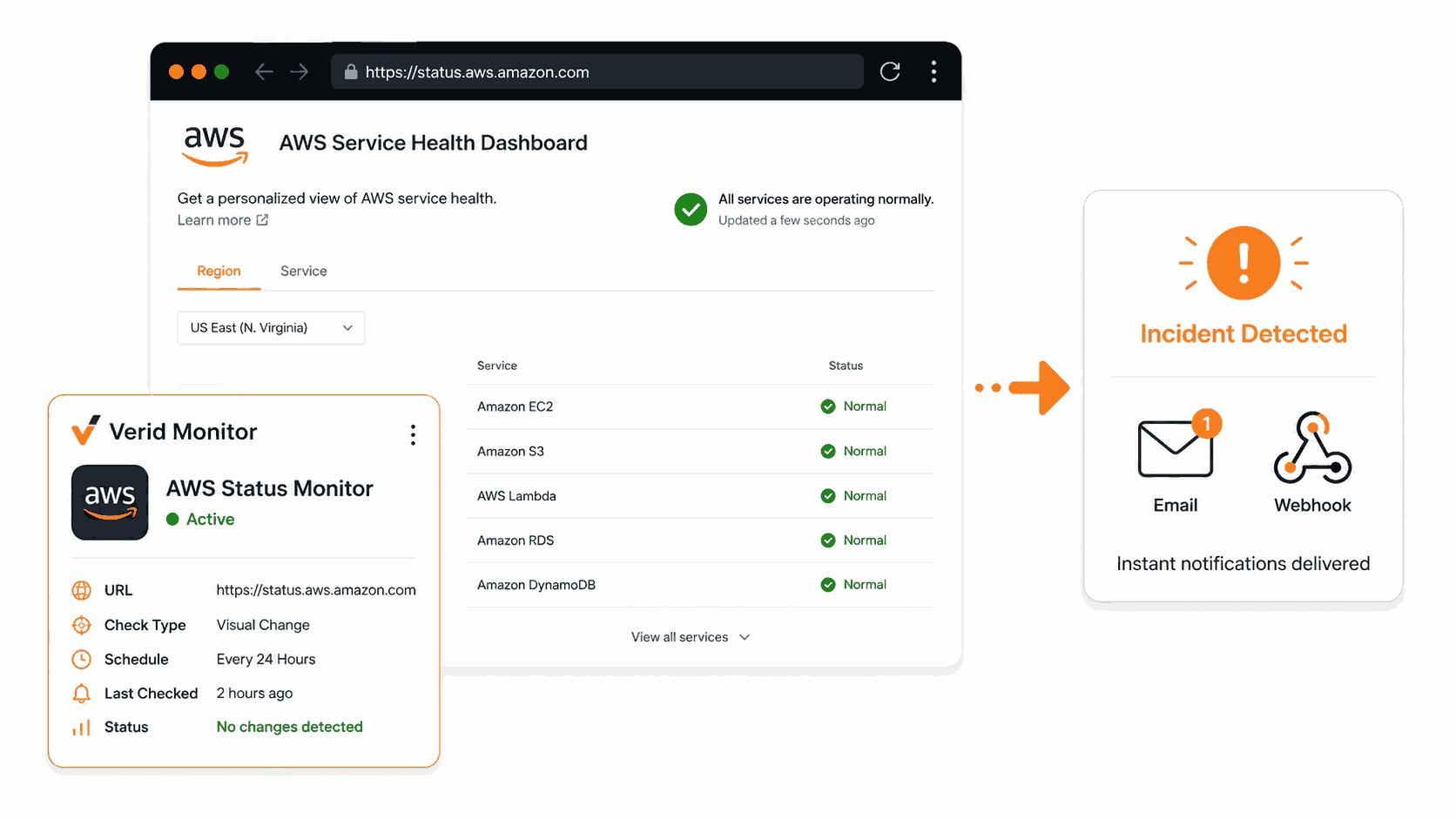
A vendor your product depends on goes down. Their status page updates within seconds. Their email notification reaches you six minutes later. By then, your support inbox is already filling up.
This guide shows you how to close that gap using Verid, a developer-first web change detection API. You will set up a monitor that watches a vendor status page and sends you an alert the moment the content changes, before the vendor's own notification system even queues your email.
No matter your technical background, the step-by-step instructions below will get you running.
What Is Status Page Incident Detection?
Status page incident detection means automatically watching a vendor's public status page and getting notified the moment something changes, whether that is a new incident being posted, a service becoming degraded, or the overall status shifting from "All Systems Operational" to "Partial Outage."
Most businesses that depend on external services already know how to subscribe to status page email updates. The problem is those emails are slow. They are sent in batches and go through multiple queues. The gap between a vendor posting an incident and your team knowing about it can be anywhere from two to fifteen minutes.
For teams running payment infrastructure, API platforms, or customer-facing SaaS products, that gap is expensive.
Which status pages should you monitor?
Here are real status pages from common dependencies:
- AWS: https://health.aws.amazon.com/health/status
- Stripe: https://status.stripe.com
- GitHub: https://githubstatus.com
- Twilio: https://status.twilio.com
- Cloudflare: https://www.cloudflarestatus.com
- Vercel: https://www.vercel-status.com
- PagerDuty: https://status.pagerduty.com
Each of these pages updates faster than their email notification systems. Polling them directly is the fastest way to detect an incident.
How Verid Works for Status Page Monitoring
Verid runs a loop on a schedule you set:
- Fetches the URL you configured
- Extracts the specific fields you care about using the method you chose
- Compares the extracted values to the previous run
- Fires a delivery only when your predicate condition is true
For a status page monitor, this means: extract the overall status text and the most recent incident title, then alert when either changes. Simple and reliable.
Method 1: Set Up a Monitor Using the Verid Dashboard
This is the no-code path. You do not need to write any API calls or code to get started.
Step 1: Create an Account and Get Your API Key
Sign up at https://verid.dev/auth/signup. The 14-day free trial gives you unlimited monitors and 200 runs, with no credit card required.
Once logged in, go to the API Keys page in your dashboard and create a key. It will start with the prefix vrd_. Keep it somewhere safe.
Step 2: Create a New Monitor
From the dashboard, click New Monitor. You will fill in four sections.
Name your monitor. Something like "AWS Status" or "Stripe Incident Watch" works well.
Enter the URL. For this walkthrough we will use the AWS status page:
https://health.aws.amazon.com/health/statusSet the schedule. Every plan, including the free trial, can check as often as every 60 seconds. Plans differ by monthly runs: a daily check uses about 30 runs a month, hourly about 720, and every 15 minutes about 2,880. Six status pages checked daily use about 180 runs a month, which fits the Lite plan at $9/month (1,000 runs); the 14-day free trial covers it while you test.
For the most critical dependencies, a faster check interval is worth the extra runs. See Verid's pricing page for plan details.
Step 3: Choose an Extraction Method
This is the most important configuration decision. Verid offers six extraction methods. For status pages, the best options are CSS selector, regex, and full-page hash.
| Method | Best for status pages | Advantages | Limitations |
|---|---|---|---|
| CSS selector | Statuspage.io-hosted pages (AWS, Stripe, GitHub, Twilio, Cloudflare, Vercel) | Targets the exact field you care about; very low noise | Breaks if the vendor changes their HTML class names |
| Regex | Any status page, especially non-Statuspage.io sites | Works against raw HTML without needing stable class names | Slightly more brittle if the status text changes wording |
| Full-page hash | Quick setup when you just want to know if anything changed | Zero configuration needed | High false-positive rate from ads, timestamps, and session tokens |
| AI / LLM prompt | Pages with inconsistent or frequently redesigned layouts | Describe what you want in plain English | Uses LLM quota; slight latency increase |
| XPath | Complex HTML where CSS selectors cannot reach the right element | More expressive than CSS | Requires familiarity with XPath syntax |
| JSONPath | Vendor JSON status APIs (Statuspage.io exposes these) | Most reliable and structured option | Only works when a JSON endpoint exists |
Recommended approach: Use CSS selector for any Statuspage.io-hosted status page (AWS, Stripe, GitHub, Cloudflare, and most major vendors use Statuspage). If you are unsure of the markup, use regex against known status strings. If the vendor exposes a JSON status API, JSONPath is the most reliable option of all.
For this example we will use CSS selector since the AWS status page uses Statuspage.io conventions.
Extraction config for the AWS status page:
- Field name:
overall_status, CSS selector:.page-status .status - Field name:
most_recent_incident, CSS selector:.incidents-list .incident-title:first-child
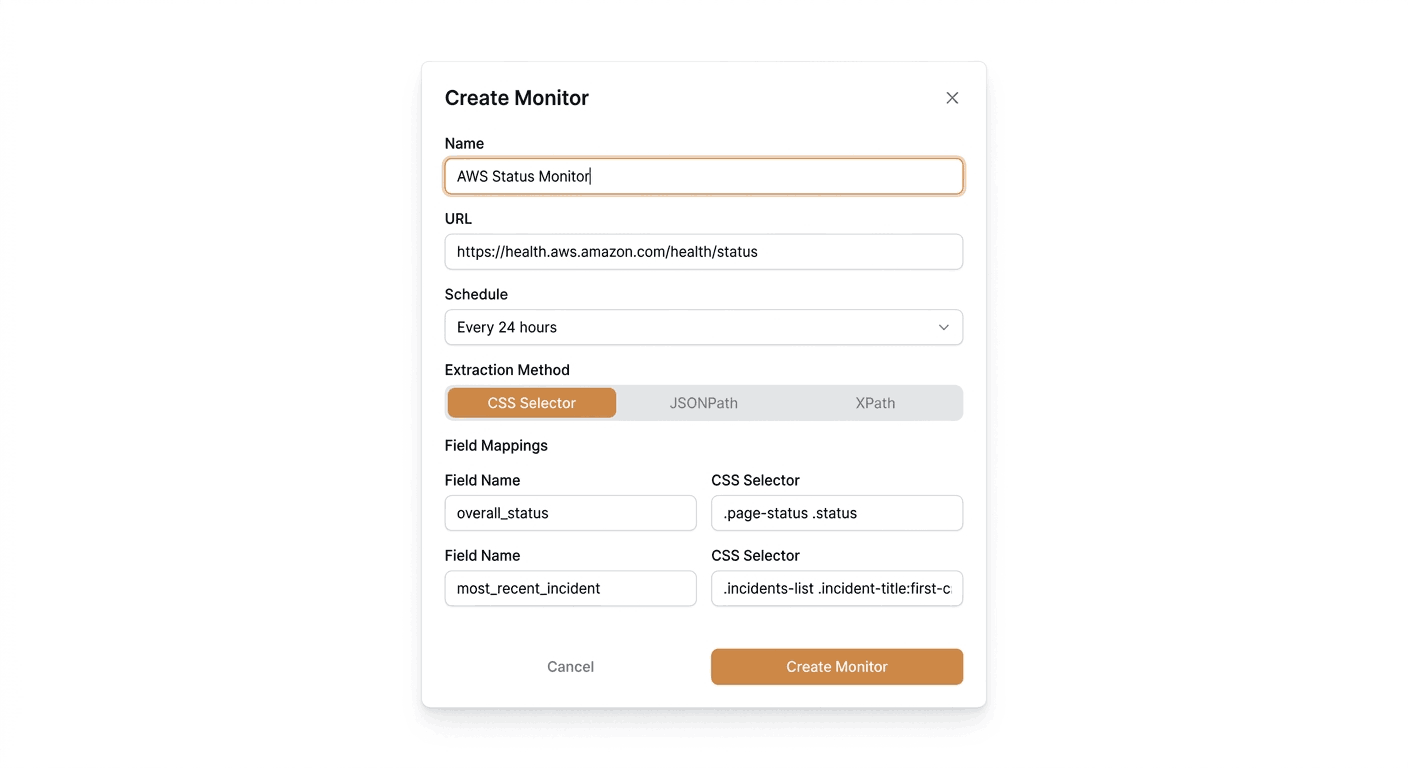
Step 4: Set the Predicate
The predicate decides when Verid actually fires a notification. For status page monitoring, you want to be alerted when either the overall status or the incident list changes.
Set the predicate to:
- Type:
any_field_changes
This tells Verid: if either overall_status or most_recent_incident differs from the previous run, fire the delivery.
If you want to only alert on bad states (not on recovery), you can instead use:
- Type:
field_matches_regex - Field:
overall_status - Pattern:
(Degraded|Outage|Partial)
This fires only when the status text contains a word indicating a problem.
Step 5: Configure the Delivery Channel
Verid supports four delivery channels: email, webhook, Slack, and Discord.
For this example we will use email. Enter the address where you want incident notifications sent, such as oncall@yourcompany.com or your personal email.
Save the monitor. Verid will run the first check, establish the baseline, and begin watching the page on your chosen schedule.
Method 2: Create a Status Page Monitor Using the Verid API
If you prefer to set things up programmatically or integrate monitoring into your existing deployment pipeline, the Verid REST API gives you full control.
The base URL for all API requests is https://api.verid.dev. Every request needs an Authorization: Bearer vrd_your_api_key header.
Create a monitor with cURL
The following command creates a monitor for the AWS status page. Replace vrd_your_api_key with your actual key. The schedule is set to 86400 seconds (24 hours), about 30 runs a month, which fits easily in the free trial and in the Lite plan's 1,000 monthly runs.
curl -X POST https://api.verid.dev/v1/monitors \
  -H "Authorization: Bearer vrd_your_api_key" \
  -H "Content-Type: application/json" \
  -d '{
    "name": "AWS Status Monitor",
    "url": "https://health.aws.amazon.com/health/status",
    "schedule_interval_seconds": 86400,
    "extract_config": {
      "method": "css",
      "fields": {
        "overall_status": ".page-status .status",
        "most_recent_incident": ".incidents-list .incident-title:first-child"
      }
    },
    "diff_predicate": {
      "type": "any_field_changes"
    },
    "deliveries": [
      {
        "type": "email",
        "to": "oncall@yourcompany.com"
      }
    ]
  }'
On success, the API returns 201 Created with the full monitor object including its id, status, and next_run_at.
What the API response looks like
{
  "id": "uuid",
  "user_id": "uuid",
  "name": "AWS Status Monitor",
  "url": "https://health.aws.amazon.com/health/status",
  "schedule_interval_seconds": 86400,
  "status": "active",
  "last_run_at": null,
  "next_run_at": "2026-06-15T00:00:00Z",
  "created_at": "2026-06-14T10:00:00Z"
}
Trigger a manual run
After creating the monitor, you can trigger an immediate check without waiting for the schedule. There is no daily cap on manual runs; each one uses one run from your monthly allowance.
curl -X POST https://api.verid.dev/v1/monitors/{monitor_id}/run \
  -H "Authorization: Bearer vrd_your_api_key" \
  -H "Content-Type: application/json" \
  -d '{}'
This returns:
{
  "run_id": "uuid",
  "queued": true
}
Use the pre-built template
Verid includes a built-in aws-status-page template. Using it requires fewer configuration fields since the extraction config is already set:
curl -X POST https://api.verid.dev/v1/monitors/from-template/aws-status-page \
  -H "Authorization: Bearer vrd_your_api_key" \
  -H "Content-Type: application/json" \
  -d '{
    "name": "AWS Status",
    "deliveries": [
      {
        "type": "email",
        "to": "oncall@yourcompany.com"
      }
    ]
  }'
The template's schedule interval works on every plan, since there are no per-plan minimum intervals.
Monitor Stripe's status page using regex
Regex extraction is a reliable alternative when you want to match against known status strings regardless of the page's HTML structure. This works well for status pages that are not on Statuspage.io.
curl -X POST https://api.verid.dev/v1/monitors \
  -H "Authorization: Bearer vrd_your_api_key" \
  -H "Content-Type: application/json" \
  -d '{
    "name": "Stripe Status Monitor",
    "url": "https://status.stripe.com",
    "schedule_interval_seconds": 86400,
    "extract_config": {
      "method": "regex",
      "fields": {
        "status_label": "(All Systems Operational|Degraded Performance|Partial Outage|Major Outage)"
      }
    },
    "diff_predicate": {
      "type": "field_changes",
      "field": "status_label"
    },
    "deliveries": [
      {
        "type": "email",
        "to": "oncall@yourcompany.com"
      }
    ]
  }'
Monitor Statuspage.io JSON API endpoints
Most Statuspage.io-hosted status pages expose a JSON API at https://status.{vendor}.com/api/v2/status.json. This is the most reliable extraction method because JSON structure is stable even when HTML changes.
Here is an example using GitHub's status JSON API:
curl -X POST https://api.verid.dev/v1/monitors \
  -H "Authorization: Bearer vrd_your_api_key" \
  -H "Content-Type: application/json" \
  -d '{
    "name": "GitHub Status JSON",
    "url": "https://www.githubstatus.com/api/v2/status.json",
    "schedule_interval_seconds": 86400,
    "extract_config": {
      "method": "json_path",
      "fields": {
        "status_description": "$.status.description",
        "status_indicator": "$.status.indicator"
      }
    },
    "diff_predicate": {
      "type": "field_changes",
      "field": "status_indicator"
    },
    "deliveries": [
      {
        "type": "email",
        "to": "oncall@yourcompany.com"
      }
    ]
  }'
The $.status.indicator field returns values like none, minor, major, or critical. A change from none to anything else means an incident has started.
Method 3: Using the Verid Node.js SDK
The official Verid SDK for Node.js is published on npm as @verid.dev/sdk. Install it with:
npm install @verid.dev/sdkCreate a monitor with the SDK
import { VeridClient } from '@verid.dev/sdk';

const client = new VeridClient({
  apiKey: process.env.VERID_API_KEY!,
});

const monitor = await client.monitors.create({
  name: 'AWS Status Monitor',
  url: 'https://health.aws.amazon.com/health/status',
  schedule_interval_seconds: 86400,
  extract_config: {
    method: 'css',
    fields: {
      overall_status: '.page-status .status',
      most_recent_incident: '.incidents-list .incident-title:first-child',
    },
  },
  diff_predicate: {
    type: 'any_field_changes',
  },
  deliveries: [
    {
      type: 'email',
      to: 'oncall@yourcompany.com',
    },
  ],
});

console.log('Monitor created:', monitor.id);
Set your API key as an environment variable before running:
export VERID_API_KEY="vrd_your_api_key"
node status-monitor.js
List your monitors
const { data } = await client.monitors.list();
console.log(data);
Trigger a manual check
await client.monitors.runNow(monitor.id);Monitor multiple status pages at once
You can loop through multiple vendors and create a monitor for each:
import { VeridClient } from '@verid.dev/sdk';

const client = new VeridClient({
  apiKey: process.env.VERID_API_KEY!,
});

const vendors = [
  {
    name: 'GitHub Status',
    url: 'https://www.githubstatus.com/api/v2/status.json',
    method: 'json_path' as const,
    fields: {
      status_indicator: '$.status.indicator',
    },
    predicate_field: 'status_indicator',
  },
  {
    name: 'Cloudflare Status',
    url: 'https://www.cloudflarestatus.com/api/v2/status.json',
    method: 'json_path' as const,
    fields: {
      status_indicator: '$.status.indicator',
    },
    predicate_field: 'status_indicator',
  },
];

for (const vendor of vendors) {
  const monitor = await client.monitors.create({
    name: vendor.name,
    url: vendor.url,
    schedule_interval_seconds: 86400,
    extract_config: {
      method: vendor.method,
      fields: vendor.fields,
    },
    diff_predicate: {
      type: 'field_changes',
      field: vendor.predicate_field,
    },
    deliveries: [
      {
        type: 'email',
        to: 'oncall@yourcompany.com',
      },
    ],
  });
  console.log(`Created monitor for ${vendor.name}: ${monitor.id}`);
}
This creates one monitor per vendor. Monitors are unlimited on every plan, and at one daily check each, the Lite plan's 1,000 monthly runs ($9/month) cover about 30 critical dependencies.
Alerting and Notifications
Email alerts
When a status page changes and the predicate fires, Verid sends a plain-text email summary showing exactly what changed. No dashboard login required to read it.
A typical alert email looks like:
Subject: Change detected: AWS Status Monitor
Body:
Monitor: AWS Status Monitor
URL: https://health.aws.amazon.com/health/status
Fired at: 2026-06-14T10:21:00Z

Fields changed: overall_status, most_recent_incident

Before:
  overall_status: All Systems Operational
  most_recent_incident: No recent incidents

After:
  overall_status: Partial Outage
  most_recent_incident: Elevated error rates on EC2 in us-east-1
Webhook integrations
If you use an on-call system like PagerDuty, Opsgenie, or a custom incident management tool, use a webhook delivery instead of email. Verid will POST a signed JSON payload to your endpoint every time the predicate fires.
The webhook payload looks like this:
{
  "id": "del_01H...",
  "version": "2026-05-01",
  "monitor_id": "uuid",
  "run_id": "uuid",
  "fired_at": "2026-06-14T10:21:00Z",
  "diff": {
    "fields_changed": ["overall_status", "most_recent_incident"],
    "before": {
      "overall_status": "All Systems Operational",
      "most_recent_incident": "No recent incidents"
    },
    "after": {
      "overall_status": "Partial Outage",
      "most_recent_incident": "Elevated error rates on EC2 in us-east-1"
    }
  },
  "monitor": {
    "url": "https://health.aws.amazon.com/health/status",
    "name": "AWS Status Monitor"
  }
}
Every webhook is HMAC-signed using SHA-256. Verid includes a Verid-Signature header with a timestamp and signature so your endpoint can verify the payload has not been tampered with. If your endpoint does not respond with a 2xx status, Verid retries up to 6 times with exponential backoff (5 minutes, 15 minutes, 30 minutes, 1 hour, 2 hours). Deliveries that fail all retries are marked as dead and can be replayed from the dashboard or via the API.
See the Verid webhooks documentation for HMAC verification code in Node.js, Python, Ruby, Go, and PHP.
Slack notifications
To route incident alerts into a Slack channel, use a Slack delivery with your Incoming Webhook URL:
{
  "type": "slack",
  "webhookUrl": "https://hooks.slack.com/services/YOUR/SLACK/WEBHOOK"
}
Verid posts the before and after diff directly into the channel the moment a predicate fires.
Tips for Reducing Noise
Use field-specific predicates instead of full-page hash. Full-page hash triggers on any byte change, including rotating ads and session tokens. CSS, regex, and JSONPath extraction targets only the fields you care about, so you only get alerted when the status actually changes.
Fire on recovery too. The field_changes predicate fires when the status goes from "Partial Outage" back to "All Systems Operational." If you route webhooks to your incident management system, it can use the recovery event to auto-close the incident ticket.
Use the JSON API endpoints when available. Statuspage.io exposes https://status.{vendor}.com/api/v2/status.json for most vendors. JSONPath extraction against this endpoint is more reliable than CSS selectors on the HTML page because JSON structure rarely changes.
One monitor per vendor. Do not try to combine multiple vendors into a single monitor. Create separate monitors so that deliveries are scoped per vendor and noise from one does not mask changes in another.
Related Resources
- Verid status page incident detection use case
- Verid status page monitor recipe
- Verid extraction methods documentation
- Verid predicates documentation
- Verid webhooks documentation
- AWS Health Dashboard
- Stripe system status
- GitHub status
Frequently Asked Questions
How often should I monitor a status page?
It depends on how critical the dependency is. For payment gateways like Stripe or infrastructure like AWS, check every 60 seconds, which every Verid plan supports; just budget for it, since a monitor checked every minute uses about 43,200 runs a month. For less critical dependencies, daily or hourly checks are usually enough. Verid's 14-day free trial includes 200 runs, enough to test daily checks on a handful of status pages, and the Lite plan's 1,000 monthly runs at $9/month cover about 30 daily checks.
What is the best extraction method for detecting status page incidents?
For most vendor status pages hosted on Statuspage.io, CSS selector extraction targeting .page-status .status works well. If you want a more stable option, use JSONPath against the vendor's Statuspage.io JSON API at https://status.{vendor}.com/api/v2/status.json and extract $.status.indicator. For non-Statuspage.io sites, regex extraction against known status strings like "Degraded Performance" or "Major Outage" is a reliable fallback.
Do I need coding knowledge to monitor a status page with Verid?
No. The Verid dashboard lets you create monitors, configure extraction, set predicates, and add email alerts entirely through a web interface without writing any code. The API and SDK are available for teams that want to automate monitor creation or integrate it into their infrastructure as code, but they are not required.
Can I receive instant notifications when a status page changes?
The speed of detection depends on your check interval. Shorter intervals use more runs, so they need a plan with a bigger monthly allowance. A 5-minute interval uses about 8,640 runs a month per monitor, which fits in the Pro plan ($49/month, 15,000 runs), and is fast enough to detect most incidents within a single check cycle. Compared to vendor email subscriptions that batch notifications and can lag by 5 to 15 minutes, even a 5-minute polling interval is a significant improvement. See Verid's pricing page for plan details.
Want this running on your own URL? Spin up the same monitor in about a minute. 5 free, no credit card.
About the author

Software Engineer & Technical Writer
Hanzala is a software engineer and technical writer. He splits his time between shipping features in Verid’s monitoring stack and turning them into documentation and guides a developer can follow without guessing.
More from HANZALA SALEEM →Related use cases
How to Monitor JSON API Fields and Get Alerts When Data Changes
Learn how to track specific fields in any JSON API response and receive instant alerts when values change. Step-by-step guide using Verid.
View blueprint →Developer & DevOpsHow to Get Automatic PyPI Package Update Alerts
Get instant alerts when any PyPI package releases a new version. Set up automated Python package update notifications with Verid in minutes.
View blueprint →Developer & DevOpsHow to Track NPM Package Version Changes Automatically
Learn how to monitor npm package versions automatically and get email alerts the moment a new version is published. No code required to get started.
View blueprint →