Browse AI Alternative: When You Need Webhooks, Not Just Scraping
You trained a Browse AI robot. It runs on schedule, pulls the page, drops the data into a Google Sheet. Then you realize that half your workflow is still manual: you still have to check the sheet, compare values, decide whether anything crossed a threshold, and trigger an action. The scraping part worked. Everything around it didn't.
That gap is what this article is about.
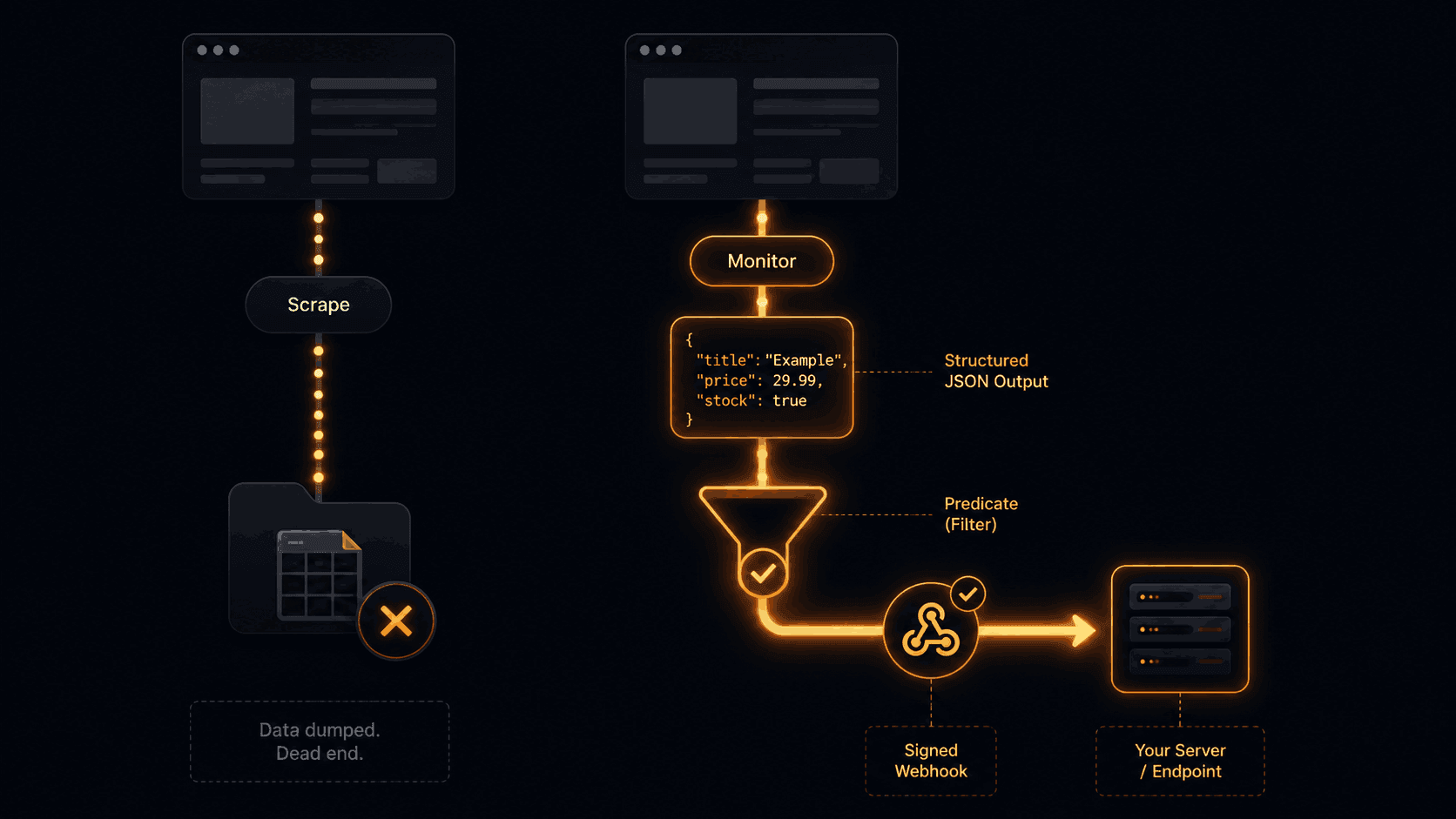
Browse AI is genuinely good at what it does: point-and-click robot training, visual data extraction, no-code integrations. But if your goal is to react to a change automatically, you need more than a data export. You need a predicate that fires only when the value you care about crosses a threshold, and you need that delivered as a signed webhook your app can consume directly.
What Browse AI Actually Gives You
Browse AI is a no-code extraction platform. You train a visual robot by clicking through a site, it records your interactions, and from then on it runs that sequence on a schedule and outputs structured rows.
On the monitoring side, it compares stored element states across runs and fires an alert when something differs. You can receive that alert via webhook or polling, route it to Zapier, or export rows to Google Sheets.
That covers a real use case: business teams that need recurring web data without writing code. The friction shows up when a developer needs more control:
- Alerts fire on any change. If a page renders a different timestamp, rotates a banner ad, or updates a cookie notice, the monitor fires. There's no way to say "fire only when the price field drops by more than 5%."
- Webhooks deliver the full dataset, not a diff. Your endpoint receives whatever data the robot extracted, not a structured before/after comparison. You write the diff logic yourself.
- No composite conditions. You can't express "alert me when the price drops AND the item is still in stock." Each condition lives separately.
- Credit-based pricing adds unpredictability. High-volume runs eat credits fast, and the cost scales with pages extracted rather than monitors active.
None of this makes Browse AI a bad tool. It makes it the wrong tool for event-driven, developer-built workflows.
The Missing Piece: Predicate-Driven Delivery
Most monitoring tools collapse the pipeline into two steps: fetch and alert. The problem is that "alert" ends up meaning "send everything," which creates noise.
Verid runs a five-stage loop:
- Fetch: Static request first, automatic fallback to a headless browser, then residential proxy if the site blocks it.
- Extract: CSS selector, XPath, JSONPath, regex, full-page hash, or LLM prompt. Output is always named, typed fields.
- Diff: Field-level comparison against the last successful run. Every field gets a before and after value.
- Predicate: A rule you define. Fire only if the rule returns true.
- Deliver: HMAC-signed webhook, Slack, Discord, or email. Six retries with exponential backoff. Dead-letter queue for anything that still fails.
Step 4 is the part that changes everything. Instead of receiving a fire-hose of change events, your endpoint only sees a webhook when your specific condition is true.
Predicate Types That Actually Matter
Verid supports nine predicate types, plus AND/OR composites. A few that come up constantly:
field_decreases_by_percent : fire when a numeric field drops by at least N%. Used for price-drop alerts and stock-dip notifications.
field_matches_regex : fire when the new value matches a pattern. Used for status-string monitors like ^In Stock$ or ^(error|failed).
field_changes : fire when a specific named field has any new value. Used for version bumps, content updates, new releases.
composite with AND/OR : chain any of the above. Fire only when price drops 10% and availability matches "in_stock." One API call, no glue code.
The first run never fires it establishes the baseline silently. That alone eliminates the false positive you always get on day one with screenshot tools.
Comparison: Browse AI vs. Verid
| Capability | Browse AI | Verid |
|---|---|---|
| Extraction method | Visual robot training (no-code) | CSS, XPath, JSONPath, regex, hash, LLM |
| Output format | Rows / dataset | Named typed fields |
| Change detection | Element state comparison | Field-level before/after diff |
| Predicate-based alerting | No | 9 types + AND/OR composites |
| Webhook delivery | Yes (data payload) | HMAC-signed, structured diff payload |
| Webhook retries | Not documented | 6 retries, exponential backoff, DLQ |
| JSON/API monitoring | Limited | JSONPath extraction, first-class |
| JS-heavy sites | Yes (headless) | Auto-escalates static → browser → proxy |
| SDK | 8 SDKs | Node.js SDK + OpenAPI 3.1 spec |
| Pricing model | Credit-based | Run-based, unlimited monitors |
| Free tier | 50 credits/month | 14-day free trial: 200 runs, unlimited monitors, no card |
| Primary audience | Non-technical teams | Developers, engineers |
Code: Creating a Monitor via API
Everything in Verid is driven by the REST API. You define the extraction config, the predicate, and the delivery target in one POST /v1/monitors call. Here's a real example from the quickstart docs:
curl -X POST https://api.verid.dev/v1/monitors \
  -H "Authorization: Bearer $VERID_API_KEY" \
  -H "Content-Type: application/json" \
  -d '{
    "name": "React New Releases",
    "url": "https://api.github.com/repos/facebook/react/releases/latest",
    "schedule_interval_seconds": 3600,
    "extract_config": {
      "method": "json_path",
      "fields": {
        "tag_name": "$.tag_name",
        "published_at": "$.published_at"
      }
    },
    "diff_predicate": {
      "type": "field_changes",
      "field": "tag_name"
    },
    "deliveries": [
      {
        "type": "webhook",
        "url": "https://your-app.com/webhooks/verid"
      }
    ]
  }'
The predicate field_changes on tag_name means your webhook fires exactly once per release, not on every hourly check, not when published_at shifts, only when the version string actually changes.
The webhook payload your endpoint receives is a structured diff, not a raw data dump:
{
  "id": "del_01H...",
  "version": "2026-05-01",
  "monitor_id": "uuid",
  "fired_at": "2026-05-08T12:00:00Z",
  "diff": {
    "fields_changed": ["tag_name"],
    "before": { "tag_name": "v18.2.0" },
    "after":  { "tag_name": "v19.0.0" }
  },
  "monitor": {
    "url":  "https://api.github.com/repos/facebook/react/releases/latest",
    "name": "React New Releases"
  }
}
Your handler already knows what changed, what the old value was, and what the new value is. No parsing the full page. No running your own diff.
Code: Verifying the Webhook Signature
Every Verid webhook is signed with HMAC-SHA256. The signature lives in the Verid-Signature header as t={timestamp},v1={hex_signature}. You should verify it before processing the payload.
Here's the Node.js verification handler from the webhooks docs:
import { createHmac, timingSafeEqual } from 'crypto';

function verifyWebhook(
  header: string,
  rawBody: string,
  secret: string,
  toleranceSecs = 300,
): boolean {
  const parts = Object.fromEntries(
    header.split(',').map((p) => p.split('=')),
  );
  const timestamp = parseInt(parts['t'] ?? '0', 10);
  const signature = parts['v1'];

  if (!timestamp || !signature) return false;

  // Reject replays older than 5 minutes
  if (Math.abs(Date.now() / 1000 - timestamp) > toleranceSecs) return false;

  const expected = createHmac('sha256', secret)
    .update(`${timestamp}.${rawBody}`)
    .digest('hex');

  // Constant-time comparison to prevent timing attacks
  return timingSafeEqual(Buffer.from(expected, 'hex'), Buffer.from(signature, 'hex'));
}

app.post('/webhooks/verid', (req, res) => {
  const isValid = verifyWebhook(
    req.headers['verid-signature'] as string,
    req.rawBody,
    process.env.WEBHOOK_SECRET!,
  );

  if (!isValid) return res.status(401).send('Invalid signature');

  const { diff } = req.body;
  console.log('Fields changed:', diff.fields_changed);
  console.log('Before:', diff.before);
  console.log('After:', diff.after);

  res.sendStatus(200);
});
Note: Always usetimingSafeEqualinstead of===when comparing HMAC signatures. String equality is vulnerable to timing attacks. See OWASP's timing attack guidance for more context.
Python, Ruby, Go, and PHP verification snippets are available in the webhooks documentation.
Code: Using the Node.js SDK
If you prefer a typed client over raw HTTP, Verid publishes an official Node.js SDK on npm:
npm install @verid.dev/sdkimport { VeridClient } from '@verid.dev/sdk';
const client = new VeridClient({ apiKey: process.env.VERID_API_KEY! });
// Create a price-drop monitor on a product page
const monitor = await client.monitors.create({
name: 'Competitor Laptop Price',
url: 'https://example-store.com/product/laptop-pro',
schedule_interval_seconds: 900, // every 15 minutes (about 2,880 runs/month)
extract_config: {
method: 'css',
fields: {
price: '.product-price',
availability: '.stock-status',
},
},
diff_predicate: {
type: 'composite',
operator: 'AND',
conditions: [
{ type: 'field_decreases_by_percent', field: 'price', threshold: 5 },
{ type: 'field_equals', field: 'availability', value: 'In Stock' },
],
},
deliveries: [
{ type: 'webhook', url: 'https://your-app.com/webhooks/verid' },
],
});
// Trigger a manual run immediately
await client.monitors.runNow(monitor.id);The composite predicate here means your webhook fires only when the price drops 5% or more AND the item is still in stock. Two conditions, one API call, zero glue code.
When to Use Browse AI Instead
Browse AI is genuinely the right choice in several situations:
- Your team is non-technical. Visual robot training, point-and-click selectors, and Google Sheets integration are genuinely better than writing JSON configs.
- You need bulk page crawling. Browse AI's automation workflows across thousands of URLs in parallel is purpose-built for large-scale extraction jobs.
- You're exporting data, not reacting to it. If the end goal is a populated spreadsheet or a CSV for analysis, not a triggered downstream action, Browse AI's export-first model fits perfectly.
- You need complex multi-step browser interactions. Click, scroll, form fill, login. Browse AI's visual recorder handles multi-action sequences well.
The overlap on "monitoring" and "webhooks" is real, but the use cases diverge significantly when you factor in predicate control and delivery guarantees.
Polling vs. Webhooks: Why It Matters for Automation
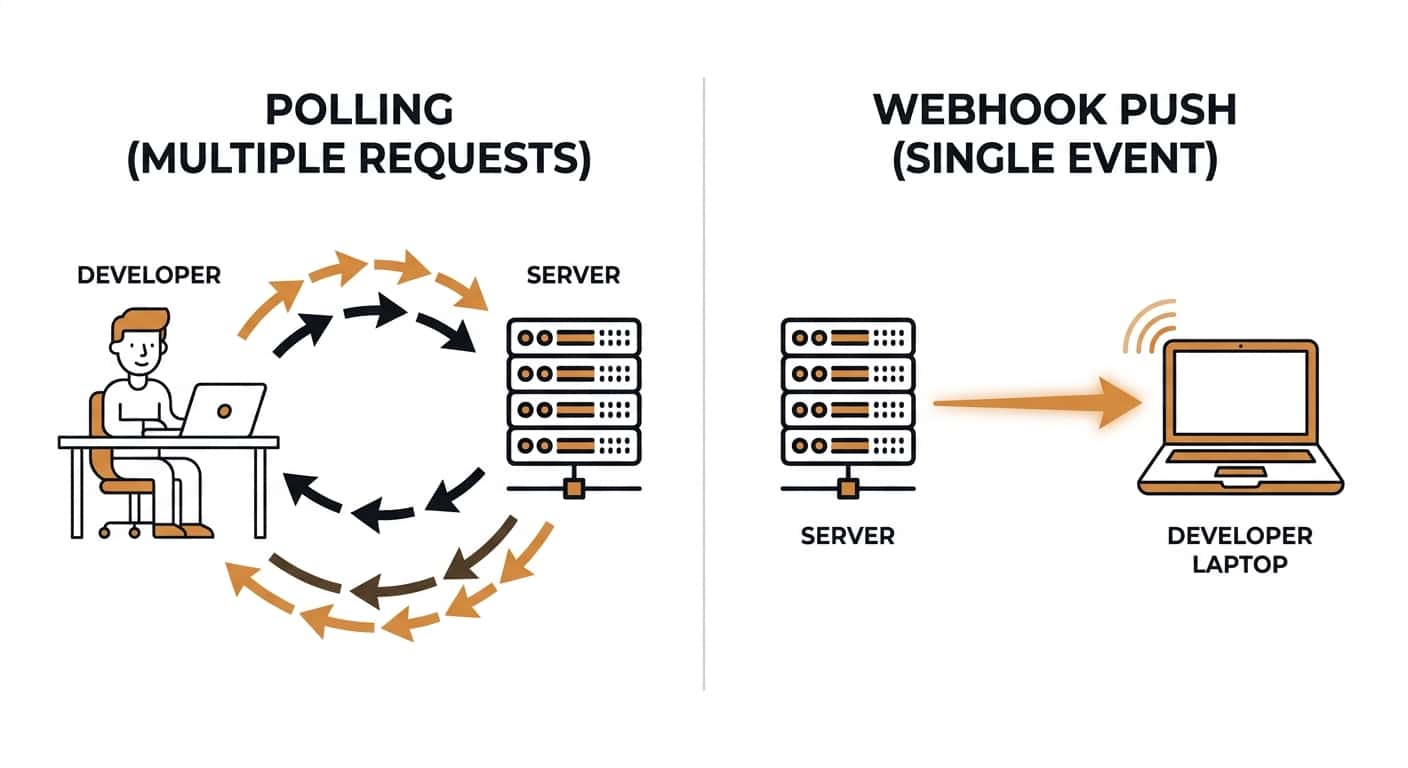
Polling-based monitoring means your system checks for a change on every run, then your code has to decide whether the change is meaningful. Over 24 hours at 15-minute intervals, that's 96 API calls to your endpoint regardless of whether anything changed.
Webhook delivery inverts this. Verid runs the check on its infrastructure. If the predicate returns false, nothing touches your endpoint. Your endpoint only receives a request when the condition you defined is actually true.
For automation pipelines, repricing, inventory updates, CI triggers, alert routing, quiet-by-default delivery is far easier to reason about than filtering a firehose of "page changed" events.
Use Cases Where Verid Has an Edge
Dependency release monitoring. Poll registry.npmjs.org or the GitHub API with JSONPath extraction. Fire a webhook only when $.version or $.tag_name changes. Your CI pipeline, Slack channel, or ticketing system gets pinged automatically. See the GitHub Release Tracker recipe.
Competitor price intelligence. Extract price and availability fields with CSS selectors. Set a field_decreases_by_percent predicate at 5%. Your repricing service gets a signed webhook with the before/after price in the payload. No polling loop required on your side.
API contract drift detection. Point a JSONPath monitor at an upstream API on a 5-minute interval (about 8,640 runs a month). If a field disappears or changes type, the field_changes predicate fires before your downstream services notice. See the JSON API field monitoring use case.
Regulatory and policy page monitoring. Government portals and compliance pages rarely have clean selectors. Full-page hash detection catches any content change. Your legal team gets an email; your compliance workflow gets a webhook.
Pricing
| Plan | Price | Runs per month | History |
|---|---|---|---|
| 14-day free trial | $0 | 200 for the trial | 14 days |
| Lite | $9/mo | 1,000 | 90 days |
| Starter | $19/mo | 5,000 | 180 days |
| Pro | $49/mo | 15,000 | 365 days |
| Scale | $149/mo | 100,000 | 2 years |
Every account starts with a 14-day free trial with no credit card requirement: 200 runs and unlimited monitors to test your setup on real pages. After the trial, monitors pause until you choose a plan, starting at $9/month for 1,000 runs. Every plan can check as often as every minute. See the full plan comparison.
Getting Started
export VERID_API_KEY="vrd_your_key_here"

curl -X POST https://api.verid.dev/v1/monitors \
  -H "Authorization: Bearer $VERID_API_KEY" \
  -H "Content-Type: application/json" \
  -d '{
    "name": "My First Monitor",
    "url": "https://api.github.com/repos/facebook/react/releases/latest",
    "schedule_interval_seconds": 3600,
    "extract_config": {
      "method": "json_path",
      "fields": { "version": "$.tag_name" }
    },
    "diff_predicate": { "type": "field_changes", "field": "version" },
    "deliveries": [{ "type": "webhook", "url": "https://your-app.com/hooks" }]
  }'
Your monitor is live. The first run establishes a baseline. The second run that finds a changed version field fires your webhook. From there it's just your handler code.
Get a free API key, no credit card, free for 14 days.
Frequently Asked Questions
Does Verid support JavaScript-rendered pages?
Yes. Verid runs a static fetch first. If extraction returns empty fields, the job automatically retries with a headless browser. Sites with active bot protection escalate further to a residential proxy network. You configure your extractor once; Verid handles the escalation automatically.
Can I use Verid to monitor JSON APIs, not just websites?
Yes, and it's one of the strongest use cases. Use method: "json_path" in your extract_config and write standard JSONPath expressions like $.tag_name or $.data.price. Verid polls the API on your schedule and applies your predicate against the extracted fields. No custom parsing code needed.
What happens if my webhook endpoint is down?
Verid retries the delivery up to 6 times with exponential backoff: immediate, 5 minutes, 15 minutes, 30 minutes, 1 hour, 2 hours. After 6 failed attempts, the delivery is marked dead. You can replay dead deliveries from the dashboard or via POST /v1/deliveries/:id/replay.
How is Verid different from Visualping or changedetection.io?
Visualping and changedetection.io detect that a page changed; they're good at "tell me when anything shifts." Verid detects that a specific field changed and evaluates a rule you defined before firing. The difference is noise. Screenshot diffing fires on cookie banners, timestamp updates, and ad rotations. Verid only fires when your predicate returns true.
About the author

Software Engineer
Suleman is a software engineer working on backend systems and browser automation at Verid. Much of his time goes to the unglamorous half of monitoring: brittle selectors, anti-bot interstitials, dedupe logic, and that’s what he writes about.
More from Suleman →Related posts
Free Website Change Monitors Compared (No Card Required)
Compare free website change monitors that need no credit card. Real limits, check frequency, and which tool actually fits your use case.
Read the post →comparisonApify Alternative for Scheduled Website Monitoring
Compare Apify Actors to a dedicated change monitoring API. See when building an Actor makes sense, and when webhooks on a rule get you there faster.
Read the post →comparisonFirecrawl vs Verid: A Scraping API and a Monitoring Loop Are Not the Same Thing
Firecrawl scrapes and now checks pages on a schedule. Verid is built only for monitoring. Here's the real architectural difference.
Read the post →comparisonWachete Alternative for Developers: Get Structured Data, Not Raw Diffs
Wachete shows you raw diffs. Verid extracts the exact field you care about and fires a webhook only when your predicate is true. No noise, no glue code.
Read the post →