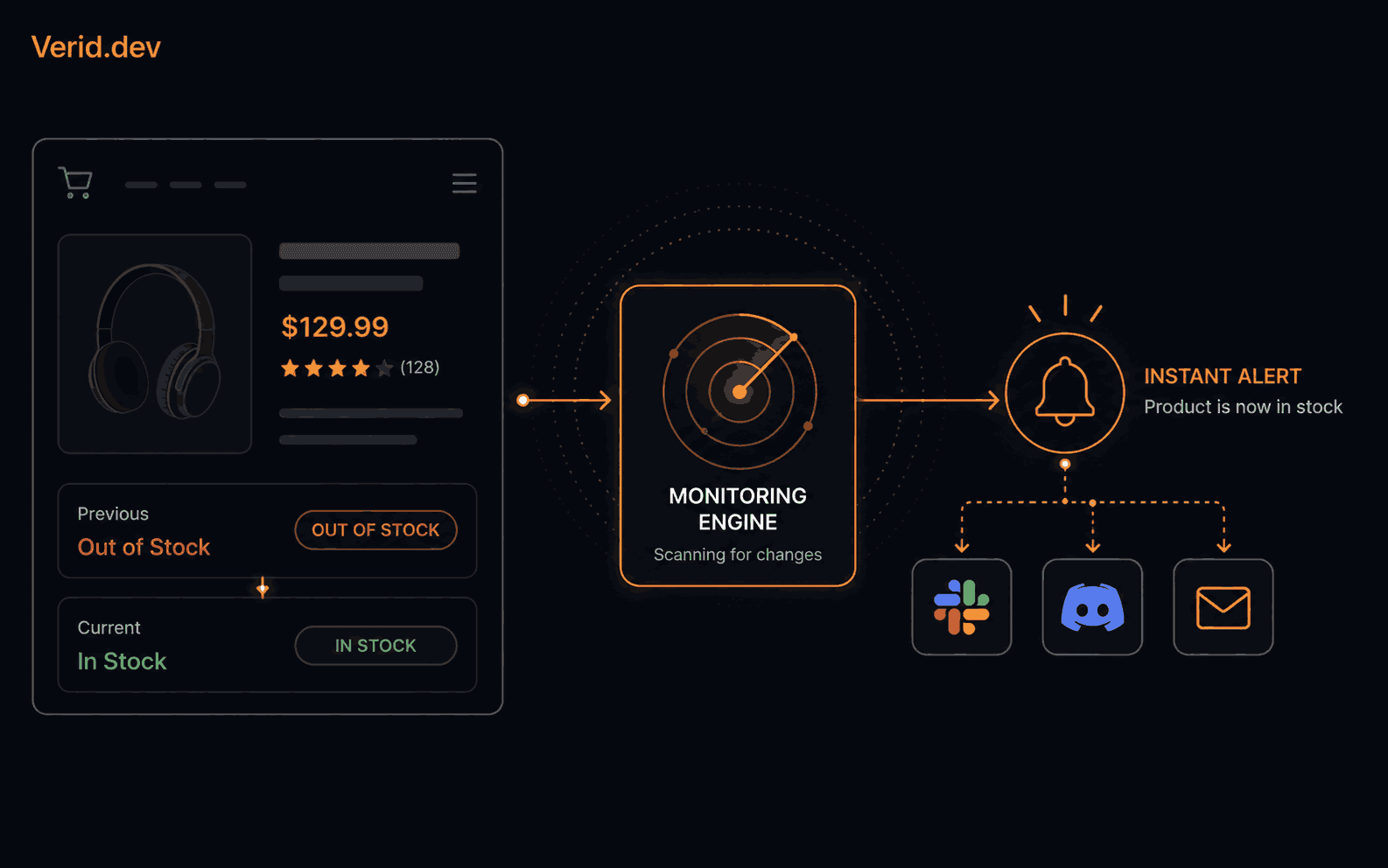
How to Get Automatic Back-in-Stock Alerts for Any Product Page
You found the product. It's sold out. You click "notify me" and wait, knowing full well that email will land two hours after everyone else already checked out.
That delay isn't an accident. Retailer restock emails are batched on purpose, partly to manage server load and partly to protect certain customers' first pick. If you want to actually beat the queue, you need something that checks the page itself, on a schedule, and tells you the second the stock label flips. That's a monitoring problem, not a shopping problem, and it has a straightforward technical solution.
This guide walks through how back-in-stock monitoring actually works under the hood, why manual checking (and most "notify me" forms) fall short, and how to build a reliable restock watcher using Verid, a web change detection API.
How Back-in-Stock Monitoring Works
At its core, back-in-stock monitoring is a five-step loop that repeats on a timer:
| Step | What happens |
|---|---|
| Fetch | A request is made to the product page URL |
| Extract | A specific value is pulled out of the HTML, such as a stock label or price |
| Compare | The new value is checked against the value from the last run |
| Evaluate | A rule decides whether the change is worth acting on |
| Deliver | If the rule fires, a notification goes out |
The part people underestimate is step 4. Most tools stop at "did anything change," which is why screenshot-based monitors are so noisy. A cookie banner, a rotating promo, or a timestamp in the footer can trigger a false alert just as easily as a real restock. What you actually want is a rule tied to a specific field: has the availability label gone from "Sold out" to "In stock," specifically.
Google's own guidance on structured product data treats availability as a distinct, machine-readable property for exactly this reason. Google Search Central documents schema.org's availability property, with values like InStock and OutOfStock, as a structured field search engines and shopping feeds rely on the same underlying signal a restock monitor should be watching, whether or not the page exposes it as formal schema markup.
Why Manual Checking Doesn't Scale
The instinct is to just check the page yourself. It works right up until it doesn't:
- Refreshing manually only works while you're awake and paying attention. Restocks don't schedule themselves around your calendar.
- Browser extensions typically only run while the tab is open and your laptop is on. Close the lid, monitoring stops.
- Retailer "notify me" forms are batched by design and often enroll you in a marketing list you didn't ask for.
- DIY scripts solve the fetch step but leave you building the scheduler, the diff logic, the retry handling, and the alert delivery yourself. Then the site changes a class name and the whole thing breaks quietly, usually the week you needed it most.
None of these give you a server-side process that runs continuously, compares state precisely, and only bothers you when something meaningful actually happened.
How Verid Solves This Problem
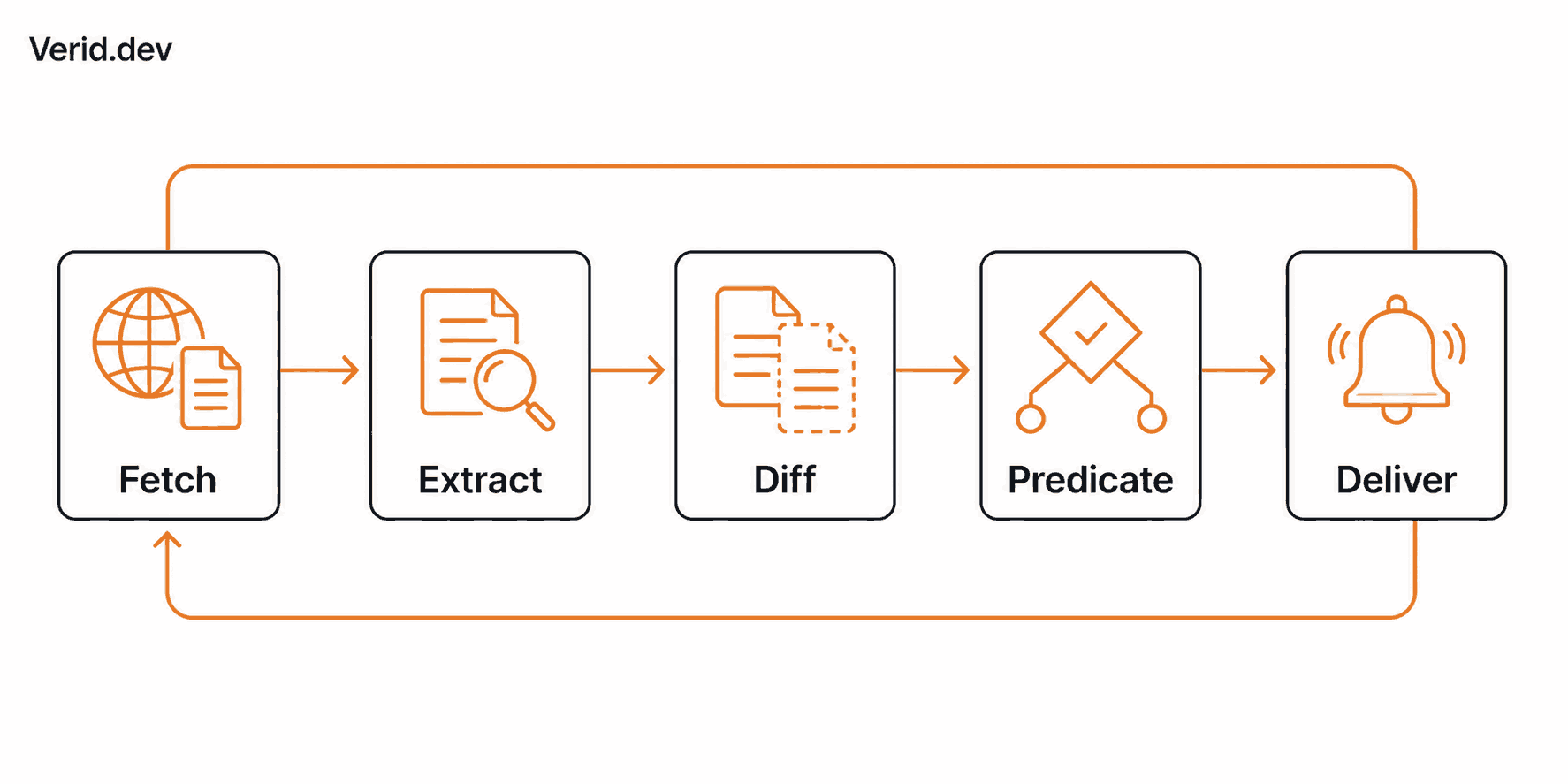
Verid runs the entire loop described above as a single configured monitor: fetch, extract, diff, evaluate, deliver. You define what to watch and what counts as a real change; Verid runs the infrastructure.
A few specifics matter here:
Extraction. Verid supports six extraction methods, including CSS selectors, XPath, JSONPath, regex, full-page hashing, and AI/LLM extraction for pages whose markup keeps shifting. For a typical product page, a CSS selector pointed at the stock label and price is usually enough.
Fetching. Verid tries a static fetch first. If the fields come back empty, it automatically escalates to a headless browser, and then to a residential proxy for sites that actively block scrapers. You don't configure this tier switching yourself.
Predicates. This is the piece that keeps you from getting spammed. Verid supports nine predicate types, including exact-match, percentage thresholds, regex matches, and composite AND/OR logic. For a restock alert, the relevant one is field_equals: fire only when the availability field reaches the exact in-stock string.
Delivery. When a predicate fires, Verid can push the result to a webhook, Slack, Discord, or email, and every webhook is signed with HMAC-SHA256 so your endpoint can confirm it actually came from Verid. That signing pattern will look familiar if you've verified webhooks from a payment provider before, since Stripe recommends verifying the Stripe-Signature header using the endpoint's secret before trusting any webhook payload; Verid's Verid-Signature header works the same way.
Here's how the pieces compare to the alternatives:
| Capability | DIY script | Screenshot tools | Verid |
|---|---|---|---|
| Structured field extraction | You write it | No, pixel diffs only | Yes, 6 methods |
| Rule-based alerting | You write it | No | 9 predicates, composable |
| Bot-protected / JS-heavy sites | You add headless browser + proxies | Limited | Auto-escalates |
| Signed delivery | You write retries | Email/Slack only | HMAC + 6x backoff + dead-letter |
| Time to first alert | Days | Minutes, then noise | Minutes, and quiet |
Step-by-Step Setup Guide
- Start a free trial at verid.dev and generate an API key from the dashboard. Keys are prefixed
vrd_treat them like a password. - Find the stock element on the target page. Right-click it in your browser, choose Inspect, then Copy → Copy selector in DevTools. Simplify the generated selector down to a class or ID where possible.
- Write the extraction config, mapping a field name to that selector.
- Choose a predicate. For a restock alert,
field_equalsagainst the in-stock string is the cleanest signal. - Pick a delivery channel webhook, Slack, Discord, or email, and set a check interval. Two to five minutes is typical for high-demand items; every plan allows intervals down to one minute, as long as your monthly runs cover them.
- Create the monitor via the API or Node.js SDK, then leave it running before the restock window opens.
Real Workflow Example
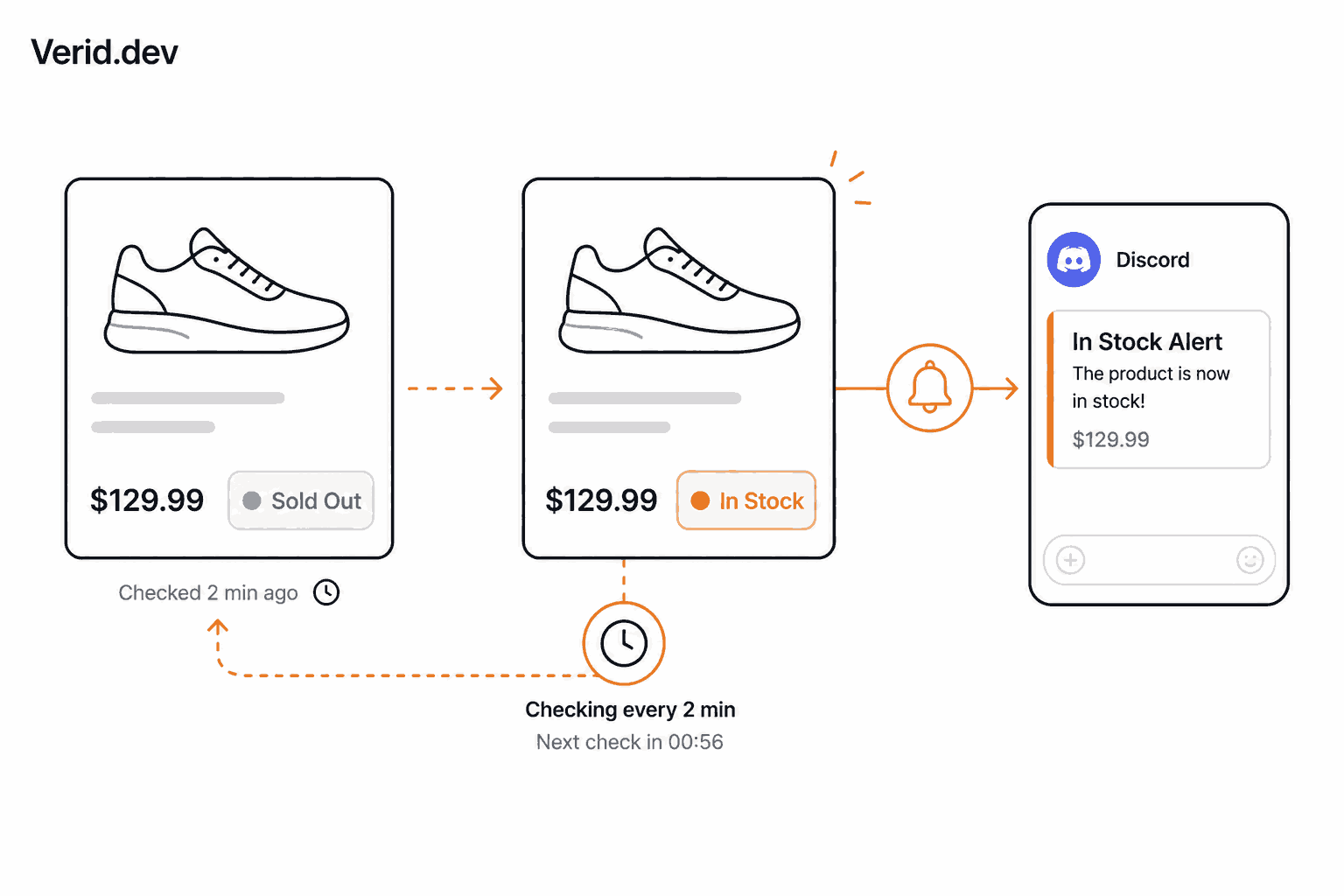
Say you're tracking a graphics card that keeps selling out within minutes of restocking. The product page shows a label like "Sold out" or "In stock" inside a class called .product-availability-label, alongside a .price element that's empty when the item isn't buyable.
The extraction config pulls both fields:
{
  "method": "css",
  "fields": {
    "availability": ".product-availability-label",
    "price": ".price"
  }
}
The predicate fires only when availability transitions to the exact in-stock string:
{ "type": "field_equals", "field": "availability", "value": "In stock" }If the page hides the price element entirely while sold out, a simpler alternative predicate is just watching for the price field to appear at all:
{ "type": "field_changes", "field": "price" }Run this on a short interval, deliver it to Discord or a webhook that pings your phone, and the first run establishes the "sold out" baseline. No alert fires until the second run detects the flip, so the monitor needs to be live before the restock actually happens.
Code Example
Creating this monitor through Verid's REST API looks like this:
curl -X POST https://api.verid.dev/v1/monitors \
  -H "Authorization: Bearer vrd_your_api_key" \
  -H "Content-Type: application/json" \
  -d '{
    "name": "Restock - GPU Model X",
    "url": "https://retailer.com/products/gpu-model-x",
    "schedule_interval_seconds": 180,
    "extract_config": {
      "method": "css",
      "fields": {
        "availability": ".product-availability-label",
        "price": ".price"
      }
    },
    "diff_predicate": { "type": "field_equals", "field": "availability", "value": "In stock" },
    "deliveries": [
      { "type": "discord", "webhookUrl": "https://discord.com/api/webhooks/..." }
    ]
  }'
Or with the official Node.js SDK:
import { VeridClient } from '@verid.dev/sdk';

const client = new VeridClient({ apiKey: 'vrd_your_api_key' });

await client.monitors.create({
  name: 'Restock - GPU Model X',
  url: 'https://retailer.com/products/gpu-model-x',
  schedule_interval_seconds: 180,
  extract_config: {
    method: 'css',
    fields: { availability: '.product-availability-label', price: '.price' },
  },
  diff_predicate: { type: 'field_equals', field: 'availability', value: 'In stock' },
  deliveries: [{ type: 'discord', webhookUrl: 'https://discord.com/api/webhooks/...' }],
});
When the predicate fires, the delivered webhook payload looks like this:
{
  "id": "del_01H...",
  "version": "2026-05-01",
  "monitor_id": "9b1c...",
  "fired_at": "2026-05-08T12:00:00Z",
  "diff": {
    "fields_changed": ["availability", "price"],
    "before": { "availability": "Sold out", "price": "" },
    "after":  { "availability": "In stock", "price": "$1,599.00" }
  }
}
Before trusting that payload, verify the Verid-Signature header against your monitor's secret. Full verification snippets in Node, Python, Ruby, Go, and PHP are in the webhooks documentation.
If a delivery attempt fails, it isn't dropped. Verid retries automatically at 5, 15, 30, and 60 minutes, then again after 2 hours, before marking it dead in your dashboard.
Best Practices
- Match the string exactly.
field_equalsis strict: "In stock" and "In Stock" are different values. Run the monitor once first to see the actual output before writing the predicate, or usefield_matches_regexwith a pattern like^(In stock|Available|Add to cart)$to cover common variants. - Namespace your CSS selectors. Use
.product-card .pricerather than a bare.priceif multiple prices appear on the page. - Tighten intervals during known drop windows, then loosen them afterward. A three-minute interval uses about 480 runs a day, so make sure your monthly runs cover it; check the pricing page for the runs included in each plan.
- Stack a price condition on top of availability using a composite predicate if you only care about a restock below a certain price:
{
  "type": "composite",
  "operator": "AND",
  "conditions": [
    { "type": "field_equals", "field": "availability", "value": "In stock" },
    { "type": "field_decreases_by_percent", "field": "price", "threshold": 5 }
  ]
}- Send alerts where you'll actually see them fast. A webhook into a phone-notification service or a Discord ping usually beats email for time-sensitive drops.
- If the markup keeps changing, switch that field to the AI extractor and describe it in plain language instead of maintaining a brittle selector. No redeploy needed, just a config change.
Common Mistakes
- Watching for "any change" instead of a specific field. This is exactly what makes screenshot tools noisy: cookie banners and rotating promos will trigger false positives.
- Assuming the first run alerts you. It doesn't. The first run only records the baseline; alerts start from the second run onward, so start the monitor before the drop window, not during it.
- Ignoring queue pages. Some high-demand retailers gate the real product page behind a virtual waiting room. A monitor pointed at that URL will only ever see the queue, not the actual stock state.
- Picking an interval your runs can't cover. Every plan, and the free trial, can poll as often as every minute, but each check uses a run. The 14-day trial includes 200 runs and Lite includes 1,000 a month, which suits daily checks; a five-minute interval uses about 8,640 runs a month, so size your plan to the polling you need.
- Skipping signature verification. Without checking the
Verid-Signatureheader, anything posted to your webhook endpoint looks legitimate, including spoofed requests.
Conclusion
Back-in-stock monitoring isn't complicated in theory: fetch a page, read one field, compare it to last time, and tell someone when it matters. The complexity is in the plumbing — scheduling, escalating past bot protection, avoiding false positives, and delivering the alert reliably. That's the part worth outsourcing.
Verid closes that loop with structured extraction, precise predicates, and signed delivery, so the only thing you have to decide is which field to watch and what value should trigger the alert. Start a free trial with unlimited monitors and 200 runs for 14 days, no credit card required, and scale the frequency up once you know it works for the page you care about.
Frequently Asked Questions
How do I get notified when an out-of-stock product is back in stock?
Set up an automated monitor that checks the product page on a schedule, extracts the availability label as a structured field, and fires a notification only when that field equals an in-stock value. This avoids the delay of retailer "notify me" emails and works even while you're offline.
What's the fastest check interval for restock alerts?
Every Verid plan, and the free trial, can check as often as every minute; plans differ by how many runs you get each month. For high-demand drops, a 2 to 5 minute interval is typical. A five-minute check uses about 8,640 runs a month, which fits on Pro (15,000 runs) or Scale (100,000 runs).
Why do screenshot-based monitoring tools send so many false alerts?
They trigger on any visual difference on the page, including ads, cookie banners, and timestamps, rather than on a specific value. Predicate-based tools like Verid only fire when a named field crosses a rule you define.
Can I track price and stock at the same time?
Yes. Extract both fields in the same monitor and use a composite predicate to fire only when both conditions are true, for example, in-stock and at least 5 percent cheaper than last check. See competitor price tracking for a pricing-focused version of this pattern.
Does this work on Shopify stores specifically?
Yes, the same CSS or regex approach works on Shopify product pages. There's a dedicated setup for Shopify product stock and price monitoring if that's your primary use case.
What if the site is JavaScript-heavy and blocks scrapers?
Verid's fetch layer escalates automatically: static fetch first, then a headless browser if fields come back empty, then a residential proxy for bot-protected sites. You don't need to configure this manually.
About the author

Software Engineer & Technical Writer
Hanzala works as a software engineer and technical writer. He documents Verid’s API and SDK while building against them, and writes tutorials on monitoring pages, parsing structured data, and wiring alerts into tools a team already uses.
More from HANZALA SALEEM →Related posts
Free Website Change Monitors Compared (No Card Required)
Compare free website change monitors that need no credit card. Real limits, check frequency, and which tool actually fits your use case.
Read the post →visual monitoringVisual Regression Testing vs Visual Monitoring: Which Do You Need?
Visual regression testing catches bugs before release. Visual monitoring catches changes after deployment. Learn the difference and which one you need.
Read the post →comparisonApify Alternative for Scheduled Website Monitoring
Compare Apify Actors to a dedicated change monitoring API. See when building an Actor makes sense, and when webhooks on a rule get you there faster.
Read the post →AiHow to Feed AI Agents Fresh Web Data Without Re-Scraping Everything
How AI agents and RAG systems stay fresh without re-scraping entire sites: change detection, webhooks, and incremental updates explained.
Read the post →