How to Feed AI Agents Fresh Web Data Without Re-Scraping Everything
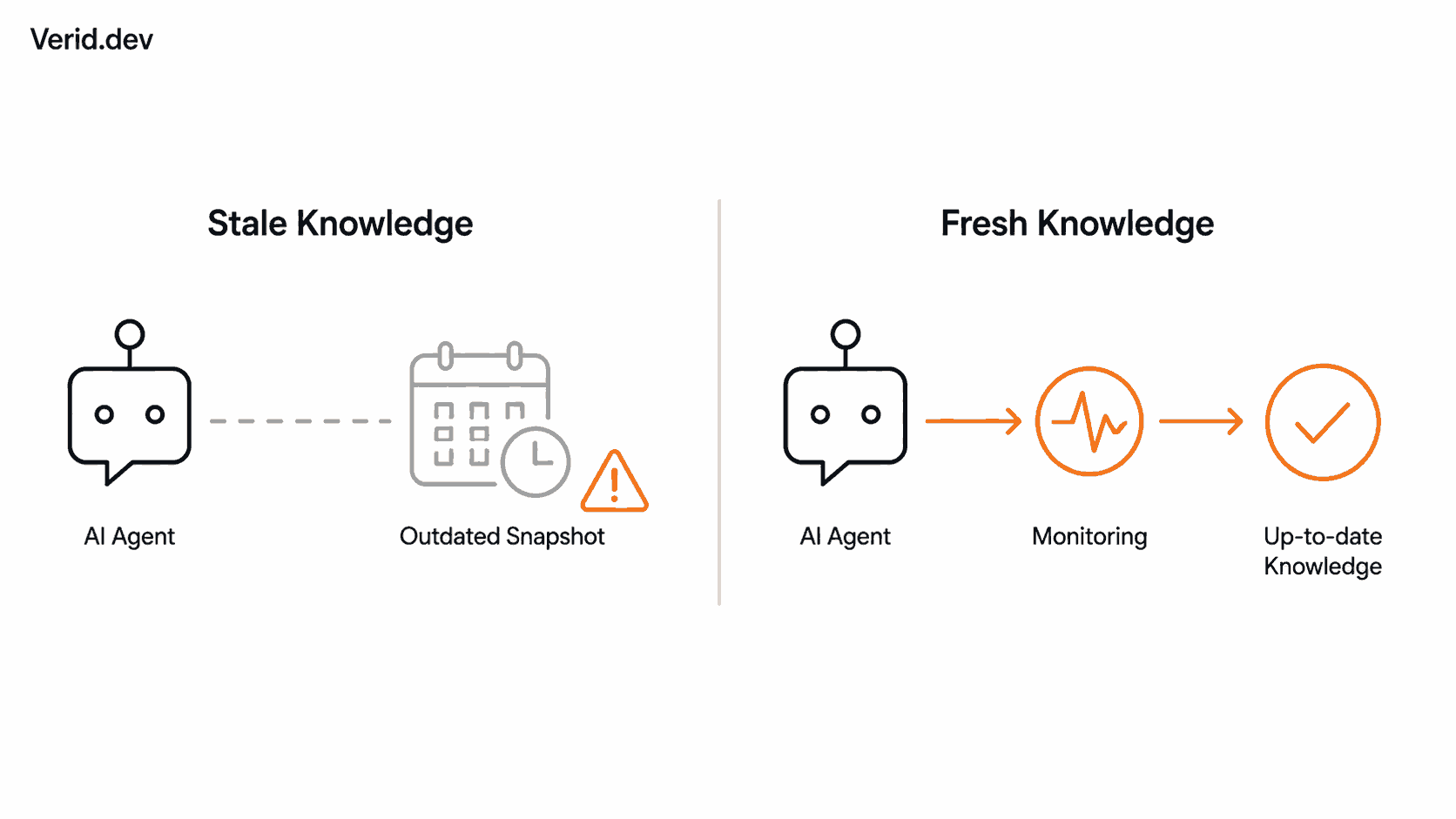
An AI agent is only as good as what it knows, and what it knows usually comes from a website that someone scraped once, weeks or months ago. The agent answers questions with total confidence, and the price it quotes is wrong, the changelog it cites is out of date, and the pricing tier it describes was retired last quarter. This is not a model problem. It is a data pipeline problem, and it shows up in almost every RAG system, research agent, and documentation assistant currently in production.
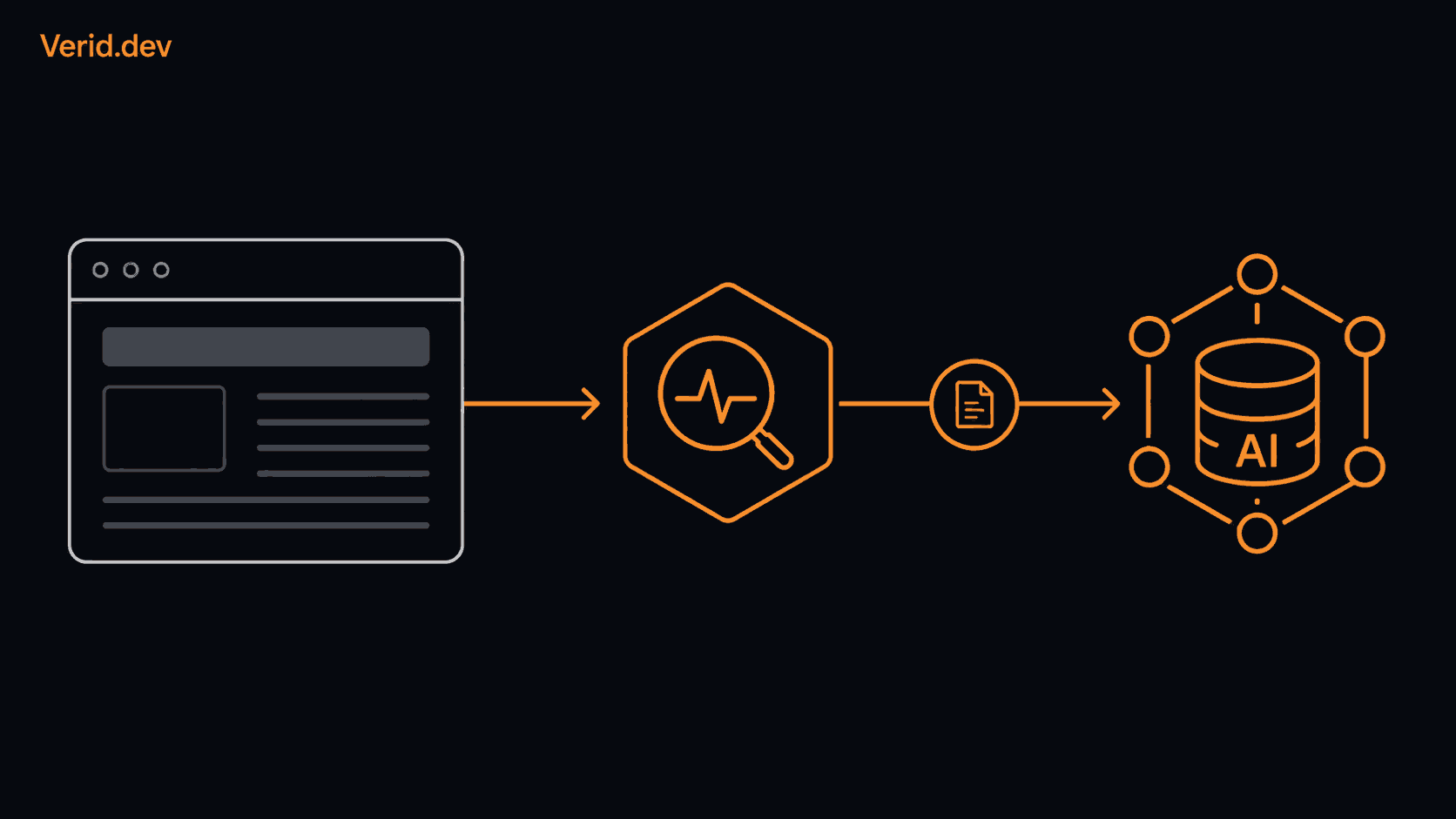
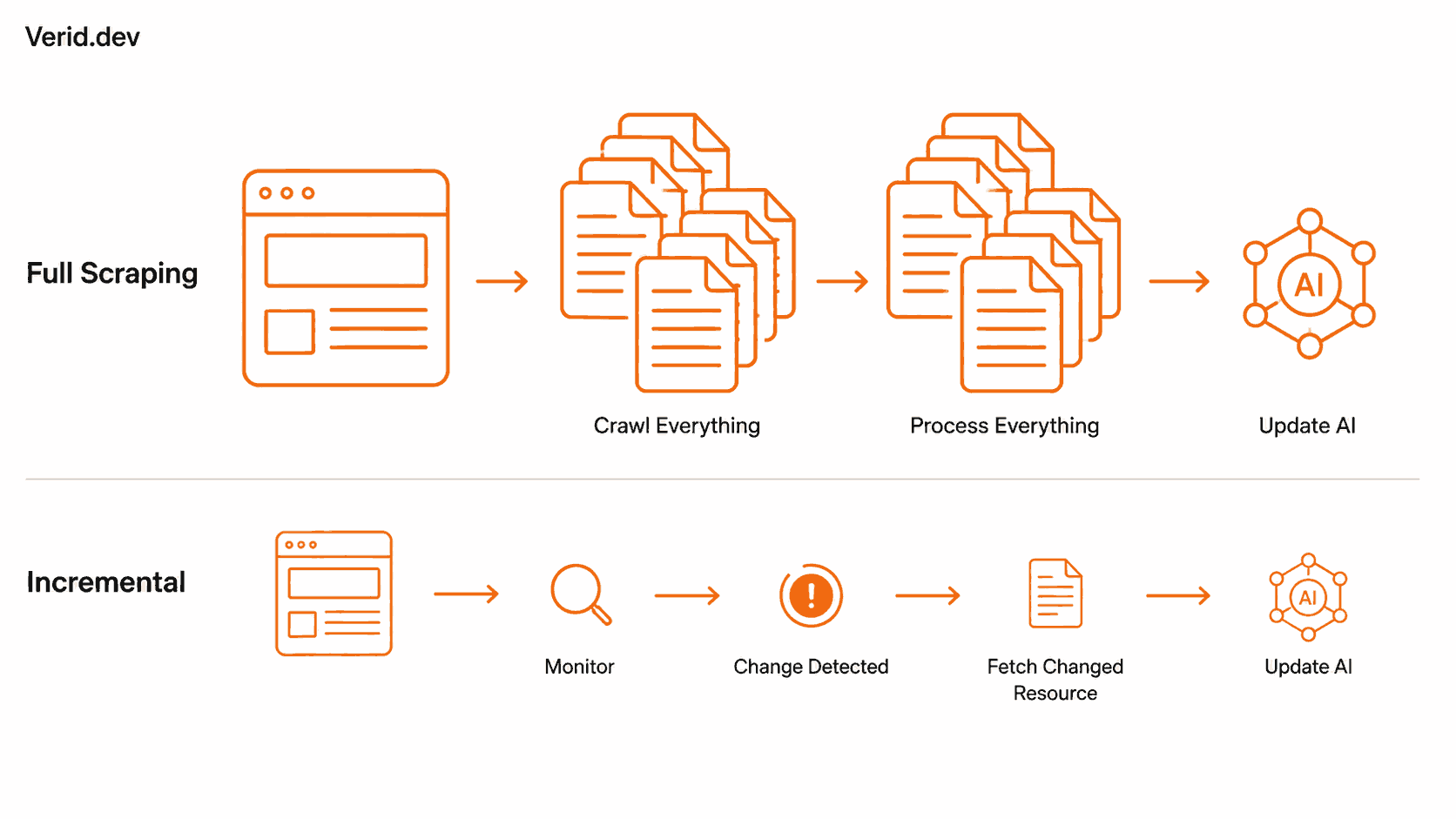
The instinct to fix it is usually to re-run the scraper. Pull the whole site again, re-chunk it, re-embed it, and reload the vector database. That works, but it is expensive, slow, and wasteful when 95 percent of the content on the site did not change at all. This article walks through a better pattern: watching web sources for the specific thing that changed, and only pulling that changed content into your AI pipeline, rather than re-processing everything on a schedule and hoping it is enough.
Why Does Web Data Go Stale for AI Agents?
Web content changes for reasons that have nothing to do with your ingestion schedule. A vendor updates a pricing page, a library ships a new release, a government portal posts a new filing, a competitor rewrites their landing page copy. None of these events announce themselves to your system. If your agent's knowledge base was built from a one-time scrape, or a scrape that reruns weekly regardless of whether anything changed, there is a gap between what actually exists on the page and what your embeddings represent. That gap is what people mean when they talk about stale knowledge in a RAG system: the retrieval step still works, the vector search still returns a plausible chunk, but the chunk describes a version of reality that no longer exists.
The fix is not simply scraping more often. Scraping more often on a fixed interval still means you are paying to re-process pages that did not change, and you are still exposed to whatever changed in between your checks.
Why Is Re-Scraping Everything Inefficient?
Consider a documentation assistant built on top of fifty pages. If the ingestion pipeline re-crawls all fifty pages nightly, re-chunks them, re-generates embeddings for every chunk, and re-writes them to the vector database, that is fifty pages of embedding cost and compute every single night, even on nights where only one changelog entry was added.
The waste compounds at scale:
- Bandwidth spent re-downloading unchanged HTML
- Compute spent re-parsing and re-cleaning content that is identical to what you already have
- Embedding API calls spent on chunks whose text has not moved a single character
- Vector database writes that overwrite existing rows with the same values
- Downstream cache invalidation across anything that reads from that knowledge base
None of this improves the agent's answers. It just costs money and adds latency to a pipeline that was already working for the 95 percent of content that stayed the same.
What's the Difference Between Scraping and Monitoring?
These two terms get used interchangeably, but they solve different problems. Web scraping retrieves content from a page, typically to extract structured data or full text at a point in time. It answers "what is on this page right now." Change monitoring repeatedly checks a resource on a schedule and identifies when its state or content has changed since the last check. It answers a different question: "did this page change since I last looked, and specifically, what changed."
A scraper on its own has no memory. Run it twice and it just gives you two independent snapshots; comparing them is your job. A monitoring layer keeps that state for you: it stores the last known value of whatever you told it to track, compares the new run against it, and only surfaces the fields that actually moved.
How Does a Change Detection Workflow Work?
A useful way to think about change detection is as a loop with five stages: fetch the resource, extract the specific field or fields you care about, diff the new extraction against the last stored one, run that diff through a rule (a predicate) that decides whether it actually matters, and only then deliver a notification. Verid is built around exactly this loop: fetch, extract, diff, predicate, deliver, and it only sends a webhook when the predicate you defined evaluates to true, rather than on every byte-level change.
That predicate step matters more than it looks. A page's raw HTML changes constantly: rotating ad slots, a "last updated" timestamp, an A/B test cookie banner. If your monitoring fires on any change at all, you get flooded with noise and eventually stop reading the alerts. A predicate lets you say, in effect, "only tell me when the version field changes" or "only tell me when the price drops by more than five percent," and everything else is ignored. Verid documents nine predicate types, including field-equals, percentage-decrease, and composite AND/OR rules, which is what lets a monitor stay quiet through a cosmetic redesign but fire immediately on a real value change.
It is worth being precise about what this buys you. Detecting a change is not the same as extracting the changed data for use downstream. A change detection layer tells you that a specific field moved from one value to another and gives you the before and after values for that field. What your application does next, whether that means re-embedding a chunk, updating a row in a document store, or triggering a fuller re-crawl of a related page, is still your application's decision.
What Does the Architecture Look Like?
A freshness-oriented pipeline for an AI agent generally splits into two halves. The first half is initial ingestion, the one-time or periodic full pull that builds the knowledge base in the first place:
Website
  |
  v
Scrape
  |
  v
Extract
  |
  v
Clean
  |
  v
Chunk
  |
  v
Embed
  |
  v
Store
The second half is the ongoing freshness loop that runs after that initial ingestion is complete:
Website
  |
  v
Monitor
  |
  v
Detect change
  |
  v
Trigger event (webhook)
  |
  v
Fetch changed content
  |
  v
Process only what changed
  |
  v
Update AI knowledge
A monitoring service like Verid covers the top half of that second diagram: watching the URL, detecting the change, and firing a signed webhook with the before/after values for the field that moved. What happens after the webhook, re-fetching the full page if you need more than the extracted field, re-chunking just the affected section, generating new embeddings, and writing them to your vector database, is application logic that lives in your own pipeline. Framing it any other way overstates what a monitoring layer does on its own.
When Should You Use Full Scraping Instead of Monitoring?
Full scraping and monitoring are not competing choices. They solve different parts of the same problem, and most production systems need both.
| Situation | Better fit |
|---|---|
| Building a knowledge base for the first time | Full scraping |
| A site has no prior baseline to diff against | Full scraping |
| You need the complete content of every page, not just specific fields | Full scraping |
| You already have a knowledge base and need to know when specific facts change | Monitoring |
| You want to avoid re-processing pages that have not changed | Monitoring |
| You're tracking a narrow, well-defined field like price, version, or stock status | Monitoring |
| The page is large and mostly static, with occasional targeted updates | Monitoring |
In practice, initial ingestion is a full scrape almost by definition, since there is no prior state to compare against. Once that baseline exists, monitoring takes over as the ongoing layer that tells you when it is worth going back to re-process something.
Practical Use Cases for AI Agents and RAG
Documentation assistants. An internal or customer-facing assistant answering questions from product docs needs to know the moment a docs page changes, not a week later on the next scheduled crawl. A full-page hash monitor on the docs index, or field-level monitors on specific version numbers, can trigger re-embedding only for the page that actually moved.
Dependency and release tracking agents. An agent that helps a team stay current on their dependencies benefits from watching package registries directly. Verid's GitHub release monitoring and JSON API field monitoring use cases cover this pattern with JSONPath extraction against registries like npm and PyPI, which is a cleaner source of truth than re-scraping changelog pages.
Competitive intelligence agents. An agent that tracks competitor pricing or positioning does not need to re-crawl an entire competitor site daily. It needs to know when a specific price, plan, or headline changes, which is a narrower and cheaper problem than full re-ingestion.
Research and policy-monitoring agents. Agents built for research teams or compliance functions that watch government portals, grant listings, or regulatory pages benefit from full-page hashing, since these sources rarely offer a stable structure or an API. Verid's research team monitoring guide covers this pattern in more detail.
Sites without a feed. Some sources an agent needs to track, like a sitemap or a listing page, don't publish RSS. Watching the listing page itself and diffing the set of URLs, as covered in Verid's sitemap monitoring use case, is a practical way to catch new content an agent should ingest, without a feed to subscribe to.
Code Example: Reacting to a Change Event
The following is a real Verid monitor configuration, matching the current quickstart documentation, that watches an npm package's latest version and fires a webhook only when the version field changes:
curl -X POST https://api.verid.dev/v1/monitors \
  -H "Authorization: Bearer $VERID_API_KEY" \
  -H "Content-Type: application/json" \
  -d '{
    "name": "TypeScript latest version",
    "url": "https://registry.npmjs.org/typescript/latest",
    "schedule_interval_seconds": 1800,
    "extract_config": {
      "method": "json_path",
      "fields": { "version": "$.version" }
    },
    "diff_predicate": { "type": "field_changes", "field": "version" },
    "deliveries": [
      { "type": "webhook", "url": "https://your-app.com/hooks/verid" }
    ]
  }'
Verid signs every webhook with an HMAC header so your endpoint can verify the payload actually came from Verid before trusting it, a pattern documented in the webhook verification guide. The payload itself carries the field that changed along with its before and after values, matching the structure shown in the quickstart.
What your application does after receiving that webhook is conceptual from here, since it depends entirely on your own stack. A typical downstream flow looks like this:
Change detected
      |
      v
Webhook received and signature verified
      |
      v
Fetch the updated resource (if more than the extracted field is needed)
      |
      v
Re-chunk only the affected section
      |
      v
Generate new embeddings for that chunk
      |
      v
Update the vector database record for that chunk
This is pseudo-code describing a general pattern, not a Verid API call. Verid's role ends at the signed webhook with the diffed field; the embedding and vector database steps are handled by whatever stack you're already using, whether that's OpenAI or Voyage embeddings, Pinecone, pgvector, or something in-house.
How Verid Fits Into the Workflow
Verid is a web change detection API: point it at a URL, choose an extraction method (CSS, XPath, JSONPath, regex, full-page hash, or an AI/LLM prompt for pages that resist selectors), define a predicate, and get a signed webhook when that predicate fires. For AI agents and RAG pipelines specifically, that makes Verid a useful freshness signal sitting in front of your ingestion pipeline: it tells your application when and what to re-process, instead of your application guessing on a fixed schedule.
It's worth being direct about the boundary here. Verid does not generate embeddings, does not write to a vector database, and does not run your agent's retrieval logic. Those remain your application's responsibility. What it verifiably does, per its documented extraction methods and API reference, is watch a URL on a schedule, extract typed fields, diff them against the last run, and deliver a signed notification when a rule you define is true. For an agent's LLM-extraction use case specifically, where a page's structure is too inconsistent for a CSS selector, Verid's AI extraction guide covers how a prompt-based extractor can hold up across layout changes better than a brittle selector would.
The distinction between detecting a change and generating a fresh embedding is the one to keep in mind. Verid closes the first gap. Your pipeline still owns the second.
Conclusion
Feeding an AI agent fresh web data does not require re-scraping every source on every run. The pattern that actually scales is a monitoring layer that watches for specific, meaningful changes and triggers your pipeline only when something worth re-processing has happened. Full scraping still has its place, particularly for initial ingestion, but the ongoing cost of keeping an agent's knowledge current is much lower when you're reacting to real change events instead of blindly re-crawling everything on a timer. The technical distinction worth holding onto is that a monitoring layer tells you what changed; your application still decides what to do about it.
FAQs
How Can AI Agents Get Fresh Website Data?
By pairing a one-time or periodic full scrape for initial ingestion with an ongoing change detection layer that watches specific pages or fields and notifies the application only when something meaningful changes, rather than re-scraping the entire source on every run.
Does Change Detection Replace Web Scraping?
No. Change detection tells you that a specific value changed and gives you the before and after values for that field. It does not replace scraping when you need the full content of a page; it reduces how often full scraping needs to happen by telling you when it's actually necessary.
Can Website Monitoring Keep a RAG System Updated?
It can act as the trigger. A monitoring service like Verid can detect that a page's content changed and deliver a signed webhook with the diffed field. Whether that triggers re-chunking, re-embedding, and a vector database update is handled by your own application logic; this is a conceptual pipeline built around the webhook, not something Verid performs on your knowledge base directly.
When Should I Use Monitoring Instead of Re-Scraping?
Once you already have a knowledge base built from an initial scrape and want to keep it current without re-processing unchanged pages. Monitoring is the better fit whenever you're tracking a specific field, like a price, version number, or availability status, rather than needing the complete content of a page on every check.
About the author

Software Engineer
Suleman is a software engineer focused on web-data infrastructure. He works on Verid’s scraping and change-detection stack, and covers CSS and XPath selectors, JSON API monitoring, and how to design alerts developers won’t end up muting.
More from Suleman →Related posts
How to Use AI Extraction to Monitor Pages That Break CSS Selectors
Selectors break when sites redesign. See how AI extraction keeps monitors alive, with real Verid configs, code, and a selector vs LLM comparison.
Read the post →change detectionFree Website Change Monitors Compared (No Card Required)
Compare free website change monitors that need no credit card. Real limits, check frequency, and which tool actually fits your use case.
Read the post →visual monitoringVisual Regression Testing vs Visual Monitoring: Which Do You Need?
Visual regression testing catches bugs before release. Visual monitoring catches changes after deployment. Learn the difference and which one you need.
Read the post →comparisonApify Alternative for Scheduled Website Monitoring
Compare Apify Actors to a dedicated change monitoring API. See when building an Actor makes sense, and when webhooks on a rule get you there faster.
Read the post →