SEO Monitoring: Track SERP Changes and Competitors
Most SEO monitoring setups run on a lag. A competitor rewrites a title tag, takes over a snippet for your best keyword, or changes their pricing, and you find out days later when someone spots a traffic dip. By then the window to respond has closed.
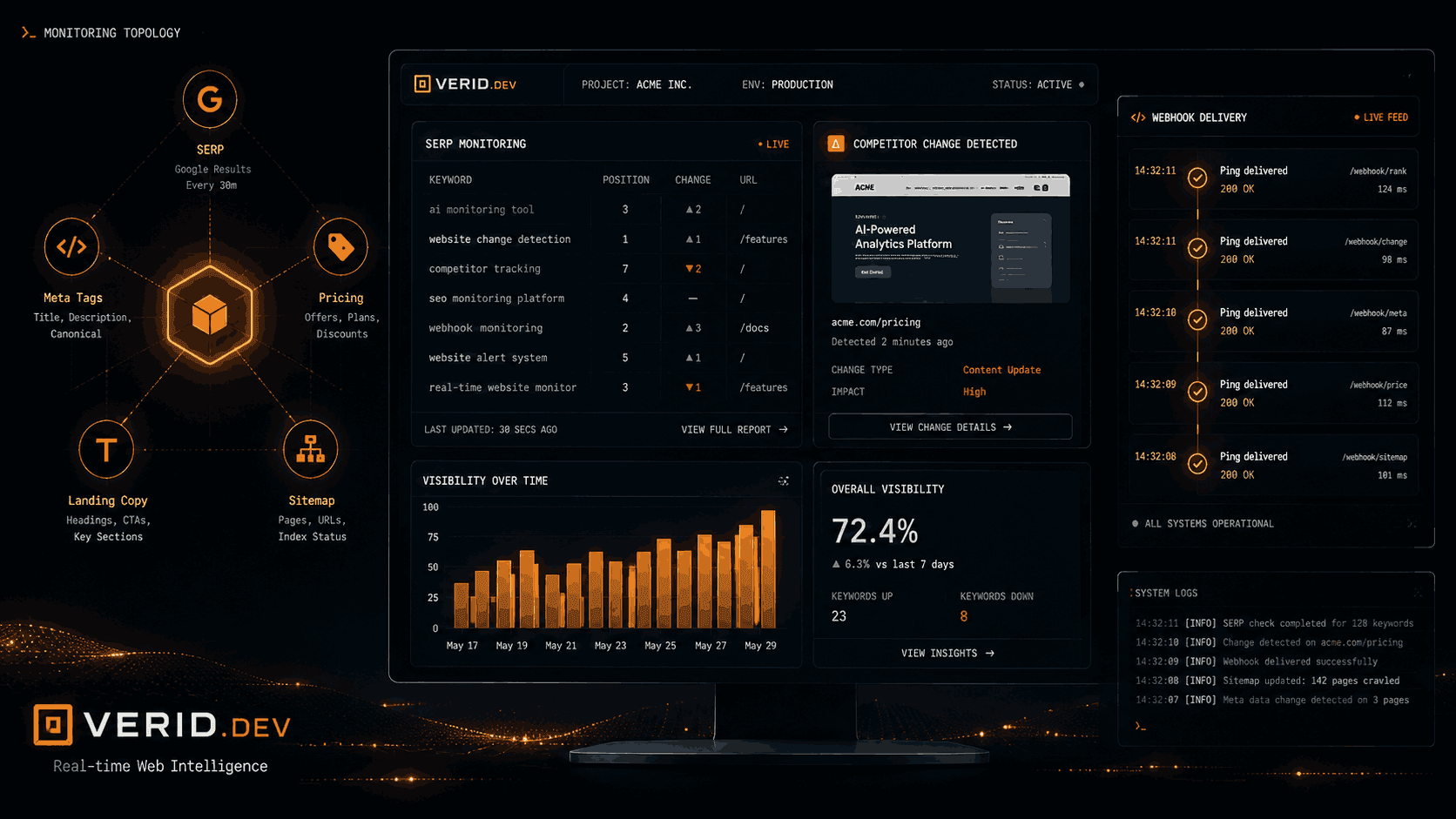
This guide shows how to build an SEO monitoring and competitor intelligence layer with Verid, a change detection API. You will watch search results with a dedicated SERP monitor, and watch competitor pages, metadata and pricing with regular page monitors. Every alert tells you what changed, what it changed from, and when.
Why SEO monitoring matters in 2026
Google's results page is no longer a plain ranked list. AI Overviews, featured snippets and People Also Ask boxes sit above or between organic listings. A position-3 ranking today can earn fewer clicks than the same position did two years ago, purely because of what appears around it.
Rank trackers report a number. That number is useful, but it leaves out the questions that explain traffic changes. Who entered the top 10 this week? Who rewrote their title and snippet? Did a competitor you ignored just jump four places?
Good SEO monitoring answers those questions as they happen. It watches three surfaces:
- The search results for the keywords that earn you revenue.
- Competitor pages: copy, metadata and pricing.
- Your own pages, where a CMS update can silently overwrite a title you spent weeks tuning.
What competitor monitoring covers
Competitor monitoring means tracking observable signals from competing sites that reveal strategy before an announcement. The signals fall into four groups:
| Signal category | What to watch | Why it matters |
|---|---|---|
| SERP positioning | Who ranks, where, and how their title and snippet read | Direct impact on your click share |
| On-page copy | Hero headline, CTA text, value proposition | Early sign of repositioning or a campaign launch |
| SEO metadata | Title tags, meta descriptions, canonical URLs | Reveals keyword targeting shifts |
| Pricing and plans | Price points, plan names, feature inclusions | Signals strategic pricing moves |
Manual checks do not scale past a handful of URLs. Screenshot-diff tools fire on noise such as cookie banners and ad rotations. And standard rank trackers miss the context around your listing. That is why SEO change monitoring works best when each signal gets the right kind of monitor.
SEO monitoring signals and the right monitor for each
Before you create anything, map your competitive surface. Here is a practical starting inventory:
| Signal | Monitor type and method | Suggested interval |
|---|---|---|
| Top results for a target keyword (who enters, leaves, rewrites a snippet) | Dedicated SERP monitor, full_analysis mode |
6 hours to daily; 10 minutes is the minimum |
| A competitor's position for a keyword | Dedicated SERP monitor, rank_tracking mode with their domain as target_domain |
Daily is a sensible default |
| Competitor homepage headline and CTA | Page monitor, CSS selectors | Every 4 to 6 hours |
| Competitor title tag and meta description | Page monitor, XPath or regex | Every 6 hours |
| Competitor pricing page | Page monitor, CSS selectors or LLM extraction | Every 4 hours |
| Competitor sitemap (new URLs) | Page monitor, regex on sitemap.xml | Daily |
The SERP rows need no selectors at all. You give the monitor a keyword, an engine, a country and a language, and it returns structured results. The page rows are different: choosing the right extraction method is what separates a precise monitor from one that fires constantly.
How Verid helps with SEO monitoring
Verid has two kinds of monitors, and SEO work uses both.
SERP monitors
A SERP monitor tracks a keyword on a search engine. Each check loads one to five result pages in a real headless browser and parses the organic results into position, title, url, domain and description. You can choose Google, Bing, Yahoo, DuckDuckGo or Yandex, and set the country and language. Google and Bing are the most tested engines.
There are two modes:
full_analysisrecords the whole result list and alerts whenever anything in it changes: a rank, a title, a snippet, or a domain entering or leaving.rank_trackingfollows onetarget_domain. It reports the domain's rank and how far it moved since the last run.
Page monitors
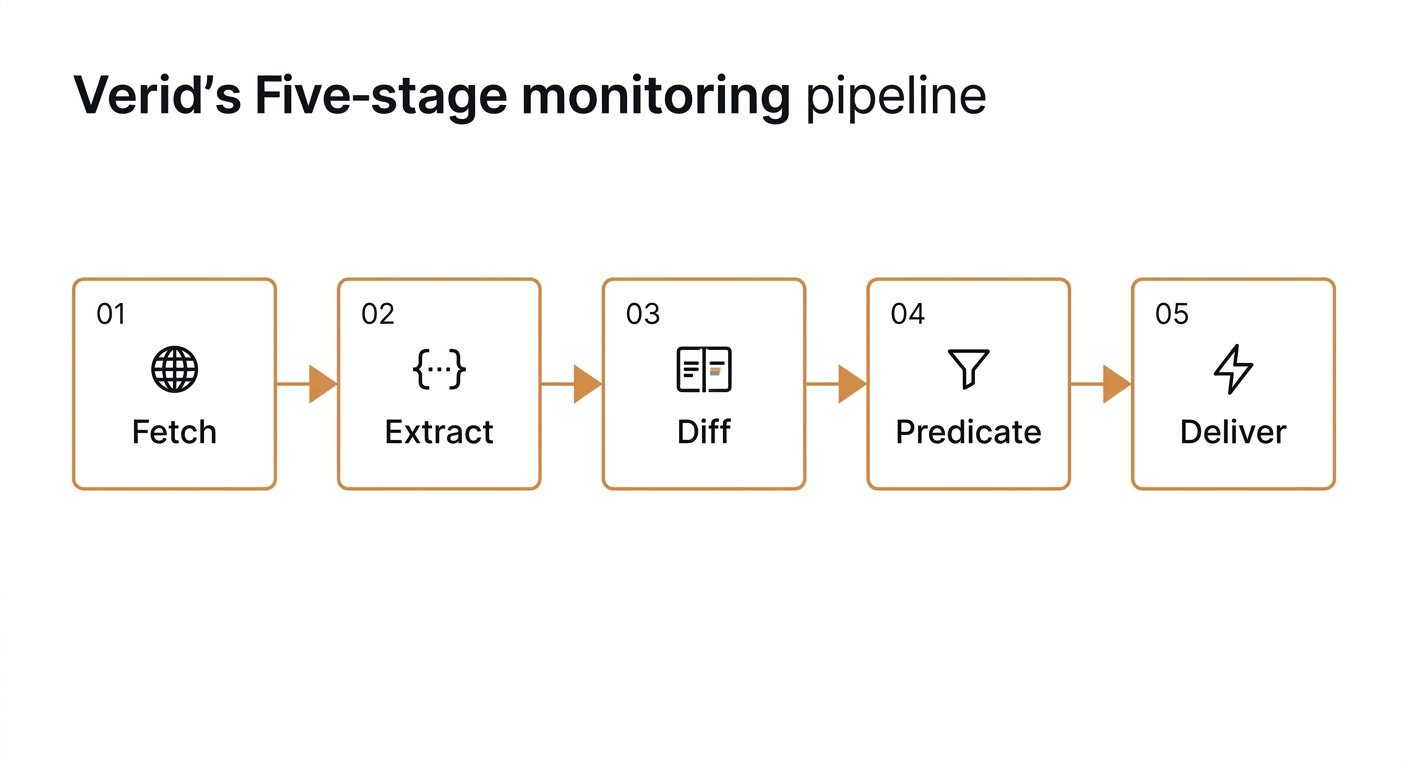
A page monitor watches a specific URL. Its pipeline has five stages: fetch, extract, diff, predicate, deliver. You choose how to pull data from the page:
- CSS selectors, XPath, JSONPath and regex for named fields.
- Full-page capture, when you only need to know that something changed.
- LLM extraction from a plain-language prompt (10 to 2,000 characters), optionally with an output schema.
Predicates decide when a change is worth an alert. You can fire on any field change, on a specific field, on a percentage or absolute increase or decrease, on a regex match, on an exact value, or on an AND/OR combination of those.
Page monitors fetch with plain HTTP first and automatically move to a stealth headless browser when the static fetch comes back empty. On Starter and above, a residential proxy is the next fallback for bot-protected sites. You can also set fetch_mode to browser to skip the static step.
Delivery
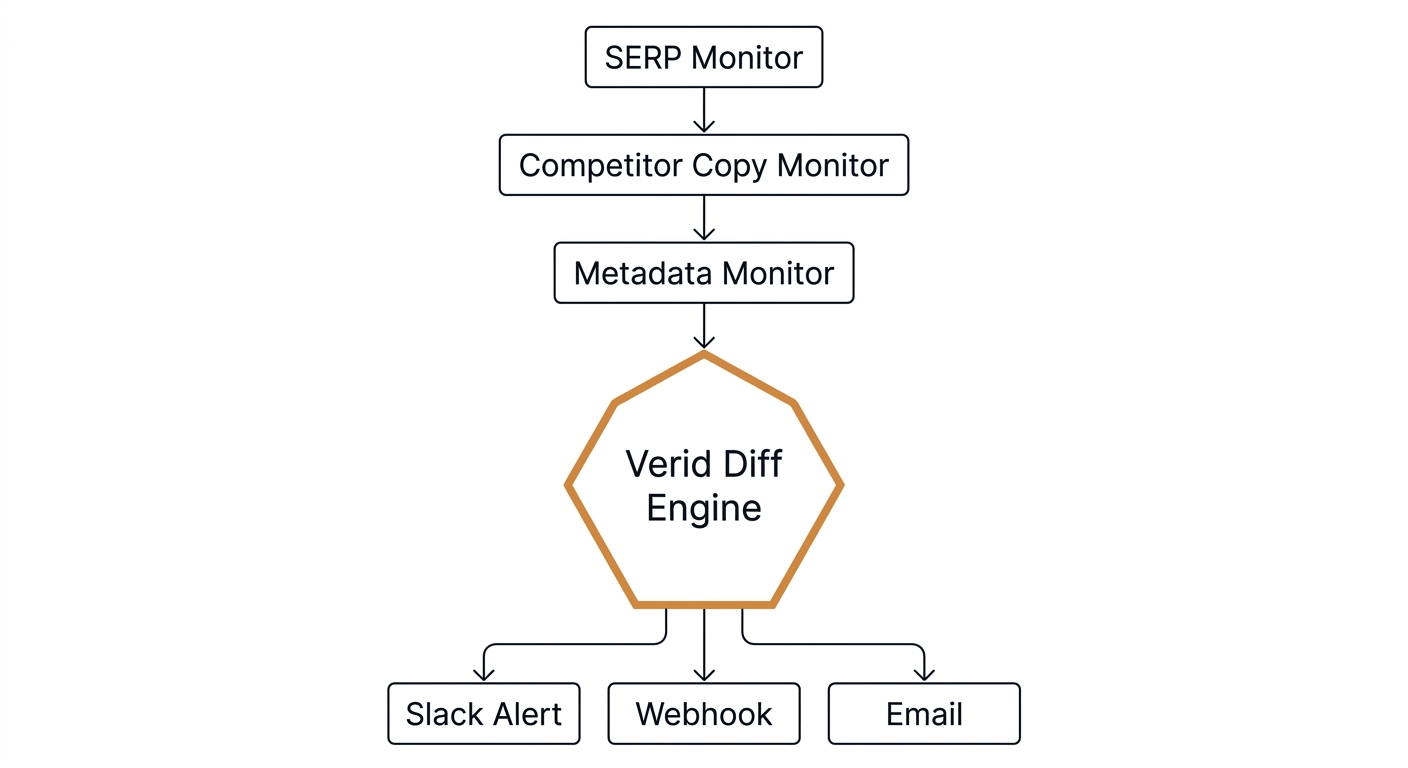
Both kinds of monitor deliver to a signed webhook, Slack, Discord or email, up to 25 destinations per monitor. Webhooks carry a Verid-Signature header with a timestamp and an HMAC-SHA256 signature, the same style Stripe uses. Failed webhook deliveries retry six times over about four hours.
SEO monitoring workflow: SERP and competitor monitoring step by step
Here is a workflow for a SaaS company that tracks a handful of commercial keywords and three competitors.
Step 1: A SERP monitor for each money keyword
Create one SERP monitor per high-value keyword. You have two ways to use it, and they answer different questions.
Watch the whole top of the results (full_analysis). This is competitor SERP monitoring in its broadest form. You see competitors enter and leave the results, and you see them rewrite titles and snippets. The alert fires when anything in the list differs from the previous comparable run. It does not fire on the first run.
Watch one competitor's position (rank_tracking). Set a competitor's domain as target_domain and add a rank_change_threshold. You get an alert when their rank moves by at least that many places, or when they enter or drop out of the results you scan. Without a threshold, the monitor records history but never alerts. target_domain matching ignores the scheme and www..
A few settings worth knowing:
pagesruns from 1 to 5, at roughly 10 results per page, so you can scan up to about the top 50.- Results are for desktop searches today.
- Location works at the country and language level, not city or postal code.
- The shortest interval is 10 minutes (600 seconds). New monitors in the dashboard default to daily.
Step 2: Competitor homepage copy monitor
Create one page monitor per competitor homepage. Use CSS selectors to pin the hero headline, sub-headline and primary CTA. Check every four to six hours, and set the predicate to fire on any field change.
Step 3: SEO metadata monitor
Create one page monitor for each high-traffic page on your own site, and mirror the setup on competitor pages you care about. Extract the title tag, meta description, canonical URL and Open Graph title with XPath. Check every six hours.
Step 4: Route alerts where your team works
Send alerts to a Slack channel with the Slack delivery type, or to your own webhook for further processing. A SERP alert from a rank_tracking monitor carries the keyword, the target domain, the new rank, the previous rank and the delta. An alert from a full_analysis monitor carries the current results and the previous results side by side, so you can diff them yourself.
Code example: SERP monitoring with the Verid API
The first request watches the full top results for one keyword. It scans three pages, checks every six hours, and posts changes to Slack.
curl -X POST https://api.verid.dev/v1/serp-monitors \
  -H "Authorization: Bearer vrd_your_api_key" \
  -H "Content-Type: application/json" \
  -d '{
    "name": "SERP - best invoicing software",
    "keyword": "best invoicing software",
    "mode": "full_analysis",
    "engine": "google",
    "location_code": "us",
    "language_code": "en",
    "pages": 3,
    "schedule_interval_seconds": 21600,
    "deliveries": [
      { "type": "slack", "webhookUrl": "https://hooks.slack.com/services/..." }
    ]
  }'
The second request follows a competitor's position for the same keyword. It alerts when the domain moves two places or more, or enters or leaves the scanned results.
curl -X POST https://api.verid.dev/v1/serp-monitors \
  -H "Authorization: Bearer vrd_your_api_key" \
  -H "Content-Type: application/json" \
  -d '{
    "name": "Rank - competitor.com on best invoicing software",
    "keyword": "best invoicing software",
    "mode": "rank_tracking",
    "target_domain": "competitor.com",
    "engine": "google",
    "location_code": "us",
    "language_code": "en",
    "pages": 2,
    "schedule_interval_seconds": 86400,
    "rank_change_threshold": 2,
    "deliveries": [
      { "type": "slack", "webhookUrl": "https://hooks.slack.com/services/..." }
    ]
  }'
For TypeScript teams, the official SDK wraps the same endpoint:
import { VeridClient } from '@verid.dev/sdk';

const client = new VeridClient({ apiKey: 'vrd_your_api_key' });

await client.serpMonitors.create({
  name: 'SERP - best invoicing software',
  keyword: 'best invoicing software',
  mode: 'full_analysis',
  engine: 'google',
  location_code: 'us',
  language_code: 'en',
  pages: 3,
  schedule_interval_seconds: 21600,
  deliveries: [
    { type: 'slack', webhookUrl: 'https://hooks.slack.com/services/...' },
  ],
});
Each run is stored. You can list them with GET /v1/serp-monitors/{id}/runs, and each run includes the organic results, the target rank and rank delta (for rank_tracking), and whether Google showed an AI Overview or a featured snippet. The dashboard also has a per-run diff page that shows what moved between two runs. You can trigger an immediate check with POST /v1/serp-monitors/{id}/run.
For page monitors, such as a competitor's metadata, the request looks like this:
curl -X POST https://api.verid.dev/v1/monitors \
  -H "Authorization: Bearer vrd_your_api_key" \
  -H "Content-Type: application/json" \
  -d '{
    "name": "Competitor metadata - competitor.com",
    "url": "https://competitor.com/",
    "schedule_interval_seconds": 21600,
    "extract_config": {
      "method": "xpath",
      "fields": {
        "title": "//title",
        "meta_description": "//meta[@name=\"description\"]/@content",
        "canonical": "//link[@rel=\"canonical\"]/@href"
      }
    },
    "diff_predicate": { "type": "any_field_changes" },
    "deliveries": [
      { "type": "slack", "webhookUrl": "https://hooks.slack.com/services/..." }
    ]
  }'
Manual vs. automated SEO monitoring
| Capability | Manual process | Screenshot tools | Verid |
|---|---|---|---|
| Search result tracking | Daily spot checks | Not designed for it | Dedicated SERP monitor, structured results, alerts on rank, title, snippet or domain changes |
| Competitor copy monitoring | Periodic page reads | Full-page screenshot | Named CSS or XPath fields, before and after values |
| Meta tag drift detection | Monthly site audits | Not supported | XPath extraction, per-page monitors |
| Pricing page changes | Ad hoc checks | Screenshot only | Field extraction with price-aware predicates |
| Delivery | Manual reporting | Email screenshot | Signed webhook, Slack, Discord, email |
| JavaScript-rendered pages | Human browser | Varies | Automatic fallback from static fetch to browser |
| Alert precision | Human judgment | Any pixel change | Fires only when your predicate is true |
Benefits for marketing teams
Marketing teams spend too much time on the checking. Verid moves the check into the background so attention goes to the response.
- Positioning changes within hours. When a competitor changes their homepage CTA from "Get a demo" to "Start free trial," that is a conversion strategy shift. A CSS extractor on the hero and CTA fields surfaces it on the next check.
- Search result changes before the traffic report. A
full_analysismonitor shows who joined the top results and whose snippet changed, so your content team can react while the change is days old, not months. - Metadata drift on your own pages. A CMS update or template change can overwrite a title you optimized. A per-page monitor catches it within hours.
Benefits for agencies
Agencies need dozens of competitor sets, with alerts routed to the right client. The REST API creates, updates, pauses and deletes both monitor types, so you can script onboarding for a new client. Each monitor has its own deliveries, so one client's alerts can land in their Slack workspace and another's in their own webhook.
Monitors are unlimited on every plan. What you pay for is runs, so the cost of a client program is predictable: a daily check of one result page uses about 30 runs a month, and a check with pages: 3 uses three runs each time.
The Verid use cases page documents blueprints for competitor price tracking, SERP monitoring, SEO metadata drift, landing page copy changes and sitemap new URL detection.
Benefits for SaaS companies
Many of the signals that matter to SaaS teams sit on pages that are JavaScript-rendered or built in React: pricing pages, comparison tables, status pages. Page monitors handle this by falling back from a static fetch to a headless browser when the first fetch returns empty fields.
For a competitor's pricing page, a CSS extractor can pull plan names and prices as typed fields, and a predicate fires the moment any of them changes. The SaaS competitor pricing monitoring use case walks through the extraction config.
Best practices for SEO monitoring with Verid
Start with the signals that cost you money. Commercial-intent keywords and competitor pricing moves have the most direct revenue impact. Cover those before informational keywords.
Pick the right SERP mode. Use full_analysis when you want to see everything that moves in the results for a keyword. Use rank_tracking with a target_domain when one named competitor is the question, and set a rank_change_threshold or you will get history but no alerts.
Use field-level predicates for competitor copy. Full-page capture fires on anything: a new cookie banner, a changed timestamp, a rotated testimonial. CSS selectors on the headline, CTA and price fire only when strategic content changes.
Set fetch_mode to browser for stubborn pages. The default auto mode already escalates when extraction comes back empty, but a known JavaScript-heavy page can skip the static attempt.
Match the country and language to your market. A SERP monitor uses a country code and a language code. Pick the pair your customers search in, and create separate monitors for each market you sell into.
Cover your own pages too. The setup that catches a competitor's title rewrite will catch an accidental rewrite on your own top 20 to 50 pages.
Schedule thoughtfully. SERP checks have a 10-minute floor, and most keywords do not need it. Daily is enough for tracking trends; shorter intervals suit launches and volatile keywords. For competitor copy, every 4 to 6 hours works well, and every 6 hours for metadata.
Conclusion
The gap in most SEO monitoring programs is not data. It is timeliness and precision. Rank trackers give you a number without context, screenshot tools drown you in noise, and DIY scrapers break whenever a site changes its markup.
Verid closes that gap with two tools. A dedicated SERP monitor watches who ranks for your keywords and alerts when the results change. Page monitors watch competitor copy, metadata and pricing, and fire only when your predicate says the change matters. Each alert arrives signed, with before and after values.
Pricing is by runs, not by monitor count. SERP monitoring is included on the "+ SERP" plans, or you can buy run credits to use it on any plan. The 14-day free trial includes SERP runs and needs no credit card.
Start your 14-day free trial of Verid and set up your first SERP monitor in a few minutes.
Frequently asked questions
What is SEO monitoring, and why does it matter in 2026?
SEO monitoring is the practice of tracking signals that affect your organic visibility: keyword rankings, who else appears in the results, on-page metadata, and competitor positioning. It matters more now because the results page has more features competing for clicks, and a rank number alone does not explain why traffic moved.
How is Verid different from Semrush or Ahrefs for competitor tracking?
Semrush and Ahrefs are broad SEO platforms built around backlink databases, keyword research and historical rank tracking. Verid is a change detection API. It watches the results for a keyword and any URL you choose, and alerts you when something changes, with the exact before and after values. The two approaches complement each other.
Can Verid monitor Google SERPs for AI Overviews and featured snippets?
Partly. Each Google run records whether an AI Overview and a featured snippet were present, as ai_overview_present and featured_snippet_present on the run. Those flags are informational. Alerts fire on changes to the organic results (a rank, a title, a snippet description, a domain entering or leaving), not when an AI Overview appears. Verid does not capture the AI Overview text.
Can I track a competitor's ranking for a keyword?
Yes. Create a SERP monitor in rank_tracking mode, set the competitor's domain as target_domain, and set a rank_change_threshold. Each run reports the domain's rank and the change since the previous run, and you get an alert when it moves far enough or enters or leaves the results.
What is the shortest SERP check interval?
10 minutes (600 seconds), on every plan. New monitors in the dashboard default to daily. Each result page you read counts as one run, so a three-page check uses three runs.
Can I check rankings for a specific city or on mobile?
No. Location is set by country and language, and results are for desktop searches today.
Does Verid handle JavaScript-rendered competitor pages?
Yes. Page monitors start with a plain HTTP fetch and automatically move to a stealth headless browser if extraction returns empty fields. On Starter and above, a residential proxy is a further fallback for bot-protected sites. You can also force browser fetching with fetch_mode: "browser".
About the author

Software Engineer & Technical Writer
Hanzala is a software engineer and technical writer covering web monitoring, automation and API design. He builds the integrations he documents, which is why the code samples in his posts tend to work on the first try.
More from HANZALA SALEEM →Related posts
How to Track When a Competitor Switches Their Tech Stack (Without Checking Manually Every Week)
Stop manually re-checking BuiltWith. Learn how to get alerted the moment a competitor's site changes its tech stack, with a real workflow.
Read the post →competitor monitoringHow to Detect When a Competitor Changes Their Pricing Page Automatically
Learn how to detect competitor pricing page changes automatically using field level extraction, predicates, and webhook alerts with Verid.
Read the post →competitor monitoringHow to Monitor Multiple Competitor Pages at Scale Without a Scraper
Learn how to track 50+ competitor pages using a change detection API, smart predicates, and webhooks. No scraping infrastructure required.
Read the post →competitor monitoringBest Competitor Monitoring Tools for SaaS Companies in 2026
Compare 9 competitor monitoring tools for SaaS teams in 2026, from five-figure CI suites to API-based pricing page monitors like Verid.
Read the post →