The Hidden Cost of DIY Website Monitoring: A Build vs Buy Cost Analysis
You can build a website monitor in an afternoon. A cron job, a fetch call, a diff against yesterday's HTML, maybe a Slack webhook if you're feeling fancy. It works. You ship it, close the ticket, and move on.
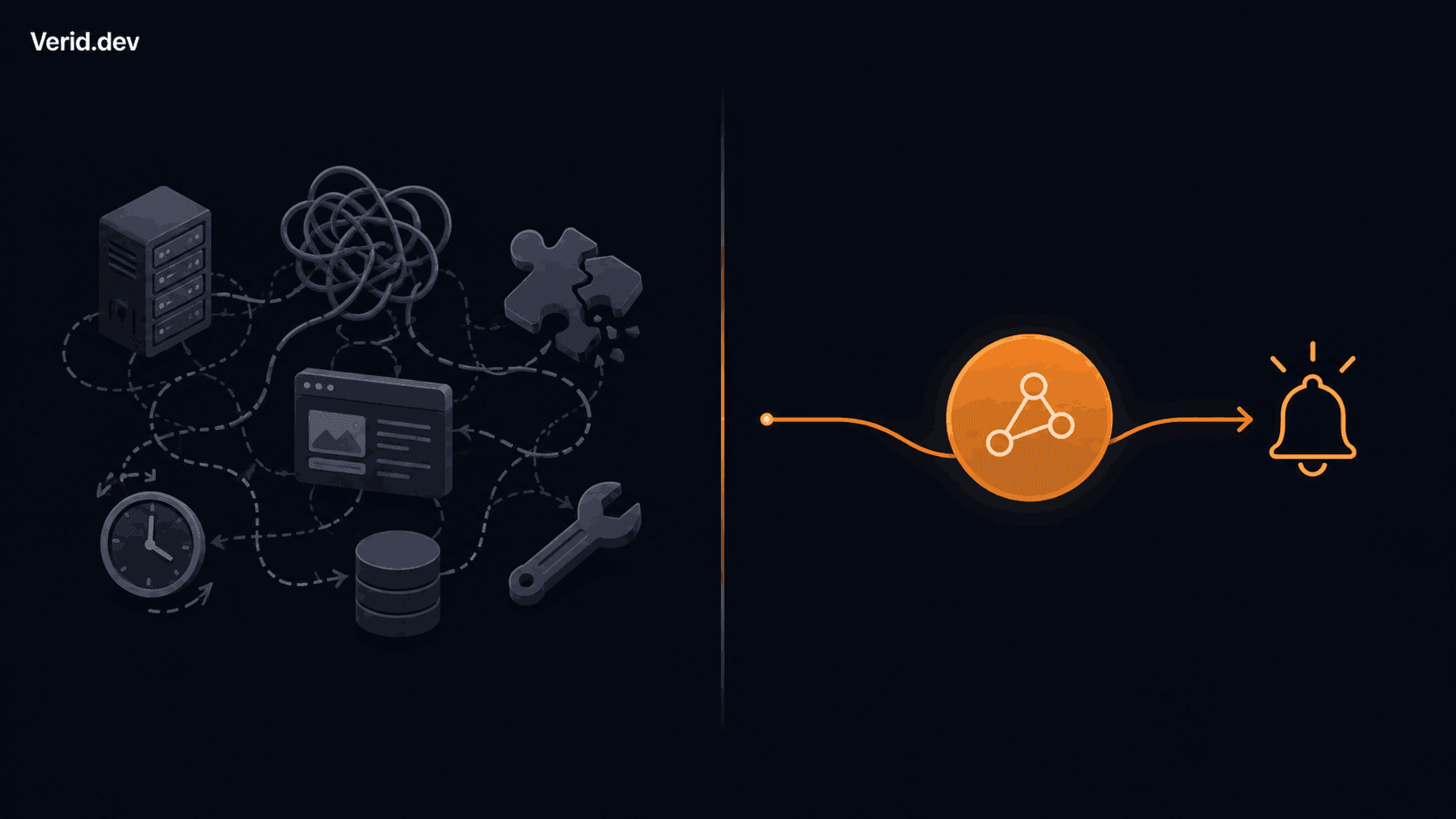
Then, three months later, the target site redesigns its product page and your selector starts returning null. Then someone on the team asks for a Discord alert instead of email. Then you need to watch twelve URLs instead of two, and half of them are JavaScript-rendered SPAs that your fetch() call can't see. Then the site puts up a bot check and your monitor goes dark for a week before anyone notices.
None of this shows up in the original estimate, because the original estimate was for the happy path. This article breaks down where the real cost of DIY website monitoring hides, what a managed alternative like Verid actually replaces, and how to make the build vs buy call with numbers instead of gut feel.
Why teams build their own monitoring in the first place
The instinct to build is usually reasonable at the starting line. A single monitor is genuinely a small amount of code: fetch a URL, extract a value with a regex or a CSS selector, compare it to the last run, fire a webhook if it changed. There's no obvious reason to pay for something that fits in fifty lines.
It's also a trust issue. Teams that live in code are naturally suspicious of "just use a SaaS tool" advice, and for good reason. Vendor lock-in is real, and a monitoring script that lives in your own repo never has a pricing page that changes on you.
The problem isn't the first monitor. It's the tenth, the twentieth, and the one that has to survive a site redesign without a human noticing at 2 a.m.
The hidden costs nobody puts in the sprint estimate
Engineering maintenance time
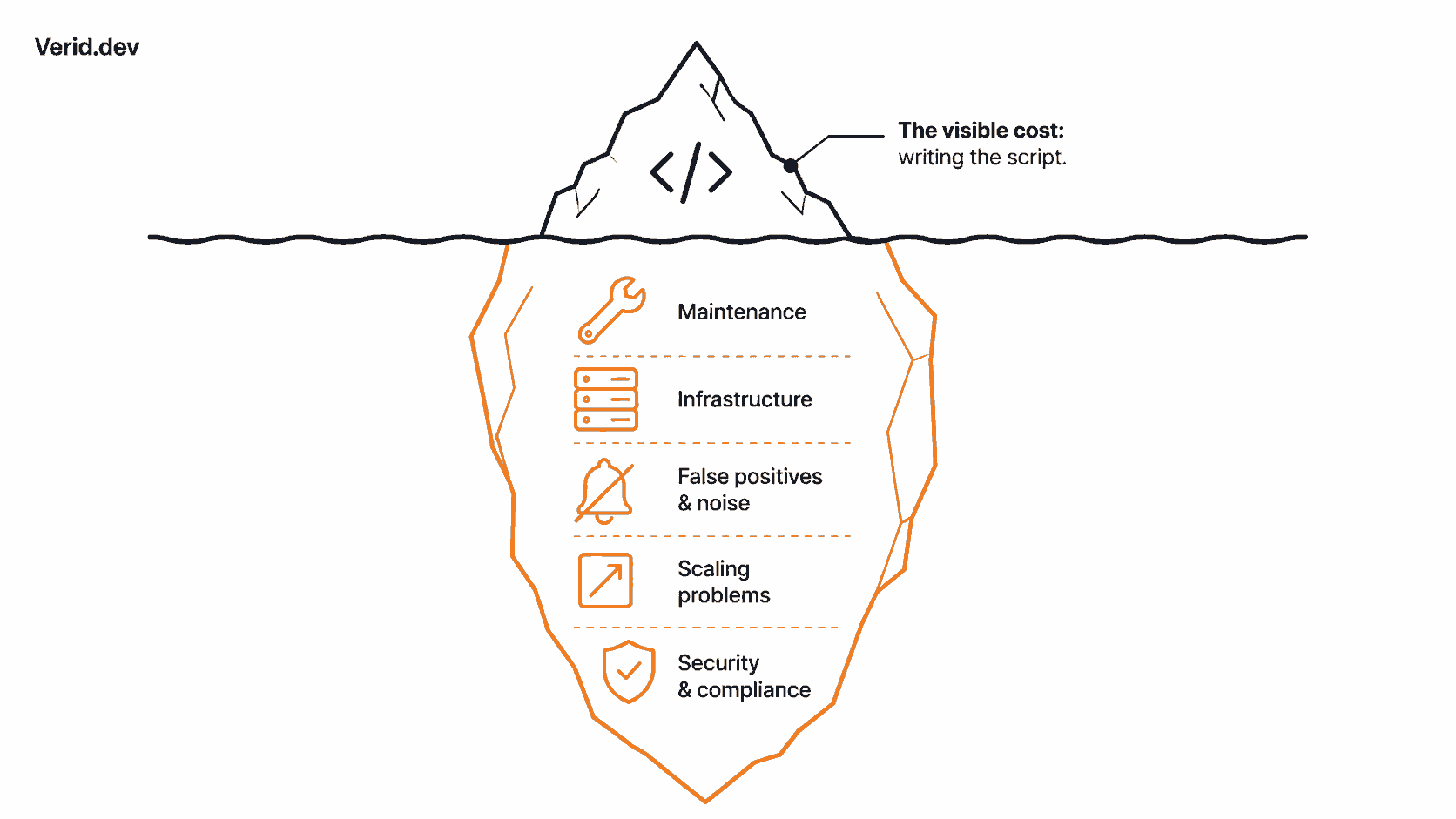
A scraping and monitoring stack does not stay finished. Every dependent site can change its markup, rotate its anti-bot defenses, or move a value from one endpoint to another, and each of those events breaks something you own. Independent cost analyses of in-house scraping infrastructure consistently land on the same pattern: the initial build is rarely the largest line item, since ongoing maintenance work like proxy management, anti-bot updates, and DOM change fixes tends to run two to three times the original build cost by the second year. Selector maintenance is quiet work. It doesn't show up as a feature in the changelog, but it consumes real sprint capacity, and it's the first thing that gets deprioritized when a launch is due, which is exactly when a monitor silently stops working.
Infrastructure costs
Scheduling, retry logic, state storage, and diff history all need somewhere to run. For a handful of URLs on a shared box, this is nearly free. It stops being free the moment a target site requires headless browser rendering or blocks your server's IP range, because now you're managing a browser farm, proxy rotation, and the queueing logic to keep it from falling over. None of that is exotic engineering, but all of it is undifferentiated work that has nothing to do with the reason you started monitoring the site in the first place.
False positives and alert noise
This is the cost that erodes trust in a monitoring system fastest. A monitor that fires on every byte change will alert on a rotating ad banner, a timestamp in the footer, or an A/B test cookie, and after the third false alarm, people stop reading the alerts. That's worse than having no monitor at all, because now a real change can hide inside noise everyone has learned to ignore. Getting from "something changed" to "something worth acting on changed" means building field-level diffing and threshold logic, which is a meaningfully harder problem than the initial fetch-and-compare script most teams start with.
Scaling problems
Five monitors and fifty monitors are different systems. At five, a single script with a cron entry is fine. At fifty, you need a scheduler that respects rate limits per domain, a way to track which monitors are healthy versus silently failing, and a delivery layer that can retry a webhook without duplicating alerts. Teams that skip this step tend to find out the hard way, usually when a monitor that "used to work" turns out to have been failing silently for weeks.
Security and compliance considerations
Webhook delivery introduces its own risk surface. An unsigned webhook can be spoofed, and a receiving endpoint that doesn't verify a signature has no way to know an incoming "price changed" event is genuine. The OWASP API Security Project treats broken authentication and insufficient monitoring as recurring, high-impact API risk categories for exactly this reason. Compliance teams watching regulatory or policy pages have an added obligation to prove a monitor actually ran and captured the page state, which means retaining history, not just the latest snapshot. That's a second system to build and maintain on top of the first.
DIY vs managed monitoring: feature by feature
| Capability | DIY scraper | Screenshot / no-code tools | Verid |
|---|---|---|---|
| Structured field extraction | Yes, you write every extractor | No, pixel diffs only | Yes, 6 methods (CSS, XPath, JSONPath, regex, full-page hash, LLM) |
| Alert only on meaningful change | You write the predicate logic | No, fires on any visual change | 9 predicate types, including composite AND/OR |
| Field-level diff history | You build and store it | Image diffs only | Per-field before/after on every run |
| JS-heavy or bot-protected sites | You add a headless browser and proxies | Limited | Auto-escalates: static fetch to headless browser to residential proxy |
| Signed webhook delivery | You write the retry and signing logic | Email or Slack only, usually unsigned | HMAC-SHA256 signed, 6 retries with backoff, dead-letter queue |
| Time to first working alert | Days to weeks | Minutes, then noise | Minutes, and quiet by default |
The real cost comparison
Numbers vary by team size and target complexity, but the shape of the curve is consistent across independent cost analyses of in-house scraping and monitoring infrastructure. One 2026 pricing analysis puts the fully-loaded cost of an in-house scraping solution run by a three-person engineering team at $80,000 to $150,000 annually once salaries, infrastructure, and maintenance are counted, and that figure is for data collection generally, before adding the diffing, predicate, and alerting layer that turns raw scraped data into something a team can act on.
For a small team watching a handful of URLs, the comparison looks different but the pattern holds:
| Cost category | DIY (small team, ~10 monitors) | Verid Pro plan |
|---|---|---|
| Initial build time | 1-3 days of engineering time | Minutes, config-driven |
| Monthly infrastructure | Server, storage, possible proxy costs | Included |
| Ongoing maintenance | Selector fixes, retry logic, on-call for silent failures | Handled by the platform |
| Alerting reliability | You build retries, signing, and dead-letter handling | HMAC-signed webhooks, 6 retries with backoff, dead-letter queue |
| Monthly cost | Variable, often underestimated | $49/mo for 15,000 runs a month, unlimited monitors, 365-day history |
The gap widens as monitor count grows, because DIY cost scales with engineering hours while a managed platform's cost scales with a published price list. Verid's pricing page lays out exactly where that ceiling sits: a 14-day free trial with no credit card required, then paid plans from $9/month for 1,000 runs, where each tier adds monthly runs, history depth, and delivery endpoints rather than gating features behind an enterprise sales call.
When DIY genuinely makes sense
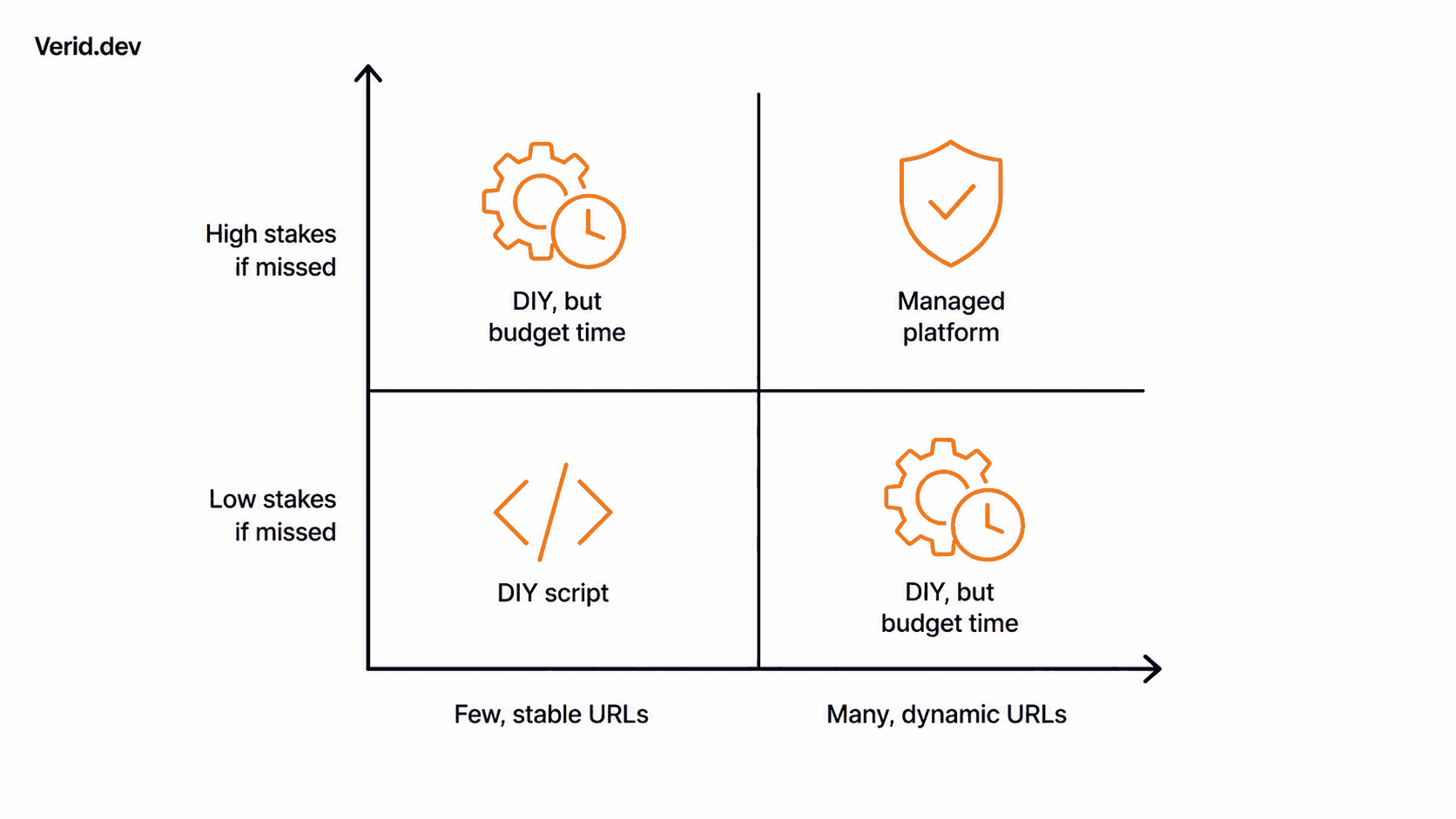
Buying isn't automatically correct. A script makes sense when you're watching one or two stable, low-traffic pages with no anti-bot protection, when a daily or weekly check is fast enough, and when the person maintaining it is comfortable owning that as an ongoing responsibility rather than a one-time project. If the target format never changes and nobody will notice a missed alert for a day, the ROI case for a managed tool is weak. Build it, and revisit the decision when the monitor count or the stakes change.
When buying is the smarter choice
The calculus flips once any of these become true: the sites you're watching use JavaScript rendering or bot protection, a missed or delayed alert has a real cost (a stockout, a compliance deadline, a competitor price move you react to a day late), you're watching more than a handful of URLs, or the team maintaining the monitor has better things to do than fix selectors on a Sunday. At that point you're not really deciding between "build" and "buy a tool." You're deciding whether to build a scheduler, a diff engine, a predicate system, and a signed delivery pipeline yourself, or use one that's already running.
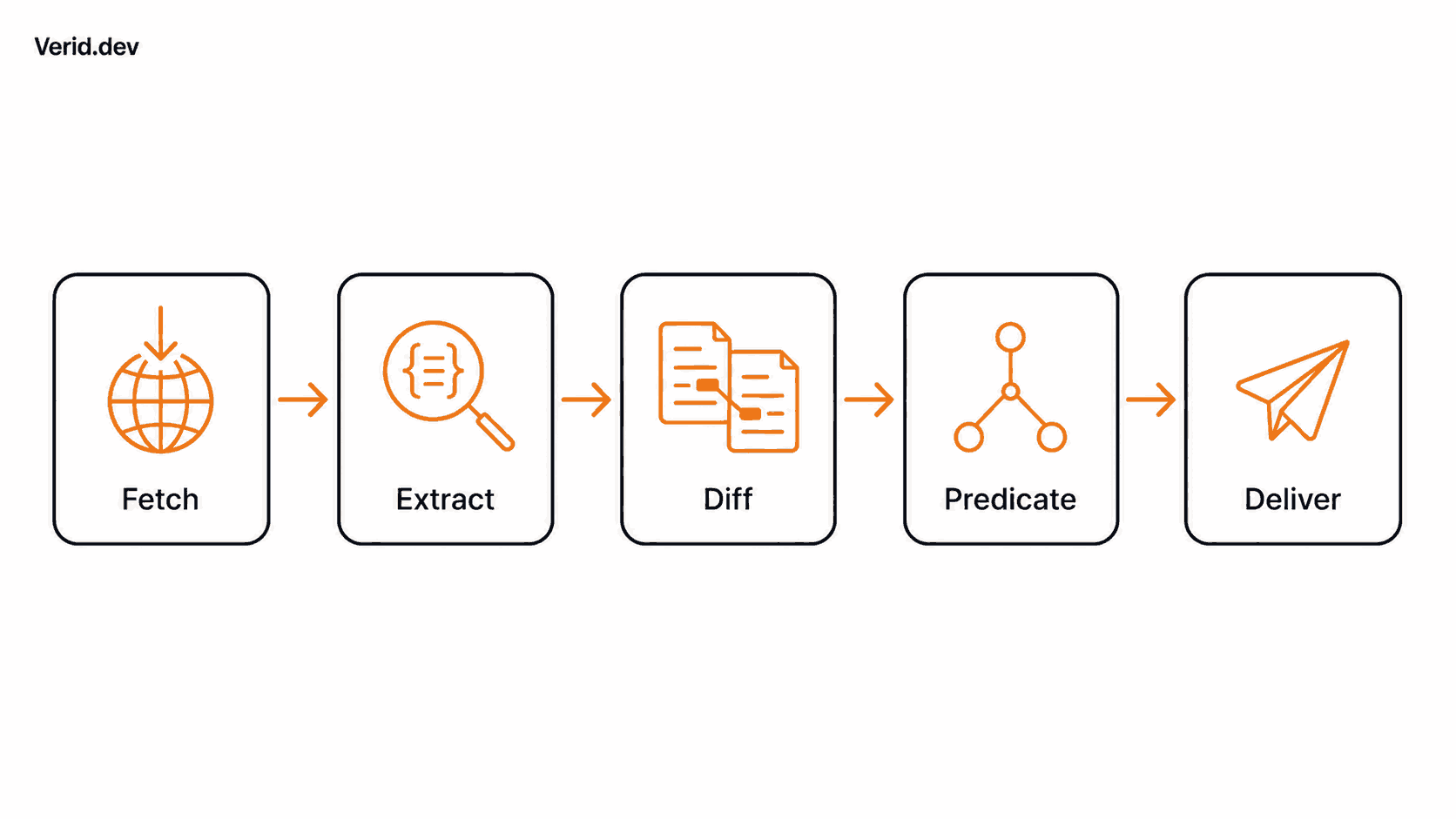
Verid's core loop is built around exactly that gap: fetch, extract, diff, predicate, and deliver in one pipeline, with the fetch layer auto-escalating from a static request to a headless browser to a residential proxy depending on what the target site requires. You write the config; the infrastructure underneath is already built.
curl -X POST https://api.verid.dev/v1/monitors \
  -H "Authorization: Bearer $VERID_API_KEY" \
  -H "Content-Type: application/json" \
  -d '{
    "name": "Competitor price watch",
    "url": "https://example.com/product",
    "schedule_interval_seconds": 3600,
    "extract_config": {
      "method": "css",
      "fields": { "price": ".product-price" }
    },
    "diff_predicate": {
      "type": "field_decreases_by_percent",
      "field": "price",
      "threshold": 10
    },
    "deliveries": [
      { "type": "webhook", "url": "https://your-app.com/webhooks/verid" }
    ]
  }'
That single request replaces a scheduler, a CSS extractor, a percentage-threshold comparator, and a webhook dispatcher. Verifying the webhook is equally direct, and it matters: an unsigned "price changed" payload hitting your endpoint is not something you should trust without checking it first.
import { createHmac, timingSafeEqual } from 'crypto';

function verifyWebhook(header, rawBody, secret, toleranceSecs = 300) {
  const parts = Object.fromEntries(header.split(',').map((p) => p.split('=')));
  const timestamp = parseInt(parts['t'] ?? '0', 10);
  const signature = parts['v1'];
  if (!timestamp || !signature) return false;
  if (Math.abs(Date.now() / 1000 - timestamp) > toleranceSecs) return false;

  const expected = createHmac('sha256', secret)
    .update(`${timestamp}.${rawBody}`)
    .digest('hex');
  return timingSafeEqual(Buffer.from(expected, 'hex'), Buffer.from(signature, 'hex'));
}
This is the same signing pattern used by Stripe's webhook signatures, a timestamped HMAC over the raw payload, which is worth knowing if your team already has verification middleware built for Stripe events. See the full webhook verification guide for Python, Ruby, Go, and PHP equivalents, or the Node.js SDK if you'd rather skip raw HTTP entirely.
A simple ROI framework
You don't need a finance degree to make this decision defensibly. Three questions get you most of the way there:
- What does an engineering hour cost your team, fully loaded? Include salary, benefits, and overhead, not just base pay.
- How many hours per month does the monitor actually consume? Count initial build, selector fixes after site changes, on-call time for silent failures, and any manual "did this actually run" checks. Teams routinely underestimate this line item because the hours are scattered across the month instead of billed as one project.
- What does a missed or delayed alert cost once, realistically? A missed restock alert, a late competitor price reaction, or a compliance deadline caught a day late all have a dollar value, even if it's an estimate.
If (engineering hours x hourly cost) plus the expected cost of a missed alert exceeds the price of a managed plan, buying wins on pure economics, before even counting the time your team gets back for work that actually differentiates the product.
Best practices either way
If you build, invest in field-level diffing before you invest in more monitors. A predicate-based alert ("price dropped 10%+") is worth more than ten more URLs added to a system that still fires on cookie banners. Log every run, not just the failures, so you can tell the difference between "nothing changed" and "the monitor stopped running." And sign every webhook you send, even internally.
If you buy, start with the free trial before committing to volume. Verid's use case library covers 31 documented patterns, from competitor price tracking to GitHub release monitoring to status page incident detection, each with a working extractor and predicate you can copy rather than design from scratch.
Conclusion
DIY website monitoring is never actually free. It's a small, deferred, and easy-to-underestimate ongoing commitment of engineering time, and that time comes due exactly when you can least afford to spend it: when a site changes its markup during a launch week, when a missed alert costs real money, or when the person who wrote the original script has moved to another team. A single monitor watching a stable page is a reasonable thing to build. A system that has to stay reliable across dozens of sites, JavaScript rendering, bot protection, and signed delivery is a different project, and it's worth pricing it as one before deciding to own it.
Verid exists for the second case: structured extraction, field-level diffing, predicate-based alerting, and signed webhook delivery in one API call, with a 14-day free trial that costs nothing before you commit either way.
Frequently Asked Questions
Is it cheaper to build my own website monitoring tool or use a service like Verid?
For one or two stable pages checked infrequently, a small script is genuinely cheaper. Once you're watching more than a handful of URLs, dealing with JavaScript-rendered pages, or need alerts you can actually trust (not just "something changed" noise), the engineering time to build and maintain that reliably tends to exceed the cost of a managed plan. Verid's 14-day free trial covers unlimited monitors and 200 runs with no credit card, which makes it straightforward to compare both approaches side by side before committing.
What's the difference between website monitoring and web scraping?
Web scraping is about collecting data from a page at a point in time. Website monitoring is about watching a page over time and getting notified when a specific value changes in a way that matters. A scraper gives you a snapshot; a monitor needs scheduling, state storage from the last run, a diff against that state, and predicate logic to decide whether the change is worth an alert. Verid's change detection features are built specifically around that predicate layer, rather than treating monitoring as a scraper run on a timer.
Why do DIY monitoring scripts break so often?
Most break because they rely on a single extraction method, usually a CSS selector, against a page the target site can redesign at any time without notice. A selector that pointed at .product-price today can point at nothing after a front-end refresh. Sites with anti-bot protection add a second failure mode: a static HTTP request that used to work can start returning a CAPTCHA page instead of content. Resilient monitoring generally needs a fallback extraction method (an AI-based extractor is one option) and a fetch layer that can escalate from a plain request to a headless browser when the simple approach stops working.
How do I stop a monitoring system from sending too many false alerts?
Move from "alert on any change" to "alert on a specific condition." Instead of watching a whole page for byte-level differences, extract the exact field you care about (price, stock status, a version number) and define a rule for when it matters, such as a percentage drop, a value crossing a threshold, or a regex match. Verid supports 9 predicate types, including composite AND/OR conditions, specifically so alerts fire on meaningful state changes rather than every cosmetic edit to a page.
About the author

Software Engineer & Technical Writer
Hanzala works as a software engineer and technical writer. He documents Verid’s API and SDK while building against them, and writes tutorials on monitoring pages, parsing structured data, and wiring alerts into tools a team already uses.
More from HANZALA SALEEM →Related posts
How to Track When a Competitor Switches Their Tech Stack (Without Checking Manually Every Week)
Stop manually re-checking BuiltWith. Learn how to get alerted the moment a competitor's site changes its tech stack, with a real workflow.
Read the post →how-toHow to Monitor PyPI Packages for Security Updates and New Releases
Learn how to monitor PyPI packages for CVEs, security advisories, and new releases using JSONPath, webhooks, and automated alerts with Verid.
Read the post →Developer & DevOpsJSONPath Expressions: The Complete Developer Reference
Learn JSONPath syntax, operators, filters, and wildcards with real API examples. Master JSON querying and use it to monitor live data with Verid.
Read the post →change detectionFree Website Change Monitors Compared (No Card Required)
Compare free website change monitors that need no credit card. Real limits, check frequency, and which tool actually fits your use case.
Read the post →