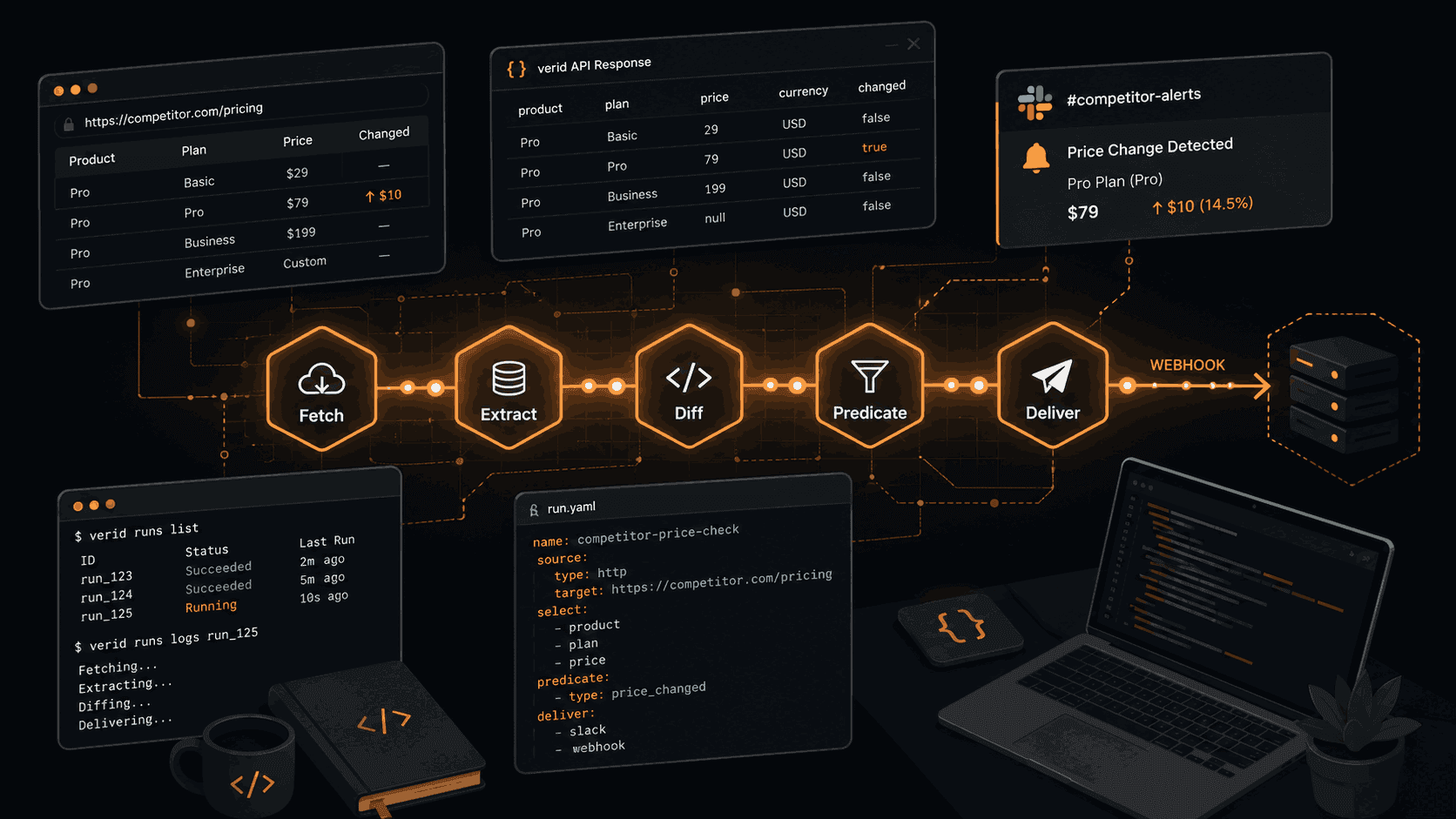
Competitive Intelligence Automation: 7 Developer Workflows You Can Ship Today
Most product teams check competitor sites the same way they have for fifteen years. Someone opens a tab on Monday morning, scrolls through a pricing page, and pastes a number into a spreadsheet. By Wednesday that number is stale, and by Friday a competitor ran a flash sale nobody noticed.
The problem is not effort. The problem is architecture. Manual checks are fundamentally polling at human speed in a market that moves faster than humans can watch.
This post covers seven competitive intelligence workflows you can build today using Verid's web change detection API. Each one replaces a recurring manual task with a webhook-driven pipeline that fires only when something actually matters.
Why Manual Competitive Monitoring Breaks Down
There is a specific failure pattern to manual CI. You check the things you remember, at intervals you find convenient, through whatever method you had time to set up. Three things go wrong:
Coverage gaps. You monitor five competitor URLs when you should be watching fifty. Nobody adds new URLs to the list because there is no system.
Reaction lag. A competitor drops their enterprise plan price on a Tuesday at 11pm. Your team finds out Thursday when a prospect brings it up on a call.
Alert fatigue from noise. If you do automate, screenshot diff tools fire on cookie banners, ad rotations, and auto-refreshing timestamps. After a week your team stops reading the alerts.
The fix is structured extraction combined with predicate-based delivery. Instead of "tell me when the page looks different," you tell the system "fire a webhook when the price field drops by more than 5%, and only then."
That is what Verid does. It extracts named fields from any URL, diffs field values between runs, and delivers a signed webhook payload only when the predicate you defined returns true. Six extraction methods, nine predicate types, and a three-layer fetch stack (static, headless browser, residential proxy) that handles bot-protected pages automatically.
The 7 Workflows
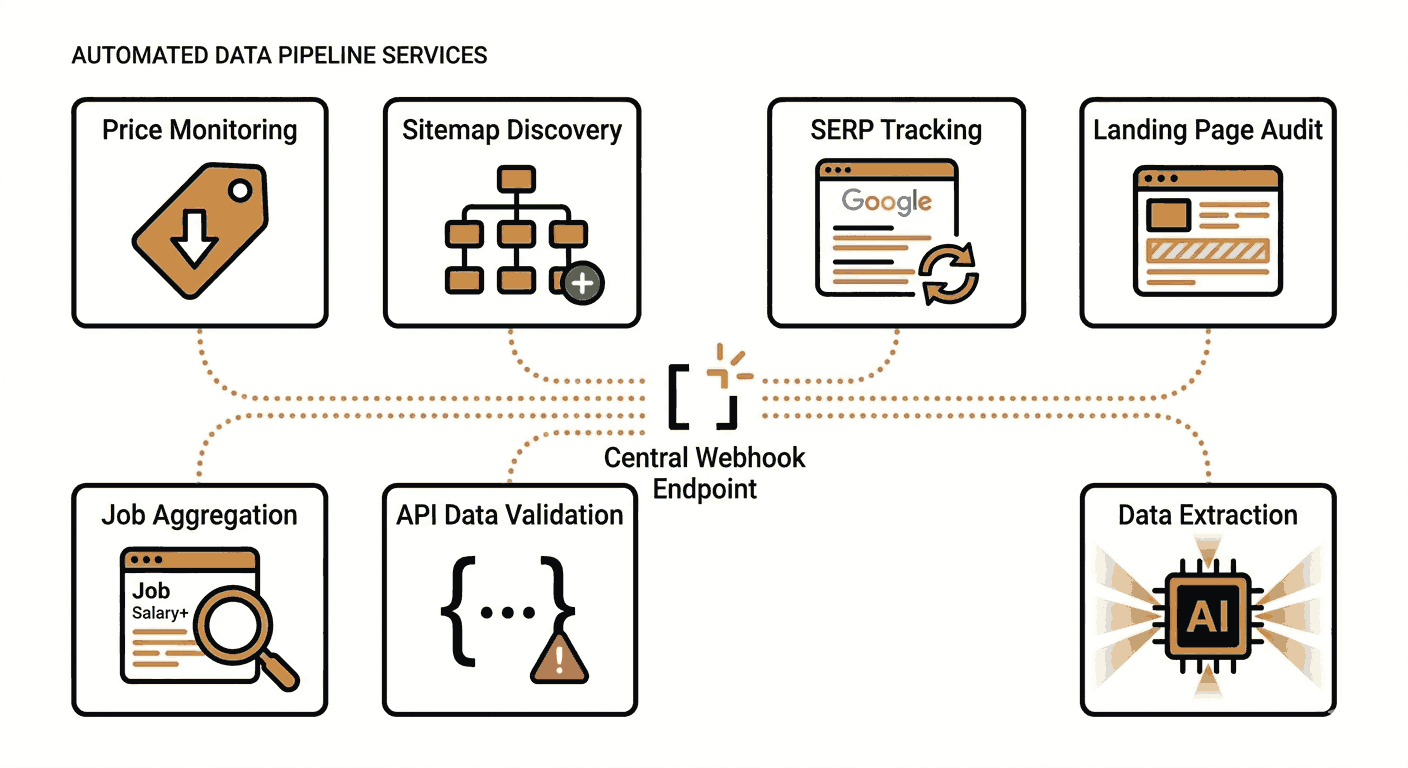
1. Competitor Price Monitoring
What it does: Watches a competitor's product page for price changes and fires an alert the moment the number moves.
Why it matters: Repricing decisions have a direct revenue impact. Every hour of reaction lag is inventory sold at sub-optimal margin or lost to a competitor who moved faster. Ecommerce teams using automated price monitoring consistently report that manual workflows miss time-sensitive promotions entirely.
How to build it: Use CSS extraction to pull the price field, then apply field_changes or field_decreases_by_percent as your predicate.
curl -X POST https://api.verid.dev/v1/monitors \
  -H "Authorization: Bearer $VERID_API_KEY" \
  -H "Content-Type: application/json" \
  -d '{
    "name": "Competitor - Laptop Pro 14",
    "url": "https://competitor.com/products/laptop-pro-14",
    "schedule_interval_seconds": 1800,
    "extract_config": {
      "method": "css",
      "fields": {
        "price": ".product-price .current",
        "availability": ".stock-status"
      }
    },
    "diff_predicate": {
      "type": "composite",
      "operator": "AND",
      "conditions": [
        { "type": "field_decreases_by_percent", "field": "price", "threshold": 5 },
        { "type": "field_equals", "field": "availability", "value": "In stock" }
      ]
    },
    "deliveries": [
      { "type": "slack", "webhookUrl": "https://hooks.slack.com/services/..." }
    ]
  }'
This composite predicate only fires when the price drops by 5% or more AND the item is still in stock. That filters out end-of-life clearances you do not need to match.
Best practices: Build one monitor per competitor SKU, not one per store. Clean diffs require clean scope. If the site is JavaScript-rendered, add "fetch_mode": "browser" to the request. Note that CSS-extracted prices with currency symbols like $1,299.00 will not satisfy numeric percent predicates since the string parses as NaN. Use field_changes in that case and apply your threshold logic in the webhook consumer. See Verid's competitor price tracking use case for the full pattern.
2. Competitor Content Publishing Tracker
What it does: Watches a competitor's sitemap for new URLs and fires whenever they publish something new.
Why it matters: A competitor's sitemap is the most reliable leading indicator of their content strategy. New landing pages signal new customer segments they are targeting. New blog posts reveal which keywords they are chasing. You find out in hours, not weeks.
How to build it: Use regex extraction to count <loc> tags in the sitemap XML, then use field_increases_by_absolute to trigger on any addition.
curl -X POST https://api.verid.dev/v1/monitors \
  -H "Authorization: Bearer $VERID_API_KEY" \
  -H "Content-Type: application/json" \
  -d '{
    "name": "Competitor Blog New Posts",
    "url": "https://competitor.com/sitemap.xml",
    "schedule_interval_seconds": 86400,
    "extract_config": {
      "method": "regex",
      "fields": {
        "url_count": "<loc>"
      }
    },
    "diff_predicate": {
      "type": "field_increases_by_absolute",
      "field": "url_count",
      "threshold": 1
    },
    "deliveries": [
      { "type": "webhook", "url": "https://your-app.com/hooks/sitemap" }
    ]
  }'
The regex extractor counts occurrences of <loc> with no capture group, returning an integer. When that count grows by at least one, the webhook fires. You can also use the built-in template: POST /v1/monitors/from-template/sitemap-new-url with just the URL and delivery config.
Best practices: Daily checks are enough for most content teams. For competitors who publish frequently, drop schedule_interval_seconds to 3600. Parse the webhook payload in your consumer to extract the actual new URLs from the sitemap directly.
3. SERP Ranking and AI Overview Monitor
What it does: Watches a Google search results page for shifts in the top organic result, featured snippet, and AI Overview.
Why it matters: When a competitor jumps to position one for a keyword you care about, or when their content gets picked up in an AI Overview that yours does not, that is traffic moving away from you in real time. Knowing within hours instead of weeks changes what you can do about it.
How to build it: Use XPath extraction with fetch_mode: "browser" since Google renders results client-side.
curl -X POST https://api.verid.dev/v1/monitors \
  -H "Authorization: Bearer $VERID_API_KEY" \
  -H "Content-Type: application/json" \
  -d '{
    "name": "SERP - best project management software",
    "url": "https://www.google.com/search?q=best+project+management+software&hl=en&gl=us&pws=0",
    "fetch_mode": "browser",
    "schedule_interval_seconds": 3600,
    "extract_config": {
      "method": "xpath",
      "fields": {
        "top_result_title":  "(//div[@id=\"search\"]//h3)[1]",
        "top_result_url":    "(//div[@id=\"search\"]//a[h3])[1]/@href",
        "ai_overview":       "//div[contains(@aria-label,\"AI Overview\")]",
        "featured_snippet":  "//div[@data-attrid=\"wa:/description\"]"
      }
    },
    "diff_predicate": { "type": "any_field_changes" },
    "deliveries": [
      { "type": "webhook", "url": "https://your-app.com/hooks/serp-shift" }
    ]
  }'
Pin pws=0 in the URL to disable personalization, otherwise results vary between runs for non-content reasons. See Verid's SERP monitoring recipe for notes on geo routing with the residential proxy layer.
Best practices: Google's HTML structure changes. Expect to update your XPath selectors a few times a year. Use any_field_changes as the predicate since you want to know about any shift in the tracked fields. One monitor per keyword you care about. See SERP monitoring use case for the full payload.
4. Competitor Landing Page and Messaging Tracker
What it does: Detects changes to a competitor's headline, positioning statement, or CTA on key marketing pages.
Why it matters: When a competitor rewrites their homepage headline, they are usually reacting to something. A new customer segment. A positioning test. A response to win-loss feedback. That signal is worth knowing about.
How to build it: LLM extraction handles this well because marketing copy sits in inconsistent markup. Describe the fields you want in plain English.
curl -X POST https://api.verid.dev/v1/monitors \
  -H "Authorization: Bearer $VERID_API_KEY" \
  -H "Content-Type: application/json" \
  -d '{
    "name": "Competitor Homepage Messaging",
    "url": "https://competitor.com",
    "schedule_interval_seconds": 86400,
    "extract_config": {
      "method": "prompt",
      "prompt": "Extract the main headline, sub-headline, primary CTA button text, and the main value proposition paragraph from this homepage. Use null for any field not present.",
      "schema": {
        "headline": "string",
        "sub_headline": "string or null",
        "cta_text": "string",
        "value_proposition": "string or null"
      }
    },
    "diff_predicate": { "type": "any_field_changes" },
    "deliveries": [
      { "type": "slack", "webhookUrl": "https://hooks.slack.com/services/..." }
    ]
  }'
LLM results are cached for 30 days on a content hash, so you only pay LLM cost on actual page content changes. See the LLM extraction recipe for prompt rules and schema guidance.
Best practices: Keep prompts specific. Vague prompts produce inconsistent field names between runs, which breaks diffs. Provide a schema object to lock output shape. Monitor each page type separately: homepage, pricing page, key feature pages.
5. Competitor Job Posting Intelligence
What it does: Watches a competitor's careers page for new job postings and fires when the count increases.
Why it matters: Hiring patterns are one of the most reliable signals in competitive intelligence. A competitor posting five engineering roles for a feature area they have never touched tells you a lot about where they are investing. A wave of sales hires in a new market is a geographic expansion signal weeks before any press release.
How to build it:
curl -X POST https://api.verid.dev/v1/monitors \
  -H "Authorization: Bearer $VERID_API_KEY" \
  -H "Content-Type: application/json" \
  -d '{
    "name": "Competitor Careers - Engineering",
    "url": "https://competitor.com/careers?department=engineering",
    "fetch_mode": "browser",
    "schedule_interval_seconds": 86400,
    "extract_config": {
      "method": "prompt",
      "prompt": "Count the number of job listings on this page. Return the total count as a number and a comma-separated list of job titles.",
      "schema": {
        "job_count": "number",
        "job_titles": "string"
      }
    },
    "diff_predicate": {
      "type": "field_increases_by_absolute",
      "field": "job_count",
      "threshold": 1
    },
    "deliveries": [
      { "type": "webhook", "url": "https://your-app.com/hooks/jobs" }
    ]
  }'
The webhook payload includes before.job_titles and after.job_titles so your consumer can diff the string to identify which specific roles are new.
Best practices: Separate monitors for each department you care about. Many careers pages are JavaScript-rendered, so fetch_mode: "browser" is often required. Check daily unless you have reason to believe a competitor is hiring aggressively.
6. API Contract and Dependency Release Monitoring
What it does: Watches JSON API endpoints (GitHub releases, npm, PyPI) for version field changes and fires when a new release ships.
Why it matters: If your product depends on a third-party API or library, knowing about breaking changes and major releases before your CI pipeline does gives you time to act. If you are tracking a competitor's public API versioning, new endpoints reveal product direction.
How to build it: JSONPath extraction works directly against JSON API endpoints without rendering.
curl -X POST https://api.verid.dev/v1/monitors \
  -H "Authorization: Bearer $VERID_API_KEY" \
  -H "Content-Type: application/json" \
  -d '{
    "name": "Competitor SDK - npm",
    "url": "https://registry.npmjs.org/competitor-sdk/latest",
    "schedule_interval_seconds": 3600,
    "extract_config": {
      "method": "json_path",
      "fields": {
        "version": "$.version",
        "description": "$.description"
      }
    },
    "diff_predicate": {
      "type": "field_changes",
      "field": "version"
    },
    "deliveries": [
      { "type": "webhook", "url": "https://your-app.com/hooks/sdk-release" }
    ]
  }'
And using the Node.js SDK:
import { VeridClient } from '@verid.dev/sdk';

const client = new VeridClient({ apiKey: process.env.VERID_API_KEY! });

await client.monitors.create({
  name: 'React Latest Release',
  url: 'https://api.github.com/repos/facebook/react/releases/latest',
  schedule_interval_seconds: 3600,
  extract_config: {
    method: 'json_path',
    fields: {
      tag_name: '$.tag_name',
      published_at: '$.published_at',
    },
  },
  diff_predicate: { type: 'field_changes', field: 'tag_name' },
  deliveries: [
    { type: 'webhook', url: 'https://your-app.com/hooks/release' },
  ],
});
JSONPath monitors do not need browser mode since the response is already structured JSON. See the GitHub release tracker recipe and the dependency release use case.
7. Regulatory Filing and Policy Page Monitoring
What it does: Detects changes on government portals, regulatory body websites, or legal/terms pages that affect your industry.
Why it matters: Regulatory changes rarely come with push notifications. A compliance team checking a government portal manually once a month will miss a policy update that takes effect in thirty days. Automated monitoring converts that from a blindspot to a timestamped webhook.
How to build it: Full-page hash is the right method here. You do not care which specific element changed, you care that something changed on a page you need to track.
curl -X POST https://api.verid.dev/v1/monitors \
  -H "Authorization: Bearer $VERID_API_KEY" \
  -H "Content-Type: application/json" \
  -d '{
    "name": "FTC Policy Page",
    "url": "https://www.ftc.gov/business-guidance/resources/ftc-endorsement-guides-what-people-are-asking",
    "schedule_interval_seconds": 86400,
    "extract_config": {
      "method": "full_page"
    },
    "diff_predicate": { "type": "any_field_changes" },
    "deliveries": [
      { "type": "email", "to": "compliance@your-company.com" }
    ]
  }'
Full-page hash monitors fire on any byte-level change to the rendered page, which is exactly what you want for policy pages where you cannot predict which section will be updated. The regulatory filings use case covers more detail on this pattern.
Best practices: Daily checks are appropriate for most regulatory pages. Route delivery to email for compliance workflows so the audit trail sits in your inbox, not a Slack thread that scrolls away.
Workflow Comparison Table
| Workflow | Extraction Method | Predicate | Delivery | Check Interval |
|---|---|---|---|---|
| Competitor price monitoring | CSS | field_decreases_by_percent | Slack | 30 min |
| Content publishing tracker | Regex | field_increases_by_absolute | Webhook | Daily |
| SERP ranking monitor | XPath | any_field_changes | Webhook | Hourly |
| Landing page messaging | LLM prompt | any_field_changes | Slack | Daily |
| Job posting intelligence | LLM prompt | field_increases_by_absolute | Webhook | Daily |
| API / dependency releases | JSONPath | field_changes | Webhook | Hourly |
| Regulatory / policy pages | Full-page hash | any_field_changes | Daily |
Putting It Together: One Pipeline, Seven Signal Types
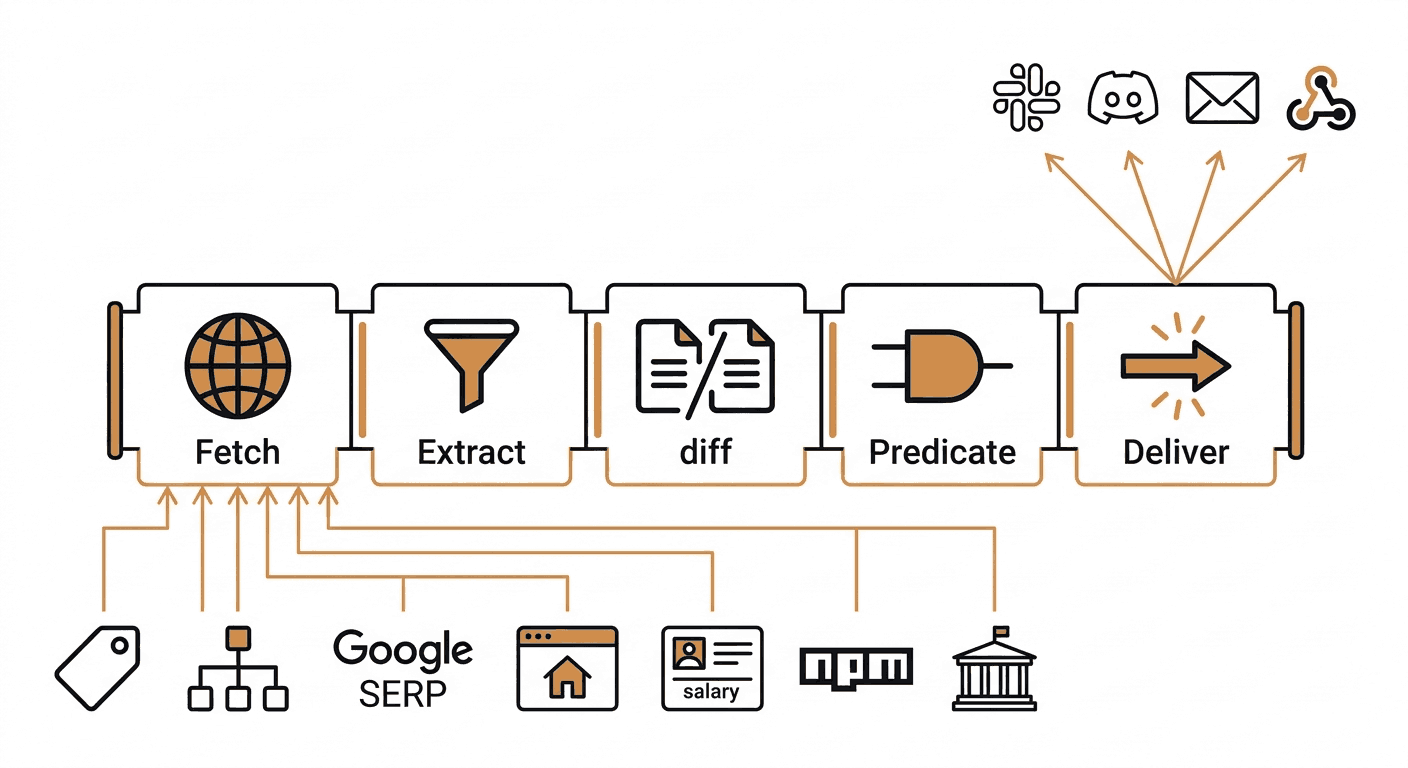
Every monitor you create on Verid runs the same five-stage loop: Fetch, Extract, Diff, Predicate, Deliver. What changes is the configuration you pass in. The infrastructure, scheduling, retry logic, and state management are already handled.
That means adding a new competitive signal takes about two minutes and one API call, not an afternoon of scraper setup.
The 14-day free trial includes unlimited monitors and 200 runs, with no credit card required. The Starter plan at $19/month includes 5,000 runs a month, enough to check about six monitors hourly or well over a hundred daily, which is enough for a solid early-stage CI program watching three to five competitors across multiple surfaces. See the full plan comparison.
Frequently Asked Questions
What is competitive intelligence automation?
Competitive intelligence automation uses software to continuously monitor competitor websites, pricing, job postings, content, and regulatory changes, then delivers structured alerts to your team when something meaningful changes. The goal is to replace periodic manual checks with event-driven notifications that fire only when a predicate you defined is true.
How is Verid different from screenshot monitoring tools?
Screenshot tools fire on any visual change, including cookie banners, ad rotations, and timestamps. Verid extracts named fields from a page using CSS, XPath, JSONPath, regex, or an LLM prompt, then only fires when the specific field you care about crosses a threshold you defined. That means no alert noise from changes that are not relevant to your workflow.
Can Verid monitor JavaScript-rendered competitor pages?
Yes. Verid attempts a static fetch first. If extraction returns empty fields, the job automatically retries with a headless browser. Bot-protected sites fall through to a residential proxy layer. You set "fetch_mode": "browser" explicitly if you know the page requires JavaScript rendering.
How do I handle currency symbols in price fields for percent-change predicates?
CSS-extracted price strings that include symbols like $1,299.00 parse as NaN and will not satisfy field_decreases_by_percent. Use field_changes as the predicate and apply your threshold logic in your webhook consumer, or switch to JSONPath against the site's underlying product API if one exists. The price drop alert recipe documents this limitation with workarounds.
About the author

Software Engineer & Technical Writer
Hanzala is a software engineer and technical writer who cares about the gap between a feature existing and a developer understanding it. At Verid he writes the docs and guides for webhooks, extraction rules and API integration, and the code behind a good deal of it.
More from HANZALA SALEEM →Related posts
Competitor Price Intelligence: Build a Real System
Build a competitor price intelligence system without gluing 5 tools together. Learn the full stack — scraping, diffing, alerting, storage.
Read the post →change detectionFree Website Change Monitors Compared (No Card Required)
Compare free website change monitors that need no credit card. Real limits, check frequency, and which tool actually fits your use case.
Read the post →visual monitoringVisual Regression Testing vs Visual Monitoring: Which Do You Need?
Visual regression testing catches bugs before release. Visual monitoring catches changes after deployment. Learn the difference and which one you need.
Read the post →comparisonApify Alternative for Scheduled Website Monitoring
Compare Apify Actors to a dedicated change monitoring API. See when building an Actor makes sense, and when webhooks on a rule get you there faster.
Read the post →