Google Alerts Alternatives: 7 Tools for Monitoring Things Google Alerts Can't
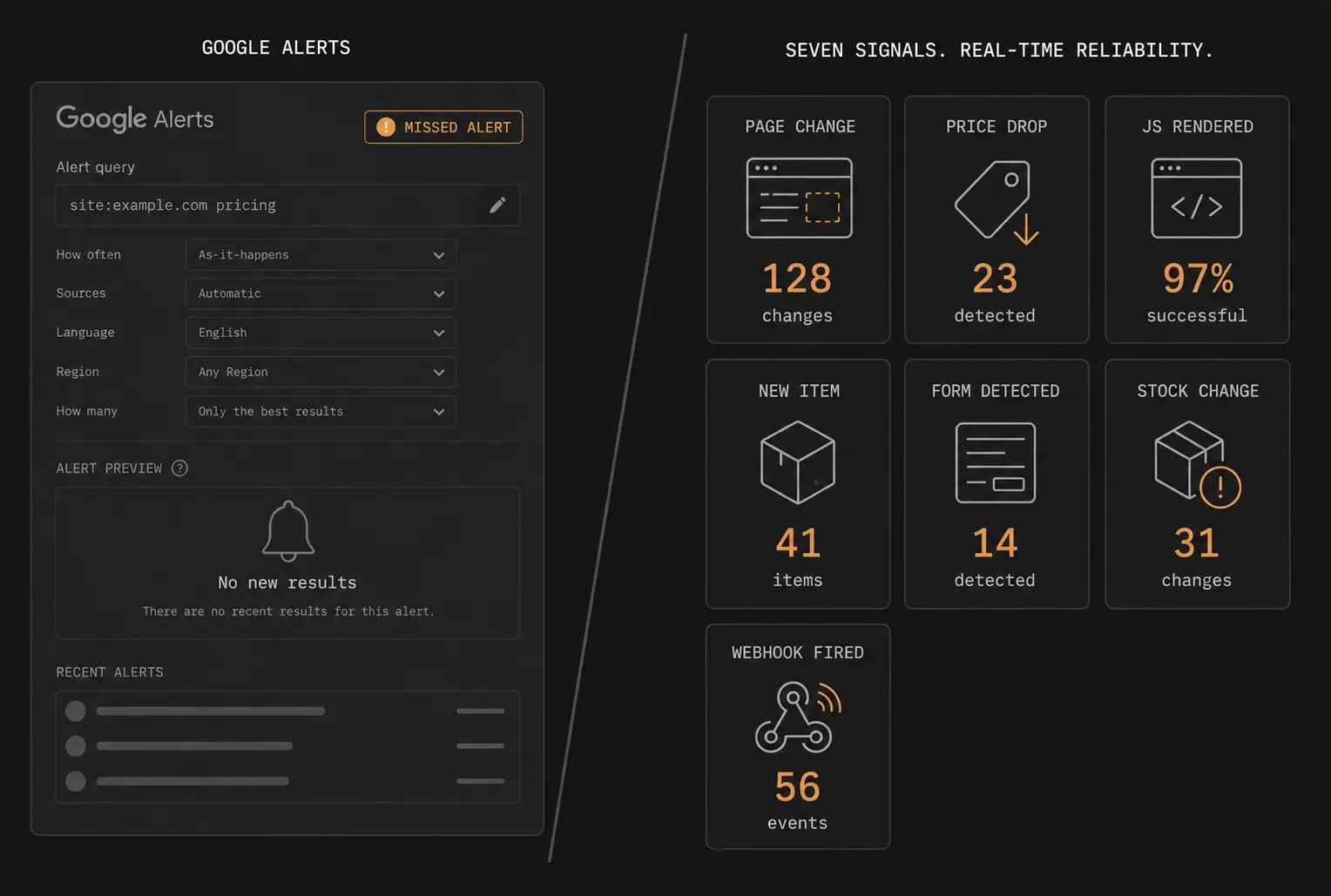
Google Alerts has one job: email you when Google indexes new web content that matches your keyword. For passive brand awareness, that is a reasonable tool. For anything more precise — detecting that a competitor changed their pricing page, that a terms-of-service document was quietly edited, or that a product you track came back in stock — Google Alerts is structurally the wrong instrument.
This guide covers the best Google Alerts alternatives for seven specific monitoring jobs that Google Alerts cannot perform. Each tool is mapped to a gap. You will know which one to reach for based on what you actually need to watch.
What Google Alerts is actually good at
Before the alternatives, the honest part. Google Alerts does one thing reasonably well: surfacing newly indexed public web pages, news articles, and blog posts that contain your chosen keyword. If you want a loose signal when your company name appears in a news article, and you are comfortable with a 24-48 hour lag and an informal delivery to your inbox, Google Alerts is free and requires no setup.
The problems start when you push past that narrow use case.
Reliability complaints are well-documented. Independent analyses have found that Google Alerts misses up to 46% of relevant brand mentions. A separate survey found that 92% of users do not rely on it because important updates are regularly absent. Delays between publication and alert delivery range from hours to days, and some alerts simply never arrive.
It monitors the index, not the page. Google Alerts fires when Google crawls and indexes new content. It has no concept of a specific page changing. If a competitor updates their pricing page, edits their terms of service, or swaps a product description, no alert fires because the URL is already in the index.
It ignores JavaScript-rendered content. Google's crawler indexes JS pages selectively. Most single-page apps, React dashboards, and dynamically loaded product data are invisible to Google Alerts entirely.
It does not support structured or conditional alerts. You cannot tell Google Alerts to fire only when a price field drops below a threshold, or to route a payload to a webhook endpoint, or to deliver a signed JSON object to a pipeline.
It cannot monitor login-gated pages. Anything behind authentication is out of scope by definition.
With those limits established, here are seven tools that address them.
Comparison table: what each tool covers
| Tool | Primary gap it fills | Free tier | Starting paid price | Best for |
|---|---|---|---|---|
| Verid | Page/data change detection, structured extraction, webhooks | 14-day free trial, no card | $9/month | Developers, data pipelines, price/TOS/API monitoring |
| Visualping | Visual page change detection with JS rendering | 5 pages, 150 checks/mo | ~$10.83/month | Non-technical teams, visual UI monitoring |
| ChangeDetection.io | Self-hosted page monitoring with no per-monitor limits | Free (self-hosted) | $8.99/month (cloud) | Homelab users, privacy-first teams |
| Distill.io | Browser-extension monitoring, login-gated pages | 25 local / 5 cloud monitors | $15/month | In-browser monitoring without a server |
| Talkwalker Alerts | Brand mention and keyword monitoring across news/web | Free | N/A (free standalone tool) | PR teams, brand monitoring |
| Feedly | Curated content intelligence and topic feeds with AI filtering | Free (basic RSS) | $6/month (Pro) | Researchers, competitive content tracking |
| Wachete | Scheduled page monitoring with form-fill and login support | 5 pages, daily checks | $5.40/month | Non-developer recurring page tracking |
1. Verid — structured page and data change detection
The gap it fills: monitoring specific pages for structured data changes, including JavaScript-rendered pages, and firing reliable webhooks with conditional logic.
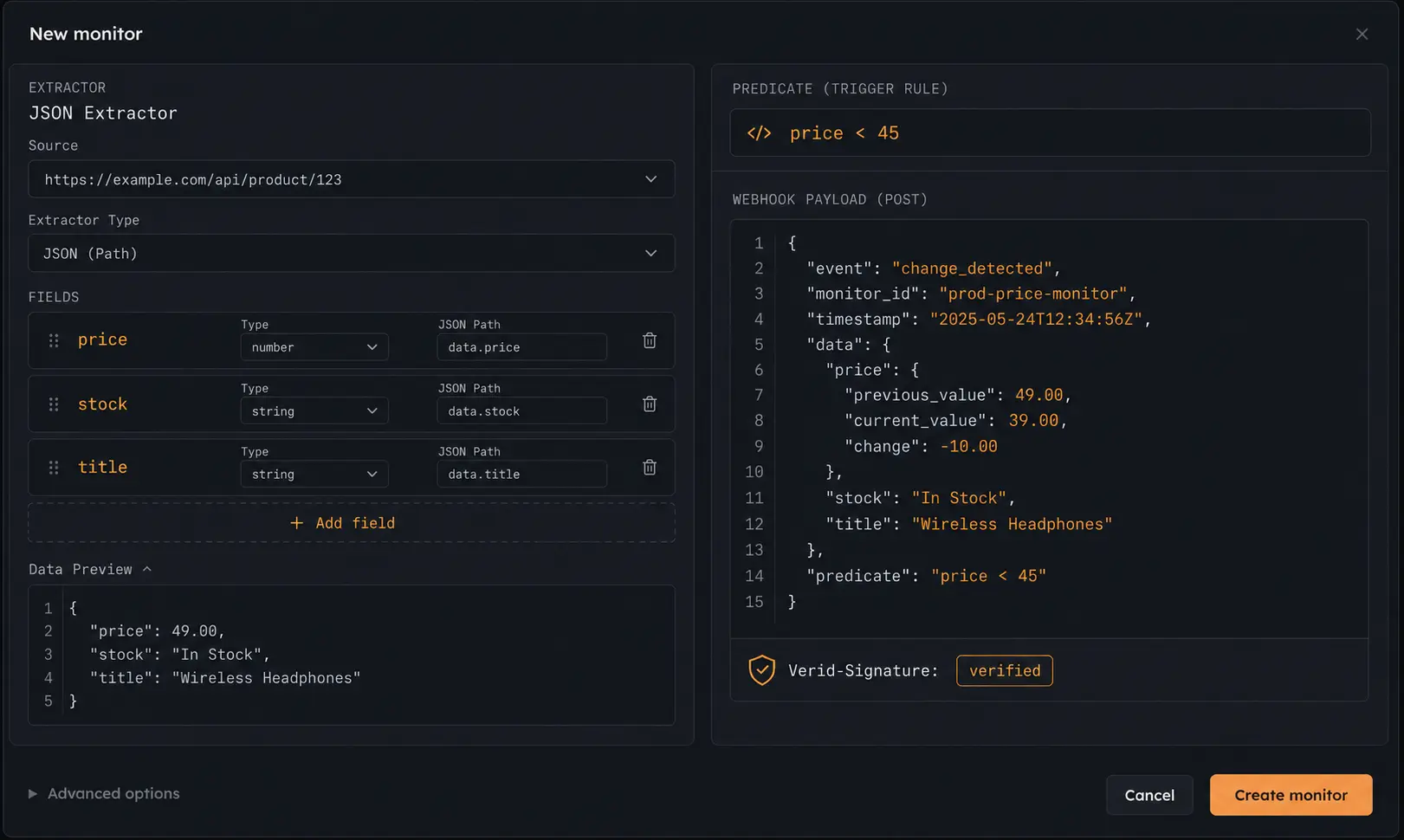
Google Alerts cannot tell you that a competitor changed their pricing page. Verid can. More precisely, it can tell you that the price field on a specific product page changed from $49 to $39, deliver that fact as a signed JSON webhook payload, and fire only when the new value satisfies a predicate you define.
The core architecture is different from every other tool in this list. Rather than storing text diffs, Verid runs extractors that pull typed JSON fields from a page using CSS selectors, XPath, JSONPath, regex, or an LLM prompt. The result is a structured document, not a blob of changed HTML. When a field changes, the webhook carries the previous and current typed values, not a string diff.
That matters for automation. If you are building a competitor price tracking system, you want your downstream pipeline to receive a number it can compare against a threshold, not a string you have to parse. If you are watching for terms-of-service and privacy policy drift, you want a diff anchored to a specific section, not a full-page noise flood.
What it covers that Google Alerts cannot:
- Specific page changes (not just newly indexed pages). Monitor a URL and get alerted when its content changes, regardless of whether Google re-indexes it. Relevant use cases include regulatory filings and policy pages, job listings for keywords, and SERP monitoring.
- JavaScript-rendered pages. Verid renders pages in a full browser environment before extraction. SPAs, React apps, and dynamically loaded content all work.
- Structured field extraction. Extract specific fields by CSS selector, XPath, JSONPath, or regex. See the guides for CSS selectors, XPath, JSONPath, and regex for setup details.
- Predicate-based alerting. Fire only when
price < 50orstock == "In Stock"rather than on every change. This is the core of the change detection engine. - Signed webhooks with retries and dead-letter queue. Every delivery includes a
Verid-SignatureHMAC header. Failed deliveries retry with exponential backoff and land in a dead-letter queue for inspection. See the notifications documentation. - REST API and SDK. Monitors are fully programmable via the API and quickstart docs, which lets you version-control your monitoring configuration alongside your application code.
Pricing: A 14-day free trial with no credit card covers unlimited monitors and 200 runs, with checks as often as every minute. Paid plans are priced by runs per month and start at $9/month (Lite, 1,000 runs), then $19/month (Starter, 5,000 runs), $49/month (Pro, 15,000 runs), and $149/month (Scale, 100,000 runs). Full details at verid.dev/pricing.
Who it is for: developers and data teams who need their monitoring to feed a pipeline, not just their inbox. If you need structured JSON output, webhook reliability guarantees, or predicate logic, this is the right tool in this list.
2. Visualping — visual change detection for non-technical teams
The gap it fills: detecting visual and layout changes on JavaScript-rendered pages without writing any code.
Visualping is the most approachable page change detection tool in this list. You paste a URL, draw a box around the region you want to watch, and Visualping takes periodic screenshots, compares them pixel by pixel, and sends an alert when the visual output changes. No selectors, no code, no configuration file.
The tool uses a headless browser to render pages, so JavaScript-rendered content, SPAs, and dynamically loaded elements are handled correctly. This is a meaningful difference from Google Alerts, which cannot monitor rendered page state at all.
Its AI layer classifies detected changes as important or not important, and generates a plain-language summary of what changed. For a marketing team that wants to know when a competitor updates their homepage hero copy or swap their pricing table layout, that summary is more useful than a raw diff.
What it covers that Google Alerts cannot:
- Visual layout changes on rendered pages (banner swaps, hero copy edits, navigation changes)
- Any change to JS-rendered content Google Alerts would miss entirely
- Screenshot-based comparison for pages where extracting structured data is impractical
Limitations to know: Visualping's free tier allows 5 pages at 150 checks per month, with a minimum interval of 60 minutes on paid plans. The tool is designed around visual comparison, not structured data extraction. If you need the value of a specific field rather than a pixel comparison, Visualping is not the right fit.
Pricing: Free tier (5 pages, 150 checks/month). Paid plans start at approximately $10.83/month for personal use, with business plans starting around $100/month for team workspaces and native integrations (Slack, Teams, n8n, Google Sheets).
Who it is for: marketing teams, PR teams, and non-technical users who want visual change detection on competitor pages without setting up selectors or code.
3. ChangeDetection.io — open-source self-hosted monitoring
The gap it fills: flexible, self-hosted website change monitoring with no per-URL cost and full data ownership.
ChangeDetection.io is free, open-source, and runs in a single Docker container. It has over 25,000 GitHub stars and an active community that has solved most edge cases. The self-hosted model means you can monitor an unlimited number of pages at whatever check frequency your server allows, and your data never leaves your infrastructure.
The tool supports CSS selector, XPath, JSONPath, and regex filtering. A separate Playwright container handles JavaScript-rendered pages. Notifications route through Apprise, which supports 70+ destinations including Slack, Discord, Telegram, email, and Pushover.
For restock and price detection specifically, ChangeDetection.io ships dedicated UI modes that require no custom configuration. Those are useful shortcuts for common patterns.
What it covers that Google Alerts cannot:
- Specific page change detection (not just newly indexed content)
- JS-rendered page monitoring via Playwright (requires a separate Chrome container)
- Wide notification routing via Apprise
- Self-hosted operation with zero per-monitor cost
Limitations to know: the hosted cloud plan at $8.99/month covers 5,000 URL watches, but self-hosting requires you to manage infrastructure, updates, and the Playwright container separately. The output is a text diff, not structured typed fields. Webhook delivery does not include HMAC signing or a dead-letter queue. If you need structured JSON output or delivery guarantees, see tool #1.
Pricing: Self-hosted is free (infrastructure costs apply: expect $5-30/month depending on whether you need browser rendering). Hosted cloud plan is $8.99/month for 5,000 watches.
Who it is for: privacy-conscious developers, homelab operators, and teams with sysadmin capacity who want maximum flexibility and zero per-monitor cost.
4. Distill.io — browser-extension monitoring including login-gated pages
The gap it fills: monitoring pages that require a login session, including internal dashboards and gated content.
Distill.io works as a browser extension. That architecture gives it an important capability that server-based tools lack: it can monitor pages that require authentication, because your logged-in browser session is already active when the check runs. If you want to watch a page you only access after logging in, Distill is the practical option.
The extension runs local monitors directly in your browser with no server-side infrastructure. Cloud monitors are also available for pages you can access without authentication, with a minimum check interval of 5 minutes on the Flexi plan.
Distill supports CSS selector and XPath filtering to narrow a watch to specific page elements. Notifications route to email, Slack, Telegram, and other destinations.
What it covers that Google Alerts cannot:
- Login-gated and session-authenticated pages (a category Google Alerts cannot touch at all)
- JavaScript-rendered pages (the browser extension renders them natively)
- Local monitoring without sending page data to a third-party server
Limitations to know: local monitoring depends on your browser being open and running. If your computer is off, no checks run. Cloud monitors require the pages to be publicly accessible. The tool is not designed for programmatic control or webhook pipelines.
Pricing: Free plan covers 25 local monitors and 5 cloud monitors with 1,000 checks per month and a 6-hour minimum cloud interval. Starter plan is $15/month (30,000 checks, 10-minute minimum interval). Professional plan is $35/month (100,000 checks, 5-minute minimum interval).
Who it is for: individuals who need to monitor pages behind a login, and who are comfortable with browser-resident monitoring for local use cases.
5. Talkwalker Alerts — the closest free Google Alerts alternative for brand mentions
The gap it fills: more reliable keyword and brand mention monitoring across news, blogs, and the web.
If your use case is genuinely what Google Alerts is designed for (keyword and brand mentions in indexed content), but you are frustrated by its reliability, Talkwalker Alerts is the most direct free Google Alerts alternative. It is free, requires no account on the full Talkwalker platform, and delivers alerts via email or RSS.
Talkwalker Alerts covers news, blogs, forums, and discussion boards. It supports Boolean search operators, which gives you more control over which mentions qualify than Google Alerts' simple keyword matching. Alerts can be scoped by language, region, and source type.
The tool does not claim perfect coverage or real-time delivery, but in comparative reviews it consistently surfaces more relevant results than Google Alerts for the same keyword. For a small team tracking competitor mentions without budget, it is a practical first step.
What it covers that Google Alerts cannot:
- More reliable mention delivery for the same keyword-monitoring use case
- Boolean search operators for precise mention filtering
- RSS feed output as an alternative to email
Limitations to know: Talkwalker Alerts is not a page change detector. It still monitors newly indexed content, not changes to specific pages. The full Talkwalker platform (enterprise social listening) starts at around $500/month and is a different product category entirely. This section refers specifically to the free Alerts product at talkwalker.com/alerts.
Pricing: Free (the standalone Alerts product). The full Talkwalker enterprise platform has custom pricing starting at approximately $500/month.
Who it is for: PR and communications teams that want a more reliable version of Google Alerts for brand and competitor keyword mentions, at no cost.
6. Feedly — AI-filtered content intelligence and topic feeds
The gap it fills: staying informed about a topic or industry without manually browsing dozens of sources.
Feedly is an RSS aggregator with an AI layer (called Leo) that filters, prioritizes, and summarizes articles from sources you subscribe to. It is not a page change detector. What it does is aggregate content from RSS feeds, blogs, news sites, and newsletters, and use AI to surface only the items that match topics you care about.
For a Google Alerts alternative in the sense of "I want to know when something relevant to my industry is published," Feedly is a more structured and reliable approach than Google Alerts. You define sources explicitly (RSS feeds from competitors' blogs, trade publications, niche forums), and Leo's filters reduce the noise to what is actually relevant.
What it covers that Google Alerts cannot:
- Curated, source-specific content monitoring rather than index-wide keyword matching
- AI-powered topic filtering and de-duplication
- Persistent archive and tagging for research workflows
Limitations to know: Feedly requires sources to publish RSS feeds. It cannot monitor arbitrary web pages that do not have feeds. It is a content curation tool, not a change detection or website change monitoring tool. It will not tell you that a specific page changed.
Pricing: Free tier (basic RSS feeds). Pro plan at $6/month (annual). Pro+ plan at $8.25/month (annual) or $12.99/month, which includes Leo AI features. Enterprise plans for market intelligence and threat intelligence start at $1,600/month.
Who it is for: researchers, analysts, and content teams who want to track a topic or competitive landscape through curated RSS and AI filtering, rather than monitoring specific page URLs.
7. Wachete — scheduled page monitoring with form-fill support
The gap it fills: monitoring web pages on a schedule without writing code, with optional support for pages that require form interactions.
Wachete is a hosted monitor website changes service with a point-and-click interface. You paste a URL, select page elements to watch, set a check interval, and Wachete emails you when those elements change. No code required, no browser extension needed.
The Standard plan and above support "dynamic pages" — pages that require a form interaction (such as a search query or dropdown selection) before the content you want to watch appears. This covers a range of pages that purely URL-based monitoring tools cannot handle.
What it covers that Google Alerts cannot:
- Monitoring specific page elements (not just newly indexed content)
- Form-interactive pages on paid plans
- Login-gated pages on the Standard plan and above
Limitations to know: Wachete is a straightforward hosted tool without a developer API or programmatic configuration. It does not produce structured JSON output or offer webhook delivery with signing. For users who need to scale beyond manual monitor setup or integrate monitoring into a data pipeline, it is not the right fit.
Pricing: Free plan covers 5 pages with daily checks. Starter plan at $5.40/month (50 pages, 60-minute intervals). Standard plan at $10.90/month (100 pages, 10-minute intervals, login support). Premium plan at $54.90/month. Ultimate plan at $329.90/month (3,000 pages, 5-minute intervals).
Who it is for: non-technical users who want simple, reliable page change monitoring without code, and occasional monitoring of form-gated pages.
How to choose the right tool
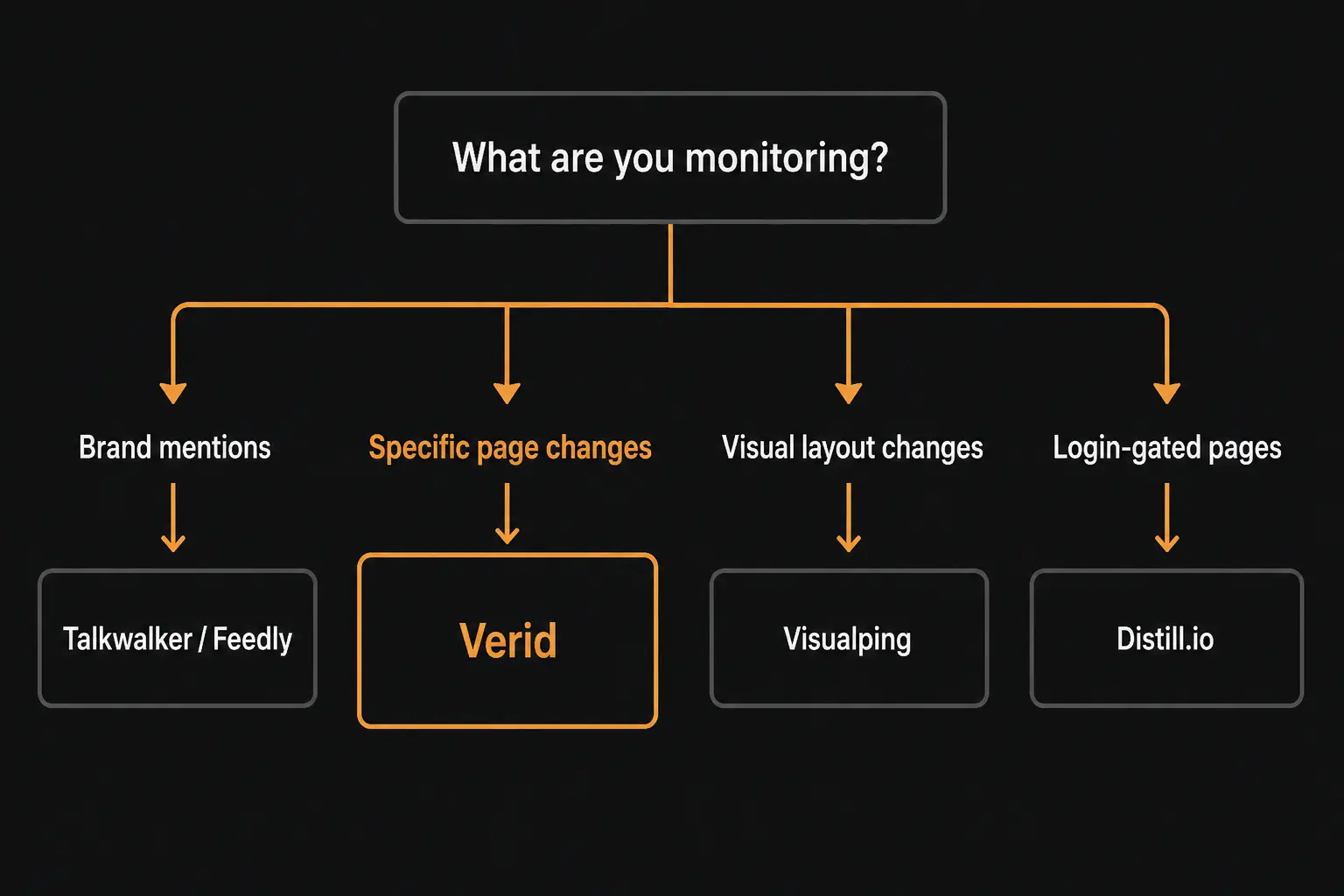
The decision comes down to what you are actually trying to detect.
If your question is "did this specific page change?" — you need a page change detection tool, not a keyword alert system. Start with Verid if you need structured output or webhooks, Visualping if you prefer visual comparison with no setup, or ChangeDetection.io if you want self-hosted.
If you need to monitor a page behind a login — Distill.io is your best option, since its browser-extension model runs inside an authenticated session.
If you need structured data output with conditional logic — Verid is the only tool in this list that produces typed JSON fields and supports predicate-based alerting. The other tools deliver text diffs or visual comparisons.
If you just want a more reliable version of Google Alerts for brand mentions — Talkwalker Alerts is free and handles the same use case with better reliability.
If you want curated topic monitoring across many sources — Feedly with Leo AI is a better-structured alternative to Google Alerts for content intelligence.
For non-technical users who want simple, low-cost page monitoring — Wachete or the free tier of Visualping or ChangeDetection.io are all reasonable starting points.
The comparison table at the top of this article maps each tool to its specific gap. For the use cases that Google Alerts handles reasonably well (keyword-triggered new content alerts on indexed public pages), it remains a serviceable free option. For everything else on that list, you need a dedicated tool.
Conclusion: Google Alerts alternatives for every monitoring job
Google Alerts works as a passive brand-awareness signal for newly indexed content. It fails at everything else on this list: page change detection, JavaScript-rendered content, structured field extraction, login-gated monitoring, conditional alerting, and webhook delivery.
The best Google Alerts alternatives depend on your use case. For monitoring specific pages and getting structured data out of them, Verid is the right starting point. For brand mention monitoring, Talkwalker Alerts costs nothing and outperforms Google Alerts for the same job. For self-hosted flexibility, ChangeDetection.io is hard to beat on price. For visual monitoring without setup, Visualping is the most approachable option.
If you have a URL you need to watch — a competitor's pricing page, a government policy document, a job board, a product listing — and you want a reliable alert when it changes, start with a Verid free trial. The trial gives you 14 days with unlimited monitors and 200 runs, no credit card required, and your first monitor is running in under five minutes.
Frequently Asked Questions
Is there a free Google Alerts alternative?
Yes. Talkwalker Alerts is a free replacement for Google Alerts' core use case (keyword mentions in newly indexed content). For website change monitoring specifically, Verid offers a 14-day free trial with unlimited monitors and 200 runs, no credit card required, and ChangeDetection.io is free to self-host. Distill.io and Wachete both have free tiers with limited monitors.
Can Google Alerts monitor price changes on a specific page?
No. Google Alerts fires when Google indexes new content matching a keyword. It has no mechanism to detect that an existing page's content changed. Monitoring a specific product or competitor pricing page for price changes requires a dedicated page change detection tool like Verid or ChangeDetection.io, which periodically re-fetch the page and compare its current state against a stored baseline.
Why does Google Alerts miss so many mentions?
Google Alerts depends on Google's crawl and index pipeline, and not all content is crawled on a reliable schedule. Independent analyses have found that Google Alerts misses up to 46% of relevant brand mentions. Content on social platforms (Reddit, LinkedIn, forums) is frequently excluded. The product has also had documented periods of reduced reliability, with users reporting empty digests and multi-day delivery delays. For more reliable mention tracking, Talkwalker Alerts or a dedicated brand monitoring tool is a better option.
Does Google Alerts work for monitoring JavaScript-rendered pages?
No. Google Alerts only surfaces pages that Google has indexed. While Google can render JavaScript on some pages, its crawler does not provide any mechanism to alert you when an already-indexed JavaScript page's rendered output changes. A page change detection tool that runs a headless browser on a schedule — such as Verid or Visualping — is required for JS-rendered page monitoring.
What can I use to monitor a specific page instead of keywords?
Tools built specifically for page change detection. Verid monitors specific URLs and detects changes to structured data fields using CSS selectors, XPath, JSONPath, or regex. Visualping uses visual screenshot comparison. ChangeDetection.io uses text diff comparison. All three re-fetch the target URL on a defined schedule and compare the result against a stored baseline — a fundamentally different architecture from Google Alerts' index-based approach.
Can I get a webhook when a page changes, instead of an email?
Google Alerts only delivers via email or RSS. For webhook delivery, you need a dedicated tool. Verid sends signed webhook payloads (HMAC-SHA256 via Verid-Signature header) with automatic retries and a dead-letter queue for failed deliveries. ChangeDetection.io supports webhooks via its notification system but without HMAC signing or built-in retry logic.
Which Google Alerts alternative is best for tracking regulatory or policy documents?
For compliance teams that need to detect edits to specific documents, a page change detection tool is the right category. Verid handles this use case well: you point it at the document URL, define an extractor for the relevant section, and receive a structured diff when the text changes. ChangeDetection.io can monitor the same pages in self-hosted mode with full text diffing. Google Alerts will not detect changes to documents already in its index.
About the author

Software Engineer
A software engineer by trade, Suleman spends his days in Verid’s monitoring internals: browser automation, field-level extraction, and signed webhook delivery. His writing leans toward implementation detail: selectors, retries, rate limits, and what actually breaks in production.
More from Suleman →Related posts
What Is Web Change Detection? (And Why Monitoring Tools Get It Wrong)
Most monitoring tools just watch for byte changes. Learn what web change detection really is, why false positives happen, and how to fix it.
Read the post →developer toolsPredicate-Based Alerting: Stop Getting Spammed by Your Monitoring Tool
Alert fatigue is a monitoring tool bug. Verid's predicate system fires only when a change meets a condition — price drop, regex match, or threshold crossed.
Read the post →change detectionFree Website Change Monitors Compared (No Card Required)
Compare free website change monitors that need no credit card. Real limits, check frequency, and which tool actually fits your use case.
Read the post →monitoringAPI Contract Monitoring: How to Catch Breaking Changes Before They Hit Production
Learn how API contract monitoring catches breaking changes before production. Schema drift, field-level diff, and continuous JSON API monitoring explained.
Read the post →